INTRODUCTION TO
CSS
WHAT IS CSS?
• CSS stands for Cascading Style Sheets
• Styles - define how to display HTML elements
• Styles are normally stored in Style Sheets
Definition:
 Cascading Style Sheets (CSS) – is a rule
based language that applies styling to your
HTML elements. You write CSS rules in
elements, and modify properties of those
elements such as color, background color,
width, border thickness, font size, etc.
SYNTAX OF CSS
The CSS syntax is made up of 5 parts:
 selector
 property/value
 declaration
 declaration block
 curly braces
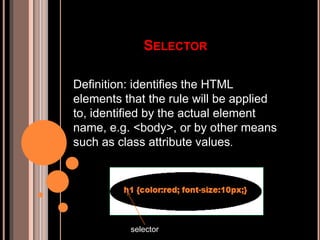
SELECTOR
Definition: identifies the HTML
elements that the rule will be applied
to, identified by the actual element
name, e.g. <body>, or by other means
such as class attribute values.
selector
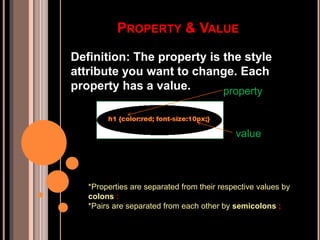
PROPERTY & VALUE
Definition: The property is the style
attribute you want to change. Each
property has a value. property
value
*Properties are separated from their respective values by
colons :
*Pairs are separated from each other by semicolons ;
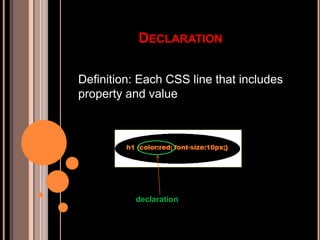
DECLARATION
Definition: Each CSS line that includes
property and value
declaration
DECLARATION BLOCK
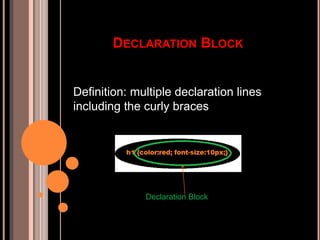
Definition: multiple declaration lines
including the curly braces
Declaration Block
CURLY BRACES
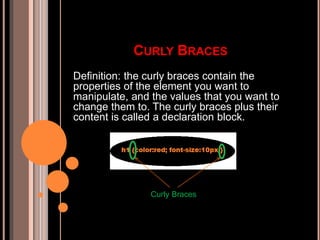
Definition: the curly braces contain the
properties of the element you want to
manipulate, and the values that you want to
change them to. The curly braces plus their
content is called a declaration block.
Curly Braces
CLASS AND ID SELECTORS
In addition to setting a style for a HTML
element, CSS allows you to specify
your own selectors called "id" and
"class".
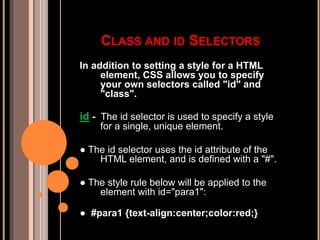
id - The id selector is used to specify a style
for a single, unique element.
● The id selector uses the id attribute of the
HTML element, and is defined with a "#".
● The style rule below will be applied to the
element with id="para1":
● #para1 {text-align:center;color:red;}
Class - The class selector is used to specify a style for a
group of elements. Unlike the id selector, the class
selector is most often used on several elements.
● This allows you to set a particular style for any HTML
elements with the same class.
●The class selector uses the HTML class attribute, and is
defined with a "."
● In the example below, all HTML elements with class="center"
will be center-aligned:
● .center {text-align:center;}
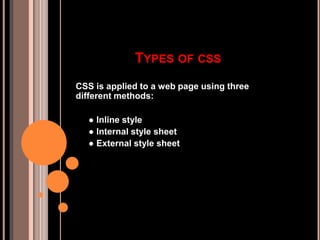
TYPES OF CSS
CSS is applied to a web page using three
different methods:
● Inline style
● Internal style sheet
● External style sheet
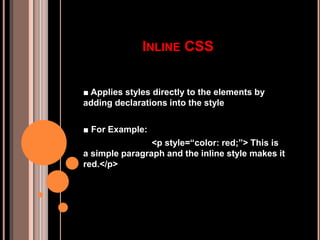
INLINE CSS
■ Applies styles directly to the elements by
adding declarations into the style
■ For Example:
<p style=“color: red;”> This is
a simple paragraph and the inline style makes it
red.</p>
INTERNAL STYLE SHEET
■ Applies styles to HTML by placing the CSS
rules inside the tag <style> inside the document
tag <head>.
■ For Example:
<head>
<title>my page</title>
<style type=“text/css”>
p{color:red}</style>
</head>
<body>
<p>this is a simple paragraph
</p>
</body>
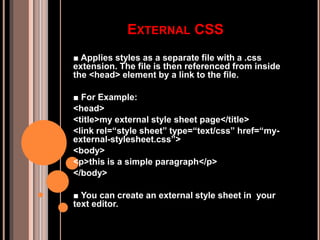
EXTERNAL CSS
■ Applies styles as a separate file with a .css
extension. The file is then referenced from inside
the <head> element by a link to the file.
■ For Example:
<head>
<title>my external style sheet page</title>
<link rel=“style sheet” type=“text/css” href=“my-
external-stylesheet.css”>
<body>
<p>this is a simple paragraph</p>
</body>
■ You can create an external style sheet in your
text editor.
STYLE SHEET
p{
text-align:justify;
line-height:15px;
padding:5px 0 5px 0;
font-size:11px;
margin:0px;
}
#main_container{
width:902px;
height:auto;
margin:auto;
padding:0px;
}
.logo{
padding:15px 0 0 0;
float:left;
}

introduction to CSS

  • 1.
  • 2.
    WHAT IS CSS? •CSS stands for Cascading Style Sheets • Styles - define how to display HTML elements • Styles are normally stored in Style Sheets Definition:  Cascading Style Sheets (CSS) – is a rule based language that applies styling to your HTML elements. You write CSS rules in elements, and modify properties of those elements such as color, background color, width, border thickness, font size, etc.
  • 3.
    SYNTAX OF CSS TheCSS syntax is made up of 5 parts:  selector  property/value  declaration  declaration block  curly braces
  • 4.
    SELECTOR Definition: identifies theHTML elements that the rule will be applied to, identified by the actual element name, e.g. <body>, or by other means such as class attribute values. selector
  • 5.
    PROPERTY & VALUE Definition:The property is the style attribute you want to change. Each property has a value. property value *Properties are separated from their respective values by colons : *Pairs are separated from each other by semicolons ;
  • 6.
    DECLARATION Definition: Each CSSline that includes property and value declaration
  • 7.
    DECLARATION BLOCK Definition: multipledeclaration lines including the curly braces Declaration Block
  • 8.
    CURLY BRACES Definition: thecurly braces contain the properties of the element you want to manipulate, and the values that you want to change them to. The curly braces plus their content is called a declaration block. Curly Braces
  • 9.
    CLASS AND IDSELECTORS In addition to setting a style for a HTML element, CSS allows you to specify your own selectors called "id" and "class". id - The id selector is used to specify a style for a single, unique element. ● The id selector uses the id attribute of the HTML element, and is defined with a "#". ● The style rule below will be applied to the element with id="para1": ● #para1 {text-align:center;color:red;}
  • 10.
    Class - Theclass selector is used to specify a style for a group of elements. Unlike the id selector, the class selector is most often used on several elements. ● This allows you to set a particular style for any HTML elements with the same class. ●The class selector uses the HTML class attribute, and is defined with a "." ● In the example below, all HTML elements with class="center" will be center-aligned: ● .center {text-align:center;}
  • 11.
    TYPES OF CSS CSSis applied to a web page using three different methods: ● Inline style ● Internal style sheet ● External style sheet
  • 12.
    INLINE CSS ■ Appliesstyles directly to the elements by adding declarations into the style ■ For Example: <p style=“color: red;”> This is a simple paragraph and the inline style makes it red.</p>
  • 13.
    INTERNAL STYLE SHEET ■Applies styles to HTML by placing the CSS rules inside the tag <style> inside the document tag <head>. ■ For Example: <head> <title>my page</title> <style type=“text/css”> p{color:red}</style> </head> <body> <p>this is a simple paragraph </p> </body>
  • 14.
    EXTERNAL CSS ■ Appliesstyles as a separate file with a .css extension. The file is then referenced from inside the <head> element by a link to the file. ■ For Example: <head> <title>my external style sheet page</title> <link rel=“style sheet” type=“text/css” href=“my- external-stylesheet.css”> <body> <p>this is a simple paragraph</p> </body> ■ You can create an external style sheet in your text editor.
  • 15.
    STYLE SHEET p{ text-align:justify; line-height:15px; padding:5px 05px 0; font-size:11px; margin:0px; } #main_container{ width:902px; height:auto; margin:auto; padding:0px; } .logo{ padding:15px 0 0 0; float:left; }