(Cascaded Style Sheet )
Tutorial On
Insert Your Image Here!!
By:
(Dinesh Kumar)
PGT(Computer Science, DPS Bareilly)
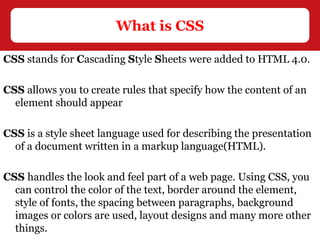
HTML is basically used to display the contents on a web page. You
can say that the HTML is for :
What to display
By HTML only, we can not design more interactive and decorative
web pages.
CSS(Cascading Style Sheet) is the solution of it.
CSS describes how HTML elements are to be displayed on screen.
Why CSS
CSS stands for Cascading Style Sheets were added to HTML 4.0.
CSS allows you to create rules that specify how the content of an
element should appear
CSS is a style sheet language used for describing the presentation
of a document written in a markup language(HTML).
CSS handles the look and feel part of a web page. Using CSS, you
can control the color of the text, border around the element,
style of fonts, the spacing between paragraphs, background
images or colors are used, layout designs and many more other
things.
What is CSS
There are three ways to include CSS in your HTML Page:
• Inline style
• Internal style
• External style
Inline style sheet:-
An inline CSS can be used by mixing content with presentation.
To use inline styles you use the style attribute in the relevant tag.
How to use CSS
<p style="color:sienna; margin-left:20px“>
This is a paragraph.
</p>
Internal Style Sheet:-
An internal style sheet should be used when a single document has
a unique style.
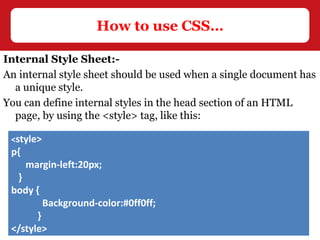
You can define internal styles in the head section of an HTML
page, by using the <style> tag, like this:
How to use CSS…
<style>
p{
margin-left:20px;
}
body {
Background-color:#0ff0ff;
}
</style>
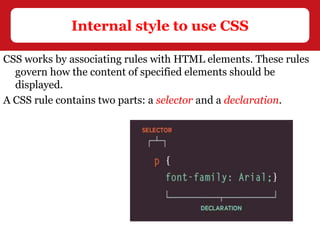
CSS works by associating rules with HTML elements. These rules
govern how the content of specified elements should be
displayed.
A CSS rule contains two parts: a selector and a declaration.
Internal style to use CSS
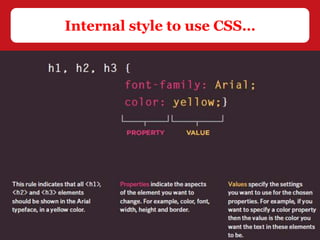
Selectors : indicate for which element the rule is applied.
The same rule can apply to more than one element if you separate
the element names with commas.
Declarations : indicate how the elements referred to in the
selector should be styled.
Declarations are split into two parts (a property and a value),
and are separated by a colon.
Property : is a style that you apply to a selector.
You can put CSS Style Rule Syntax as follows −
You can specify several properties in one declaration, each
separated by a semi-colon.
Internal style to use CSS…
selector { property: value }
Internal style to use CSS…
External Style Sheet:-
An external style sheet is ideal when the style is applied to many
pages.
With an external style sheet, you can change the look of an entire
Web site by changing one file.
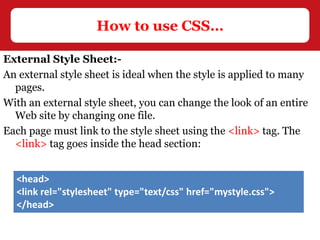
Each page must link to the style sheet using the <link> tag. The
<link> tag goes inside the head section:
How to use CSS…
<head>
<link rel="stylesheet" type="text/css" href="mystyle.css">
</head>
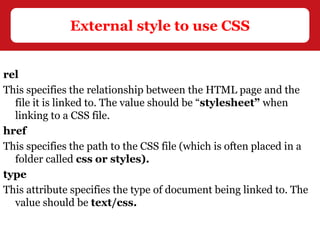
rel
This specifies the relationship between the HTML page and the
file it is linked to. The value should be “stylesheet” when
linking to a CSS file.
href
This specifies the path to the CSS file (which is often placed in a
folder called css or styles).
type
This attribute specifies the type of document being linked to. The
value should be text/css.
External style to use CSS
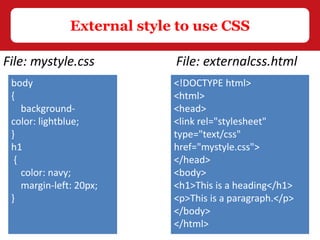
File: mystyle.css File: externalcss.html
<!DOCTYPE html>
<html>
<head>
<link rel="stylesheet"
type="text/css"
href="mystyle.css">
</head>
<body>
<h1>This is a heading</h1>
<p>This is a paragraph.</p>
</body>
</html>
body
{
background-
color: lightblue;
}
h1
{
color: navy;
margin-left: 20px;
}
Introduction of css

Introduction of css

  • 1.
    (Cascaded Style Sheet) Tutorial On Insert Your Image Here!! By: (Dinesh Kumar) PGT(Computer Science, DPS Bareilly)
  • 2.
    HTML is basicallyused to display the contents on a web page. You can say that the HTML is for : What to display By HTML only, we can not design more interactive and decorative web pages. CSS(Cascading Style Sheet) is the solution of it. CSS describes how HTML elements are to be displayed on screen. Why CSS
  • 3.
    CSS stands forCascading Style Sheets were added to HTML 4.0. CSS allows you to create rules that specify how the content of an element should appear CSS is a style sheet language used for describing the presentation of a document written in a markup language(HTML). CSS handles the look and feel part of a web page. Using CSS, you can control the color of the text, border around the element, style of fonts, the spacing between paragraphs, background images or colors are used, layout designs and many more other things. What is CSS
  • 4.
    There are threeways to include CSS in your HTML Page: • Inline style • Internal style • External style Inline style sheet:- An inline CSS can be used by mixing content with presentation. To use inline styles you use the style attribute in the relevant tag. How to use CSS <p style="color:sienna; margin-left:20px“> This is a paragraph. </p>
  • 5.
    Internal Style Sheet:- Aninternal style sheet should be used when a single document has a unique style. You can define internal styles in the head section of an HTML page, by using the <style> tag, like this: How to use CSS… <style> p{ margin-left:20px; } body { Background-color:#0ff0ff; } </style>
  • 6.
    CSS works byassociating rules with HTML elements. These rules govern how the content of specified elements should be displayed. A CSS rule contains two parts: a selector and a declaration. Internal style to use CSS
  • 7.
    Selectors : indicatefor which element the rule is applied. The same rule can apply to more than one element if you separate the element names with commas. Declarations : indicate how the elements referred to in the selector should be styled. Declarations are split into two parts (a property and a value), and are separated by a colon. Property : is a style that you apply to a selector. You can put CSS Style Rule Syntax as follows − You can specify several properties in one declaration, each separated by a semi-colon. Internal style to use CSS… selector { property: value }
  • 8.
  • 9.
    External Style Sheet:- Anexternal style sheet is ideal when the style is applied to many pages. With an external style sheet, you can change the look of an entire Web site by changing one file. Each page must link to the style sheet using the <link> tag. The <link> tag goes inside the head section: How to use CSS… <head> <link rel="stylesheet" type="text/css" href="mystyle.css"> </head>
  • 10.
    rel This specifies therelationship between the HTML page and the file it is linked to. The value should be “stylesheet” when linking to a CSS file. href This specifies the path to the CSS file (which is often placed in a folder called css or styles). type This attribute specifies the type of document being linked to. The value should be text/css. External style to use CSS
  • 11.
    External style touse CSS File: mystyle.css File: externalcss.html <!DOCTYPE html> <html> <head> <link rel="stylesheet" type="text/css" href="mystyle.css"> </head> <body> <h1>This is a heading</h1> <p>This is a paragraph.</p> </body> </html> body { background- color: lightblue; } h1 { color: navy; margin-left: 20px; }