CSS
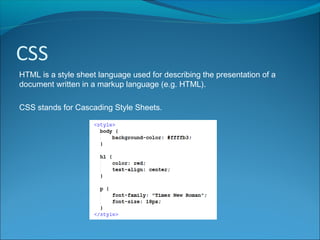
HTML is a style sheet language used for describing the presentation of a
document written in a markup language (e.g. HTML).
CSS stands for Cascading Style Sheets.
Why CSS?
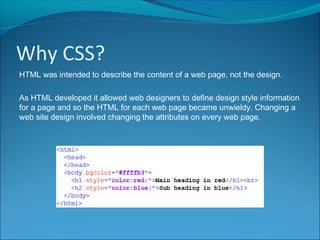
HTML was intended to describe the content of a web page, not the design.
As HTML developed it allowed web designers to define design style information
for a page and so the HTML for each web page became unwieldy. Changing a
web site design involved changing the attributes on every web page.
Why CSS?
HTML was intended to describe the content of a web page, not the design.
As HTML developed it allowed web designers to define design style information
for a page and so the HTML for each web page became unwieldy. Changing a
web site design involved changing the attributes on every web page.
CSS removes the style information from the HTML page.
CSS style definitions are commonly stored in a separate file. Changes to the
style information in this file can change the style of the entire website.
Inline, Internal & External CSS
Inline CSS
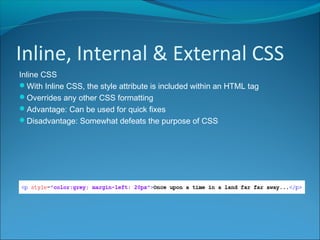
With Inline CSS, the style attribute is included within an HTML tag
Overrides any other CSS formatting
Advantage: Can be used for quick fixes
Disadvantage: Somewhat defeats the purpose of CSS
Inline, Internal & External CSS
Internal CSS
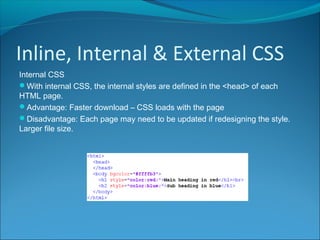
With internal CSS, the internal styles are defined in the <head> of each
HTML page.
Advantage: Faster download – CSS loads with the page
Disadvantage: Each page may need to be updated if redesigning the style.
Larger file size.
Inline, Internal & External CSS
External CSS
With external CSS, the CSS is held in a separate file.
Advantage: Changing the file will update the style change across all pages in
website
CSS
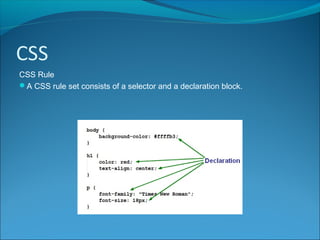
CSS Rule
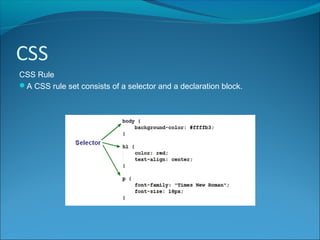
A CSS rule set consists of a selector and a declaration block.
CSS
CSS Rule
A CSS rule set consists of a selector and a declaration block.
CSS
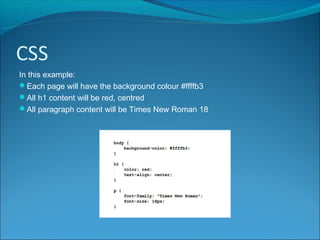
In this example:
Each page will have the background colour #ffffb3
All h1 content will be red, centred
All paragraph content will be Times New Roman 18
CSS
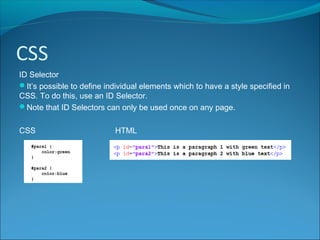
ID Selector
It’s possible to define individual elements which to have a style specified in
CSS. To do this, use an ID Selector.
Note that ID Selectors can only be used once on any page.
CSS HTML
CSS
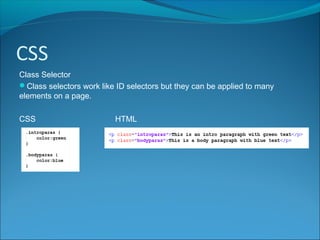
Class Selector
Class selectors work like ID selectors but they can be applied to many
elements on a page.
CSS HTML
CSS
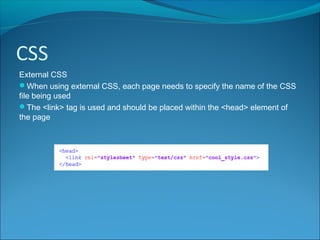
External CSS
When using external CSS, each page needs to specify the name of the CSS
file being used
The <link> tag is used and should be placed within the <head> element of
the page

Higher Computing Science CSS

  • 2.
    CSS HTML is astyle sheet language used for describing the presentation of a document written in a markup language (e.g. HTML). CSS stands for Cascading Style Sheets.
  • 3.
    Why CSS? HTML wasintended to describe the content of a web page, not the design. As HTML developed it allowed web designers to define design style information for a page and so the HTML for each web page became unwieldy. Changing a web site design involved changing the attributes on every web page.
  • 4.
    Why CSS? HTML wasintended to describe the content of a web page, not the design. As HTML developed it allowed web designers to define design style information for a page and so the HTML for each web page became unwieldy. Changing a web site design involved changing the attributes on every web page. CSS removes the style information from the HTML page. CSS style definitions are commonly stored in a separate file. Changes to the style information in this file can change the style of the entire website.
  • 5.
    Inline, Internal &External CSS Inline CSS With Inline CSS, the style attribute is included within an HTML tag Overrides any other CSS formatting Advantage: Can be used for quick fixes Disadvantage: Somewhat defeats the purpose of CSS
  • 6.
    Inline, Internal &External CSS Internal CSS With internal CSS, the internal styles are defined in the <head> of each HTML page. Advantage: Faster download – CSS loads with the page Disadvantage: Each page may need to be updated if redesigning the style. Larger file size.
  • 7.
    Inline, Internal &External CSS External CSS With external CSS, the CSS is held in a separate file. Advantage: Changing the file will update the style change across all pages in website
  • 8.
    CSS CSS Rule A CSSrule set consists of a selector and a declaration block.
  • 9.
    CSS CSS Rule A CSSrule set consists of a selector and a declaration block.
  • 10.
    CSS In this example: Eachpage will have the background colour #ffffb3 All h1 content will be red, centred All paragraph content will be Times New Roman 18
  • 11.
    CSS ID Selector It’s possibleto define individual elements which to have a style specified in CSS. To do this, use an ID Selector. Note that ID Selectors can only be used once on any page. CSS HTML
  • 12.
    CSS Class Selector Class selectorswork like ID selectors but they can be applied to many elements on a page. CSS HTML
  • 13.
    CSS External CSS When usingexternal CSS, each page needs to specify the name of the CSS file being used The <link> tag is used and should be placed within the <head> element of the page