CSS
(CASCADING STYLE SHEETS)
1
WHAT IS CSS?
 Styles were added to HTML 4.0 to solve a problem
 HTML is used to structure content where as CSS is
used for formatting structured content.
 Unlike HTML, CSS doesn’t create anything.
 Instead it decorates, aligns and positions (etc) elements
in HTML.
 In a nut shell, CSS takes the normal HTML output &
adds a few rules to how it is actually displayed.
2
“CSS stands for Cascading Style Sheets”
“CSS is a style language that defines layout of HTML
documents.”
“Styles define how to display HTML elements”
STYLES SOLVED A BIG PROBLEM
 HTML was never intended to contain tags for formatting
a document.
 HTML was intended to define the content of a
document, like:
o <h1>This is a heading</h1>
o <p>This is a paragraph.</p>
 When tags like <font>, and color attributes were added
to the HTML 3.2 specification, it started a nightmare for
web developers. Development of large web sites, where
fonts and color information were added to every single
page, became a long and expensive process.
 To solve this problem, the World Wide Web Consortium
(W3C) created CSS.
 In HTML 4.0, all formatting could be removed from the
HTML document, and stored in a separate CSS file.
 All browsers support CSS today. 3
CSS SAVES A LOT OF WORK!
 Cascading Style Sheets are now the standard
way to define the presentation of your HTML pages.
They are much more efficient than using HTML on
every page to define the look of your site.
 A collection of style is commonly referred to as style
sheets.
 Styles are normally saved in external .css files.
External style sheets enable you to change the
appearance and layout of all the pages in a Web
site, just by editing one single file!
4
CSS RULE
5
CSS RULE:
1. Selector this is the HTML tag that you want to style.
2. Property this is the attribute you adjust, control or
modify.
3. Value it is the style you apply to that property
selector
{ property : value;
property : value;
property : value; }
EXAMPLE:
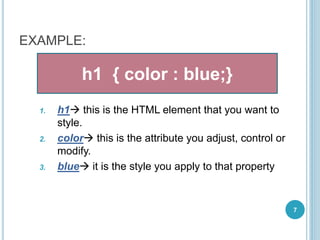
1. h1 this is the HTML element that you want to
style.
2. color this is the attribute you adjust, control or
modify.
3. blue it is the style you apply to that property
7
h1 { color : blue;}
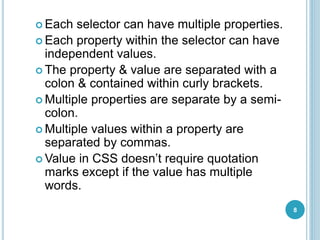
 Each selector can have multiple properties.
 Each property within the selector can have
independent values.
 The property & value are separated with a
colon & contained within curly brackets.
 Multiple properties are separate by a semi-
colon.
 Multiple values within a property are
separated by commas.
 Value in CSS doesn’t require quotation
marks except if the value has multiple
words.
8
HOW TO ADD CSS TO WEB PAGES?
9
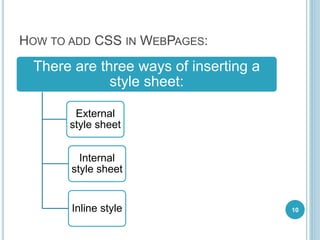
HOW TO ADD CSS IN WEBPAGES:
There are three ways of inserting a
style sheet:
External
style sheet
Internal
style sheet
Inline style 10
ADDING CSS TO WEB PAGES:
1. It can be inserted within the header of a web page 
Internal style sheet
2. It can be inserted within the body of a web page
(usually in certain sections or individual elements)
Inline style sheet
3. It can be inserted within a separate web page 
External style sheet
1.INTERNAL STYLE SHEET
<head>
<style type=“text/css”>
h1 { color : blue;}
</style>
</head>
•The <STYLE> element is used in HEAD section to indicate style
information for the entire document.
•type It declares the type of data which is being linked to the
document. In case of CSS, the only allowed value is text/css.
2.INLINE STYLE SHEETS
 The value of style attribute is any combination of
style declarations.
 Also note that there aren’t any curly braces used
here, but the colon/semicolon rule still applies.
<element style=“…styles…”>
<p style="color: blue; font-family: Arial;
">
3.EXTERNAL STYLE SHEETS
<link rel=“stylesheet” type=“text/css” href=“” >
The <LINK> is a special HEAD element which indicates a
relationship between the current document & some other object. It
is mostly used to link style sheets.
rel It describes the relation of the linked file to the document itself. There
are 2 possible values:
1. stylesheet used to control the way the current document is
rendered.
2. alternate stylesheet used to control the way the current
document is rendered, but will not be used by default if a
"rel='stylesheet'" stylesheet is present and successfully loaded.
type It declares the type of data which is being linked to the document. In
case of CSS, the only allowed value is text/css.
href It is the URL of the external style sheet. Either relative or absolute
URLs may be needed. This attribute is required.
15
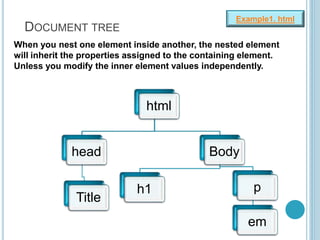
DOCUMENT TREE
html
head
Title
Body
h1 p
em
Example1. html
When you nest one element inside another, the nested element
will inherit the properties assigned to the containing element.
Unless you modify the inner element values independently.
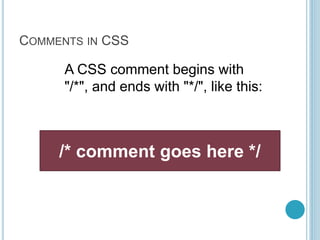
COMMENTS IN CSS
/* comment goes here */
A CSS comment begins with
"/*", and ends with "*/", like this:
GROUPING SELECTORS
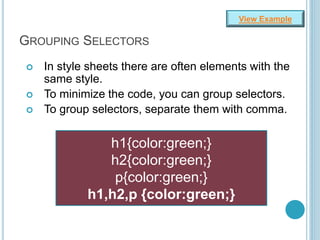
 In style sheets there are often elements with the
same style.
 To minimize the code, you can group selectors.
 To group selectors, separate them with comma.
h1{color:green;}
h2{color:green;}
p{color:green;}
h1,h2,p {color:green;}
View Example
CONTEXTUAL SELECTORS
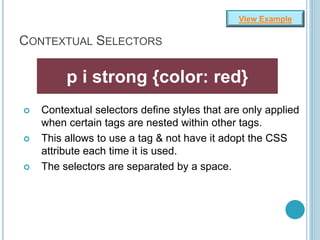
 Contextual selectors define styles that are only applied
when certain tags are nested within other tags.
 This allows to use a tag & not have it adopt the CSS
attribute each time it is used.
 The selectors are separated by a space.
p i strong {color: red}
View Example
CLASS SELECTOR
o What would you do if you want some of the
paragraphs to appear bold while other ones do
not?
o Use a class selector!
o Class selectors allow you to associate a class
with a particular subset or class of elements.
GET INTO ACTION!
CLASS SELECTOR
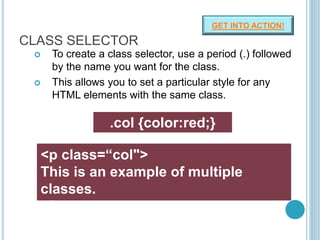
 To create a class selector, use a period (.) followed
by the name you want for the class.
 This allows you to set a particular style for any
HTML elements with the same class.
.col {color:red;}
<p class=“col">
This is an example of multiple
classes.
</p>
GET INTO ACTION!
DIFFERENT INSTANCES OF A CLASS
SELECTOR
p.col {color:red;}
i.col{color:blue;}
• To create a class that can only apply to particular
elements, you need to specify that element in
selector.
• You can create generic selectors that can apply to
every HTML element.
MULTIPLE CLASSES
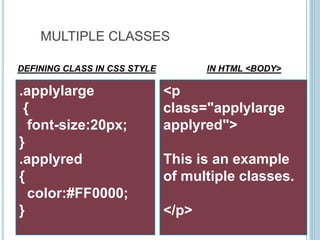
.applylarge
{
font-size:20px;
}
.applyred
{
color:#FF0000;
}
<p
class="applylarge
applyred">
This is an example
of multiple classes.
</p>
DEFINING CLASS IN CSS STYLE IN HTML <BODY>
ID SELECTOR
 The id selector is used to specify a style for a single,
unique element.
 It is defined by using a # symbol.
GET INTO ACTION!
#red{color:red;}
<h1 id="red"> ID selectors </h1>
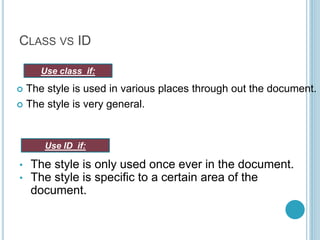
CLASS VS ID
 The style is used in various places through out the document.
 The style is very general.
Use class if:
• The style is only used once ever in the document.
• The style is specific to a certain area of the
document.
Use ID if:

Introduction to CSS

  • 1.
  • 2.
    WHAT IS CSS? Styles were added to HTML 4.0 to solve a problem  HTML is used to structure content where as CSS is used for formatting structured content.  Unlike HTML, CSS doesn’t create anything.  Instead it decorates, aligns and positions (etc) elements in HTML.  In a nut shell, CSS takes the normal HTML output & adds a few rules to how it is actually displayed. 2 “CSS stands for Cascading Style Sheets” “CSS is a style language that defines layout of HTML documents.” “Styles define how to display HTML elements”
  • 3.
    STYLES SOLVED ABIG PROBLEM  HTML was never intended to contain tags for formatting a document.  HTML was intended to define the content of a document, like: o <h1>This is a heading</h1> o <p>This is a paragraph.</p>  When tags like <font>, and color attributes were added to the HTML 3.2 specification, it started a nightmare for web developers. Development of large web sites, where fonts and color information were added to every single page, became a long and expensive process.  To solve this problem, the World Wide Web Consortium (W3C) created CSS.  In HTML 4.0, all formatting could be removed from the HTML document, and stored in a separate CSS file.  All browsers support CSS today. 3
  • 4.
    CSS SAVES ALOT OF WORK!  Cascading Style Sheets are now the standard way to define the presentation of your HTML pages. They are much more efficient than using HTML on every page to define the look of your site.  A collection of style is commonly referred to as style sheets.  Styles are normally saved in external .css files. External style sheets enable you to change the appearance and layout of all the pages in a Web site, just by editing one single file! 4
  • 5.
  • 6.
    CSS RULE: 1. Selectorthis is the HTML tag that you want to style. 2. Property this is the attribute you adjust, control or modify. 3. Value it is the style you apply to that property selector { property : value; property : value; property : value; }
  • 7.
    EXAMPLE: 1. h1 thisis the HTML element that you want to style. 2. color this is the attribute you adjust, control or modify. 3. blue it is the style you apply to that property 7 h1 { color : blue;}
  • 8.
     Each selectorcan have multiple properties.  Each property within the selector can have independent values.  The property & value are separated with a colon & contained within curly brackets.  Multiple properties are separate by a semi- colon.  Multiple values within a property are separated by commas.  Value in CSS doesn’t require quotation marks except if the value has multiple words. 8
  • 9.
    HOW TO ADDCSS TO WEB PAGES? 9
  • 10.
    HOW TO ADDCSS IN WEBPAGES: There are three ways of inserting a style sheet: External style sheet Internal style sheet Inline style 10
  • 11.
    ADDING CSS TOWEB PAGES: 1. It can be inserted within the header of a web page  Internal style sheet 2. It can be inserted within the body of a web page (usually in certain sections or individual elements) Inline style sheet 3. It can be inserted within a separate web page  External style sheet
  • 12.
    1.INTERNAL STYLE SHEET <head> <styletype=“text/css”> h1 { color : blue;} </style> </head> •The <STYLE> element is used in HEAD section to indicate style information for the entire document. •type It declares the type of data which is being linked to the document. In case of CSS, the only allowed value is text/css.
  • 13.
    2.INLINE STYLE SHEETS The value of style attribute is any combination of style declarations.  Also note that there aren’t any curly braces used here, but the colon/semicolon rule still applies. <element style=“…styles…”> <p style="color: blue; font-family: Arial; ">
  • 14.
    3.EXTERNAL STYLE SHEETS <linkrel=“stylesheet” type=“text/css” href=“” >
  • 15.
    The <LINK> isa special HEAD element which indicates a relationship between the current document & some other object. It is mostly used to link style sheets. rel It describes the relation of the linked file to the document itself. There are 2 possible values: 1. stylesheet used to control the way the current document is rendered. 2. alternate stylesheet used to control the way the current document is rendered, but will not be used by default if a "rel='stylesheet'" stylesheet is present and successfully loaded. type It declares the type of data which is being linked to the document. In case of CSS, the only allowed value is text/css. href It is the URL of the external style sheet. Either relative or absolute URLs may be needed. This attribute is required. 15
  • 16.
    DOCUMENT TREE html head Title Body h1 p em Example1.html When you nest one element inside another, the nested element will inherit the properties assigned to the containing element. Unless you modify the inner element values independently.
  • 17.
    COMMENTS IN CSS /*comment goes here */ A CSS comment begins with "/*", and ends with "*/", like this:
  • 18.
    GROUPING SELECTORS  Instyle sheets there are often elements with the same style.  To minimize the code, you can group selectors.  To group selectors, separate them with comma. h1{color:green;} h2{color:green;} p{color:green;} h1,h2,p {color:green;} View Example
  • 19.
    CONTEXTUAL SELECTORS  Contextualselectors define styles that are only applied when certain tags are nested within other tags.  This allows to use a tag & not have it adopt the CSS attribute each time it is used.  The selectors are separated by a space. p i strong {color: red} View Example
  • 20.
    CLASS SELECTOR o Whatwould you do if you want some of the paragraphs to appear bold while other ones do not? o Use a class selector! o Class selectors allow you to associate a class with a particular subset or class of elements. GET INTO ACTION!
  • 21.
    CLASS SELECTOR  Tocreate a class selector, use a period (.) followed by the name you want for the class.  This allows you to set a particular style for any HTML elements with the same class. .col {color:red;} <p class=“col"> This is an example of multiple classes. </p> GET INTO ACTION!
  • 22.
    DIFFERENT INSTANCES OFA CLASS SELECTOR p.col {color:red;} i.col{color:blue;} • To create a class that can only apply to particular elements, you need to specify that element in selector. • You can create generic selectors that can apply to every HTML element.
  • 23.
    MULTIPLE CLASSES .applylarge { font-size:20px; } .applyred { color:#FF0000; } <p class="applylarge applyred"> This isan example of multiple classes. </p> DEFINING CLASS IN CSS STYLE IN HTML <BODY>
  • 24.
    ID SELECTOR  Theid selector is used to specify a style for a single, unique element.  It is defined by using a # symbol. GET INTO ACTION! #red{color:red;} <h1 id="red"> ID selectors </h1>
  • 25.
    CLASS VS ID The style is used in various places through out the document.  The style is very general. Use class if: • The style is only used once ever in the document. • The style is specific to a certain area of the document. Use ID if: