IT6801
SERVICE ORIENTED
ARCHITECTURE
-
UNIT I INTRODUCTION TO XML
XML document structure – Well formed and valid
documents – Namespaces – DTD – XML Schema
– X-Files.
XML Namespaces
Provide a method
to avoid element name conflicts
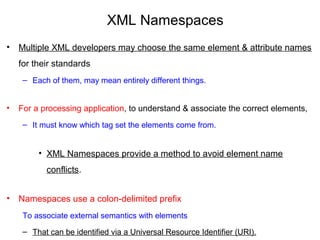
XML Namespaces
• Multiple XML developers may choose the same element & attribute names 
for their standards
– Each of them, may mean entirely different things. 
• For a processing application, to understand & associate the correct elements, 
– It must know which tag set the elements come from.
• XML Namespaces provide a method to avoid element name 
conflicts.
• Namespaces use a colon-delimited prefix 
To associate external semantics with elements 
– That can be identified via a Universal Resource Identifier (URI).
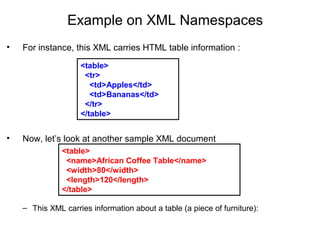
Example on XML Namespaces
• For instance, this XML carries HTML table information :
• Now, let’s look at another sample XML document
– This XML carries information about a table (a piece of furniture):
<table>
  <name>African Coffee Table</name>
  <width>80</width>
  <length>120</length>
</table>
<table>
  <tr>
    <td>Apples</td>
    <td>Bananas</td>
  </tr>
</table>
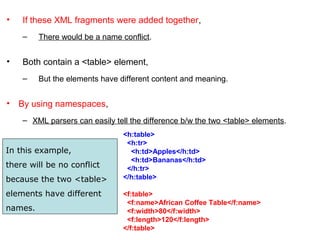
• If these XML fragments were added together, 
– There would be a name conflict. 
• Both contain a <table> element, 
– But the elements have different content and meaning.
• By using namespaces,
– XML parsers can easily tell the difference b/w the two <table> elements.
<h:table>
  <h:tr>
    <h:td>Apples</h:td>
    <h:td>Bananas</h:td>
  </h:tr>
</h:table>
<f:table>
  <f:name>African Coffee Table</f:name>
  <f:width>80</f:width>
  <f:length>120</f:length>
</f:table>
In this example,
there will be no conflict
because the two <table>
elements have different
names.
Declaring Namespaces
• Namespaces can be declared using one of two methods:
1. A default declaration or
2. An explicit declaration.
A Default Declaration
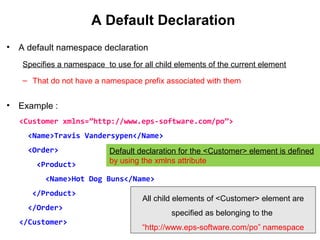
• A default namespace declaration
Specifies a namespace to use for all child elements of the current element
– That do not have a namespace prefix associated with them
• Example :
<Customer xmlns=”http://www.eps-software.com/po”>
<Name>Travis Vandersypen</Name>
<Order>
<Product>
<Name>Hot Dog Buns</Name>
</Product>
</Order>
</Customer>
Default declaration for the <Customer> element is defined
by using the xmlns attribute
All child elements of <Customer> element are
specified as belonging to the
“http://www.eps-software.com/po” namespace
An Explicit Declaration
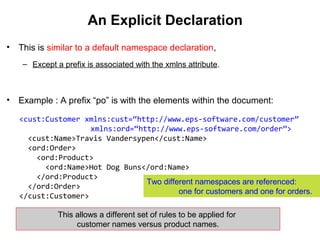
• This is similar to a default namespace declaration,
– Except a prefix is associated with the xmlns attribute.
• Example : A prefix “po” is with the elements within the document:
<cust:Customer xmlns:cust=“http://www.eps-software.com/customer”
xmlns:ord=“http://www.eps-software.com/order”>
<cust:Name>Travis Vandersypen</cust:Name>
<ord:Order>
<ord:Product>
<ord:Name>Hot Dog Buns</ord:Name>
</ord:Product>
</ord:Order>
</cust:Customer>
Two different namespaces are referenced:
one for customers and one for orders.
This allows a different set of rules to be applied for
customer names versus product names.
Identifying the Scope of Namespaces
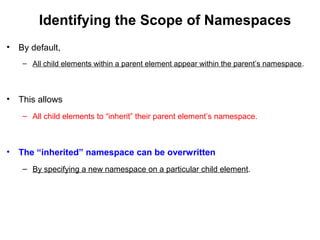
• By default,
– All child elements within a parent element appear within the parent’s namespace.
• This allows
– All child elements to “inherit” their parent element’s namespace.
• The “inherited” namespace can be overwritten
– By specifying a new namespace on a particular child element.
Identifying the Scope of Namespaces
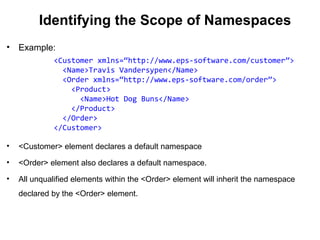
• Example:
• <Customer> element declares a default namespace
• <Order> element also declares a default namespace.
• All unqualified elements within the <Order> element will inherit the namespace
declared by the <Order> element.
<Customer xmlns=“http://www.eps-software.com/customer”>
<Name>Travis Vandersypen</Name>
<Order xmlns=“http://www.eps-software.com/order”>
<Product>
<Name>Hot Dog Buns</Name>
</Product>
</Order>
</Customer>

03 namespace

  • 1.
  • 2.
    UNIT I INTRODUCTIONTO XML XML document structure – Well formed and valid documents – Namespaces – DTD – XML Schema – X-Files.
  • 3.
    XML Namespaces Provide amethod to avoid element name conflicts
  • 4.
    XML Namespaces • Multiple XML developers may choose the same element & attribute names  for their standards – Each of them, may mean entirely different things.  •For a processing application, to understand & associate the correct elements,  – It must know which tag set the elements come from. • XML Namespaces provide a method to avoid element name  conflicts. • Namespaces use a colon-delimited prefix  To associate external semantics with elements  – That can be identified via a Universal Resource Identifier (URI).
  • 5.
    Example on XML Namespaces • For instance, this XML carries HTML table information : • Now, let’s look at another sample XML document –This XML carries information about a table (a piece of furniture): <table>   <name>African Coffee Table</name>   <width>80</width>   <length>120</length> </table> <table>   <tr>     <td>Apples</td>     <td>Bananas</td>   </tr> </table>
  • 6.
    • If these XML fragments were added together,  – There would be a name conflict.  •Both contain a <table> element,  – But the elements have different content and meaning. • By using namespaces, – XML parsers can easily tell the difference b/w the two <table> elements. <h:table>   <h:tr>     <h:td>Apples</h:td>     <h:td>Bananas</h:td>   </h:tr> </h:table> <f:table>   <f:name>African Coffee Table</f:name>   <f:width>80</f:width>   <f:length>120</f:length> </f:table> In this example, there will be no conflict because the two <table> elements have different names.
  • 7.
    Declaring Namespaces • Namespacescan be declared using one of two methods: 1. A default declaration or 2. An explicit declaration.
  • 8.
    A Default Declaration •A default namespace declaration Specifies a namespace to use for all child elements of the current element – That do not have a namespace prefix associated with them • Example : <Customer xmlns=”http://www.eps-software.com/po”> <Name>Travis Vandersypen</Name> <Order> <Product> <Name>Hot Dog Buns</Name> </Product> </Order> </Customer> Default declaration for the <Customer> element is defined by using the xmlns attribute All child elements of <Customer> element are specified as belonging to the “http://www.eps-software.com/po” namespace
  • 9.
    An Explicit Declaration •This is similar to a default namespace declaration, – Except a prefix is associated with the xmlns attribute. • Example : A prefix “po” is with the elements within the document: <cust:Customer xmlns:cust=“http://www.eps-software.com/customer” xmlns:ord=“http://www.eps-software.com/order”> <cust:Name>Travis Vandersypen</cust:Name> <ord:Order> <ord:Product> <ord:Name>Hot Dog Buns</ord:Name> </ord:Product> </ord:Order> </cust:Customer> Two different namespaces are referenced: one for customers and one for orders. This allows a different set of rules to be applied for customer names versus product names.
  • 10.
    Identifying the Scopeof Namespaces • By default, – All child elements within a parent element appear within the parent’s namespace. • This allows – All child elements to “inherit” their parent element’s namespace. • The “inherited” namespace can be overwritten – By specifying a new namespace on a particular child element.
  • 11.
    Identifying the Scopeof Namespaces • Example: • <Customer> element declares a default namespace • <Order> element also declares a default namespace. • All unqualified elements within the <Order> element will inherit the namespace declared by the <Order> element. <Customer xmlns=“http://www.eps-software.com/customer”> <Name>Travis Vandersypen</Name> <Order xmlns=“http://www.eps-software.com/order”> <Product> <Name>Hot Dog Buns</Name> </Product> </Order> </Customer>