6.0 XML DOM
By
Dr.Smitha.P.S
Associate Professor
Velammal Engineering College
• The Document Object Model (DOM) is a
programming API for HTML and XML documents.
• It defines the logical structure of documents and
the way a document is accessed and
manipulated.
• With the Document Object Model, programmers
can create and build documents, navigate their
structure, and add, modify, or delete elements
and content.
• Anything found in an HTML or XML document
can be accessed, changed, deleted, or added
using the Document Object Model
• The DOM is a W3C (World Wide Web
Consortium) standard.
• The DOM defines a standard for accessing
documents:
– "The W3C Document Object Model (DOM) is a
platform and language-neutral interface that allows
programs and scripts to dynamically access and
update the content, structure, and style of a
document.“
• The XML DOM defines a standard for accessing and
manipulating XML documents.
• The DOM presents an XML document as a tree-structure.
• The Document Object Model (DOM) is an application
programming interface (API) for HTML and XML
documents.
• It defines the logical structure of documents and the way a
document is accessed and manipulated.
• The DOM is separated into 3 different parts / levels:
– Core DOM - standard model for any structured document
– XML DOM - standard model for XML documents
– HTML DOM - standard model for HTML documents
What DOM is not
• DOM is not a mechanism for persisting or
storing objects as XML documents.
• DOM is not a set of data structures;rather it is
an object model describing XML elements
• DOM does not specify what information in a
document is relevant or how information
should be structured
Why do I need DOM
• To create or modify an XML document
programmatically
• It is possible to process XML documents using
simpler techniques such as XSLT
Disadvantages of using DOM
• DOM is memory intensive
• DOM API is too complex
• DOM is not practical for small devices such as
PDAs and cellular phones
DOM LEVELS
• Level 1 allows traversal of an XML document as
well as the manipulation of the content in that
document
• Level 2 extends level1 with additional features
such as namespace support,events,ranges.
What is the XML DOM?
• The XML DOM is:
• A standard object model for XML
• A standard programming interface for XML
• Platform- and language-independent
• A W3C standard
• The XML DOM defines the objects and properties
of all XML elements, and the methods (interface)
to access them.
• In other words: The XML DOM is a standard for
how to get, change, add, or delete XML
elements.
• DOM Nodes
• According to the DOM, everything in an XML
document is a node.
• The DOM says:
• The entire document is a document node
• Every XML element is an element node
• The text in the XML elements are text nodes
• Every attribute is an attribute node
• Comments are comment nodes
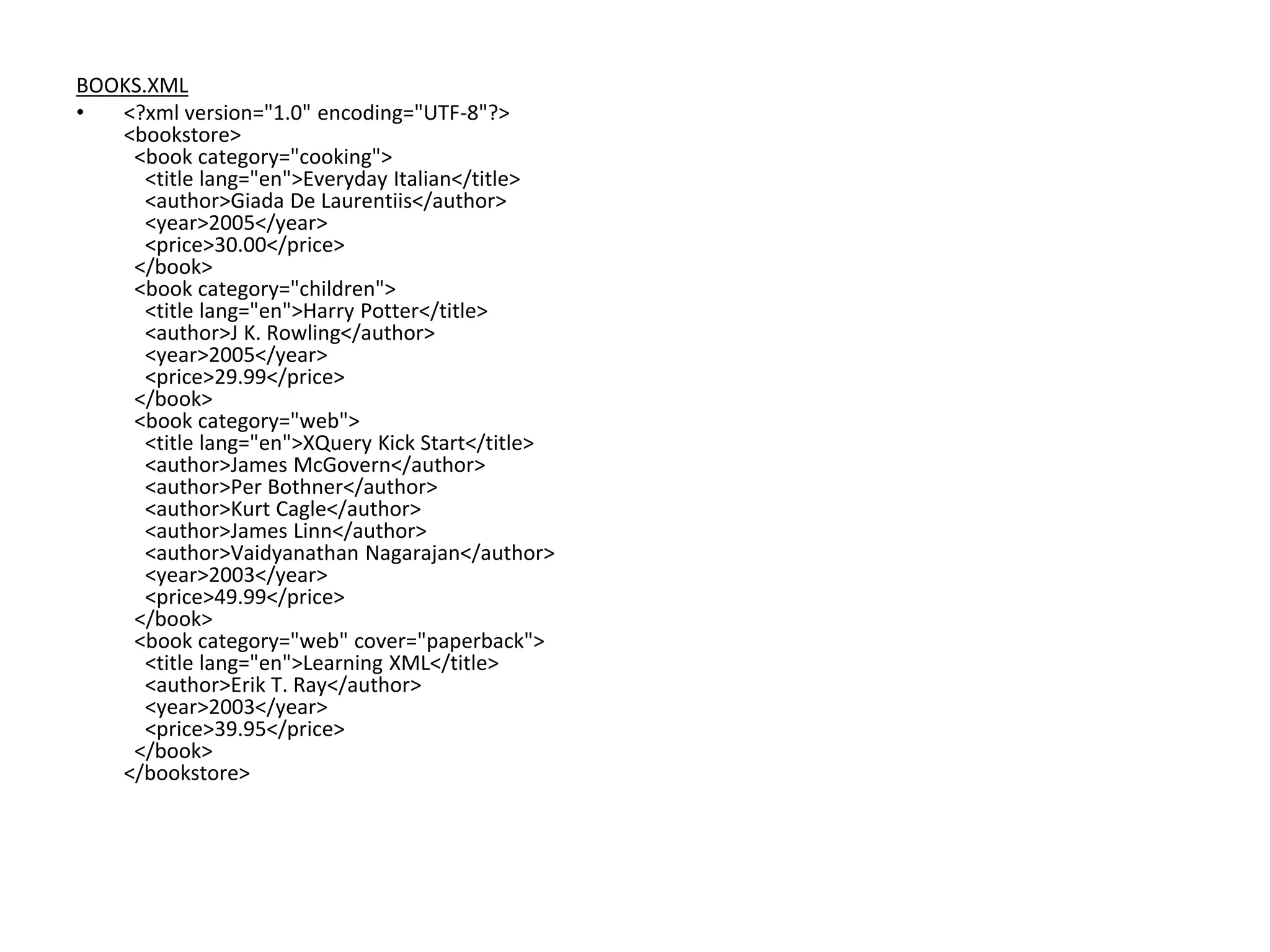
BOOKS.XML
• <?xml version="1.0" encoding="UTF-8"?>
<bookstore>
<book category="cooking">
<title lang="en">Everyday Italian</title>
<author>Giada De Laurentiis</author>
<year>2005</year>
<price>30.00</price>
</book>
<book category="children">
<title lang="en">Harry Potter</title>
<author>J K. Rowling</author>
<year>2005</year>
<price>29.99</price>
</book>
<book category="web">
<title lang="en">XQuery Kick Start</title>
<author>James McGovern</author>
<author>Per Bothner</author>
<author>Kurt Cagle</author>
<author>James Linn</author>
<author>Vaidyanathan Nagarajan</author>
<year>2003</year>
<price>49.99</price>
</book>
<book category="web" cover="paperback">
<title lang="en">Learning XML</title>
<author>Erik T. Ray</author>
<year>2003</year>
<price>39.95</price>
</book>
</bookstore>
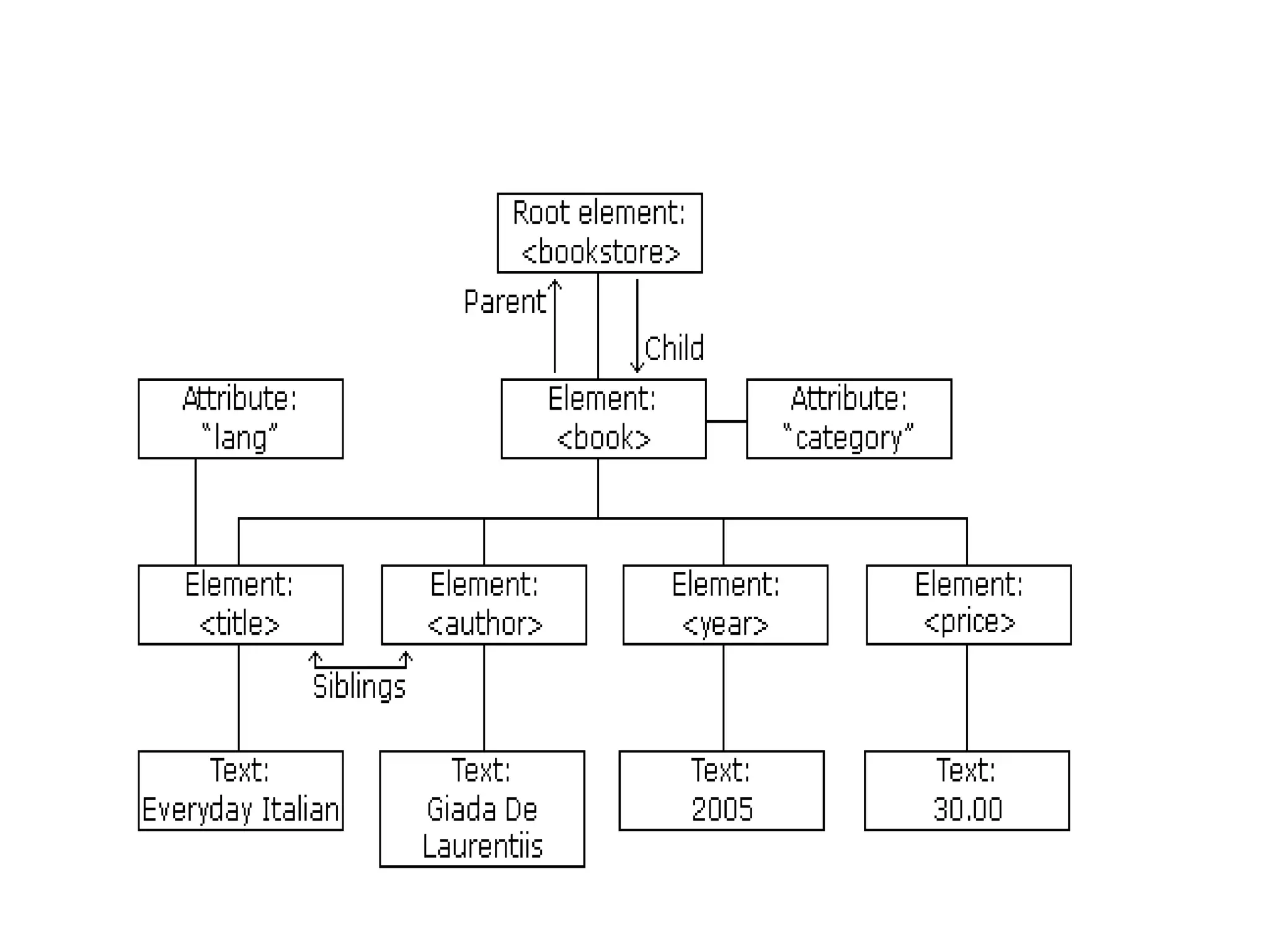
• The root node in the XML above is named
<bookstore>.
• All other nodes in the document are contained
within <bookstore>.
• The root node <bookstore> holds four <book>
nodes.
• The first <book> node holds four nodes: <title>,
<author>, <year>, and <price>, which contains
one text node each, "Everyday Italian", "Giada De
Laurentiis", "2005", and "30.00".
• The XML DOM Node Tree
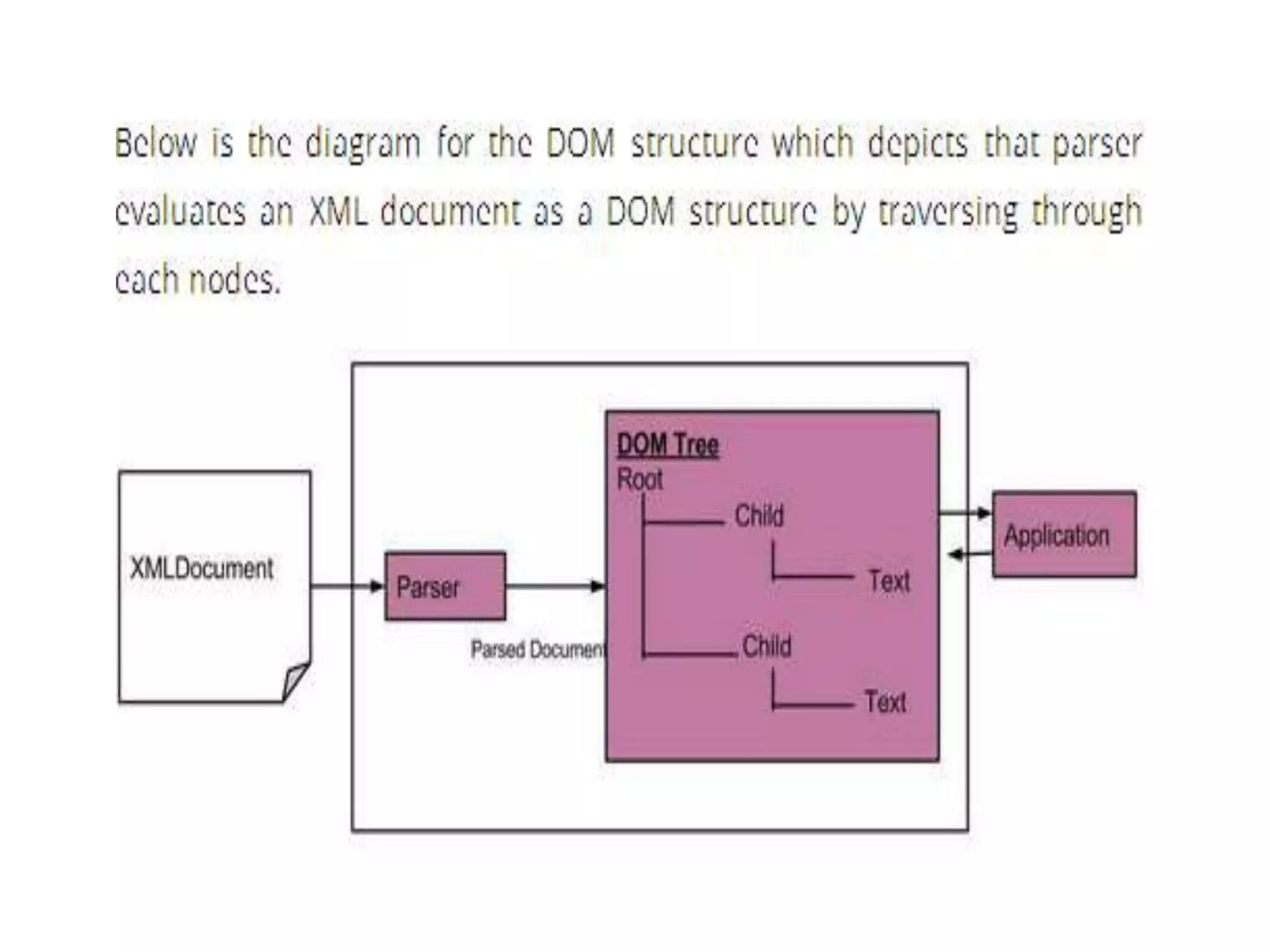
• The XML DOM views an XML document as a
tree-structure.
• The tree structure is called a node-tree.
• All nodes can be accessed through the tree.
• Their contents can be modified or deleted,
and new elements can be created.
• The node tree shows the set of nodes, and the
connections between them.
• The tree starts at the root node and branches
out to the text nodes at the lowest level of the
tree:
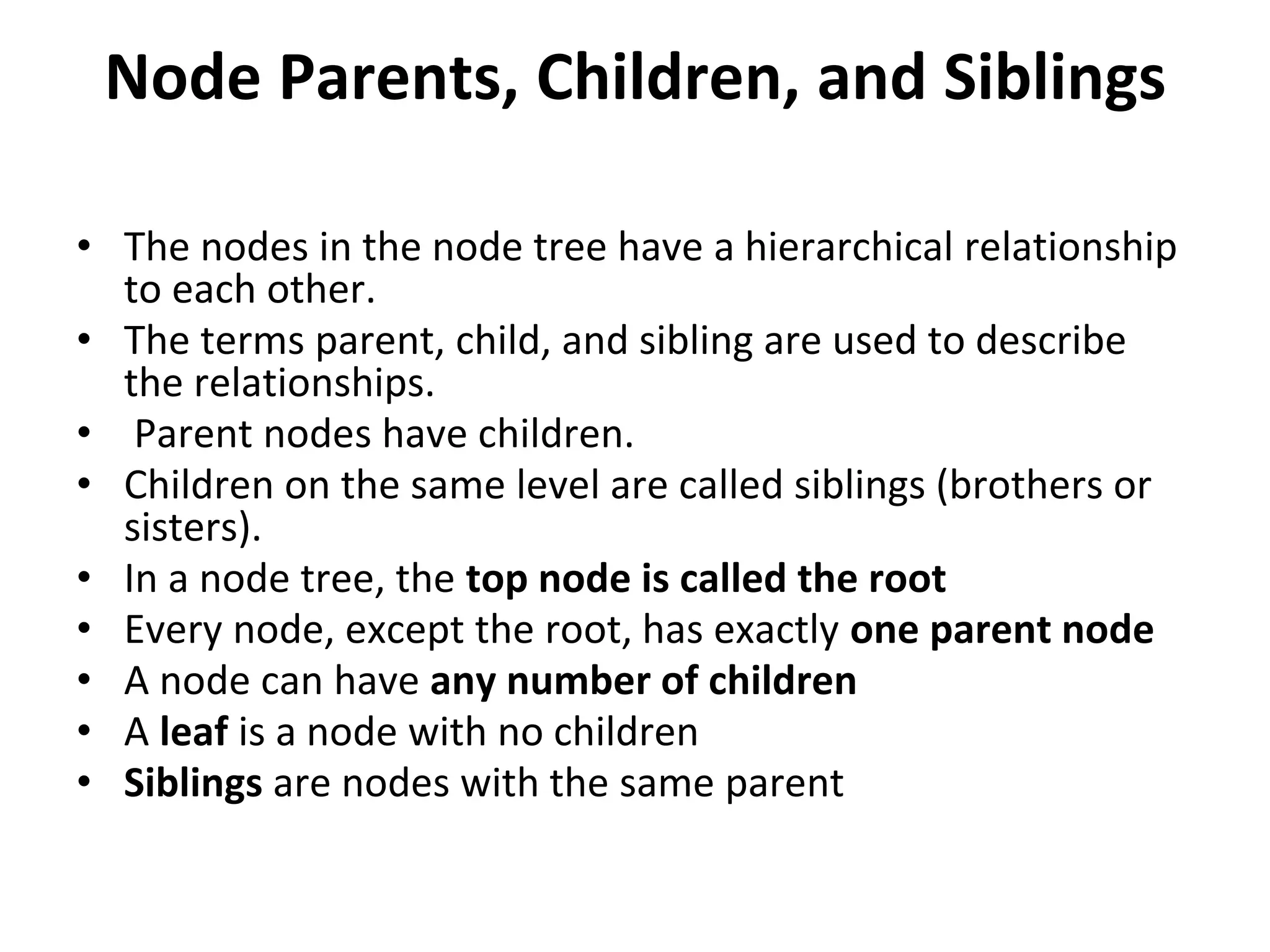
Node Parents, Children, and Siblings
• The nodes in the node tree have a hierarchical relationship
to each other.
• The terms parent, child, and sibling are used to describe
the relationships.
• Parent nodes have children.
• Children on the same level are called siblings (brothers or
sisters).
• In a node tree, the top node is called the root
• Every node, except the root, has exactly one parent node
• A node can have any number of children
• A leaf is a node with no children
• Siblings are nodes with the same parent
Xml parser
• XML Parser provides way how to access or
modify data present in an XML document.
• Java provides multiple options to parse XML
document.
• Following are various types of parsers which
are commonly used to parse XML documents.
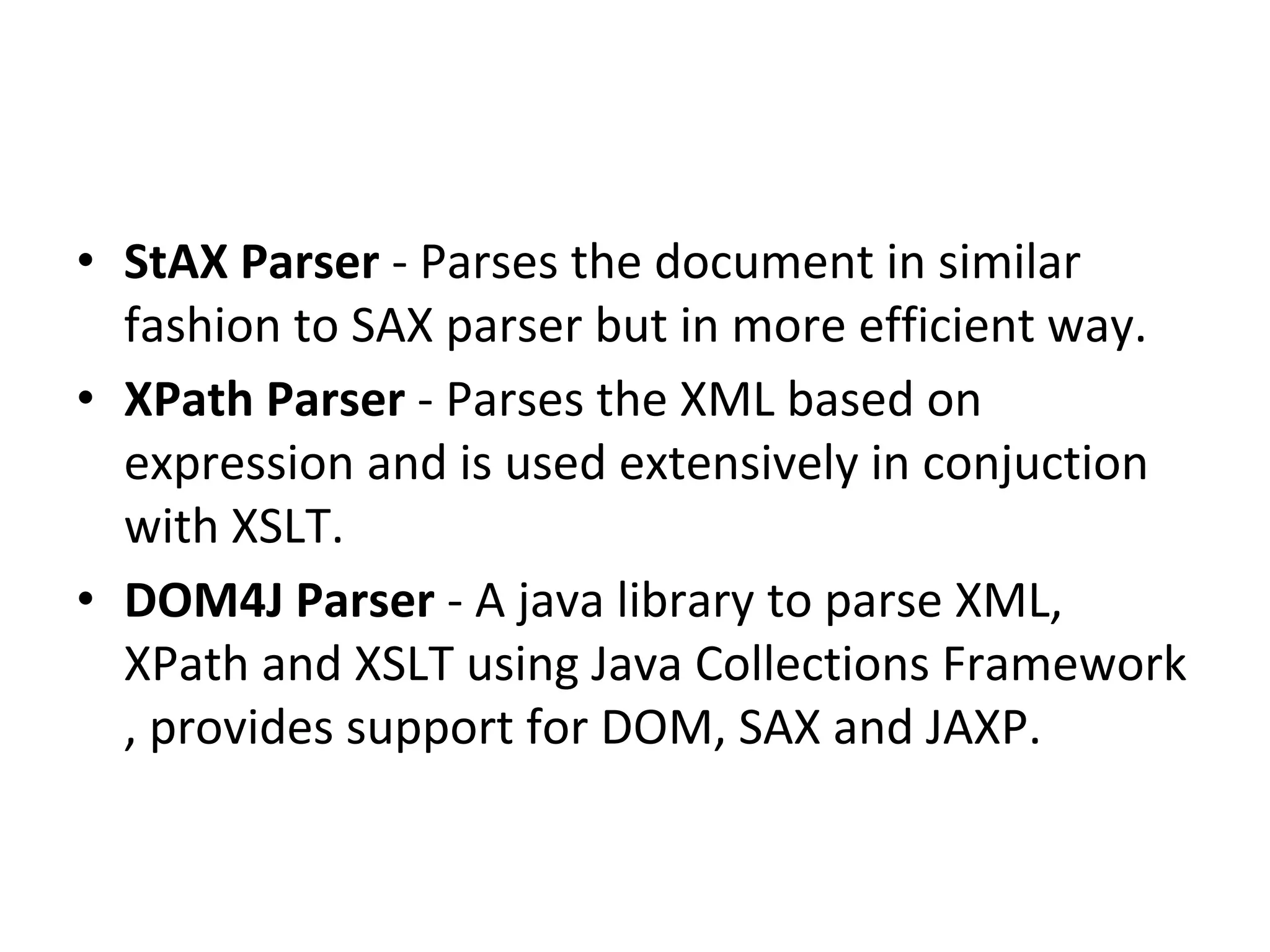
• Dom Parser - Parses the document by loading the
complete contents of the document and creating
its complete hiearchical tree in memory.
• SAX Parser - Parses the document on event
based triggers. Does not load the complete
document into the memory.
• JDOM Parser - Parses the document in similar
fashion to DOM parser but in more easier way.
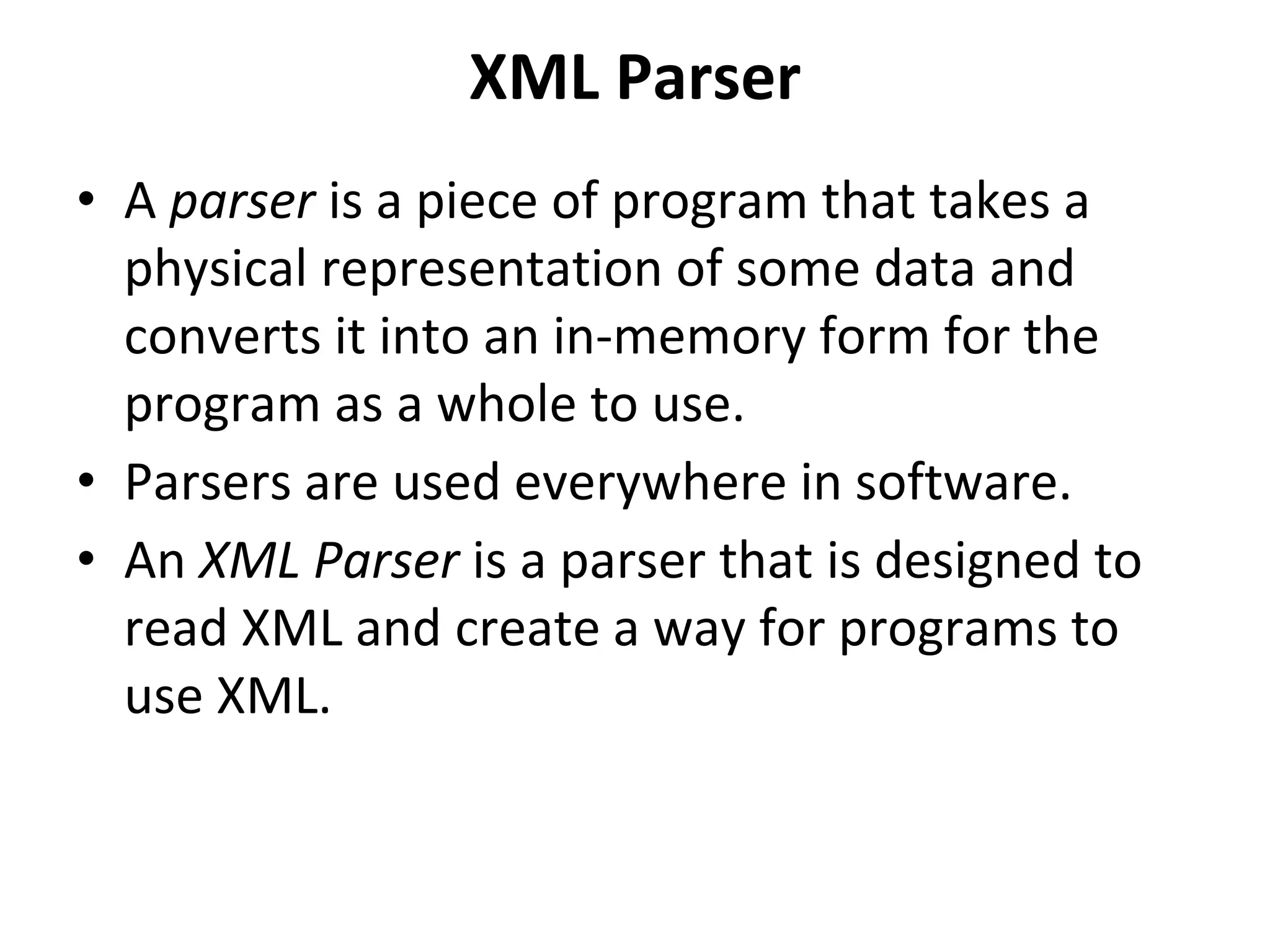
• StAX Parser - Parses the document in similar
fashion to SAX parser but in more efficient way.
• XPath Parser - Parses the XML based on
expression and is used extensively in conjuction
with XSLT.
• DOM4J Parser - A java library to parse XML,
XPath and XSLT using Java Collections Framework
, provides support for DOM, SAX and JAXP.
XML Parser
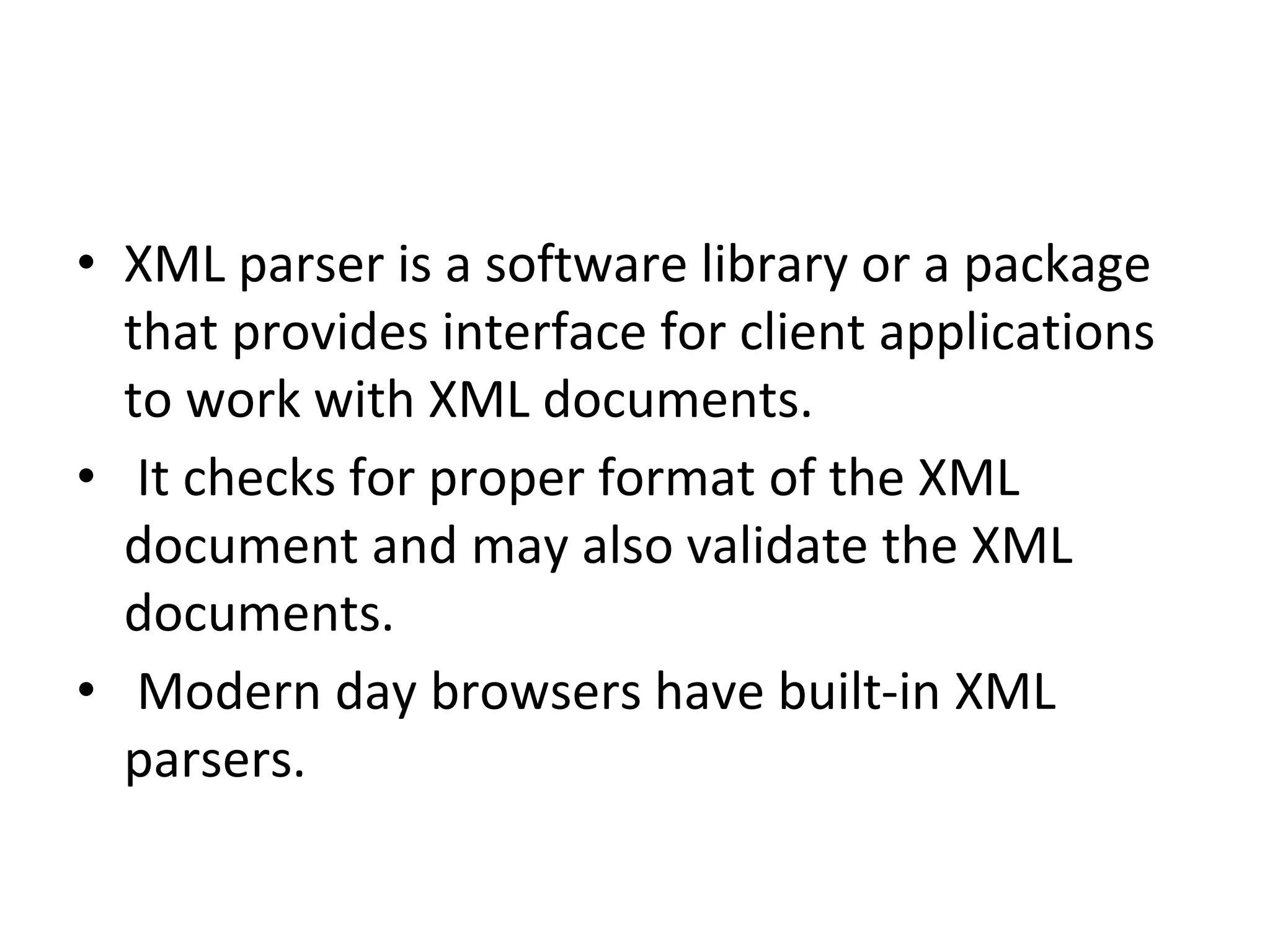
• A parser is a piece of program that takes a
physical representation of some data and
converts it into an in-memory form for the
program as a whole to use.
• Parsers are used everywhere in software.
• An XML Parser is a parser that is designed to
read XML and create a way for programs to
use XML.
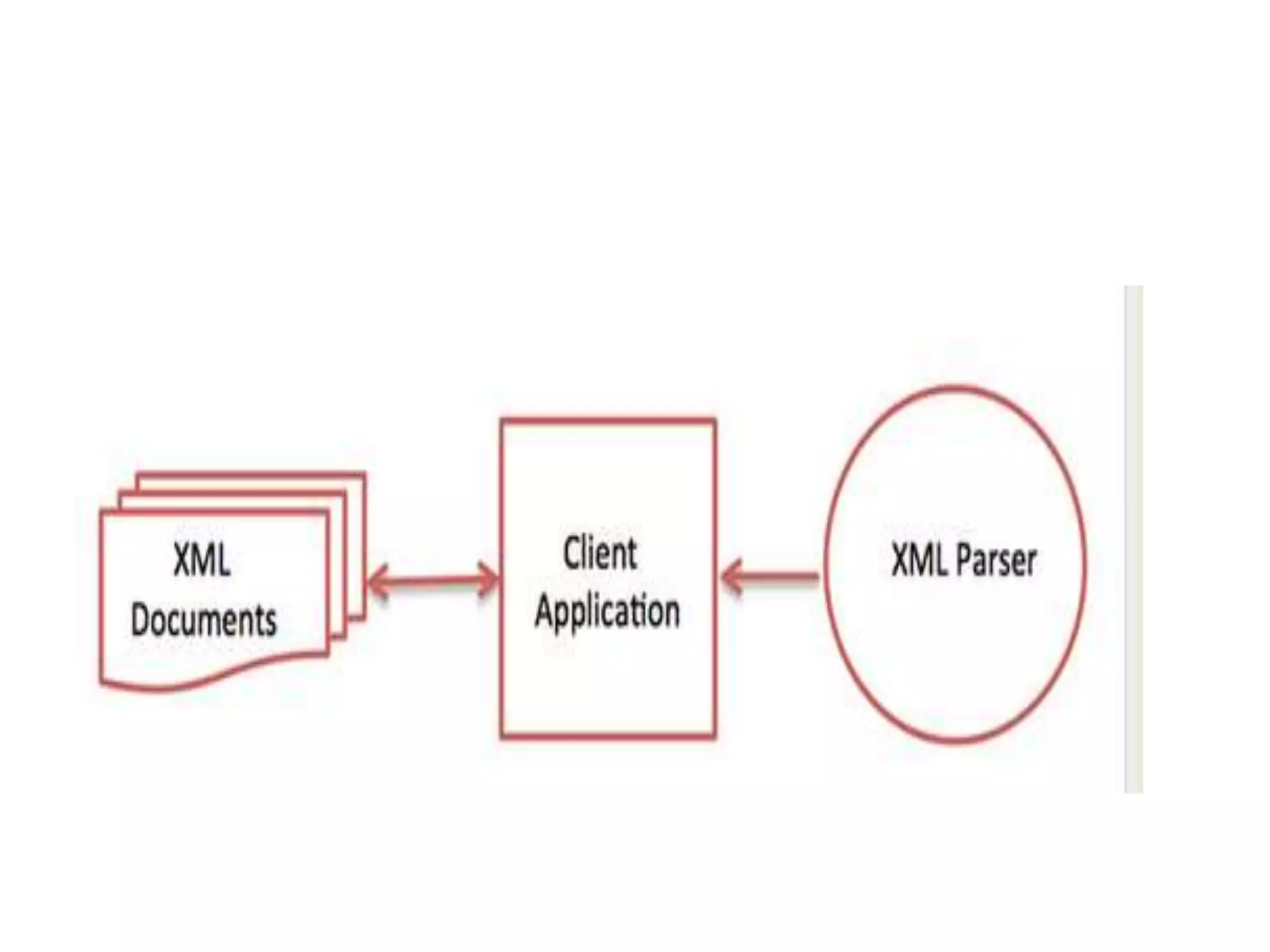
• XML parser is a software library or a package
that provides interface for client applications
to work with XML documents.
• It checks for proper format of the XML
document and may also validate the XML
documents.
• Modern day browsers have built-in XML
parsers.
• the goal of a parser is to transform XML into a readable code.
• To ease the process of parsing, some commercial products are available that
facilitate the breakdown of XML document and yield more reliable results.
• Some commonly used parsers are listed below:
• MSXML (Microsoft Core XML Services) : This is a standard set of XML tools from
Microsoft that includes a parser.
• System.Xml.XmlDocument : This class is part of .NET library, which contains a
number of different classes related to working with XML.
• Java built-in parser : The Java library has its own parser. The library is designed
such that you can replace the built-in parser with an external implementation such
as Xerces from Apache or Saxon.
• Saxon : Saxon offers tools for parsing, transforming, and querying XML.
• Xerces : Xerces is implemented in Java and is developed by the famous open
source Apache Software Foundation.
XML DOM Parser
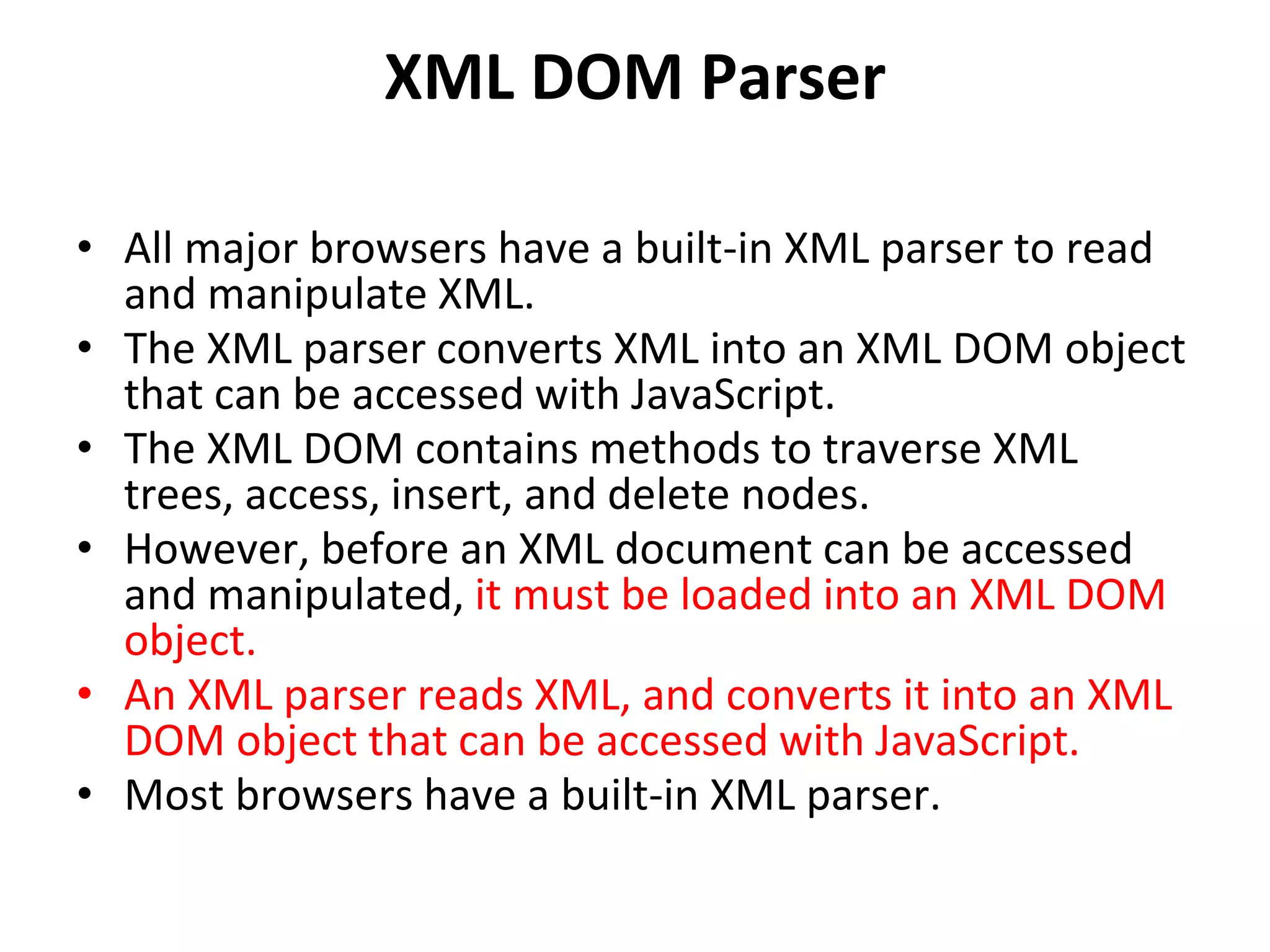
• All major browsers have a built-in XML parser to read
and manipulate XML.
• The XML parser converts XML into an XML DOM object
that can be accessed with JavaScript.
• The XML DOM contains methods to traverse XML
trees, access, insert, and delete nodes.
• However, before an XML document can be accessed
and manipulated, it must be loaded into an XML DOM
object.
• An XML parser reads XML, and converts it into an XML
DOM object that can be accessed with JavaScript.
• Most browsers have a built-in XML parser.
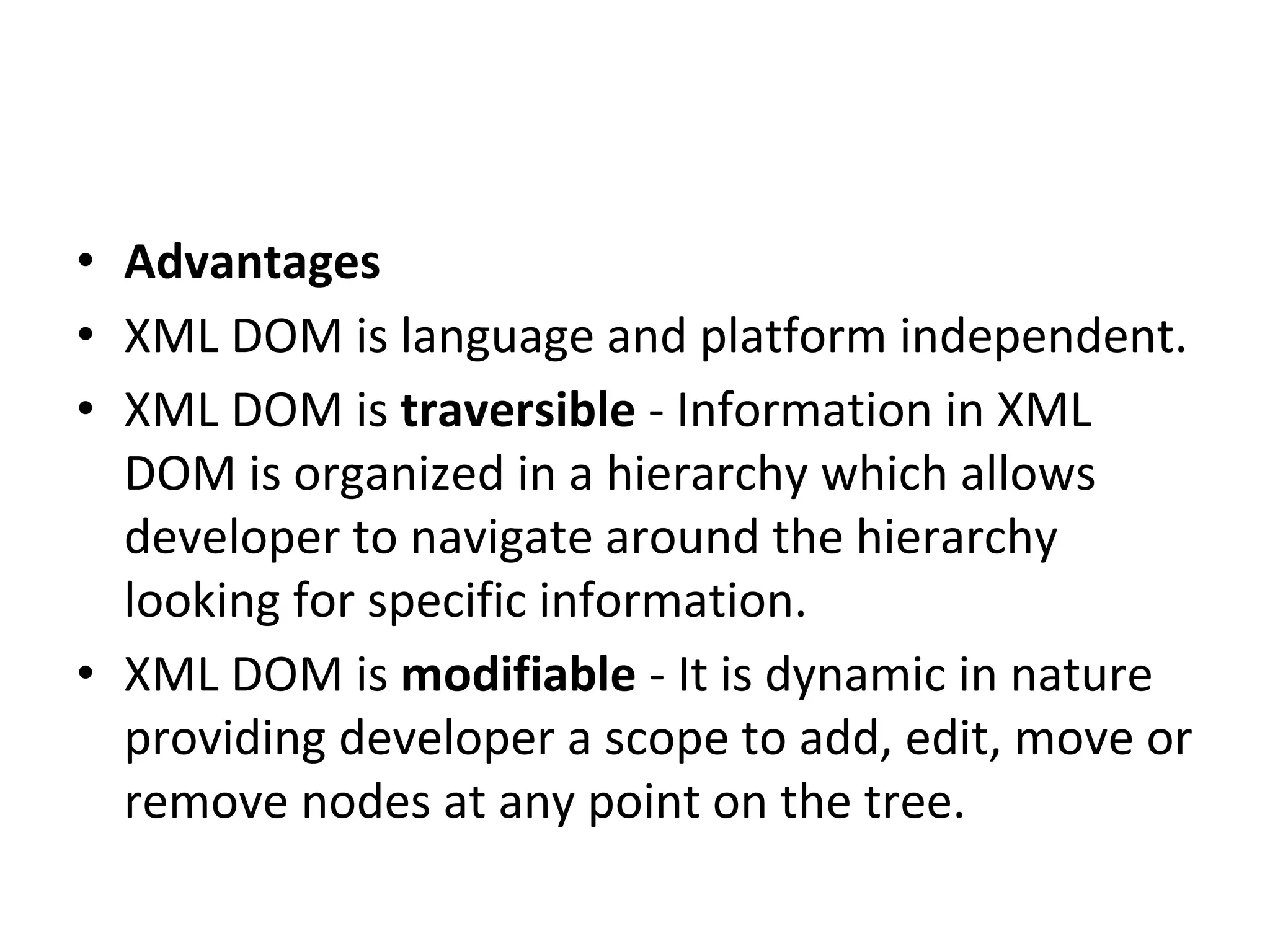
• Advantages
• XML DOM is language and platform independent.
• XML DOM is traversible - Information in XML
DOM is organized in a hierarchy which allows
developer to navigate around the hierarchy
looking for specific information.
• XML DOM is modifiable - It is dynamic in nature
providing developer a scope to add, edit, move or
remove nodes at any point on the tree.
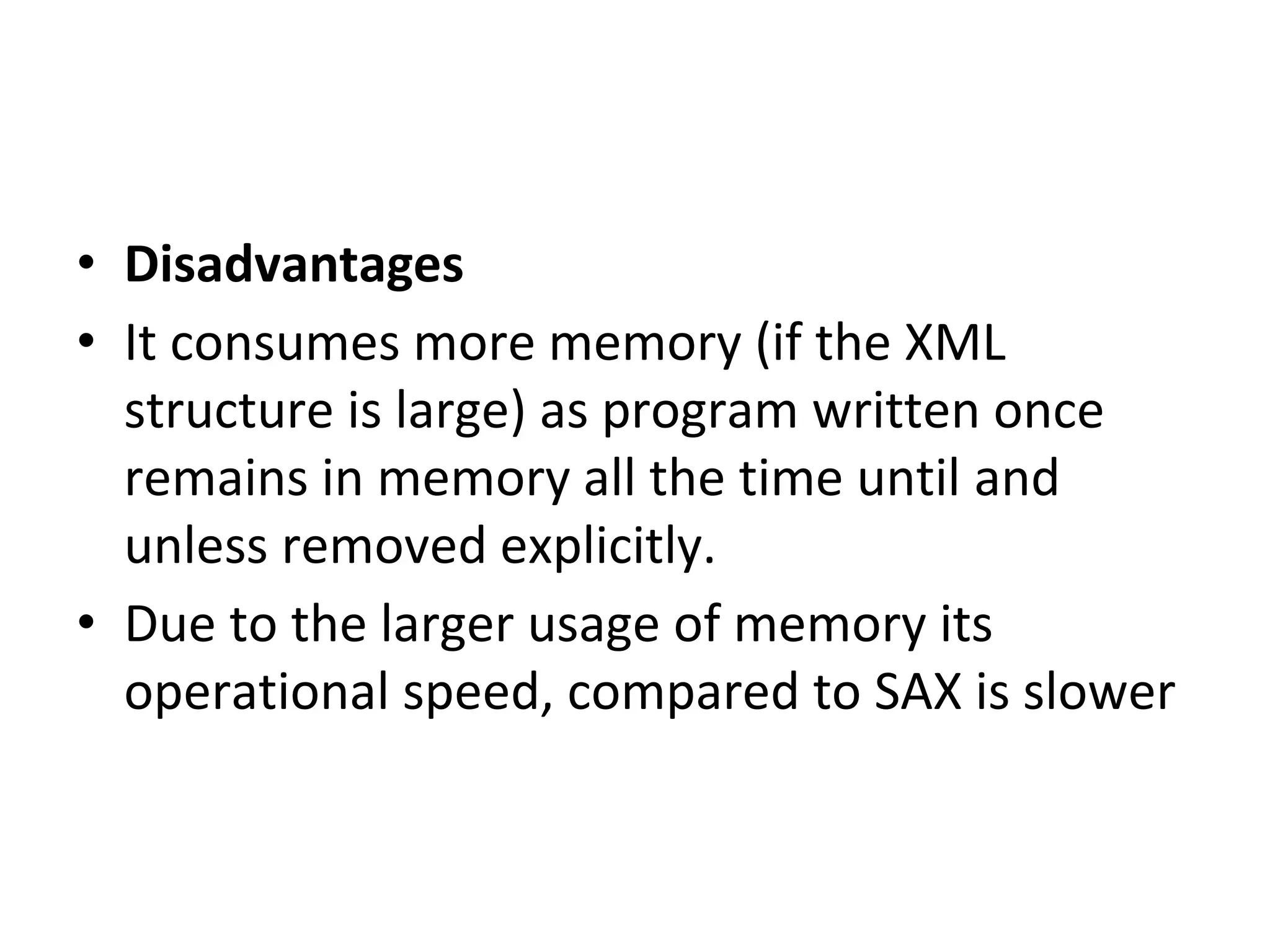
• Disadvantages
• It consumes more memory (if the XML
structure is large) as program written once
remains in memory all the time until and
unless removed explicitly.
• Due to the larger usage of memory its
operational speed, compared to SAX is slower
PROGRAM 1
<!DOCTYPE html>
<html>
<head>
<script src="loadxmldoc.js"></script>
</head>
<body>
<script>
xmlDoc=loadXMLDoc("books.xml");
document.write(xmlDoc.getElementsByTagName("title")[0].childNodes[0].nodeValue + "<br>");
document.write(xmlDoc.getElementsByTagName("author")[0].childNodes[0].nodeValue + "<br>");
document.write(xmlDoc.getElementsByTagName("year")[0].childNodes[0].nodeValue);
</script>
</body>
</html>
OUTPUT:
Everyday Italian
Giada De Laurentiis
2005
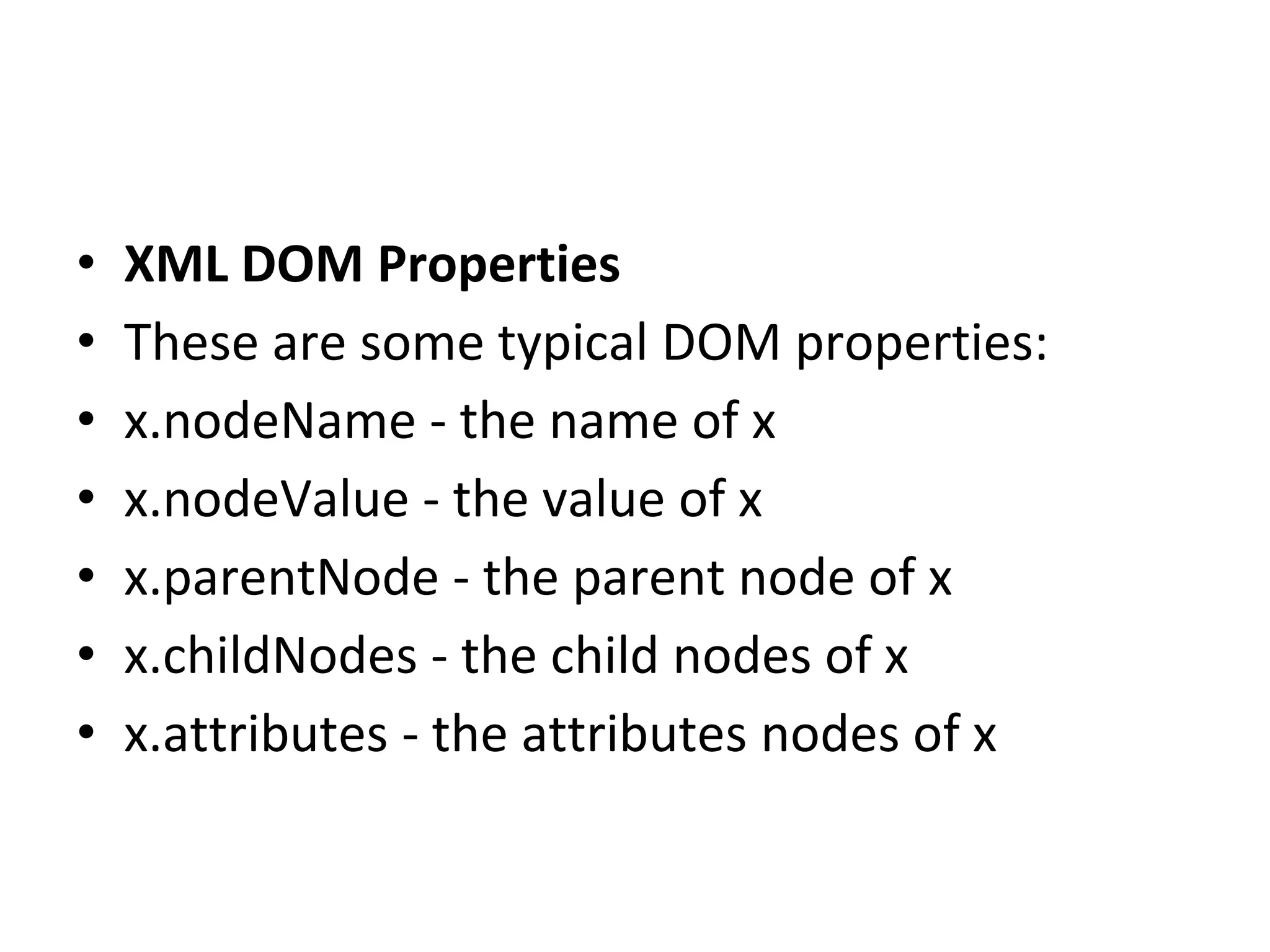
• XML DOM Properties
• These are some typical DOM properties:
• x.nodeName - the name of x
• x.nodeValue - the value of x
• x.parentNode - the parent node of x
• x.childNodes - the child nodes of x
• x.attributes - the attributes nodes of x
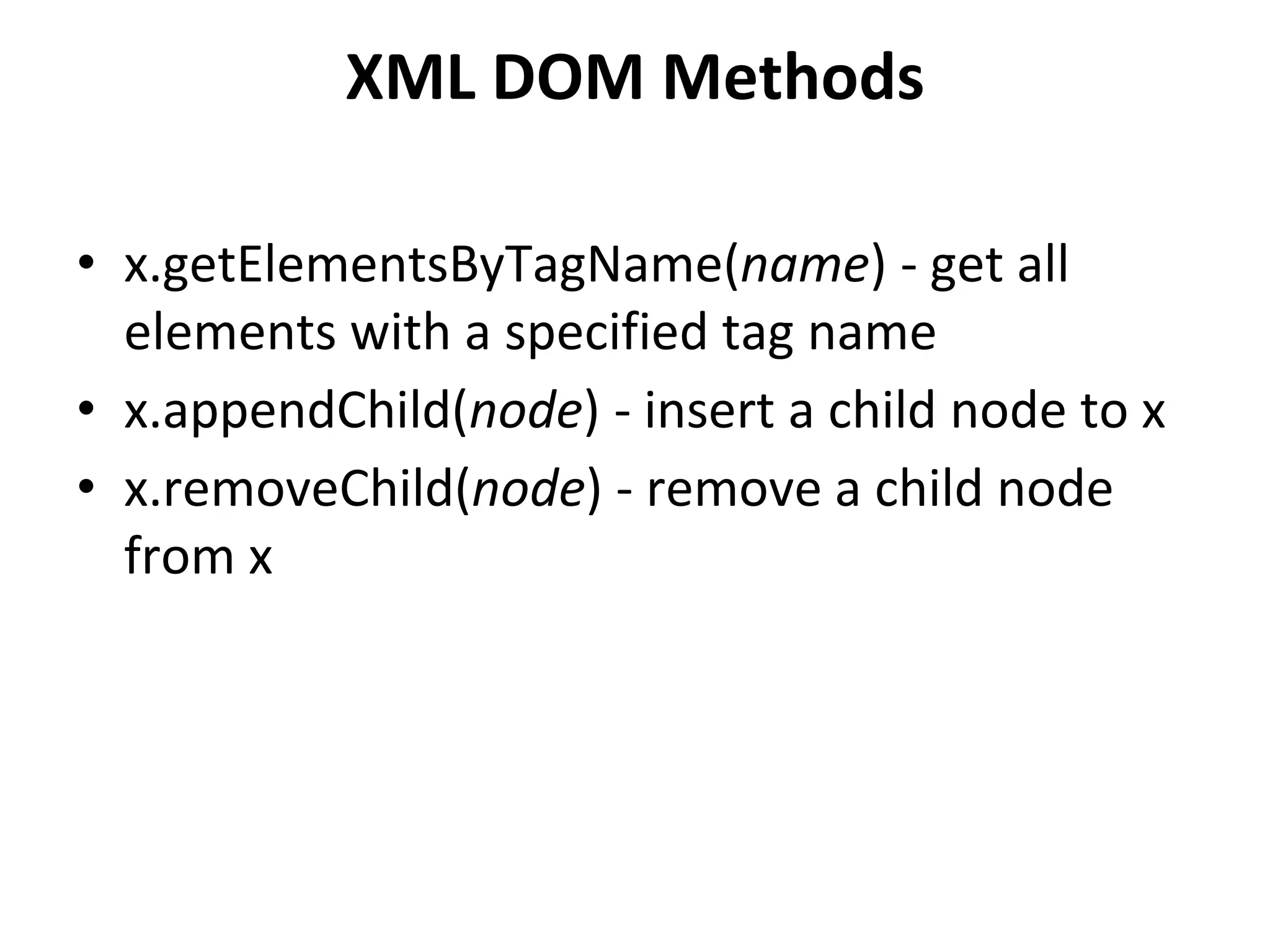
XML DOM Methods
• x.getElementsByTagName(name) - get all
elements with a specified tag name
• x.appendChild(node) - insert a child node to x
• x.removeChild(node) - remove a child node
from x
• You can access a node in three ways:
• 1. By using the getElementsByTagName()
method
• 2. By looping through (traversing) the nodes
tree.
• 3. By navigating the node tree, using the node
relationships.
• The getElementsByTagName() Method
• getElementsByTagName() returns all elements
with a specified tag name.
• Syntax
• node.getElementsByTagName("tagname");
• DOM Node List Length
• The length property defines the length of a
node list (the number of nodes).
• You can loop through a node list by using the
length property:
PROGRAM2
<!DOCTYPE html>
<html>
<head>
<script src="loadxmldoc.js"></script>
</head>
<body>
<script>
xmlDoc=loadXMLDoc("books.xml");
x=xmlDoc.getElementsByTagName("title");
for (i=0;i<x.length;i++)
{
document.write(x[i].childNodes[0].nodeValue);
document.write("<br>");
}
</script>
</body>
</html>
OUTPUT
Everyday Italian
Harry Potter
XQuery Kick Start
Learning XML
• Traversing Nodes
• The following code loops through the child nodes, that are also element nodes, of
the root node:
• Example
• var xmlDoc=loadXMLDoc("books.xml");
var x=xmlDoc.documentElement.childNodes;
for (i=0;i<x.length;i++)
{
// Process only element nodes (type 1)
if (x[i].nodeType==1)
{
document.write(x[i].nodeName);
document.write("<br>");
}
}
OUTPUT
book
book
book
book
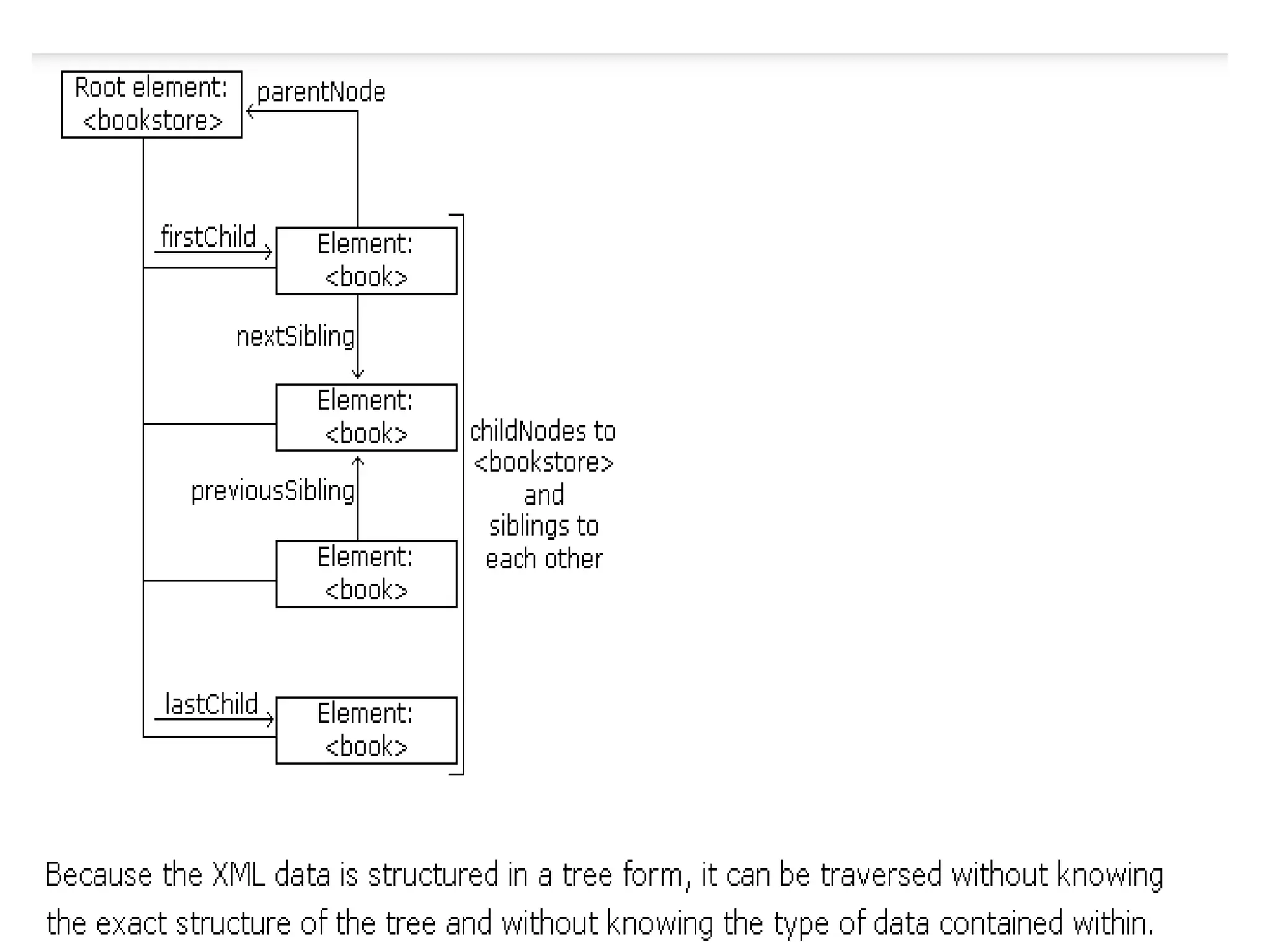
• Navigating Node Relationships
• The following code navigates the node tree using the node relationships:
<!DOCTYPE html>
<html>
<head>
<script src="loadxmldoc.js"></script>
</head>
<body>
<script>
xmlDoc=loadXMLDoc("books.xml");
x=xmlDoc.getElementsByTagName("book")[0].childNodes;
y=xmlDoc.getElementsByTagName("book")[0].firstChild;
for (i=0;i<x.length;i++)
{
if (y.nodeType==1)
{//Process only element nodes (type 1)
document.write(y.nodeName + "<br>");
}
y=y.nextSibling;
}
</script>
</body>
</html>
Output
title
author
year
price
• Node Properties
• In the XML DOM, each node is an object.
• Objects have methods and properties, that
can be accessed and manipulated by
JavaScript.
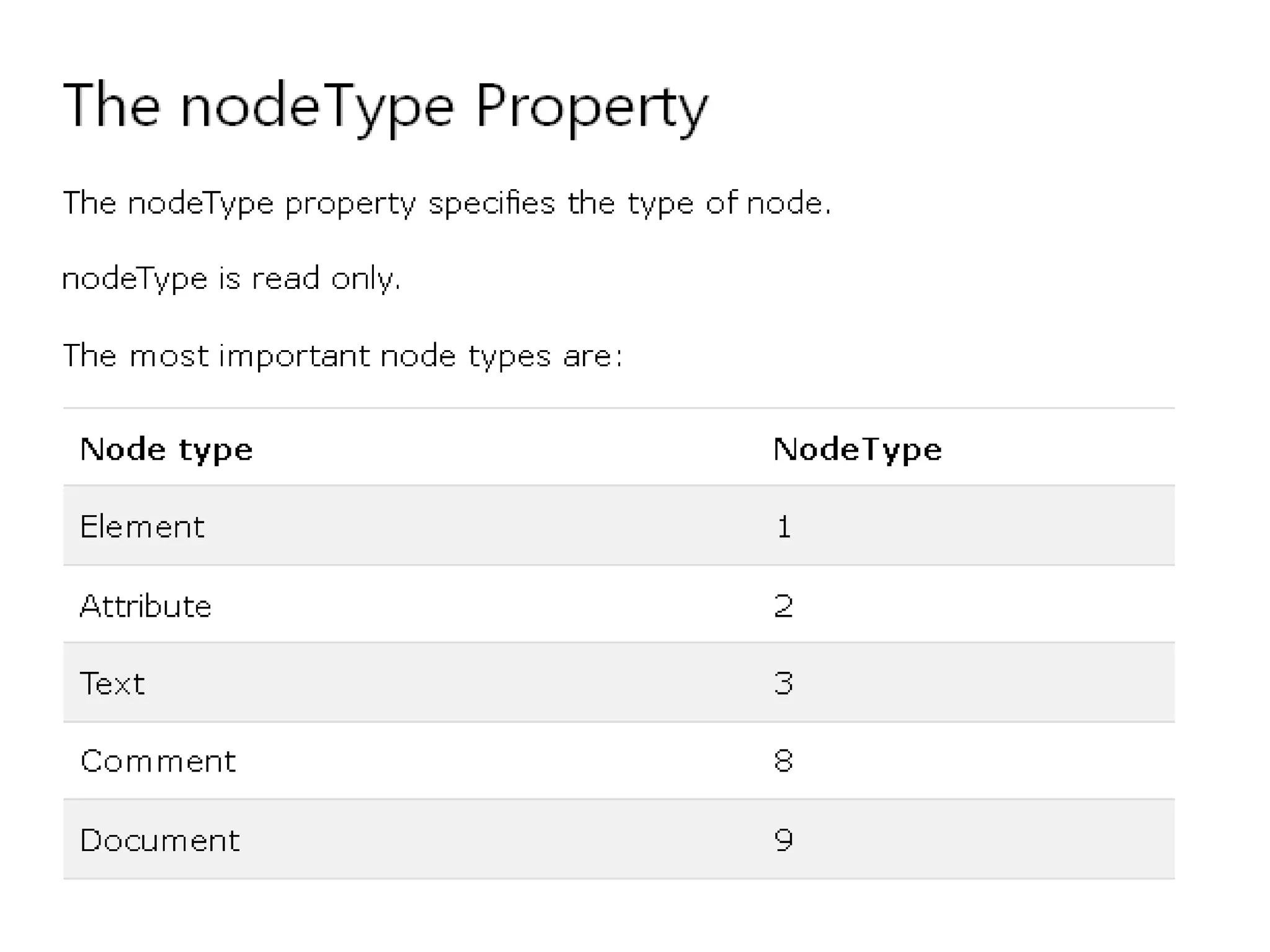
• Three important node properties are:
• nodeName
• nodeValue
• nodeType
• The nodeName Property
• The nodeName property specifies the name of a
node.
• nodeName is read-only
• nodeName of an element node is the same as the
tag name
• nodeName of an attribute node is the attribute
name
• nodeName of a text node is always #text
• nodeName of the document node is always
#document
• The nodeValue Property
• The nodeValue property specifies the value of
a node.
• nodeValue for element nodes is undefined
• nodeValue for text nodes is the text itself
• nodeValue for attribute nodes is the attribute
value
Get the Value of an Element
• The following code retrieves the text node value of the first <title> element:
Example
<!DOCTYPE html>
<html>
<head>
<script src="loadxmldoc.js"></script>
</head>
<body>
<script>
xmlDoc=loadXMLDoc("books.xml");
x=xmlDoc.getElementsByTagName("title")[0]
y=x.childNodes[0];
document.write(y.nodeValue);
</script>
</body>
</html>
OUTPUT
Everyday Italian
• The getAttribute() method returns an attribute value.
<!DOCTYPE html>
<html>
<head>
<script src="loadxmldoc.js">
</script>
</head>
<body>
<script>
xmlDoc=loadXMLDoc("books.xml");
x=xmlDoc.getElementsByTagName('book');
for (i=0;i<x.length;i++)
{
document.write(x[i].getAttribute('category'));
document.write("<br>");
}
</script>
</body>
</html>
Output
cooking
children
web
web
The getAttributeNode() method
returns an attribute node.
<!DOCTYPE html>
<html>
<head>
<script src="loadxmldoc.js">
</script>
</head>
<body>
<script>
xmlDoc=loadXMLDoc("books.xml");
x=xmlDoc.getElementsByTagName("title")[0].getAttributeNode("lang");
txt=x.nodeValue;
document.write(txt);
</script>
</body>
</html>
OUTPUT
En
Change the Value of an Element
• The following code changes the text node value of the first
<title> element:
Example
<script>
xmlDoc=loadXMLDoc("books.xml");
x=xmlDoc.getElementsByTagName("title")[0].childNodes[0];
x.nodeValue="Easy Cooking";
document.write(x.nodeValue);
</script>
OUTPUT:
• Easy Cooking
Change an Attribute Using
setAttribute()
• The setAttribute() method changes the value of an existing
attribute, or creates a new attribute.
• The following code changes the category attribute of the <book>
element:
Example
<script>
xmlDoc=loadXMLDoc("books.xml");
x=xmlDoc.getElementsByTagName('book');
x[0].setAttribute("category","food");
document.write(x[0].getAttribute("category"));
</script>
OUTPUT:
FOOD
removeChild() and replaceChild()
• The removeChild() method removes a
specified node.
• When a node is removed, all its child nodes
are also removed
• Replace an Element Node
• The replaceChild() method is used to replace a
node.
EXAMPLE
//create a book element, title element and a text node
newNode=xmlDoc.createElement("book");
newTitle=xmlDoc.createElement("title");
newText=xmlDoc.createTextNode("A Notebook");
//add the text node to the title node,
newTitle.appendChild(newText);
//add the title node to the book node
newNode.appendChild(newTitle);
y=xmlDoc.getElementsByTagName("book")[0]
//replace the first book node with the new node
x.replaceChild(newNode,y);
z=xmlDoc.getElementsByTagName("title");
for (i=0;i<z.length;i++)
{
document.write(z[i].childNodes[0].nodeValue);
document.write("<br>");
}
</script>
</body>
</html>
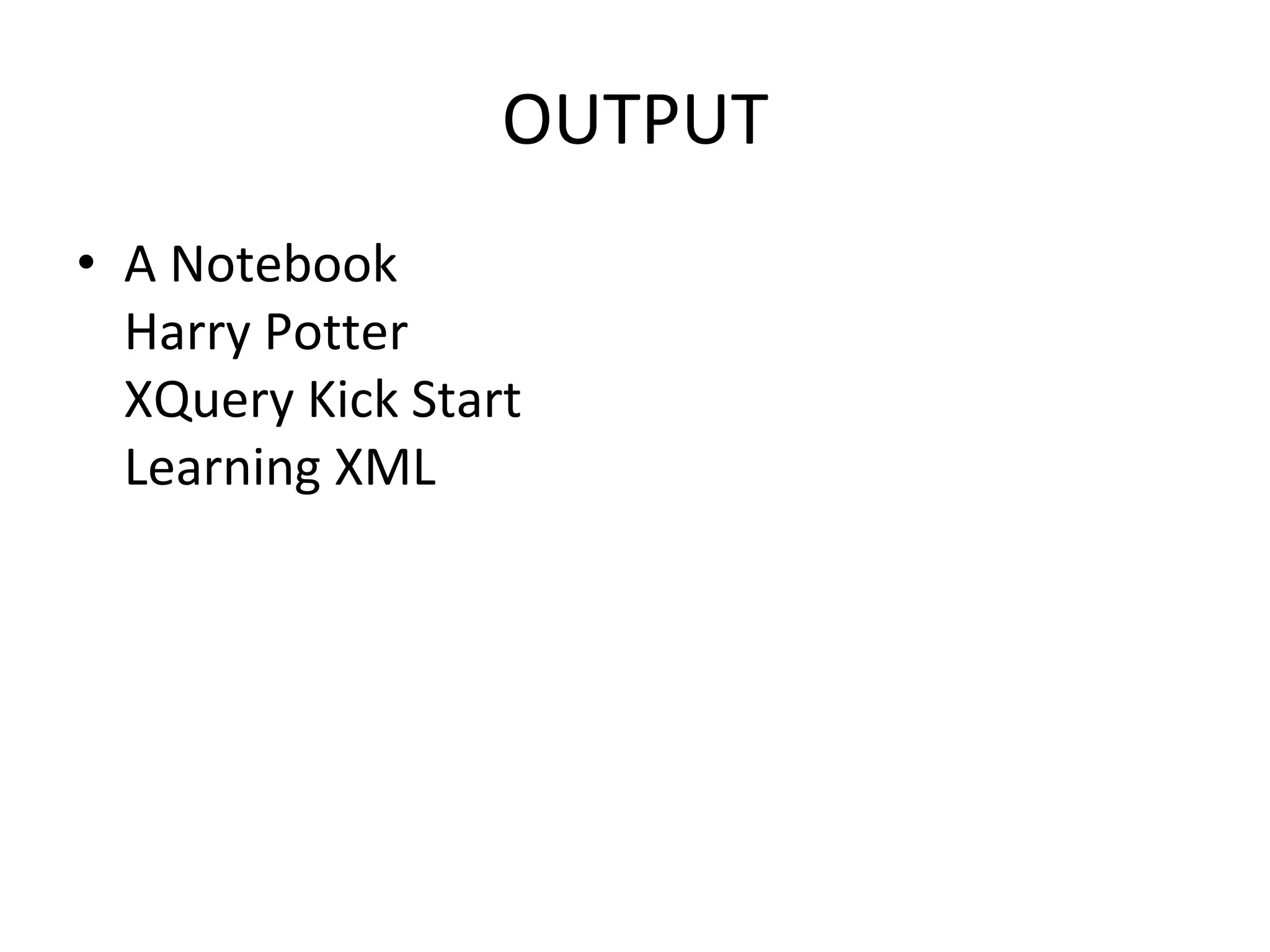
OUTPUT
• A Notebook
Harry Potter
XQuery Kick Start
Learning XML

Unit iv xml dom

  • 1.
    6.0 XML DOM By Dr.Smitha.P.S AssociateProfessor Velammal Engineering College
  • 2.
    • The DocumentObject Model (DOM) is a programming API for HTML and XML documents. • It defines the logical structure of documents and the way a document is accessed and manipulated. • With the Document Object Model, programmers can create and build documents, navigate their structure, and add, modify, or delete elements and content. • Anything found in an HTML or XML document can be accessed, changed, deleted, or added using the Document Object Model
  • 3.
    • The DOMis a W3C (World Wide Web Consortium) standard. • The DOM defines a standard for accessing documents: – "The W3C Document Object Model (DOM) is a platform and language-neutral interface that allows programs and scripts to dynamically access and update the content, structure, and style of a document.“
  • 4.
    • The XMLDOM defines a standard for accessing and manipulating XML documents. • The DOM presents an XML document as a tree-structure. • The Document Object Model (DOM) is an application programming interface (API) for HTML and XML documents. • It defines the logical structure of documents and the way a document is accessed and manipulated. • The DOM is separated into 3 different parts / levels: – Core DOM - standard model for any structured document – XML DOM - standard model for XML documents – HTML DOM - standard model for HTML documents
  • 5.
    What DOM isnot • DOM is not a mechanism for persisting or storing objects as XML documents. • DOM is not a set of data structures;rather it is an object model describing XML elements • DOM does not specify what information in a document is relevant or how information should be structured
  • 6.
    Why do Ineed DOM • To create or modify an XML document programmatically • It is possible to process XML documents using simpler techniques such as XSLT
  • 7.
    Disadvantages of usingDOM • DOM is memory intensive • DOM API is too complex • DOM is not practical for small devices such as PDAs and cellular phones DOM LEVELS • Level 1 allows traversal of an XML document as well as the manipulation of the content in that document • Level 2 extends level1 with additional features such as namespace support,events,ranges.
  • 8.
    What is theXML DOM? • The XML DOM is: • A standard object model for XML • A standard programming interface for XML • Platform- and language-independent • A W3C standard • The XML DOM defines the objects and properties of all XML elements, and the methods (interface) to access them. • In other words: The XML DOM is a standard for how to get, change, add, or delete XML elements.
  • 9.
    • DOM Nodes •According to the DOM, everything in an XML document is a node. • The DOM says: • The entire document is a document node • Every XML element is an element node • The text in the XML elements are text nodes • Every attribute is an attribute node • Comments are comment nodes
  • 10.
    BOOKS.XML • <?xml version="1.0"encoding="UTF-8"?> <bookstore> <book category="cooking"> <title lang="en">Everyday Italian</title> <author>Giada De Laurentiis</author> <year>2005</year> <price>30.00</price> </book> <book category="children"> <title lang="en">Harry Potter</title> <author>J K. Rowling</author> <year>2005</year> <price>29.99</price> </book> <book category="web"> <title lang="en">XQuery Kick Start</title> <author>James McGovern</author> <author>Per Bothner</author> <author>Kurt Cagle</author> <author>James Linn</author> <author>Vaidyanathan Nagarajan</author> <year>2003</year> <price>49.99</price> </book> <book category="web" cover="paperback"> <title lang="en">Learning XML</title> <author>Erik T. Ray</author> <year>2003</year> <price>39.95</price> </book> </bookstore>
  • 11.
    • The rootnode in the XML above is named <bookstore>. • All other nodes in the document are contained within <bookstore>. • The root node <bookstore> holds four <book> nodes. • The first <book> node holds four nodes: <title>, <author>, <year>, and <price>, which contains one text node each, "Everyday Italian", "Giada De Laurentiis", "2005", and "30.00".
  • 12.
    • The XMLDOM Node Tree • The XML DOM views an XML document as a tree-structure. • The tree structure is called a node-tree. • All nodes can be accessed through the tree. • Their contents can be modified or deleted, and new elements can be created. • The node tree shows the set of nodes, and the connections between them. • The tree starts at the root node and branches out to the text nodes at the lowest level of the tree:
  • 14.
    Node Parents, Children,and Siblings • The nodes in the node tree have a hierarchical relationship to each other. • The terms parent, child, and sibling are used to describe the relationships. • Parent nodes have children. • Children on the same level are called siblings (brothers or sisters). • In a node tree, the top node is called the root • Every node, except the root, has exactly one parent node • A node can have any number of children • A leaf is a node with no children • Siblings are nodes with the same parent
  • 16.
    Xml parser • XMLParser provides way how to access or modify data present in an XML document. • Java provides multiple options to parse XML document. • Following are various types of parsers which are commonly used to parse XML documents.
  • 17.
    • Dom Parser- Parses the document by loading the complete contents of the document and creating its complete hiearchical tree in memory. • SAX Parser - Parses the document on event based triggers. Does not load the complete document into the memory. • JDOM Parser - Parses the document in similar fashion to DOM parser but in more easier way.
  • 18.
    • StAX Parser- Parses the document in similar fashion to SAX parser but in more efficient way. • XPath Parser - Parses the XML based on expression and is used extensively in conjuction with XSLT. • DOM4J Parser - A java library to parse XML, XPath and XSLT using Java Collections Framework , provides support for DOM, SAX and JAXP.
  • 19.
    XML Parser • Aparser is a piece of program that takes a physical representation of some data and converts it into an in-memory form for the program as a whole to use. • Parsers are used everywhere in software. • An XML Parser is a parser that is designed to read XML and create a way for programs to use XML.
  • 20.
    • XML parseris a software library or a package that provides interface for client applications to work with XML documents. • It checks for proper format of the XML document and may also validate the XML documents. • Modern day browsers have built-in XML parsers.
  • 22.
    • the goalof a parser is to transform XML into a readable code. • To ease the process of parsing, some commercial products are available that facilitate the breakdown of XML document and yield more reliable results. • Some commonly used parsers are listed below: • MSXML (Microsoft Core XML Services) : This is a standard set of XML tools from Microsoft that includes a parser. • System.Xml.XmlDocument : This class is part of .NET library, which contains a number of different classes related to working with XML. • Java built-in parser : The Java library has its own parser. The library is designed such that you can replace the built-in parser with an external implementation such as Xerces from Apache or Saxon. • Saxon : Saxon offers tools for parsing, transforming, and querying XML. • Xerces : Xerces is implemented in Java and is developed by the famous open source Apache Software Foundation.
  • 23.
    XML DOM Parser •All major browsers have a built-in XML parser to read and manipulate XML. • The XML parser converts XML into an XML DOM object that can be accessed with JavaScript. • The XML DOM contains methods to traverse XML trees, access, insert, and delete nodes. • However, before an XML document can be accessed and manipulated, it must be loaded into an XML DOM object. • An XML parser reads XML, and converts it into an XML DOM object that can be accessed with JavaScript. • Most browsers have a built-in XML parser.
  • 25.
    • Advantages • XMLDOM is language and platform independent. • XML DOM is traversible - Information in XML DOM is organized in a hierarchy which allows developer to navigate around the hierarchy looking for specific information. • XML DOM is modifiable - It is dynamic in nature providing developer a scope to add, edit, move or remove nodes at any point on the tree.
  • 26.
    • Disadvantages • Itconsumes more memory (if the XML structure is large) as program written once remains in memory all the time until and unless removed explicitly. • Due to the larger usage of memory its operational speed, compared to SAX is slower
  • 27.
    PROGRAM 1 <!DOCTYPE html> <html> <head> <scriptsrc="loadxmldoc.js"></script> </head> <body> <script> xmlDoc=loadXMLDoc("books.xml"); document.write(xmlDoc.getElementsByTagName("title")[0].childNodes[0].nodeValue + "<br>"); document.write(xmlDoc.getElementsByTagName("author")[0].childNodes[0].nodeValue + "<br>"); document.write(xmlDoc.getElementsByTagName("year")[0].childNodes[0].nodeValue); </script> </body> </html> OUTPUT: Everyday Italian Giada De Laurentiis 2005
  • 28.
    • XML DOMProperties • These are some typical DOM properties: • x.nodeName - the name of x • x.nodeValue - the value of x • x.parentNode - the parent node of x • x.childNodes - the child nodes of x • x.attributes - the attributes nodes of x
  • 29.
    XML DOM Methods •x.getElementsByTagName(name) - get all elements with a specified tag name • x.appendChild(node) - insert a child node to x • x.removeChild(node) - remove a child node from x
  • 31.
    • You canaccess a node in three ways: • 1. By using the getElementsByTagName() method • 2. By looping through (traversing) the nodes tree. • 3. By navigating the node tree, using the node relationships.
  • 32.
    • The getElementsByTagName()Method • getElementsByTagName() returns all elements with a specified tag name. • Syntax • node.getElementsByTagName("tagname");
  • 33.
    • DOM NodeList Length • The length property defines the length of a node list (the number of nodes). • You can loop through a node list by using the length property:
  • 34.
    PROGRAM2 <!DOCTYPE html> <html> <head> <script src="loadxmldoc.js"></script> </head> <body> <script> xmlDoc=loadXMLDoc("books.xml"); x=xmlDoc.getElementsByTagName("title"); for(i=0;i<x.length;i++) { document.write(x[i].childNodes[0].nodeValue); document.write("<br>"); } </script> </body> </html> OUTPUT Everyday Italian Harry Potter XQuery Kick Start Learning XML
  • 35.
    • Traversing Nodes •The following code loops through the child nodes, that are also element nodes, of the root node: • Example • var xmlDoc=loadXMLDoc("books.xml"); var x=xmlDoc.documentElement.childNodes; for (i=0;i<x.length;i++) { // Process only element nodes (type 1) if (x[i].nodeType==1) { document.write(x[i].nodeName); document.write("<br>"); } } OUTPUT book book book book
  • 36.
    • Navigating NodeRelationships • The following code navigates the node tree using the node relationships: <!DOCTYPE html> <html> <head> <script src="loadxmldoc.js"></script> </head> <body> <script> xmlDoc=loadXMLDoc("books.xml"); x=xmlDoc.getElementsByTagName("book")[0].childNodes; y=xmlDoc.getElementsByTagName("book")[0].firstChild; for (i=0;i<x.length;i++) { if (y.nodeType==1) {//Process only element nodes (type 1) document.write(y.nodeName + "<br>"); } y=y.nextSibling; } </script> </body> </html> Output title author year price
  • 37.
    • Node Properties •In the XML DOM, each node is an object. • Objects have methods and properties, that can be accessed and manipulated by JavaScript. • Three important node properties are: • nodeName • nodeValue • nodeType
  • 38.
    • The nodeNameProperty • The nodeName property specifies the name of a node. • nodeName is read-only • nodeName of an element node is the same as the tag name • nodeName of an attribute node is the attribute name • nodeName of a text node is always #text • nodeName of the document node is always #document
  • 39.
    • The nodeValueProperty • The nodeValue property specifies the value of a node. • nodeValue for element nodes is undefined • nodeValue for text nodes is the text itself • nodeValue for attribute nodes is the attribute value
  • 40.
    Get the Valueof an Element • The following code retrieves the text node value of the first <title> element: Example <!DOCTYPE html> <html> <head> <script src="loadxmldoc.js"></script> </head> <body> <script> xmlDoc=loadXMLDoc("books.xml"); x=xmlDoc.getElementsByTagName("title")[0] y=x.childNodes[0]; document.write(y.nodeValue); </script> </body> </html> OUTPUT Everyday Italian
  • 41.
    • The getAttribute()method returns an attribute value. <!DOCTYPE html> <html> <head> <script src="loadxmldoc.js"> </script> </head> <body> <script> xmlDoc=loadXMLDoc("books.xml"); x=xmlDoc.getElementsByTagName('book'); for (i=0;i<x.length;i++) { document.write(x[i].getAttribute('category')); document.write("<br>"); } </script> </body> </html> Output cooking children web web
  • 42.
    The getAttributeNode() method returnsan attribute node. <!DOCTYPE html> <html> <head> <script src="loadxmldoc.js"> </script> </head> <body> <script> xmlDoc=loadXMLDoc("books.xml"); x=xmlDoc.getElementsByTagName("title")[0].getAttributeNode("lang"); txt=x.nodeValue; document.write(txt); </script> </body> </html> OUTPUT En
  • 43.
    Change the Valueof an Element • The following code changes the text node value of the first <title> element: Example <script> xmlDoc=loadXMLDoc("books.xml"); x=xmlDoc.getElementsByTagName("title")[0].childNodes[0]; x.nodeValue="Easy Cooking"; document.write(x.nodeValue); </script> OUTPUT: • Easy Cooking
  • 44.
    Change an AttributeUsing setAttribute() • The setAttribute() method changes the value of an existing attribute, or creates a new attribute. • The following code changes the category attribute of the <book> element: Example <script> xmlDoc=loadXMLDoc("books.xml"); x=xmlDoc.getElementsByTagName('book'); x[0].setAttribute("category","food"); document.write(x[0].getAttribute("category")); </script> OUTPUT: FOOD
  • 45.
    removeChild() and replaceChild() •The removeChild() method removes a specified node. • When a node is removed, all its child nodes are also removed • Replace an Element Node • The replaceChild() method is used to replace a node.
  • 46.
    EXAMPLE //create a bookelement, title element and a text node newNode=xmlDoc.createElement("book"); newTitle=xmlDoc.createElement("title"); newText=xmlDoc.createTextNode("A Notebook"); //add the text node to the title node, newTitle.appendChild(newText); //add the title node to the book node newNode.appendChild(newTitle); y=xmlDoc.getElementsByTagName("book")[0] //replace the first book node with the new node x.replaceChild(newNode,y); z=xmlDoc.getElementsByTagName("title"); for (i=0;i<z.length;i++) { document.write(z[i].childNodes[0].nodeValue); document.write("<br>"); } </script> </body> </html>
  • 47.
    OUTPUT • A Notebook HarryPotter XQuery Kick Start Learning XML