FFW
Toni Kolev
Quality Assurance Team Leader
e: toni.kolev@ffwagency.com
s: k-o-l-e-v
today’s agenda
01
02
03
04
05
06
What is jQuery?
jQuery basics
Searching the DOM
Chaining and Stacking
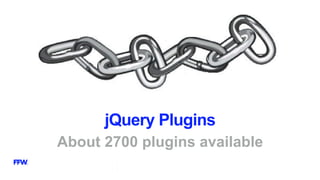
jQuery Plugins
LIVE DEMO
jQuery
What is jQuery?
STOP
Before studying jQuery you should have basic knowledge of
HTML, CSS and JavaScript
jQuery Introduction
•jQuery is a cross-platform JavaScript library
•Initial release 2006
•Designed to simplify client-side scripting of HTML
•Installed on 65% of top 10 million highest-trafficked sites
•jQuery is free and open source
Why is it so popular?
•It is easy to learn
•Easy to extend – lots of jQuery plugins
•Powerful DOM selection
•Community Support
Browser support
•jQuery 1.x, 2.x and 3.x versions
•jQuery 1.x supports IE 6-8, Opera 12.1.x and Safari 5.1+
•2.x and 3.x versions are used for modern browsers support
What jQuery can do?
•HTML/DOM manipulation
•CSS manipulation
•HTML event methods
•Effects and animations
•AJAX
•Utilities
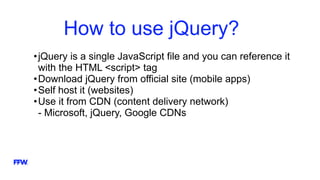
How to use jQuery?
•jQuery is a single JavaScript file and you can reference it
with the HTML <script> tag
•Download jQuery from official site (mobile apps)
•Self host it (websites)
•Use it from CDN (content delivery network)
- Microsoft, jQuery, Google CDNs
jQuery Syntax
How to write jQuery
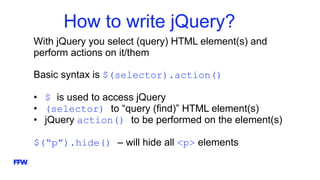
How to write jQuery?
With jQuery you select (query) HTML element(s) and
perform actions on it/them
Basic syntax is $(selector).action()
• $ is used to access jQuery
• (selector) to “query (find)” HTML element(s)
• jQuery action() to be performed on the element(s)
$(“p”).hide() – will hide all <p> elements
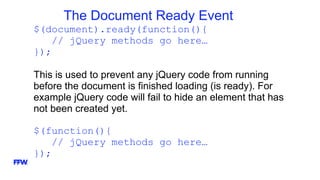
The Document Ready Event
$(document).ready(function(){
// jQuery methods go here…
});
This is used to prevent any jQuery code from running
before the document is finished loading (is ready). For
example jQuery code will fail to hide an element that has
not been created yet.
$(function(){
// jQuery methods go here…
});
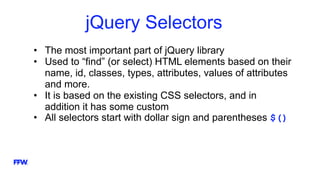
jQuery Selectors
• The most important part of jQuery library
• Used to “find” (or select) HTML elements based on their
name, id, classes, types, attributes, values of attributes
and more.
• It is based on the existing CSS selectors, and in
addition it has some custom
• All selectors start with dollar sign and parentheses $()
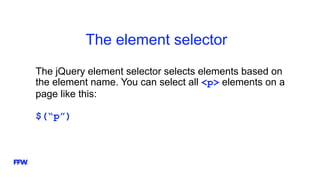
The element selector
The jQuery element selector selects elements based on
the element name. You can select all <p> elements on a
page like this:
$(“p”)
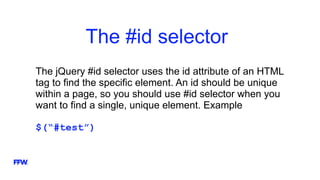
The #id selector
The jQuery #id selector uses the id attribute of an HTML
tag to find the specific element. An id should be unique
within a page, so you should use #id selector when you
want to find a single, unique element. Example
$(“#test”)
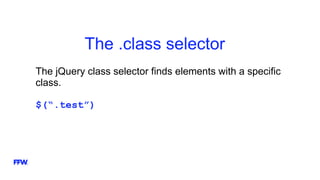
The .class selector
The jQuery class selector finds elements with a specific
class.
$(“.test”)
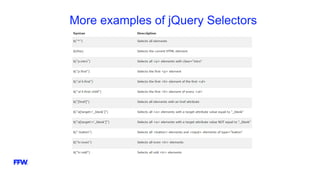
More examples of jQuery Selectors
jQuery Event Methods
All the different visitor’s actions that a web page can
respond to are called events. An event represents the
precise moment when something happens.
For example:
• Moving a mouse over an element
• Selecting a radio button
• Clicking on an element
Syntax for jQuery Event Methods
To assign a click event to all paragraphs on a page you
can do this by:
$(“p”).click();
The next step is to define what should happen when the
event fires. You must pass a function to the event:
$(“p”).click(function(){
// action goes here
});
Searching the DOM
More complex jQuery selectors
jQuery Traversing
•Traversing means “move through”
•Used to “find” (or select) HTML elements based
on their relation to other elements
•Ancestors, Descendants, Siblings, Filtering
jQuery Traversing
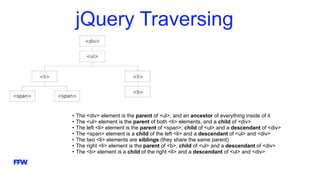
• The <div> element is the parent of <ul>, and an ancestor of everything inside of it
• The <ul> element is the parent of both <li> elements, and a child of <div>
• The left <li> element is the parent of <span>, child of <ul> and a descendant of <div>
• The <span> element is a child of the left <li> and a descendant of <ul> and <div>
• The two <li> elements are siblings (they share the same parent)
• The right <li> element is the parent of <b>, child of <ul> and a descendant of <div>
• The <b> element is a child of the right <li> and a descendant of <ul> and <div>
Ancestors
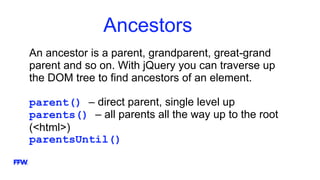
An ancestor is a parent, grandparent, great-grand
parent and so on. With jQuery you can traverse up
the DOM tree to find ancestors of an element.
parent() – direct parent, single level up
parents() – all parents all the way up to the root
(<html>)
parentsUntil()
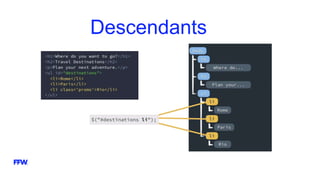
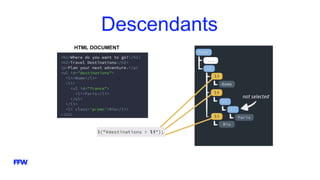
Descendants
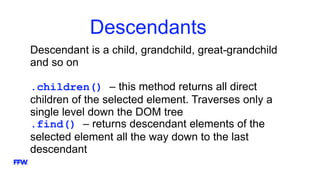
Descendant is a child, grandchild, great-grandchild
and so on
.children() – this method returns all direct
children of the selected element. Traverses only a
single level down the DOM tree
.find() – returns descendant elements of the
selected element all the way down to the last
descendant
Descendants
Descendants
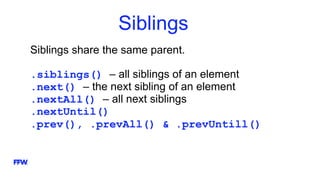
Siblings
Siblings share the same parent.
.siblings() – all siblings of an element
.next() – the next sibling of an element
.nextAll() – all next siblings
.nextUntil()
.prev(), .prevAll() & .prevUntill()
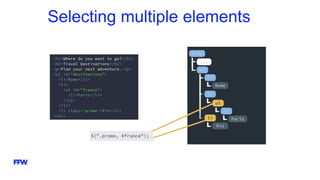
Selecting multiple elements
Chaining and Stacking
More complex jQuery selectors
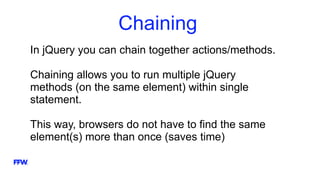
Chaining
In jQuery you can chain together actions/methods.
Chaining allows you to run multiple jQuery
methods (on the same element) within single
statement.
This way, browsers do not have to find the same
element(s) more than once (saves time)
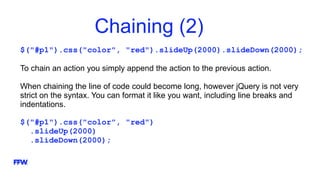
Chaining (2)
$("#p1").css("color", "red").slideUp(2000).slideDown(2000);
To chain an action you simply append the action to the previous action.
When chaining the line of code could become long, however jQuery is not very
strict on the syntax. You can format it like you want, including line breaks and
indentations.
$("#p1").css("color", "red")
.slideUp(2000)
.slideDown(2000);
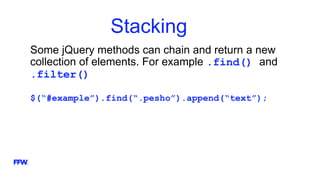
Stacking
Some jQuery methods can chain and return a new
collection of elements. For example .find() and
.filter()
$(“#example”).find(“.pesho”).append(“text”);
jQuery Plugins
About 2700 plugins available
Plugins examples
http://chuckyglitch.twbbs.org/novacancy/
http://dropthebit.com/demos/fancy_input/fancyInput.html
http://danpalmer.me/jquery-complexify/
http://harvesthq.github.io/chosen/
LIVE DEMO
Now I will show you some live demo, using most of
the things we talked about today, so you can see
everything in action.
jQuery Reference
• jQuery API documentation
http://api.jquery.com/
• jQuery Plugin Registry
http://plugins.jquery.com/
FFW Gabrovo PMG - jQuery

FFW Gabrovo PMG - jQuery

  • 2.
    FFW Toni Kolev Quality AssuranceTeam Leader e: toni.kolev@ffwagency.com s: k-o-l-e-v
  • 3.
    today’s agenda 01 02 03 04 05 06 What isjQuery? jQuery basics Searching the DOM Chaining and Stacking jQuery Plugins LIVE DEMO
  • 4.
  • 5.
    STOP Before studying jQueryyou should have basic knowledge of HTML, CSS and JavaScript
  • 6.
    jQuery Introduction •jQuery isa cross-platform JavaScript library •Initial release 2006 •Designed to simplify client-side scripting of HTML •Installed on 65% of top 10 million highest-trafficked sites •jQuery is free and open source
  • 7.
    Why is itso popular? •It is easy to learn •Easy to extend – lots of jQuery plugins •Powerful DOM selection •Community Support
  • 8.
    Browser support •jQuery 1.x,2.x and 3.x versions •jQuery 1.x supports IE 6-8, Opera 12.1.x and Safari 5.1+ •2.x and 3.x versions are used for modern browsers support
  • 9.
    What jQuery cando? •HTML/DOM manipulation •CSS manipulation •HTML event methods •Effects and animations •AJAX •Utilities
  • 10.
    How to usejQuery? •jQuery is a single JavaScript file and you can reference it with the HTML <script> tag •Download jQuery from official site (mobile apps) •Self host it (websites) •Use it from CDN (content delivery network) - Microsoft, jQuery, Google CDNs
  • 11.
  • 12.
    How to writejQuery? With jQuery you select (query) HTML element(s) and perform actions on it/them Basic syntax is $(selector).action() • $ is used to access jQuery • (selector) to “query (find)” HTML element(s) • jQuery action() to be performed on the element(s) $(“p”).hide() – will hide all <p> elements
  • 13.
    The Document ReadyEvent $(document).ready(function(){ // jQuery methods go here… }); This is used to prevent any jQuery code from running before the document is finished loading (is ready). For example jQuery code will fail to hide an element that has not been created yet. $(function(){ // jQuery methods go here… });
  • 14.
    jQuery Selectors • Themost important part of jQuery library • Used to “find” (or select) HTML elements based on their name, id, classes, types, attributes, values of attributes and more. • It is based on the existing CSS selectors, and in addition it has some custom • All selectors start with dollar sign and parentheses $()
  • 15.
    The element selector ThejQuery element selector selects elements based on the element name. You can select all <p> elements on a page like this: $(“p”)
  • 16.
    The #id selector ThejQuery #id selector uses the id attribute of an HTML tag to find the specific element. An id should be unique within a page, so you should use #id selector when you want to find a single, unique element. Example $(“#test”)
  • 17.
    The .class selector ThejQuery class selector finds elements with a specific class. $(“.test”)
  • 18.
    More examples ofjQuery Selectors
  • 19.
    jQuery Event Methods Allthe different visitor’s actions that a web page can respond to are called events. An event represents the precise moment when something happens. For example: • Moving a mouse over an element • Selecting a radio button • Clicking on an element
  • 20.
    Syntax for jQueryEvent Methods To assign a click event to all paragraphs on a page you can do this by: $(“p”).click(); The next step is to define what should happen when the event fires. You must pass a function to the event: $(“p”).click(function(){ // action goes here });
  • 21.
    Searching the DOM Morecomplex jQuery selectors
  • 22.
    jQuery Traversing •Traversing means“move through” •Used to “find” (or select) HTML elements based on their relation to other elements •Ancestors, Descendants, Siblings, Filtering
  • 23.
    jQuery Traversing • The<div> element is the parent of <ul>, and an ancestor of everything inside of it • The <ul> element is the parent of both <li> elements, and a child of <div> • The left <li> element is the parent of <span>, child of <ul> and a descendant of <div> • The <span> element is a child of the left <li> and a descendant of <ul> and <div> • The two <li> elements are siblings (they share the same parent) • The right <li> element is the parent of <b>, child of <ul> and a descendant of <div> • The <b> element is a child of the right <li> and a descendant of <ul> and <div>
  • 24.
    Ancestors An ancestor isa parent, grandparent, great-grand parent and so on. With jQuery you can traverse up the DOM tree to find ancestors of an element. parent() – direct parent, single level up parents() – all parents all the way up to the root (<html>) parentsUntil()
  • 25.
    Descendants Descendant is achild, grandchild, great-grandchild and so on .children() – this method returns all direct children of the selected element. Traverses only a single level down the DOM tree .find() – returns descendant elements of the selected element all the way down to the last descendant
  • 26.
  • 27.
  • 28.
    Siblings Siblings share thesame parent. .siblings() – all siblings of an element .next() – the next sibling of an element .nextAll() – all next siblings .nextUntil() .prev(), .prevAll() & .prevUntill()
  • 29.
  • 30.
    Chaining and Stacking Morecomplex jQuery selectors
  • 31.
    Chaining In jQuery youcan chain together actions/methods. Chaining allows you to run multiple jQuery methods (on the same element) within single statement. This way, browsers do not have to find the same element(s) more than once (saves time)
  • 32.
    Chaining (2) $("#p1").css("color", "red").slideUp(2000).slideDown(2000); Tochain an action you simply append the action to the previous action. When chaining the line of code could become long, however jQuery is not very strict on the syntax. You can format it like you want, including line breaks and indentations. $("#p1").css("color", "red") .slideUp(2000) .slideDown(2000);
  • 33.
    Stacking Some jQuery methodscan chain and return a new collection of elements. For example .find() and .filter() $(“#example”).find(“.pesho”).append(“text”);
  • 34.
    jQuery Plugins About 2700plugins available
  • 35.
  • 36.
    LIVE DEMO Now Iwill show you some live demo, using most of the things we talked about today, so you can see everything in action.
  • 37.
    jQuery Reference • jQueryAPI documentation http://api.jquery.com/ • jQuery Plugin Registry http://plugins.jquery.com/

Editor's Notes

  • #11 За мобилни приложения създадени с PhoneGap е по-удачно да се използва self hosted метода, защото jQuery файла е малък и не заема толкова много памет. За web сайтове е по-удачно да се ползва CDN, защото не е необходимо всикчи сайтове да самохостват един и същ файл. CDN са много по-оптимизирани. Many users already have downloaded jQuery from Google or Microsoft when visiting another site. As a result, it will be loaded from cache when they visit your site, which leads to faster loading time. Also, most CDN's will make sure that once a user requests a file from it, it will be served from the server closest to them, which also leads to faster loading time.
  • #19 http://www.w3schools.com/jquery/jquery_ref_selectors.asp
  • #24 http://www.w3schools.com/jquery/jquery_ref_traversing.asp
  • #26 $("div").children("p.first"); - returns all <p> elements with the class name "first", that are direct children of <div> $("div").find("span"); - returns all <span> elements that are descendants of <div>
  • #28 Чрез „ > „ се избират директните деца, а не всички елементи надоло по дървото. Това може да се направи и чрез Traversal използвайки $(“destinations”).children();
  • #35 jQuery plugin e малко парче JS код записан в отделен файл. Идеята на plugin-ите е много ценна част от кода, която разбира се може да бъде преизползвана отново и отново, да бъде записана в отделен файл и да бъде използвана много пъти по различни страници от даден сайт, дори и по други проекти. Екосистемата от плъгини е един от най-ценните аспекти на jQuery. Ако ви потрябва нещо, било то form validation, table sorting или autocomplete функционалност – има голяма вероятност вече някой да е написал плъгин за това и да няма нужда вие да го правите от нулата. До колко са качествени плъгините? Зависи от поддръжката на създателите им. Добра практика е да не сваляте плъгин, който прави повече от това което ви е необходимо. Излишно ще натовари страницата Ви. Ако плъгина има добра документация и много примери, то той е добър плъгин.