CS8792 – CRYPTOGRAPHY
AND NETWORK SECURITY
Unit V
Prepared by
Dr. R. Arthy, AP/IT,
Kamaraj College of Engineering and Technology
(Autonomous), Madurai.
INTRUSION DETECTION
Intruders
• significant issue for networked systems is hostile or unwanted
access
• either via network or local
• can identify classes of intruders:
• masquerader
• misfeasor
• clandestine user
• varying levels of competence
Intruders
• clearly a growing publicized problem
• from “Wily Hacker” in 1986/87
• to clearly escalating CERT stats
• may seem benign, but still cost resources
• may use compromised system to launch other attacks
• awareness of intruders has led to the development of CERTs
Intrusion Techniques
• aim to gain access and/or increase privileges on a system
• basic attack methodology
• target acquisition and information gathering
• initial access
• privilege escalation
• covering tracks
• key goal often is to acquire passwords
• so then exercise access rights of owner
Password Capture
• another attack involves password capture
• watching over shoulder as password is entered
• using a trojan horse program to collect
• monitoring an insecure network login
• eg. telnet, FTP, web, email
• extracting recorded info after successful login (web
history/cache, last number dialed etc)
• using valid login/password can impersonate user
• users need to be educated to use suitable
precautions/countermeasures
Intrusion Detection
• inevitably will have security failures
• so need also to detect intrusions so can
• block if detected quickly
• act as deterrent
• collect info to improve security
• assume intruder will behave differently to a legitimate user
• but will have imperfect distinction between
Password Guessing
• one of the most common attacks
• attacker knows a login (from email/web page etc)
• then attempts to guess password for it
• defaults, short passwords, common word searches
• user info (variations on names, birthday, phone, common
words/interests)
• exhaustively searching all possible passwords
• check by login or against stolen password file
• success depends on password chosen by user
• surveys show many users choose poorly
Approaches to Intrusion Detection
• statistical anomaly detection
• threshold
• profile based
• rule-based detection
• anomaly
• penetration identification
Audit Records
• fundamental tool for intrusion detection
• native audit records
• part of all common multi-user O/S
• already present for use
• may not have info wanted in desired form
• detection-specific audit records
• created specifically to collect wanted info
• at cost of additional overhead on system
StatisticalAnomaly Detection
• threshold detection
• count occurrences of specific event over time
• if exceed reasonable value assume intrusion
• alone is a crude & ineffective detector
• profile based
• characterize past behavior of users
• detect significant deviations from this
• profile usually multi-parameter
Audit RecordAnalysis
• foundation of statistical approaches
• analyze records to get metrics over time
• counter, gauge, interval timer, resource use
• use various tests on these to determine if current behavior is
acceptable
• mean & standard deviation, multivariate, markov process, time series,
operational
• key advantage is no prior knowledge used
Rule-Based Intrusion Detection
• observe events on system & apply rules to decide if activity is
suspicious or not
• rule-based anomaly detection
• analyze historical audit records to identify usage patterns & auto-generate
rules for them
• then observe current behavior & match against rules to see if conforms
• like statistical anomaly detection does not require prior knowledge of
security flaws
Rule-Based Intrusion Detection
• rule-based penetration identification
• uses expert systems technology
• with rules identifying known penetration, weakness patterns, or suspicious
behavior
• compare audit records or states against rules
• rules usually machine & O/S specific
• rules are generated by experts who interview & codify knowledge of
security admins
• quality depends on how well this is done
Base-Rate Fallacy
• practically an intrusion detection system needs to detect a
substantial percentage of intrusions with few false alarms
• if too few intrusions detected -> false security
• if too many false alarms -> ignore / waste time
• this is very hard to do
• existing systems seem not to have a good record
Distributed Intrusion Detection
• traditional focus is on single systems
• but typically have networked systems
• more effective defense has these working together to detect
intrusions
• issues
• dealing with varying audit record formats
• integrity & confidentiality of networked data
• centralized or decentralized architecture
Distributed Intrusion Detection -Architecture
Distributed Intrusion Detection –Agent
Implementation
Honeypots
• decoy systems to lure attackers
• away from accessing critical systems
• to collect information of their activities
• to encourage attacker to stay on system so administrator can respond
• are filled with fabricated information
• instrumented to collect detailed information on attackers
activities
• single or multiple networked systems
• cf IETF Intrusion Detection WG standards
Password Management
• front-line defense against intruders
• users supply both:
• login – determines privileges of that user
• password – to identify them
• passwords often stored encrypted
• Unix uses multiple DES (variant with salt)
• more recent systems use crypto hash function
• should protect password file on system
Password Studies
• Purdue 1992 - many short passwords
• Klein 1990 - many guessable passwords
• conclusion is that users choose poor passwords too often
• need some approach to counter this
Managing Passwords - Education
• can use policies and good user education
• educate on importance of good passwords
• give guidelines for good passwords
• minimum length (>6)
• require a mix of upper & lower case letters, numbers, punctuation
• not dictionary words
• but likely to be ignored by many users
Managing Passwords - Computer Generated
• let computer create passwords
• if random likely not memorisable, so will be written down
(sticky label syndrome)
• even pronounceable not remembered
• have history of poor user acceptance
• FIPS PUB 181 one of best generators
• has both description & sample code
• generates words from concatenating random pronounceable syllables
Managing Passwords - Reactive Checking
• reactively run password guessing tools
• note that good dictionaries exist for almost any language/interest group
• cracked passwords are disabled
• but is resource intensive
• bad passwords are vulnerable till found
Managing Passwords - Proactive Checking
• most promising approach to improving password security
• allow users to select own password
• but have system verify it is acceptable
• simple rule enforcement (see earlier slide)
• compare against dictionary of bad passwords
• use algorithmic (markov model or bloom filter) to detect poor choices
Viruses and Other Malicious Content
• computer viruses have got a lot of publicity
• one of a family of malicious software
• effects usually obvious
• have figured in news reports, fiction, movies (often
exaggerated)
• getting more attention than deserve
• are a concern though
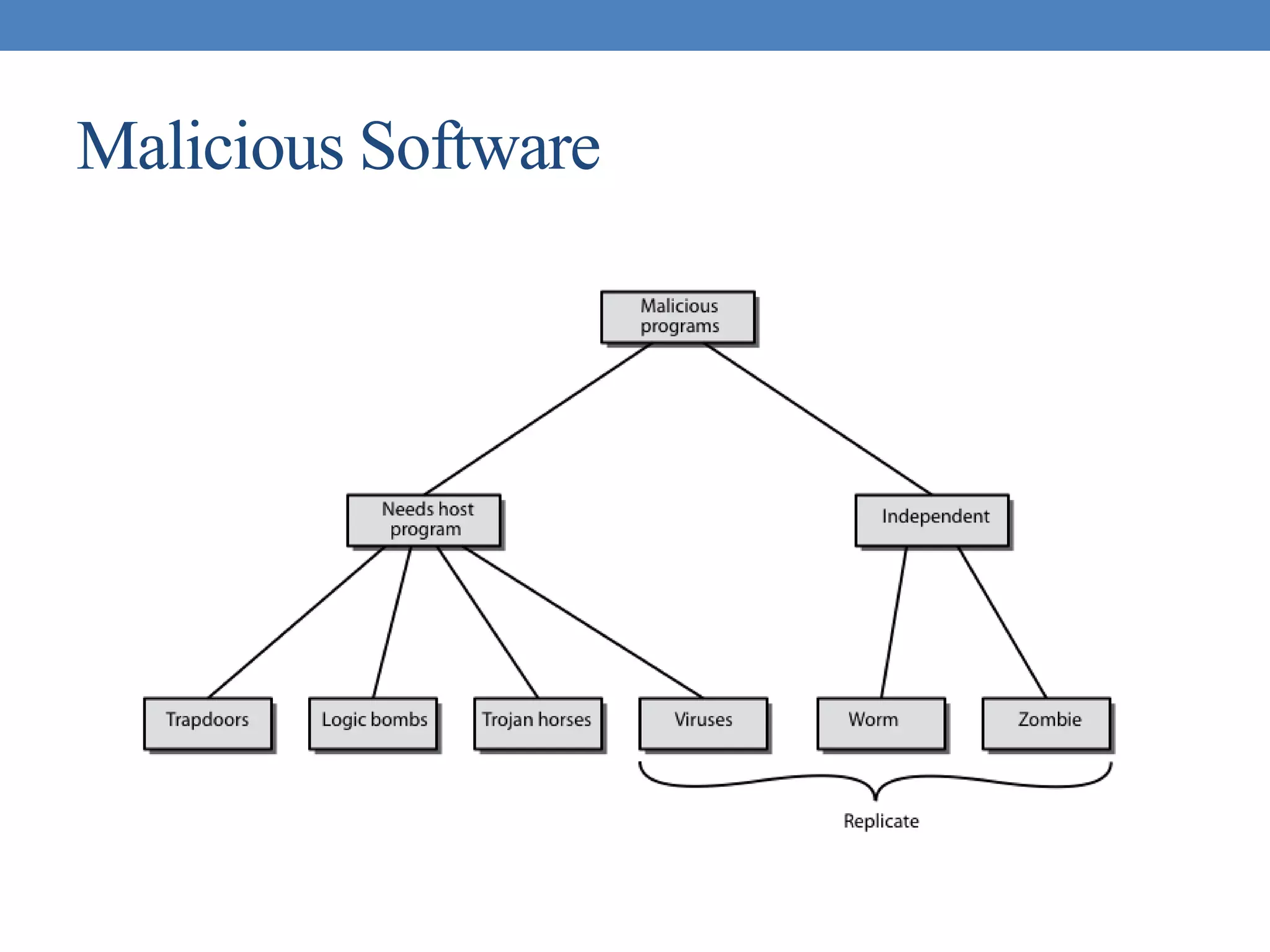
Malicious Software
Backdoor or Trapdoor
• secret entry point into a program
• allows those who know access bypassing usual security
procedures
• have been commonly used by developers
• a threat when left in production programs allowing exploited by
attackers
• very hard to block in O/S
• requires good s/w development & update
Logic Bomb
• one of oldest types of malicious software
• code embedded in legitimate program
• activated when specified conditions met
• eg presence/absence of some file
• particular date/time
• particular user
• when triggered typically damage system
• modify/delete files/disks, halt machine, etc
Trojan Horse
• program with hidden side-effects
• which is usually superficially attractive
• eg game, s/w upgrade etc
• when run performs some additional tasks
• allows attacker to indirectly gain access they do not have
directly
• often used to propagate a virus/worm or install a
backdoor
• or simply to destroy data
Mobile Code
• program/script/macro that runs unchanged
• on heterogeneous collection of platforms
• on large homogeneous collection (Windows)
• transmitted from remote system to local system & then executed
on local system
• often to inject virus, worm, or Trojan horse
• or to perform own exploits
• unauthorized data access, root compromise
Multiple-Threat Malware
• malware may operate in multiple ways
• multipartite virus infects in multiple ways
• eg. multiple file types
• blended attack uses multiple methods of infection or
transmission
• to maximize speed of contagion and severity
• may include multiple types of malware
• eg. Nimda has worm, virus, mobile code
• can also use IM & P2P
Viruses
• piece of software that infects programs
• modifying them to include a copy of the virus
• so it executes secretly when host program is run
• specific to operating system and hardware
• taking advantage of their details and weaknesses
• a typical virus goes through phases of:
• dormant
• propagation
• triggering
• execution
Virus Structure
• components:
• infection mechanism - enables replication
• trigger - event that makes payload activate
• payload - what it does, malicious or benign
• prepended / postpended / embedded
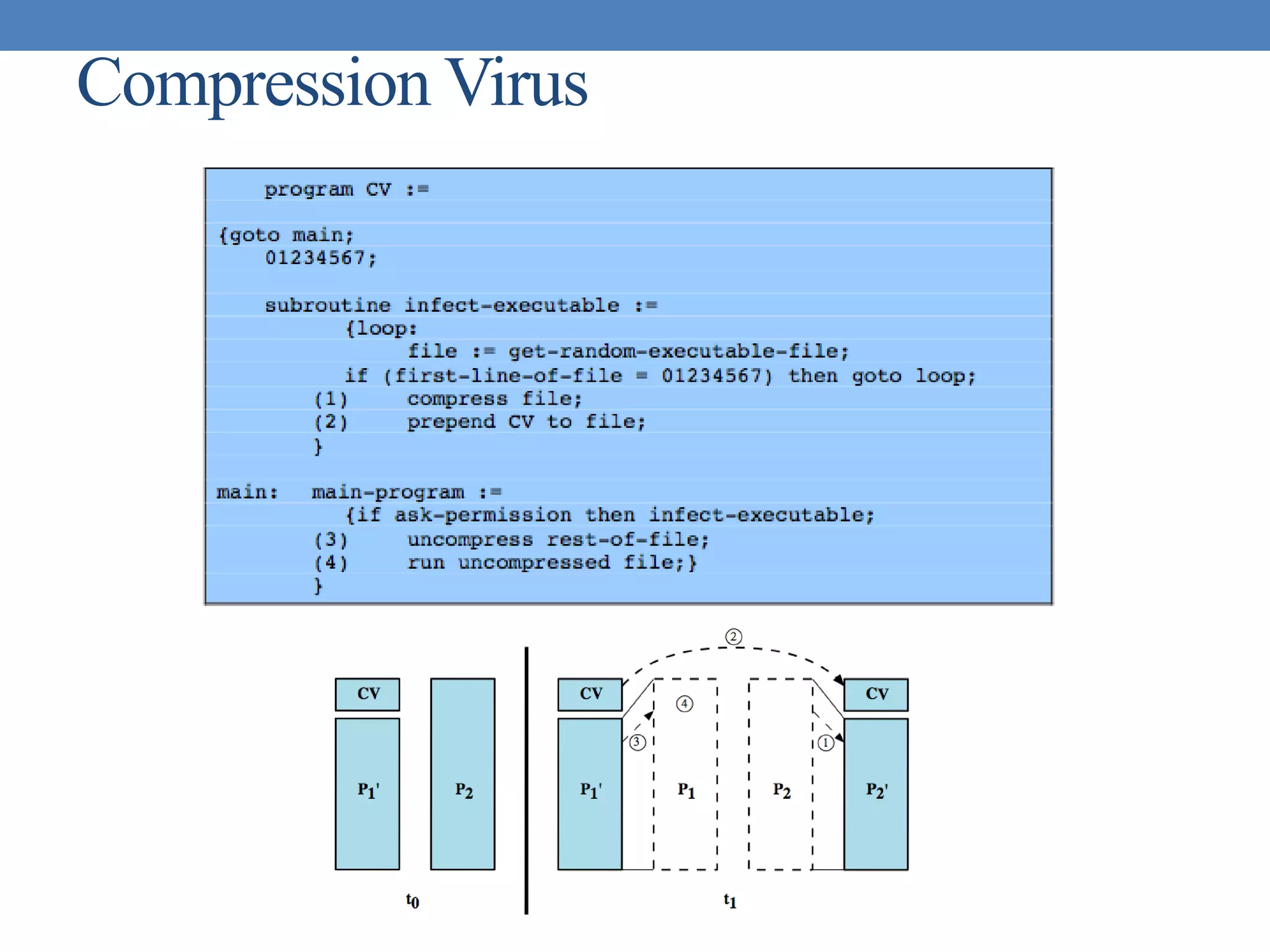
• when infected program invoked, executes virus code then
original program code
• can block initial infection (difficult)
• or propogation (with access controls)
Virus Structure
Compression Virus
Virus Classification
• boot sector
• file infector
• macro virus
• encrypted virus
• stealth virus
• polymorphic virus
• metamorphic virus
Macro Virus
• became very common in mid-1990s since
• platform independent
• infect documents
• easily spread
• exploit macro capability of office apps
• executable program embedded in office doc
• often a form of Basic
• more recent releases include protection
• recognized by many anti-virus programs
E-Mail Viruses
• more recent development
• e.g. Melissa
• exploits MS Word macro in attached doc
• if attachment opened, macro activates
• sends email to all on users address list
• and does local damage
• then saw versions triggered reading email
• hence much faster propagation
Virus Countermeasures
• prevention - ideal solution but difficult
• realistically need:
• detection
• identification
• removal
• if detect but can’t identify or remove, must discard and replace
infected program
Anti-Virus Evolution
• virus & antivirus tech have both evolved
• early viruses simple code, easily removed
• as become more complex, so must the countermeasures
• generations
• first - signature scanners
• second - heuristics
• third - identify actions
• fourth - combination packages
Generic Decryption
• runs executable files through GD scanner:
• CPU emulator to interpret instructions
• virus scanner to check known virus signatures
• emulation control module to manage process
• lets virus decrypt itself in interpreter
• periodically scan for virus signatures
• issue is long to interpret and scan
• tradeoff chance of detection vs time delay
Digital Immune System
Behavior-Blocking Software
Worms
• replicating program that propagates over net
• using email, remote exec, remote login
• has phases like a virus:
• dormant, propagation, triggering, execution
• propagation phase: searches for other systems, connects to it,
copies self to it and runs
• may disguise itself as a system process
• concept seen in Brunner’s “Shockwave Rider”
• implemented by Xerox Palo Alto labs in 1980’s
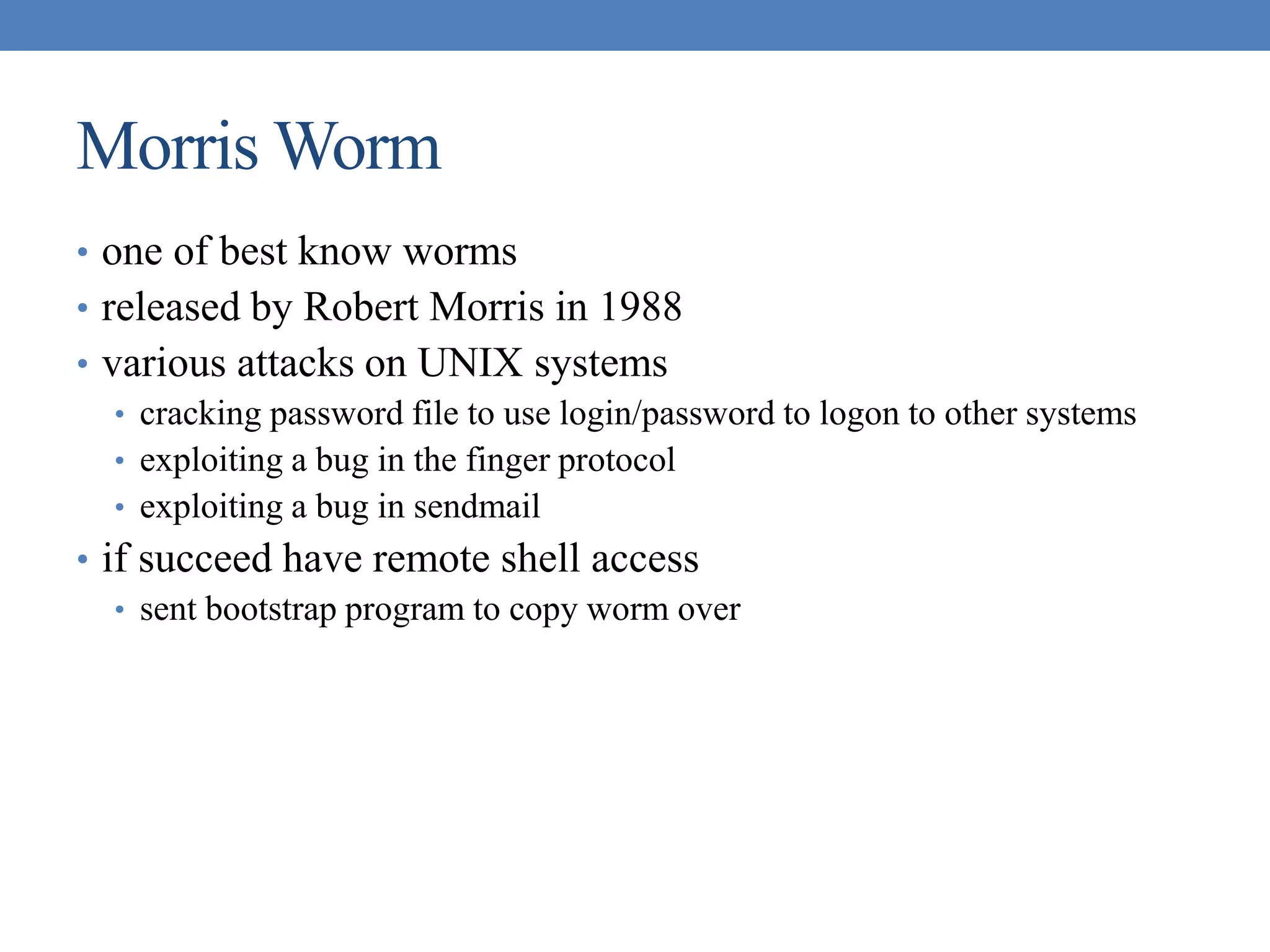
Morris Worm
• one of best know worms
• released by Robert Morris in 1988
• various attacks on UNIX systems
• cracking password file to use login/password to logon to other systems
• exploiting a bug in the finger protocol
• exploiting a bug in sendmail
• if succeed have remote shell access
• sent bootstrap program to copy worm over
Worm Propagation Model
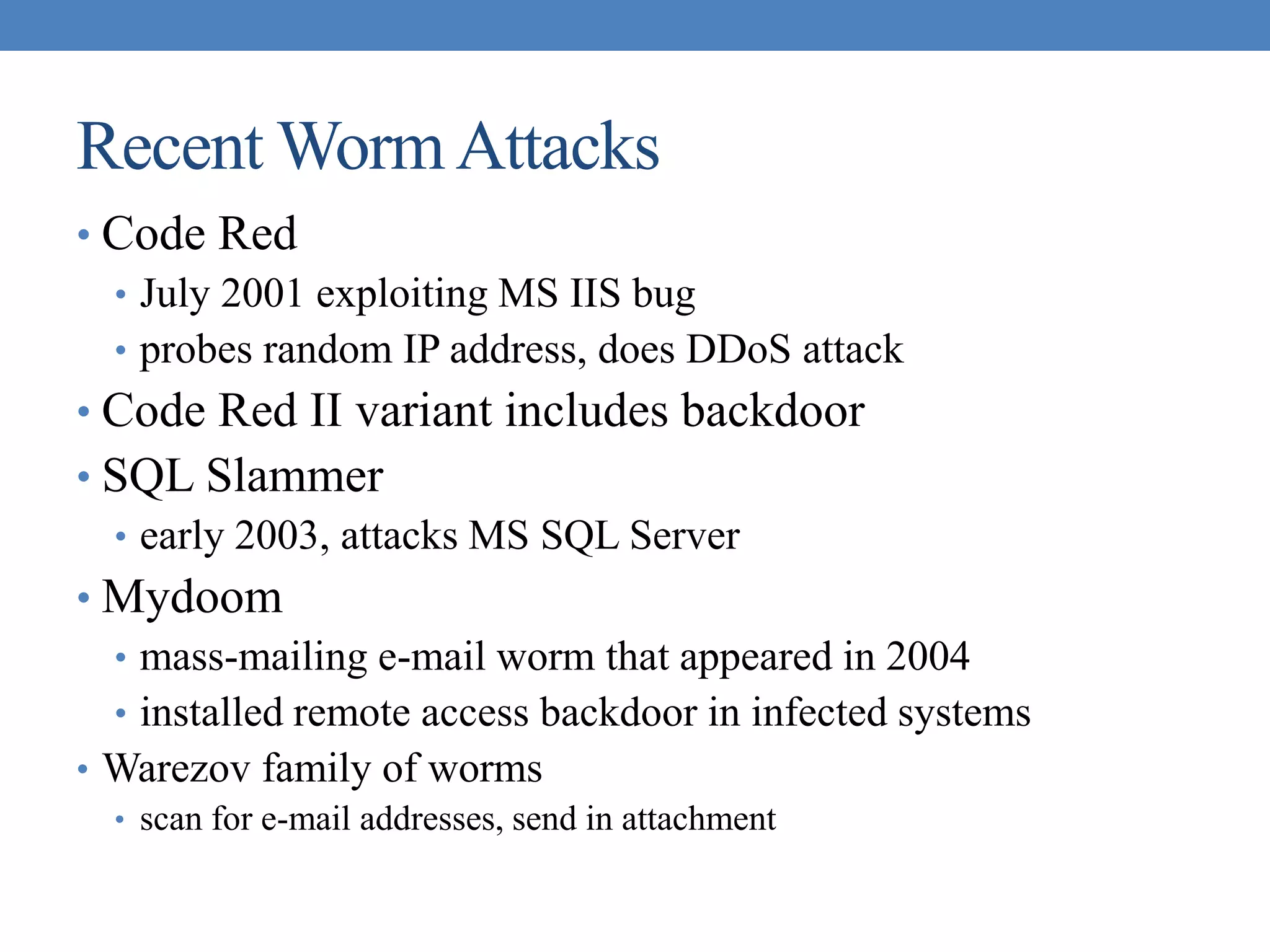
Recent WormAttacks
• Code Red
• July 2001 exploiting MS IIS bug
• probes random IP address, does DDoS attack
• Code Red II variant includes backdoor
• SQL Slammer
• early 2003, attacks MS SQL Server
• Mydoom
• mass-mailing e-mail worm that appeared in 2004
• installed remote access backdoor in infected systems
• Warezov family of worms
• scan for e-mail addresses, send in attachment
Worm Technology
• multiplatform
• multi-exploit
• ultrafast spreading
• polymorphic
• metamorphic
• transport vehicles
• zero-day exploit
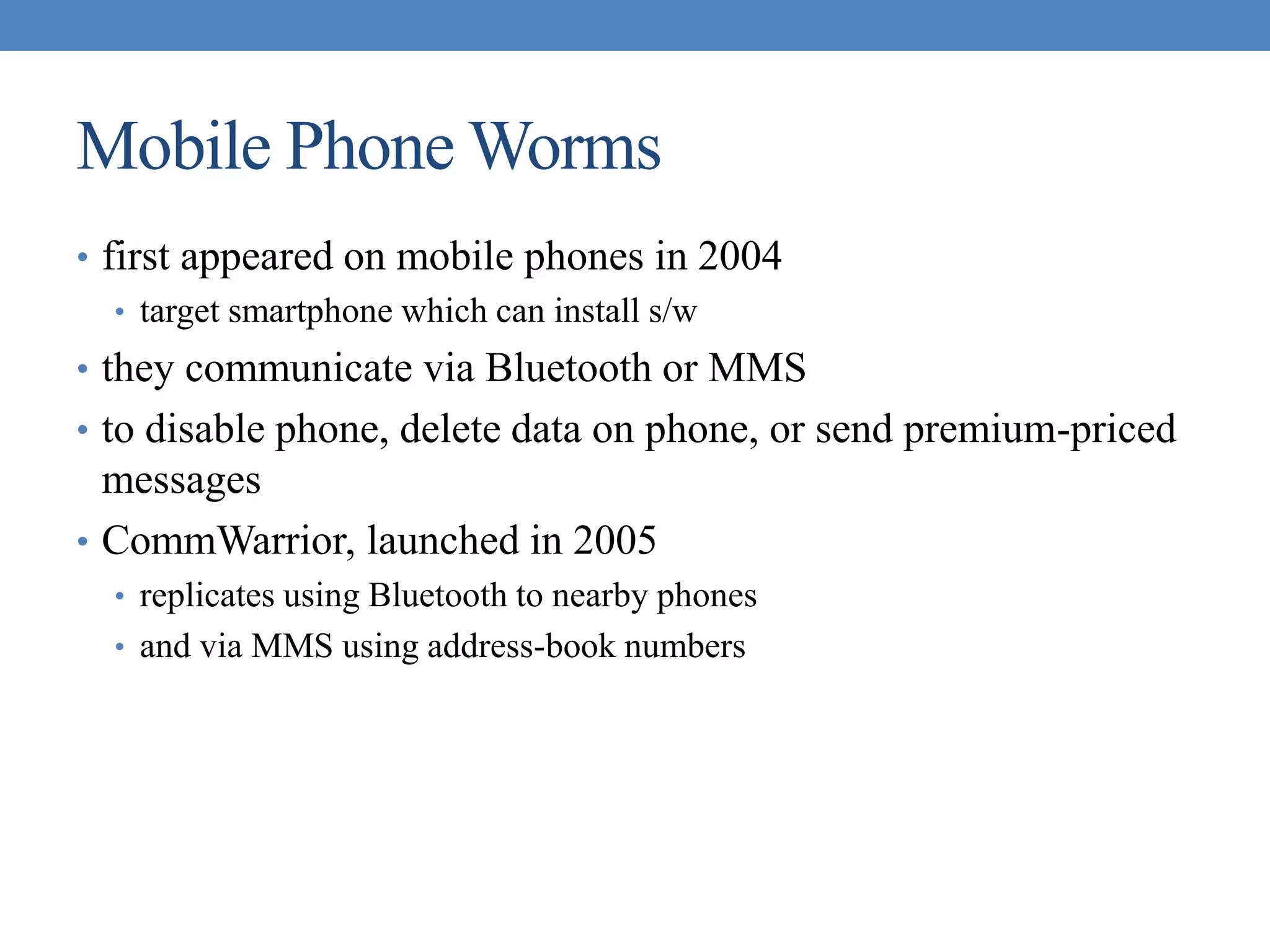
Mobile Phone Worms
• first appeared on mobile phones in 2004
• target smartphone which can install s/w
• they communicate via Bluetooth or MMS
• to disable phone, delete data on phone, or send premium-priced
messages
• CommWarrior, launched in 2005
• replicates using Bluetooth to nearby phones
• and via MMS using address-book numbers
Worm Countermeasures
• overlaps with anti-virus techniques
• once worm on system A/V can detect
• worms also cause significant net activity
• worm defense approaches include:
• signature-based worm scan filtering
• filter-based worm containment
• payload-classification-based worm containment
• threshold random walk scan detection
• rate limiting and rate halting
Proactive Worm Containment
Network Based Worm Defense
Distributed Denial of ServiceAttacks
(DDoS)
• Distributed Denial of Service (DDoS) attacks form a significant
security threat
• making networked systems unavailable
• by flooding with useless traffic
• using large numbers of “zombies”
• growing sophistication of attacks
• defense technologies struggling to cope
Distributed Denial of ServiceAttacks
(DDoS)
DDoS
Flood
Types
Constructing anAttack Network
• must infect large number of zombies
• needs:
1. software to implement the DDoS attack
2. an unpatched vulnerability on many systems
3. scanning strategy to find vulnerable systems
• random, hit-list, topological, local subnet
DDoS Countermeasures
• three broad lines of defense:
1. attack prevention & preemption (before)
2. attack detection & filtering (during)
3. attack source traceback & ident (after)
• huge range of attack possibilities
• hence evolving countermeasures
FIREWALLS
Firewall Design Principles:
• Establish a controlled link
• Protect the premises network from Internet-based attacks
• Provide a single choke point
Firewall Characteristics
Design Goals
• All traffic from inside to outside must pass through the firewall
(physically blocking all access to the local network except via
the firewall)
• Only authorized traffic (defined by the local security police)
will be allowed to pass
• The firewall itself is immune to penetration (use of trusted
system with a secure operating system)
Contd…
General Techniques
• Service control
• Direction control
• User control
• Behavior control
Contd….
• Scope of Firewall
• A firewall defines a single choke point that keeps unauthorized users
out of the protected network, prohibits potentially vulnerable services
from entering or leaving the network, and provides protection from
various kinds of IP spoofing and routing attacks. The use of a single
choke point simplifies security management because security
capabilities are consolidated on a single system or set of systems.
• A firewall provides a location for monitoring security-related events.
Audits and alarms can be implemented on the firewall system.
• A firewall is a convenient platform for several Internet functions that
are not security related. These include a network address translator,
which maps local addresses to Internet addresses, and a network
management function that audits or logs Internet usage.
• A firewall can serve as the platform for IPsec. Using the tunnel mode
capability described in Chapter 19, the firewall can be used to
implement virtual private networks
Contd…
• Limitations
• The firewall cannot protect against attacks that bypass the firewall.
Internal systems may have dial-out capability to connect to an ISP. An
internal LAN may support a modem pool that provides dial-in
capability for traveling employees and telecommuters.
• The firewall may not protect fully against internal threats, such as a
disgruntled employee or an employee who unwittingly cooperates
with an external attacker.
• An improperly secured wireless LAN may be accessed from outside
the organization. An internal firewall that separates portions of an
enterprise network cannot guard against wireless communications
between local systems on different sides of the internal firewall.
• A laptop, PDA, or portable storage device may be used and infected
outside the corporate network, and then attached and used internally.
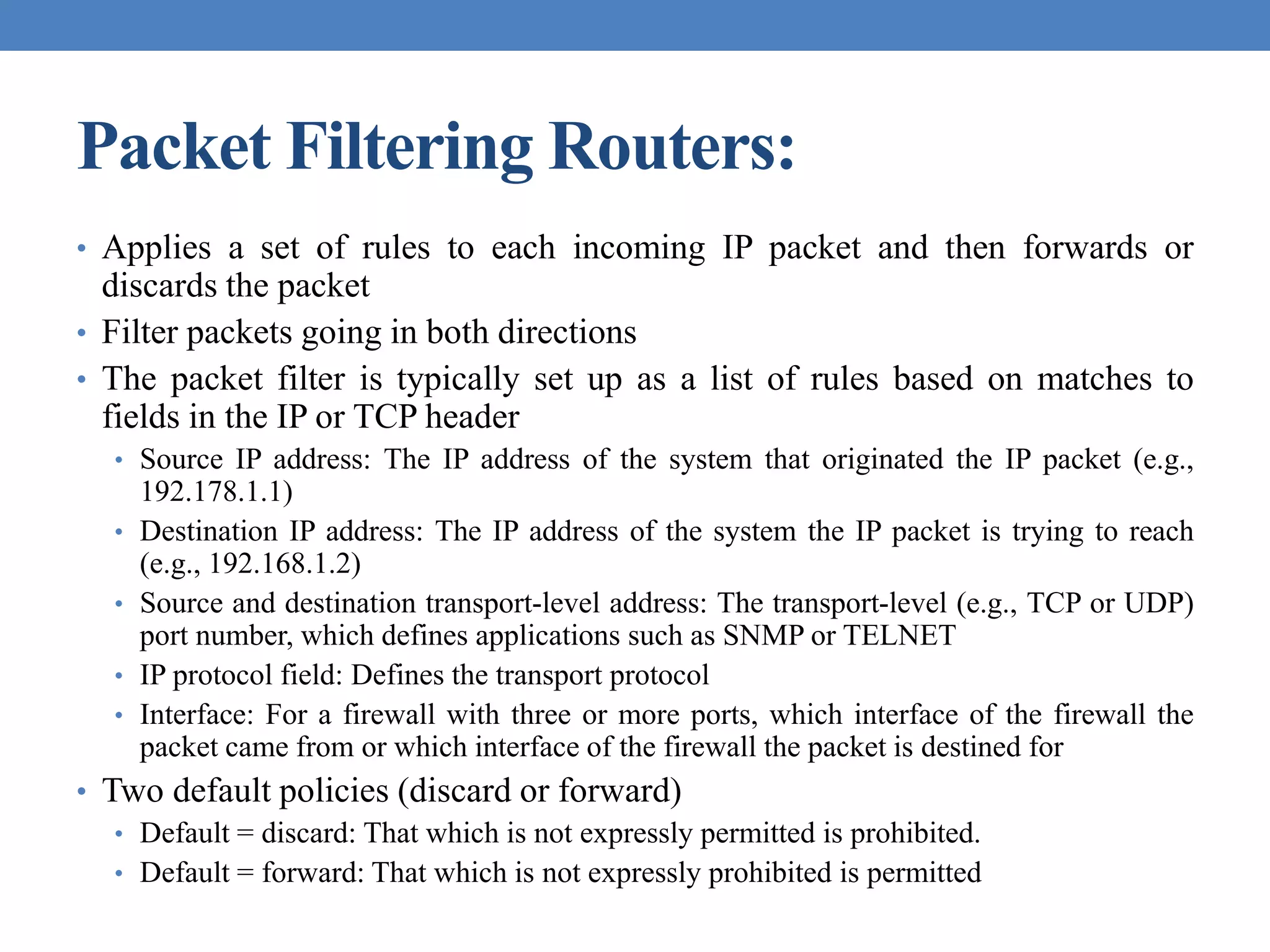
Packet Filtering Routers:
• Applies a set of rules to each incoming IP packet and then forwards or
discards the packet
• Filter packets going in both directions
• The packet filter is typically set up as a list of rules based on matches to
fields in the IP or TCP header
• Source IP address: The IP address of the system that originated the IP packet (e.g.,
192.178.1.1)
• Destination IP address: The IP address of the system the IP packet is trying to reach
(e.g., 192.168.1.2)
• Source and destination transport-level address: The transport-level (e.g., TCP or UDP)
port number, which defines applications such as SNMP or TELNET
• IP protocol field: Defines the transport protocol
• Interface: For a firewall with three or more ports, which interface of the firewall the
packet came from or which interface of the firewall the packet is destined for
• Two default policies (discard or forward)
• Default = discard: That which is not expressly permitted is prohibited.
• Default = forward: That which is not expressly prohibited is permitted
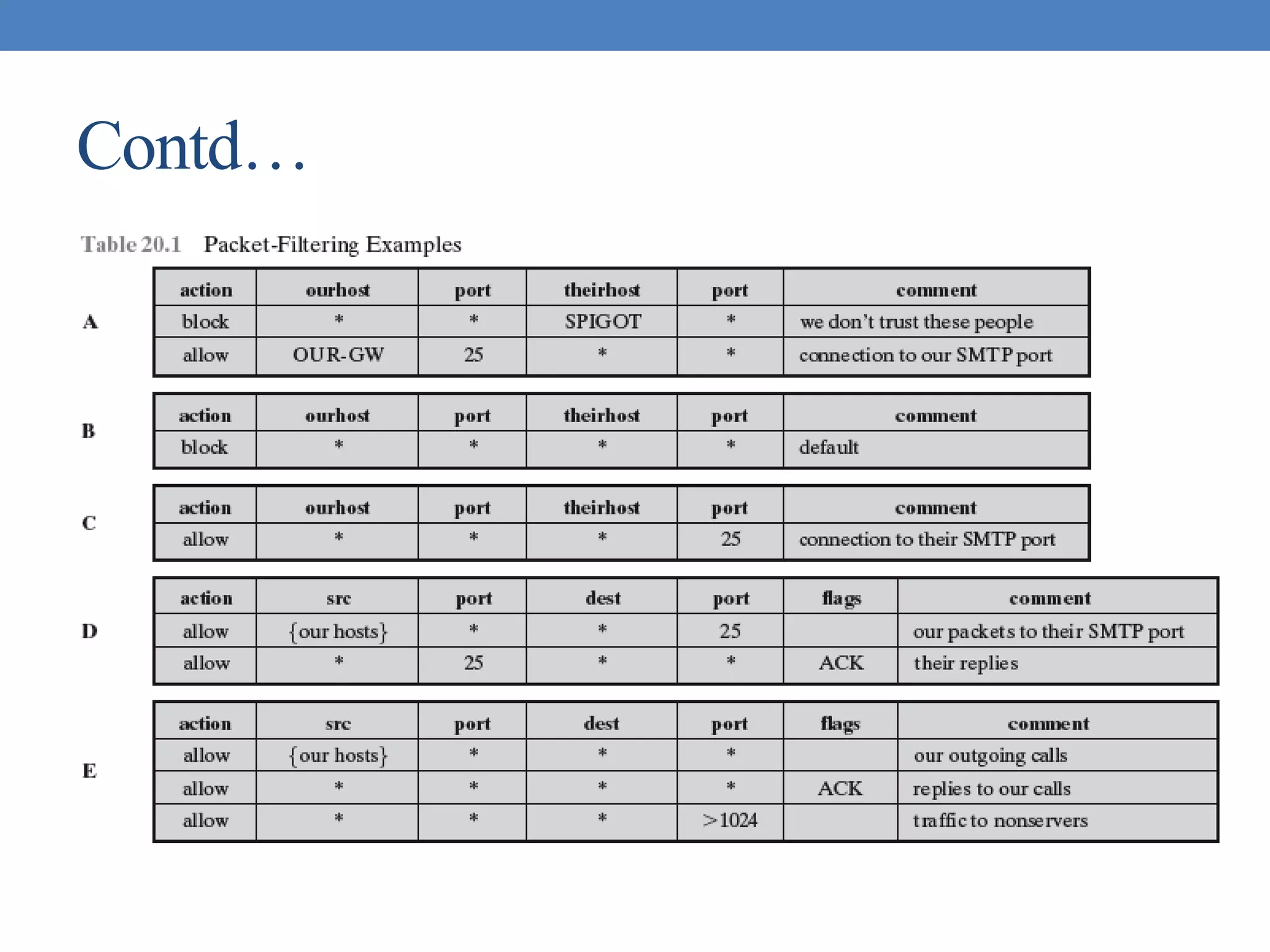
Contd…
Contd…
Contd…
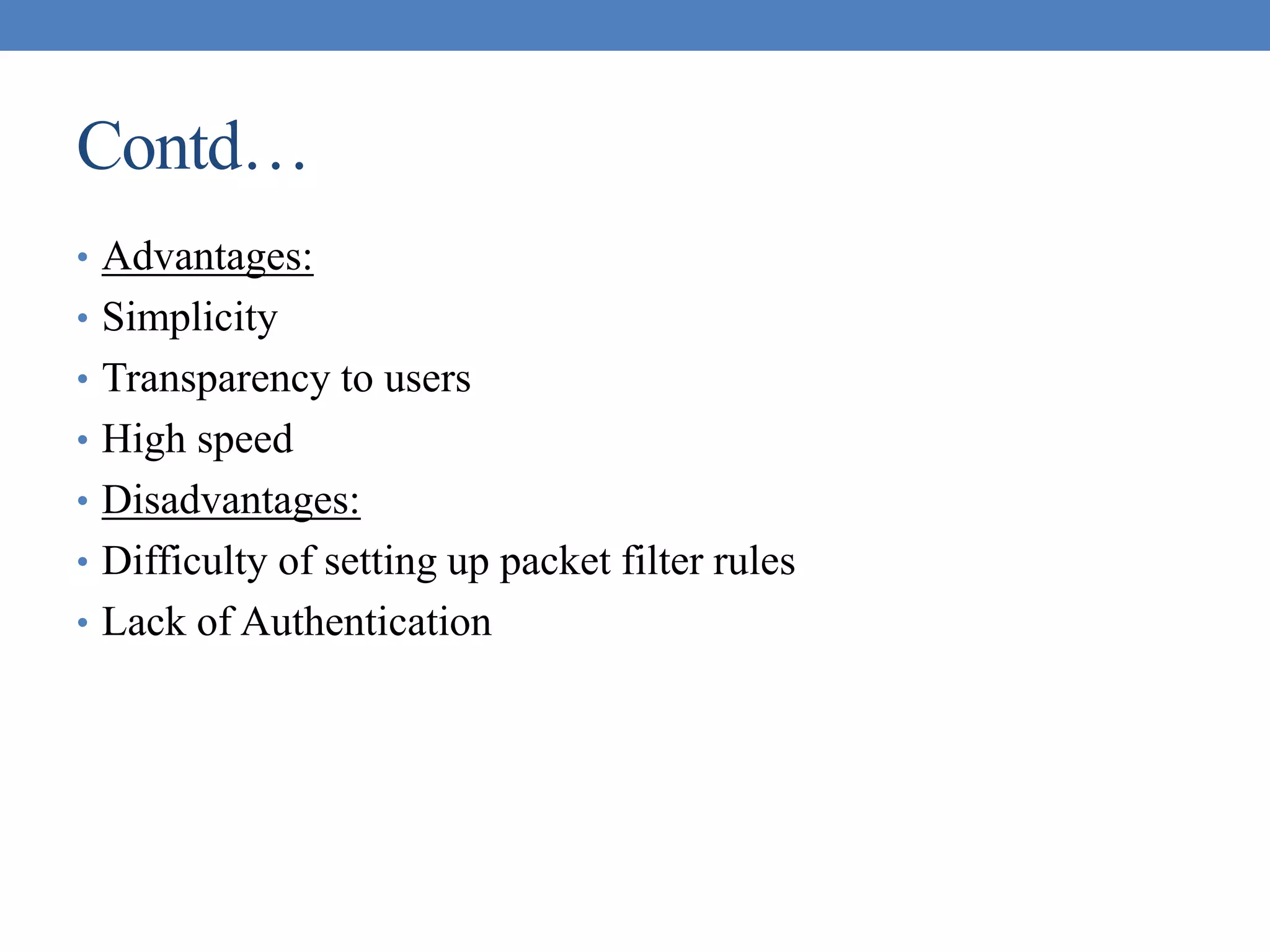
• Advantages:
• Simplicity
• Transparency to users
• High speed
• Disadvantages:
• Difficulty of setting up packet filter rules
• Lack of Authentication
Contd…
• IP address spoofing
• fake source address to be trusted
• add filters on router to block
• source routing attacks
• attacker sets a route other than default
• block source routed packets
• tiny fragment attacks
• split header info over several tiny packets
• either discard or reassemble before check
Application-level gateway
• An application-level gateway (or proxy server), acts as a relay
of application-level traffic.
• The user contacts the gateway using a TCP/IP application, such
as Telnet or FTP, and the gateway asks the user for the name of
the remote host to be accessed.
• When the user responds and provides a valid user ID and
authentication information, the gateway contacts the application
on the remote host and relays TCP segments containing the
application data between the two endpoints
Firewalls -Application Level Gateway (or
Proxy)
Contd…
• Advantages:
• Higher security than packet filters
• Only need to scrutinize a few allowable applications
• Easy to log and audit all incoming traffic
• Disadvantages:
• Additional processing overhead on each connection (gateway as splice
point)
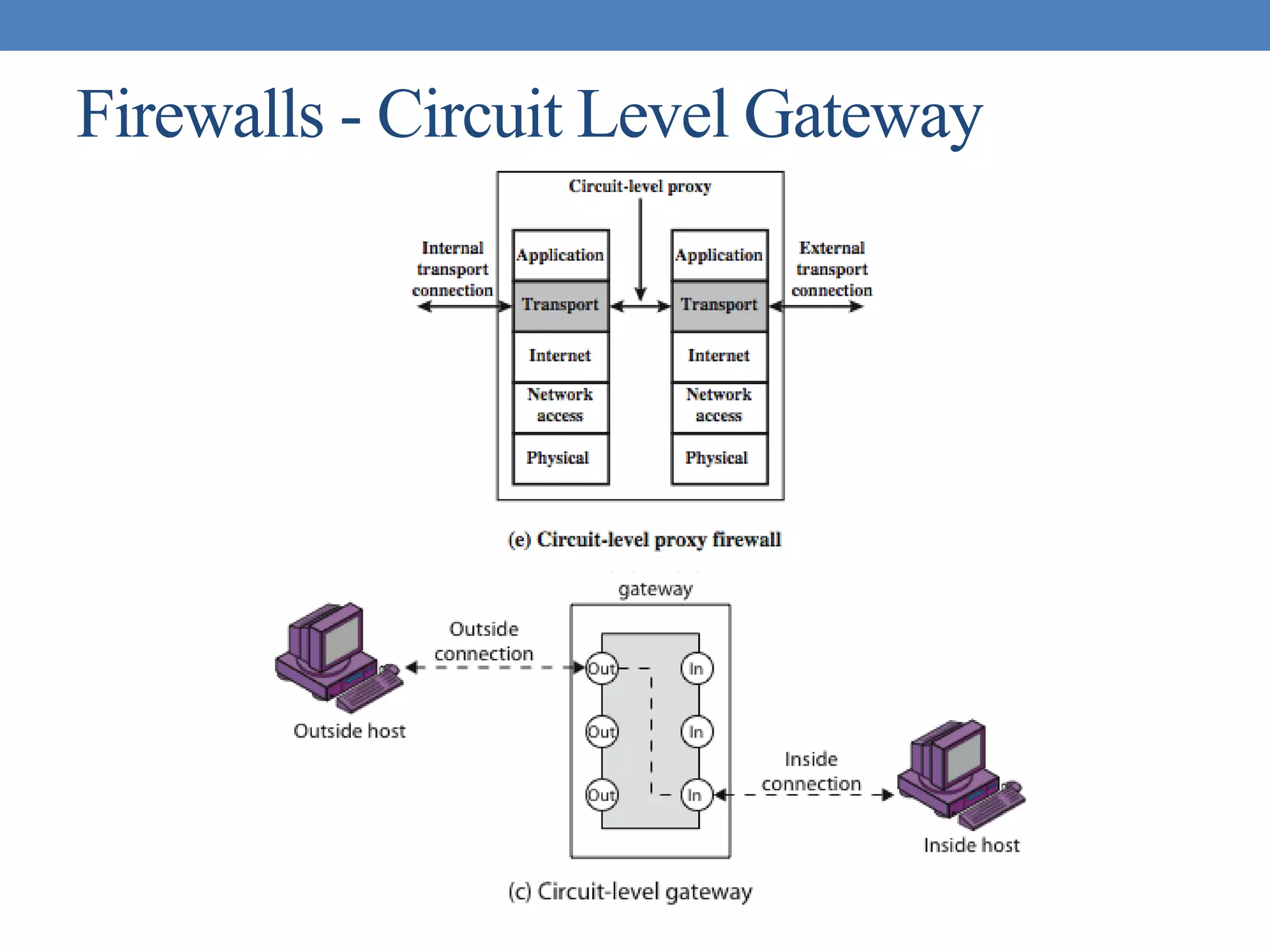
Circuit-level gateway
• A circuit-level gateway relays two TCP connections, one
between itself and an inside TCP user, and the other between
itself and a TCP user on an outside host.
• Once the two connections are established, it relays TCP data
from one connection to the other without examining its
contents.
• The security function consists of determining which
connections will be allowed.
• It is typically used when internal users are trusted to decide
what external services to access.
Firewalls - Circuit Level Gateway
Bastion Host
• A bastion host is a critical strong point in the network’s security,
serving as a platform for an application-level or circuit-level
gateway, or for external services.
Properties
• executes a secure version of its O/S, making it a trusted system
• has only essential services installed on the bastion host
• may require additional authentication before a user may access to
proxy services
• configured to use only subset of standard commands, access only
specific hosts
• maintains detailed audit information by logging all traffic
• each proxy module a very small software package designed for
network security
• has each proxy independent of other proxies on the bastion host
• have a proxy performs no disk access other than read its initial
configuration file
• have each proxy run as a non-privileged user in a private and secured
directory
Firewall Configurations
• In addition to the use of simple configuration of a single system
(single packet filtering router or single gateway), more complex
configurations are possible
• Three common configurations
Firewall Configurations
• Screened host firewall system (single-homed bastion
host)
Henric Johnson 78
Firewall Configurations
• Screened host firewall, single-homed bastion
configuration
• Firewall consists of two systems:
• A packet-filtering router
• A bastion host
Henric Johnson 79
Firewall Configurations
• Configuration for the packet-filtering router:
• Only packets from and to the bastion host are allowed to pass through the
router
• The bastion host performs authentication and proxy functions
Firewall Configurations
• Greater security than single configurations because of two
reasons:
• This configuration implements both packet-level and application-level
filtering (allowing for flexibility in defining security policy)
• An intruder must generally penetrate two separate systems
Firewall Configurations
• This configuration also affords flexibility in providing direct
Internet access (public information server, e.g. Web server)
Firewall Configurations
• Screened host firewall system (dual-homed bastion host)
Firewall Configurations
• Screened host firewall, dual-homed bastion configuration
• The packet-filtering router is not completely compromised
• Traffic between the Internet and other hosts on the private network has to
flow through the bastion host
Firewall Configurations
• Screened-subnet firewall system
Firewall Configurations
• Screened subnet firewall configuration
• Most secure configuration of the three
• Two packet-filtering routers are used
• Creation of an isolated sub-network
Firewall Configurations
• Advantages:
• Three levels of defense to thwart intruders
• The outside router advertises only the existence of the screened subnet to
the Internet (internal network is invisible to the Internet)
Firewall Configurations
• Disadvantages:
• The inside router advertises only the existence of the screened subnet to
the internal network (the systems on the inside network cannot construct
direct routes to the Internet)
Distributed
Firewalls

Cs8792 cns - unit v

  • 1.
    CS8792 – CRYPTOGRAPHY ANDNETWORK SECURITY Unit V Prepared by Dr. R. Arthy, AP/IT, Kamaraj College of Engineering and Technology (Autonomous), Madurai.
  • 2.
  • 3.
    Intruders • significant issuefor networked systems is hostile or unwanted access • either via network or local • can identify classes of intruders: • masquerader • misfeasor • clandestine user • varying levels of competence
  • 4.
    Intruders • clearly agrowing publicized problem • from “Wily Hacker” in 1986/87 • to clearly escalating CERT stats • may seem benign, but still cost resources • may use compromised system to launch other attacks • awareness of intruders has led to the development of CERTs
  • 5.
    Intrusion Techniques • aimto gain access and/or increase privileges on a system • basic attack methodology • target acquisition and information gathering • initial access • privilege escalation • covering tracks • key goal often is to acquire passwords • so then exercise access rights of owner
  • 6.
    Password Capture • anotherattack involves password capture • watching over shoulder as password is entered • using a trojan horse program to collect • monitoring an insecure network login • eg. telnet, FTP, web, email • extracting recorded info after successful login (web history/cache, last number dialed etc) • using valid login/password can impersonate user • users need to be educated to use suitable precautions/countermeasures
  • 7.
    Intrusion Detection • inevitablywill have security failures • so need also to detect intrusions so can • block if detected quickly • act as deterrent • collect info to improve security • assume intruder will behave differently to a legitimate user • but will have imperfect distinction between
  • 8.
    Password Guessing • oneof the most common attacks • attacker knows a login (from email/web page etc) • then attempts to guess password for it • defaults, short passwords, common word searches • user info (variations on names, birthday, phone, common words/interests) • exhaustively searching all possible passwords • check by login or against stolen password file • success depends on password chosen by user • surveys show many users choose poorly
  • 9.
    Approaches to IntrusionDetection • statistical anomaly detection • threshold • profile based • rule-based detection • anomaly • penetration identification
  • 10.
    Audit Records • fundamentaltool for intrusion detection • native audit records • part of all common multi-user O/S • already present for use • may not have info wanted in desired form • detection-specific audit records • created specifically to collect wanted info • at cost of additional overhead on system
  • 11.
    StatisticalAnomaly Detection • thresholddetection • count occurrences of specific event over time • if exceed reasonable value assume intrusion • alone is a crude & ineffective detector • profile based • characterize past behavior of users • detect significant deviations from this • profile usually multi-parameter
  • 12.
    Audit RecordAnalysis • foundationof statistical approaches • analyze records to get metrics over time • counter, gauge, interval timer, resource use • use various tests on these to determine if current behavior is acceptable • mean & standard deviation, multivariate, markov process, time series, operational • key advantage is no prior knowledge used
  • 13.
    Rule-Based Intrusion Detection •observe events on system & apply rules to decide if activity is suspicious or not • rule-based anomaly detection • analyze historical audit records to identify usage patterns & auto-generate rules for them • then observe current behavior & match against rules to see if conforms • like statistical anomaly detection does not require prior knowledge of security flaws
  • 14.
    Rule-Based Intrusion Detection •rule-based penetration identification • uses expert systems technology • with rules identifying known penetration, weakness patterns, or suspicious behavior • compare audit records or states against rules • rules usually machine & O/S specific • rules are generated by experts who interview & codify knowledge of security admins • quality depends on how well this is done
  • 15.
    Base-Rate Fallacy • practicallyan intrusion detection system needs to detect a substantial percentage of intrusions with few false alarms • if too few intrusions detected -> false security • if too many false alarms -> ignore / waste time • this is very hard to do • existing systems seem not to have a good record
  • 16.
    Distributed Intrusion Detection •traditional focus is on single systems • but typically have networked systems • more effective defense has these working together to detect intrusions • issues • dealing with varying audit record formats • integrity & confidentiality of networked data • centralized or decentralized architecture
  • 17.
  • 18.
    Distributed Intrusion Detection–Agent Implementation
  • 19.
    Honeypots • decoy systemsto lure attackers • away from accessing critical systems • to collect information of their activities • to encourage attacker to stay on system so administrator can respond • are filled with fabricated information • instrumented to collect detailed information on attackers activities • single or multiple networked systems • cf IETF Intrusion Detection WG standards
  • 20.
    Password Management • front-linedefense against intruders • users supply both: • login – determines privileges of that user • password – to identify them • passwords often stored encrypted • Unix uses multiple DES (variant with salt) • more recent systems use crypto hash function • should protect password file on system
  • 21.
    Password Studies • Purdue1992 - many short passwords • Klein 1990 - many guessable passwords • conclusion is that users choose poor passwords too often • need some approach to counter this
  • 22.
    Managing Passwords -Education • can use policies and good user education • educate on importance of good passwords • give guidelines for good passwords • minimum length (>6) • require a mix of upper & lower case letters, numbers, punctuation • not dictionary words • but likely to be ignored by many users
  • 23.
    Managing Passwords -Computer Generated • let computer create passwords • if random likely not memorisable, so will be written down (sticky label syndrome) • even pronounceable not remembered • have history of poor user acceptance • FIPS PUB 181 one of best generators • has both description & sample code • generates words from concatenating random pronounceable syllables
  • 24.
    Managing Passwords -Reactive Checking • reactively run password guessing tools • note that good dictionaries exist for almost any language/interest group • cracked passwords are disabled • but is resource intensive • bad passwords are vulnerable till found
  • 25.
    Managing Passwords -Proactive Checking • most promising approach to improving password security • allow users to select own password • but have system verify it is acceptable • simple rule enforcement (see earlier slide) • compare against dictionary of bad passwords • use algorithmic (markov model or bloom filter) to detect poor choices
  • 26.
    Viruses and OtherMalicious Content • computer viruses have got a lot of publicity • one of a family of malicious software • effects usually obvious • have figured in news reports, fiction, movies (often exaggerated) • getting more attention than deserve • are a concern though
  • 27.
  • 28.
    Backdoor or Trapdoor •secret entry point into a program • allows those who know access bypassing usual security procedures • have been commonly used by developers • a threat when left in production programs allowing exploited by attackers • very hard to block in O/S • requires good s/w development & update
  • 29.
    Logic Bomb • oneof oldest types of malicious software • code embedded in legitimate program • activated when specified conditions met • eg presence/absence of some file • particular date/time • particular user • when triggered typically damage system • modify/delete files/disks, halt machine, etc
  • 30.
    Trojan Horse • programwith hidden side-effects • which is usually superficially attractive • eg game, s/w upgrade etc • when run performs some additional tasks • allows attacker to indirectly gain access they do not have directly • often used to propagate a virus/worm or install a backdoor • or simply to destroy data
  • 31.
    Mobile Code • program/script/macrothat runs unchanged • on heterogeneous collection of platforms • on large homogeneous collection (Windows) • transmitted from remote system to local system & then executed on local system • often to inject virus, worm, or Trojan horse • or to perform own exploits • unauthorized data access, root compromise
  • 32.
    Multiple-Threat Malware • malwaremay operate in multiple ways • multipartite virus infects in multiple ways • eg. multiple file types • blended attack uses multiple methods of infection or transmission • to maximize speed of contagion and severity • may include multiple types of malware • eg. Nimda has worm, virus, mobile code • can also use IM & P2P
  • 33.
    Viruses • piece ofsoftware that infects programs • modifying them to include a copy of the virus • so it executes secretly when host program is run • specific to operating system and hardware • taking advantage of their details and weaknesses • a typical virus goes through phases of: • dormant • propagation • triggering • execution
  • 34.
    Virus Structure • components: •infection mechanism - enables replication • trigger - event that makes payload activate • payload - what it does, malicious or benign • prepended / postpended / embedded • when infected program invoked, executes virus code then original program code • can block initial infection (difficult) • or propogation (with access controls)
  • 35.
  • 36.
  • 37.
    Virus Classification • bootsector • file infector • macro virus • encrypted virus • stealth virus • polymorphic virus • metamorphic virus
  • 38.
    Macro Virus • becamevery common in mid-1990s since • platform independent • infect documents • easily spread • exploit macro capability of office apps • executable program embedded in office doc • often a form of Basic • more recent releases include protection • recognized by many anti-virus programs
  • 39.
    E-Mail Viruses • morerecent development • e.g. Melissa • exploits MS Word macro in attached doc • if attachment opened, macro activates • sends email to all on users address list • and does local damage • then saw versions triggered reading email • hence much faster propagation
  • 40.
    Virus Countermeasures • prevention- ideal solution but difficult • realistically need: • detection • identification • removal • if detect but can’t identify or remove, must discard and replace infected program
  • 41.
    Anti-Virus Evolution • virus& antivirus tech have both evolved • early viruses simple code, easily removed • as become more complex, so must the countermeasures • generations • first - signature scanners • second - heuristics • third - identify actions • fourth - combination packages
  • 42.
    Generic Decryption • runsexecutable files through GD scanner: • CPU emulator to interpret instructions • virus scanner to check known virus signatures • emulation control module to manage process • lets virus decrypt itself in interpreter • periodically scan for virus signatures • issue is long to interpret and scan • tradeoff chance of detection vs time delay
  • 43.
  • 44.
  • 45.
    Worms • replicating programthat propagates over net • using email, remote exec, remote login • has phases like a virus: • dormant, propagation, triggering, execution • propagation phase: searches for other systems, connects to it, copies self to it and runs • may disguise itself as a system process • concept seen in Brunner’s “Shockwave Rider” • implemented by Xerox Palo Alto labs in 1980’s
  • 46.
    Morris Worm • oneof best know worms • released by Robert Morris in 1988 • various attacks on UNIX systems • cracking password file to use login/password to logon to other systems • exploiting a bug in the finger protocol • exploiting a bug in sendmail • if succeed have remote shell access • sent bootstrap program to copy worm over
  • 47.
  • 48.
    Recent WormAttacks • CodeRed • July 2001 exploiting MS IIS bug • probes random IP address, does DDoS attack • Code Red II variant includes backdoor • SQL Slammer • early 2003, attacks MS SQL Server • Mydoom • mass-mailing e-mail worm that appeared in 2004 • installed remote access backdoor in infected systems • Warezov family of worms • scan for e-mail addresses, send in attachment
  • 49.
    Worm Technology • multiplatform •multi-exploit • ultrafast spreading • polymorphic • metamorphic • transport vehicles • zero-day exploit
  • 50.
    Mobile Phone Worms •first appeared on mobile phones in 2004 • target smartphone which can install s/w • they communicate via Bluetooth or MMS • to disable phone, delete data on phone, or send premium-priced messages • CommWarrior, launched in 2005 • replicates using Bluetooth to nearby phones • and via MMS using address-book numbers
  • 51.
    Worm Countermeasures • overlapswith anti-virus techniques • once worm on system A/V can detect • worms also cause significant net activity • worm defense approaches include: • signature-based worm scan filtering • filter-based worm containment • payload-classification-based worm containment • threshold random walk scan detection • rate limiting and rate halting
  • 52.
  • 53.
  • 54.
    Distributed Denial ofServiceAttacks (DDoS) • Distributed Denial of Service (DDoS) attacks form a significant security threat • making networked systems unavailable • by flooding with useless traffic • using large numbers of “zombies” • growing sophistication of attacks • defense technologies struggling to cope
  • 55.
    Distributed Denial ofServiceAttacks (DDoS)
  • 56.
  • 57.
    Constructing anAttack Network •must infect large number of zombies • needs: 1. software to implement the DDoS attack 2. an unpatched vulnerability on many systems 3. scanning strategy to find vulnerable systems • random, hit-list, topological, local subnet
  • 58.
    DDoS Countermeasures • threebroad lines of defense: 1. attack prevention & preemption (before) 2. attack detection & filtering (during) 3. attack source traceback & ident (after) • huge range of attack possibilities • hence evolving countermeasures
  • 59.
  • 60.
    Firewall Design Principles: •Establish a controlled link • Protect the premises network from Internet-based attacks • Provide a single choke point
  • 61.
    Firewall Characteristics Design Goals •All traffic from inside to outside must pass through the firewall (physically blocking all access to the local network except via the firewall) • Only authorized traffic (defined by the local security police) will be allowed to pass • The firewall itself is immune to penetration (use of trusted system with a secure operating system)
  • 62.
    Contd… General Techniques • Servicecontrol • Direction control • User control • Behavior control
  • 63.
    Contd…. • Scope ofFirewall • A firewall defines a single choke point that keeps unauthorized users out of the protected network, prohibits potentially vulnerable services from entering or leaving the network, and provides protection from various kinds of IP spoofing and routing attacks. The use of a single choke point simplifies security management because security capabilities are consolidated on a single system or set of systems. • A firewall provides a location for monitoring security-related events. Audits and alarms can be implemented on the firewall system. • A firewall is a convenient platform for several Internet functions that are not security related. These include a network address translator, which maps local addresses to Internet addresses, and a network management function that audits or logs Internet usage. • A firewall can serve as the platform for IPsec. Using the tunnel mode capability described in Chapter 19, the firewall can be used to implement virtual private networks
  • 64.
    Contd… • Limitations • Thefirewall cannot protect against attacks that bypass the firewall. Internal systems may have dial-out capability to connect to an ISP. An internal LAN may support a modem pool that provides dial-in capability for traveling employees and telecommuters. • The firewall may not protect fully against internal threats, such as a disgruntled employee or an employee who unwittingly cooperates with an external attacker. • An improperly secured wireless LAN may be accessed from outside the organization. An internal firewall that separates portions of an enterprise network cannot guard against wireless communications between local systems on different sides of the internal firewall. • A laptop, PDA, or portable storage device may be used and infected outside the corporate network, and then attached and used internally.
  • 65.
    Packet Filtering Routers: •Applies a set of rules to each incoming IP packet and then forwards or discards the packet • Filter packets going in both directions • The packet filter is typically set up as a list of rules based on matches to fields in the IP or TCP header • Source IP address: The IP address of the system that originated the IP packet (e.g., 192.178.1.1) • Destination IP address: The IP address of the system the IP packet is trying to reach (e.g., 192.168.1.2) • Source and destination transport-level address: The transport-level (e.g., TCP or UDP) port number, which defines applications such as SNMP or TELNET • IP protocol field: Defines the transport protocol • Interface: For a firewall with three or more ports, which interface of the firewall the packet came from or which interface of the firewall the packet is destined for • Two default policies (discard or forward) • Default = discard: That which is not expressly permitted is prohibited. • Default = forward: That which is not expressly prohibited is permitted
  • 66.
  • 67.
  • 68.
    Contd… • Advantages: • Simplicity •Transparency to users • High speed • Disadvantages: • Difficulty of setting up packet filter rules • Lack of Authentication
  • 69.
    Contd… • IP addressspoofing • fake source address to be trusted • add filters on router to block • source routing attacks • attacker sets a route other than default • block source routed packets • tiny fragment attacks • split header info over several tiny packets • either discard or reassemble before check
  • 70.
    Application-level gateway • Anapplication-level gateway (or proxy server), acts as a relay of application-level traffic. • The user contacts the gateway using a TCP/IP application, such as Telnet or FTP, and the gateway asks the user for the name of the remote host to be accessed. • When the user responds and provides a valid user ID and authentication information, the gateway contacts the application on the remote host and relays TCP segments containing the application data between the two endpoints
  • 71.
    Firewalls -Application LevelGateway (or Proxy)
  • 72.
    Contd… • Advantages: • Highersecurity than packet filters • Only need to scrutinize a few allowable applications • Easy to log and audit all incoming traffic • Disadvantages: • Additional processing overhead on each connection (gateway as splice point)
  • 73.
    Circuit-level gateway • Acircuit-level gateway relays two TCP connections, one between itself and an inside TCP user, and the other between itself and a TCP user on an outside host. • Once the two connections are established, it relays TCP data from one connection to the other without examining its contents. • The security function consists of determining which connections will be allowed. • It is typically used when internal users are trusted to decide what external services to access.
  • 74.
    Firewalls - CircuitLevel Gateway
  • 75.
    Bastion Host • Abastion host is a critical strong point in the network’s security, serving as a platform for an application-level or circuit-level gateway, or for external services.
  • 76.
    Properties • executes asecure version of its O/S, making it a trusted system • has only essential services installed on the bastion host • may require additional authentication before a user may access to proxy services • configured to use only subset of standard commands, access only specific hosts • maintains detailed audit information by logging all traffic • each proxy module a very small software package designed for network security • has each proxy independent of other proxies on the bastion host • have a proxy performs no disk access other than read its initial configuration file • have each proxy run as a non-privileged user in a private and secured directory
  • 77.
    Firewall Configurations • Inaddition to the use of simple configuration of a single system (single packet filtering router or single gateway), more complex configurations are possible • Three common configurations
  • 78.
    Firewall Configurations • Screenedhost firewall system (single-homed bastion host) Henric Johnson 78
  • 79.
    Firewall Configurations • Screenedhost firewall, single-homed bastion configuration • Firewall consists of two systems: • A packet-filtering router • A bastion host Henric Johnson 79
  • 80.
    Firewall Configurations • Configurationfor the packet-filtering router: • Only packets from and to the bastion host are allowed to pass through the router • The bastion host performs authentication and proxy functions
  • 81.
    Firewall Configurations • Greatersecurity than single configurations because of two reasons: • This configuration implements both packet-level and application-level filtering (allowing for flexibility in defining security policy) • An intruder must generally penetrate two separate systems
  • 82.
    Firewall Configurations • Thisconfiguration also affords flexibility in providing direct Internet access (public information server, e.g. Web server)
  • 83.
    Firewall Configurations • Screenedhost firewall system (dual-homed bastion host)
  • 84.
    Firewall Configurations • Screenedhost firewall, dual-homed bastion configuration • The packet-filtering router is not completely compromised • Traffic between the Internet and other hosts on the private network has to flow through the bastion host
  • 85.
  • 86.
    Firewall Configurations • Screenedsubnet firewall configuration • Most secure configuration of the three • Two packet-filtering routers are used • Creation of an isolated sub-network
  • 87.
    Firewall Configurations • Advantages: •Three levels of defense to thwart intruders • The outside router advertises only the existence of the screened subnet to the Internet (internal network is invisible to the Internet)
  • 88.
    Firewall Configurations • Disadvantages: •The inside router advertises only the existence of the screened subnet to the internal network (the systems on the inside network cannot construct direct routes to the Internet)
  • 89.