Department of Information Technology
2023 – 2024 (ODD SEMESTER)
Year : III IT Course Code : IT2304
Faculty Name : Dr. R. Arthy, AP/IT Course Name : Full Stack Web Development
Course code
(as per NBA)
: 21ITC304 Regulation : R2021
UNIT V
Schema and Validation
 In MongoDB, schema and validation are crucial aspects of data management.
 Schema refers to the structure of data within a collection, defining the fields and their
data types.
 Validation, on the other hand, enforces rules to ensure that data inserted or updated
adheres to the defined schema.
Schema Definition
 MongoDB utilizes a flexible schema model, meaning that documents within a
collection do not necessarily share the same fields or data types.
 This flexibility allows for dynamic data structures and eases development.
 However, this flexibility can also lead to data inconsistencies and errors.
 To address this, MongoDB provides schema validation mechanisms that allow
defining rules for fields, such as data types, value ranges, and presence requirements.
 Validation rules are specified using JSON Schema, a vocabulary for describing the
structure of JSON data.
Validation Levels
 MongoDB offers two validation levels: strict and moderate.
o Strict validation: Enforces validation rules for all inserts and updates,
preventing invalid documents from being stored.
o Moderate validation: Applies validation rules only for new documents and
existing valid documents. Existing invalid documents remain unchanged.
Validation Implementation
 Schema validation can be implemented using various methods:
o Using db.createCollection(): During collection creation, the validator option
can be used to define validation rules.
o Using collMod command: For existing collections, the validator option can be
added to the collMod command to introduce validation rules.
o Using MongoDB Atlas: MongoDB Atlas provides a user interface for defining
and managing schema validation rules.
Benefits of Schema Validation
 Data Integrity: Enforces data consistency and prevents invalid or unexpected data
from being stored.
 Data Quality: Improves data quality by ensuring that data adheres to the defined
structure and constraints.
 Error Prevention: Reduces errors caused by invalid data, improving application
reliability and stability.
 Data Understanding: Provides a clear understanding of the expected data structure,
facilitating code development and maintenance.
Example: For Scheme
const MongoClient = require('mongodb').MongoClient;
const url = 'mongodb://localhost:27017';
const dbName = 'myDatabase';
const collectionName = 'users';
const schema = {
bsonType: 'object',
required: ['name', 'email'],
properties: {
name: {
bsonType: 'string',
minLength: 3,
maxLength: 50,
},
email: {
bsonType: 'string',
pattern: '^S+@[S+.]+$',
},
age: {
bsonType: 'int',
minimum: 18,
maximum: 120,
},
},
};
const createCollection = async () => {
const client = await MongoClient.connect(url);
const db = client.db(dbName);
await db.createCollection(collectionName, {
validator: {
$jsonSchema: schema,
},
});
console.log('Collection created successfully');
client.close();
};
createCollection();
Example: For Validation
{
"name": "John Doe",
"email": "johndoe@example.com",
"age": 30
}
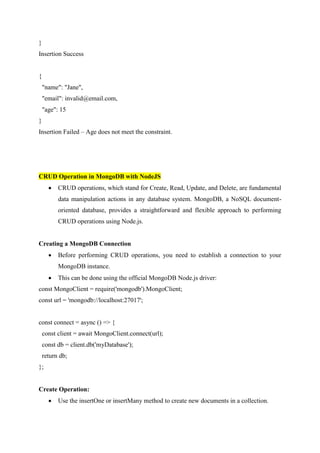
Insertion Success
{
"name": "Jane",
"email": invalid@email.com,
"age": 15
}
Insertion Failed – Age does not meet the constraint.
CRUD Operation in MongoDB with NodeJS
 CRUD operations, which stand for Create, Read, Update, and Delete, are fundamental
data manipulation actions in any database system. MongoDB, a NoSQL document-
oriented database, provides a straightforward and flexible approach to performing
CRUD operations using Node.js.
Creating a MongoDB Connection
 Before performing CRUD operations, you need to establish a connection to your
MongoDB instance.
 This can be done using the official MongoDB Node.js driver:
const MongoClient = require('mongodb').MongoClient;
const url = 'mongodb://localhost:27017';
const connect = async () => {
const client = await MongoClient.connect(url);
const db = client.db('myDatabase');
return db;
};
Create Operation:
 Use the insertOne or insertMany method to create new documents in a collection.
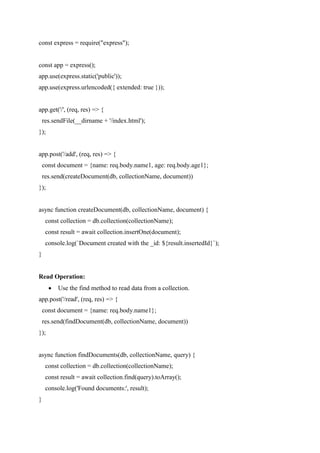
const express = require("express");
const app = express();
app.use(express.static('public'));
app.use(express.urlencoded({ extended: true }));
app.get('/', (req, res) => {
res.sendFile(__dirname + '/index.html');
});
app.post('/add', (req, res) => {
const document = {name: req.body.name1, age: req.body.age1};
res.send(createDocument(db, collectionName, document))
});
async function createDocument(db, collectionName, document) {
const collection = db.collection(collectionName);
const result = await collection.insertOne(document);
console.log(`Document created with the _id: ${result.insertedId}`);
}
Read Operation:
 Use the find method to read data from a collection.
app.post('/read', (req, res) => {
const document = {name: req.body.name1};
res.send(findDocument(db, collectionName, document))
});
async function findDocuments(db, collectionName, query) {
const collection = db.collection(collectionName);
const result = await collection.find(query).toArray();
console.log('Found documents:', result);
}
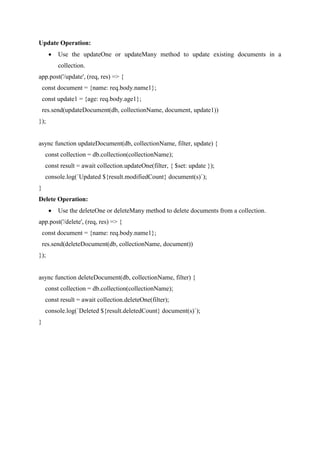
Update Operation:
 Use the updateOne or updateMany method to update existing documents in a
collection.
app.post('/update', (req, res) => {
const document = {name: req.body.name1};
const update1 = {age: req.body.age1};
res.send(updateDocument(db, collectionName, document, update1))
});
async function updateDocument(db, collectionName, filter, update) {
const collection = db.collection(collectionName);
const result = await collection.updateOne(filter, { $set: update });
console.log(`Updated ${result.modifiedCount} document(s)`);
}
Delete Operation:
 Use the deleteOne or deleteMany method to delete documents from a collection.
app.post('/delete', (req, res) => {
const document = {name: req.body.name1};
res.send(deleteDocument(db, collectionName, document))
});
async function deleteDocument(db, collectionName, filter) {
const collection = db.collection(collectionName);
const result = await collection.deleteOne(filter);
console.log(`Deleted ${result.deletedCount} document(s)`);
}

MongoDB.pdf

  • 1.
    Department of InformationTechnology 2023 – 2024 (ODD SEMESTER) Year : III IT Course Code : IT2304 Faculty Name : Dr. R. Arthy, AP/IT Course Name : Full Stack Web Development Course code (as per NBA) : 21ITC304 Regulation : R2021 UNIT V Schema and Validation  In MongoDB, schema and validation are crucial aspects of data management.  Schema refers to the structure of data within a collection, defining the fields and their data types.  Validation, on the other hand, enforces rules to ensure that data inserted or updated adheres to the defined schema. Schema Definition  MongoDB utilizes a flexible schema model, meaning that documents within a collection do not necessarily share the same fields or data types.  This flexibility allows for dynamic data structures and eases development.  However, this flexibility can also lead to data inconsistencies and errors.  To address this, MongoDB provides schema validation mechanisms that allow defining rules for fields, such as data types, value ranges, and presence requirements.  Validation rules are specified using JSON Schema, a vocabulary for describing the structure of JSON data. Validation Levels  MongoDB offers two validation levels: strict and moderate. o Strict validation: Enforces validation rules for all inserts and updates, preventing invalid documents from being stored.
  • 2.
    o Moderate validation:Applies validation rules only for new documents and existing valid documents. Existing invalid documents remain unchanged. Validation Implementation  Schema validation can be implemented using various methods: o Using db.createCollection(): During collection creation, the validator option can be used to define validation rules. o Using collMod command: For existing collections, the validator option can be added to the collMod command to introduce validation rules. o Using MongoDB Atlas: MongoDB Atlas provides a user interface for defining and managing schema validation rules. Benefits of Schema Validation  Data Integrity: Enforces data consistency and prevents invalid or unexpected data from being stored.  Data Quality: Improves data quality by ensuring that data adheres to the defined structure and constraints.  Error Prevention: Reduces errors caused by invalid data, improving application reliability and stability.  Data Understanding: Provides a clear understanding of the expected data structure, facilitating code development and maintenance. Example: For Scheme const MongoClient = require('mongodb').MongoClient; const url = 'mongodb://localhost:27017'; const dbName = 'myDatabase'; const collectionName = 'users'; const schema = { bsonType: 'object', required: ['name', 'email'], properties: { name: { bsonType: 'string', minLength: 3, maxLength: 50,
  • 3.
    }, email: { bsonType: 'string', pattern:'^S+@[S+.]+$', }, age: { bsonType: 'int', minimum: 18, maximum: 120, }, }, }; const createCollection = async () => { const client = await MongoClient.connect(url); const db = client.db(dbName); await db.createCollection(collectionName, { validator: { $jsonSchema: schema, }, }); console.log('Collection created successfully'); client.close(); }; createCollection(); Example: For Validation { "name": "John Doe", "email": "johndoe@example.com", "age": 30
  • 4.
    } Insertion Success { "name": "Jane", "email":invalid@email.com, "age": 15 } Insertion Failed – Age does not meet the constraint. CRUD Operation in MongoDB with NodeJS  CRUD operations, which stand for Create, Read, Update, and Delete, are fundamental data manipulation actions in any database system. MongoDB, a NoSQL document- oriented database, provides a straightforward and flexible approach to performing CRUD operations using Node.js. Creating a MongoDB Connection  Before performing CRUD operations, you need to establish a connection to your MongoDB instance.  This can be done using the official MongoDB Node.js driver: const MongoClient = require('mongodb').MongoClient; const url = 'mongodb://localhost:27017'; const connect = async () => { const client = await MongoClient.connect(url); const db = client.db('myDatabase'); return db; }; Create Operation:  Use the insertOne or insertMany method to create new documents in a collection.
  • 5.
    const express =require("express"); const app = express(); app.use(express.static('public')); app.use(express.urlencoded({ extended: true })); app.get('/', (req, res) => { res.sendFile(__dirname + '/index.html'); }); app.post('/add', (req, res) => { const document = {name: req.body.name1, age: req.body.age1}; res.send(createDocument(db, collectionName, document)) }); async function createDocument(db, collectionName, document) { const collection = db.collection(collectionName); const result = await collection.insertOne(document); console.log(`Document created with the _id: ${result.insertedId}`); } Read Operation:  Use the find method to read data from a collection. app.post('/read', (req, res) => { const document = {name: req.body.name1}; res.send(findDocument(db, collectionName, document)) }); async function findDocuments(db, collectionName, query) { const collection = db.collection(collectionName); const result = await collection.find(query).toArray(); console.log('Found documents:', result); }
  • 6.
    Update Operation:  Usethe updateOne or updateMany method to update existing documents in a collection. app.post('/update', (req, res) => { const document = {name: req.body.name1}; const update1 = {age: req.body.age1}; res.send(updateDocument(db, collectionName, document, update1)) }); async function updateDocument(db, collectionName, filter, update) { const collection = db.collection(collectionName); const result = await collection.updateOne(filter, { $set: update }); console.log(`Updated ${result.modifiedCount} document(s)`); } Delete Operation:  Use the deleteOne or deleteMany method to delete documents from a collection. app.post('/delete', (req, res) => { const document = {name: req.body.name1}; res.send(deleteDocument(db, collectionName, document)) }); async function deleteDocument(db, collectionName, filter) { const collection = db.collection(collectionName); const result = await collection.deleteOne(filter); console.log(`Deleted ${result.deletedCount} document(s)`); }