Types Of Attacks
BY LAVA KUMAR | CRYPTOGRAPHY
Index
 Cryptography Attacks  What is Cryptography
 Types Of Attacks
 General Attacks
 Technical Attacks
 Passive Attacks
 Active Attacks
 Specific Attacks
What is Cryptography
 Cryptography is a method of storing and transmitting data in a particular form so that only
those for whom it is intended can read and process it.
 Cryptography is closely related to the disciplines of cryptology and cryptanalysis.
 Cryptography includes techniques such as microdots, merging words with images, and other
ways to hide information in storage or transit.
 However, in today's computer-centric world, cryptography is most often associated with
scrambling plaintext (ordinary text, sometimes referred to as cleartext) into ciphertext (a
process called encryption), then back again (known as decryption).
TYPES OF ATTACKS
 A General View:
1. Criminal attacks
2. Publicity attacks
3. Legal Attacks
 A Technical View:
1. Modification
2. Fabrication
3. Interruption
4. Interception
Attacks: A General View
 Criminal Attacks:
Criminal Attacks are the simplest to understand.
Fraud: Modern Fraud attacks concentrate on manipulating some aspects
of electronic currency, credit cards, electronic stock certificates etc.
Scams: Scams come in various forms, some of the most common ones
being sale of services, auctions, multi-level marketing schemes etc.People are
enticed to send money in return of great profits but end up losing their money.
Eg: Nigeria Scam.
Destruction: Some sort of grudge is the motive behind such attacks. For example
unhappy employees attack their oen organization, whereas terrorists strike at much
bigger levels.Users Loses there authorization to access the site.
Publicity Attacks: Occur because the attackers want to see their names appear on
television news channels and newspapers.The attacks are usually performed by
students in universities or employees in large organizations,who seek publicity by
adopting a novel approach of attacking computer systems.
Legal Attacks: For example, an attacker may sue a bank for a performing an online
transaction,which she never wanted to perform. In court, she could innocently say
something . A judge Is likely to sympathize with the attacker.
Attacks: A Technical View
 Interception: Discussed in the context of confidentiality, earlier. It means that
an unauthorized party has gained access to a resource. The party can be a
person, program or computer-based system. Examples of interception are
copying of data or programs and listening to network traffic.
 Fabrication: Discussed in the context of authentication, earlier. This lnvolves
creation of illegal objects on a computer system. For example, the attacker
may add fake records to a database.
 Modification: Discussed in the context of integrity. For example, the attacker
may modify thr values in a database.
 Interruption: Discussed in the context of availability. Here, the resources
becomes unavailable , lost or unusable. Examples of interruption are causing
problems to a hardware device, erasing program , data or os components
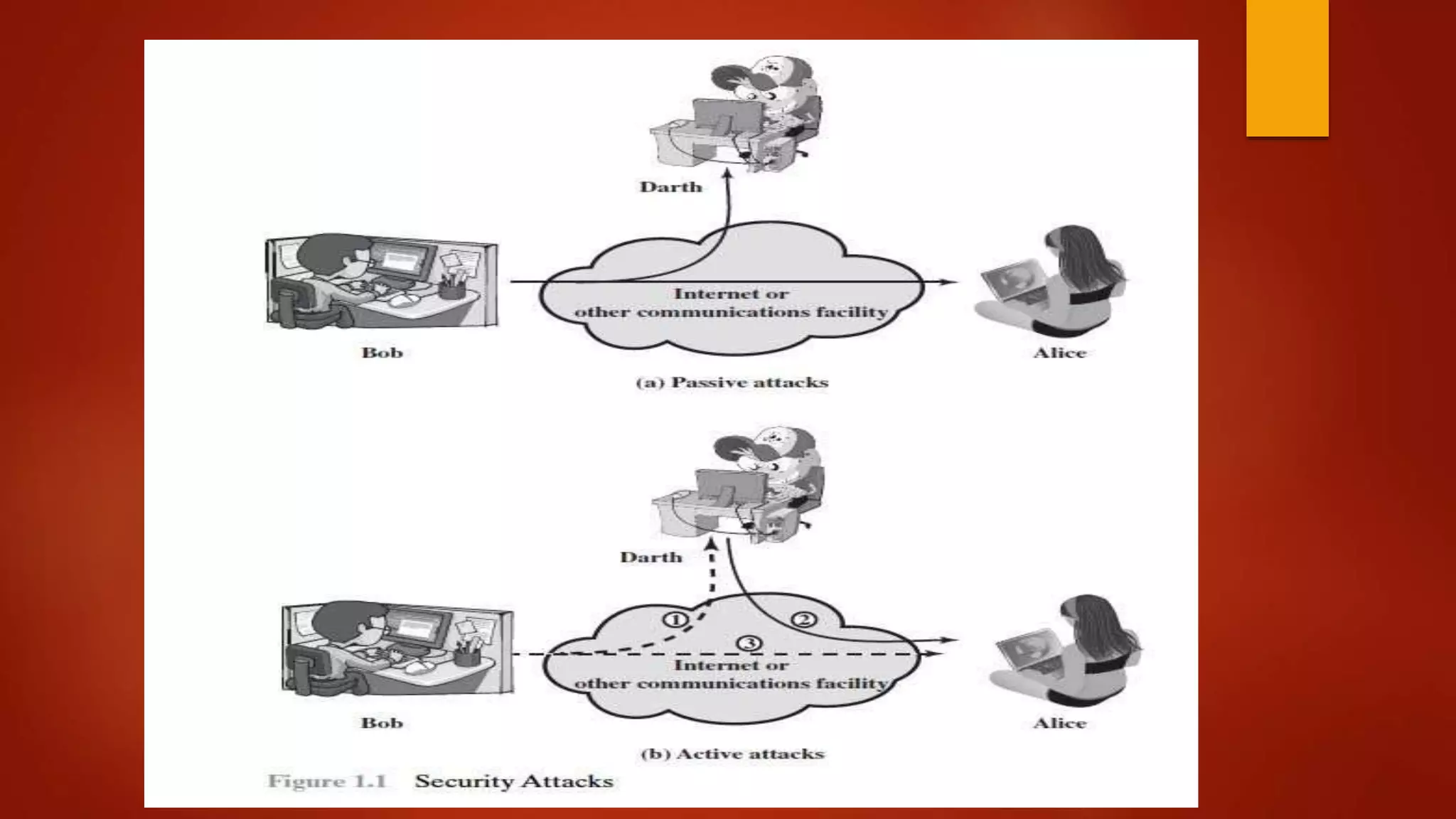
Passive Attacks
 Passive attacks are in the nature of eavesdropping on, or monitoring of,
transmissions. The goal of the opponent is to obtain information that is being
transmitted. Two types of passive attacks are release of message contents
and traffic analysis.
 The release of message contents is easily understood . A telephone
conversation, an electronic mail message, and a transferred file may contain
sensitive or confidential information. We would like to prevent an opponent
from learning the contents of these transmissions.
 A second type of passive attack, traffic analysis, is subtler. Suppose that we
had a way of masking the contents of messages or other information traffic so
that opponents , even if they captured the message, could not extract the
information from the message. The common technique for masking contents
is encryption.
 If we had encryption protection in place, an opponent might still be able to
observe the pattern of these messages. The opponent could determine the
location and identity of communicating hosts and could observe the
frequency and length of messages being exchanged. This information
might be useful in guessing the nature of the communication that was
taking place.
 Passive attacks are very difficult to detect because they do not involve any
alteration of the data. Typically, the messages are sent and received in
seemingly normal fashion. Neither the sender nor receiver is aware that a
third party has read the messages or observed the traffic pattern. However,
it is feasible to prevent the success of these attacks. Message encryption
is a simple solution to thwart passive attacks. Thus, the emphasis in
dealing with passive attacks is on prevention rather than detection.
Active Attacks
 Active attacks involve some modification of the data stream or the creation
of a false stream and can be subdivided into four categories: masquerade,
replay, modification of messages, and denial of service.
 Replay involves the passive capture of a data unit and its subsequent
retransmission to produce an unauthorized effect.
 A masquerade takes place when one entity pretends to be a different
entity .A masquerade attack usually includes one of the other forms of
active attack. For example, authentication sequences can be captured and
replayed after a valid authentication sequence has taken place, thus
enabling an authorized entity with few privileges to obtain extra privileges
by impersonating an entity that has those privileges.
 Modification of messages simply means that some portion of a legitimate
message is altered, or that messages are delayed or reordered, to produce an
unauthorized effect . For example, a message meaning "Allow John Smith to read
confidential file accounts" is modified to mean "Allow Fred Brown to read
confidential file accounts."
 The denial of service prevents or inhibits the normal use or management of
communications facilities (Figure 1.4 d). This attack may have a specific target;
for example, an entity may suppress all messages directed to a particular
destination (e.g., the security audit service). Another form of service denial is the
disruption of an entire network, either by disabling the network or by overloading
it with messages so as to degrade performance.
The Practical Side Of Attacks
 They can be classified into two broad categories
1. Application-Level attacks
2. Network-level attacks.
 Application level attacks: These attacks happen at an application level in the
sense that the attacker attempts to access, modify or prevent access to information
of a particular application or to the application itself. Examples of this are trying to
obtain someones’s credit information on the internet or changing of a message to
change the amount in a transaction, etc.
 Network level attacks: These attacks generally aim at reducing the capabilities
of a network by a number of possible means. These attacks generally make an
attempt to either to slow down or completely bring to halt, a computer network. Note
that this automatically can lead to application level attacks, because once someone
is able to gain access to a network usually she is able to access/modify at least
some sensitive information, causing havoc.
Programs that Attack:
 1. Virus(infects)
 2. Worm (replicates)
 3. Trojan (hidden)
 4. Applets and Active X controls (downloadable)
Viruses
 piece of software that infects programs
 modifying them to include a copy of the virus
 so it executes secretly when host program is run
 specific to operating system and hardware
 taking advantage of their details and weaknesses
 a typical virus goes through phases of:
 dormant
 propagation
 triggering
 execution
Virus Structure
 components:
 infection mechanism - enables replication
 trigger - event that makes payload activate
 payload - what it does, malicious or benign
 prepended / postpended / embedded
 when infected program invoked, executes virus code then original program
code
 can block initial infection (difficult)
 or propogation (with access controls)
Virus Classification
 boot sector
 file infector
 macro virus
 encrypted virus
 stealth virus
 polymorphic virus
 metamorphic virus
Macro Virus
 became very common in mid-1990s since
 platform independent
 infect documents
 easily spread
 exploit macro capability of office apps
 executable program embedded in office doc
 often a form of Basic
 more recent releases include protection
 recognized by many anti-virus programs
E-Mail Viruses
 more recent development
 e.g. Melissa
 exploits MS Word macro in attached doc
 if attachment opened, macro activates
 sends email to all on users address list
 and does local damage
 then saw versions triggered reading email
 hence much faster propagation
Virus Countermeasures
 prevention - ideal solution but difficult
 realistically need:
 detection
 identification
 removal
 if detect but can’t identify or remove, must discard and replace infected
program
Anti-Virus Evolution
 virus & antivirus tech have both evolved
 early viruses simple code, easily removed
 as become more complex, so must the countermeasures
 generations
 first - signature scanners
 second - heuristics
 third - identify actions
 fourth - combination packages
Worms
 replicating program that propagates over net
 using email, remote exec, remote login
 has phases like a virus:
 dormant, propagation, triggering, execution
 propagation phase: searches for other systems, connects
to it, copies self to it and runs
 may disguise itself as a system process
 concept seen in Brunner’s “Shockwave Rider”
 implemented by Xerox Palo Alto labs in 1980’s
Morris Worm
 one of best know worms
 released by Robert Morris in 1988
 various attacks on UNIX systems
 cracking password file to use login/password to logon to other systems
 exploiting a bug in the finger protocol
 exploiting a bug in sendmail
 if succeed have remote shell access
 sent bootstrap program to copy worm over
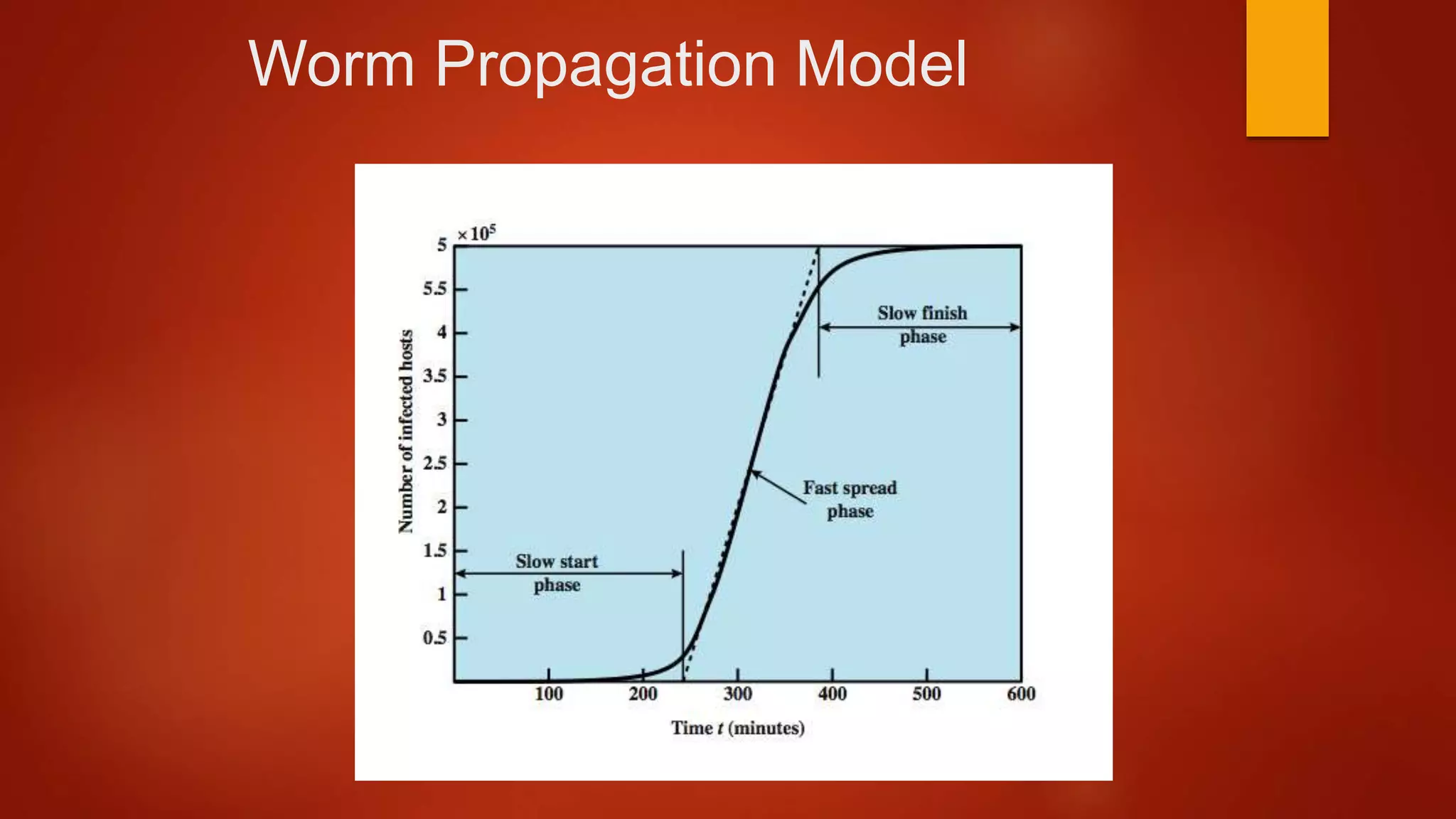
Worm Propagation Model
Recent Worm Attacks
 Code Red
 July 2001 exploiting MS IIS bug
 probes random IP address, does DDoS attack
 Code Red II variant includes backdoor
 SQL Slammer
 early 2003, attacks MS SQL Server
 Mydoom
 mass-mailing e-mail worm that appeared in 2004
 installed remote access backdoor in infected systems
 Warezov family of worms
 scan for e-mail addresses, send in attachment
Worm Technology
 multiplatform
 multi-exploit
 ultrafast spreading
 polymorphic
 metamorphic
 transport vehicles
 zero-day exploit
Mobile Phone Worms
 first appeared on mobile phones in 2004
 target smartphone which can install s/w
 they communicate via Bluetooth or MMS
 to disable phone, delete data on phone, or send premium-priced
messages
 CommWarrior, launched in 2005
 replicates using Bluetooth to nearby phones
 and via MMS using address-book numbers
Worm Countermeasures
 overlaps with anti-virus techniques
 once worm on system A/V can detect
 worms also cause significant net activity
 worm defense approaches include:
 signature-based worm scan filtering
 filter-based worm containment
 payload-classification-based worm containment
 threshold random walk scan detection
 rate limiting and rate halting
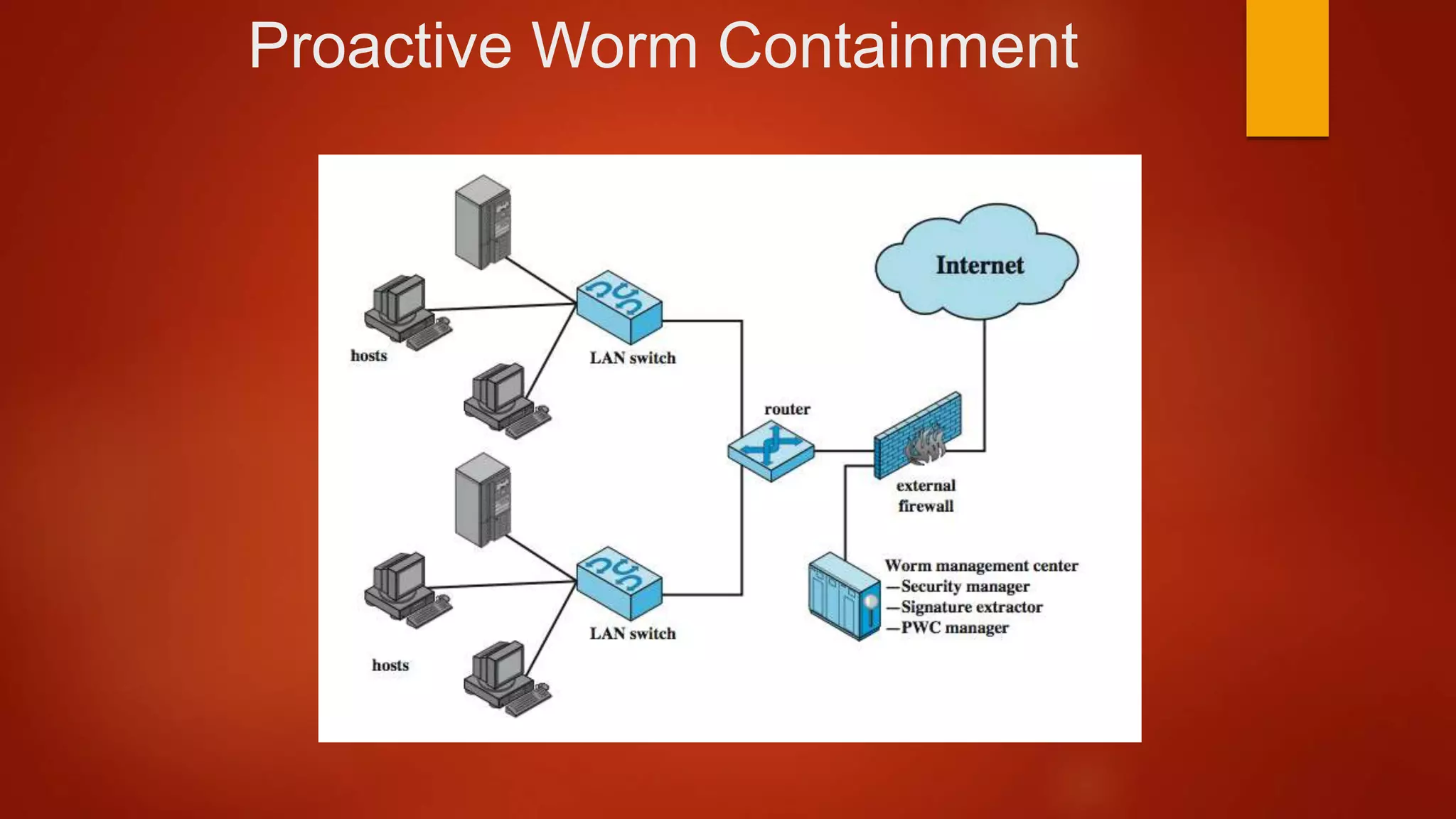
Proactive Worm Containment
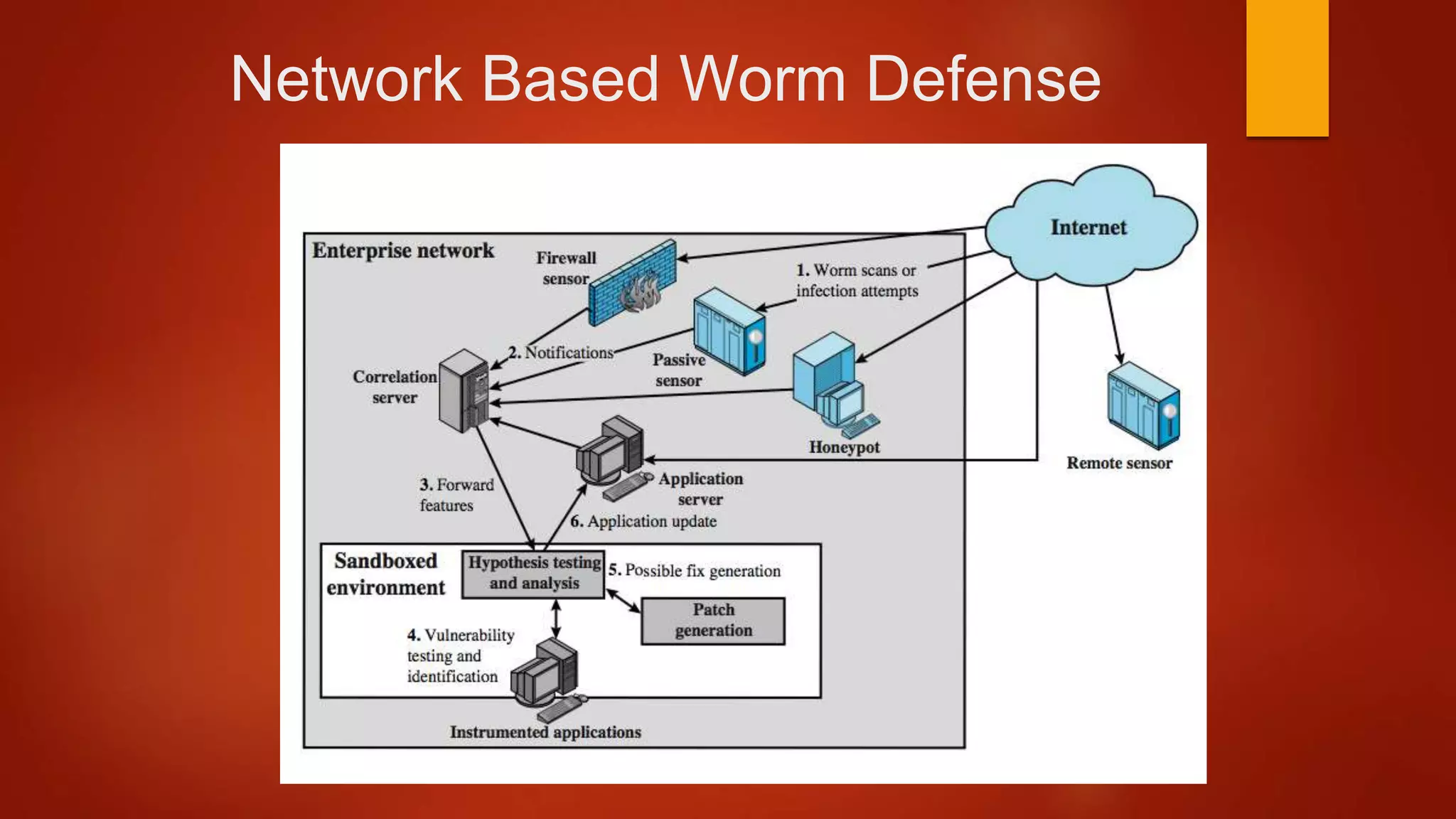
Network Based Worm Defense
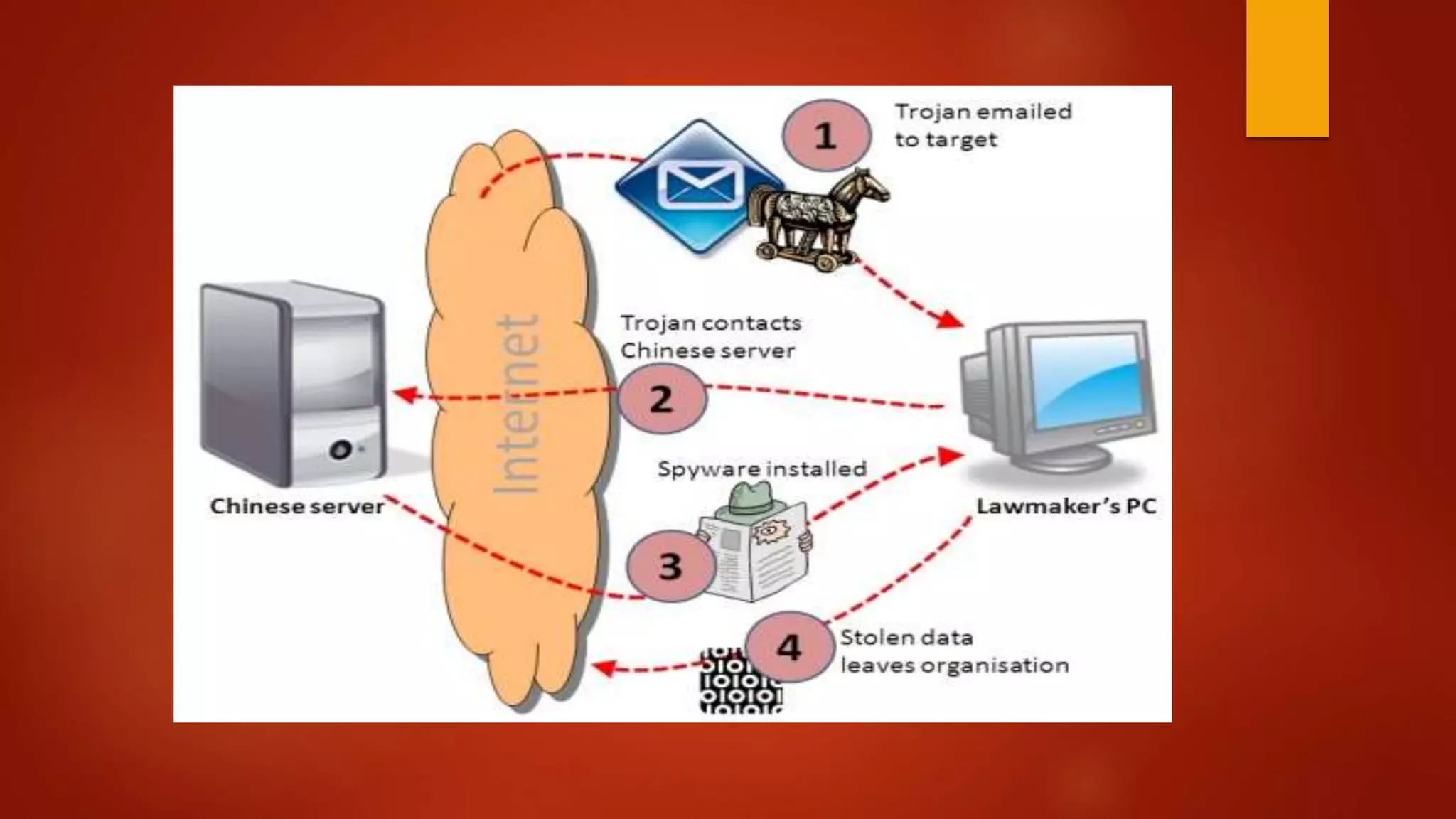
Trojan Horse
 program with hidden side-effects
 which is usually superficially attractive
 eg game, s/w upgrade etc
 when run performs some additional tasks
 allows attacker to indirectly gain access they do not have
directly
 often used to propagate a virus/worm or install a
backdoor
 or simply to destroy data
Applets and ActiveX controls
 An ActiveX control is a component program object that can be re-used by
many application programs within a computer or among computers in a
network. The technology for creating ActiveX controls is part of Microsoft's
overall ActiveX set of technologies, chief of which is the Component Object
Model (COM).
 ActiveX controls can be downloaded as small programs or animations for
Web pages, but they can also be used for any commonly-needed task by
an application program in the latest Windows and Macintosh
environments. In general, ActiveX controls replace the earlier OCX(Object
Linking and Embedding custom controls). An ActiveX control is roughly
equivalent in concept and implementation to the Java applet.
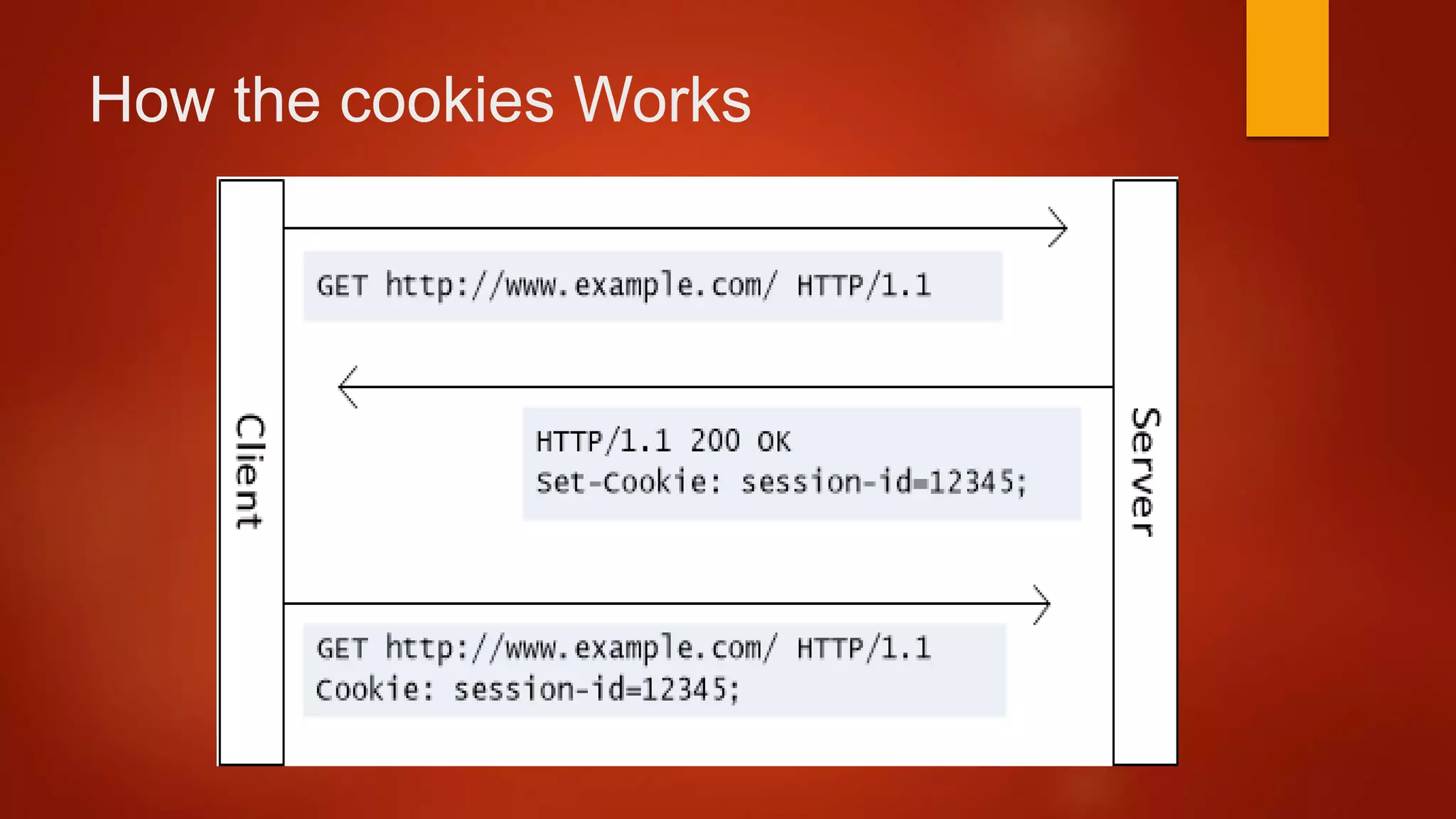
Cookies
 Web Browsers and Servers use HTTP protocol to communicate and HTTP
is a stateless protocol. But for a commercial website, it is required to
maintain session information among different pages. For example, one
user registration ends after completing many pages. But how to maintain
users' session information across all the web pages.
 In many situations, using cookies is the most efficient method of
remembering and tracking preferences, purchases, commissions, and
other information required for better visitor experience or site statistics.
How the cookies Works
Specific Attacks
 Sniffing
 Spoofing
 Phishing
 Pharming
Sniffing Attack
 Sniffing is the act of intercepting and inspecting data packets using sniffers
(Software or hardware devices) over the Net.
 Sniffing is a passive security attack in which a machine separated from the
intended destination reads data on a network.
 These passive security attacks are those, that do not alter the normal flow
of data on a communication link or inject data in to the link, but lead to
leakages of different kinds of information like: Passwords, Financial
figures, Confidential/Sensitive data & Low level Protocol information.
Sniffing is considered as the virtual counterpart of shoulder surfing.
Sniffers are also used as a troubleshooting tool by the Network
Administrators.
Spoofing Attack
 Spoofing is the act of identity impersonation. IP Spoofing is the technique used by
intruders to gain access to a Network by sending messages to a computer with an IP
address indicating that the message is coming from a trusted host.
 To engage in IP spoofing, a hacker uses variety of techniques to find an IP address
of a trusted host and then modify the packet headers so that it appears that the
packets are coming from that host.
 As IP being connectionless, routers use the "destination IP" address in order to
forward packets through the Internet, but ignore the "source IP" address which is
only used by the destination machine when it responds back to the source. This
makes the task of an attacker much easier to forge the identity by modifying the IP
Packets and becoming a part of the destination network. However, IP spoofing is an
integral part of many network attacks that do not need to see responses (blind
spoofing). With the current IP protocol technology, it is impossible to eliminate IP-
spoofed packets.
Phishing Attack
 Phishing is a type of social engineering attack often used to steal user
data, including login credentials and credit card numbers.
 It occurs when an attacker, masquerading as a trusted entity, dupes a
victim into opening an email, instant message, or text message.
 The recipient is then tricked into clicking a malicious link, which can lead to
the installation of malware, the freezing of the system as part of a
ransomware attack or the revealing of sensitive information.
 An attack can have devastating results. For individuals, this includes
unauthorized purchases, the stealing of funds, or identify theft
PHISHING ATTACK EXAMPLES
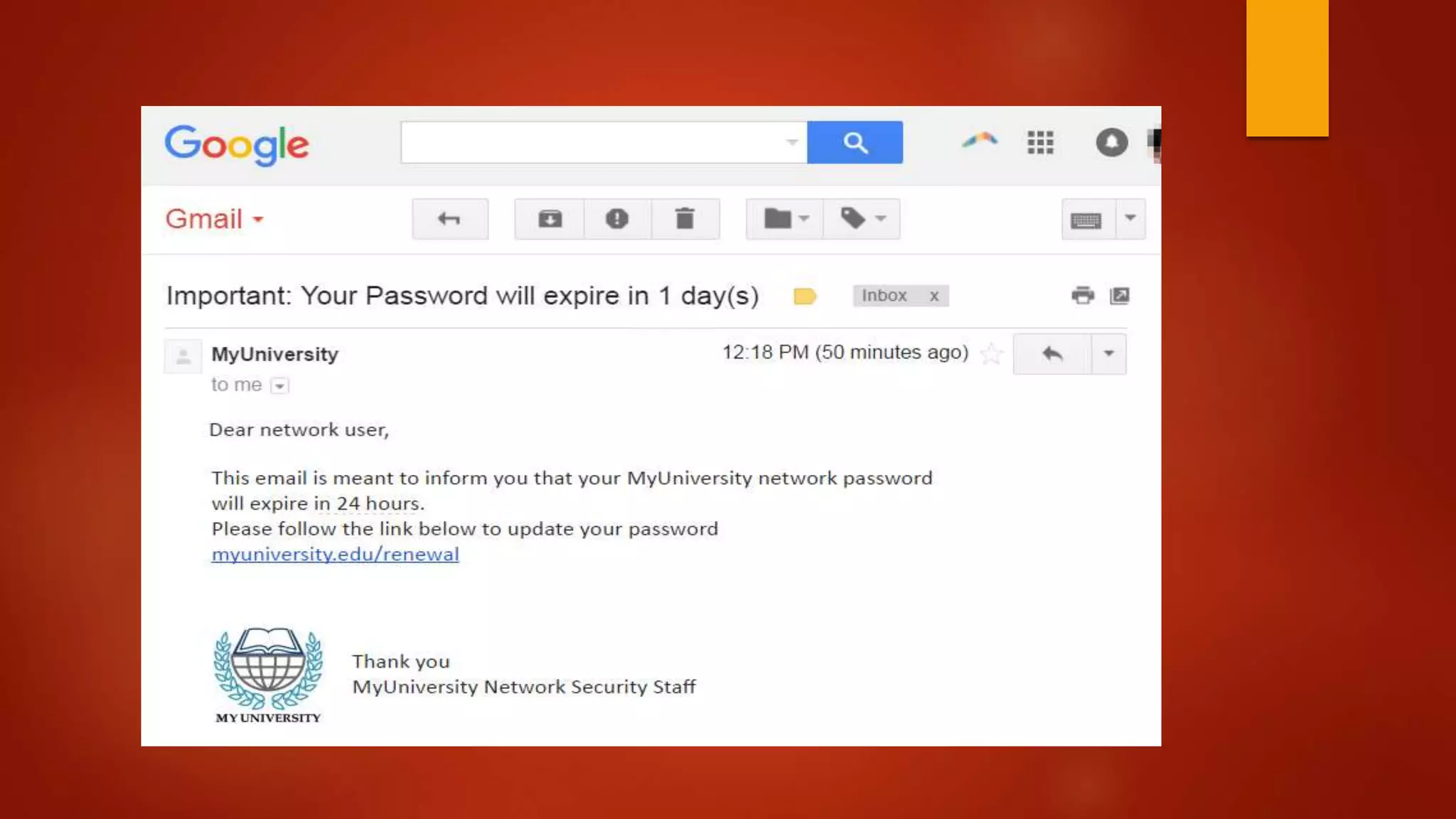
 The following illustrates a common phishing scam attempt:
1. A spoofed email ostensibly from myuniversity.edu is mass-distributed to as many
faculty members as possible.
2. The email claims that the user’s password is about to expire. Instructions are
given to go to myuniversity.edu/renewal to renew their password within 24 hours
 Several things can occur by clicking the link. For example:
1. The user is redirected to myuniversity.edurenewal.com, a bogus page appearing
exactly like the real renewal page, where both new and existing passwords are
requested. The attacker, monitoring the page, hijacks the original password to gain
access to secured areas on the university network.
2. The user is sent to the actual password renewal page. However, while being
redirected, a malicious script activates in the background to hijack the user’s session
cookie. This results in a reflected XSS attack, giving the perpetrator privileged
access to the university network.
Pharming Attack
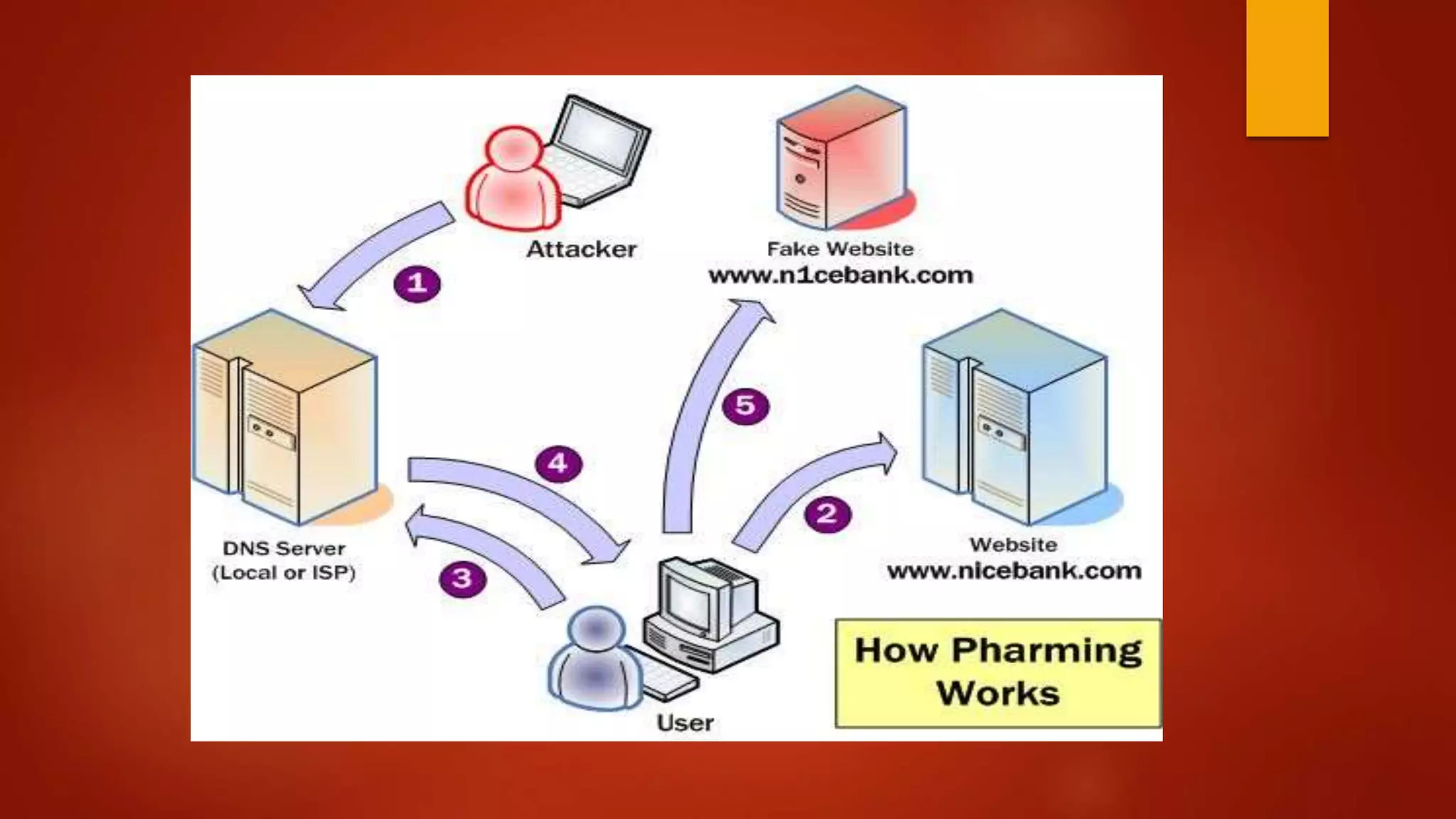
 Pharming is an attacker’s attack intended to redirect a website’s traffic to
another, bogus site. Pharming can be conducted either by changing the hosts
file on a victim’s computer or by exploitation of a vulnerability in DNS server
software. DNS servers are computers responsible for resolving Internet names
into their real IP addresses.
 Compromised DNS servers are sometimes referred to as “poisoned.” Pharming
requires unprotected access to target a computer, such as altering a
customer’s home computer, rather than a corporate business server.
 The term “pharming” is a neologism based on the words “farming” and
“phishing.” Phishing is a type of social-engineering attack to obtain access
credentials, such as user names and passwords. In recent years, both
pharming and phishing have been used to gain information for online identity
theft.
 Pharming has become a major concern to businesses hosting ecommerce
and online banking websites. Sophisticated measures known as anti-
pharming are required to protect against this serious threat. Antivirus
software and spyware removal software cannot protect against pharming.
 A pharming attack will redirect the victim to the fake website (an attacker
website) even though the victim enters the correct address for the
legitimate website. For Example: The victim intends to
access www.twitter.com, so he writes the right URL to the browser, the
URL will still be www.twitter.com, but he will surf the fake website instead.
How does it works
 Method 1: DNS Poisoning:
1. Attacker hacks into the DNS server and changes the IP address for
www.targetsite.com to IP of www.targetsite1.com (Fake page).
2. So if the user enter the URL in address bar, the computer queries
the DNS server for the IP address of www.targetsite.com.
3. Since the DNS server has already been poisoned by the attacker, it
returns the IP address of www.targetsite1.com(fake page).
4. The user will believe it is original website but it is phishing page.
 Hosts File Modification
1. The hosts file definition, according to Wikipedia, is: The hosts file is a
computer file used by an operating system to map hostnames to IP
addresses. The hosts file is a plain text file, and is conventionally
named hosts.”
2. The hosts file is a plain text file that contains lines of text consisting of an IP
address followed by one or more host names where each field is separated
by white space.
3. An IP address may refer to multiple host names (see the following
example), and a host name may be mapped to both IPv4 and IPv6 IP
addresses (see the following example).
4. By the way, you can leave comments in the hosts file by using the hash
character (#), which indicates this line is a comment. Here is an example of
hosts file content:
Any Questions?
Thank You

What is Cryptography and Types of attacks in it

  • 1.
    Types Of Attacks BYLAVA KUMAR | CRYPTOGRAPHY
  • 2.
    Index  Cryptography Attacks What is Cryptography  Types Of Attacks  General Attacks  Technical Attacks  Passive Attacks  Active Attacks  Specific Attacks
  • 3.
    What is Cryptography Cryptography is a method of storing and transmitting data in a particular form so that only those for whom it is intended can read and process it.  Cryptography is closely related to the disciplines of cryptology and cryptanalysis.  Cryptography includes techniques such as microdots, merging words with images, and other ways to hide information in storage or transit.  However, in today's computer-centric world, cryptography is most often associated with scrambling plaintext (ordinary text, sometimes referred to as cleartext) into ciphertext (a process called encryption), then back again (known as decryption).
  • 4.
    TYPES OF ATTACKS A General View: 1. Criminal attacks 2. Publicity attacks 3. Legal Attacks  A Technical View: 1. Modification 2. Fabrication 3. Interruption 4. Interception
  • 5.
    Attacks: A GeneralView  Criminal Attacks: Criminal Attacks are the simplest to understand. Fraud: Modern Fraud attacks concentrate on manipulating some aspects of electronic currency, credit cards, electronic stock certificates etc. Scams: Scams come in various forms, some of the most common ones being sale of services, auctions, multi-level marketing schemes etc.People are enticed to send money in return of great profits but end up losing their money. Eg: Nigeria Scam.
  • 6.
    Destruction: Some sortof grudge is the motive behind such attacks. For example unhappy employees attack their oen organization, whereas terrorists strike at much bigger levels.Users Loses there authorization to access the site. Publicity Attacks: Occur because the attackers want to see their names appear on television news channels and newspapers.The attacks are usually performed by students in universities or employees in large organizations,who seek publicity by adopting a novel approach of attacking computer systems. Legal Attacks: For example, an attacker may sue a bank for a performing an online transaction,which she never wanted to perform. In court, she could innocently say something . A judge Is likely to sympathize with the attacker.
  • 7.
    Attacks: A TechnicalView  Interception: Discussed in the context of confidentiality, earlier. It means that an unauthorized party has gained access to a resource. The party can be a person, program or computer-based system. Examples of interception are copying of data or programs and listening to network traffic.  Fabrication: Discussed in the context of authentication, earlier. This lnvolves creation of illegal objects on a computer system. For example, the attacker may add fake records to a database.  Modification: Discussed in the context of integrity. For example, the attacker may modify thr values in a database.  Interruption: Discussed in the context of availability. Here, the resources becomes unavailable , lost or unusable. Examples of interruption are causing problems to a hardware device, erasing program , data or os components
  • 8.
    Passive Attacks  Passiveattacks are in the nature of eavesdropping on, or monitoring of, transmissions. The goal of the opponent is to obtain information that is being transmitted. Two types of passive attacks are release of message contents and traffic analysis.  The release of message contents is easily understood . A telephone conversation, an electronic mail message, and a transferred file may contain sensitive or confidential information. We would like to prevent an opponent from learning the contents of these transmissions.  A second type of passive attack, traffic analysis, is subtler. Suppose that we had a way of masking the contents of messages or other information traffic so that opponents , even if they captured the message, could not extract the information from the message. The common technique for masking contents is encryption.
  • 9.
     If wehad encryption protection in place, an opponent might still be able to observe the pattern of these messages. The opponent could determine the location and identity of communicating hosts and could observe the frequency and length of messages being exchanged. This information might be useful in guessing the nature of the communication that was taking place.  Passive attacks are very difficult to detect because they do not involve any alteration of the data. Typically, the messages are sent and received in seemingly normal fashion. Neither the sender nor receiver is aware that a third party has read the messages or observed the traffic pattern. However, it is feasible to prevent the success of these attacks. Message encryption is a simple solution to thwart passive attacks. Thus, the emphasis in dealing with passive attacks is on prevention rather than detection.
  • 10.
    Active Attacks  Activeattacks involve some modification of the data stream or the creation of a false stream and can be subdivided into four categories: masquerade, replay, modification of messages, and denial of service.  Replay involves the passive capture of a data unit and its subsequent retransmission to produce an unauthorized effect.  A masquerade takes place when one entity pretends to be a different entity .A masquerade attack usually includes one of the other forms of active attack. For example, authentication sequences can be captured and replayed after a valid authentication sequence has taken place, thus enabling an authorized entity with few privileges to obtain extra privileges by impersonating an entity that has those privileges.
  • 11.
     Modification ofmessages simply means that some portion of a legitimate message is altered, or that messages are delayed or reordered, to produce an unauthorized effect . For example, a message meaning "Allow John Smith to read confidential file accounts" is modified to mean "Allow Fred Brown to read confidential file accounts."  The denial of service prevents or inhibits the normal use or management of communications facilities (Figure 1.4 d). This attack may have a specific target; for example, an entity may suppress all messages directed to a particular destination (e.g., the security audit service). Another form of service denial is the disruption of an entire network, either by disabling the network or by overloading it with messages so as to degrade performance.
  • 13.
    The Practical SideOf Attacks  They can be classified into two broad categories 1. Application-Level attacks 2. Network-level attacks.
  • 14.
     Application levelattacks: These attacks happen at an application level in the sense that the attacker attempts to access, modify or prevent access to information of a particular application or to the application itself. Examples of this are trying to obtain someones’s credit information on the internet or changing of a message to change the amount in a transaction, etc.  Network level attacks: These attacks generally aim at reducing the capabilities of a network by a number of possible means. These attacks generally make an attempt to either to slow down or completely bring to halt, a computer network. Note that this automatically can lead to application level attacks, because once someone is able to gain access to a network usually she is able to access/modify at least some sensitive information, causing havoc.
  • 15.
    Programs that Attack: 1. Virus(infects)  2. Worm (replicates)  3. Trojan (hidden)  4. Applets and Active X controls (downloadable)
  • 16.
    Viruses  piece ofsoftware that infects programs  modifying them to include a copy of the virus  so it executes secretly when host program is run  specific to operating system and hardware  taking advantage of their details and weaknesses  a typical virus goes through phases of:  dormant  propagation  triggering  execution
  • 17.
    Virus Structure  components: infection mechanism - enables replication  trigger - event that makes payload activate  payload - what it does, malicious or benign  prepended / postpended / embedded  when infected program invoked, executes virus code then original program code  can block initial infection (difficult)  or propogation (with access controls)
  • 18.
    Virus Classification  bootsector  file infector  macro virus  encrypted virus  stealth virus  polymorphic virus  metamorphic virus
  • 19.
    Macro Virus  becamevery common in mid-1990s since  platform independent  infect documents  easily spread  exploit macro capability of office apps  executable program embedded in office doc  often a form of Basic  more recent releases include protection  recognized by many anti-virus programs
  • 20.
    E-Mail Viruses  morerecent development  e.g. Melissa  exploits MS Word macro in attached doc  if attachment opened, macro activates  sends email to all on users address list  and does local damage  then saw versions triggered reading email  hence much faster propagation
  • 21.
    Virus Countermeasures  prevention- ideal solution but difficult  realistically need:  detection  identification  removal  if detect but can’t identify or remove, must discard and replace infected program
  • 22.
    Anti-Virus Evolution  virus& antivirus tech have both evolved  early viruses simple code, easily removed  as become more complex, so must the countermeasures  generations  first - signature scanners  second - heuristics  third - identify actions  fourth - combination packages
  • 23.
    Worms  replicating programthat propagates over net  using email, remote exec, remote login  has phases like a virus:  dormant, propagation, triggering, execution  propagation phase: searches for other systems, connects to it, copies self to it and runs  may disguise itself as a system process  concept seen in Brunner’s “Shockwave Rider”  implemented by Xerox Palo Alto labs in 1980’s
  • 24.
    Morris Worm  oneof best know worms  released by Robert Morris in 1988  various attacks on UNIX systems  cracking password file to use login/password to logon to other systems  exploiting a bug in the finger protocol  exploiting a bug in sendmail  if succeed have remote shell access  sent bootstrap program to copy worm over
  • 25.
  • 26.
    Recent Worm Attacks Code Red  July 2001 exploiting MS IIS bug  probes random IP address, does DDoS attack  Code Red II variant includes backdoor  SQL Slammer  early 2003, attacks MS SQL Server  Mydoom  mass-mailing e-mail worm that appeared in 2004  installed remote access backdoor in infected systems  Warezov family of worms  scan for e-mail addresses, send in attachment
  • 27.
    Worm Technology  multiplatform multi-exploit  ultrafast spreading  polymorphic  metamorphic  transport vehicles  zero-day exploit
  • 28.
    Mobile Phone Worms first appeared on mobile phones in 2004  target smartphone which can install s/w  they communicate via Bluetooth or MMS  to disable phone, delete data on phone, or send premium-priced messages  CommWarrior, launched in 2005  replicates using Bluetooth to nearby phones  and via MMS using address-book numbers
  • 29.
    Worm Countermeasures  overlapswith anti-virus techniques  once worm on system A/V can detect  worms also cause significant net activity  worm defense approaches include:  signature-based worm scan filtering  filter-based worm containment  payload-classification-based worm containment  threshold random walk scan detection  rate limiting and rate halting
  • 30.
  • 31.
  • 32.
    Trojan Horse  programwith hidden side-effects  which is usually superficially attractive  eg game, s/w upgrade etc  when run performs some additional tasks  allows attacker to indirectly gain access they do not have directly  often used to propagate a virus/worm or install a backdoor  or simply to destroy data
  • 34.
    Applets and ActiveXcontrols  An ActiveX control is a component program object that can be re-used by many application programs within a computer or among computers in a network. The technology for creating ActiveX controls is part of Microsoft's overall ActiveX set of technologies, chief of which is the Component Object Model (COM).  ActiveX controls can be downloaded as small programs or animations for Web pages, but they can also be used for any commonly-needed task by an application program in the latest Windows and Macintosh environments. In general, ActiveX controls replace the earlier OCX(Object Linking and Embedding custom controls). An ActiveX control is roughly equivalent in concept and implementation to the Java applet.
  • 35.
    Cookies  Web Browsersand Servers use HTTP protocol to communicate and HTTP is a stateless protocol. But for a commercial website, it is required to maintain session information among different pages. For example, one user registration ends after completing many pages. But how to maintain users' session information across all the web pages.  In many situations, using cookies is the most efficient method of remembering and tracking preferences, purchases, commissions, and other information required for better visitor experience or site statistics.
  • 36.
  • 37.
    Specific Attacks  Sniffing Spoofing  Phishing  Pharming
  • 38.
    Sniffing Attack  Sniffingis the act of intercepting and inspecting data packets using sniffers (Software or hardware devices) over the Net.  Sniffing is a passive security attack in which a machine separated from the intended destination reads data on a network.  These passive security attacks are those, that do not alter the normal flow of data on a communication link or inject data in to the link, but lead to leakages of different kinds of information like: Passwords, Financial figures, Confidential/Sensitive data & Low level Protocol information. Sniffing is considered as the virtual counterpart of shoulder surfing. Sniffers are also used as a troubleshooting tool by the Network Administrators.
  • 39.
    Spoofing Attack  Spoofingis the act of identity impersonation. IP Spoofing is the technique used by intruders to gain access to a Network by sending messages to a computer with an IP address indicating that the message is coming from a trusted host.  To engage in IP spoofing, a hacker uses variety of techniques to find an IP address of a trusted host and then modify the packet headers so that it appears that the packets are coming from that host.  As IP being connectionless, routers use the "destination IP" address in order to forward packets through the Internet, but ignore the "source IP" address which is only used by the destination machine when it responds back to the source. This makes the task of an attacker much easier to forge the identity by modifying the IP Packets and becoming a part of the destination network. However, IP spoofing is an integral part of many network attacks that do not need to see responses (blind spoofing). With the current IP protocol technology, it is impossible to eliminate IP- spoofed packets.
  • 40.
    Phishing Attack  Phishingis a type of social engineering attack often used to steal user data, including login credentials and credit card numbers.  It occurs when an attacker, masquerading as a trusted entity, dupes a victim into opening an email, instant message, or text message.  The recipient is then tricked into clicking a malicious link, which can lead to the installation of malware, the freezing of the system as part of a ransomware attack or the revealing of sensitive information.  An attack can have devastating results. For individuals, this includes unauthorized purchases, the stealing of funds, or identify theft
  • 41.
    PHISHING ATTACK EXAMPLES The following illustrates a common phishing scam attempt: 1. A spoofed email ostensibly from myuniversity.edu is mass-distributed to as many faculty members as possible. 2. The email claims that the user’s password is about to expire. Instructions are given to go to myuniversity.edu/renewal to renew their password within 24 hours  Several things can occur by clicking the link. For example: 1. The user is redirected to myuniversity.edurenewal.com, a bogus page appearing exactly like the real renewal page, where both new and existing passwords are requested. The attacker, monitoring the page, hijacks the original password to gain access to secured areas on the university network. 2. The user is sent to the actual password renewal page. However, while being redirected, a malicious script activates in the background to hijack the user’s session cookie. This results in a reflected XSS attack, giving the perpetrator privileged access to the university network.
  • 43.
    Pharming Attack  Pharmingis an attacker’s attack intended to redirect a website’s traffic to another, bogus site. Pharming can be conducted either by changing the hosts file on a victim’s computer or by exploitation of a vulnerability in DNS server software. DNS servers are computers responsible for resolving Internet names into their real IP addresses.  Compromised DNS servers are sometimes referred to as “poisoned.” Pharming requires unprotected access to target a computer, such as altering a customer’s home computer, rather than a corporate business server.  The term “pharming” is a neologism based on the words “farming” and “phishing.” Phishing is a type of social-engineering attack to obtain access credentials, such as user names and passwords. In recent years, both pharming and phishing have been used to gain information for online identity theft.
  • 44.
     Pharming hasbecome a major concern to businesses hosting ecommerce and online banking websites. Sophisticated measures known as anti- pharming are required to protect against this serious threat. Antivirus software and spyware removal software cannot protect against pharming.  A pharming attack will redirect the victim to the fake website (an attacker website) even though the victim enters the correct address for the legitimate website. For Example: The victim intends to access www.twitter.com, so he writes the right URL to the browser, the URL will still be www.twitter.com, but he will surf the fake website instead.
  • 45.
    How does itworks  Method 1: DNS Poisoning: 1. Attacker hacks into the DNS server and changes the IP address for www.targetsite.com to IP of www.targetsite1.com (Fake page). 2. So if the user enter the URL in address bar, the computer queries the DNS server for the IP address of www.targetsite.com. 3. Since the DNS server has already been poisoned by the attacker, it returns the IP address of www.targetsite1.com(fake page). 4. The user will believe it is original website but it is phishing page.
  • 46.
     Hosts FileModification 1. The hosts file definition, according to Wikipedia, is: The hosts file is a computer file used by an operating system to map hostnames to IP addresses. The hosts file is a plain text file, and is conventionally named hosts.” 2. The hosts file is a plain text file that contains lines of text consisting of an IP address followed by one or more host names where each field is separated by white space. 3. An IP address may refer to multiple host names (see the following example), and a host name may be mapped to both IPv4 and IPv6 IP addresses (see the following example). 4. By the way, you can leave comments in the hosts file by using the hash character (#), which indicates this line is a comment. Here is an example of hosts file content:
  • 48.
  • 49.