Creating a Task ListSUST-CSIT Ahmed Hamza
ObjectiveEnter task information.Estimate and enter how long each task should last.Create a milestone to track an important event.Organize tasks into phases.Create task relationships by linking tasks.Record task details in notes and insert a hyperlink to content on the Internet.Check a project plan’s overall duration.SUST-CSIT Ahmed Hamza
Entering TasksTasks are the most basic building blocks of any project-tasksTasks describe project work in terms of sequence, duration, and resource requirementsSUST-CSIT Ahmed Hamza
How to Enter TaskIn the first cell directly below the Task Name column heading, type Pre-Production, and then press The task you entered is given an ID number. Each task has a unique ID number, but it does not necessarily represent the order in which tasks occur.Project assigns a duration of one day to the new taskthe question mark indicates that this is an estimated durationBy default, the task start date is the same as the project start dateSUST-CSIT Ahmed Hamza
Cont>>Enter the following task names below the Pre-Production task name, pressing after Entereach task nameDevelop scriptDevelop production boardsPick locationsHold auditionsProductionRehearseShoot videoLog footageSUST-CSIT Ahmed Hamza
Every project has an ultimate goal or intent: the reason that the project was started.This is called the project deliverable. This deliverable is usually a productDefining the right tasks to create the right deliverable is an essential skill for a project managerThe task lists you create in Project should describe all of the work required, and only the work required, to complete the project successfullySUST-CSIT Ahmed Hamza Project Management Focus: Defining the Right Tasks for the Right Deliverable
Estimating DurationsA task’s duration is the amount of time you expect it will take to complete the taskProject can work with task durations that range from minutes to monthsFor example, a project might have a project calendar with working time defined as 8 A.M. through 5 P.M. with a one-hour lunch break Monday through FridaySUST-CSIT Ahmed Hamza
Cont>>you estimate that a task will take 16 hours of working time, you could enter its duration as 2d to schedule work over two eight-hour workdays. By starting the task at 8 A.M. on a Thursday, you should then expect that it wouldn’t be completed until 5 P.M. on the following Sunday. No work would be scheduled over the weekend because Friday and Saturday have been defined as nonworking time.SUST-CSIT Ahmed Hamza
TipYou determine the overall duration of a project by calculating the difference between the earliest start date and the latest finish date of the tasks that compose it.SUST-CSIT Ahmed Hamza
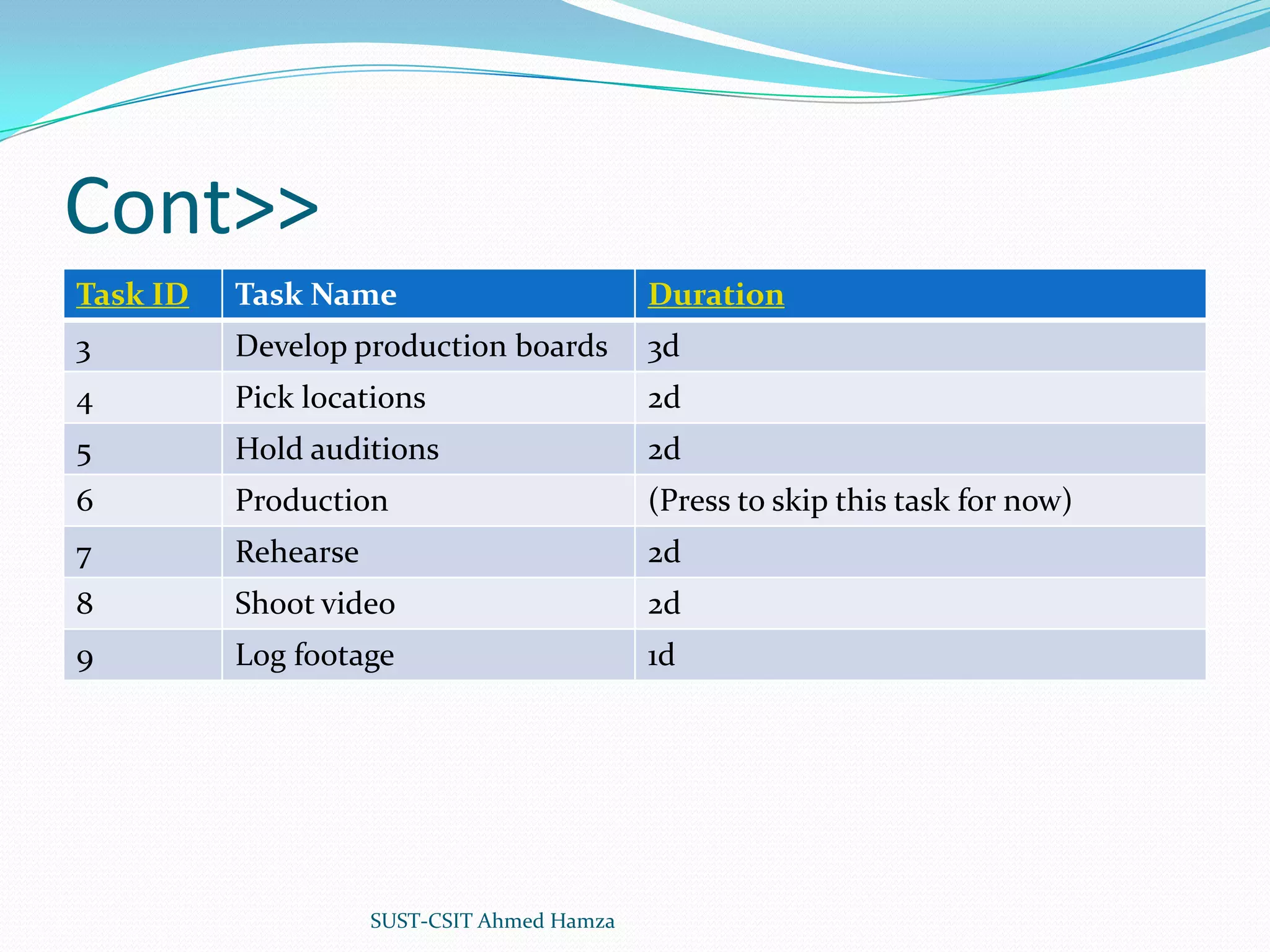
Cont>>Click the cell below the Duration column heading for task 2, Develop script.The Duration field for task 2 is selected. Type 5d, and then press EnterThe value 5 days appears in the Duration field.Enter the following durations for the remaining tasks.SUST-CSIT Ahmed Hamza
Cont>>SUST-CSIT Ahmed Hamza
You should consider two general rules when estimating task durationsOverall project duration often correlates to task duration; long projects tend to have tasks with longer durations than do tasks in short projectsIf you track progress against your project plan you must consider the level of detail you want to apply to your project’s tasks. If you have a multi-year project, for example, it might not be practical or even possible to track tasks that are measured in minutes or hoursSUST-CSIT Ahmed Hamza How Do You Come Up with Accurate Task Durations?
For your real-world projects, you will often estimate task durations. Good sources of task duration estimates include:Historical information from previous, similar projects.Estimates from the people who will complete the tasks.Expert judgment of those who have managed similar projects.Standards of professional or industrial organizations that undertake projects similar to yoursSUST-CSIT Ahmed Hamza Cont>>
For complex projects, you probably would combine these and other sources to estimate task durations. Because inaccurate task duration estimates are a major source of risk in any project, making good estimates is well worth the effort expendedSUST-CSIT Ahmed Hamza Cont>>
Organizing Tasks into PhasesIt is helpful to organize groups of closely related tasks that represent a major portion of the project’s work into phasesFor example, it is common to divide a film or video project into major phases of work such as pre-production, production, and post-productionIn Project, phases are represented by summary tasksA summary task behaves differently from other tasksYou can’t edit its duration, start date, or other calculated values directly because this information is derived or “rolled up” from the detail tasksSUST-CSIT Ahmed Hamza
The two most common approaches to developing tasks and phases are top-down and bottom-up planning.Top-down planning. Identifies major phases or products of the project before filling in the tasks required to complete those phases. Complex projects can have several layers of phases. This approach works from general to specific.Bottom-up planning. Identifies as many bottom-level detailed tasks as possible before organizing them into logical groups, called phases or summary tasks. This approach works from specific to general.SUST-CSIT Ahmed Hamza Top-Down and Bottom-Up Planning
Cont>>create two summary tasks by indenting tasksSelect the names of tasks 2 through 6.On the Project menu, point to Outline, and then click IndentNext, select the names of tasks 8 through 10.On the Project menu, point to Outline, and then click Indent.Task 7 becomes a summary task, and a summary task bar for it appears in the Gantt chart. SUST-CSIT Ahmed Hamza
Linking TasksProjects require tasks to be performed in a specific orderIf we have tow task that have a finish-to-start relationship (also called a link or dependency) that has two aspects:The second task must occur later than the first task; this is a sequence.The second task can occur only if the first task is completed; this is a dependency.SUST-CSIT Ahmed Hamza
Cont>>In Project, the first task (“film the scene”) is called the predecessor because it precedes tasks that depend on it. The second task (“edit the filmed scene”) is called the successor because it succeeds tasks on which it is dependent. Any task can be a predecessor for one or more successor tasks. Likewise, any task can be a successor to one or more predecessor tasksSUST-CSIT Ahmed Hamza
Cont>>You create task relationships by creating links between tasksFirst you’ll create a finish-to-start dependency between two tasks.Select the names of tasks 2 and 3.On the Edit menu, click Link Tasks.When working with summary tasks, you can either link summary tasks directly (as you did above) or link the latest task in the first phase with the earliest task in the second phaseSUST-CSIT Ahmed Hamza
Cont>>You can also create a finish-to-start relationship between tasks right in the Gantt chart. Point to the task bar of the predecessor task until the pointer changes to a four-pointed star. Then, drag the mouse pointer up or down to the task bar of the successor task. While you’re dragging the mouse pointer to create a taskSUST-CSIT Ahmed Hamza
Documenting TasksYou can record additional information about a task in a noteThere are three types of notes: task notes, resource notes, and assignment notesSelect the name of task 4, Pick locationsOn the Project menu, click Task Notes.In the Notes box, type Includes exterior street scene and indoor studio scenesSUST-CSIT Ahmed Hamza
Checking the Plan’s DurationAt this point, you might want to know how long the project is expected to take.You haven’t directly entered a total project duration or finish date, but Project has calculated these values based on individual task durations and task relationshipsAn easy way to view the project’s scheduled finish date is via the Project Information dialog box.SUST-CSIT Ahmed Hamza
Cont>>On the Project menu, click Project InformationSUST-CSIT Ahmed Hamza
Key PointsEssential aspects of tasks in a project plan include their duration and order of occurrence.Task links, or relationships, cause the start or end of one task to affect the start or end of another task. A common task relationship is a finish-to-start relationship in which the completion of one task controls the start of another task.In Project, phases of a schedule are represented as summary tasks.You can document additional details using task notes and create hyperlinks to the Internet.The Project Information dialog box (Project menu) is an excellent way to observe the key values of a project plan, such as its scheduled finish date and duration.SUST-CSIT Ahmed Hamza

Creating a task list

  • 1.
    Creating a TaskListSUST-CSIT Ahmed Hamza
  • 2.
    ObjectiveEnter task information.Estimateand enter how long each task should last.Create a milestone to track an important event.Organize tasks into phases.Create task relationships by linking tasks.Record task details in notes and insert a hyperlink to content on the Internet.Check a project plan’s overall duration.SUST-CSIT Ahmed Hamza
  • 3.
    Entering TasksTasks arethe most basic building blocks of any project-tasksTasks describe project work in terms of sequence, duration, and resource requirementsSUST-CSIT Ahmed Hamza
  • 4.
    How to EnterTaskIn the first cell directly below the Task Name column heading, type Pre-Production, and then press The task you entered is given an ID number. Each task has a unique ID number, but it does not necessarily represent the order in which tasks occur.Project assigns a duration of one day to the new taskthe question mark indicates that this is an estimated durationBy default, the task start date is the same as the project start dateSUST-CSIT Ahmed Hamza
  • 5.
    Cont>>Enter the followingtask names below the Pre-Production task name, pressing after Entereach task nameDevelop scriptDevelop production boardsPick locationsHold auditionsProductionRehearseShoot videoLog footageSUST-CSIT Ahmed Hamza
  • 6.
    Every project hasan ultimate goal or intent: the reason that the project was started.This is called the project deliverable. This deliverable is usually a productDefining the right tasks to create the right deliverable is an essential skill for a project managerThe task lists you create in Project should describe all of the work required, and only the work required, to complete the project successfullySUST-CSIT Ahmed Hamza Project Management Focus: Defining the Right Tasks for the Right Deliverable
  • 7.
    Estimating DurationsA task’sduration is the amount of time you expect it will take to complete the taskProject can work with task durations that range from minutes to monthsFor example, a project might have a project calendar with working time defined as 8 A.M. through 5 P.M. with a one-hour lunch break Monday through FridaySUST-CSIT Ahmed Hamza
  • 8.
    Cont>>you estimate thata task will take 16 hours of working time, you could enter its duration as 2d to schedule work over two eight-hour workdays. By starting the task at 8 A.M. on a Thursday, you should then expect that it wouldn’t be completed until 5 P.M. on the following Sunday. No work would be scheduled over the weekend because Friday and Saturday have been defined as nonworking time.SUST-CSIT Ahmed Hamza
  • 9.
    TipYou determine theoverall duration of a project by calculating the difference between the earliest start date and the latest finish date of the tasks that compose it.SUST-CSIT Ahmed Hamza
  • 10.
    Cont>>Click the cellbelow the Duration column heading for task 2, Develop script.The Duration field for task 2 is selected. Type 5d, and then press EnterThe value 5 days appears in the Duration field.Enter the following durations for the remaining tasks.SUST-CSIT Ahmed Hamza
  • 11.
  • 12.
    You should considertwo general rules when estimating task durationsOverall project duration often correlates to task duration; long projects tend to have tasks with longer durations than do tasks in short projectsIf you track progress against your project plan you must consider the level of detail you want to apply to your project’s tasks. If you have a multi-year project, for example, it might not be practical or even possible to track tasks that are measured in minutes or hoursSUST-CSIT Ahmed Hamza How Do You Come Up with Accurate Task Durations?
  • 13.
    For your real-worldprojects, you will often estimate task durations. Good sources of task duration estimates include:Historical information from previous, similar projects.Estimates from the people who will complete the tasks.Expert judgment of those who have managed similar projects.Standards of professional or industrial organizations that undertake projects similar to yoursSUST-CSIT Ahmed Hamza Cont>>
  • 14.
    For complex projects,you probably would combine these and other sources to estimate task durations. Because inaccurate task duration estimates are a major source of risk in any project, making good estimates is well worth the effort expendedSUST-CSIT Ahmed Hamza Cont>>
  • 15.
    Organizing Tasks intoPhasesIt is helpful to organize groups of closely related tasks that represent a major portion of the project’s work into phasesFor example, it is common to divide a film or video project into major phases of work such as pre-production, production, and post-productionIn Project, phases are represented by summary tasksA summary task behaves differently from other tasksYou can’t edit its duration, start date, or other calculated values directly because this information is derived or “rolled up” from the detail tasksSUST-CSIT Ahmed Hamza
  • 16.
    The two mostcommon approaches to developing tasks and phases are top-down and bottom-up planning.Top-down planning. Identifies major phases or products of the project before filling in the tasks required to complete those phases. Complex projects can have several layers of phases. This approach works from general to specific.Bottom-up planning. Identifies as many bottom-level detailed tasks as possible before organizing them into logical groups, called phases or summary tasks. This approach works from specific to general.SUST-CSIT Ahmed Hamza Top-Down and Bottom-Up Planning
  • 17.
    Cont>>create two summarytasks by indenting tasksSelect the names of tasks 2 through 6.On the Project menu, point to Outline, and then click IndentNext, select the names of tasks 8 through 10.On the Project menu, point to Outline, and then click Indent.Task 7 becomes a summary task, and a summary task bar for it appears in the Gantt chart. SUST-CSIT Ahmed Hamza
  • 18.
    Linking TasksProjects requiretasks to be performed in a specific orderIf we have tow task that have a finish-to-start relationship (also called a link or dependency) that has two aspects:The second task must occur later than the first task; this is a sequence.The second task can occur only if the first task is completed; this is a dependency.SUST-CSIT Ahmed Hamza
  • 19.
    Cont>>In Project, thefirst task (“film the scene”) is called the predecessor because it precedes tasks that depend on it. The second task (“edit the filmed scene”) is called the successor because it succeeds tasks on which it is dependent. Any task can be a predecessor for one or more successor tasks. Likewise, any task can be a successor to one or more predecessor tasksSUST-CSIT Ahmed Hamza
  • 20.
    Cont>>You create taskrelationships by creating links between tasksFirst you’ll create a finish-to-start dependency between two tasks.Select the names of tasks 2 and 3.On the Edit menu, click Link Tasks.When working with summary tasks, you can either link summary tasks directly (as you did above) or link the latest task in the first phase with the earliest task in the second phaseSUST-CSIT Ahmed Hamza
  • 21.
    Cont>>You can alsocreate a finish-to-start relationship between tasks right in the Gantt chart. Point to the task bar of the predecessor task until the pointer changes to a four-pointed star. Then, drag the mouse pointer up or down to the task bar of the successor task. While you’re dragging the mouse pointer to create a taskSUST-CSIT Ahmed Hamza
  • 22.
    Documenting TasksYou canrecord additional information about a task in a noteThere are three types of notes: task notes, resource notes, and assignment notesSelect the name of task 4, Pick locationsOn the Project menu, click Task Notes.In the Notes box, type Includes exterior street scene and indoor studio scenesSUST-CSIT Ahmed Hamza
  • 23.
    Checking the Plan’sDurationAt this point, you might want to know how long the project is expected to take.You haven’t directly entered a total project duration or finish date, but Project has calculated these values based on individual task durations and task relationshipsAn easy way to view the project’s scheduled finish date is via the Project Information dialog box.SUST-CSIT Ahmed Hamza
  • 24.
    Cont>>On the Projectmenu, click Project InformationSUST-CSIT Ahmed Hamza
  • 25.
    Key PointsEssential aspectsof tasks in a project plan include their duration and order of occurrence.Task links, or relationships, cause the start or end of one task to affect the start or end of another task. A common task relationship is a finish-to-start relationship in which the completion of one task controls the start of another task.In Project, phases of a schedule are represented as summary tasks.You can document additional details using task notes and create hyperlinks to the Internet.The Project Information dialog box (Project menu) is an excellent way to observe the key values of a project plan, such as its scheduled finish date and duration.SUST-CSIT Ahmed Hamza