CPU and Software
Yong Heui Cho @ Mokwon University
Some of slides are referred to:
[1] Software, slideshare.
Basic Computer Design
9. AVR CPU – ATmega328
10. Role of CPU
11. CPU and Software
12. Analog and Digital I/O
3
Machine vs. Software
3
• When a computer is using a particular program,
it is said to be running or executing that program.
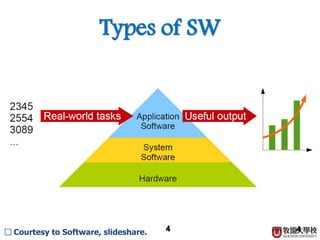
• Two major categories of software
– System software, i.e., Operating System (OS)
– Application software
□ Courtesy to Software, slideshare.
4
Types of SW
4□ Courtesy to Software, slideshare.
5
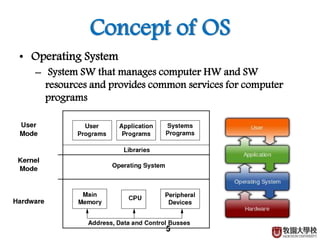
Concept of OS
• Operating System
– System SW that manages computer HW and SW
resources and provides common services for computer
programs
6
Why OS?
• Requirements of OS
– OS must shield the details of the HW from the application
programs, and thus from the user.
– OS has to substitute a set of abstract services to the application
programs, to replace the physical HW services. When applications
use these abstract services, the operations must be translated into
real HW operations.
– OS must act as a resource manager, optimizing the use of the
resources, and protecting them against misuse and abuse. When a
system provides multiuser or multitasking capabilities, resources
must be allocated fairly and equitably amongst a number of
competing requests.
7
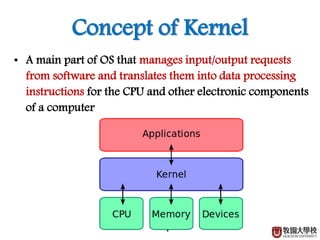
Concept of Kernel
• A main part of OS that manages input/output requests
from software and translates them into data processing
instructions for the CPU and other electronic components
of a computer
8
Application SW
• Application software is a program that help people
accomplish specific tasks.
• Thousands of application are available; however
• some major categories that likely to be encounter
• are:
– Word processors
– Spreadsheets
– Database management software (DBMS)
– Multimedia, graphics and presentations
– Utilities
– Communications
8□ Courtesy to Software, slideshare.
Binary System
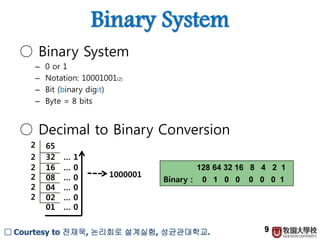
○ Binary System
– 0 or 1
– Notation: 10001001(2)
– Bit (binary digit)
– Byte = 8 bits
○ Decimal to Binary Conversion
9
652
32 … 1
16 … 0
08 … 0
04 … 0
02 … 0
01 … 0
2
2
2
2
2
1000001
128 64 32 16 8 4 2 1
0 1 0 0 0 0 0 1Binary :
□ Courtesy to 전재욱, 논리회로 설계실험, 성균관대학교.
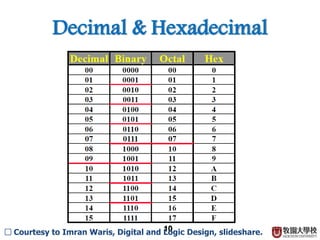
Decimal & Hexadecimal
10□ Courtesy to Imran Waris, Digital and Logic Design, slideshare.
ASCII Code
• The American National Standard Institute (ANSI) solution
to represent the symbols with bits of data was the ASCII
character set.
• ASCII = American Standard Code for Information
Interchange
• Today ASCII is the most common character set
• used.
• ASCII was the seven bits code, now the eight bits code.
• The ISO (International Standard Organization) standard
expanded on the ASCII character set, to offer different sets
of characters for different language group.
11
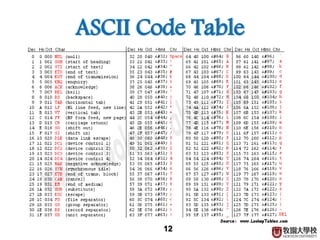
ASCII Code Table
12
Unicode
• Unicode Worldwide Character Standard
represents each symbol by one - four bytes.
• With two bytes, a Unicode character can be any
one of more than 65,536 different characters or
symbols.
• Many software publishers, including Microsoft,
encourage their developers to use Unicode in
their programs.
13
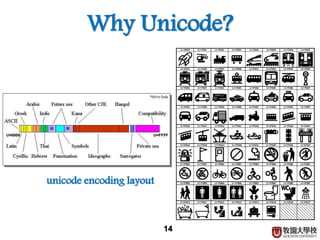
Why Unicode?
14
unicode encoding layout

CPU and Software

  • 1.
    CPU and Software YongHeui Cho @ Mokwon University Some of slides are referred to: [1] Software, slideshare.
  • 2.
    Basic Computer Design 9.AVR CPU – ATmega328 10. Role of CPU 11. CPU and Software 12. Analog and Digital I/O
  • 3.
    3 Machine vs. Software 3 •When a computer is using a particular program, it is said to be running or executing that program. • Two major categories of software – System software, i.e., Operating System (OS) – Application software □ Courtesy to Software, slideshare.
  • 4.
    4 Types of SW 4□Courtesy to Software, slideshare.
  • 5.
    5 Concept of OS •Operating System – System SW that manages computer HW and SW resources and provides common services for computer programs
  • 6.
    6 Why OS? • Requirementsof OS – OS must shield the details of the HW from the application programs, and thus from the user. – OS has to substitute a set of abstract services to the application programs, to replace the physical HW services. When applications use these abstract services, the operations must be translated into real HW operations. – OS must act as a resource manager, optimizing the use of the resources, and protecting them against misuse and abuse. When a system provides multiuser or multitasking capabilities, resources must be allocated fairly and equitably amongst a number of competing requests.
  • 7.
    7 Concept of Kernel •A main part of OS that manages input/output requests from software and translates them into data processing instructions for the CPU and other electronic components of a computer
  • 8.
    8 Application SW • Applicationsoftware is a program that help people accomplish specific tasks. • Thousands of application are available; however • some major categories that likely to be encounter • are: – Word processors – Spreadsheets – Database management software (DBMS) – Multimedia, graphics and presentations – Utilities – Communications 8□ Courtesy to Software, slideshare.
  • 9.
    Binary System ○ BinarySystem – 0 or 1 – Notation: 10001001(2) – Bit (binary digit) – Byte = 8 bits ○ Decimal to Binary Conversion 9 652 32 … 1 16 … 0 08 … 0 04 … 0 02 … 0 01 … 0 2 2 2 2 2 1000001 128 64 32 16 8 4 2 1 0 1 0 0 0 0 0 1Binary : □ Courtesy to 전재욱, 논리회로 설계실험, 성균관대학교.
  • 10.
    Decimal & Hexadecimal 10□Courtesy to Imran Waris, Digital and Logic Design, slideshare.
  • 11.
    ASCII Code • TheAmerican National Standard Institute (ANSI) solution to represent the symbols with bits of data was the ASCII character set. • ASCII = American Standard Code for Information Interchange • Today ASCII is the most common character set • used. • ASCII was the seven bits code, now the eight bits code. • The ISO (International Standard Organization) standard expanded on the ASCII character set, to offer different sets of characters for different language group. 11
  • 12.
  • 13.
    Unicode • Unicode WorldwideCharacter Standard represents each symbol by one - four bytes. • With two bytes, a Unicode character can be any one of more than 65,536 different characters or symbols. • Many software publishers, including Microsoft, encourage their developers to use Unicode in their programs. 13
  • 14.