1
2018 Mid-term Examination(100)
Architecting Smart Devices
Date: 2018-10-23
1. 여러 업체들이 경쟁적으로 출시하고 있는 smart speaker의 유용성(장점)을 3가지 이
상 서술하시오. (15)
- UI(User Interface)가 voice UI이므로 특별한 사용법 공부 필요없이 대화하듯이 speaker
에게 지시할 수 있다.
- Smart speaker는 기본적으로 speaker이므로 여러 종류의 음성 생성이 가능하다.
- 음성 인식을 위해 사용하는 AI는 다른 장치 제어 용도로 변경되어 사용할 수 있다.
- Smart speaker는 smart home hub로 작동해 가정에 있는 다양한 전자기기를 지능적으
로 제어할 수 있다.
- Smart speaker는 개인 비서로 작동할 수 있다.
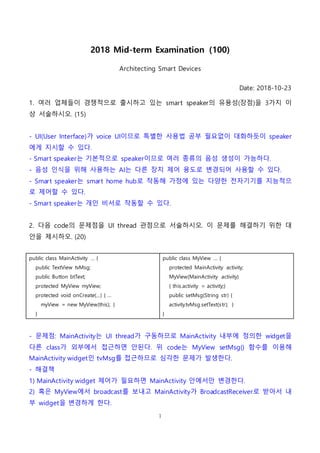
2. 다음 code의 문제점을 UI thread 관점으로 서술하시오. 이 문제를 해결하기 위한 대
안을 제시하오. (20)
public class MainActivity … {
public TextView tvMsg;
public Button btText;
protected MyView myView;
protected void onCreate(…) { …
myView = new MyView(this); }
}
public class MyView … {
protected MainActivity activity;
MyView(MainActivity activity)
{ this.activity = activity;}
public setMsg(String str) {
activity.tvMsg.setText(str); }
}
- 문제점: MainActivity는 UI thread가 구동하므로 MainActivity 내부에 정의한 widget을
다른 class가 외부에서 접근하면 안된다. 위 code는 MyView setMsg() 함수를 이용해
MainActivity widget인 tvMsg를 접근하므로 심각한 문제가 발생한다.
- 해결책
1) MainActivity widget 제어가 필요하면 MainActivity 안에서만 변경한다.
2) 혹은 MyView에서 broadcast를 보내고 MainActivity가 BroadcastReceiver로 받아서 내
부 widget을 변경하게 한다.
2.
2
3) 변경하고 싶은widget에 있는 post() 함수를 이용해 MainActivity로 Runnable을 보낸
다.
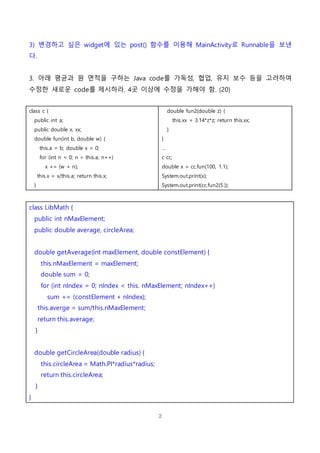
3. 아래 평균과 원 면적을 구하는 Java code를 가독성, 협업, 유지 보수 등을 고려하여
수정한 새로운 code를 제시하라. 4곳 이상에 수정을 가해야 함. (20)
class c {
public int a;
public double x, xx;
double fun(int b, double w) {
this.a = b; double x = 0;
for (int n = 0; n < this.a; n++)
x += (w + n);
this.x = x/this.a; return this.x;
}
double fun2(double z) {
this.xx = 3.14*z*z; return this.xx;
}
}
…
c cc;
double x = cc.fun(100, 1.1);
System.out.print(x);
System.out.print(cc.fun2(5.));
class LibMath {
public int nMaxElement;
public double average, circleArea;
double getAverage(int maxElement, double constElement) {
this.nMaxElement = maxElement;
double sum = 0;
for (int nIndex = 0; nIndex < this. nMaxElement; nIndex++)
sum += (constElement + nIndex);
this.averge = sum/this.nMaxElement;
return this.average;
}
double getCircleArea(double radius) {
this.circleArea = Math.PI*radius*radius;
return this.circleArea;
}
}
3.
3
…
LibMath libMath;
int nMaxElement= 100;
double constElement = 1.1;
double radius = 5.;
double average = libMath.getAverage(nMaxElement, constElement);
double circleArea = libMath.getCircleArea(radius);
System.out.print(average);
System.out.print(circleArea);
4. 특정 Button을 누르면 아래 기능을 실행하는 Android code를 함수로 제시하라. Code
는 최대한 짧게. Code에 사용하는 EditText, TextView, Button은 이미 잘 초기화됨. (45)
- 함수 정의: 입력, 출력, 함수명 반드시 표시 – 예) double fun(double x) { … }
- 함수 실행 예 작성 – 예) double ans = fun(1.2);
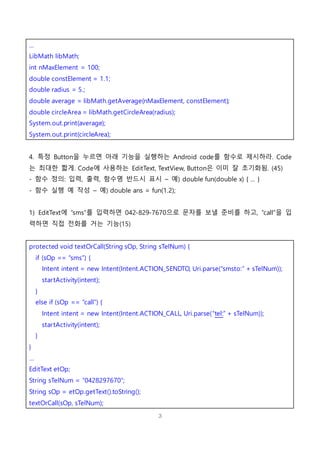
1) EditText에 “sms”를 입력하면 042-829-7670으로 문자를 보낼 준비를 하고, “call”을 입
력하면 직접 전화를 거는 기능(15)
protected void textOrCall(String sOp, String sTelNum) {
if (sOp == “sms”) {
Intent intent = new Intent(Intent.ACTION_SENDTO, Uri.parse(“smsto:” + sTelNum));
startActivity(intent);
}
else if (sOp == “call”) {
Intent intent = new Intent(Intent.ACTION_CALL, Uri.parse(“tel:” + sTelNum));
startActivity(intent);
}
}
…
EditText etOp;
String sTelNum = “0428297670”;
String sOp = etOp.getText().toString();
textOrCall(sOp, sTelNum);
4.
4
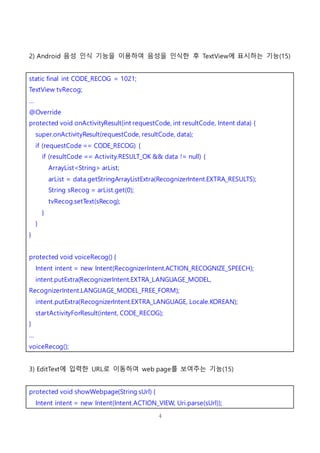
2) Android 음성인식 기능을 이용하여 음성을 인식한 후 TextView에 표시하는 기능(15)
static final int CODE_RECOG = 1021;
TextView tvRecog;
…
@Override
protected void onActivityResult(int requestCode, int resultCode, Intent data) {
super.onActivityResult(requestCode, resultCode, data);
if (requestCode == CODE_RECOG) {
if (resultCode == Activity.RESULT_OK && data != null) {
ArrayList<String> arList;
arList = data.getStringArrayListExtra(RecognizerIntent.EXTRA_RESULTS);
String sRecog = arList.get(0);
tvRecog.setText(sRecog);
}
}
}
protected void voiceRecog() {
Intent intent = new Intent(RecognizerIntent.ACTION_RECOGNIZE_SPEECH);
intent.putExtra(RecognizerIntent.EXTRA_LANGUAGE_MODEL,
RecognizerIntent.LANGUAGE_MODEL_FREE_FORM);
intent.putExtra(RecognizerIntent.EXTRA_LANGUAGE, Locale.KOREAN);
startActivityForResult(intent, CODE_RECOG);
}
…
voiceRecog();
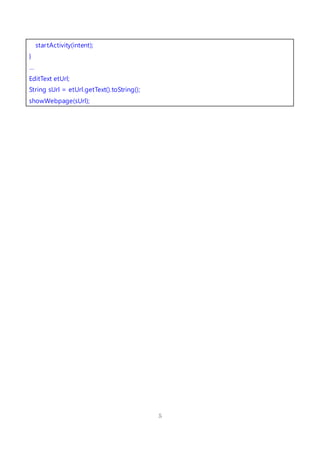
3) EditText에 입력한 URL로 이동하여 web page를 보여주는 기능(15)
protected void showWebpage(String sUrl) {
Intent intent = new Intent(Intent.ACTION_VIEW, Uri.parse(sUrl));


![[신경망기초] 퍼셉트론구현](https://cdn.slidesharecdn.com/ss_thumbnails/1-180604135609-thumbnail.jpg?width=640&height=640&fit=bounds)


![[신경망기초] 선형회귀분석](https://cdn.slidesharecdn.com/ss_thumbnails/nn07-180318142107-thumbnail.jpg?width=640&height=640&fit=bounds)


![[신경망기초] 신경망의시작-퍼셉트론](https://cdn.slidesharecdn.com/ss_thumbnails/nn02-180318141341-thumbnail.jpg?width=640&height=640&fit=bounds)


![[방송통신대 컴퓨터과학과] 2020년 1학기 전공 모바일 앱 프로그래밍 기말평가 제출본](https://cdn.slidesharecdn.com/ss_thumbnails/2-200717105739-thumbnail.jpg?width=640&height=640&fit=bounds)


![[방송통신대 컴퓨터과학과] 2020년 1학기 전공 모바일 앱 프로그래밍 과제물 제출본](https://cdn.slidesharecdn.com/ss_thumbnails/2-200716160026-thumbnail.jpg?width=640&height=640&fit=bounds)


