Computer Science with Python (083)
Class XI
Dr. Sunil Vats, PGT Computer Science
Computer Science with Python (083)
Class XI
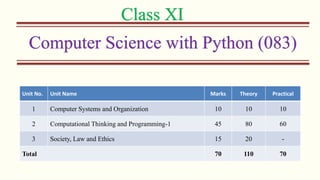
Unit No. Unit Name Marks Theory Practical
1 Computer Systems and Organization 10 10 10
2 Computational Thinking and Programming-1 45 80 60
3 Society, Law and Ethics 15 20 -
Total 70 110 70
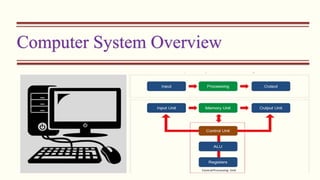
Computer System Overview
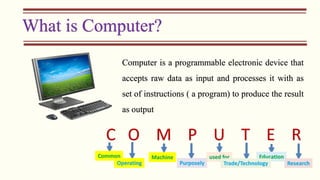
What is Computer?
Computer is a programmable electronic device that
accepts raw data as input and processes it with as
set of instructions ( a program) to produce the result
as output
C O M P U T E R
Common
Operating
Machine used for Education
Purposely Trade/Technology Research
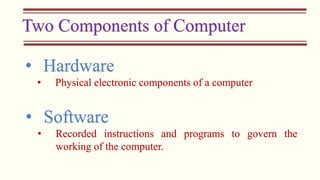
Two Components of Computer
• Hardware
• Physical electronic components of a computer
• Software
• Recorded instructions and programs to govern the
working of the computer.
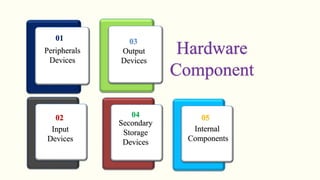
Peripherals
Devices
Input
Devices
Output
Devices
Secondary
Storage
Devices
Internal
Components
01
02
03
04 05
Hardware
Component
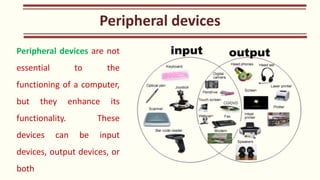
Peripheral devices are not
essential to the
functioning of a computer,
but they enhance its
functionality. These
devices can be input
devices, output devices, or
both
Peripheral devices
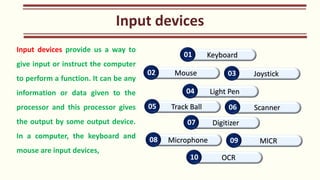
Input devices provide us a way to
give input or instruct the computer
to perform a function. It can be any
information or data given to the
processor and this processor gives
the output by some output device.
In a computer, the keyboard and
mouse are input devices,
Input devices
Keyboard
01
Mouse
02 Joystick
03
Track Ball
05 Scanner
06
Light Pen
04
Digitizer
07
Microphone
08 MICR
09
OCR
10
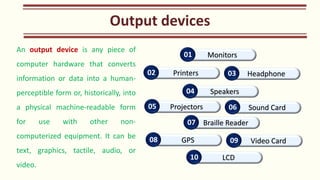
An output device is any piece of
computer hardware that converts
information or data into a human-
perceptible form or, historically, into
a physical machine-readable form
for use with other non-
computerized equipment. It can be
text, graphics, tactile, audio, or
video.
Output devices
Monitors
01
Printers
02 Headphone
03
Projectors
05 Sound Card
06
Speakers
04
Braille Reader
07
GPS
08 Video Card
09
LCD
10
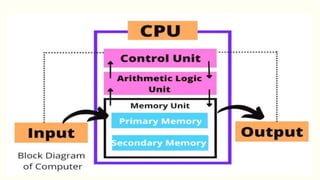
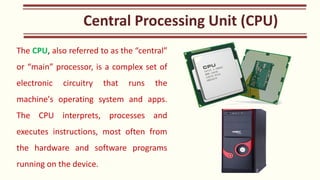
The CPU, also referred to as the “central”
or “main” processor, is a complex set of
electronic circuitry that runs the
machine's operating system and apps.
The CPU interprets, processes and
executes instructions, most often from
the hardware and software programs
running on the device.
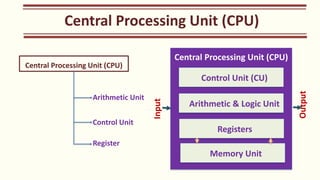
Central Processing Unit (CPU)
Arithmetic Unit
Control Unit
Register
Central Processing Unit (CPU)
Control Unit (CU)
Arithmetic & Logic Unit
Registers
Memory Unit
Input
Output
ALU
Control Unit (CU)
Arithmetic & Logic Unit
Registers
Memory Unit
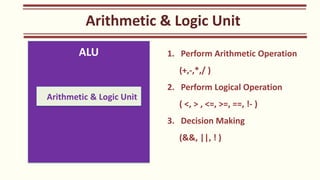
1. Perform Arithmetic Operation
(+,-,*,/ )
2. Perform Logical Operation
( <, > , <=, >=, ==, !- )
3. Decision Making
(&&, ||, ! )
Arithmetic & Logic Unit
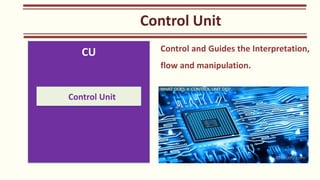
CU
Control Unit
Control and Guides the Interpretation,
flow and manipulation.
Control Unit
Registers
Registers
• Small Units of Data Holding Places
located near the processor.
• Used to store some important
instructions and important data when
CPU is running some program
• Frequently used Instruction/Memory
is stored in Registers and rest of the
instructions/Data is stored in Cache,
RAM etc.
Registers
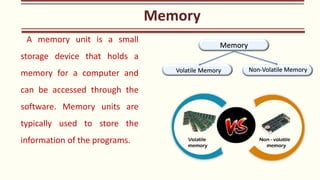
A memory unit is a small
storage device that holds a
memory for a computer and
can be accessed through the
software. Memory units are
typically used to store the
information of the programs.
Memory
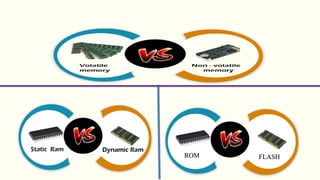
Volatile Memory Non-Volatile Memory
Memory
ROM FLASH
Computer
Memory
Primary
Memory
RAM
SRAM
DRAM
ROM
PROM
EPROM
EEPROM
Secondary
Memory
Sequential
Magnetic
Tape
Gramophone
Random
Magnetic
Disk
Hard Disk
Floppy
Disk
Optical
Disk
CD
DVD
Flash
memory
Pen Drive
Memory
Card
Computer Memory
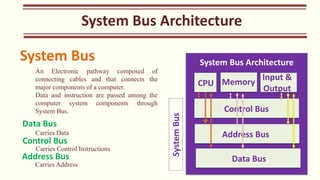
System Bus Architecture
CPU
Control Bus
Address Bus
Data Bus
Memory
Input &
Output
System
Bus
System Bus
An Electronic pathway composed of
connecting cables and that connects the
major components of a computer.
Data and instruction are passed among the
computer system components through
System Bus.
Data Bus
Carries Data
Control Bus
Carries Control Instructions
Address Bus
Carries Address
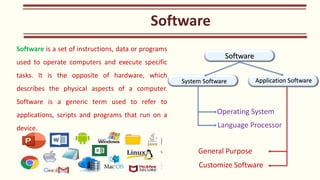
Software is a set of instructions, data or programs
used to operate computers and execute specific
tasks. It is the opposite of hardware, which
describes the physical aspects of a computer.
Software is a generic term used to refer to
applications, scripts and programs that run on a
device.
Software
Software
System Software Application Software
Operating System
Language Processor
General Purpose
Customize Software
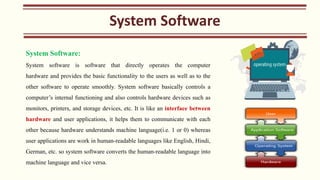
System Software:
System software is software that directly operates the computer
hardware and provides the basic functionality to the users as well as to the
other software to operate smoothly. System software basically controls a
computer’s internal functioning and also controls hardware devices such as
monitors, printers, and storage devices, etc. It is like an interface between
hardware and user applications, it helps them to communicate with each
other because hardware understands machine language(i.e. 1 or 0) whereas
user applications are work in human-readable languages like English, Hindi,
German, etc. so system software converts the human-readable language into
machine language and vice versa.
System Software
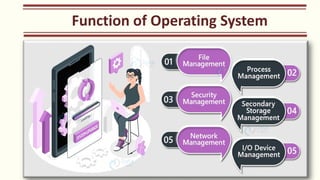
Function of Operating System
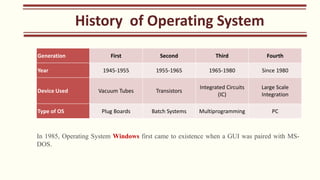
Generation First Second Third Fourth
Year 1945-1955 1955-1965 1965-1980 Since 1980
Device Used Vacuum Tubes Transistors
Integrated Circuits
(IC)
Large Scale
Integration
Type of OS Plug Boards Batch Systems Multiprogramming PC
In 1985, Operating System Windows first came to existence when a GUI was paired with MS-
DOS.
History of Operating System
Type of Operating System
Batch Processing Operating System
Similar types of jobs are grouped together under a batch
which is executed without any user intervention. The jobs are there
in process in the order of submission.
Multitasking or Time Sharing Operating System
Allows many users to share the computer’s resources
simultaneously. It also reduces the CPU idle time.
Distributed Operating System
This operating system uses multiple central processes to serve
many real-time applications. The distributed operating system
manages a group of independent systems and projects them to a
single system.
Network Operating System
It runs on a server and helps manage data and other networking
functions in a system.
Real-time Operating System
Aims to execute real-time applications. The user intervention is
bare minimum and it is a time-bound operating system.
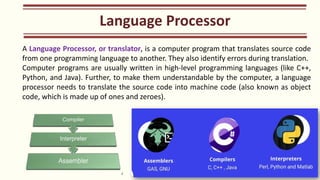
Language Processor
A Language Processor, or translator, is a computer program that translates source code
from one programming language to another. They also identify errors during translation.
Computer programs are usually written in high-level programming languages (like C++,
Python, and Java). Further, to make them understandable by the computer, a language
processor needs to translate the source code into machine code (also known as object
code, which is made up of ones and zeroes).

Chapter-1 || Computer Overview || Class XI || 2024 ||

  • 1.
    Computer Science withPython (083) Class XI Dr. Sunil Vats, PGT Computer Science
  • 2.
    Computer Science withPython (083) Class XI Unit No. Unit Name Marks Theory Practical 1 Computer Systems and Organization 10 10 10 2 Computational Thinking and Programming-1 45 80 60 3 Society, Law and Ethics 15 20 - Total 70 110 70
  • 3.
  • 4.
    What is Computer? Computeris a programmable electronic device that accepts raw data as input and processes it with as set of instructions ( a program) to produce the result as output C O M P U T E R Common Operating Machine used for Education Purposely Trade/Technology Research
  • 6.
    Two Components ofComputer • Hardware • Physical electronic components of a computer • Software • Recorded instructions and programs to govern the working of the computer.
  • 7.
  • 8.
    Peripheral devices arenot essential to the functioning of a computer, but they enhance its functionality. These devices can be input devices, output devices, or both Peripheral devices
  • 9.
    Input devices provideus a way to give input or instruct the computer to perform a function. It can be any information or data given to the processor and this processor gives the output by some output device. In a computer, the keyboard and mouse are input devices, Input devices Keyboard 01 Mouse 02 Joystick 03 Track Ball 05 Scanner 06 Light Pen 04 Digitizer 07 Microphone 08 MICR 09 OCR 10
  • 10.
    An output deviceis any piece of computer hardware that converts information or data into a human- perceptible form or, historically, into a physical machine-readable form for use with other non- computerized equipment. It can be text, graphics, tactile, audio, or video. Output devices Monitors 01 Printers 02 Headphone 03 Projectors 05 Sound Card 06 Speakers 04 Braille Reader 07 GPS 08 Video Card 09 LCD 10
  • 11.
    The CPU, alsoreferred to as the “central” or “main” processor, is a complex set of electronic circuitry that runs the machine's operating system and apps. The CPU interprets, processes and executes instructions, most often from the hardware and software programs running on the device. Central Processing Unit (CPU)
  • 12.
    Central Processing Unit(CPU) Central Processing Unit (CPU) Arithmetic Unit Control Unit Register Central Processing Unit (CPU) Control Unit (CU) Arithmetic & Logic Unit Registers Memory Unit Input Output
  • 13.
    ALU Control Unit (CU) Arithmetic& Logic Unit Registers Memory Unit 1. Perform Arithmetic Operation (+,-,*,/ ) 2. Perform Logical Operation ( <, > , <=, >=, ==, !- ) 3. Decision Making (&&, ||, ! ) Arithmetic & Logic Unit
  • 14.
    CU Control Unit Control andGuides the Interpretation, flow and manipulation. Control Unit
  • 15.
    Registers Registers • Small Unitsof Data Holding Places located near the processor. • Used to store some important instructions and important data when CPU is running some program • Frequently used Instruction/Memory is stored in Registers and rest of the instructions/Data is stored in Cache, RAM etc. Registers
  • 16.
    A memory unitis a small storage device that holds a memory for a computer and can be accessed through the software. Memory units are typically used to store the information of the programs. Memory Volatile Memory Non-Volatile Memory Memory
  • 17.
  • 18.
  • 20.
    System Bus Architecture SystemBus Architecture CPU Control Bus Address Bus Data Bus Memory Input & Output System Bus System Bus An Electronic pathway composed of connecting cables and that connects the major components of a computer. Data and instruction are passed among the computer system components through System Bus. Data Bus Carries Data Control Bus Carries Control Instructions Address Bus Carries Address
  • 21.
    Software is aset of instructions, data or programs used to operate computers and execute specific tasks. It is the opposite of hardware, which describes the physical aspects of a computer. Software is a generic term used to refer to applications, scripts and programs that run on a device. Software Software System Software Application Software Operating System Language Processor General Purpose Customize Software
  • 22.
    System Software: System softwareis software that directly operates the computer hardware and provides the basic functionality to the users as well as to the other software to operate smoothly. System software basically controls a computer’s internal functioning and also controls hardware devices such as monitors, printers, and storage devices, etc. It is like an interface between hardware and user applications, it helps them to communicate with each other because hardware understands machine language(i.e. 1 or 0) whereas user applications are work in human-readable languages like English, Hindi, German, etc. so system software converts the human-readable language into machine language and vice versa. System Software
  • 23.
  • 24.
    Generation First SecondThird Fourth Year 1945-1955 1955-1965 1965-1980 Since 1980 Device Used Vacuum Tubes Transistors Integrated Circuits (IC) Large Scale Integration Type of OS Plug Boards Batch Systems Multiprogramming PC In 1985, Operating System Windows first came to existence when a GUI was paired with MS- DOS. History of Operating System
  • 25.
    Type of OperatingSystem Batch Processing Operating System Similar types of jobs are grouped together under a batch which is executed without any user intervention. The jobs are there in process in the order of submission. Multitasking or Time Sharing Operating System Allows many users to share the computer’s resources simultaneously. It also reduces the CPU idle time. Distributed Operating System This operating system uses multiple central processes to serve many real-time applications. The distributed operating system manages a group of independent systems and projects them to a single system. Network Operating System It runs on a server and helps manage data and other networking functions in a system. Real-time Operating System Aims to execute real-time applications. The user intervention is bare minimum and it is a time-bound operating system.
  • 26.
    Language Processor A LanguageProcessor, or translator, is a computer program that translates source code from one programming language to another. They also identify errors during translation. Computer programs are usually written in high-level programming languages (like C++, Python, and Java). Further, to make them understandable by the computer, a language processor needs to translate the source code into machine code (also known as object code, which is made up of ones and zeroes).