Introduction to digital
computers and
Number systems
Content
Computer system
Computer Architecture
Decimal Number System
Number System Conversion
ASCII,
ISCII,
Unicode
Introduction to programming
Problem-solving and expression of solution through flow chart and algorithm,
Parts of a computer program
Intel® C/C++ compiler vs GCC C vs C++
C++ fundamentals
Computer system
A computer system is an integrated form of different components that work together to give a
desirable result.
It has different components and each works for a specific purpose; however, they generate a
common result as required by the user.
Components of Computer System
Hardware
Software
Humanware
Firmware
Bridgeware
Hardware
The physical components collectively form the hardware of a computer system. Hardware comprises
the equipment that helps in the working system of the computer.
Monitor − It displays (visual) the result.
CPU − It is the Central Processing Unit that controls the computer’s functions and transmits data.
Motherboard − It is mainly accountable to establish communication between components and
transmission of information.
RAM − It is the Random Access Memory and is responsible for the storage of programs that are
currently running and also stores data temporarily.
Hard Disk Drive − It is a permanent memory storage device.
Floppy Disk Drive − It is hardly being used in recent times.
Optical disks − It is a device that also stores data. For example, CDs, DVDs, etc.
Input & Output Device
The following table categorically lists down the input and output device −
Software
The hardware components can only function when software components are added to the computer
system. Software is a program that performs different commands given by a user.
Software is an intangible part of hardware and controls the sequence of operations.
Types of Software
Depending on the basic features and functionality, the software can be categorized as −
Operating Systems (OS)
Application Software (AS)
E-accessibility Software
Operating System
This software helps to load the basic program automatically as soon as the computer is started.
Following are the major types of operating system −
Application Software
The software, which can be used on an installed operating system, is known as application software.
Following are the significant examples of application software −
E-accessibility Software
The E-accessibility software components additional facilities to users such as −
Voice recognition software
Screen reader
Magnifying tool
On-screen keyboard
Video games
Learning software, etc.
Computer architecture
Computer architecture can be defined as a set of rules and methods that describe the functionality,
management, and implementation of computers.
Computer Architecture can be divided into mainly three categories, which are as follows −
Instruction set Architecture or ISA − Whenever an instruction is given to the processor, its role is
to read and act accordingly. It allocates memory to instructions and also acts upon memory address
mode (Direct Addressing mode or Indirect Addressing mode).
Micro Architecture − It describes how a particular processor will handle and implement
instructions from ISA.
System design − It includes the other entire hardware component within the system such as
virtualization and multiprocessing.
Structure of Computer Architecture
Generally, computer architecture consists of the
following −
Processor
Memory
Peripherals
All the above parts are connected with the help of
system bus, which consists of address bus, data bus
and control bus.
Number System
Number system is important from the viewpoint of understanding how data are represented before
they can be processed by any digital system including a digital computer.
1. Decimal Number System
2. Binary Number System
3. Octal Number System
4. Hexa Decimal Number System
Decimal Number System
The number system that we use in our day-to-day life is the decimal number system.
Decimal number system has base 10 as it uses 10 digits from 0 to 9.
In the decimal number system, the successive positions to the left of the decimal point represent
units, tens, hundreds, thousands, and so on.
Each position represents a specific power of the base (10). For example, the decimal number 1234
consists of the digit 4 in the units position, 3 in the tens position, 2 in the hundreds position, and 1
in the thousands position. Its value can be written as:
Binary Number System
A binary number system represents a number in terms of only two digits, i.e., 0 (zero) and 1 (one).
In the word “binary”, “bi” means “two”.
The base-2 numeral system is used to represent binary numbers. For example, (1101)2 is a binary
number where 2 is the radix. Each digit in the binary number system is said to be a “bit”.
All inputs given to a computer are decoded by it into a series of 0’s or 1’s before being processed
further since a computer can only understand binary information.
Decimal to Binary Conversion
A decimal number is converted into a binary number by dividing the given decimal number by 2
continuously until we get the quotient as 1, and we write the numbers from downwards to upwards.
Example: Convert (28)10 into a binary number.
Binary to Decimal Conversion
A binary number is converted into a decimal number by multiplying each digit of the binary number
by the power of either 1 or 0 to the corresponding power of 2.
Let us consider that a binary number has n digits, B = an-1…a3a2a1a0. Now, the corresponding
decimal number is given as D= (an-1 × 2n-1) +…+(a3 × 23) + (a2 × 22) + (a1 × 21) + (a0 × 20).
Example: Convert (10011)2 to a decimal number.
Problems
Problem 1: Convert the decimal number (98)10 into binary.
Problem 2: Convert the binary number (1010101)2 to a decimal number.
Problem 3: Divide (11110)2 by (101)2.
Problem 4: Add (11011)2 and (10100)2.
Problem 5: Subtract (11010)2 and (10110)2.
Problem 6: Multiply (1110)2 and (1001)2.
Octal number system
It has eight digits (0, 1, 2, 3, 4, 5, 6, 7) so its base is 8. Each digit in an octal number represents a
specific power of its base (8).
As there are only eight digits, three bits (23=8) of binary number system can convert any octal
number into binary number. This number system is also used to shorten long binary numbers.
The three binary digits can be represented with a single octal digit.
Octal to Binary number conversion
Write the binary representation for each octal digit
Join those numbers together
You will have a binary number
Binary to Octal number conversion
Group the binary number into sets of three digits from the right.
Bring each group of digits to a multiple of three by adding zeroes to the left.
Write the corresponding octal symbol underneath each group.
You will have an octal number.
Hexadecimal number system
This number system has 16 digits that ranges from 0 to 9 and A to F. So, its base is 16. The A to F
alphabets represent 10 to 15 decimal numbers.
The position of each digit in a hexadecimal number represents a specific power of base (16) of the
number system.
As there are only sixteen digits, four bits (24=16) of binary number system can convert any
hexadecimal number into binary number.
It is also known as alphanumeric number system as it uses both numeric digits and alphabets.
Hexadecimal to Decimal number
conversion
Hexadecimal numbers are preceded by a # to indicate that they are base-16.
Hexadecimal to decimal conversion
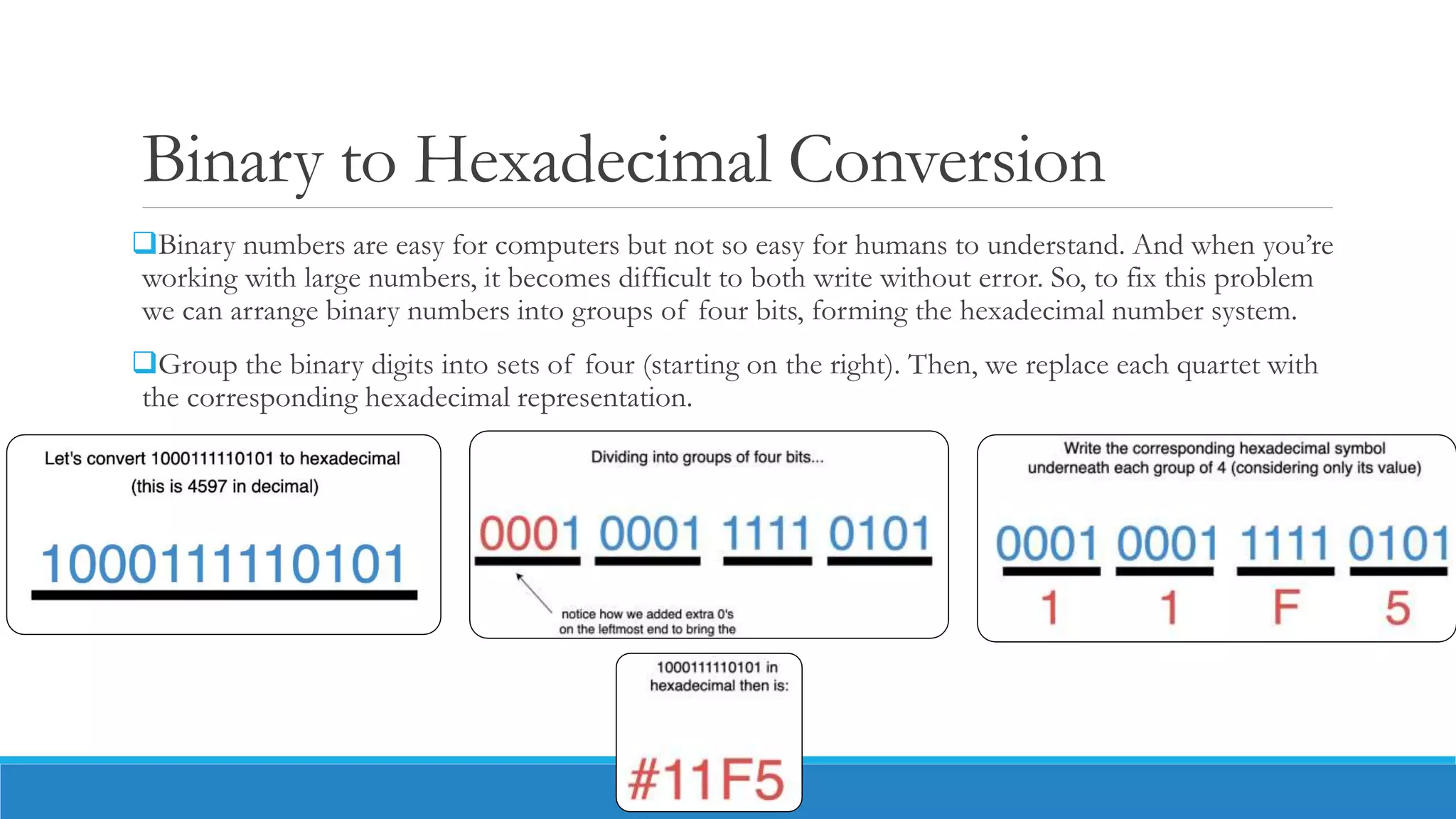
Binary to Hexadecimal Conversion
Binary numbers are easy for computers but not so easy for humans to understand. And when you’re
working with large numbers, it becomes difficult to both write without error. So, to fix this problem
we can arrange binary numbers into groups of four bits, forming the hexadecimal number system.
Group the binary digits into sets of four (starting on the right). Then, we replace each quartet with
the corresponding hexadecimal representation.
Hexadecimal to Binary Conversion
Write binary number for digit of the Hexadecimal number separately.
Join all the binary digit from left to right to get the whole binary number for the given hexadecimal
number.
Problems
Table of number system
ASCII-American Standard Code for
Information Interchange
ASCII (American Standard Code for Information Interchange) is the most common character
encoding format for text data in computers and on the internet
 In standard ASCII-encoded data, there are unique values for 128 alphabetic, numeric or special
additional characters and control codes.
ASCII encoding is based on character encoding used for telegraph data. The American National
Standards Institute first published it as a standard for computing in 1963.
Characters in ASCII encoding include upper- and lowercase letters A through Z, numerals 0
through 9 and basic punctuation symbols. It also uses some non-printing control characters that
were originally intended for use with teletype printing terminals.
ASCII representation
ASCII characters may be represented in the following ways:
as pairs of hexadecimal digits -- base-16 numbers, represented as 0 through 9 and A through F for
the decimal values of 10-15;
as three-digit octal (base 8) numbers;
as decimal numbers from 0 to 127; or
as 7-bit or 8-bit binary
ISCII - Indian Script Code for
Information Interchange
Indian Script Code for Information Interchange (ISCII) is a coding scheme for representing various
writing systems of India. It encodes the main Indic scripts
It consists of 256 characters. Furthermore,
◦ the first 128 characters are the same as the ASCII coding.
◦ the rest characters from 128-255 are the characters of different Indian languages.
◦ it uses 8 bits to represent the characters.
Supported Languages in ISCII
The standard supports various Indian languages. They are as follows:
◦ Punjabi
◦ Gujarati
◦ Oriya
◦ Telugu
◦ Kannada
◦ Devanagari
◦ Bengali
◦ Assamese
◦ Tamil
◦ Malayalam
https://www.toppr.com/guides/computer-science/computer-fundamentals/internal-storage-encoding-of-characters/iscii/
UNICODE- universal character encoding
Unicode is the universal character encoding, maintained by the Unicode Consortium. This encoding
standard provides the basis for
◦ processing,
◦ storage and
◦ interchange of text data in any language in all modern software and information technology protocols.
Unicode Coding Scheme ASCII Coding Scheme
 It uses variable bit encoding according to the requirement.
For example, UTF-8, UTF-16, UTF-32
 It uses 7-bit encoding. As of now, the extended form uses 8-
bit encoding.
 It is a standard form.  It is not a standard all over the world.
 People use this scheme all over the world.
 It has only limited characters hence, it cannot be used all over
the world.
 The Unicode characters themselves involve all the
characters of the ASCII encoding. Therefore we can say
that it is a superset for it.
 It has its equivalent coding characters in the Unicode.
 It has more than 128,000 characters.  In contrast, it has only 256 characters.
Difference between Unicode and ASCII
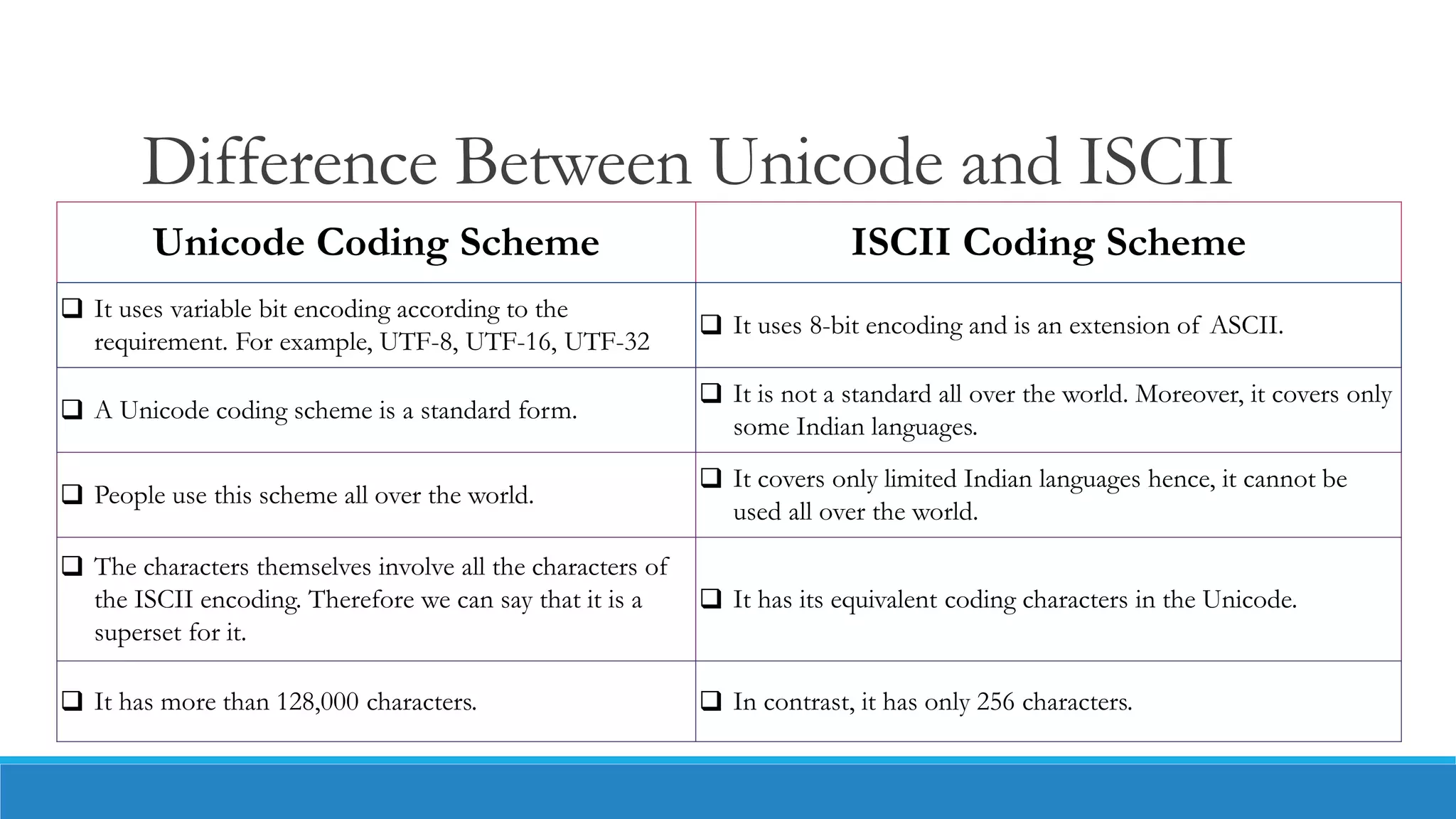
Difference Between Unicode and ISCII
Unicode Coding Scheme ISCII Coding Scheme
 It uses variable bit encoding according to the
requirement. For example, UTF-8, UTF-16, UTF-32
 It uses 8-bit encoding and is an extension of ASCII.
 A Unicode coding scheme is a standard form.
 It is not a standard all over the world. Moreover, it covers only
some Indian languages.
 People use this scheme all over the world.
 It covers only limited Indian languages hence, it cannot be
used all over the world.
 The characters themselves involve all the characters of
the ISCII encoding. Therefore we can say that it is a
superset for it.
 It has its equivalent coding characters in the Unicode.
 It has more than 128,000 characters.  In contrast, it has only 256 characters.
Introduction to Programming
The computer system is simply a machine and hence it cannot perform any work; therefore, in order
to make it functional different languages are developed, which are known as programming languages
or simply computer languages.
Following are the major categories of Programming Languages −
Machine Language
Assembly Language
High Level Language
Machine language
Machine language is a collection of binary digits or bits that the computer reads and interprets.
Machine language is the only language a computer is capable of understanding.
Machine level language is a language that supports the machine side of the programming or does
not provide human side of the programming. It consists of (binary) zeros and ones.
Each instruction in a program is represented by a numeric code, and numerical addresses are used
throughout the program to refer to memory locations in the computer’s memory.
Assembly language
A processor understands only machine language instructions, which are strings of 1's and 0's.
However, machine language is too obscure and complex for using in software development. So, the
low-level assembly language is designed for a specific family of processors that represents various
instructions in symbolic code and a more understandable form.
History
https://codeforwin.org/2017/08/introduction-c-programming.html
C Features
Why C programming?
As a middle-level language, C combines the features of both high-level and low-level languages
C is a structured programming language which allows a complex program to be broken into simpler programs
called functions.
Various features of C including
◦ direct access to machine level hardware APIs,
◦ the presence of C compilers,
◦ deterministic resource use and
◦ dynamic memory allocation
C language an optimum choice for scripting applications and drivers of embedded systems
C is a general-purpose programming language
C language has a rich library which provides a number of built-in functions.
C implements algorithms and data structures swiftly, facilitating faster computations in programs.
Why C programming?
The development of various languages has been influenced by C language
◦ C++ (also known as C with classes),
◦ C#,
◦ Python,
◦ Java,
◦ JavaScript,
◦ Perl,
◦ PHP,
◦ Verilog,
◦ D, Limbo and
◦ C shell of Unix
Where C is used
Operating Systems
Development of New Languages
Computation Platforms
Embedded Systems
Graphics and Games
Applications written in C/C++
Adobe Systems
Google Applications
Google file system
Google Chromium browser
MapReduce large cluster data processing.
Mozilla Firefox and Thunderbird
MySQL Server
Alias System – Autodesk Maya
Winamp Media Player
12D Solutions
Bloomberg RDBMS
Callas Software
Image Systems
Microsoft Operating Systems
Symbian Operating System
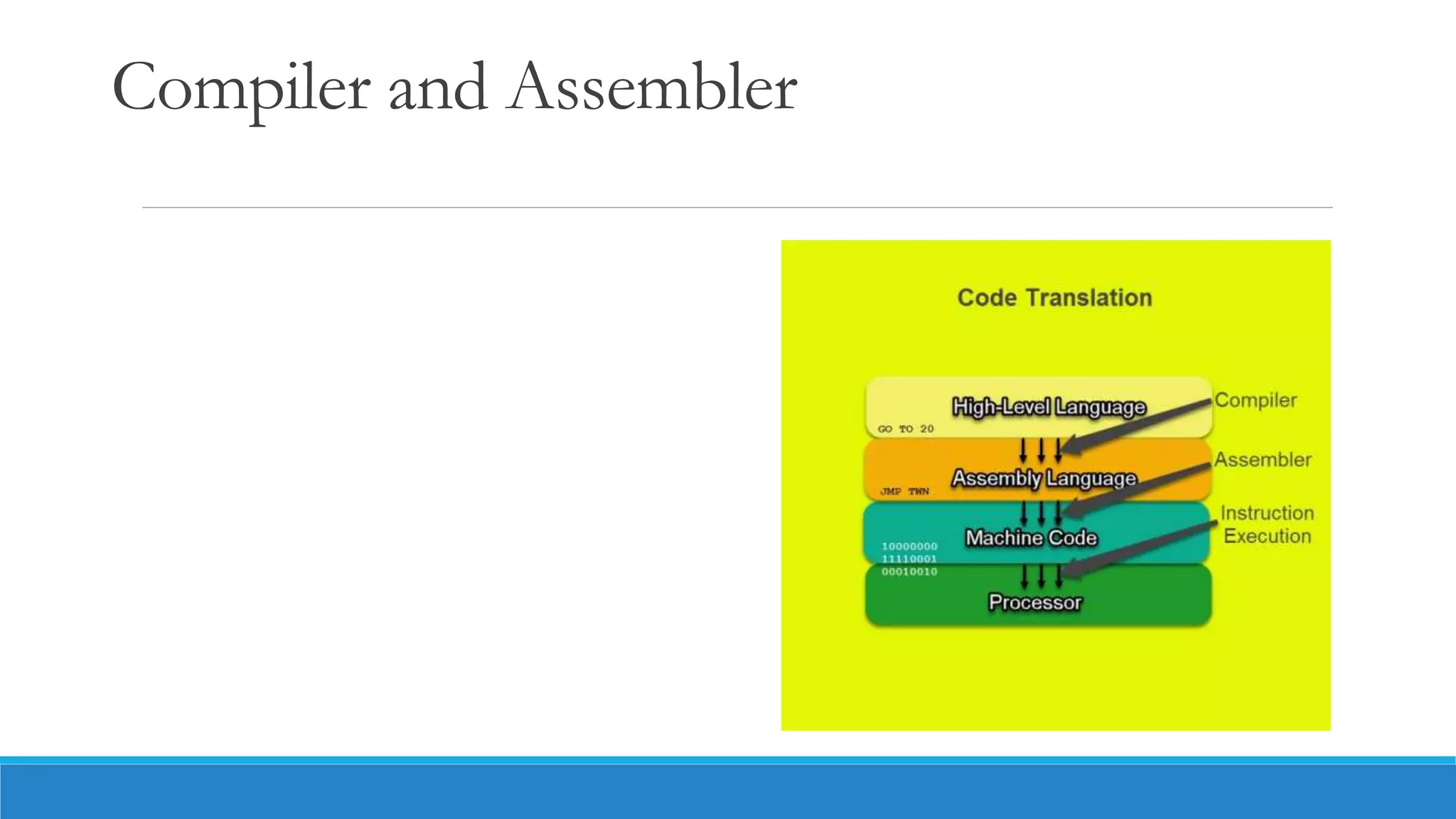
Compiler and Assembler
Types of programming
The 4 types of Programming Language that are classified are:
◦ Procedural Programming Language
◦ A procedural language is a computer programming language that follows, in order, a set of commands. Examples of computer procedural languages
are BASIC, C, FORTRAN, Java, and Pascal.
◦ Functional Programming Language
◦ Functional programming languages are specially designed to handle symbolic computation and list processing applications. Some of the popular
functional programming languages include: Lisp, Python, Erlang, Haskell, Clojure, etc.
◦ Scripting Programming Language
◦ A scripting language is a programming language that employs a high-level construct to interpret and execute one command at a time. It is translated
into machine code when the code is run, rather than beforehand. JavaScript, Python, and Ruby are all examples of scripting languages.
◦ Logic Programming Language
◦ Logic programming is a programming paradigm which is largely based on formal logic. Any program written in a logic programming language is a
set of sentences in logical form
◦ Object-Oriented Programming Language
◦ Object-oriented language (OOL) is a high-level computer programming language that implements objects and their associated procedures within the
programming context to create software programs. Python, C++, Java are some of the object-oriented programming languages.
Difference Between Functional and Logical Programming
Functional Programming Logical Programming
It is totally based on functions. It is totally based on formal logic.
In this programming paradigm, programs are constructed by applying
and composing functions.
In this programming paradigm, program statements usually express or
represent facts and rules related to problems within a system of formal
logic.
These are specially designed to manage and handle symbolic
computation and list processing applications.
These are specially designed for fault diagnosis, natural language
processing, planning, and machine learning.
Its main aim is to reduce side effects that are accomplished by isolating
them from the rest of the software code.
Its main aim is to allow machines to reason because it is very useful for
representing knowledge.
Some languages used in functional programming include Clojure,
Wolfram Language, Erland, OCaml, etc.
Some languages used for logic programming include Absys, Cycl, Alice,
ALF (Algebraic logic functional programming language), etc.
It reduces code redundancy, improves modularity, solves complex
problems, increases maintainability, etc.
It is data-driven, array-oriented, used to express knowledge, etc.
Testing is much easier as compared to logical programming.
Testing is comparatively more difficult as compared to functional
programming.
What Is a Flow Chart?
Flow charts tend to consist of four main symbols, linked with arrows that show the direction of flow:
◦ Elongated circles, which signify the start or end of a process.
◦ Rectangles, which show instructions or actions.
Diamonds, which highlight where you must make a decision.
Parallelograms, which show input and output. This can include materials, services or people.
Problem Solving and Algorithms
Steps involved in algorithm development
Step 1: Obtain a description of the problem.
Step2. Identification of input
Step3: Identification of output
Step4 : Identification the processing operation
Step5 : Processing Definiteness
Step6 : Processing Finitenes
Step7 : Possessing Effectiveness
https://www.mcemotihari.ac.in/wp-content/uploads/2019/11/file_5dc2a6c80c260.pdf
Example
Suppose we want to find the average of three numbers, the algorithm is as follows
◦ Step 1 Read the numbers a, b, c
◦ Step 2 Compute the sum of a, b and c
◦ Step 3 Divide the sum by 3
◦ Step 4 Store the result in variable d
◦ Step 5 Print the value of d
◦ Step 6 End of the program
Example
Write an algorithm to calculate the simple interest using the formula. Simple interest = P*N* R/100.
Where P is principle Amount, N is the number of years and R is the rate of interest.
◦ Step 1: Read the three input quantities’ P, N and R.
◦ Step 2 : Calculate simple interest as
◦ Simple interest = P* N* R/100
◦ Step 3: Print simple interest.
◦ Step 4: Stop.
Parts of a computer program
The 5 Basic Coding Concepts
◦ Variables
◦ Data Structures
◦ Control Structures
◦ Syntax
◦ Tools
https://sphero.com/blogs/news/coding-concepts
Structure of a C Program
Include Header File Section
Global Declaration
Function main()
Declaration Part
Executable Part
Function Call
User-defined Function
Body of the Function
Comments:
C
vs
C++

Introduction to digital computers and Number systems.pptx

  • 1.
  • 2.
    Content Computer system Computer Architecture DecimalNumber System Number System Conversion ASCII, ISCII, Unicode Introduction to programming Problem-solving and expression of solution through flow chart and algorithm, Parts of a computer program Intel® C/C++ compiler vs GCC C vs C++ C++ fundamentals
  • 4.
    Computer system A computersystem is an integrated form of different components that work together to give a desirable result. It has different components and each works for a specific purpose; however, they generate a common result as required by the user. Components of Computer System Hardware Software Humanware Firmware Bridgeware
  • 5.
    Hardware The physical componentscollectively form the hardware of a computer system. Hardware comprises the equipment that helps in the working system of the computer. Monitor − It displays (visual) the result. CPU − It is the Central Processing Unit that controls the computer’s functions and transmits data. Motherboard − It is mainly accountable to establish communication between components and transmission of information. RAM − It is the Random Access Memory and is responsible for the storage of programs that are currently running and also stores data temporarily. Hard Disk Drive − It is a permanent memory storage device. Floppy Disk Drive − It is hardly being used in recent times. Optical disks − It is a device that also stores data. For example, CDs, DVDs, etc.
  • 6.
    Input & OutputDevice The following table categorically lists down the input and output device −
  • 7.
    Software The hardware componentscan only function when software components are added to the computer system. Software is a program that performs different commands given by a user. Software is an intangible part of hardware and controls the sequence of operations. Types of Software Depending on the basic features and functionality, the software can be categorized as − Operating Systems (OS) Application Software (AS) E-accessibility Software
  • 8.
    Operating System This softwarehelps to load the basic program automatically as soon as the computer is started. Following are the major types of operating system −
  • 9.
    Application Software The software,which can be used on an installed operating system, is known as application software. Following are the significant examples of application software −
  • 10.
    E-accessibility Software The E-accessibilitysoftware components additional facilities to users such as − Voice recognition software Screen reader Magnifying tool On-screen keyboard Video games Learning software, etc.
  • 11.
    Computer architecture Computer architecturecan be defined as a set of rules and methods that describe the functionality, management, and implementation of computers. Computer Architecture can be divided into mainly three categories, which are as follows − Instruction set Architecture or ISA − Whenever an instruction is given to the processor, its role is to read and act accordingly. It allocates memory to instructions and also acts upon memory address mode (Direct Addressing mode or Indirect Addressing mode). Micro Architecture − It describes how a particular processor will handle and implement instructions from ISA. System design − It includes the other entire hardware component within the system such as virtualization and multiprocessing.
  • 12.
    Structure of ComputerArchitecture Generally, computer architecture consists of the following − Processor Memory Peripherals All the above parts are connected with the help of system bus, which consists of address bus, data bus and control bus.
  • 13.
    Number System Number systemis important from the viewpoint of understanding how data are represented before they can be processed by any digital system including a digital computer. 1. Decimal Number System 2. Binary Number System 3. Octal Number System 4. Hexa Decimal Number System
  • 14.
    Decimal Number System Thenumber system that we use in our day-to-day life is the decimal number system. Decimal number system has base 10 as it uses 10 digits from 0 to 9. In the decimal number system, the successive positions to the left of the decimal point represent units, tens, hundreds, thousands, and so on. Each position represents a specific power of the base (10). For example, the decimal number 1234 consists of the digit 4 in the units position, 3 in the tens position, 2 in the hundreds position, and 1 in the thousands position. Its value can be written as:
  • 15.
    Binary Number System Abinary number system represents a number in terms of only two digits, i.e., 0 (zero) and 1 (one). In the word “binary”, “bi” means “two”. The base-2 numeral system is used to represent binary numbers. For example, (1101)2 is a binary number where 2 is the radix. Each digit in the binary number system is said to be a “bit”. All inputs given to a computer are decoded by it into a series of 0’s or 1’s before being processed further since a computer can only understand binary information.
  • 16.
    Decimal to BinaryConversion A decimal number is converted into a binary number by dividing the given decimal number by 2 continuously until we get the quotient as 1, and we write the numbers from downwards to upwards. Example: Convert (28)10 into a binary number.
  • 17.
    Binary to DecimalConversion A binary number is converted into a decimal number by multiplying each digit of the binary number by the power of either 1 or 0 to the corresponding power of 2. Let us consider that a binary number has n digits, B = an-1…a3a2a1a0. Now, the corresponding decimal number is given as D= (an-1 × 2n-1) +…+(a3 × 23) + (a2 × 22) + (a1 × 21) + (a0 × 20). Example: Convert (10011)2 to a decimal number.
  • 18.
    Problems Problem 1: Convertthe decimal number (98)10 into binary. Problem 2: Convert the binary number (1010101)2 to a decimal number. Problem 3: Divide (11110)2 by (101)2. Problem 4: Add (11011)2 and (10100)2. Problem 5: Subtract (11010)2 and (10110)2. Problem 6: Multiply (1110)2 and (1001)2.
  • 19.
    Octal number system Ithas eight digits (0, 1, 2, 3, 4, 5, 6, 7) so its base is 8. Each digit in an octal number represents a specific power of its base (8). As there are only eight digits, three bits (23=8) of binary number system can convert any octal number into binary number. This number system is also used to shorten long binary numbers. The three binary digits can be represented with a single octal digit.
  • 20.
    Octal to Binarynumber conversion Write the binary representation for each octal digit Join those numbers together You will have a binary number
  • 21.
    Binary to Octalnumber conversion Group the binary number into sets of three digits from the right. Bring each group of digits to a multiple of three by adding zeroes to the left. Write the corresponding octal symbol underneath each group. You will have an octal number.
  • 22.
    Hexadecimal number system Thisnumber system has 16 digits that ranges from 0 to 9 and A to F. So, its base is 16. The A to F alphabets represent 10 to 15 decimal numbers. The position of each digit in a hexadecimal number represents a specific power of base (16) of the number system. As there are only sixteen digits, four bits (24=16) of binary number system can convert any hexadecimal number into binary number. It is also known as alphanumeric number system as it uses both numeric digits and alphabets.
  • 23.
    Hexadecimal to Decimalnumber conversion Hexadecimal numbers are preceded by a # to indicate that they are base-16.
  • 25.
  • 26.
    Binary to HexadecimalConversion Binary numbers are easy for computers but not so easy for humans to understand. And when you’re working with large numbers, it becomes difficult to both write without error. So, to fix this problem we can arrange binary numbers into groups of four bits, forming the hexadecimal number system. Group the binary digits into sets of four (starting on the right). Then, we replace each quartet with the corresponding hexadecimal representation.
  • 27.
    Hexadecimal to BinaryConversion Write binary number for digit of the Hexadecimal number separately. Join all the binary digit from left to right to get the whole binary number for the given hexadecimal number.
  • 28.
  • 29.
  • 30.
    ASCII-American Standard Codefor Information Interchange ASCII (American Standard Code for Information Interchange) is the most common character encoding format for text data in computers and on the internet  In standard ASCII-encoded data, there are unique values for 128 alphabetic, numeric or special additional characters and control codes. ASCII encoding is based on character encoding used for telegraph data. The American National Standards Institute first published it as a standard for computing in 1963. Characters in ASCII encoding include upper- and lowercase letters A through Z, numerals 0 through 9 and basic punctuation symbols. It also uses some non-printing control characters that were originally intended for use with teletype printing terminals.
  • 31.
    ASCII representation ASCII charactersmay be represented in the following ways: as pairs of hexadecimal digits -- base-16 numbers, represented as 0 through 9 and A through F for the decimal values of 10-15; as three-digit octal (base 8) numbers; as decimal numbers from 0 to 127; or as 7-bit or 8-bit binary
  • 33.
    ISCII - IndianScript Code for Information Interchange Indian Script Code for Information Interchange (ISCII) is a coding scheme for representing various writing systems of India. It encodes the main Indic scripts It consists of 256 characters. Furthermore, ◦ the first 128 characters are the same as the ASCII coding. ◦ the rest characters from 128-255 are the characters of different Indian languages. ◦ it uses 8 bits to represent the characters.
  • 34.
    Supported Languages inISCII The standard supports various Indian languages. They are as follows: ◦ Punjabi ◦ Gujarati ◦ Oriya ◦ Telugu ◦ Kannada ◦ Devanagari ◦ Bengali ◦ Assamese ◦ Tamil ◦ Malayalam https://www.toppr.com/guides/computer-science/computer-fundamentals/internal-storage-encoding-of-characters/iscii/
  • 35.
    UNICODE- universal characterencoding Unicode is the universal character encoding, maintained by the Unicode Consortium. This encoding standard provides the basis for ◦ processing, ◦ storage and ◦ interchange of text data in any language in all modern software and information technology protocols.
  • 36.
    Unicode Coding SchemeASCII Coding Scheme  It uses variable bit encoding according to the requirement. For example, UTF-8, UTF-16, UTF-32  It uses 7-bit encoding. As of now, the extended form uses 8- bit encoding.  It is a standard form.  It is not a standard all over the world.  People use this scheme all over the world.  It has only limited characters hence, it cannot be used all over the world.  The Unicode characters themselves involve all the characters of the ASCII encoding. Therefore we can say that it is a superset for it.  It has its equivalent coding characters in the Unicode.  It has more than 128,000 characters.  In contrast, it has only 256 characters. Difference between Unicode and ASCII
  • 37.
    Difference Between Unicodeand ISCII Unicode Coding Scheme ISCII Coding Scheme  It uses variable bit encoding according to the requirement. For example, UTF-8, UTF-16, UTF-32  It uses 8-bit encoding and is an extension of ASCII.  A Unicode coding scheme is a standard form.  It is not a standard all over the world. Moreover, it covers only some Indian languages.  People use this scheme all over the world.  It covers only limited Indian languages hence, it cannot be used all over the world.  The characters themselves involve all the characters of the ISCII encoding. Therefore we can say that it is a superset for it.  It has its equivalent coding characters in the Unicode.  It has more than 128,000 characters.  In contrast, it has only 256 characters.
  • 38.
    Introduction to Programming Thecomputer system is simply a machine and hence it cannot perform any work; therefore, in order to make it functional different languages are developed, which are known as programming languages or simply computer languages. Following are the major categories of Programming Languages − Machine Language Assembly Language High Level Language
  • 39.
    Machine language Machine languageis a collection of binary digits or bits that the computer reads and interprets. Machine language is the only language a computer is capable of understanding. Machine level language is a language that supports the machine side of the programming or does not provide human side of the programming. It consists of (binary) zeros and ones. Each instruction in a program is represented by a numeric code, and numerical addresses are used throughout the program to refer to memory locations in the computer’s memory.
  • 40.
    Assembly language A processorunderstands only machine language instructions, which are strings of 1's and 0's. However, machine language is too obscure and complex for using in software development. So, the low-level assembly language is designed for a specific family of processors that represents various instructions in symbolic code and a more understandable form.
  • 41.
  • 42.
  • 43.
    Why C programming? Asa middle-level language, C combines the features of both high-level and low-level languages C is a structured programming language which allows a complex program to be broken into simpler programs called functions. Various features of C including ◦ direct access to machine level hardware APIs, ◦ the presence of C compilers, ◦ deterministic resource use and ◦ dynamic memory allocation C language an optimum choice for scripting applications and drivers of embedded systems C is a general-purpose programming language C language has a rich library which provides a number of built-in functions. C implements algorithms and data structures swiftly, facilitating faster computations in programs.
  • 44.
    Why C programming? Thedevelopment of various languages has been influenced by C language ◦ C++ (also known as C with classes), ◦ C#, ◦ Python, ◦ Java, ◦ JavaScript, ◦ Perl, ◦ PHP, ◦ Verilog, ◦ D, Limbo and ◦ C shell of Unix
  • 45.
    Where C isused Operating Systems Development of New Languages Computation Platforms Embedded Systems Graphics and Games
  • 46.
    Applications written inC/C++ Adobe Systems Google Applications Google file system Google Chromium browser MapReduce large cluster data processing. Mozilla Firefox and Thunderbird MySQL Server Alias System – Autodesk Maya Winamp Media Player 12D Solutions Bloomberg RDBMS Callas Software Image Systems Microsoft Operating Systems Symbian Operating System
  • 47.
  • 49.
    Types of programming The4 types of Programming Language that are classified are: ◦ Procedural Programming Language ◦ A procedural language is a computer programming language that follows, in order, a set of commands. Examples of computer procedural languages are BASIC, C, FORTRAN, Java, and Pascal. ◦ Functional Programming Language ◦ Functional programming languages are specially designed to handle symbolic computation and list processing applications. Some of the popular functional programming languages include: Lisp, Python, Erlang, Haskell, Clojure, etc. ◦ Scripting Programming Language ◦ A scripting language is a programming language that employs a high-level construct to interpret and execute one command at a time. It is translated into machine code when the code is run, rather than beforehand. JavaScript, Python, and Ruby are all examples of scripting languages. ◦ Logic Programming Language ◦ Logic programming is a programming paradigm which is largely based on formal logic. Any program written in a logic programming language is a set of sentences in logical form ◦ Object-Oriented Programming Language ◦ Object-oriented language (OOL) is a high-level computer programming language that implements objects and their associated procedures within the programming context to create software programs. Python, C++, Java are some of the object-oriented programming languages.
  • 50.
    Difference Between Functionaland Logical Programming Functional Programming Logical Programming It is totally based on functions. It is totally based on formal logic. In this programming paradigm, programs are constructed by applying and composing functions. In this programming paradigm, program statements usually express or represent facts and rules related to problems within a system of formal logic. These are specially designed to manage and handle symbolic computation and list processing applications. These are specially designed for fault diagnosis, natural language processing, planning, and machine learning. Its main aim is to reduce side effects that are accomplished by isolating them from the rest of the software code. Its main aim is to allow machines to reason because it is very useful for representing knowledge. Some languages used in functional programming include Clojure, Wolfram Language, Erland, OCaml, etc. Some languages used for logic programming include Absys, Cycl, Alice, ALF (Algebraic logic functional programming language), etc. It reduces code redundancy, improves modularity, solves complex problems, increases maintainability, etc. It is data-driven, array-oriented, used to express knowledge, etc. Testing is much easier as compared to logical programming. Testing is comparatively more difficult as compared to functional programming.
  • 51.
    What Is aFlow Chart? Flow charts tend to consist of four main symbols, linked with arrows that show the direction of flow: ◦ Elongated circles, which signify the start or end of a process. ◦ Rectangles, which show instructions or actions.
  • 52.
    Diamonds, which highlightwhere you must make a decision. Parallelograms, which show input and output. This can include materials, services or people.
  • 55.
    Problem Solving andAlgorithms Steps involved in algorithm development Step 1: Obtain a description of the problem. Step2. Identification of input Step3: Identification of output Step4 : Identification the processing operation Step5 : Processing Definiteness Step6 : Processing Finitenes Step7 : Possessing Effectiveness https://www.mcemotihari.ac.in/wp-content/uploads/2019/11/file_5dc2a6c80c260.pdf
  • 56.
    Example Suppose we wantto find the average of three numbers, the algorithm is as follows ◦ Step 1 Read the numbers a, b, c ◦ Step 2 Compute the sum of a, b and c ◦ Step 3 Divide the sum by 3 ◦ Step 4 Store the result in variable d ◦ Step 5 Print the value of d ◦ Step 6 End of the program
  • 57.
    Example Write an algorithmto calculate the simple interest using the formula. Simple interest = P*N* R/100. Where P is principle Amount, N is the number of years and R is the rate of interest. ◦ Step 1: Read the three input quantities’ P, N and R. ◦ Step 2 : Calculate simple interest as ◦ Simple interest = P* N* R/100 ◦ Step 3: Print simple interest. ◦ Step 4: Stop.
  • 58.
    Parts of acomputer program The 5 Basic Coding Concepts ◦ Variables ◦ Data Structures ◦ Control Structures ◦ Syntax ◦ Tools https://sphero.com/blogs/news/coding-concepts
  • 59.
    Structure of aC Program Include Header File Section Global Declaration Function main() Declaration Part Executable Part Function Call User-defined Function Body of the Function Comments:
  • 60.

Editor's Notes

  • #51 https://www.geeksforgeeks.org/difference-between-functional-and-logical-programming/