1
2016 Mid-term Examination(100)
Architecting Smart Devices
Date: 2016-10-18
1. 현재 Smart Device 기능(CPU, OS, I/O Interface)이 들어가지 않은 제품 하
나를 택해 Smart Device 기능을 추가한다. 이 경우 새롭게 제안한 Smart
제품을 상세히 설명하고 그 장점을 논하시오. (20)
[Smart Device 개념으로 설계한 Beam Projector]
- 설명: 기존 BP는 Remote Control로만 구동할 수 있어 사용성이 떨어지므
로 Smart Device 개념을 적용하여 자동화시키며 UI/UX도 직관적으로 바꾼다.
- 장점
= Smartphone과 BP를 Bluetooth로 연결하여 여러 제어 신호를 무선
으로 전송한다.
= Smartphone을 가진 사용자의 권한 및 현재 시간에 따라 BP를 자
동으로 On/Off한다.
= BP Control을 Smartphone App으로 처리하여 UI/UX를 개선한다.
2. Activity에서 Android OS 기능에 접근하기 위한 방법을 다음 관점에서 설
명하고 Code도 제시하시오. Code는 짧을수록 가산점 반영. (30)
A. 학과 Homepage에 접근
- 단순한 Homepage 접근이므로 Intent 기능을 이용한다.
Intent intent = new Intent(Intent.ACTION_VIEW, Uri.parse("http://ice.mokwon.ac.kr"));
startActivity(mIntent);
B. 연락처에 접근하기 위해 Contacts Provider에 접근
- Context 함수인 getContentResolver()를 이용해 Contacts Provider에 간접
접근할 수 있다. 이후 query() 함수를 통해 연락처 정보를 얻는다. Activity는
Context를 상속 받았으므로 바로 사용할 수 있다.
ContentResolver cr = getContentResolver();
C. Telephony Manager에 접근
2.
2
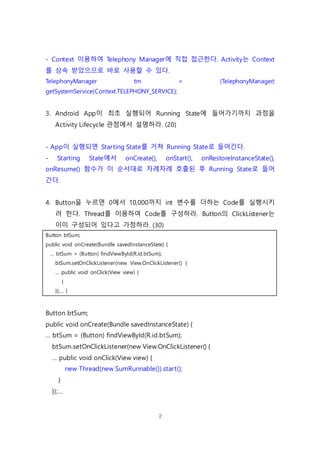
- Context 이용하여Telephony Manager에 직접 접근한다. Activity는 Context
를 상속 받았으므로 바로 사용할 수 있다.
TelephonyManager tm = (TelephonyManager)
getSystemService(Context.TELEPHONY_SERVICE);
3. Android App이 최초 실행되어 Running State에 들어가기까지 과정을
Activity Lifecycle 관점에서 설명하라. (20)
- App이 실행되면 Starting State를 거쳐 Running State로 들어간다.
- Starting State에서 onCreate(), onStart(), onRestoreInstanceState(),
onResume() 함수가 이 순서대로 차례차례 호출된 후 Running State로 들어
간다.
4. Button을 누르면 0에서 10,000까지 int 변수를 더하는 Code를 실행시키
려 한다. Thread를 이용하여 Code를 구성하라. Button의 ClickListener는
이미 구성되어 있다고 가정하라. (30)
Button btSum;
public void onCreate(Bundle savedInstanceState) {
… btSum = (Button) findViewById(R.id.btSum);
btSum.setOnClickListener(new View.OnClickListener() {
… public void onClick(View view) {
}
});… }
Button btSum;
public void onCreate(Bundle savedInstanceState) {
… btSum = (Button) findViewById(R.id.btSum);
btSum.setOnClickListener(new View.OnClickListener() {
… public void onClick(View view) {
new Thread(new SumRunnable()).start();
}
});…
3.
3
}
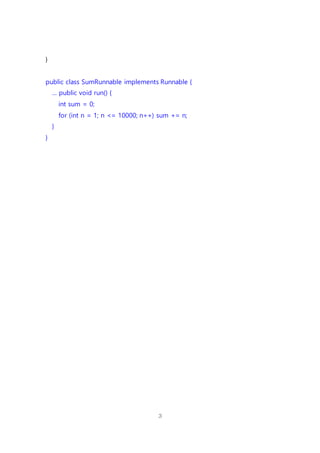
public class SumRunnableimplements Runnable {
… public void run() {
int sum = 0;
for (int n = 1; n <= 10000; n++) sum += n;
}
}

![1
2016 Mid-term Examination (100)
Architecting Smart Devices
Date: 2016-10-18
1. 현재 Smart Device 기능(CPU, OS, I/O Interface)이 들어가지 않은 제품 하
나를 택해 Smart Device 기능을 추가한다. 이 경우 새롭게 제안한 Smart
제품을 상세히 설명하고 그 장점을 논하시오. (20)
[Smart Device 개념으로 설계한 Beam Projector]
- 설명: 기존 BP는 Remote Control로만 구동할 수 있어 사용성이 떨어지므
로 Smart Device 개념을 적용하여 자동화시키며 UI/UX도 직관적으로 바꾼다.
- 장점
= Smartphone과 BP를 Bluetooth로 연결하여 여러 제어 신호를 무선
으로 전송한다.
= Smartphone을 가진 사용자의 권한 및 현재 시간에 따라 BP를 자
동으로 On/Off한다.
= BP Control을 Smartphone App으로 처리하여 UI/UX를 개선한다.
2. Activity에서 Android OS 기능에 접근하기 위한 방법을 다음 관점에서 설
명하고 Code도 제시하시오. Code는 짧을수록 가산점 반영. (30)
A. 학과 Homepage에 접근
- 단순한 Homepage 접근이므로 Intent 기능을 이용한다.
Intent intent = new Intent(Intent.ACTION_VIEW, Uri.parse("http://ice.mokwon.ac.kr"));
startActivity(mIntent);
B. 연락처에 접근하기 위해 Contacts Provider에 접근
- Context 함수인 getContentResolver()를 이용해 Contacts Provider에 간접
접근할 수 있다. 이후 query() 함수를 통해 연락처 정보를 얻는다. Activity는
Context를 상속 받았으므로 바로 사용할 수 있다.
ContentResolver cr = getContentResolver();
C. Telephony Manager에 접근](https://image.slidesharecdn.com/testsds2016-1answer-161204104409/85/TestSDS2016-1-Answer-1-320.jpg)
![1
2016 Mid-term Examination (100)
Architecting Smart Devices
Date: 2016-10-18
1. 현재 Smart Device 기능(CPU, OS, I/O Interface)이 들어가지 않은 제품 하
나를 택해 Smart Device 기능을 추가한다. 이 경우 새롭게 제안한 Smart
제품을 상세히 설명하고 그 장점을 논하시오. (20)
[Smart Device 개념으로 설계한 Beam Projector]
- 설명: 기존 BP는 Remote Control로만 구동할 수 있어 사용성이 떨어지므
로 Smart Device 개념을 적용하여 자동화시키며 UI/UX도 직관적으로 바꾼다.
- 장점
= Smartphone과 BP를 Bluetooth로 연결하여 여러 제어 신호를 무선
으로 전송한다.
= Smartphone을 가진 사용자의 권한 및 현재 시간에 따라 BP를 자
동으로 On/Off한다.
= BP Control을 Smartphone App으로 처리하여 UI/UX를 개선한다.
2. Activity에서 Android OS 기능에 접근하기 위한 방법을 다음 관점에서 설
명하고 Code도 제시하시오. Code는 짧을수록 가산점 반영. (30)
A. 학과 Homepage에 접근
- 단순한 Homepage 접근이므로 Intent 기능을 이용한다.
Intent intent = new Intent(Intent.ACTION_VIEW, Uri.parse("http://ice.mokwon.ac.kr"));
startActivity(mIntent);
B. 연락처에 접근하기 위해 Contacts Provider에 접근
- Context 함수인 getContentResolver()를 이용해 Contacts Provider에 간접
접근할 수 있다. 이후 query() 함수를 통해 연락처 정보를 얻는다. Activity는
Context를 상속 받았으므로 바로 사용할 수 있다.
ContentResolver cr = getContentResolver();
C. Telephony Manager에 접근](https://image.slidesharecdn.com/testsds2016-1answer-161204104409/75/TestSDS2016-1-Answer-1-2048.jpg)


![[방송통신대 컴퓨터과학과] 2020년 1학기 전공 모바일 앱 프로그래밍 기말평가 제출본](https://cdn.slidesharecdn.com/ss_thumbnails/2-200717105739-thumbnail.jpg?width=640&height=640&fit=bounds)


![[1A5]효율적인안드로이드앱개발](https://cdn.slidesharecdn.com/ss_thumbnails/1a5-140927232721-phpapp02-thumbnail.jpg?width=640&height=640&fit=bounds)
![[NEXT] 화면 재갱신이 되는 안드로이드 앱 만들기 - 네트워크에 독립하는 구조로 변경](https://cdn.slidesharecdn.com/ss_thumbnails/day8networkaloneapp-141209112528-conversion-gate02-thumbnail.jpg?width=640&height=640&fit=bounds)


![[방송통신대 컴퓨터과학과] 2020년 1학기 전공 모바일 앱 프로그래밍 과제물 제출본](https://cdn.slidesharecdn.com/ss_thumbnails/2-200716160026-thumbnail.jpg?width=640&height=640&fit=bounds)
![[NEXT] Android 개발 경험 프로젝트 4일차 (Networking)](https://cdn.slidesharecdn.com/ss_thumbnails/day4-131216014011-phpapp02-thumbnail.jpg?width=640&height=640&fit=bounds)


