By:- SANGRAM PRADHAN
B-Tech:- CSE-1
Year:- 2018-22
Regd. No:- 1801298289
CONTENTS
• INTRODUCTION TO CPU
• TYPES OF COMPONENETS OF CPU
• COMPONENTS OF CPU
• FUNCTION OF CPU
• A GLANCE OF MOTHERBOARD
• JOURNEY OF STORAGE DEVICES
• HDD VS SSD
• PROCESSOR AND TYPES
• BIOS
INTRODUCTION TO CPU
•The central processing unit (CPU) is
the portion of a computer system
that carries out the instructions of a
computer program, to perform the
basic arithmetical, logical, and input
and output operations of the system. It
acts as the BRAIN OF COMPUTER.
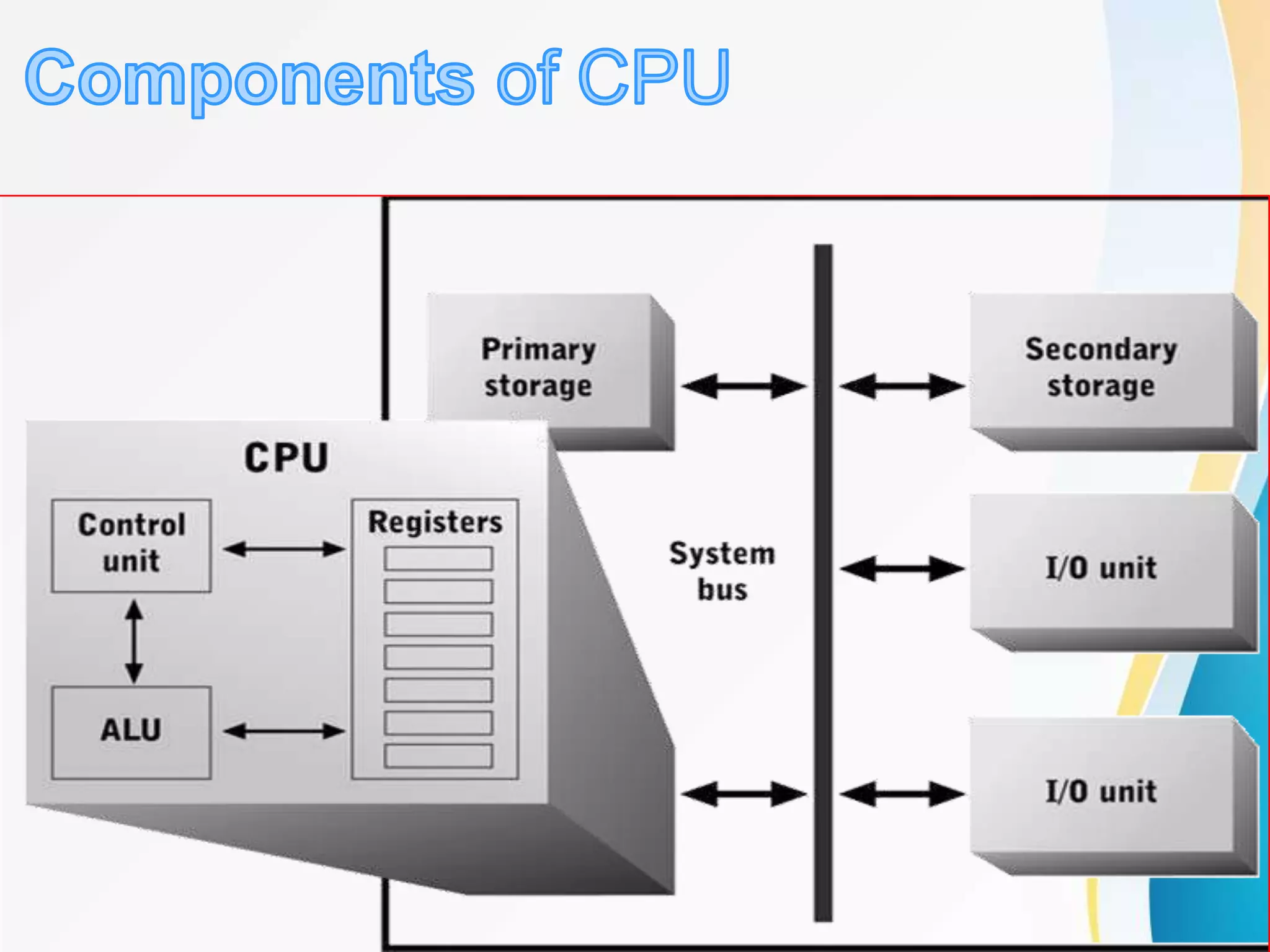
Arithmetic and Logic
Unit (ALU) : It carries out
the logical, algebrical or
any types calculations.
Control unit :
It manages the
fetching, decoding and
execution of the
instructions.
Registors : It is very
fast temporary storage
locations which hold
data being processed,
instructions being
executed and
addresses of the
memory location to be
accessed.
Internal buses : Buses
are used to transmit
informations from one
place to another.
1 - The Fetch step:
 This involves retrieving a binary instruction from a memory
address and storing it in the Current Instruction register.
 The memory address of the instruction is stored in a
register called the Program Counter (PC) so the CPU can
keep track of which instruction is next.
 After an instruction is fetched, the PC is updated so the
CPU knows the address of the next instruction it has to
fetch.
Slide 6
MEMORY
ADDRESS
MEMORY
CONTENTS
1 0 0 1 1 1 1 0 0 0 1 1 0
2 - The Decode step:
• This involves the CPU identifying the operation code
(op-code) part of the instruction which tells it which
operation to perform.
• If the op-code requires the CPU to act on some data
then the second part of the instruction will contain
either the data or the memory address where the
data is stored.
Slide 7
MEMORY CONTENTS
1 1 0 0 0 1 1 0
OP-CODE ADDRESS OF
DATA
1 1 0 0 0 1 1 0
3 - The Execute step:
• In this step the control unit links together the parts of the
CPU that are needed to execute the instruction.
– If the instruction involved integer arithmetic or logical operations
then the arithmetic logic unit (ALU) would be connected to the
relevant memory locations
– Some types of instructions alter the program counter rather than
produce result data. This allows programs to carry out iteration
loops and conditional program execution rather than stepping
through instructions in sequence.
– Some instructions involve an additional write-back step if data is
written back to RAM.
Slide 8
A GLANCE OF MOTHERBOARD
A JOURNEY OF STORAGE DEVICES
HDD VS SSD
This is a Old CPU
Model I486 DX2
Pin GridArray
This is the CPU model
we will be showing
Pentium 4 Processor
Land GridArray
PROCESSOR
A processor or Central Processing Unit (CPU) is an
electronic circuit that can execute computer
programs.
A processor is the logic circuitry that responds to
and processes the basic instructions that drives a
computer.
A computer processor analyzes data and
controls data flow in a computer.
It handles the central management functions of a
high-powered PC.
Clock speed : Clock
speed is a measure of
how quickly a
computer completes
basic computations
and operations. It is
measured as a
frequency in hertz.
Generally this speed
varies 2.4-3.4 GHz.
Core : A processor
core is a hardware
unit in the processor
architecture that can
execute instructions
sent to it.
Hyper threading :
Thread are the virtual
core and work like a
real core inside cpu.
When cores
assembled with multi
threads then it is
known as Hyper
threading technology.
Cache : The cache
is the first block of
RAM which interact
between the main
memory and CPU
using cache
controller chipThis
memorYhelps
processor to fetch
instructions in quick
routine and is very
faster than RAM
MULTI
PROCESSING
: Simultaneous
processing with two
or more processors
in one computer or
two or more
computers
processing together.
PARALLEL
PROCESSING :
The
simultaneous use of
more than one cpu
or processor core to
execute a program
or multiple
computational
threads
Intel : The Intel computer processor is
exclusively designed by Intel. Its latest and
most popular models include Intel hyper
thread technology that speed up processor
speed .
AMD : The AMD computer processor is
exclusively made by Advanced Micro Devices,
Inc. (AMD). It provides excellent performance
and value. It is compatible with most off-the-shelf
computer programs and applications. Some
AMD Computer Processors are programmed
with built-in anti- virus protection
BIOS
BIOS is an integral part of the computer and
comes with it when you bring it home. (In
contrast, the operating system can either be
preinstalled by the manufacturer or vendor or
installed by the user.) BIOS is a program that
is made accessible to the microprocessor on
an eraseable programmable read-only
memory (EPROM) chip. When you turn on the
computer, the microprocessor passes
control to the BIOS program, which is always
located at the same place on EPROM.
When BIOS boots up (starts up) the computer, it first
determines whether all of the attachments are in
place and operational and then it loads the operating
system (or key parts of it) into the computer's
random access memory RAM from the hard disk or
diskette drive. With BIOS, the operating system and
its applications are freed from having to understand
exact details (such as hardware addresses) about
the attached input/output devices. When device
details change, only the BIOS program needs to be
changed. Sometimes this change can be made
during the system setup. In any case, neither the
operating system or any applications you use need
to be changed.
www.wiki.com
www.google.com

Cpu

  • 1.
    By:- SANGRAM PRADHAN B-Tech:-CSE-1 Year:- 2018-22 Regd. No:- 1801298289
  • 2.
    CONTENTS • INTRODUCTION TOCPU • TYPES OF COMPONENETS OF CPU • COMPONENTS OF CPU • FUNCTION OF CPU • A GLANCE OF MOTHERBOARD • JOURNEY OF STORAGE DEVICES • HDD VS SSD • PROCESSOR AND TYPES • BIOS
  • 3.
    INTRODUCTION TO CPU •Thecentral processing unit (CPU) is the portion of a computer system that carries out the instructions of a computer program, to perform the basic arithmetical, logical, and input and output operations of the system. It acts as the BRAIN OF COMPUTER.
  • 5.
    Arithmetic and Logic Unit(ALU) : It carries out the logical, algebrical or any types calculations. Control unit : It manages the fetching, decoding and execution of the instructions. Registors : It is very fast temporary storage locations which hold data being processed, instructions being executed and addresses of the memory location to be accessed. Internal buses : Buses are used to transmit informations from one place to another.
  • 6.
    1 - TheFetch step:  This involves retrieving a binary instruction from a memory address and storing it in the Current Instruction register.  The memory address of the instruction is stored in a register called the Program Counter (PC) so the CPU can keep track of which instruction is next.  After an instruction is fetched, the PC is updated so the CPU knows the address of the next instruction it has to fetch. Slide 6 MEMORY ADDRESS MEMORY CONTENTS 1 0 0 1 1 1 1 0 0 0 1 1 0
  • 7.
    2 - TheDecode step: • This involves the CPU identifying the operation code (op-code) part of the instruction which tells it which operation to perform. • If the op-code requires the CPU to act on some data then the second part of the instruction will contain either the data or the memory address where the data is stored. Slide 7 MEMORY CONTENTS 1 1 0 0 0 1 1 0 OP-CODE ADDRESS OF DATA 1 1 0 0 0 1 1 0
  • 8.
    3 - TheExecute step: • In this step the control unit links together the parts of the CPU that are needed to execute the instruction. – If the instruction involved integer arithmetic or logical operations then the arithmetic logic unit (ALU) would be connected to the relevant memory locations – Some types of instructions alter the program counter rather than produce result data. This allows programs to carry out iteration loops and conditional program execution rather than stepping through instructions in sequence. – Some instructions involve an additional write-back step if data is written back to RAM. Slide 8
  • 9.
    A GLANCE OFMOTHERBOARD
  • 10.
    A JOURNEY OFSTORAGE DEVICES
  • 11.
  • 13.
    This is aOld CPU Model I486 DX2 Pin GridArray
  • 14.
    This is theCPU model we will be showing Pentium 4 Processor
  • 15.
  • 16.
    PROCESSOR A processor orCentral Processing Unit (CPU) is an electronic circuit that can execute computer programs. A processor is the logic circuitry that responds to and processes the basic instructions that drives a computer. A computer processor analyzes data and controls data flow in a computer. It handles the central management functions of a high-powered PC.
  • 17.
    Clock speed :Clock speed is a measure of how quickly a computer completes basic computations and operations. It is measured as a frequency in hertz. Generally this speed varies 2.4-3.4 GHz. Core : A processor core is a hardware unit in the processor architecture that can execute instructions sent to it. Hyper threading : Thread are the virtual core and work like a real core inside cpu. When cores assembled with multi threads then it is known as Hyper threading technology.
  • 18.
    Cache : Thecache is the first block of RAM which interact between the main memory and CPU using cache controller chipThis memorYhelps processor to fetch instructions in quick routine and is very faster than RAM MULTI PROCESSING : Simultaneous processing with two or more processors in one computer or two or more computers processing together. PARALLEL PROCESSING : The simultaneous use of more than one cpu or processor core to execute a program or multiple computational threads
  • 21.
    Intel : TheIntel computer processor is exclusively designed by Intel. Its latest and most popular models include Intel hyper thread technology that speed up processor speed . AMD : The AMD computer processor is exclusively made by Advanced Micro Devices, Inc. (AMD). It provides excellent performance and value. It is compatible with most off-the-shelf computer programs and applications. Some AMD Computer Processors are programmed with built-in anti- virus protection
  • 22.
    BIOS BIOS is anintegral part of the computer and comes with it when you bring it home. (In contrast, the operating system can either be preinstalled by the manufacturer or vendor or installed by the user.) BIOS is a program that is made accessible to the microprocessor on an eraseable programmable read-only memory (EPROM) chip. When you turn on the computer, the microprocessor passes control to the BIOS program, which is always located at the same place on EPROM.
  • 23.
    When BIOS bootsup (starts up) the computer, it first determines whether all of the attachments are in place and operational and then it loads the operating system (or key parts of it) into the computer's random access memory RAM from the hard disk or diskette drive. With BIOS, the operating system and its applications are freed from having to understand exact details (such as hardware addresses) about the attached input/output devices. When device details change, only the BIOS program needs to be changed. Sometimes this change can be made during the system setup. In any case, neither the operating system or any applications you use need to be changed.
  • 24.

Editor's Notes

  • #7 Prior learning: Students will need to know about memory addresses and memory contents.
  • #8 Prior learning: Students will need to know about memory addresses and memory contents.
  • #9 Prior learning: Students will need to know about memory addresses and memory contents.