LOGO


   Inside the Computer


       Hardware story by respecting functionality
       Compile by Zafar Ayub
       (zafar_ayub@hotmail.com)
Components of hardware
        Introduction
   Today computer has three major components, means all of computer is dividing into
   three sections;
1.        Processing
2.        Storage
3.        Input / Output
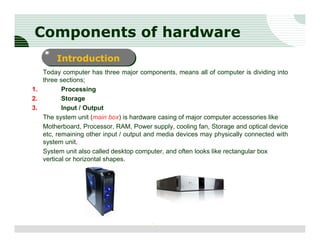
   The system unit (main box) is hardware casing of major computer accessories like
   Motherboard, Processor, RAM, Power supply, cooling fan, Storage and optical device
   etc, remaining other input / output and media devices may physically connected with
   system unit.
   System unit also called desktop computer, and often looks like rectangular box
   vertical or horizontal shapes.


                                        2
Note:
  Commonly desktop computers available in two types in market;
  Branded – those desktop which may assemble by authorized hardware manufacture
  with international standard. Usually hardware manufacture offer three years
  warranty of parts / labor / repair, but due to following circumstances price may much
  higher as compare to unbranded desktop computer. Some international desktop
  manufactures are Dell, HP, Apple, IBM, Sony, and Acer.
  Unbranded – those desktop which may assemble by local hardware vendors without
  any standard. Usually hardware vendor offer ten months limited its own warranty to
  customer. So reason that unbranded desktop computer much cheaper to branded
  desktop computer.


                                       3
1. Processing
Processing define execution of all computer hardware devices, accepting input by
user, process on data, generate output result and save on storage.
Processing unit major components are following;


    Motherboard
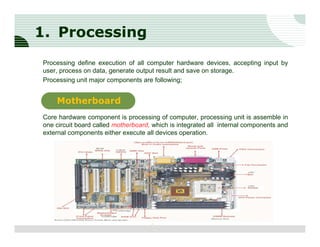
Core hardware component is processing of computer, processing unit is assemble in
one circuit board called motherboard, which is integrated all internal components and
external components either execute all devices operation.


                                     4
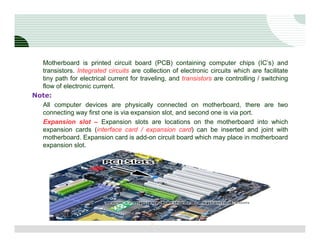
Motherboard is printed circuit board (PCB) containing computer chips (IC’s) and
  transistors. Integrated circuits are collection of electronic circuits which are facilitate
  tiny path for electrical current for traveling, and transistors are controlling / switching
  flow of electronic current.
Note:
  All computer devices are physically connected on motherboard, there are two
  connecting way first one is via expansion slot, and second one is via port.
  Expansion slot – Expansion slots are locations on the motherboard into which
  expansion cards (interface card / expansion card) can be inserted and joint with
  motherboard. Expansion card is add-on circuit board which may place in motherboard
  expansion slot.


                                           5
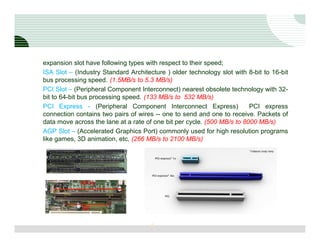
expansion slot have following types with respect to their speed;
ISA Slot – (Industry Standard Architecture ) older technology slot with 8-bit to 16-bit
bus processing speed. (1.5MB/s to 5.3 MB/s)
PCI Slot – (Peripheral Component Interconnect) nearest obsolete technology with 32-
bit to 64-bit bus processing speed. (133 MB/s to 532 MB/s)
PCI Express - (Peripheral Component Interconnect Express)                PCI express
connection contains two pairs of wires -- one to send and one to receive. Packets of
data move across the lane at a rate of one bit per cycle. (500 MB/s to 8000 MB/s)
AGP Slot – (Accelerated Graphics Port) commonly used for high resolution programs
like games, 3D animation, etc. (266 MB/s to 2100 MB/s)


                                      6
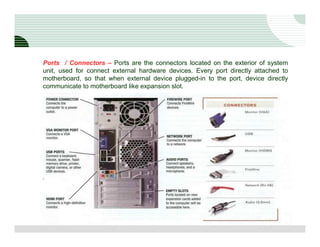
Ports / Connectors – Ports are the connectors located on the exterior of system
unit, used for connect external hardware devices. Every port directly attached to
motherboard, so that when external device plugged-in to the port, device directly
communicate to motherboard like expansion slot.


                                   7
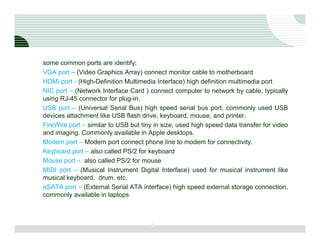
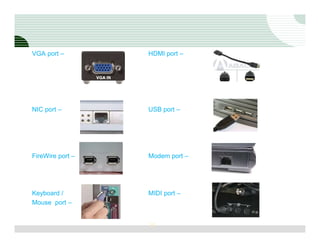
some common ports are identify;
VGA port – (Video Graphics Array) connect monitor cable to motherboard
HDMI port - (High-Definition Multimedia Interface) high definition multimedia port
NIC port – (Network Interface Card ) connect computer to network by cable, typically
using RJ-45 connector for plug-in.
USB port – (Universal Serial Bus) high speed serial bus port, commonly used USB
devices attachment like USB flash drive, keyboard, mouse, and printer.
FireWire port – similar to USB but tiny in size, used high speed data transfer for video
and imaging. Commonly available in Apple desktops.
Modem port – Modem port connect phone line to modem for connectivity.
Keyboard port – also called PS/2 for keyboard
Mouse port – also called PS/2 for mouse
MIDI port – (Musical Instrument Digital Interface) used for musical instrument like
musical keyboard, drum, etc.
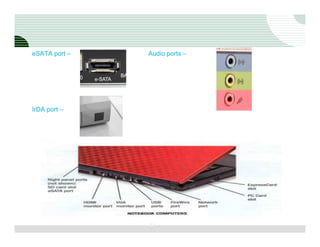
eSATA port – (External Serial ATA interface) high speed external storage connection,
commonly available in laptops


                                      8
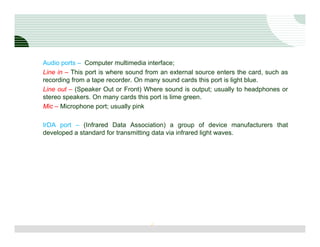
Audio ports – Computer multimedia interface;
Line in – This port is where sound from an external source enters the card, such as
recording from a tape recorder. On many sound cards this port is light blue.
Line out – (Speaker Out or Front) Where sound is output; usually to headphones or
stereo speakers. On many cards this port is lime green.
Mic – Microphone port; usually pink

IrDA port – (Infrared Data Association) a group of device manufacturers that
developed a standard for transmitting data via infrared light waves.


                                    9
VGA port –        HDMI port –


NIC port –        USB port –


FireWire port –   Modem port –


Keyboard /        MIDI port –
Mouse port –


                  10
eSATA port –   Audio ports –


IrDA port –


               11
1. Processing
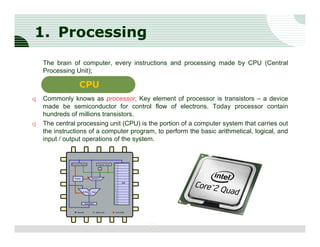
    The brain of computer, every instructions and processing made by CPU (Central
    Processing Unit);

                CPU
q   Commonly knows as processor, Key element of processor is transistors – a device
    made be semiconductor for control flow of electrons. Today processor contain
    hundreds of millions transistors.
q   The central processing unit (CPU) is the portion of a computer system that carries out
    the instructions of a computer program, to perform the basic arithmetical, logical, and
    input / output operations of the system.


                                         12
q  Usually processor contain one or more PCB’s (Print Circuit Board) as per their speed
   and performance as well computer specification is also involve like desktop,
   workstation, and server processor.
q Modern processors are small (less than four centimeters square) and contain multiple
   metallic connectors or pins on the underside / pin less. The CPU is inserted directly
   into a CPU socket, pin side down, on the motherboard.
q Each motherboard will support only a specific type (or range) of CPU / processor as
   well vendor specification.
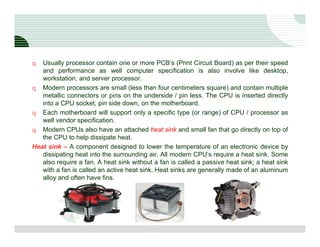
q Modern CPUs also have an attached heat sink and small fan that go directly on top of
   the CPU to help dissipate heat.
Heat sink – A component designed to lower the temperature of an electronic device by
   dissipating heat into the surrounding air. All modern CPU’s require a heat sink. Some
   also require a fan. A heat sink without a fan is called a passive heat sink; a heat sink
   with a fan is called an active heat sink. Heat sinks are generally made of an aluminum
   alloy and often have fins.


                                         13
Components of CPU
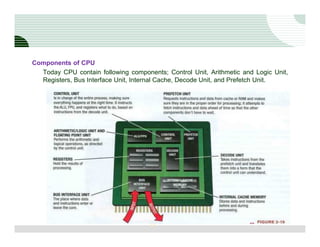
  Today CPU contain following components; Control Unit, Arithmetic and Logic Unit,
  Registers, Bus Interface Unit, Internal Cache, Decode Unit, and Prefetch Unit.


                                     14
Arithmetic and Logic Unit – The ALU perform core job on CPU, means arithmetic
    operation (addition, subtraction, multiplications, and divisions) and logic operation
    (comparing two values of data, condition true or false). Decimal calculation has been
    performed by FPU (Floating Point Unit). Some arithmetic operations like, editing
    digital image, running spell checker, burning CD, etc.

Control Unit - The control unit coordinates the input and output devices of a computer
   system. It fetches the code of all of the instructions in the microprograms. It directs
   the operation of the other units by providing timing and control signals, all computer
   resources are managed by the CU. It directs the flow of data between the CPU and
   the other devices. CU pass data to ALU and FPU for execution for what to do and
   make sure every thing at right order.

Prefetch Unit - The prefetch unit order data and instructions from cache or RAM with
   specific task, this unit predicts what data and instructions will be needed / when /
   where, retrieves from cache or RAM to help avoid delays in processing.

Decoded Unit - The decode unit take the instructions by the prefetch unit and translates
   them into a form that can be understood by CU, ALU, and FPU. The decoded
   instructions go to the control unit for processing.

                                         15
Registers and Internal Cache Memory – Registers are groups of high speed memory
   location with-in CPU that used during processing. The ALU and FPU using registers
   to store data, intermediary calculations, and result processing. These memory bank
   also known as Cache memory with L1, L2, and L3 specifications; often used to store
   instructions and data for CPU, to avoid retrieving from RAM or HDD.

BUS Interface Unit - This interface allows communicating with other CPU components,
  like flow of data and instructions from memory controller to RAM or HDD.


                                       16
CPU Operation

1. CU fetches the data, from computer programs by source of input.
2. For this purpose prefetch unit, execute CU instructions, and ask data from RAM /
    HDD as per requirement, phase by phase.
3. The decoded unit translates fetches data into processor language for CU, CLU and
    FPU.
4. And then forward to CU
5. When data arrive at CU then its forward to ALU and FPU for arithmetic operation.
6. But during operation register and internal cache memory temporary hold results and
    instruction and fetch data before processing.
7. ALU perform basic arithmetic operation like and FPU perform decimal point
    calculation.
8. After processing all data again goes to decoded unit for reverse translating.
9. And at last result data ready to output; and by bus interface data has been transfer to
    HDD and RAM, where bus interface perform both operation means input data and
    output results.
10. It’s important that register hold results only and internal cache memory hold
    instruction and data before processing.

                                         17
System Clock and Machine Cycle

1. In computer every instruction that feed into computer by either typing or clicking; is
    convert into machine language.
2. Each machine language instruction is broken down several smaller instructions set
    called microcode.
3. For example adding two specific numbers store into two sprat registers set and store
    result another sprat register.
4. All these operations are synchronizing by system clock; send out signals every parts
    of computer.
5. Each signal knows as cycle, the cycle per second is measured in hertz (Hz).
6. One megahertz (MHz) is equal to one million clock signals / ticks per second.
7. Note that system clock speed is ability for whole computer signals execution speed,
    but processor has much more clock speed then system.
8. Like system clock speed is 200 MHz but CPU speed is 2 GHz, means in one system
    clock ticks CPU perform 10 pieces of operations.
9. When CPU executes one signal piece of instruction on microcode, is called machine
    cycle.
10. Means each machine cycle is much higher speed with system clock speed.

                                        18
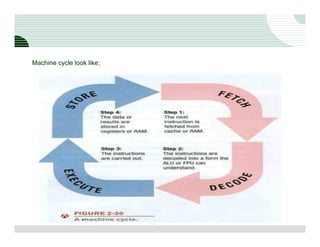
11. Each machine cycle execute four operations;
         Fetch – extract the data by form of input
         Decode – translate into CU, ALU and FPU understandable format
         Execute – perform operation by ALU and FPU
         Store – store original data and results into register
12. Each machine cycle perform one microcode instruction.
13. As example addition of 2 + 3 required four machine cycle like;
         Fetch number 2 from RAM, decode it and store in register X
         Fetch number 3 from RAM, decode it and store another register Y
         Fetch addition instruction and decode it, execute addition operation into both
         registers X and Y, and store results into Z register
         Fetch and decode result for display purpose by register Z and transfer to RAM


                                       19
Machine cycle look like;


                           20

Inside the computer

  • 1.
    LOGO Inside the Computer Hardware story by respecting functionality Compile by Zafar Ayub (zafar_ayub@hotmail.com)
  • 2.
    Components of hardware Introduction Today computer has three major components, means all of computer is dividing into three sections; 1. Processing 2. Storage 3. Input / Output The system unit (main box) is hardware casing of major computer accessories like Motherboard, Processor, RAM, Power supply, cooling fan, Storage and optical device etc, remaining other input / output and media devices may physically connected with system unit. System unit also called desktop computer, and often looks like rectangular box vertical or horizontal shapes. 2
  • 3.
    Note: Commonlydesktop computers available in two types in market; Branded – those desktop which may assemble by authorized hardware manufacture with international standard. Usually hardware manufacture offer three years warranty of parts / labor / repair, but due to following circumstances price may much higher as compare to unbranded desktop computer. Some international desktop manufactures are Dell, HP, Apple, IBM, Sony, and Acer. Unbranded – those desktop which may assemble by local hardware vendors without any standard. Usually hardware vendor offer ten months limited its own warranty to customer. So reason that unbranded desktop computer much cheaper to branded desktop computer. 3
  • 4.
    1. Processing Processing defineexecution of all computer hardware devices, accepting input by user, process on data, generate output result and save on storage. Processing unit major components are following; Motherboard Core hardware component is processing of computer, processing unit is assemble in one circuit board called motherboard, which is integrated all internal components and external components either execute all devices operation. 4
  • 5.
    Motherboard is printedcircuit board (PCB) containing computer chips (IC’s) and transistors. Integrated circuits are collection of electronic circuits which are facilitate tiny path for electrical current for traveling, and transistors are controlling / switching flow of electronic current. Note: All computer devices are physically connected on motherboard, there are two connecting way first one is via expansion slot, and second one is via port. Expansion slot – Expansion slots are locations on the motherboard into which expansion cards (interface card / expansion card) can be inserted and joint with motherboard. Expansion card is add-on circuit board which may place in motherboard expansion slot. 5
  • 6.
    expansion slot havefollowing types with respect to their speed; ISA Slot – (Industry Standard Architecture ) older technology slot with 8-bit to 16-bit bus processing speed. (1.5MB/s to 5.3 MB/s) PCI Slot – (Peripheral Component Interconnect) nearest obsolete technology with 32- bit to 64-bit bus processing speed. (133 MB/s to 532 MB/s) PCI Express - (Peripheral Component Interconnect Express) PCI express connection contains two pairs of wires -- one to send and one to receive. Packets of data move across the lane at a rate of one bit per cycle. (500 MB/s to 8000 MB/s) AGP Slot – (Accelerated Graphics Port) commonly used for high resolution programs like games, 3D animation, etc. (266 MB/s to 2100 MB/s) 6
  • 7.
    Ports / Connectors– Ports are the connectors located on the exterior of system unit, used for connect external hardware devices. Every port directly attached to motherboard, so that when external device plugged-in to the port, device directly communicate to motherboard like expansion slot. 7
  • 8.
    some common portsare identify; VGA port – (Video Graphics Array) connect monitor cable to motherboard HDMI port - (High-Definition Multimedia Interface) high definition multimedia port NIC port – (Network Interface Card ) connect computer to network by cable, typically using RJ-45 connector for plug-in. USB port – (Universal Serial Bus) high speed serial bus port, commonly used USB devices attachment like USB flash drive, keyboard, mouse, and printer. FireWire port – similar to USB but tiny in size, used high speed data transfer for video and imaging. Commonly available in Apple desktops. Modem port – Modem port connect phone line to modem for connectivity. Keyboard port – also called PS/2 for keyboard Mouse port – also called PS/2 for mouse MIDI port – (Musical Instrument Digital Interface) used for musical instrument like musical keyboard, drum, etc. eSATA port – (External Serial ATA interface) high speed external storage connection, commonly available in laptops 8
  • 9.
    Audio ports –Computer multimedia interface; Line in – This port is where sound from an external source enters the card, such as recording from a tape recorder. On many sound cards this port is light blue. Line out – (Speaker Out or Front) Where sound is output; usually to headphones or stereo speakers. On many cards this port is lime green. Mic – Microphone port; usually pink IrDA port – (Infrared Data Association) a group of device manufacturers that developed a standard for transmitting data via infrared light waves. 9
  • 10.
    VGA port – HDMI port – NIC port – USB port – FireWire port – Modem port – Keyboard / MIDI port – Mouse port – 10
  • 11.
    eSATA port – Audio ports – IrDA port – 11
  • 12.
    1. Processing The brain of computer, every instructions and processing made by CPU (Central Processing Unit); CPU q Commonly knows as processor, Key element of processor is transistors – a device made be semiconductor for control flow of electrons. Today processor contain hundreds of millions transistors. q The central processing unit (CPU) is the portion of a computer system that carries out the instructions of a computer program, to perform the basic arithmetical, logical, and input / output operations of the system. 12
  • 13.
    q Usuallyprocessor contain one or more PCB’s (Print Circuit Board) as per their speed and performance as well computer specification is also involve like desktop, workstation, and server processor. q Modern processors are small (less than four centimeters square) and contain multiple metallic connectors or pins on the underside / pin less. The CPU is inserted directly into a CPU socket, pin side down, on the motherboard. q Each motherboard will support only a specific type (or range) of CPU / processor as well vendor specification. q Modern CPUs also have an attached heat sink and small fan that go directly on top of the CPU to help dissipate heat. Heat sink – A component designed to lower the temperature of an electronic device by dissipating heat into the surrounding air. All modern CPU’s require a heat sink. Some also require a fan. A heat sink without a fan is called a passive heat sink; a heat sink with a fan is called an active heat sink. Heat sinks are generally made of an aluminum alloy and often have fins. 13
  • 14.
    Components of CPU Today CPU contain following components; Control Unit, Arithmetic and Logic Unit, Registers, Bus Interface Unit, Internal Cache, Decode Unit, and Prefetch Unit. 14
  • 15.
    Arithmetic and LogicUnit – The ALU perform core job on CPU, means arithmetic operation (addition, subtraction, multiplications, and divisions) and logic operation (comparing two values of data, condition true or false). Decimal calculation has been performed by FPU (Floating Point Unit). Some arithmetic operations like, editing digital image, running spell checker, burning CD, etc. Control Unit - The control unit coordinates the input and output devices of a computer system. It fetches the code of all of the instructions in the microprograms. It directs the operation of the other units by providing timing and control signals, all computer resources are managed by the CU. It directs the flow of data between the CPU and the other devices. CU pass data to ALU and FPU for execution for what to do and make sure every thing at right order. Prefetch Unit - The prefetch unit order data and instructions from cache or RAM with specific task, this unit predicts what data and instructions will be needed / when / where, retrieves from cache or RAM to help avoid delays in processing. Decoded Unit - The decode unit take the instructions by the prefetch unit and translates them into a form that can be understood by CU, ALU, and FPU. The decoded instructions go to the control unit for processing. 15
  • 16.
    Registers and InternalCache Memory – Registers are groups of high speed memory location with-in CPU that used during processing. The ALU and FPU using registers to store data, intermediary calculations, and result processing. These memory bank also known as Cache memory with L1, L2, and L3 specifications; often used to store instructions and data for CPU, to avoid retrieving from RAM or HDD. BUS Interface Unit - This interface allows communicating with other CPU components, like flow of data and instructions from memory controller to RAM or HDD. 16
  • 17.
    CPU Operation 1. CUfetches the data, from computer programs by source of input. 2. For this purpose prefetch unit, execute CU instructions, and ask data from RAM / HDD as per requirement, phase by phase. 3. The decoded unit translates fetches data into processor language for CU, CLU and FPU. 4. And then forward to CU 5. When data arrive at CU then its forward to ALU and FPU for arithmetic operation. 6. But during operation register and internal cache memory temporary hold results and instruction and fetch data before processing. 7. ALU perform basic arithmetic operation like and FPU perform decimal point calculation. 8. After processing all data again goes to decoded unit for reverse translating. 9. And at last result data ready to output; and by bus interface data has been transfer to HDD and RAM, where bus interface perform both operation means input data and output results. 10. It’s important that register hold results only and internal cache memory hold instruction and data before processing. 17
  • 18.
    System Clock andMachine Cycle 1. In computer every instruction that feed into computer by either typing or clicking; is convert into machine language. 2. Each machine language instruction is broken down several smaller instructions set called microcode. 3. For example adding two specific numbers store into two sprat registers set and store result another sprat register. 4. All these operations are synchronizing by system clock; send out signals every parts of computer. 5. Each signal knows as cycle, the cycle per second is measured in hertz (Hz). 6. One megahertz (MHz) is equal to one million clock signals / ticks per second. 7. Note that system clock speed is ability for whole computer signals execution speed, but processor has much more clock speed then system. 8. Like system clock speed is 200 MHz but CPU speed is 2 GHz, means in one system clock ticks CPU perform 10 pieces of operations. 9. When CPU executes one signal piece of instruction on microcode, is called machine cycle. 10. Means each machine cycle is much higher speed with system clock speed. 18
  • 19.
    11. Each machinecycle execute four operations; Fetch – extract the data by form of input Decode – translate into CU, ALU and FPU understandable format Execute – perform operation by ALU and FPU Store – store original data and results into register 12. Each machine cycle perform one microcode instruction. 13. As example addition of 2 + 3 required four machine cycle like; Fetch number 2 from RAM, decode it and store in register X Fetch number 3 from RAM, decode it and store another register Y Fetch addition instruction and decode it, execute addition operation into both registers X and Y, and store results into Z register Fetch and decode result for display purpose by register Z and transfer to RAM 19
  • 20.