Basic of Computer
Introduction : Computer word is adopted from “Latin” word “compute” which
means “calculation”.
Definition : Computer is an electronic device in which we input something(data)
& after processing. We get result or output.
Full Form of Computer : C – Calculate / Commonly
O – Operate / Organize
M – Memory / Machine
P – Print / Processing
U – Unit / Used for
T – Training /Technology
E – Education / Edit
R – Research / Random
Computer
 Bank
 School/College
 Office/Business
 Mechanical
 Engineering
 Reservation/Air lines
 Science
 Defense
 Medical
 Entertainment
Application of Computer
 Physically problem
 Eyes Weakness
 Head pain / Memory loss
 Different parts of body problem
 Addiction problem
 Virus
 System Hang
 Bank A/C Password theft.
Drawback’s of Computer
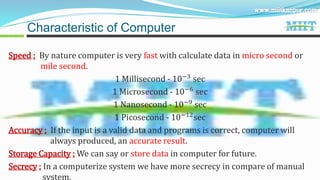
Speed : By nature computer is very fast with calculate data in micro second or
mile second.
1 Millisecond - 10−3
sec
1 Microsecond - 10−6
sec
1 Nanosecond - 10−9 sec
1 Picosecond - 10−12sec
Accuracy : If the input is a valid data and programs is correct, computer will
always produced, an accurate result.
Storage Capacity : We can say or store data in computer for future.
Secrecy : In a computerize system we have more secrecy in compare of manual
system.
Characteristic of Computer
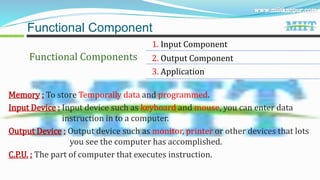
Functional Components
1. Input Component
2. Output Component
3. Application
Functional Component
Memory : To store Temporally data and programmed.
Input Device : Input device such as keyboard and mouse, you can enter data
instruction in to a computer.
Output Device : Output device such as monitor, printer or other devices that lots
you see the computer has accomplished.
C.P.U. : The part of computer that executes instruction.
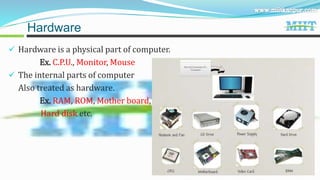
 Hardware is a physical part of computer.
Ex. C.P.U., Monitor, Mouse
 The internal parts of computer
Also treated as hardware.
Ex. RAM, ROM, Mother board,
Hard disk etc.
Hardware
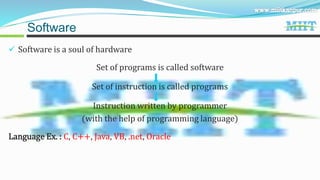
 Software is a soul of hardware
Set of programs is called software
Set of instruction is called programs
Instruction written by programmer
(with the help of programming language)
Language Ex. : C, C++, Java, VB, .net, Oracle
Software
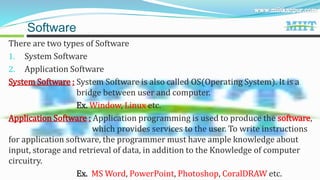
There are two types of Software
1. System Software
2. Application Software
System Software : System Software is also called OS(Operating System). It is a
bridge between user and computer.
Ex. Window, Linux etc.
Application Software : Application programming is used to produce the software,
which provides services to the user. To write instructions
for application software, the programmer must have ample knowledge about
input, storage and retrieval of data, in addition to the Knowledge of computer
circuitry.
Ex. MS Word, PowerPoint, Photoshop, CoralDRAW etc.
Software
Computer Memory
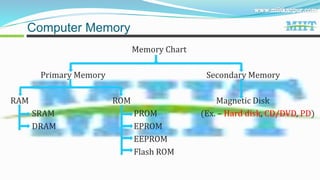
Memory Chart
Primary Memory Secondary Memory
RAM ROM Magnetic Disk
SRAM PROM (Ex. – Hard disk, CD/DVD, PD)
DRAM EPROM
EEPROM
Flash ROM
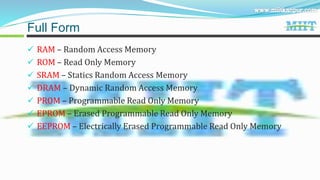
 RAM – Random Access Memory
 ROM – Read Only Memory
 SRAM – Statics Random Access Memory
 DRAM – Dynamic Random Access Memory
 PROM – Programmable Read Only Memory
 EPROM – Erased Programmable Read Only Memory
 EEPROM – Electrically Erased Programmable Read Only Memory
Full Form
 There are different types of memory. Which are used in computer.
 CPU uses it to store data and instruction for processing. CDROM used to store
data permanently but we requires CD writer to store data in to it.
Primary Memory :
 It is also called main memory our computer. It serve as a temporary storage
area for data and instructions.
 It is made up of a large number of cell, each cell capable of storing one bit.
Secondary Memory :
 The Programs and data that are required to be used again are kept in
secondary memory.
 Secondary Memory also called auxiliary Memory. Ex. Hard disk, Pen drive etc.
Computer Memory
RAM(Random Access Memory) - RAM is a read and write memory. Data store
in this memory is erased. When power is cut off. It
is volatile memory. There are two type of RAM.
1) SRAM(Static Random Access Memory) - Static RAM consist of internal flip
flop that store the binary information.
The store information in the RAM remains valid as long as power applied the
unit. SRAM read data in short form so speed is very high.
2) DRAM(Dynamic Random Access Memory) - DRAM is store the binary
information in the form of electric
charges. The store charges on the capister to discharge will limited duration.
Types of Primary Memory
ROM(Read only Memory) - ROM is the permanent memory. Its data not be erased,
when power is cut off. It non volatile memory.
Four type of ROM
1) PROM - Programmable Read Only Memory.
2) EPROM - Erased Programmable Read Only Memory.
3) EEPROM - Electrically Erased Programmable Read Only Memory.
4) Flash Memory - Flash Memory is the type of EEPROM but its information can
be erase an written in block instead of bits.
Types of Primary Memory
There are two types of Memory.
1. Cache Memory
2. Buffer Memory
1) Cache Memory - The Cache Memory is placed between CPU and Main memory.
It is faster than main memory. It is used to store frequently
data in main memory.
2) Buffer Memory - Buffer Memory is the data share memory. It store cut and
copy data temporally.
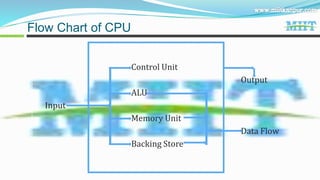
CPU(Central Processing Unit) - It is heart of the computer. It process all types all
data and process it then provide result.
Other Memory
Control Unit
Output
ALU
Input
Memory Unit
Data Flow
Backing Store
Flow Chart of CPU
Control Unit - It controls all input data.
Ex. It convert human language to binary language and again
binary language and again binary language to human
language.
ALU( Arithmetic Logical Unit) – With the help of this unit computer capable to
performing addition, subtraction,multiplication,
division as well as all logical operations.%
Other Memory
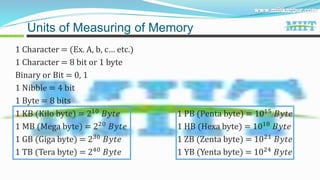
1 Character = (Ex. A, b, c
 etc.)
1 Character = 8 bit or 1 byte
Binary or Bit = 0, 1
1 Nibble = 4 bit
1 Byte = 8 bits
1 KB (Kilo byte) = 210
đ”đ‘Šđ‘Ąđ‘’ 1 PB (Penta byte) = 1015
đ”đ‘Šđ‘Ąđ‘’
1 MB (Mega byte) = 220 đ”đ‘Šđ‘Ąđ‘’ 1 HB (Hexa byte) = 1018 đ”đ‘Šđ‘Ąđ‘’
1 GB (Giga byte) = 230 đ”đ‘Šđ‘Ąđ‘’ 1 ZB (Zenta byte) = 1021 đ”đ‘Šđ‘Ąđ‘’
1 TB (Tera byte) = 240 đ”đ‘Šđ‘Ąđ‘’ 1 YB (Yenta byte) = 1024 đ”đ‘Šđ‘Ąđ‘’
Units of Measuring of Memory

Basic of computer ( miit )

  • 1.
  • 2.
    Introduction : Computerword is adopted from “Latin” word “compute” which means “calculation”. Definition : Computer is an electronic device in which we input something(data) & after processing. We get result or output. Full Form of Computer : C – Calculate / Commonly O – Operate / Organize M – Memory / Machine P – Print / Processing U – Unit / Used for T – Training /Technology E – Education / Edit R – Research / Random Computer
  • 3.
     Bank  School/College Office/Business  Mechanical  Engineering  Reservation/Air lines  Science  Defense  Medical  Entertainment Application of Computer
  • 4.
     Physically problem Eyes Weakness  Head pain / Memory loss  Different parts of body problem  Addiction problem  Virus  System Hang  Bank A/C Password theft. Drawback’s of Computer
  • 5.
    Speed : Bynature computer is very fast with calculate data in micro second or mile second. 1 Millisecond - 10−3 sec 1 Microsecond - 10−6 sec 1 Nanosecond - 10−9 sec 1 Picosecond - 10−12sec Accuracy : If the input is a valid data and programs is correct, computer will always produced, an accurate result. Storage Capacity : We can say or store data in computer for future. Secrecy : In a computerize system we have more secrecy in compare of manual system. Characteristic of Computer
  • 6.
    Functional Components 1. InputComponent 2. Output Component 3. Application Functional Component Memory : To store Temporally data and programmed. Input Device : Input device such as keyboard and mouse, you can enter data instruction in to a computer. Output Device : Output device such as monitor, printer or other devices that lots you see the computer has accomplished. C.P.U. : The part of computer that executes instruction.
  • 7.
     Hardware isa physical part of computer. Ex. C.P.U., Monitor, Mouse  The internal parts of computer Also treated as hardware. Ex. RAM, ROM, Mother board, Hard disk etc. Hardware
  • 8.
     Software isa soul of hardware Set of programs is called software Set of instruction is called programs Instruction written by programmer (with the help of programming language) Language Ex. : C, C++, Java, VB, .net, Oracle Software
  • 9.
    There are twotypes of Software 1. System Software 2. Application Software System Software : System Software is also called OS(Operating System). It is a bridge between user and computer. Ex. Window, Linux etc. Application Software : Application programming is used to produce the software, which provides services to the user. To write instructions for application software, the programmer must have ample knowledge about input, storage and retrieval of data, in addition to the Knowledge of computer circuitry. Ex. MS Word, PowerPoint, Photoshop, CoralDRAW etc. Software
  • 10.
    Computer Memory Memory Chart PrimaryMemory Secondary Memory RAM ROM Magnetic Disk SRAM PROM (Ex. – Hard disk, CD/DVD, PD) DRAM EPROM EEPROM Flash ROM
  • 11.
     RAM –Random Access Memory  ROM – Read Only Memory  SRAM – Statics Random Access Memory  DRAM – Dynamic Random Access Memory  PROM – Programmable Read Only Memory  EPROM – Erased Programmable Read Only Memory  EEPROM – Electrically Erased Programmable Read Only Memory Full Form
  • 12.
     There aredifferent types of memory. Which are used in computer.  CPU uses it to store data and instruction for processing. CDROM used to store data permanently but we requires CD writer to store data in to it. Primary Memory :  It is also called main memory our computer. It serve as a temporary storage area for data and instructions.  It is made up of a large number of cell, each cell capable of storing one bit. Secondary Memory :  The Programs and data that are required to be used again are kept in secondary memory.  Secondary Memory also called auxiliary Memory. Ex. Hard disk, Pen drive etc. Computer Memory
  • 13.
    RAM(Random Access Memory)- RAM is a read and write memory. Data store in this memory is erased. When power is cut off. It is volatile memory. There are two type of RAM. 1) SRAM(Static Random Access Memory) - Static RAM consist of internal flip flop that store the binary information. The store information in the RAM remains valid as long as power applied the unit. SRAM read data in short form so speed is very high. 2) DRAM(Dynamic Random Access Memory) - DRAM is store the binary information in the form of electric charges. The store charges on the capister to discharge will limited duration. Types of Primary Memory
  • 14.
    ROM(Read only Memory)- ROM is the permanent memory. Its data not be erased, when power is cut off. It non volatile memory. Four type of ROM 1) PROM - Programmable Read Only Memory. 2) EPROM - Erased Programmable Read Only Memory. 3) EEPROM - Electrically Erased Programmable Read Only Memory. 4) Flash Memory - Flash Memory is the type of EEPROM but its information can be erase an written in block instead of bits. Types of Primary Memory
  • 15.
    There are twotypes of Memory. 1. Cache Memory 2. Buffer Memory 1) Cache Memory - The Cache Memory is placed between CPU and Main memory. It is faster than main memory. It is used to store frequently data in main memory. 2) Buffer Memory - Buffer Memory is the data share memory. It store cut and copy data temporally. CPU(Central Processing Unit) - It is heart of the computer. It process all types all data and process it then provide result. Other Memory
  • 16.
    Control Unit Output ALU Input Memory Unit DataFlow Backing Store Flow Chart of CPU
  • 17.
    Control Unit -It controls all input data. Ex. It convert human language to binary language and again binary language and again binary language to human language. ALU( Arithmetic Logical Unit) – With the help of this unit computer capable to performing addition, subtraction,multiplication, division as well as all logical operations.% Other Memory
  • 18.
    1 Character =(Ex. A, b, c
 etc.) 1 Character = 8 bit or 1 byte Binary or Bit = 0, 1 1 Nibble = 4 bit 1 Byte = 8 bits 1 KB (Kilo byte) = 210 đ”đ‘Šđ‘Ąđ‘’ 1 PB (Penta byte) = 1015 đ”đ‘Šđ‘Ąđ‘’ 1 MB (Mega byte) = 220 đ”đ‘Šđ‘Ąđ‘’ 1 HB (Hexa byte) = 1018 đ”đ‘Šđ‘Ąđ‘’ 1 GB (Giga byte) = 230 đ”đ‘Šđ‘Ąđ‘’ 1 ZB (Zenta byte) = 1021 đ”đ‘Šđ‘Ąđ‘’ 1 TB (Tera byte) = 240 đ”đ‘Šđ‘Ąđ‘’ 1 YB (Yenta byte) = 1024 đ”đ‘Šđ‘Ąđ‘’ Units of Measuring of Memory