Commercial Off-the-
Shelf (COTS)
Integration
GURKAMAL KAUR
(2K11/SE/031)
AVINASH KUMAR
(2K11/SE/016)
Types in COTS Integration
process
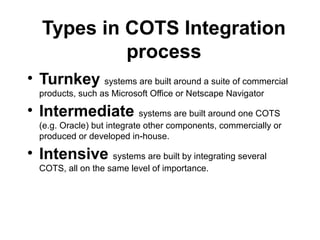
• Turnkey systems are built around a suite of commercial
products, such as Microsoft Office or Netscape Navigator
• Intermediate systems are built around one COTS
(e.g. Oracle) but integrate other components, commercially or
produced or developed in-house.
• Intensive systems are built by integrating several
COTS, all on the same level of importance.
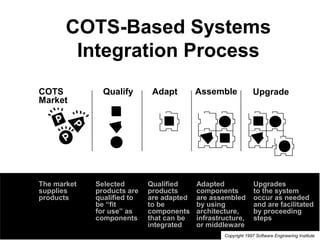
COTS-Based Systems
Integration Process
Qualify Adapt Assemble UpgradeCOTS
Market
Selected
products are
qualified to
be “fit
for use” as
components
Qualified
products
are adapted
to be
components
that can be
integrated
Adapted
components
are assembled
by using
architecture,
infrastructure,
or middleware
Upgrades
to the system
occur as needed
and are facilitated
by proceeding
steps
The market
supplies
products
Copyright 1997 Software Engineering Institute
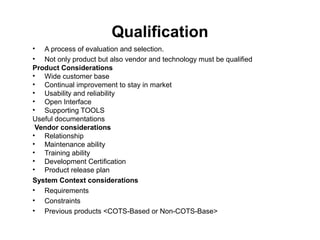
Qualification
• A process of evaluation and selection.
• Not only product but also vendor and technology must be qualified
Product Considerations
• Wide customer base
• Continual improvement to stay in market
• Usability and reliability
• Open Interface
• Supporting TOOLS
Useful documentations
Vendor considerations
• Relationship
• Maintenance ability
• Training ability
• Development Certification
• Product release plan
System Context considerations
• Requirements
• Constraints
• Previous products <COTS-Based or Non-COTS-Base>
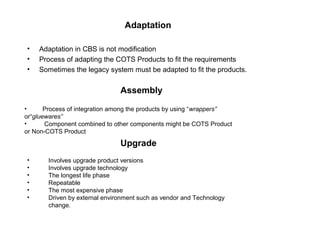
Adaptation
• Adaptation in CBS is not modification
• Process of adapting the COTS Products to fit the requirements
• Sometimes the legacy system must be adapted to fit the products.
• Process of integration among the products by using “wrappers”
or“gluewares”
• Component combined to other components might be COTS Product
or Non-COTS Product
Assembly
• Involves upgrade product versions
• Involves upgrade technology
• The longest life phase
• Repeatable
• The most expensive phase
• Driven by external environment such as vendor and Technology
change.
Upgrade
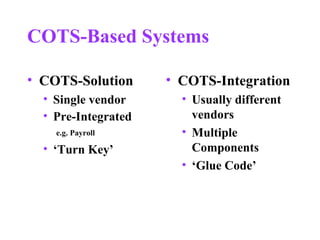
COTS-Based Systems
• COTS-Solution
• Single vendor
• Pre-Integrated
e.g. Payroll
• ‘Turn Key’
• COTS-Integration
• Usually different
vendors
• Multiple
Components
• ‘Glue Code’
Integrating Commercial Off-the-Shelf
Software
In hardware design, standardized chips are good examples of standard
parts. They are well understood components listed in catalogues and they
perform very specific functions: they are the physical building blocks of larger
designs. Now imagine preexisting, pretested software components that can
be inserted right into new software programs.
These pieces of pretested software are like little black boxes. Just like a
standard hardware part, commercial off-the-shelf software is meant to be
cheaper and more reliable than a home-grown solution. The following are
common subcategories for commercial off-the-shelf software:
COTS components — Program parts designed to be
included within developed software to provide additional
functionality. These parts are designed, developed, tested,
documented, and usually maintained by their suppliers.
Because COTS components are developed and tested with
reuse in mind, they are more generically designed than
typical custom software.
COTS applications — Stand-alone applications available
for sale to businesses, government, and the general public.
For example, word processors such as Microsoft Word or
WordPerfect may be considered COTS applications when
they are used to fulfill user requirements. COTS applications
are clearly tempting because they provide turnkey
functionality
Evaluating in COTS Integration
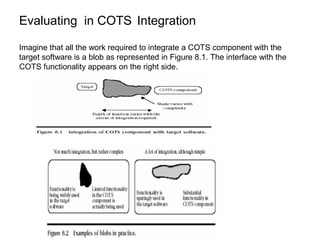
Imagine that all the work required to integrate a COTS component with the
target software is a blob as represented in Figure 8.1. The interface with the
COTS functionality appears on the right side.
The target software interface or resultant functionality impacted
is represented on the left side. The area in the middle
represents the required work. The amount of COTS
functionality, the impacted target functionality, and integration
work together to determine the size of the blob, and thus the
job. A lot of integration work means a longer blob and more
functionality makes it wider. A fourth factor is complexity, and
this is represented by shading. Although complexity is positively
correlated with integration work, sometimes a small amount of
work will be very complex and vice versa. Figure 8.2 illustrates
two examples of blobs in practice. It can be used as a
framework to better explain the scope of any COTS integration
work.
Three Components of COTS
Integration
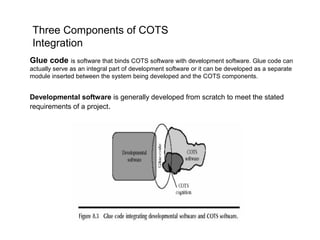
Glue code is software that binds COTS software with development software. Glue code can
actually serve as an integral part of development software or it can be developed as a separate
module inserted between the system being developed and the COTS components.
Developmental software is generally developed from scratch to meet the stated
requirements of a project.
Estimating COTS Integration
Different methodologies that can be used to estimate the
integration of COTS software:
(1) using function points and an estimating model lacking
COTS-specific capability;
(2) using SEER-SEM cost drivers to estimate COTS;
(3) rules of thumb.
(1) using function points and an estimating model lacking COTS-specific
capability
For the COTS software, perform the following steps:
1. Count the functionality to be learned or used by the developers. In the language of function
points, these will usually be internal logical files.
2. Count only the function calls used by the host application as external inquiries.
3. Count any error messages used as external interface files.
4. Count screen, printed, and clipboard outputs individually as external outputs.
5. Count user interactions with library functions as external inputs.
6. In general, count inputs and outputs within the boundary of the host application
Integration of Stand-Alone COTS Software
What about stand-alone packages that are simply launched from a host application? For
example, a mission control system may have an option to launch a word processor. The effort
associated with such types of turnkey integration is captured in the host application’s
development effort. This is appropriate only for COTS packages that are used as-is with no
further understanding required.
Stand-Alone COTS Software with Significant Configuration
Some stand-alone packages require significant configuration. For example, a mail system often requires
extensive hardware-dependent setup and may involve script and initialization file edits, 4GL code, etc.
Configuration should be modeled within a sizing framework, that is, determine the size of each item to be
configured. Use the following guidelines for estimating configuration work:
1.Count setup files as internal logical files (function points).
2. If the configuration is performed from scratch, count whatever is created either as SLOC or functions.
3. If configuration templates are provided, count them as preexisting SLOC or functions.
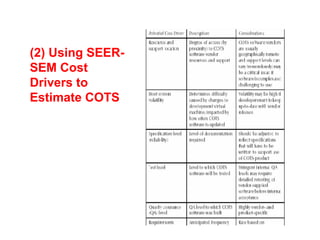
(2) Using SEER-
SEM Cost
Drivers to
Estimate COTS
For a COTS element, “size” describes the functionality that must be understood by the integrator. This
perspective on sizing has been called COTS cognition.
SEER-SEM provides a number of COTS cognition sizing methods:
(1) object sizing
(2) feature sizing
(3) quick sizing which allows an analyst to estimate by drawing
analogies.
The options for COTS sizing are detailed below:
(1) Object Sizing If the COTS software is object-oriented, there is no better choice than this
metric that was carefully adapted from IFPUG’s object-oriented function point specification.
Identify the parts of the COTS that will be learned and used, not the entire COTS application.
(2) Feature Sizing This technique was specially developed for use in the COTS WBS element.
Developed from function points, feature sizing allows you to model functions as they appear
from the developer’s perspective
. Feature sizing is broken down into three categories: unique functions, data tables referenced,
and data tables configured.
Unique Functions: Defined as the number of unique functions that must be understood to
integrate the component, functions may reside in APIs, program libraries, etc.
Data Tables Referenced: This category represents the number of unique data tables
referenced including configuration files, databases, external data structures, etc. A single
database having several closely related tables should be referenced once only unless those
tables are sufficiently different from one another. These data groupings are referenced only and
not changed.
Data Tables Configured: The final category includes the number of data tables that must be
configured, changed or created in order to integrate the component. Data tables include
configuration files, databases, and external data structures.
(3)Quick Sizing This is a method for approximating size by analogy against common application types.
Two categories of COTS software are outlined and discussed here: embedded COTS software and
components.
Embedded COTS software is integrated directly into the delivered software. Embedded COTS software
items are broken down further into those that are adapted and those that are components, that is, directly
integrated into the computer program.
Components are intended for reuse; source code often is not available and usually requires no
modification such as libraries, object classes, and applications.
Off-the-shelf product characteristics —
This category of parameters describes issues faced by users of off-the-shelf components.
Integration experiences show that these issues differ from standard development issues, and
particularly involve product support and integration complexity.
Parameters in this category include component type, component volatility, component
application complexity, interface complexity, and product support.
Use parameters relate to the quality of the experiences developers will have in using these
components.
Many issues surrounding component integration involves learning how to use components and
checking their integrity.
The use parameters focus on these factors and include component selection completeness,
experience with component, learning rate, reverse engineering, component integration and testing,
and test level.
Cost parameters are both recurring (e.g., annual licensing fees) and nonrecurring (e.g., one-time
purchasing and training costs) associated with the COTS product.
(3) Rules of Thumb for COTS Integration
COTS projects vary widely in the level of required integration, the type of integration carried out, the
type of product, ease of use, and many other factors. Because of this, this table must be evaluated
skeptically; use it only to understand probable ranges for COTS efforts.
Experience with COTS Product
This factor describes the developers’ previous experience in integrating developed software with this
COTS product:
Limited: nearly no experience with product
Functional: one or two limited instances of dealing with product
Fully proficient: fully knowledgeable and practiced in integration issues with product
Scope of COTS Scope is the combined functionality and complexity of the COTS product:
Limited: typical desktop-level software products such as a PCbased accounting system or operating
system changeover
Moderate: medium-sized company tools such as a human resources system, shop floor automation,
shipping, and operating system changeovers
Complex: mainframe-class products such as SAP R/3, a broadly deployed reservations system, or a
system with complex real-world interactions that do not become fully apparent except over time
COTS Risks
Because COTS software is designed to address common needs, the specifications for this software
often sound very appealing. However, a number of common assumptions should be questioned:
*Assumption — A COTS package is relatively bug-free. Reality — Although the marketplace tries to
ensure that bugs are discovered and fixed promptly, newer, less tested versions cause defects to
reappear. Shop for a mature COTS package (or version).
*Assumption — System integrators know the functionality and interface nuances of the COTS
packages that they propose to use. Reality — Manuals do not always tell the whole story, especially
with programming components. Use of almost any COTS involves a learning curve
*Assumption —Glue code is very easy to write. Therefore, only a minimum amount of time is
required to design and implement it. Reality — Because glue code interfaces independent sets of
code, it can be extremely complex.
*Assumption — COTS software works and no special testing beyond integration testing is needed.
Reality — The golden rule behind COTS software is “trust but verify.”
*Assumption — User requirements will be met by the finished system. Reality — In general, COTS
packages need to be extended to meet 100 percent of user requirements.
*Assumption — COTS is mass-produced and priced at dramatic economies of scale. Reality —
Keep in mind that although COTS software may be sold to many people, developers must still make
decent returns on their investments.
Risk Reduction
Maximize the use of COTS components that:
*Perform relatively well defined functions.
*Are mature, replaceable, and have equivalents from alternate, competitive sources. This means
studying the market since products are not generally standardized.
*Have well defined and predictable inputs and outputs. This requires looking at product architecture
in some detail.
Minimize the use of COTS components that:
*Combine many functions in an integrated solution, all of which must be used or purchased and
maintained. Ask whether you can use a portion of the COTS product or package.
*Do not have well defined internal and external interfaces. Incorporate the other rules of estimation.
All the other cautions related to estimation of software projects are applicable to projects
incorporating COTS software:
*Experience levels with languages, tools, and practices are just as important as the languages,
tools, and practices being used.
*Simply having tools available does not mean they will be used.
*The complexity of an application is related to how quickly you can add people to the project.
*There is no such thing as a free lunch! COTS integration is never free
Risks Associated with Reuse and COTS
While reuse or COTS software can provide the potential to significantly reduce cost, schedule, or quality
exposure of a project, opting for reused or COTS software by no means ensures success. Many risks can
arise. If not managed and successfully mitigated, they can develop into problems and negate any savings
projected.
The risks generally fall into three categories:
1. The process used to select the components or criteria used in trade-offs resulting in the selection
2. A need to modify, extend, or upgrade reused or COTS components to support operational or application
requirements
3. The need to maintain or sustain the reused or COTS components during periods of operational support
COTS system integration problems
• Lack of control over functionality and performance
– COTS systems may be less effective than they appear
• Problems with COTS system inter-operability
– Different COTS systems may make different assumptions
that means integration is difficult
• No control over system evolution
– COTS vendors not system users control evolution
• Support from COTS vendors
– COTS vendors may not offer support over the lifetime of
the product
Thank you….

Cots integration

  • 1.
    Commercial Off-the- Shelf (COTS) Integration GURKAMALKAUR (2K11/SE/031) AVINASH KUMAR (2K11/SE/016)
  • 2.
    Types in COTSIntegration process • Turnkey systems are built around a suite of commercial products, such as Microsoft Office or Netscape Navigator • Intermediate systems are built around one COTS (e.g. Oracle) but integrate other components, commercially or produced or developed in-house. • Intensive systems are built by integrating several COTS, all on the same level of importance.
  • 3.
    COTS-Based Systems Integration Process QualifyAdapt Assemble UpgradeCOTS Market Selected products are qualified to be “fit for use” as components Qualified products are adapted to be components that can be integrated Adapted components are assembled by using architecture, infrastructure, or middleware Upgrades to the system occur as needed and are facilitated by proceeding steps The market supplies products Copyright 1997 Software Engineering Institute
  • 4.
    Qualification • A processof evaluation and selection. • Not only product but also vendor and technology must be qualified Product Considerations • Wide customer base • Continual improvement to stay in market • Usability and reliability • Open Interface • Supporting TOOLS Useful documentations Vendor considerations • Relationship • Maintenance ability • Training ability • Development Certification • Product release plan System Context considerations • Requirements • Constraints • Previous products <COTS-Based or Non-COTS-Base>
  • 5.
    Adaptation • Adaptation inCBS is not modification • Process of adapting the COTS Products to fit the requirements • Sometimes the legacy system must be adapted to fit the products. • Process of integration among the products by using “wrappers” or“gluewares” • Component combined to other components might be COTS Product or Non-COTS Product Assembly • Involves upgrade product versions • Involves upgrade technology • The longest life phase • Repeatable • The most expensive phase • Driven by external environment such as vendor and Technology change. Upgrade
  • 6.
    COTS-Based Systems • COTS-Solution •Single vendor • Pre-Integrated e.g. Payroll • ‘Turn Key’ • COTS-Integration • Usually different vendors • Multiple Components • ‘Glue Code’
  • 7.
    Integrating Commercial Off-the-Shelf Software Inhardware design, standardized chips are good examples of standard parts. They are well understood components listed in catalogues and they perform very specific functions: they are the physical building blocks of larger designs. Now imagine preexisting, pretested software components that can be inserted right into new software programs. These pieces of pretested software are like little black boxes. Just like a standard hardware part, commercial off-the-shelf software is meant to be cheaper and more reliable than a home-grown solution. The following are common subcategories for commercial off-the-shelf software:
  • 10.
    COTS components —Program parts designed to be included within developed software to provide additional functionality. These parts are designed, developed, tested, documented, and usually maintained by their suppliers. Because COTS components are developed and tested with reuse in mind, they are more generically designed than typical custom software. COTS applications — Stand-alone applications available for sale to businesses, government, and the general public. For example, word processors such as Microsoft Word or WordPerfect may be considered COTS applications when they are used to fulfill user requirements. COTS applications are clearly tempting because they provide turnkey functionality
  • 11.
    Evaluating in COTSIntegration Imagine that all the work required to integrate a COTS component with the target software is a blob as represented in Figure 8.1. The interface with the COTS functionality appears on the right side.
  • 12.
    The target softwareinterface or resultant functionality impacted is represented on the left side. The area in the middle represents the required work. The amount of COTS functionality, the impacted target functionality, and integration work together to determine the size of the blob, and thus the job. A lot of integration work means a longer blob and more functionality makes it wider. A fourth factor is complexity, and this is represented by shading. Although complexity is positively correlated with integration work, sometimes a small amount of work will be very complex and vice versa. Figure 8.2 illustrates two examples of blobs in practice. It can be used as a framework to better explain the scope of any COTS integration work.
  • 13.
    Three Components ofCOTS Integration Glue code is software that binds COTS software with development software. Glue code can actually serve as an integral part of development software or it can be developed as a separate module inserted between the system being developed and the COTS components. Developmental software is generally developed from scratch to meet the stated requirements of a project.
  • 14.
    Estimating COTS Integration Differentmethodologies that can be used to estimate the integration of COTS software: (1) using function points and an estimating model lacking COTS-specific capability; (2) using SEER-SEM cost drivers to estimate COTS; (3) rules of thumb.
  • 15.
    (1) using functionpoints and an estimating model lacking COTS-specific capability For the COTS software, perform the following steps: 1. Count the functionality to be learned or used by the developers. In the language of function points, these will usually be internal logical files. 2. Count only the function calls used by the host application as external inquiries. 3. Count any error messages used as external interface files. 4. Count screen, printed, and clipboard outputs individually as external outputs. 5. Count user interactions with library functions as external inputs. 6. In general, count inputs and outputs within the boundary of the host application Integration of Stand-Alone COTS Software What about stand-alone packages that are simply launched from a host application? For example, a mission control system may have an option to launch a word processor. The effort associated with such types of turnkey integration is captured in the host application’s development effort. This is appropriate only for COTS packages that are used as-is with no further understanding required. Stand-Alone COTS Software with Significant Configuration Some stand-alone packages require significant configuration. For example, a mail system often requires extensive hardware-dependent setup and may involve script and initialization file edits, 4GL code, etc. Configuration should be modeled within a sizing framework, that is, determine the size of each item to be configured. Use the following guidelines for estimating configuration work: 1.Count setup files as internal logical files (function points). 2. If the configuration is performed from scratch, count whatever is created either as SLOC or functions. 3. If configuration templates are provided, count them as preexisting SLOC or functions.
  • 16.
    (2) Using SEER- SEMCost Drivers to Estimate COTS
  • 17.
    For a COTSelement, “size” describes the functionality that must be understood by the integrator. This perspective on sizing has been called COTS cognition. SEER-SEM provides a number of COTS cognition sizing methods: (1) object sizing (2) feature sizing (3) quick sizing which allows an analyst to estimate by drawing analogies.
  • 18.
    The options forCOTS sizing are detailed below: (1) Object Sizing If the COTS software is object-oriented, there is no better choice than this metric that was carefully adapted from IFPUG’s object-oriented function point specification. Identify the parts of the COTS that will be learned and used, not the entire COTS application. (2) Feature Sizing This technique was specially developed for use in the COTS WBS element. Developed from function points, feature sizing allows you to model functions as they appear from the developer’s perspective . Feature sizing is broken down into three categories: unique functions, data tables referenced, and data tables configured. Unique Functions: Defined as the number of unique functions that must be understood to integrate the component, functions may reside in APIs, program libraries, etc. Data Tables Referenced: This category represents the number of unique data tables referenced including configuration files, databases, external data structures, etc. A single database having several closely related tables should be referenced once only unless those tables are sufficiently different from one another. These data groupings are referenced only and not changed. Data Tables Configured: The final category includes the number of data tables that must be configured, changed or created in order to integrate the component. Data tables include configuration files, databases, and external data structures. (3)Quick Sizing This is a method for approximating size by analogy against common application types. Two categories of COTS software are outlined and discussed here: embedded COTS software and components. Embedded COTS software is integrated directly into the delivered software. Embedded COTS software items are broken down further into those that are adapted and those that are components, that is, directly integrated into the computer program. Components are intended for reuse; source code often is not available and usually requires no modification such as libraries, object classes, and applications.
  • 19.
    Off-the-shelf product characteristics— This category of parameters describes issues faced by users of off-the-shelf components. Integration experiences show that these issues differ from standard development issues, and particularly involve product support and integration complexity. Parameters in this category include component type, component volatility, component application complexity, interface complexity, and product support. Use parameters relate to the quality of the experiences developers will have in using these components. Many issues surrounding component integration involves learning how to use components and checking their integrity. The use parameters focus on these factors and include component selection completeness, experience with component, learning rate, reverse engineering, component integration and testing, and test level. Cost parameters are both recurring (e.g., annual licensing fees) and nonrecurring (e.g., one-time purchasing and training costs) associated with the COTS product.
  • 20.
    (3) Rules ofThumb for COTS Integration COTS projects vary widely in the level of required integration, the type of integration carried out, the type of product, ease of use, and many other factors. Because of this, this table must be evaluated skeptically; use it only to understand probable ranges for COTS efforts. Experience with COTS Product This factor describes the developers’ previous experience in integrating developed software with this COTS product: Limited: nearly no experience with product Functional: one or two limited instances of dealing with product Fully proficient: fully knowledgeable and practiced in integration issues with product Scope of COTS Scope is the combined functionality and complexity of the COTS product: Limited: typical desktop-level software products such as a PCbased accounting system or operating system changeover Moderate: medium-sized company tools such as a human resources system, shop floor automation, shipping, and operating system changeovers Complex: mainframe-class products such as SAP R/3, a broadly deployed reservations system, or a system with complex real-world interactions that do not become fully apparent except over time
  • 21.
    COTS Risks Because COTSsoftware is designed to address common needs, the specifications for this software often sound very appealing. However, a number of common assumptions should be questioned: *Assumption — A COTS package is relatively bug-free. Reality — Although the marketplace tries to ensure that bugs are discovered and fixed promptly, newer, less tested versions cause defects to reappear. Shop for a mature COTS package (or version). *Assumption — System integrators know the functionality and interface nuances of the COTS packages that they propose to use. Reality — Manuals do not always tell the whole story, especially with programming components. Use of almost any COTS involves a learning curve *Assumption —Glue code is very easy to write. Therefore, only a minimum amount of time is required to design and implement it. Reality — Because glue code interfaces independent sets of code, it can be extremely complex. *Assumption — COTS software works and no special testing beyond integration testing is needed. Reality — The golden rule behind COTS software is “trust but verify.” *Assumption — User requirements will be met by the finished system. Reality — In general, COTS packages need to be extended to meet 100 percent of user requirements. *Assumption — COTS is mass-produced and priced at dramatic economies of scale. Reality — Keep in mind that although COTS software may be sold to many people, developers must still make decent returns on their investments.
  • 22.
    Risk Reduction Maximize theuse of COTS components that: *Perform relatively well defined functions. *Are mature, replaceable, and have equivalents from alternate, competitive sources. This means studying the market since products are not generally standardized. *Have well defined and predictable inputs and outputs. This requires looking at product architecture in some detail. Minimize the use of COTS components that: *Combine many functions in an integrated solution, all of which must be used or purchased and maintained. Ask whether you can use a portion of the COTS product or package. *Do not have well defined internal and external interfaces. Incorporate the other rules of estimation. All the other cautions related to estimation of software projects are applicable to projects incorporating COTS software: *Experience levels with languages, tools, and practices are just as important as the languages, tools, and practices being used. *Simply having tools available does not mean they will be used. *The complexity of an application is related to how quickly you can add people to the project. *There is no such thing as a free lunch! COTS integration is never free
  • 23.
    Risks Associated withReuse and COTS While reuse or COTS software can provide the potential to significantly reduce cost, schedule, or quality exposure of a project, opting for reused or COTS software by no means ensures success. Many risks can arise. If not managed and successfully mitigated, they can develop into problems and negate any savings projected. The risks generally fall into three categories: 1. The process used to select the components or criteria used in trade-offs resulting in the selection 2. A need to modify, extend, or upgrade reused or COTS components to support operational or application requirements 3. The need to maintain or sustain the reused or COTS components during periods of operational support
  • 24.
    COTS system integrationproblems • Lack of control over functionality and performance – COTS systems may be less effective than they appear • Problems with COTS system inter-operability – Different COTS systems may make different assumptions that means integration is difficult • No control over system evolution – COTS vendors not system users control evolution • Support from COTS vendors – COTS vendors may not offer support over the lifetime of the product
  • 25.

Editor's Notes

  • #3 ** These categories I got from the paper that Dr. Seaman join with NASA and other universities to write it. There are 3 types of CBS-Turnkey, Intermediate, and Intensive. … These types are categorized based on the number of COTS used and their influence on the final system. In this presentation I will focus on the intensive system.
  • #4 This model is called the five-panel model. The five panels represent various activities that address different aspects of turning a set of COTS components into a COTS-based system. The COTS Market panel deals with the market survey and analysis activities that determine what are the viable candidates for a particular component, from both a business and a technical perspective. The Qualify panel activities investigate the hidden interfaces and other characteristics and features of the candidate products. The result of this discovery process is to reveal the necessary information to make a selection and identify possible sources of conflict and overlap, so that the component can be effectively assembled and evolved. The Adapt panel activities amend the selected components to address potential sources of conflict. The figure implies a kind of component &amp;quot;wrapping,&amp;quot; but other approaches are possible (e.g., mediators and translators). The Assemble panel shows the integration of the adapted components into an architectural infrastructure. This infrastructure will support component assembly and coordination, and differentiates architectural assembly from ad hoc &amp;quot;glue.&amp;quot; The Update panel acknowledges that new versions of components will replace older versions; in some cases, components may be replaced by different components with similar behavior and interfaces. These replacement activities may require that wrappers be rewritten, and they suggest the advantage of well-defined component interfaces that reduce the extensive testing otherwise needed to ensure that the operation of unchanged components is not adversely affected.
  • #5 It’s kind of decision making more than technical process.
  • #6 Adaptation – COTS Products is unlikely match all requirement, so we have to adapt the product fit to the requirement. The adaptation in CBS is not to modify the product. COTS Products are black-block that you have to write “wrappers” or “gluewares” to make them be compatible.