Chapter 5 B.M.H Input and Output
Learning Objectives Computer Screen CRT (Cathode Ray Tube) LCD (Liquid Crystal Display) Printer Impact printer Nonimpact printer Voice output Music output and other sounds
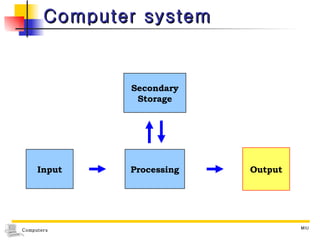
Computer system Input Processing Output Secondary Storage
Output: information for the user Computer output screen  printer output voice  sound  various form of graphics output
Computer Screen Monitor components the housing  for its electrical components  a stand  that can be tilted or swiveled a screen Screen output Known in the computer industry as soft copy Intangible and temporary    Hard copy  Output  by printer  on paper Tangible, permanent
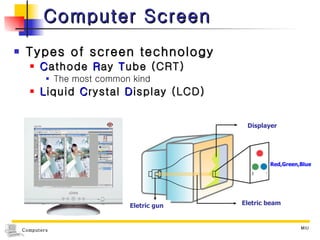
Computer Screen Types of screen technology C athode  R ay  T ube (CRT) The most common kind L iquid  C rystal  D isplay (LCD) Eletric beam Eletric gun Displayer Red,Green,Blue
Cathode Ray Tube (CRT) Types according to color Most CRTs are color Some are  monochrome Only one color, usually green or amber (yellowish-brown color) Less expensive than those with color
CRT Technology  Called  raster scanning A process of sweeping electron beams across the back of the screen The backing of the screen display Has a phosphorous coating that glows whenever it is hit by a beam of electron The phosphorous does not glow for very long The image must be refreshed often
CRT    Phosphorous  : (Symbol P) a chemical element found in several different forms, including as a poisonous, pale yellow substance that shines in the dark and starts to burn as soon as it is placed in air    Electron  : a very small piece of MATTER (= a substance) with a negative electric CHARGE, found in all atoms
CRT Scan rate The number of times the electron beam refreshed the screen 80 to 100 times per second Adequate to retain a clear screen image
CRT Has hundreds of horizontal lines scanned for left to right and from top to bottom Interlaced fashion The odd-numbered lines on one pass of the electron beam And then the even-numbered lines on the next pass - a lower refresh rate without producing flicker - Inexpensive monitors - with text and fixed graphics displays Noninterlaced (NI) All lines are scanned on each pass - With animated graphics
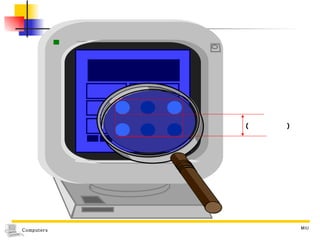
Computer Screen Is divided into dots Called  addressable they can be addressed individually by the graphics SW Each dot Referred to as  a  pic ture  el ement,  or  pixel Dot pitch  the amount of space between the dots
(  )
Computer Screen The Resolution of the screen  the power of a computer screen to give a clear image Factors related the number of pixels on the screen The more pixels, the higher the resolution Dot pitch  The smaller the dot pitch, the better the quality of the screen image
Computer Screen Chips  affixed to the motherboard Convert the electrical output signals of the control unit into the signals that control the monitor To upgrade the graphics capability Most used  graphics card , or graphics adapter board, plugged into a expansion slot
Graphic Standards The intention of standards To agree on resolutions, colors and so forth to make it easier for the manufacturers of PCs, monitors, graphics boards to ensure that their products work together
Graphic Standards CGA (Color Graphics Adapter) 320(horizontal)x200(vetrical) pixels EGA (Enhanced Graphics Adapter) 640x350 pixels VGA (Video Graphics Array) 640x480 pixels
Graphic Standards The standards in most common use today SVGA (Super VGA) Provide different resolution 800(h)x600(v), 1024x768, 1280x1024, 1600x1200 pixels Support a palette of 16million colors But simultaneous colors which can be displayed is limited by the amount of video memory installed in a system  XGA (eXtended Graphics Array) High-resolution graphics standard The same resolution but more simultaneous color Allows to be  noninterlaced
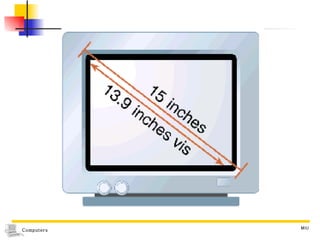
Computer Screen Screen sizes Measured  diagonally 15-or 17-inch screen : a typical office worker handling word processing and spreadsheet    1 inch = 2.54 cm 19-inch screen : a user involved with high-powered graphics Bigger is usually better, more expensive
 
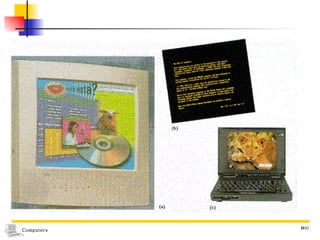
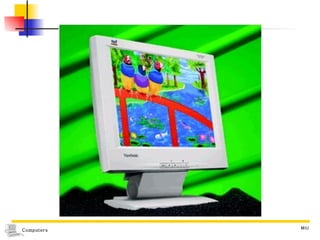
Liquid Crystal Display (LCD) Flat-Panel Screens Commonly used on laptop computers Basic technologies Active-matrix Based on TFT (thin-film transistor technology) Brighter image Can be viewed from wider angles Passive-matrix Fewer transistor  cheaper, less power Easy on the eyes; not flicker, brightly shine on Higher price than CRT
 
 
Printer A device that produces information on paper output Two orientation settings    Orientation : the direction in which an object faces Portrait mode Default setting Printed in a  vertical alignment Suited for  graphics images Landscape mode Sideway or  horizontally Useful for  spreadsheets  that have a lot of data across the sheet
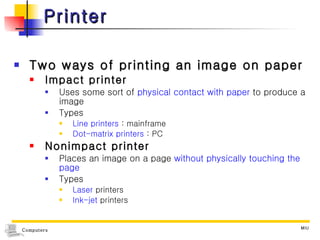
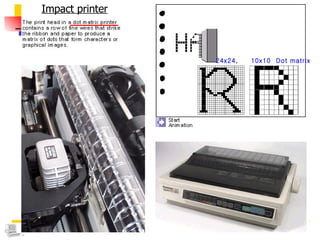
Printer Two ways of printing an image on paper Impact printer Uses some sort of  physical contact with paper  to produce a image Types  Line printers  : mainframe Dot-matrix printers  : PC Nonimpact printer Places an image on a page  without physically touching the page Types  Laser  printers Ink-jet  printers
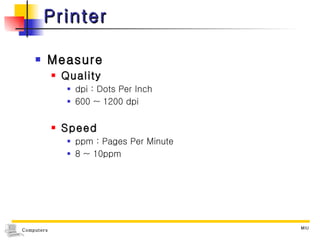
Printer Measure Quality dpi : Dots Per Inch 600 ~ 1200 dpi  Speed ppm : Pages Per Minute 8 ~ 10ppm
Impact printer 24x24,  10x10  Dot matrix
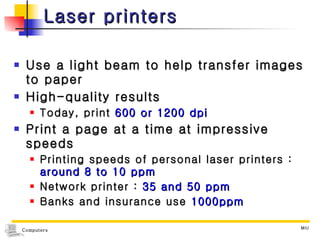
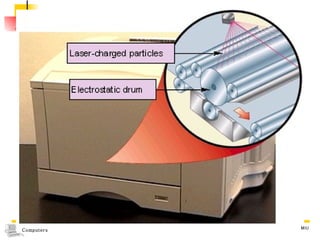
Laser printers Use a light beam to help transfer images to paper High-quality results Today, print  600 or 1200 dpi Print a page at a time at impressive speeds Printing speeds of personal laser printers :  around 8 to 10 ppm Network printer :  35 and 50 ppm Banks and insurance use  1000ppm
 
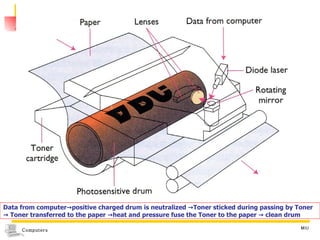
Data from computer->positive charged drum is neutralized ->Toner sticked during passing by Toner ->  Toner transferred to the paper ->heat and pressure fuse the Toner to the paper -> clean drum
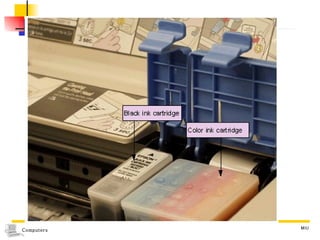
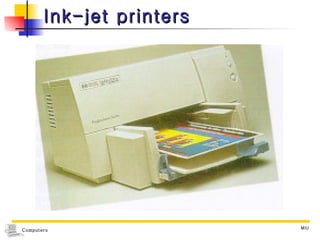
Ink-jet printers Spray in from multiple jet nozzles Print in both black and white and several different colors of ink Low quality ,  not speedy Need a fairly high quality of paper Cost : little more than a hundred dollars
 
Ink-jet printers
Voice Output Speech synthesis The process of enabling machines to talk to people Accomplished through voice synthesizers (voice-output devices or audio-response units) Two approaches to getting a computer to talk Synthesis by analysis The computer analyzes stored tapes of spoken words Synthesis by rules The computer applies linguistic rules to create artificial speech Ex) airline, bus terminals, banks,
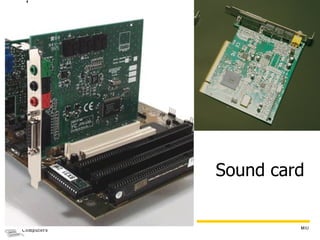
Music Output and Other Sounds Speaker Sound output devices Multimedia A certain kind of software  for good-quality software Including  multiple sight and sound effects An integrated collection of computer-based media including text, graphics, sound, animation, photo images and video Sound card Contain  sophisticated audio chips Enhance the listening experience by varying the frequencies and timing of the sound waves
Sound card
Music Output and Other Sounds MIDI  ( M usical  I nstrument  D igital  I nterface) A set of rules  designed for connecting devices that produce and process digital music signals Devices  that conform to the MIDI standard Can communicate with each other and with a computer containing a MIDI interface Two musical devices Can communicate via MIDI  The information exchanged between two MIDI devices Is musical in nature Supported by many makers of PC sound cards

Computers10 Ch5

  • 1.
    Chapter 5 B.M.HInput and Output
  • 2.
    Learning Objectives ComputerScreen CRT (Cathode Ray Tube) LCD (Liquid Crystal Display) Printer Impact printer Nonimpact printer Voice output Music output and other sounds
  • 3.
    Computer system InputProcessing Output Secondary Storage
  • 4.
    Output: information forthe user Computer output screen printer output voice sound various form of graphics output
  • 5.
    Computer Screen Monitorcomponents the housing for its electrical components a stand that can be tilted or swiveled a screen Screen output Known in the computer industry as soft copy Intangible and temporary  Hard copy Output by printer on paper Tangible, permanent
  • 6.
    Computer Screen Typesof screen technology C athode R ay T ube (CRT) The most common kind L iquid C rystal D isplay (LCD) Eletric beam Eletric gun Displayer Red,Green,Blue
  • 7.
    Cathode Ray Tube(CRT) Types according to color Most CRTs are color Some are monochrome Only one color, usually green or amber (yellowish-brown color) Less expensive than those with color
  • 8.
    CRT Technology Called raster scanning A process of sweeping electron beams across the back of the screen The backing of the screen display Has a phosphorous coating that glows whenever it is hit by a beam of electron The phosphorous does not glow for very long The image must be refreshed often
  • 9.
    CRT  Phosphorous : (Symbol P) a chemical element found in several different forms, including as a poisonous, pale yellow substance that shines in the dark and starts to burn as soon as it is placed in air  Electron : a very small piece of MATTER (= a substance) with a negative electric CHARGE, found in all atoms
  • 10.
    CRT Scan rateThe number of times the electron beam refreshed the screen 80 to 100 times per second Adequate to retain a clear screen image
  • 11.
    CRT Has hundredsof horizontal lines scanned for left to right and from top to bottom Interlaced fashion The odd-numbered lines on one pass of the electron beam And then the even-numbered lines on the next pass - a lower refresh rate without producing flicker - Inexpensive monitors - with text and fixed graphics displays Noninterlaced (NI) All lines are scanned on each pass - With animated graphics
  • 12.
    Computer Screen Isdivided into dots Called addressable they can be addressed individually by the graphics SW Each dot Referred to as a pic ture el ement, or pixel Dot pitch the amount of space between the dots
  • 13.
  • 14.
    Computer Screen TheResolution of the screen the power of a computer screen to give a clear image Factors related the number of pixels on the screen The more pixels, the higher the resolution Dot pitch The smaller the dot pitch, the better the quality of the screen image
  • 15.
    Computer Screen Chips affixed to the motherboard Convert the electrical output signals of the control unit into the signals that control the monitor To upgrade the graphics capability Most used graphics card , or graphics adapter board, plugged into a expansion slot
  • 16.
    Graphic Standards Theintention of standards To agree on resolutions, colors and so forth to make it easier for the manufacturers of PCs, monitors, graphics boards to ensure that their products work together
  • 17.
    Graphic Standards CGA(Color Graphics Adapter) 320(horizontal)x200(vetrical) pixels EGA (Enhanced Graphics Adapter) 640x350 pixels VGA (Video Graphics Array) 640x480 pixels
  • 18.
    Graphic Standards Thestandards in most common use today SVGA (Super VGA) Provide different resolution 800(h)x600(v), 1024x768, 1280x1024, 1600x1200 pixels Support a palette of 16million colors But simultaneous colors which can be displayed is limited by the amount of video memory installed in a system XGA (eXtended Graphics Array) High-resolution graphics standard The same resolution but more simultaneous color Allows to be noninterlaced
  • 19.
    Computer Screen Screensizes Measured diagonally 15-or 17-inch screen : a typical office worker handling word processing and spreadsheet  1 inch = 2.54 cm 19-inch screen : a user involved with high-powered graphics Bigger is usually better, more expensive
  • 20.
  • 21.
    Liquid Crystal Display(LCD) Flat-Panel Screens Commonly used on laptop computers Basic technologies Active-matrix Based on TFT (thin-film transistor technology) Brighter image Can be viewed from wider angles Passive-matrix Fewer transistor cheaper, less power Easy on the eyes; not flicker, brightly shine on Higher price than CRT
  • 22.
  • 23.
  • 24.
    Printer A devicethat produces information on paper output Two orientation settings  Orientation : the direction in which an object faces Portrait mode Default setting Printed in a vertical alignment Suited for graphics images Landscape mode Sideway or horizontally Useful for spreadsheets that have a lot of data across the sheet
  • 25.
    Printer Two waysof printing an image on paper Impact printer Uses some sort of physical contact with paper to produce a image Types Line printers : mainframe Dot-matrix printers : PC Nonimpact printer Places an image on a page without physically touching the page Types Laser printers Ink-jet printers
  • 26.
    Printer Measure Qualitydpi : Dots Per Inch 600 ~ 1200 dpi Speed ppm : Pages Per Minute 8 ~ 10ppm
  • 27.
    Impact printer 24x24, 10x10 Dot matrix
  • 28.
    Laser printers Usea light beam to help transfer images to paper High-quality results Today, print 600 or 1200 dpi Print a page at a time at impressive speeds Printing speeds of personal laser printers : around 8 to 10 ppm Network printer : 35 and 50 ppm Banks and insurance use 1000ppm
  • 29.
  • 30.
    Data from computer->positivecharged drum is neutralized ->Toner sticked during passing by Toner -> Toner transferred to the paper ->heat and pressure fuse the Toner to the paper -> clean drum
  • 31.
    Ink-jet printers Sprayin from multiple jet nozzles Print in both black and white and several different colors of ink Low quality , not speedy Need a fairly high quality of paper Cost : little more than a hundred dollars
  • 32.
  • 33.
  • 34.
    Voice Output Speechsynthesis The process of enabling machines to talk to people Accomplished through voice synthesizers (voice-output devices or audio-response units) Two approaches to getting a computer to talk Synthesis by analysis The computer analyzes stored tapes of spoken words Synthesis by rules The computer applies linguistic rules to create artificial speech Ex) airline, bus terminals, banks,
  • 35.
    Music Output andOther Sounds Speaker Sound output devices Multimedia A certain kind of software for good-quality software Including multiple sight and sound effects An integrated collection of computer-based media including text, graphics, sound, animation, photo images and video Sound card Contain sophisticated audio chips Enhance the listening experience by varying the frequencies and timing of the sound waves
  • 36.
  • 37.
    Music Output andOther Sounds MIDI ( M usical I nstrument D igital I nterface) A set of rules designed for connecting devices that produce and process digital music signals Devices that conform to the MIDI standard Can communicate with each other and with a computer containing a MIDI interface Two musical devices Can communicate via MIDI The information exchanged between two MIDI devices Is musical in nature Supported by many makers of PC sound cards