Introduction to
Computer Applications
Lecture # 5
Objective of Lecture
 Output devices
 Types of output device
 Monitors
 Printers
 Plotters
 Speakers
Output Devices
 An output device is a device that retrieve processed
data from the computer’s memory and process it into a
suitable form familiar for human or save it permanently
for future use.
 Output devices generate computer output that can be
broadly classified into two types:-
 Soft-copy output:-They are temporary in nature
 Hard-copy output:- They are permanent in nature and
can be kept in paper files or can be looked later when
the person is not using a computer
Types of output device
 Monitors
 Printers
 Plotter
 Speakers
Monitors
 Monitor are the most popular output device used today
for producing soft-copy output
 Five basic types of monitor:-
 Cathode Ray tube
 Liquid crystal display
 Light emitted diode
 Plasma screen
 Projector
Cathode Ray Tubes
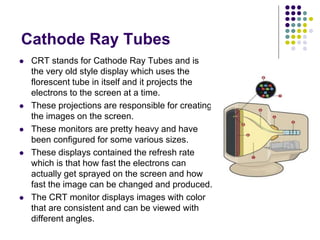
 CRT stands for Cathode Ray Tubes and is
the very old style display which uses the
florescent tube in itself and it projects the
electrons to the screen at a time.
 These projections are responsible for creating
the images on the screen.
 These monitors are pretty heavy and have
been configured for some various sizes.
 These displays contained the refresh rate
which is that how fast the electrons can
actually get sprayed on the screen and how
fast the image can be changed and produced.
 The CRT monitor displays images with color
that are consistent and can be viewed with
different angles.
Liquid crystal display
 It is the very common type of the display that one can find
anywhere.
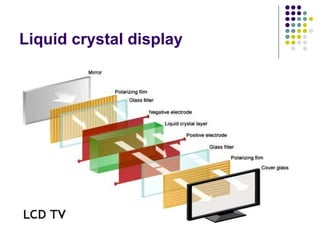
 At the back of the screen, there's a large bright light that shines out
toward the viewer. In front of this, there are the millions of pixels,
each one made up of smaller areas called sub-pixels that are
colored red, blue, or green.
 Each pixel has a polarizing glass filter behind it and another one in
front of it at 90 degrees. That means the pixel normally looks dark.
In between the two polarizing filters there's a liquid crystal that can
be switched on or off electronically.
 When it's switched on, it rotates the light passing through it through
90 degrees, effectively allowing light to flow through the two
polarizing filters and making the pixel look bright. Each pixel is
controlled by a separate transistor (a tiny electronic component) that
can switch it on or off many times each second.
Liquid crystal display
Light Emitting diode
 It is known as led since the backlight used in it is normally a
fluorescent light and it is used instead of using a normal backlight.
But, there is always the LCD there which gives the screen
information and helps us having the view. So, it's even better if it is
called LED Backlit LCD.
 The cost of LED is pretty low and LED is mostly used in the mobile
phones due to it fast speed and the good response time. The angel
of viewing is also pretty wide.
Plasma Screen
 This is another new invention and it is named as the
plasma display since there are some small sized cells
present there.
 These cells are of the Nobel gases and when the
voltage is provided to them, the ultra-violate ray is
generated and the each light is brightened and hence
the light is emitted through the display.
Projectors
 The projectors are now also being used and almost
every organization use this to spread the information on
the screen.
 The data can be projected at the wall and it can become
visible to many people at the same time.
 These are also known as the CD projectors but the truth
is, that there are many various technologies which are
being used for that displays and the LCD is not the only
option
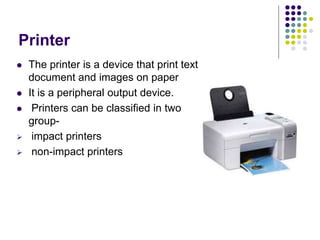
Printer
 The printer is a device that print text
document and images on paper
 It is a peripheral output device.
 Printers can be classified in two
group-
 impact printers
 non-impact printers
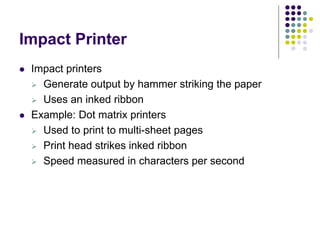
Impact Printer
 Impact printers
 Generate output by hammer striking the paper
 Uses an inked ribbon
 Example: Dot matrix printers
 Used to print to multi-sheet pages
 Print head strikes inked ribbon
 Speed measured in characters per second
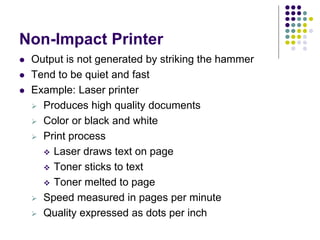
Non-Impact Printer
 Output is not generated by striking the hammer
 Tend to be quiet and fast
 Example: Laser printer
 Produces high quality documents
 Color or black and white
 Print process
 Laser draws text on page
 Toner sticks to text
 Toner melted to page
 Speed measured in pages per minute
 Quality expressed as dots per inch
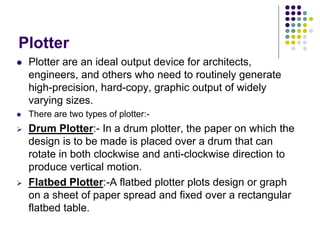
Plotter
 Plotter are an ideal output device for architects,
engineers, and others who need to routinely generate
high-precision, hard-copy, graphic output of widely
varying sizes.
 There are two types of plotter:-
 Drum Plotter:- In a drum plotter, the paper on which the
design is to be made is placed over a drum that can
rotate in both clockwise and anti-clockwise direction to
produce vertical motion.
 Flatbed Plotter:-A flatbed plotter plots design or graph
on a sheet of paper spread and fixed over a rectangular
flatbed table.
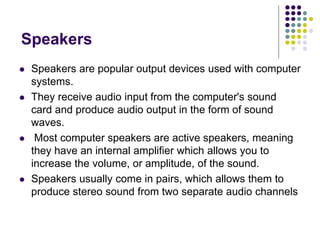
Speakers
 Speakers are popular output devices used with computer
systems.
 They receive audio input from the computer's sound
card and produce audio output in the form of sound
waves.
 Most computer speakers are active speakers, meaning
they have an internal amplifier which allows you to
increase the volume, or amplitude, of the sound.
 Speakers usually come in pairs, which allows them to
produce stereo sound from two separate audio channels
Questions??

ITC_lec_5_5.ppt

  • 1.
  • 2.
    Objective of Lecture Output devices  Types of output device  Monitors  Printers  Plotters  Speakers
  • 3.
    Output Devices  Anoutput device is a device that retrieve processed data from the computer’s memory and process it into a suitable form familiar for human or save it permanently for future use.  Output devices generate computer output that can be broadly classified into two types:-  Soft-copy output:-They are temporary in nature  Hard-copy output:- They are permanent in nature and can be kept in paper files or can be looked later when the person is not using a computer
  • 4.
    Types of outputdevice  Monitors  Printers  Plotter  Speakers
  • 5.
    Monitors  Monitor arethe most popular output device used today for producing soft-copy output  Five basic types of monitor:-  Cathode Ray tube  Liquid crystal display  Light emitted diode  Plasma screen  Projector
  • 6.
    Cathode Ray Tubes CRT stands for Cathode Ray Tubes and is the very old style display which uses the florescent tube in itself and it projects the electrons to the screen at a time.  These projections are responsible for creating the images on the screen.  These monitors are pretty heavy and have been configured for some various sizes.  These displays contained the refresh rate which is that how fast the electrons can actually get sprayed on the screen and how fast the image can be changed and produced.  The CRT monitor displays images with color that are consistent and can be viewed with different angles.
  • 7.
    Liquid crystal display It is the very common type of the display that one can find anywhere.  At the back of the screen, there's a large bright light that shines out toward the viewer. In front of this, there are the millions of pixels, each one made up of smaller areas called sub-pixels that are colored red, blue, or green.  Each pixel has a polarizing glass filter behind it and another one in front of it at 90 degrees. That means the pixel normally looks dark. In between the two polarizing filters there's a liquid crystal that can be switched on or off electronically.  When it's switched on, it rotates the light passing through it through 90 degrees, effectively allowing light to flow through the two polarizing filters and making the pixel look bright. Each pixel is controlled by a separate transistor (a tiny electronic component) that can switch it on or off many times each second.
  • 8.
  • 9.
    Light Emitting diode It is known as led since the backlight used in it is normally a fluorescent light and it is used instead of using a normal backlight. But, there is always the LCD there which gives the screen information and helps us having the view. So, it's even better if it is called LED Backlit LCD.  The cost of LED is pretty low and LED is mostly used in the mobile phones due to it fast speed and the good response time. The angel of viewing is also pretty wide.
  • 10.
    Plasma Screen  Thisis another new invention and it is named as the plasma display since there are some small sized cells present there.  These cells are of the Nobel gases and when the voltage is provided to them, the ultra-violate ray is generated and the each light is brightened and hence the light is emitted through the display.
  • 11.
    Projectors  The projectorsare now also being used and almost every organization use this to spread the information on the screen.  The data can be projected at the wall and it can become visible to many people at the same time.  These are also known as the CD projectors but the truth is, that there are many various technologies which are being used for that displays and the LCD is not the only option
  • 12.
    Printer  The printeris a device that print text document and images on paper  It is a peripheral output device.  Printers can be classified in two group-  impact printers  non-impact printers
  • 13.
    Impact Printer  Impactprinters  Generate output by hammer striking the paper  Uses an inked ribbon  Example: Dot matrix printers  Used to print to multi-sheet pages  Print head strikes inked ribbon  Speed measured in characters per second
  • 14.
    Non-Impact Printer  Outputis not generated by striking the hammer  Tend to be quiet and fast  Example: Laser printer  Produces high quality documents  Color or black and white  Print process  Laser draws text on page  Toner sticks to text  Toner melted to page  Speed measured in pages per minute  Quality expressed as dots per inch
  • 15.
    Plotter  Plotter arean ideal output device for architects, engineers, and others who need to routinely generate high-precision, hard-copy, graphic output of widely varying sizes.  There are two types of plotter:-  Drum Plotter:- In a drum plotter, the paper on which the design is to be made is placed over a drum that can rotate in both clockwise and anti-clockwise direction to produce vertical motion.  Flatbed Plotter:-A flatbed plotter plots design or graph on a sheet of paper spread and fixed over a rectangular flatbed table.
  • 16.
    Speakers  Speakers arepopular output devices used with computer systems.  They receive audio input from the computer's sound card and produce audio output in the form of sound waves.  Most computer speakers are active speakers, meaning they have an internal amplifier which allows you to increase the volume, or amplitude, of the sound.  Speakers usually come in pairs, which allows them to produce stereo sound from two separate audio channels
  • 17.