ASSIGNMENT 
NAME: SULTAN SALAHUDDIN ROLL NO: 85 
ASSIGNMENT: OUTPUT DEVICES 
COLLAGE: GOVT AKL PG COLLAGE MATTA 
SUBMITTED BY: SULTAN SALAHUDDIN 
SUBMITTED BY; MR AMIN ULLAH
OUTPUT DEVICES 
An output device is any hardware component that 
conveys information to one or more people. Three 
commonly used output devices are a printer, a monitor 
and speakers. 
There are two type of output devices which is the 
following: 
1.Soft copy devices 
2.Hard copy devices
Soft copy 
Displayed on screen or by other non-permanent 
means. 
Hard copy 
Printed on paper or other permanent media.
SOFT COPY OUTPUT DEVICES 
Soft copy output devices output information to a 
computer monitor or other temporary output device. 
Soft copy output devices: 
 Monitor 
 CRT (cathode ray tube) 
 LCD (liquid crystal display) 
 Speaker
Monitors 
The computer monitor, like a television, displays 
computer output for a user to view. The monitor has 
various names: screen or video display unit. When 
purchasing a computer monitor, the following 
features are important: 
Colour 
Size 
Resolution
Colour: 
Monitors can be monochrome, grey scale or 
coloured. 
Monochrome monitors display images in two 
colours one for the background and the other for the 
foreground. 
The colours can be white, green, or amber 
foreground on black background. 
Greyscale monitors are a special type of monitor 
that displays information's.
Resolution: 
On way of measuring the quality of a monitor is by 
its resolution. 
The resolution of a screen is a measure of how 
accurately data 
can be represented on it. Screens are usually Low 
Resolution. 
Medium Resolution or High Resolution.
Size: 
Monitors come in various sizes: 14", 15", 17", 20" and 
even larger monitors can be had at higher prices. 
 A 15" monitor can display 800 pixels horizontally 
and 600 pixels vertically. 
A pixel, short for picture element, refers to the dots 
that make up the pictures displayed on the screen. 
The more pixels per inch, the better the quality of 
the picture.
Monitor 
Specifications
Cathode-ray tube (CRT) 
Resemble televisions 
Use picture tube technology 
Less expensive than a LCD 
monitor 
Take up more desk space and 
use more energy than LCD 
monitors
Cathode-ray tube (CRT) TECHNOLOGY 
CRT technology uses electron guns that must be at 
distances of over one foot from the screen. 
The inside surface of the screen is coated with dots 
of phosphors which glow when a stream of 
electrons from the electron gun strike them.
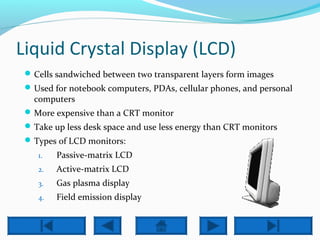
Liquid Crystal Display (LCD) 
Cells sandwiched between two transparent layers form images 
Used for notebook computers, PDAs, cellular phones, and personal 
computers 
More expensive than a CRT monitor 
Take up less desk space and use less energy than CRT monitors 
Types of LCD monitors: 
1. Passive-matrix LCD 
2. Active-matrix LCD 
3. Gas plasma display 
4. Field emission display
 Liquid Crystal Display (LCD): 
the most popular current technology for flat-screen 
display is liquid crystal display (LCD) used for pocket 
calculators and digital watches. LCD consists of 
liquid crystal material between two glass plates. 
Characters are etched on to the inner sheet but 
cannot be seen. The user can see them on the outer 
sheet only when a current is passed through them.
SPEAKERS 
Speaker (VOICE OUTPUT DEVICES): 
A voice output device convert digital data into speech-like 
sounds. 
Two types of voice output technology are: 
1. Speech coding 
2. Speech synthesis
 Speech coding: 
uses actual human voices speaking words to provide a 
digital database of words that can output as voice 
sounds. 
 Speech synthesis: 
uses a set of forty basis speech sounds (called phonemes, 
the basic of all speech English) to electronically create 
any word. 
Human voices are not used to make up a database of 
words: the computer converts stored text in voices.
 Audio output is the ability of the computer to output 
sound. 
 Two components are needed: 
 Sound card – Plays contents of digitized recordings 
 Speakers – Attach to sound card 
WMA MIDI MP3 WAV 
Beethoven 
Rocky 
Hornsby 
Cheers 
1:15 min 
2:56 min 
48 sec 
15 sec 
Click an 
icon to play 
music. 
Click the 
icon again 
to stop 
playing. 
Try clicking 
on Cheers 
while playing 
music.
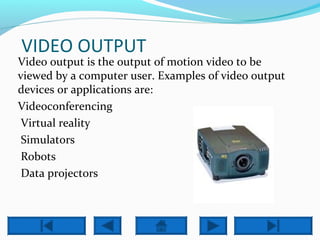
VIDEO OUTPUT 
Video output is the output of motion video to be 
viewed by a computer user. Examples of video output 
devices or applications are: 
Videoconferencing 
Virtual reality 
Simulators 
Robots 
Data projectors
HARD COPY OUTPUT DEVICES 
Which use for to convert softcopy information's 
into hard copy. 
1.Printers 
2.Dot Matrix Printers 
3.Inkjet Printers 
4.Laser Printers
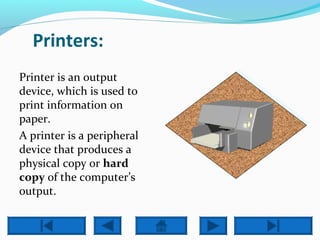
Printers: 
Printer is an output 
device, which is used to 
print information on 
paper. 
A printer is a peripheral 
device that produces a 
physical copy or hard 
copy of the computer’s 
output.
Dot Matrix Printers: 
In the market one of the most popular printers is Dot 
Matrix Printer. These printers are popular because of their 
ease of printing and economical price. 
Each character printed is in form of pattern of dots and 
head consists of a Matrix of Pins of size (5*7, 7*9, 9*7 or 
9*9) which come out to form a character that is why it is 
called Dot Matrix Printer.
Advantages 
Inexpensive 
Widely Used 
Other language characters can be printed 
 Disadvantages 
Slow Speed 
Poor Quality
Inkjet Printers 
Inkjet printers are non-impact character printers 
based on a relatively new technology. 
They print characters by spraying small drops of ink 
onto paper. 
Inkjet printers Produce high quality output with 
presentable features. 
They make less noise because no hammering is done 
and these have many styles of Printing modes 
available. 
 Colour printing is also possible.
Advantages 
High quality printing 
More reliable 
Disadvantages 
Expensive as cost per page is high 
Slow as compared to laser printer
Laser Printers 
These are non-impact page printers. They use laser 
lights to produce the dots needed to form the 
characters to be printed on a page. 
 Advantages 
Very high speed 
Give good graphics quality 
Disadvantages 
Expensive 
Cannot be used to produce multiple copies of a 
document in a single printing.
Output devices
Output devices

Output devices

  • 2.
    ASSIGNMENT NAME: SULTANSALAHUDDIN ROLL NO: 85 ASSIGNMENT: OUTPUT DEVICES COLLAGE: GOVT AKL PG COLLAGE MATTA SUBMITTED BY: SULTAN SALAHUDDIN SUBMITTED BY; MR AMIN ULLAH
  • 3.
    OUTPUT DEVICES Anoutput device is any hardware component that conveys information to one or more people. Three commonly used output devices are a printer, a monitor and speakers. There are two type of output devices which is the following: 1.Soft copy devices 2.Hard copy devices
  • 4.
    Soft copy Displayedon screen or by other non-permanent means. Hard copy Printed on paper or other permanent media.
  • 5.
    SOFT COPY OUTPUTDEVICES Soft copy output devices output information to a computer monitor or other temporary output device. Soft copy output devices:  Monitor  CRT (cathode ray tube)  LCD (liquid crystal display)  Speaker
  • 6.
    Monitors The computermonitor, like a television, displays computer output for a user to view. The monitor has various names: screen or video display unit. When purchasing a computer monitor, the following features are important: Colour Size Resolution
  • 7.
    Colour: Monitors canbe monochrome, grey scale or coloured. Monochrome monitors display images in two colours one for the background and the other for the foreground. The colours can be white, green, or amber foreground on black background. Greyscale monitors are a special type of monitor that displays information's.
  • 8.
    Resolution: On wayof measuring the quality of a monitor is by its resolution. The resolution of a screen is a measure of how accurately data can be represented on it. Screens are usually Low Resolution. Medium Resolution or High Resolution.
  • 9.
    Size: Monitors comein various sizes: 14", 15", 17", 20" and even larger monitors can be had at higher prices.  A 15" monitor can display 800 pixels horizontally and 600 pixels vertically. A pixel, short for picture element, refers to the dots that make up the pictures displayed on the screen. The more pixels per inch, the better the quality of the picture.
  • 10.
  • 12.
    Cathode-ray tube (CRT) Resemble televisions Use picture tube technology Less expensive than a LCD monitor Take up more desk space and use more energy than LCD monitors
  • 13.
    Cathode-ray tube (CRT)TECHNOLOGY CRT technology uses electron guns that must be at distances of over one foot from the screen. The inside surface of the screen is coated with dots of phosphors which glow when a stream of electrons from the electron gun strike them.
  • 14.
    Liquid Crystal Display(LCD) Cells sandwiched between two transparent layers form images Used for notebook computers, PDAs, cellular phones, and personal computers More expensive than a CRT monitor Take up less desk space and use less energy than CRT monitors Types of LCD monitors: 1. Passive-matrix LCD 2. Active-matrix LCD 3. Gas plasma display 4. Field emission display
  • 15.
     Liquid CrystalDisplay (LCD): the most popular current technology for flat-screen display is liquid crystal display (LCD) used for pocket calculators and digital watches. LCD consists of liquid crystal material between two glass plates. Characters are etched on to the inner sheet but cannot be seen. The user can see them on the outer sheet only when a current is passed through them.
  • 17.
    SPEAKERS Speaker (VOICEOUTPUT DEVICES): A voice output device convert digital data into speech-like sounds. Two types of voice output technology are: 1. Speech coding 2. Speech synthesis
  • 18.
     Speech coding: uses actual human voices speaking words to provide a digital database of words that can output as voice sounds.  Speech synthesis: uses a set of forty basis speech sounds (called phonemes, the basic of all speech English) to electronically create any word. Human voices are not used to make up a database of words: the computer converts stored text in voices.
  • 19.
     Audio outputis the ability of the computer to output sound.  Two components are needed:  Sound card – Plays contents of digitized recordings  Speakers – Attach to sound card WMA MIDI MP3 WAV Beethoven Rocky Hornsby Cheers 1:15 min 2:56 min 48 sec 15 sec Click an icon to play music. Click the icon again to stop playing. Try clicking on Cheers while playing music.
  • 20.
    VIDEO OUTPUT Videooutput is the output of motion video to be viewed by a computer user. Examples of video output devices or applications are: Videoconferencing Virtual reality Simulators Robots Data projectors
  • 21.
    HARD COPY OUTPUTDEVICES Which use for to convert softcopy information's into hard copy. 1.Printers 2.Dot Matrix Printers 3.Inkjet Printers 4.Laser Printers
  • 22.
    Printers: Printer isan output device, which is used to print information on paper. A printer is a peripheral device that produces a physical copy or hard copy of the computer’s output.
  • 24.
    Dot Matrix Printers: In the market one of the most popular printers is Dot Matrix Printer. These printers are popular because of their ease of printing and economical price. Each character printed is in form of pattern of dots and head consists of a Matrix of Pins of size (5*7, 7*9, 9*7 or 9*9) which come out to form a character that is why it is called Dot Matrix Printer.
  • 25.
    Advantages Inexpensive WidelyUsed Other language characters can be printed  Disadvantages Slow Speed Poor Quality
  • 27.
    Inkjet Printers Inkjetprinters are non-impact character printers based on a relatively new technology. They print characters by spraying small drops of ink onto paper. Inkjet printers Produce high quality output with presentable features. They make less noise because no hammering is done and these have many styles of Printing modes available.  Colour printing is also possible.
  • 28.
    Advantages High qualityprinting More reliable Disadvantages Expensive as cost per page is high Slow as compared to laser printer
  • 30.
    Laser Printers Theseare non-impact page printers. They use laser lights to produce the dots needed to form the characters to be printed on a page.  Advantages Very high speed Give good graphics quality Disadvantages Expensive Cannot be used to produce multiple copies of a document in a single printing.