Chapter 5 B.M.H Input and Output
Learning Objectives Terminals Dumb terminals Intelligent terminals Computer Graphics Business graphics Video graphics CAD/CAM, CIM
Terminals A device (or combination of devices) that combines both input and output capabilities. Types Dumb terminal Intelligent terminal
Dumb terminal The simplest type of terminal Consists of  a  keyboard  for input a  monitor  for output  No processing capability Connects directly to a host computer
Intelligent terminal Combines A keyboard A monitor  with memory and a processor   performing limited processing functions Example Display  a input form on the screen  Accept  user input through the keyboard Perform  editing and error-checking functions on the data Send  the entire set of data to the host computer for processing When the results are sent back, the terminal could format and display those results on the screen
Point-of-sale (POS) terminal A combination of input and output devices designed to capture retail sales data  at the point where the transaction takes place. The most familiar one Supermarket checkout station Primary input device is the  bar code reader  built into the counter.
Computer Graphics Useful in education, science, sports, computer art, and more, specially in business Business Graphics Video Graphics  CAD/CAM Ex. The lines and charts of business graphics Computer-produced animated graphics on TV commercials or movies
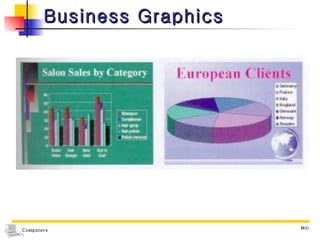
Business Graphics A powerful way to impart information Colorful graphics, maps and charts - Compare data more easily - Spot trends - make decisions more quickly. As the underlying data changes, the graphs updated instantaneously More detail : Chapter 13
Business Graphics
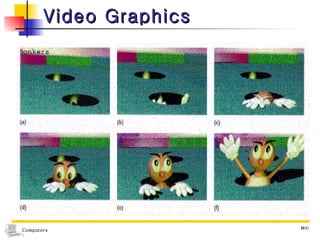
Video Graphics A series of computer-produced pictures As creative as an animated cartoon Ex. No live human in the advertisement, the moving objects you see on television Television network’s logo and theme Arcade game with joystick
Video Graphics
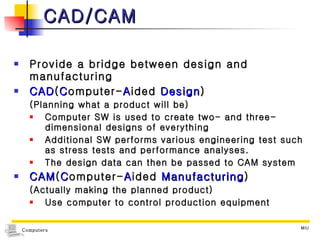
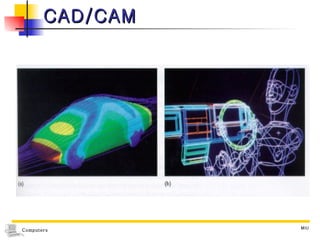
CAD/CAM Provide a bridge between design and manufacturing CAD ( C omputer- A ided  Design ) (Planning what a product will be) Computer SW is used to create two- and three-dimensional designs of everything  Additional SW performs various engineering test such as stress tests and performance analyses. The design data can then be passed to CAM system CAM ( C omputer- A ided  Manufacturing ) (Actually making the planned product) Use computer to control production equipment
CAD/CAM
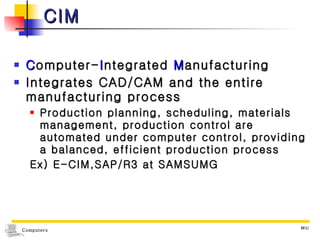
CIM C omputer- I ntegrated  M anufacturing Integrates CAD/CAM and the entire manufacturing process Production planning, scheduling, materials management, production control are automated under computer control, providing a balanced, efficient production process Ex) E-CIM,SAP/R3 at SAMSUMG

Computers11 Ch5

  • 1.
    Chapter 5 B.M.HInput and Output
  • 2.
    Learning Objectives TerminalsDumb terminals Intelligent terminals Computer Graphics Business graphics Video graphics CAD/CAM, CIM
  • 3.
    Terminals A device(or combination of devices) that combines both input and output capabilities. Types Dumb terminal Intelligent terminal
  • 4.
    Dumb terminal Thesimplest type of terminal Consists of a keyboard for input a monitor for output No processing capability Connects directly to a host computer
  • 5.
    Intelligent terminal CombinesA keyboard A monitor with memory and a processor performing limited processing functions Example Display a input form on the screen Accept user input through the keyboard Perform editing and error-checking functions on the data Send the entire set of data to the host computer for processing When the results are sent back, the terminal could format and display those results on the screen
  • 6.
    Point-of-sale (POS) terminalA combination of input and output devices designed to capture retail sales data at the point where the transaction takes place. The most familiar one Supermarket checkout station Primary input device is the bar code reader built into the counter.
  • 7.
    Computer Graphics Usefulin education, science, sports, computer art, and more, specially in business Business Graphics Video Graphics CAD/CAM Ex. The lines and charts of business graphics Computer-produced animated graphics on TV commercials or movies
  • 8.
    Business Graphics Apowerful way to impart information Colorful graphics, maps and charts - Compare data more easily - Spot trends - make decisions more quickly. As the underlying data changes, the graphs updated instantaneously More detail : Chapter 13
  • 9.
  • 10.
    Video Graphics Aseries of computer-produced pictures As creative as an animated cartoon Ex. No live human in the advertisement, the moving objects you see on television Television network’s logo and theme Arcade game with joystick
  • 11.
  • 12.
    CAD/CAM Provide abridge between design and manufacturing CAD ( C omputer- A ided Design ) (Planning what a product will be) Computer SW is used to create two- and three-dimensional designs of everything Additional SW performs various engineering test such as stress tests and performance analyses. The design data can then be passed to CAM system CAM ( C omputer- A ided Manufacturing ) (Actually making the planned product) Use computer to control production equipment
  • 13.
  • 14.
    CIM C omputer-I ntegrated M anufacturing Integrates CAD/CAM and the entire manufacturing process Production planning, scheduling, materials management, production control are automated under computer control, providing a balanced, efficient production process Ex) E-CIM,SAP/R3 at SAMSUMG