OUTPUT DEVICES
TOPICS
• Output Devices
• Examples of Output Devices
• Printer
• Monitor
• Speaker
• Projector
Output Devices
• Any peripheral that receives or displays output
from a computer
• Computer hardware equipment used to
communicate the results of data processing carried
out by a computer to the outside world.
Examples of Output Device
• Monitor
• Printer
• Speaker
• Headphones
• Projector
• Virtual Reality
Monitor
• The device which displays computer output.
• The monitor displays the video and graphics
information generated by the computer through the
video card.
• Monitors are very similar to televisions but usually
display information at a much higher resolution.
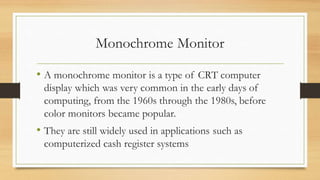
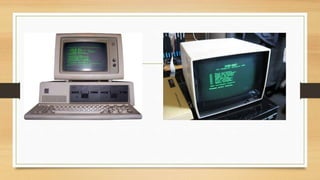
Monochrome Monitor
• A monochrome monitor is a type of CRT computer
display which was very common in the early days of
computing, from the 1960s through the 1980s, before
color monitors became popular.
• They are still widely used in applications such as
computerized cash register systems
Color Monitor
• Color monitors can display anywhere from 16 to
over 1 million different colors.
• Color monitors are sometimes called RGB
monitors because they accept three separate signals
-- red, green, and blue.
Types of Monitor
• Cathode Ray Tube (CRT)
• Liquid Crystal Display (LCD)
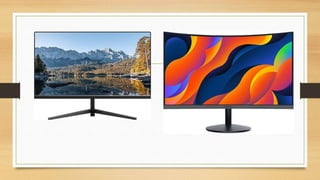
• Light-emitting Diode (LED)
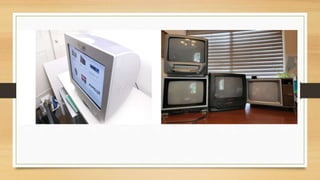
Cathode Ray Tube (CRT)
• Large
• Heavy
• Produce heat
• Not expensive
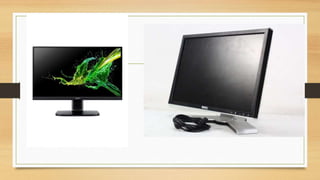
Liquid Crystal Display (LCD)
• Less space
• Lighter
• Low power consumption
• Expensive
• Limited viewing angle
Light-emitting Diode(LED)
• Less space
• Lighter
• Very expensive
• Provide higher contrast and better viewing angles than
LCD monitor
Monitor Features
• Screen Size
• Aspect Ratio
• Display Resolution
• Refresh Rate
• Color Depth
Screen Size
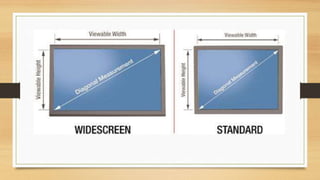
• The actual amount of screen space that is available
to display a picture, video or working space
• Desktop screens are usually 14 - 25 inches by
diagonal measurement.
Aspect Ratio
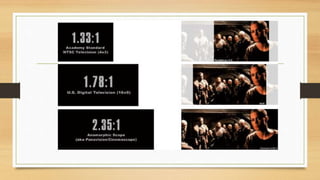
• The aspect ratio of a display is the fractional
relation of the width of the display area compared
to its height.
• Two common aspect ratio:
– 4:3
– 16:9
Display Resolution
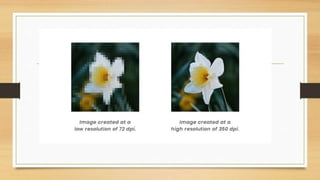
• The resolution of a monitor indicates how densely packed the pixels
are.
• In general, the more pixels (often expressed in dots per inch), the
sharper the image.
• Most modern monitors can display 1024 by 768 pixels, the SVGA
standard
• Some high-end models can display 1280 by 1024, or even 1600 by
1200.
Refresh Rate
• The refresh rate is the number of times in a second that a
monitor draws the data.
• The refresh rate for a monitor is measured in hertz (Hz)
• The standard refresh rate is 75Hz, this means that the
monitor redraws the display 75 times per second.
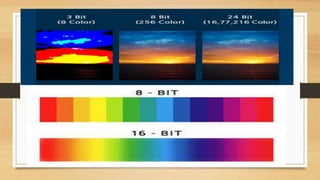
Color Depth
• Color depth describes how many colors that can be displayed on a
monitor's screen.
• Common color depths used by monitor:
• 4-bit (EGA) = 16 colors
• 8-bit (VGA) = 256 colors
• 16-bit (High Color) = 65,536 colors
• 24-bit (True Color) = 16 million colors
Printer
• Printer is an external hardware device responsible for
taking computer data and generating a hard copy of that
data.
• Printers are one of the most used peripherals on
computers and are commonly used to print text, images,
and photos.
TYPES OF PRINTER
•Impact Printer
•Non-Impact Printer
Impact Printer
• It strikes paper and ribbon together to form a character, like a
typewriter.
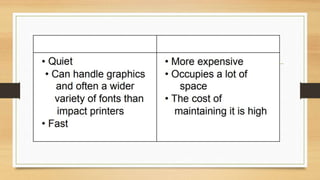
• Less expensive
• Can make multiple copies with multipart paper
• Noisy
• Print quality lower in some types
• Poor graphics or none at all
• Slow
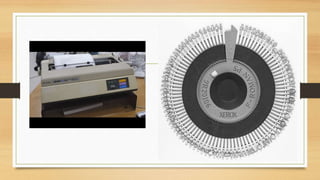
Daisy-wheel
• Daisy-wheel printers produce letter-quality print but
cannot print graphics.
• A hammer presses the wheel against a ribbon, which in
turn makes an ink stain in the shape of the character on
the paper.
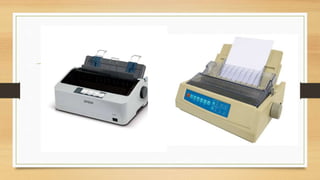
Dot-Matrix
• Creates characters by striking pins against an ink
ribbon.
• Each pin makes a dot, and combinations of dots
form characters and illustrations.
Non-Impact Printer
• It uses ink spray, toner powder or inkless.
• A laser printer rapidly produces high quality text and
graphics.
• Laser printers are often used in corporate, school, and
other environments that require print jobs to be
completed quickly and in large quantities.
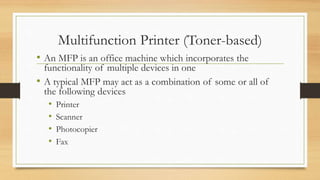
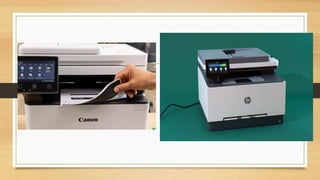
Multifunction Printer (Toner-based)
• An MFP is an office machine which incorporates the
functionality of multiple devices in one
• A typical MFP may act as a combination of some or all of
the following devices
• Printer
• Scanner
• Photocopier
• Fax
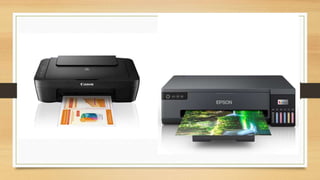
Ink-jet Printer
• Inkjet printer operates by propelling variably-sized
droplets of liquid or molten material (ink) onto almost
any sized page.
• They are the most common type of computer printer
used by consumers.
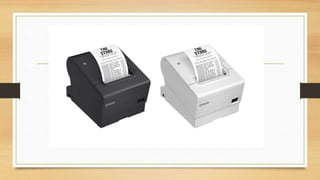
Thermal Printer (Inkless)
• Thermal printers work by selectively heating
regions of special heat sensitive paper.
• These printers are commonly used in calculators
and fax machines; and although they are
inexpensive and print relatively fast, they produce
low resolution print jobs.
Printing Speed
•cps (characters per second)
•lpm (lines per minute)
•ppm (pages per minute)
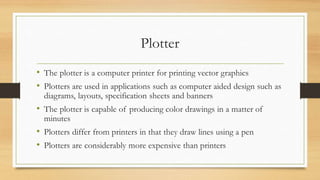
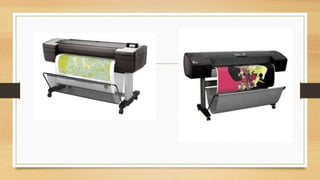
Plotter
• The plotter is a computer printer for printing vector graphics
• Plotters are used in applications such as computer aided design such as
diagrams, layouts, specification sheets and banners
• The plotter is capable of producing color drawings in a matter of
minutes
• Plotters differ from printers in that they draw lines using a pen
• Plotters are considerably more expensive than printers
Speakers
• A hardware device connected to a computer's sound card
that outputs sounds generated by the computer.
• Speakers can be used for various sounds meant to alert
the user, as well as music and spoken text
Headphones
• Headphones give sound output from the computer
• They are similar to speakers, except they are worn
on the ears so only one person can hear the output
at a time.
Projector
• An output device that can take the display of a
computer screen and project a large version of it
onto a flat surface.
• Projectors are often used in meetings and
presentations so that everyone in the room can
view the presentation.
Types of projector
• Cathode Ray Tube (CRT) projector
• Liquid Crystal Display (LCD) projector
• Digital Light Processing (DLP) projector
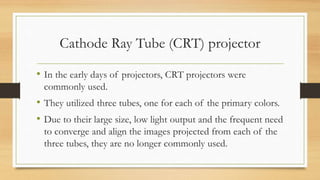
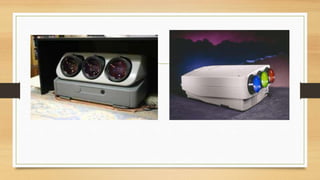
Cathode Ray Tube (CRT) projector
• In the early days of projectors, CRT projectors were
commonly used.
• They utilized three tubes, one for each of the primary colors.
• Due to their large size, low light output and the frequent need
to converge and align the images projected from each of the
three tubes, they are no longer commonly used.
Liquid Crystal Display (LCD) projector
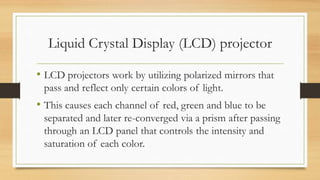
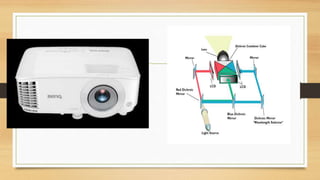
• LCD projectors work by utilizing polarized mirrors that
pass and reflect only certain colors of light.
• This causes each channel of red, green and blue to be
separated and later re-converged via a prism after passing
through an LCD panel that controls the intensity and
saturation of each color.
Digital Light Processing (DLP) projector
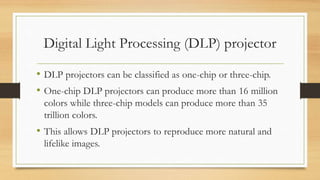
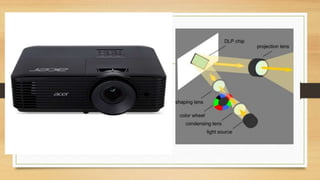
• DLP projectors can be classified as one-chip or three-chip.
• One-chip DLP projectors can produce more than 16 million
colors while three-chip models can produce more than 35
trillion colors.
• This allows DLP projectors to reproduce more natural and
lifelike images.
THANK YOU…

Output-Devices.com.ph power point presentation pdf

  • 1.
  • 2.
    TOPICS • Output Devices •Examples of Output Devices • Printer • Monitor • Speaker • Projector
  • 3.
    Output Devices • Anyperipheral that receives or displays output from a computer • Computer hardware equipment used to communicate the results of data processing carried out by a computer to the outside world.
  • 4.
    Examples of OutputDevice • Monitor • Printer • Speaker • Headphones • Projector • Virtual Reality
  • 5.
    Monitor • The devicewhich displays computer output. • The monitor displays the video and graphics information generated by the computer through the video card. • Monitors are very similar to televisions but usually display information at a much higher resolution.
  • 6.
    Monochrome Monitor • Amonochrome monitor is a type of CRT computer display which was very common in the early days of computing, from the 1960s through the 1980s, before color monitors became popular. • They are still widely used in applications such as computerized cash register systems
  • 8.
    Color Monitor • Colormonitors can display anywhere from 16 to over 1 million different colors. • Color monitors are sometimes called RGB monitors because they accept three separate signals -- red, green, and blue.
  • 9.
    Types of Monitor •Cathode Ray Tube (CRT) • Liquid Crystal Display (LCD) • Light-emitting Diode (LED)
  • 10.
    Cathode Ray Tube(CRT) • Large • Heavy • Produce heat • Not expensive
  • 12.
    Liquid Crystal Display(LCD) • Less space • Lighter • Low power consumption • Expensive • Limited viewing angle
  • 14.
    Light-emitting Diode(LED) • Lessspace • Lighter • Very expensive • Provide higher contrast and better viewing angles than LCD monitor
  • 16.
    Monitor Features • ScreenSize • Aspect Ratio • Display Resolution • Refresh Rate • Color Depth
  • 17.
    Screen Size • Theactual amount of screen space that is available to display a picture, video or working space • Desktop screens are usually 14 - 25 inches by diagonal measurement.
  • 19.
    Aspect Ratio • Theaspect ratio of a display is the fractional relation of the width of the display area compared to its height. • Two common aspect ratio: – 4:3 – 16:9
  • 21.
    Display Resolution • Theresolution of a monitor indicates how densely packed the pixels are. • In general, the more pixels (often expressed in dots per inch), the sharper the image. • Most modern monitors can display 1024 by 768 pixels, the SVGA standard • Some high-end models can display 1280 by 1024, or even 1600 by 1200.
  • 23.
    Refresh Rate • Therefresh rate is the number of times in a second that a monitor draws the data. • The refresh rate for a monitor is measured in hertz (Hz) • The standard refresh rate is 75Hz, this means that the monitor redraws the display 75 times per second.
  • 24.
    Color Depth • Colordepth describes how many colors that can be displayed on a monitor's screen. • Common color depths used by monitor: • 4-bit (EGA) = 16 colors • 8-bit (VGA) = 256 colors • 16-bit (High Color) = 65,536 colors • 24-bit (True Color) = 16 million colors
  • 26.
    Printer • Printer isan external hardware device responsible for taking computer data and generating a hard copy of that data. • Printers are one of the most used peripherals on computers and are commonly used to print text, images, and photos.
  • 27.
    TYPES OF PRINTER •ImpactPrinter •Non-Impact Printer
  • 28.
    Impact Printer • Itstrikes paper and ribbon together to form a character, like a typewriter. • Less expensive • Can make multiple copies with multipart paper • Noisy • Print quality lower in some types • Poor graphics or none at all • Slow
  • 29.
    Daisy-wheel • Daisy-wheel printersproduce letter-quality print but cannot print graphics. • A hammer presses the wheel against a ribbon, which in turn makes an ink stain in the shape of the character on the paper.
  • 31.
    Dot-Matrix • Creates charactersby striking pins against an ink ribbon. • Each pin makes a dot, and combinations of dots form characters and illustrations.
  • 33.
    Non-Impact Printer • Ituses ink spray, toner powder or inkless. • A laser printer rapidly produces high quality text and graphics. • Laser printers are often used in corporate, school, and other environments that require print jobs to be completed quickly and in large quantities.
  • 35.
    Multifunction Printer (Toner-based) •An MFP is an office machine which incorporates the functionality of multiple devices in one • A typical MFP may act as a combination of some or all of the following devices • Printer • Scanner • Photocopier • Fax
  • 37.
    Ink-jet Printer • Inkjetprinter operates by propelling variably-sized droplets of liquid or molten material (ink) onto almost any sized page. • They are the most common type of computer printer used by consumers.
  • 39.
    Thermal Printer (Inkless) •Thermal printers work by selectively heating regions of special heat sensitive paper. • These printers are commonly used in calculators and fax machines; and although they are inexpensive and print relatively fast, they produce low resolution print jobs.
  • 41.
    Printing Speed •cps (charactersper second) •lpm (lines per minute) •ppm (pages per minute)
  • 42.
    Plotter • The plotteris a computer printer for printing vector graphics • Plotters are used in applications such as computer aided design such as diagrams, layouts, specification sheets and banners • The plotter is capable of producing color drawings in a matter of minutes • Plotters differ from printers in that they draw lines using a pen • Plotters are considerably more expensive than printers
  • 44.
    Speakers • A hardwaredevice connected to a computer's sound card that outputs sounds generated by the computer. • Speakers can be used for various sounds meant to alert the user, as well as music and spoken text
  • 45.
    Headphones • Headphones givesound output from the computer • They are similar to speakers, except they are worn on the ears so only one person can hear the output at a time.
  • 46.
    Projector • An outputdevice that can take the display of a computer screen and project a large version of it onto a flat surface. • Projectors are often used in meetings and presentations so that everyone in the room can view the presentation.
  • 47.
    Types of projector •Cathode Ray Tube (CRT) projector • Liquid Crystal Display (LCD) projector • Digital Light Processing (DLP) projector
  • 48.
    Cathode Ray Tube(CRT) projector • In the early days of projectors, CRT projectors were commonly used. • They utilized three tubes, one for each of the primary colors. • Due to their large size, low light output and the frequent need to converge and align the images projected from each of the three tubes, they are no longer commonly used.
  • 50.
    Liquid Crystal Display(LCD) projector • LCD projectors work by utilizing polarized mirrors that pass and reflect only certain colors of light. • This causes each channel of red, green and blue to be separated and later re-converged via a prism after passing through an LCD panel that controls the intensity and saturation of each color.
  • 52.
    Digital Light Processing(DLP) projector • DLP projectors can be classified as one-chip or three-chip. • One-chip DLP projectors can produce more than 16 million colors while three-chip models can produce more than 35 trillion colors. • This allows DLP projectors to reproduce more natural and lifelike images.
  • 54.