COMPUTER PRESENTATION
OUTPUT DEVICES
MONITOR
PRINTER
PRESENTER NAMES:
• AROOBA AYESHA
• NEETA PUNSHI
SUBJECT TEACHER
SIR NOOR NABI
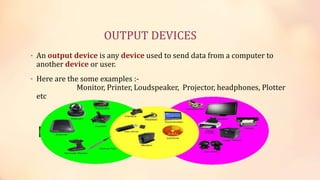
OUTPUT DEVICES
• An output device is any device used to send data from a computer to
another device or user.
• Here are the some examples :-
Monitor, Printer, Loudspeaker, Projector, headphones, Plotter
etc
LET’S KNOW SOMETHING ABOUT MONITORS
Def:-
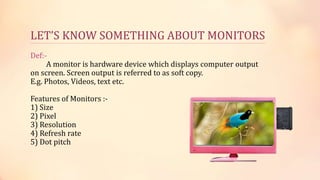
A monitor is hardware device which displays computer output
on screen. Screen output is referred to as soft copy.
E.g. Photos, Videos, text etc.
Features of Monitors :-
1) Size
2) Pixel
3) Resolution
4) Refresh rate
5) Dot pitch
LET’S KNOW SOMETHING ABOUT MONITORS
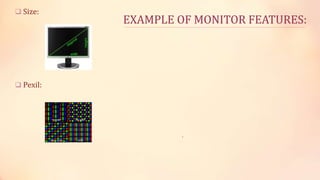
• Size:-
Measured as diagonal of screen – distance from lower left corner to upper right corner.
• Pixels:-
Also known as picture element dots that makes up image on the screen.
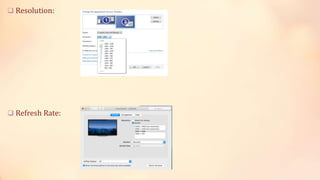
• Resolution:-
The number of pixel displayed on the screen ( the higher the resolution, the closer together
the dots. The screen resolution tells you how many pixels your screen can display horizontally
and vertically. In this example, the screen can show 1,024 pixels horizontally, and 768 vertically:
• Refresh Rate:-
The speed with which monitors renews or refresh the image of screen, is measured in
Hertz/cycles per second/ vibrations per second/ oscillation per second.
• Dot pitch:-
It is the distance between the center of pair of like-colored pixels. It tells you how sharp
the displayed image can be. It is measured in millimeters.
EXAMPLE OF MONITOR FEATURES:
 Size:
 Pexil:
.
 Resolution:
 Refresh Rate:
 Dot pitch:
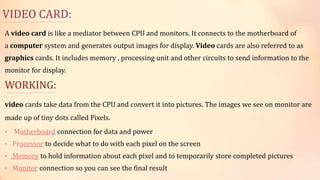
VIDEO CARD:
A video card is like a mediator between CPU and monitors. It connects to the motherboard of
a computer system and generates output images for display. Video cards are also referred to as
graphics cards. It includes memory , processing unit and other circuits to send information to the
monitor for display.
WORKING:
video cards take data from the CPU and convert it into pictures. The images we see on monitor are
made up of tiny dots called Pixels.
• Motherboard connection for data and power
• Processor to decide what to do with each pixel on the screen
• Memory to hold information about each pixel and to temporarily store completed pictures
• Monitor connection so you can see the final result
TYPES OF MONITORS
There are two main types of monitors.
 CRT monitors (Cathode ray tube)
 Flat-Panel monitors
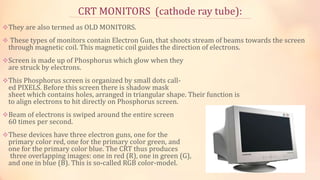
CRT MONITORS (cathode ray tube):
They are also termed as OLD MONITORS.
 These types of monitors contain Electron Gun, that shoots stream of beams towards the screen
through magnetic coil. This magnetic coil guides the direction of electrons.
Screen is made up of Phosphorus which glow when they
are struck by electrons.
This Phosphorus screen is organized by small dots call-
ed PIXELS. Before this screen there is shadow mask
sheet which contains holes, arranged in triangular shape. Their function is
to align electrons to hit directly on Phosphorus screen.
Beam of electrons is swiped around the entire screen
60 times per second.
These devices have three electron guns, one for the
primary color red, one for the primary color green, and
one for the primary color blue. The CRT thus produces
three overlapping images: one in red (R), one in green (G),
and one in blue (B). This is so-called RGB color-model.
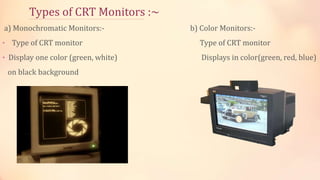
Types of CRT Monitors :~
a) Monochromatic Monitors:- b) Color Monitors:-
• Type of CRT monitor Type of CRT monitor
• Display one color (green, white) Displays in color(green, red, blue)
on black background
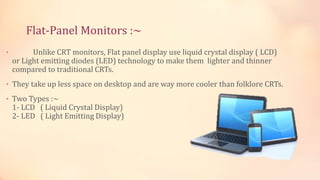
Flat-Panel Monitors :~
• Unlike CRT monitors, Flat panel display use liquid crystal display ( LCD)
or Light emitting diodes (LED) technology to make them lighter and thinner
compared to traditional CRTs.
• They take up less space on desktop and are way more cooler than folklore CRTs.
• Two Types :~
1- LCD ( Liquid Crystal Display)
2- LED ( Light Emitting Display)
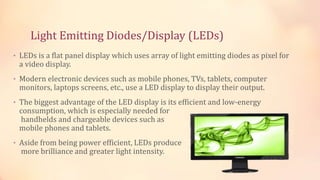
Light Emitting Diodes/Display (LEDs)
• LEDs is a flat panel display which uses array of light emitting diodes as pixel for
a video display.
• Modern electronic devices such as mobile phones, TVs, tablets, computer
monitors, laptops screens, etc., use a LED display to display their output.
• The biggest advantage of the LED display is its efficient and low-energy
consumption, which is especially needed for
handhelds and chargeable devices such as
mobile phones and tablets.
• Aside from being power efficient, LEDs produce
more brilliance and greater light intensity.
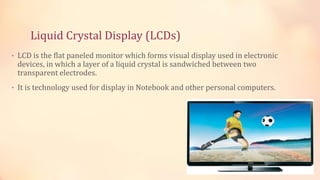
Liquid Crystal Display (LCDs)
• LCD is the flat paneled monitor which forms visual display used in electronic
devices, in which a layer of a liquid crystal is sandwiched between two
transparent electrodes.
• It is technology used for display in Notebook and other personal computers.
Printers
Printers
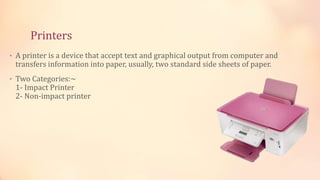
• A printer is a device that accept text and graphical output from computer and
transfers information into paper, usually, two standard side sheets of paper.
• Two Categories:~
1- Impact Printer
2- Non-impact printer
Impact Printer
• Type of printer that operates by striking a metal or plastic head against an ink ribbon.
E.g. Dot Matrix Printer, Type Writer etc.
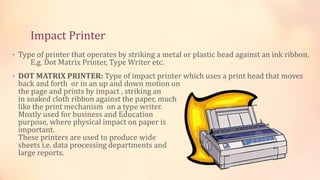
• DOT MATRIX PRINTER: Type of impact printer which uses a print head that moves
back and forth or in an up and down motion on
the page and prints by impact , striking an
in soaked cloth ribbon against the paper, much
like the print mechanism on a type writer.
Mostly used for business and Education
purpose, where physical impact on paper is
important.
These printers are used to produce wide
sheets i.e. data processing departments and
large reports.
Non-impact Printers :~
• A printer that prints without banging a ribbon onto paper.
E.g. Laser, LED, Inkjet Printer, thermal wax transfer Printer and Dye Sublimation
Printers.
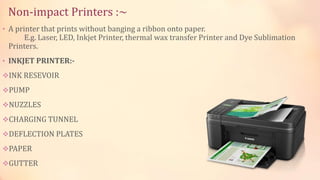
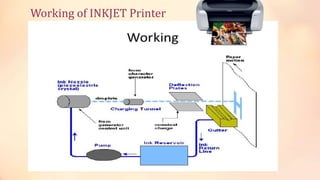
• INKJET PRINTER:-
INK RESEVOIR
PUMP
NUZZLES
CHARGING TUNNEL
DEFLECTION PLATES
PAPER
GUTTER
Working of INKJET Printer
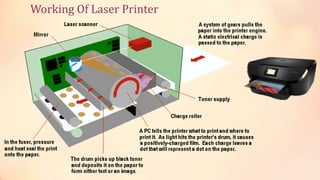
• LASER PRINTER:-
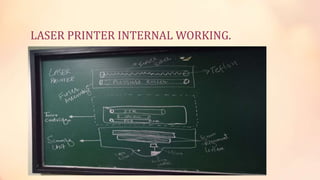
THERE ARE THREE UNITES THAT ARE INVOLVED IN WHOLE PROCESS OF PRINTING IN
LASER PRINTER.
 SCANNING UNIT (laser diode, scanning motor, mirror, beam alignment lenses)
TONER CARTRIDGE (primary charging roller, organic charging roller, and image transfer
roller, and transformer roller)
FUSER ASSEMBLY (pressure roller, fuser roller)
Working Of Laser Printer
LASER PRINTER INTERNAL WORKING.
Let’s Compare Printers now ;))
• Printers are compared on the basis of :
1) Capabilities of text and graphing
2) Print colors
3) Font size
4) Speed of Printing.
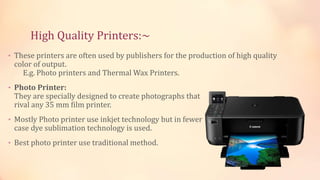
High Quality Printers:~
• These printers are often used by publishers for the production of high quality
color of output.
E.g. Photo printers and Thermal Wax Printers.
• Photo Printer:
They are specially designed to create photographs that
rival any 35 mm film printer.
• Mostly Photo printer use inkjet technology but in fewer
case dye sublimation technology is used.
• Best photo printer use traditional method.
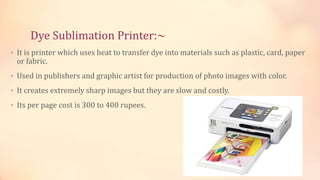
Dye Sublimation Printer:~
• It is printer which uses heat to transfer dye into materials such as plastic, card, paper
or fabric.
• Used in publishers and graphic artist for production of photo images with color.
• It creates extremely sharp images but they are slow and costly.
• Its per page cost is 300 to 400 rupees.
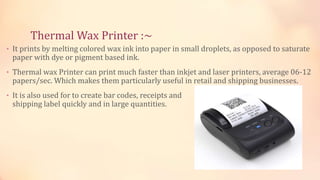
Thermal Wax Printer :~
• It prints by melting colored wax ink into paper in small droplets, as opposed to saturate
paper with dye or pigment based ink.
• Thermal wax Printer can print much faster than inkjet and laser printers, average 06-12
papers/sec. Which makes them particularly useful in retail and shipping businesses.
• It is also used for to create bar codes, receipts and
shipping label quickly and in large quantities.
That’s all !!!
Thank you For your attention

Computer presentation : Output Devices

  • 1.
  • 2.
    PRESENTER NAMES: • AROOBAAYESHA • NEETA PUNSHI SUBJECT TEACHER SIR NOOR NABI
  • 3.
    OUTPUT DEVICES • Anoutput device is any device used to send data from a computer to another device or user. • Here are the some examples :- Monitor, Printer, Loudspeaker, Projector, headphones, Plotter etc
  • 4.
    LET’S KNOW SOMETHINGABOUT MONITORS
  • 5.
    LET’S KNOW SOMETHINGABOUT MONITORS Def:- A monitor is hardware device which displays computer output on screen. Screen output is referred to as soft copy. E.g. Photos, Videos, text etc. Features of Monitors :- 1) Size 2) Pixel 3) Resolution 4) Refresh rate 5) Dot pitch
  • 6.
    LET’S KNOW SOMETHINGABOUT MONITORS • Size:- Measured as diagonal of screen – distance from lower left corner to upper right corner. • Pixels:- Also known as picture element dots that makes up image on the screen. • Resolution:- The number of pixel displayed on the screen ( the higher the resolution, the closer together the dots. The screen resolution tells you how many pixels your screen can display horizontally and vertically. In this example, the screen can show 1,024 pixels horizontally, and 768 vertically: • Refresh Rate:- The speed with which monitors renews or refresh the image of screen, is measured in Hertz/cycles per second/ vibrations per second/ oscillation per second. • Dot pitch:- It is the distance between the center of pair of like-colored pixels. It tells you how sharp the displayed image can be. It is measured in millimeters.
  • 7.
    EXAMPLE OF MONITORFEATURES:  Size:  Pexil: .
  • 8.
  • 9.
  • 10.
    VIDEO CARD: A videocard is like a mediator between CPU and monitors. It connects to the motherboard of a computer system and generates output images for display. Video cards are also referred to as graphics cards. It includes memory , processing unit and other circuits to send information to the monitor for display. WORKING: video cards take data from the CPU and convert it into pictures. The images we see on monitor are made up of tiny dots called Pixels. • Motherboard connection for data and power • Processor to decide what to do with each pixel on the screen • Memory to hold information about each pixel and to temporarily store completed pictures • Monitor connection so you can see the final result
  • 11.
    TYPES OF MONITORS Thereare two main types of monitors.  CRT monitors (Cathode ray tube)  Flat-Panel monitors
  • 12.
    CRT MONITORS (cathoderay tube): They are also termed as OLD MONITORS.  These types of monitors contain Electron Gun, that shoots stream of beams towards the screen through magnetic coil. This magnetic coil guides the direction of electrons. Screen is made up of Phosphorus which glow when they are struck by electrons. This Phosphorus screen is organized by small dots call- ed PIXELS. Before this screen there is shadow mask sheet which contains holes, arranged in triangular shape. Their function is to align electrons to hit directly on Phosphorus screen. Beam of electrons is swiped around the entire screen 60 times per second. These devices have three electron guns, one for the primary color red, one for the primary color green, and one for the primary color blue. The CRT thus produces three overlapping images: one in red (R), one in green (G), and one in blue (B). This is so-called RGB color-model.
  • 13.
    Types of CRTMonitors :~ a) Monochromatic Monitors:- b) Color Monitors:- • Type of CRT monitor Type of CRT monitor • Display one color (green, white) Displays in color(green, red, blue) on black background
  • 14.
    Flat-Panel Monitors :~ •Unlike CRT monitors, Flat panel display use liquid crystal display ( LCD) or Light emitting diodes (LED) technology to make them lighter and thinner compared to traditional CRTs. • They take up less space on desktop and are way more cooler than folklore CRTs. • Two Types :~ 1- LCD ( Liquid Crystal Display) 2- LED ( Light Emitting Display)
  • 15.
    Light Emitting Diodes/Display(LEDs) • LEDs is a flat panel display which uses array of light emitting diodes as pixel for a video display. • Modern electronic devices such as mobile phones, TVs, tablets, computer monitors, laptops screens, etc., use a LED display to display their output. • The biggest advantage of the LED display is its efficient and low-energy consumption, which is especially needed for handhelds and chargeable devices such as mobile phones and tablets. • Aside from being power efficient, LEDs produce more brilliance and greater light intensity.
  • 16.
    Liquid Crystal Display(LCDs) • LCD is the flat paneled monitor which forms visual display used in electronic devices, in which a layer of a liquid crystal is sandwiched between two transparent electrodes. • It is technology used for display in Notebook and other personal computers.
  • 17.
  • 18.
    Printers • A printeris a device that accept text and graphical output from computer and transfers information into paper, usually, two standard side sheets of paper. • Two Categories:~ 1- Impact Printer 2- Non-impact printer
  • 19.
    Impact Printer • Typeof printer that operates by striking a metal or plastic head against an ink ribbon. E.g. Dot Matrix Printer, Type Writer etc. • DOT MATRIX PRINTER: Type of impact printer which uses a print head that moves back and forth or in an up and down motion on the page and prints by impact , striking an in soaked cloth ribbon against the paper, much like the print mechanism on a type writer. Mostly used for business and Education purpose, where physical impact on paper is important. These printers are used to produce wide sheets i.e. data processing departments and large reports.
  • 20.
    Non-impact Printers :~ •A printer that prints without banging a ribbon onto paper. E.g. Laser, LED, Inkjet Printer, thermal wax transfer Printer and Dye Sublimation Printers. • INKJET PRINTER:- INK RESEVOIR PUMP NUZZLES CHARGING TUNNEL DEFLECTION PLATES PAPER GUTTER
  • 21.
  • 22.
    • LASER PRINTER:- THEREARE THREE UNITES THAT ARE INVOLVED IN WHOLE PROCESS OF PRINTING IN LASER PRINTER.  SCANNING UNIT (laser diode, scanning motor, mirror, beam alignment lenses) TONER CARTRIDGE (primary charging roller, organic charging roller, and image transfer roller, and transformer roller) FUSER ASSEMBLY (pressure roller, fuser roller)
  • 23.
  • 24.
  • 25.
    Let’s Compare Printersnow ;)) • Printers are compared on the basis of : 1) Capabilities of text and graphing 2) Print colors 3) Font size 4) Speed of Printing.
  • 26.
    High Quality Printers:~ •These printers are often used by publishers for the production of high quality color of output. E.g. Photo printers and Thermal Wax Printers. • Photo Printer: They are specially designed to create photographs that rival any 35 mm film printer. • Mostly Photo printer use inkjet technology but in fewer case dye sublimation technology is used. • Best photo printer use traditional method.
  • 27.
    Dye Sublimation Printer:~ •It is printer which uses heat to transfer dye into materials such as plastic, card, paper or fabric. • Used in publishers and graphic artist for production of photo images with color. • It creates extremely sharp images but they are slow and costly. • Its per page cost is 300 to 400 rupees.
  • 28.
    Thermal Wax Printer:~ • It prints by melting colored wax ink into paper in small droplets, as opposed to saturate paper with dye or pigment based ink. • Thermal wax Printer can print much faster than inkjet and laser printers, average 06-12 papers/sec. Which makes them particularly useful in retail and shipping businesses. • It is also used for to create bar codes, receipts and shipping label quickly and in large quantities.
  • 30.
    That’s all !!! Thankyou For your attention