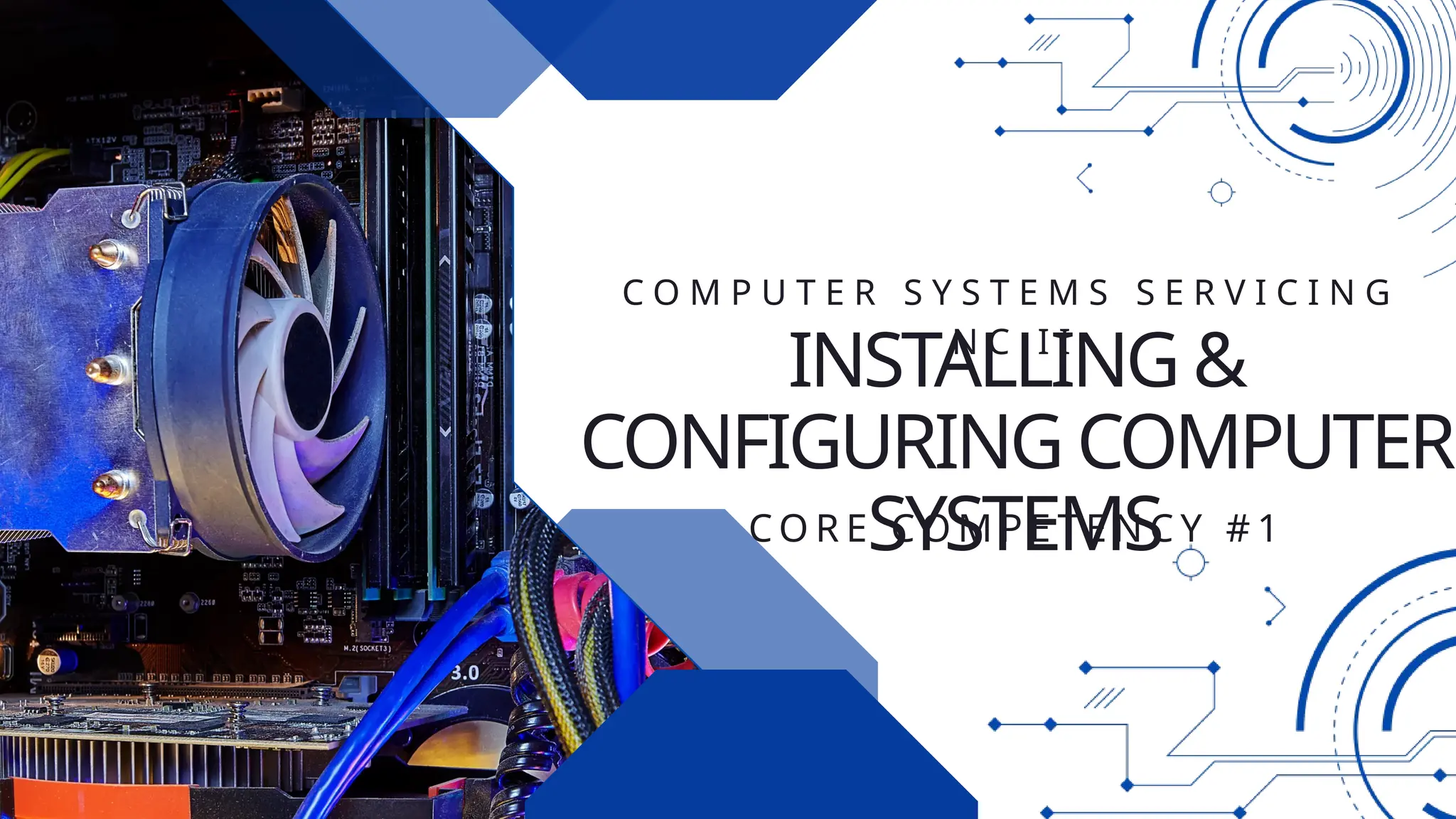
INSTALLING &
CONFIGURING COMPUTER
SYSTEMS
C O R E C O M P E T E N C Y # 1
C O M P U T E R S Y S T E M S S E R V I C I N G
N C I I
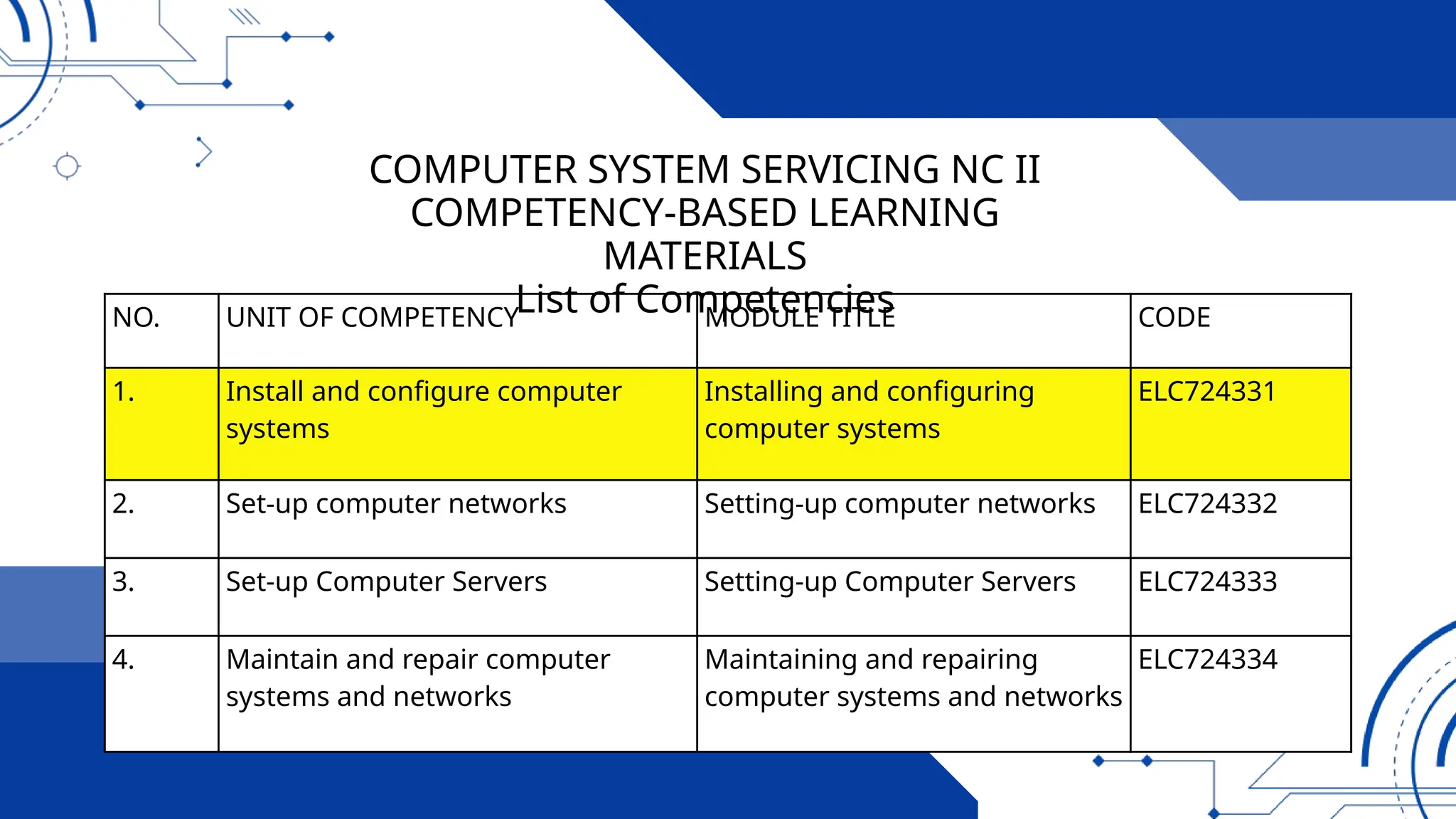
NO. UNIT OF COMPETENCY MODULE TITLE CODE
1. Install and configure computer
systems
Installing and configuring
computer systems
ELC724331
2. Set-up computer networks Setting-up computer networks ELC724332
3. Set-up Computer Servers Setting-up Computer Servers ELC724333
4. Maintain and repair computer
systems and networks
Maintaining and repairing
computer systems and networks
ELC724334
COMPUTER SYSTEM SERVICING NC II
COMPETENCY-BASED LEARNING
MATERIALS
List of Competencies
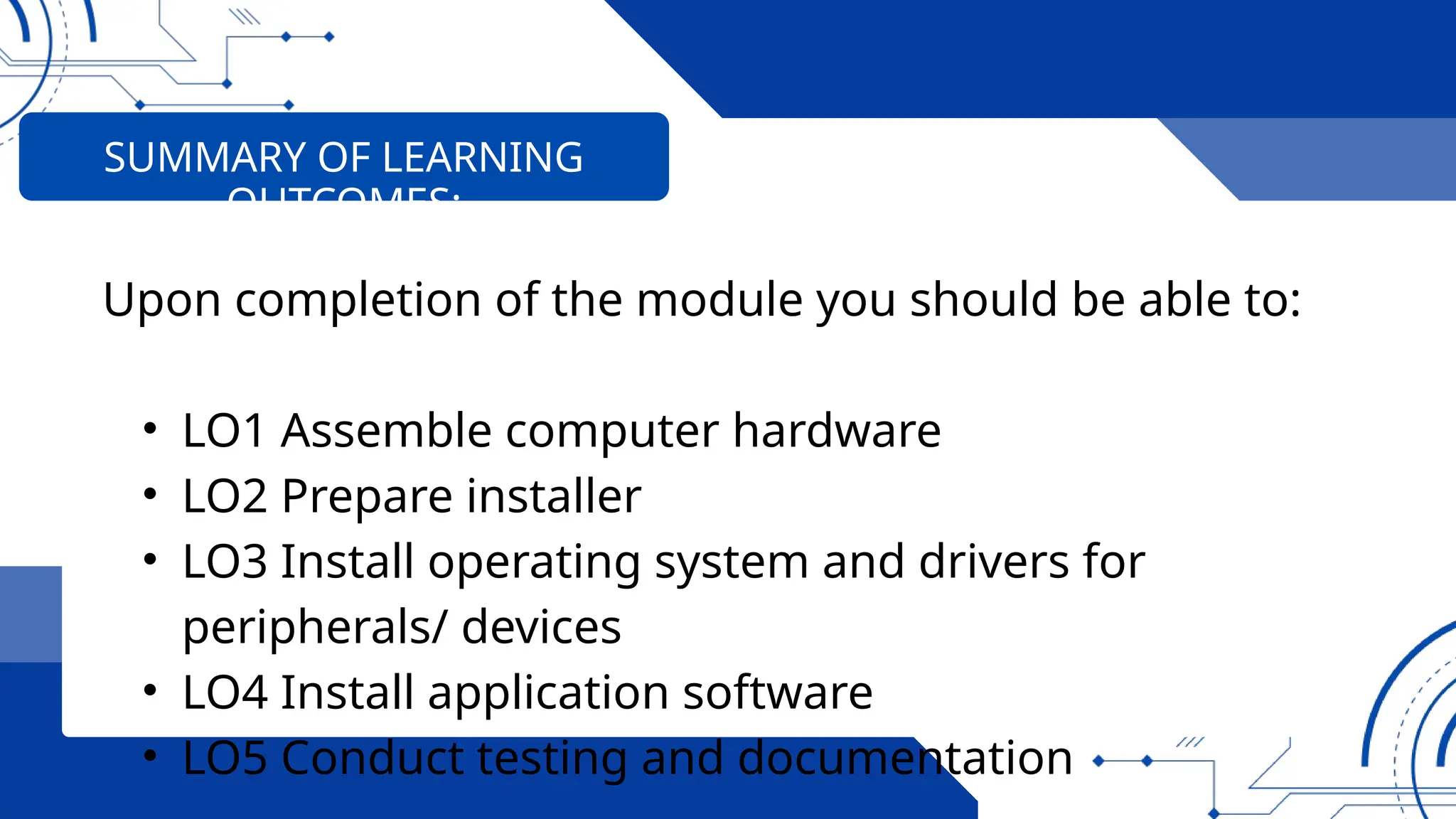
Upon completion of the module you should be able to:
• LO1 Assemble computer hardware
• LO2 Prepare installer
• LO3 Install operating system and drivers for
peripherals/ devices
• LO4 Install application software
• LO5 Conduct testing and documentation
SUMMARY OF LEARNING
OUTCOMES:
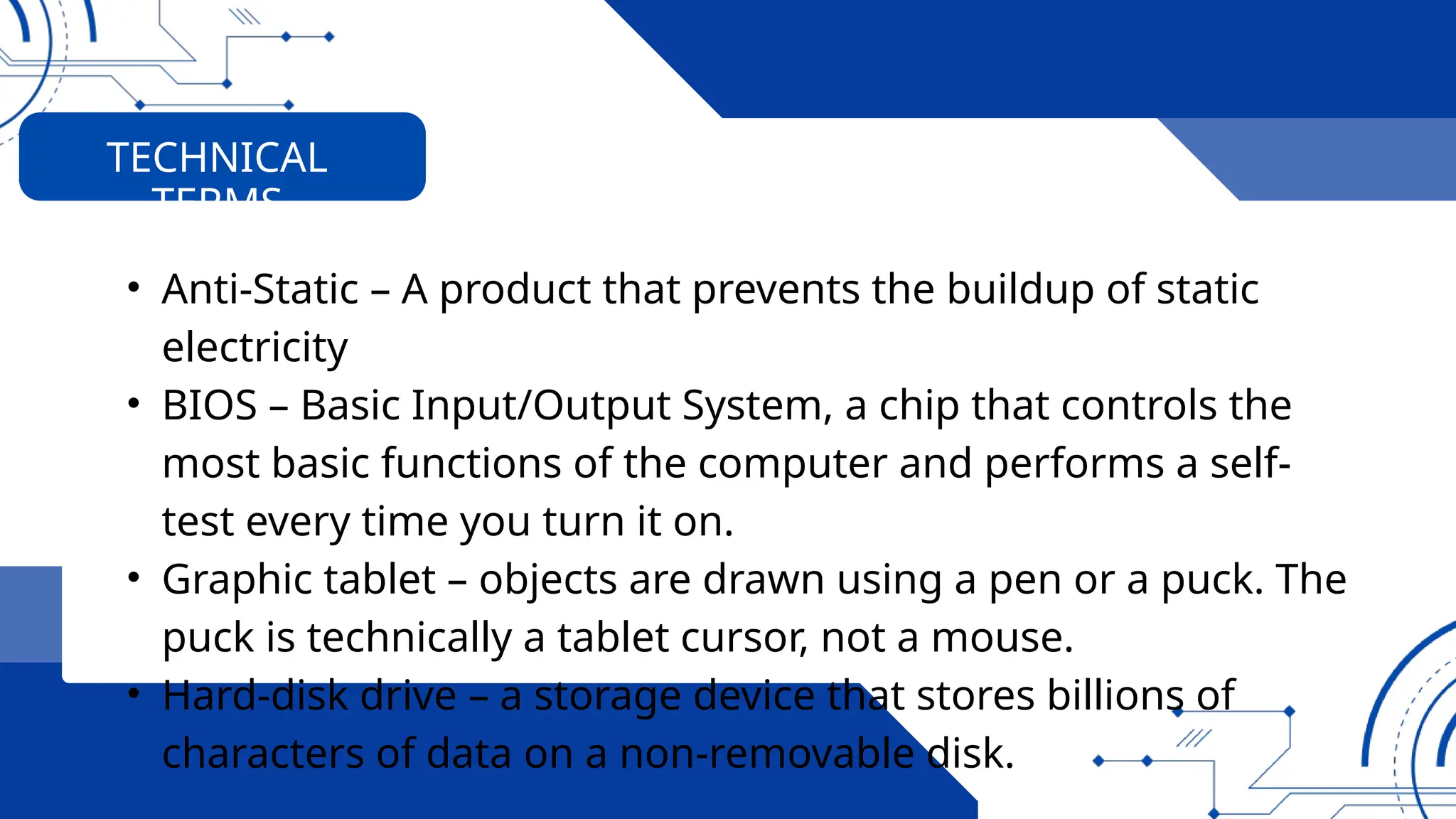
• Anti-Static – A product that prevents the buildup of static
electricity
• BIOS – Basic Input/Output System, a chip that controls the
most basic functions of the computer and performs a self-
test every time you turn it on.
• Graphic tablet – objects are drawn using a pen or a puck. The
puck is technically a tablet cursor, not a mouse.
• Hard-disk drive – a storage device that stores billions of
characters of data on a non-removable disk.
TECHNICAL
TERMS
• Hardware- refers to the tangible (things you can touch)
components of a computer system. Hardware components
are further divided into three groups namely
• Joy Stick - a hand-held control stick that allows a player to
control the movements of a cursor on a computer screen or a
symbol in a video game.
• LAN Card – Local area network interface card.
• Multi-tester- is an instrument use to measure voltage, current
and resistance.
TECHNICAL
TERMS
• NIC – Network Interface Card–The PC expansion board that
plug into a personal computer or server and works with the
network operating system to control the flow of information
over the network.
• Network – is a communications system connecting two or
more computers.
• OHS – Occupational Health and Safety
• Operating System (OS) - software that controls the
allocation and use of programs and data that a computer
uses.
TECHNICAL
TERMS
• Peers- mean any computer sharing the same protocol layer
with another computer.
• Printer - It is a piece of hardware that produces a paper
copy (also known as ‘hardcopy’) of the information
generated by the computer.
• RAM – Random Access Memory, is a primary memory. This
memory is used inside the computer to hold programs and
data while it is running.
• RJ 45 – Registered Jack 45 is the connector plugged into the
NIC ports on computers and often connecting the main
networking hardware together.
TECHNICAL
TERMS
• Router – a device that forwards data packets between Local
or Wide Area Network groups.
• Scanner- it is an input device that reads text or illustration
printed on paper, and translates the information into a form
that a computer can use.
• Server – is a part of a network. It is a special computer that
users on the network can assess to carry out a particular
job.
TECHNICAL
TERMS
• Software – programs and data that a computer uses.
• Static – The discharge of electricity between two objects
with different electrical potential
• USB – Universal Serial Bus, a hardware interface for low-
speed peripherals such as the keyboard, mouse, joystick,
scanner, printer and telephony devices.
TECHNICAL
TERMS
• Unit assembly is planned and prepared to ensure OH&S
policies and procedures are followed in accordance with
systems requirements
• Materials necessary to complete the work are identified and
obtained in accordance with established procedures and
checked against systems requirements.
• Tools, equipment, and testing devices needed to carry out
the installation work are obtained in accordance with
established procedures and checked for correct operation
LEARNING OUTCOME 01:
ASSEMBLE COMPUTER HARDWARE
• Computer hardware is assembled in accordance with
established procedures and systems requirements
• Basic-input-output-system (BIOS) configuration is
performed in accordance with hardware requirements.
LEARNING OUTCOME 01:
ASSEMBLE COMPUTER HARDWARE
EQUIPMENT AND
ACCESSORIES
TOOLS MATERIALS
RESOURCES:
OHS POLICIES AND
PROCEDURES
Personal Safety While Working Along
With PC’s
Computer equipment can be dangerous, and you or others can
be injured or even killed if you don’t follow proper safety
guidelines when working along PC’s.
OHS POLICIES AND
PROCEDURES
OCCUPATIONAL HEALTH & SAFETY (OHS) PROCEDURES
(When assembling computer hardware)
• Wear shoes with non-conductive rubber soles to help
reduce the chance of being shocked.
• Unplug all electronics/equipment from the power source?
• Do not remove expansion cards or other components a
computer when it is turned on.
• Remove all jewelry when working inside any computer
related equipment.
OHS POLICIES AND
PROCEDURES
OCCUPATIONAL HEALTH & SAFETY (OHS) PROCEDURES
(When assembling computer hardware)
• Be sure not to mix electronic components and water.
• Do not over tighten the screws.
• Always handle computer components by the edges.
• Wear an anti-static device to prevent Electro Static
Discharge.
OHS POLICIES AND
PROCEDURES
INTRODUCTION TO COMPUTER
SYSTEMS
What is Computer?
FOUR (4) TYPES OF COMPUTER:
1. Supercomputer
• The most powerful
computers in terms of
performance and data
processing are the
supercomputers.
INTRODUCTION TO COMPUTER
SYSTEMS
This Supercomputer Can Calculate in 1 Second What Would Take You
6 Billion Years. The supercomputer is an IBM AC922 system that's
made up of 4,608 computer servers
FOUR (4) TYPES OF COMPUTER:
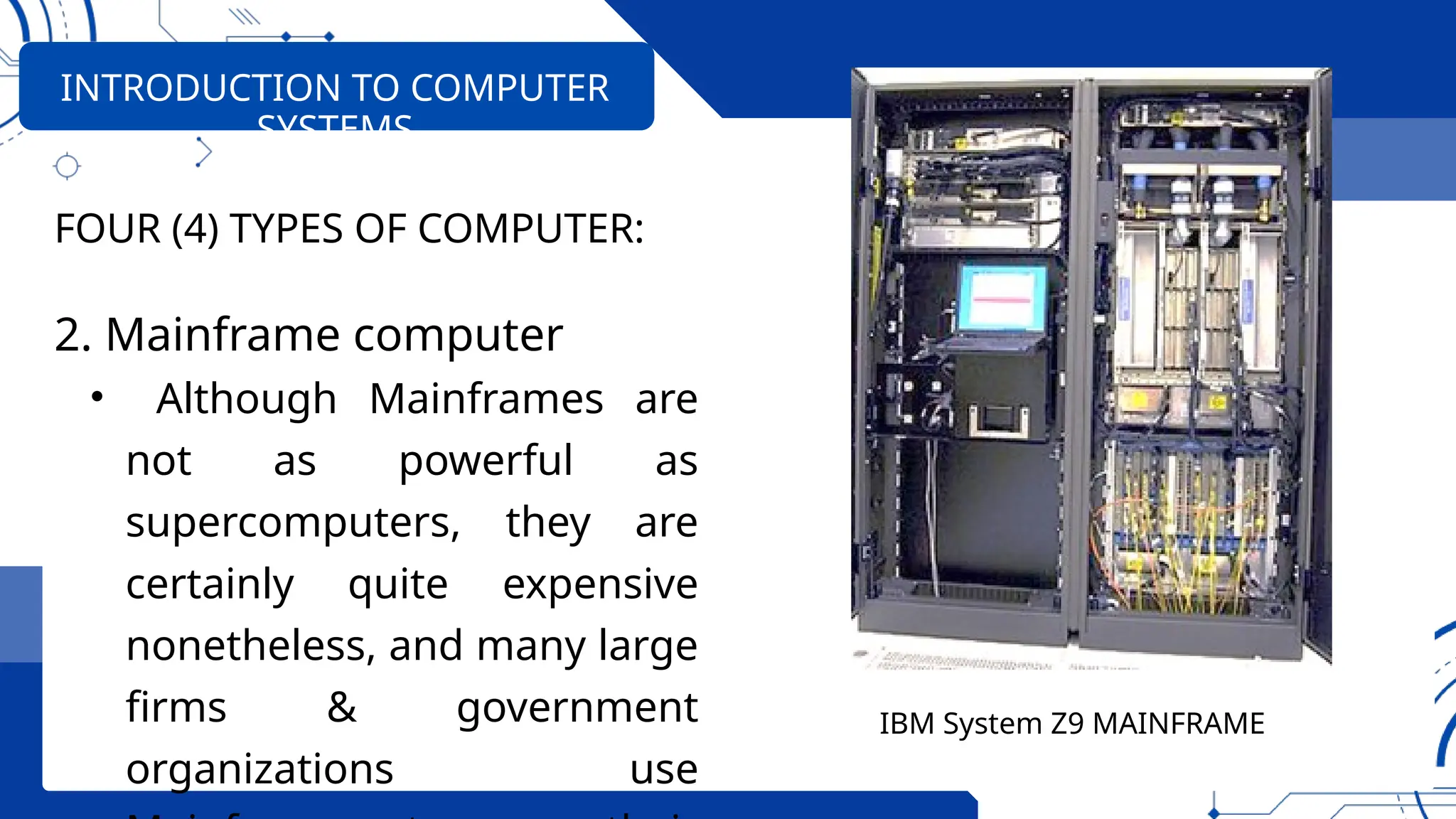
2. Mainframe computer
• Although Mainframes are
not as powerful as
supercomputers, they are
certainly quite expensive
nonetheless, and many large
firms & government
organizations use
INTRODUCTION TO COMPUTER
SYSTEMS
IBM System Z9 MAINFRAME
FOUR (4) TYPES OF COMPUTER:
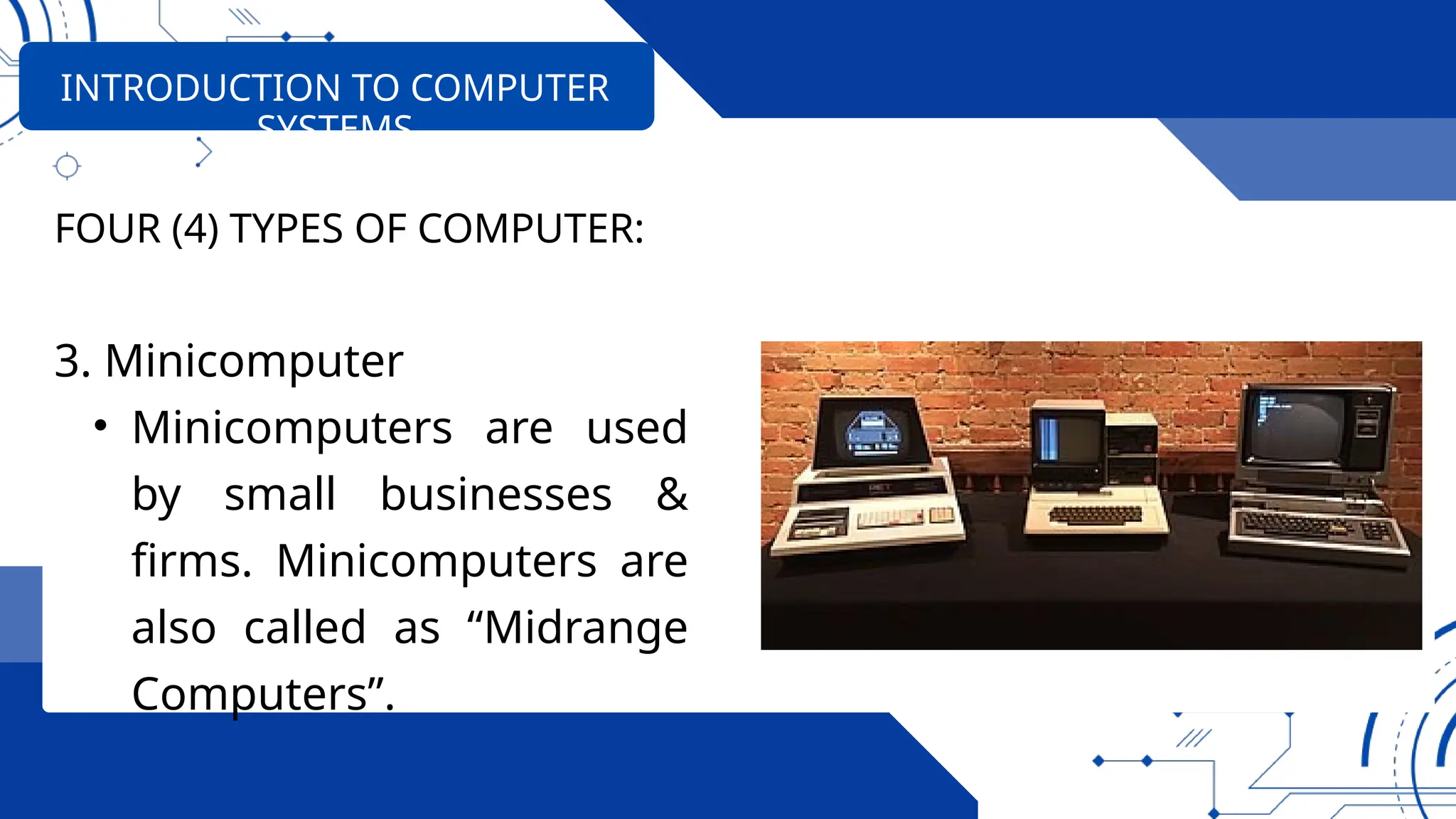
3. Minicomputer
• Minicomputers are used
by small businesses &
firms. Minicomputers are
also called as “Midrange
Computers”.
INTRODUCTION TO COMPUTER
SYSTEMS
FOUR (4) TYPES OF COMPUTER:
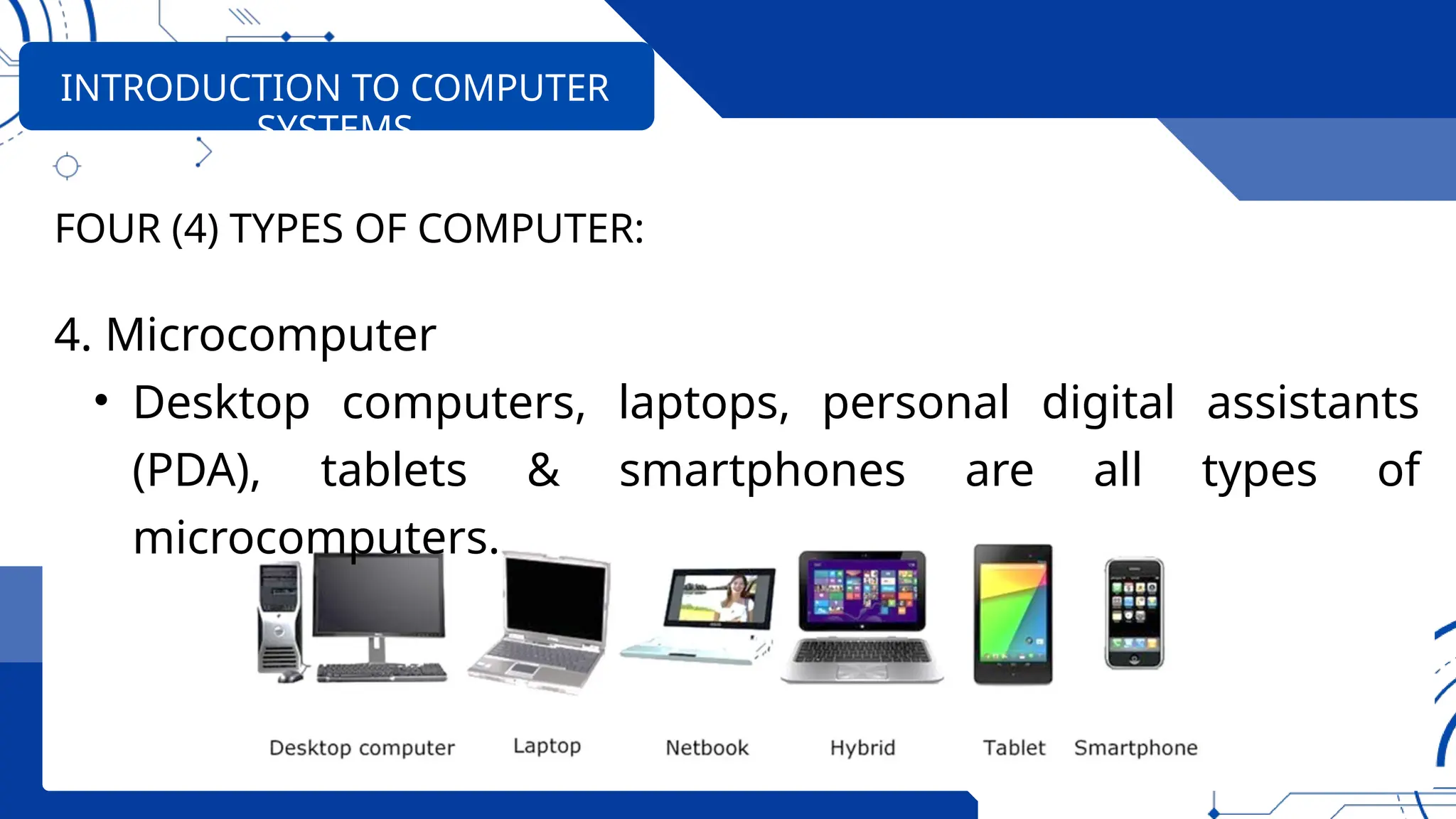
4. Microcomputer
• Desktop computers, laptops, personal digital assistants
(PDA), tablets & smartphones are all types of
microcomputers.
INTRODUCTION TO COMPUTER
SYSTEMS
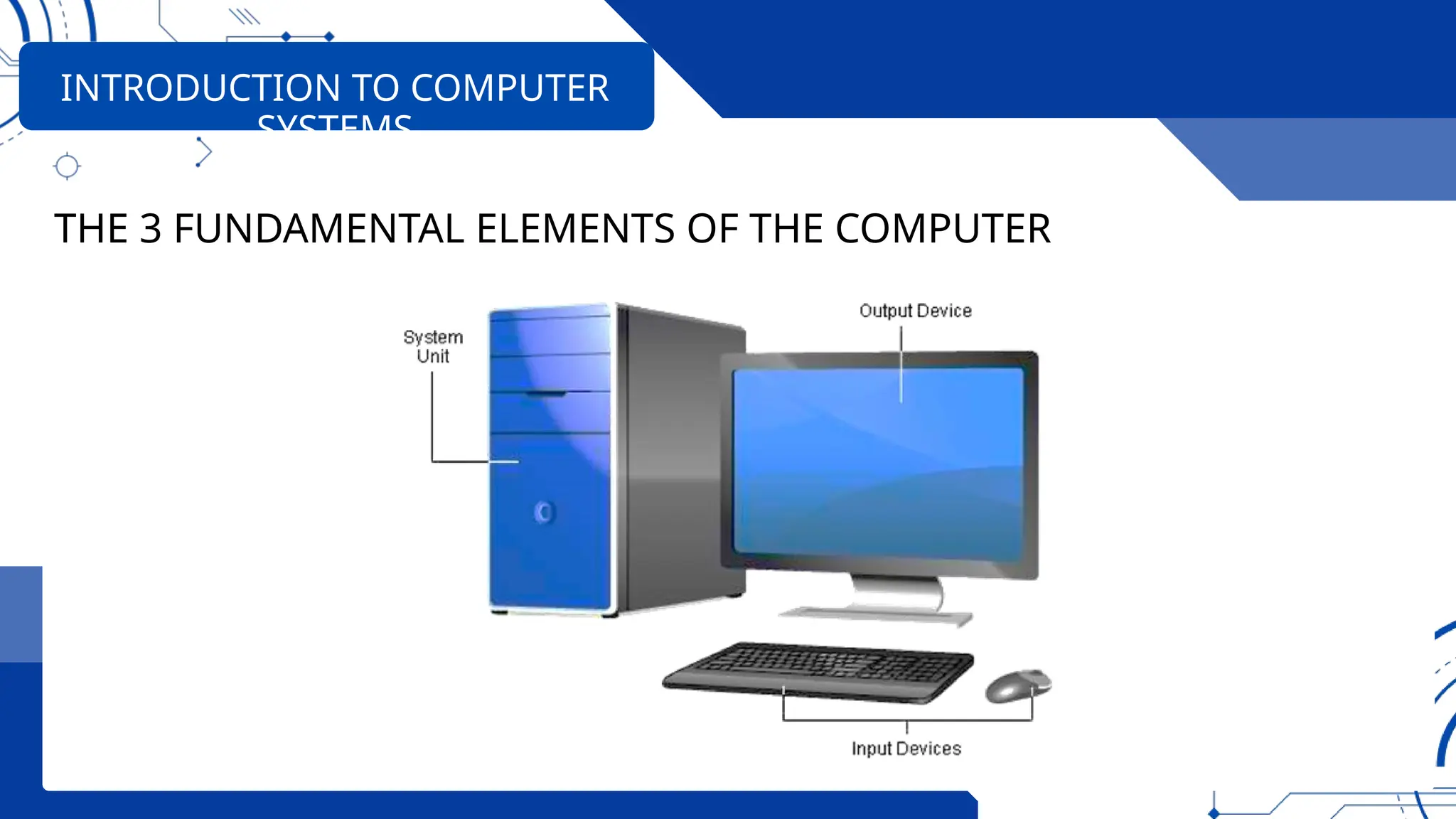
THE 3 FUNDAMENTAL ELEMENTS OF THE COMPUTER
• System Unit-acts like the center or core, processing the
data and information it receives from input devices.
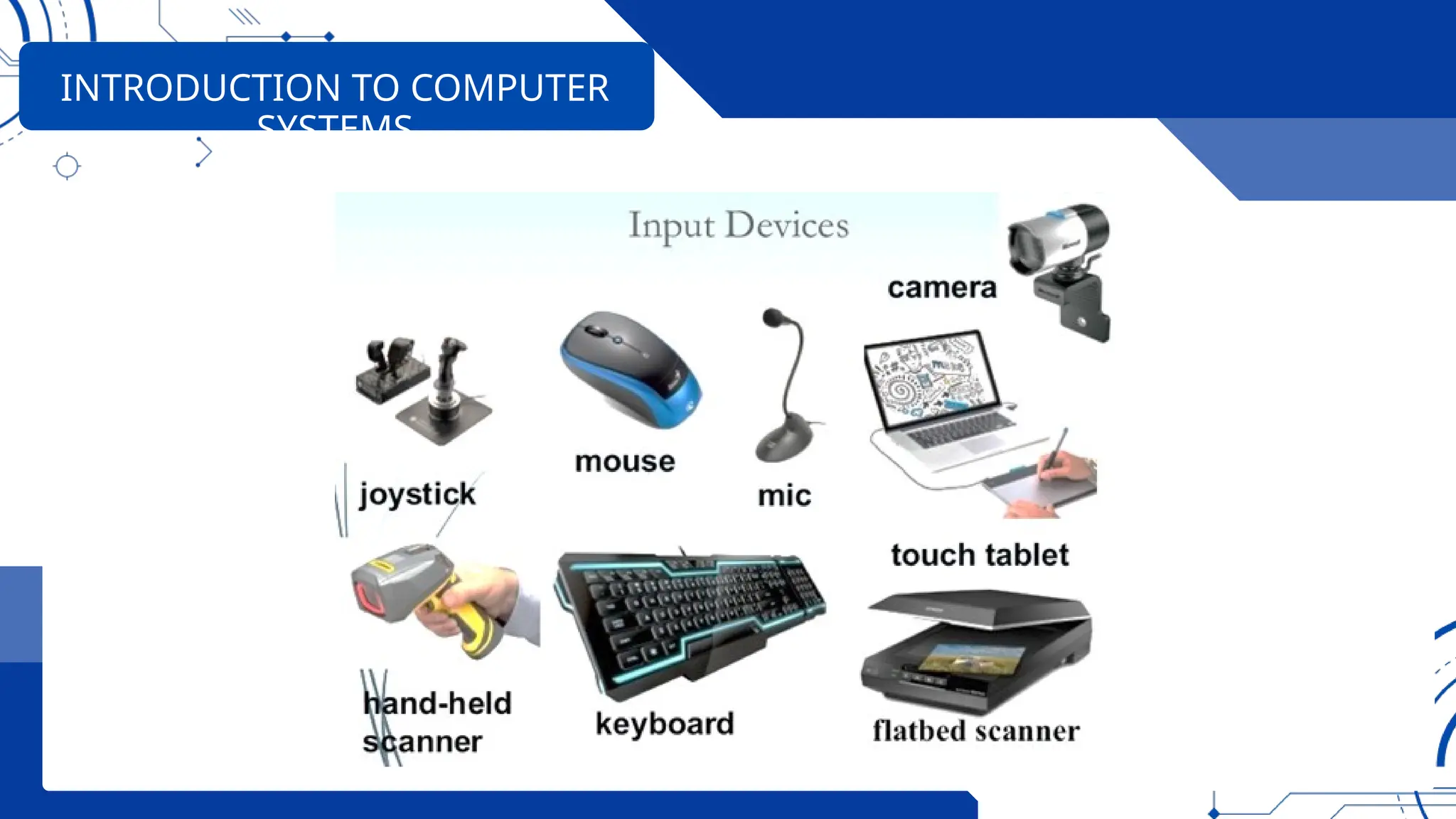
• Input Devices-An input device is any hardware device that
sends data to a computer, allowing you to interact with
and control the computer.
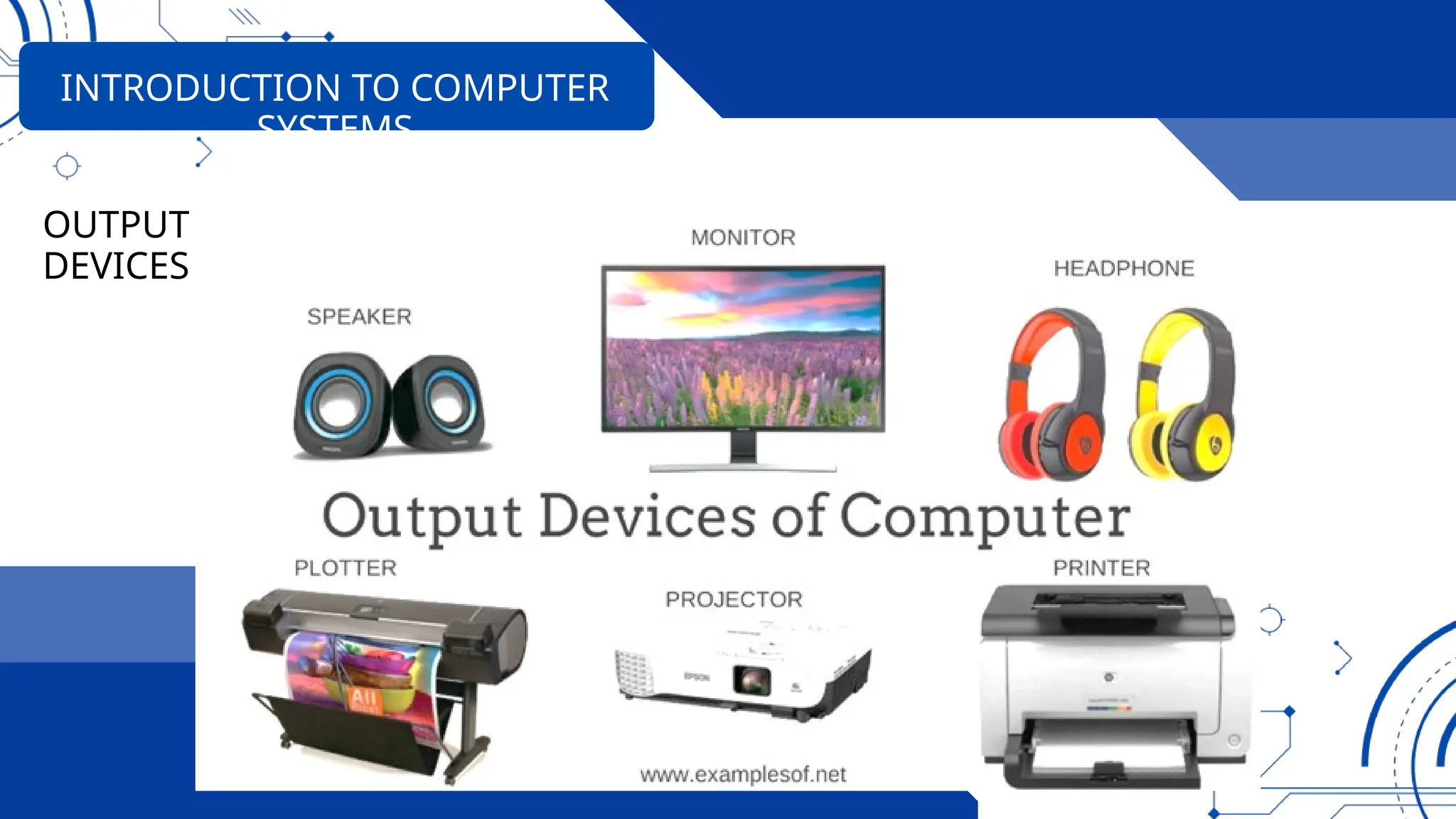
• Output Devices-these are the devices like printers. It
receives the system unit's processed information.
INTRODUCTION TO COMPUTER
SYSTEMS
THE 3 FUNDAMENTAL ELEMENTS OF THE COMPUTER
INTRODUCTION TO COMPUTER
SYSTEMS
INTRODUCTION TO COMPUTER
SYSTEMS
INTRODUCTION TO COMPUTER
SYSTEMS
OUTPUT
DEVICES
INTRODUCTION TO COMPUTER
SYSTEMS
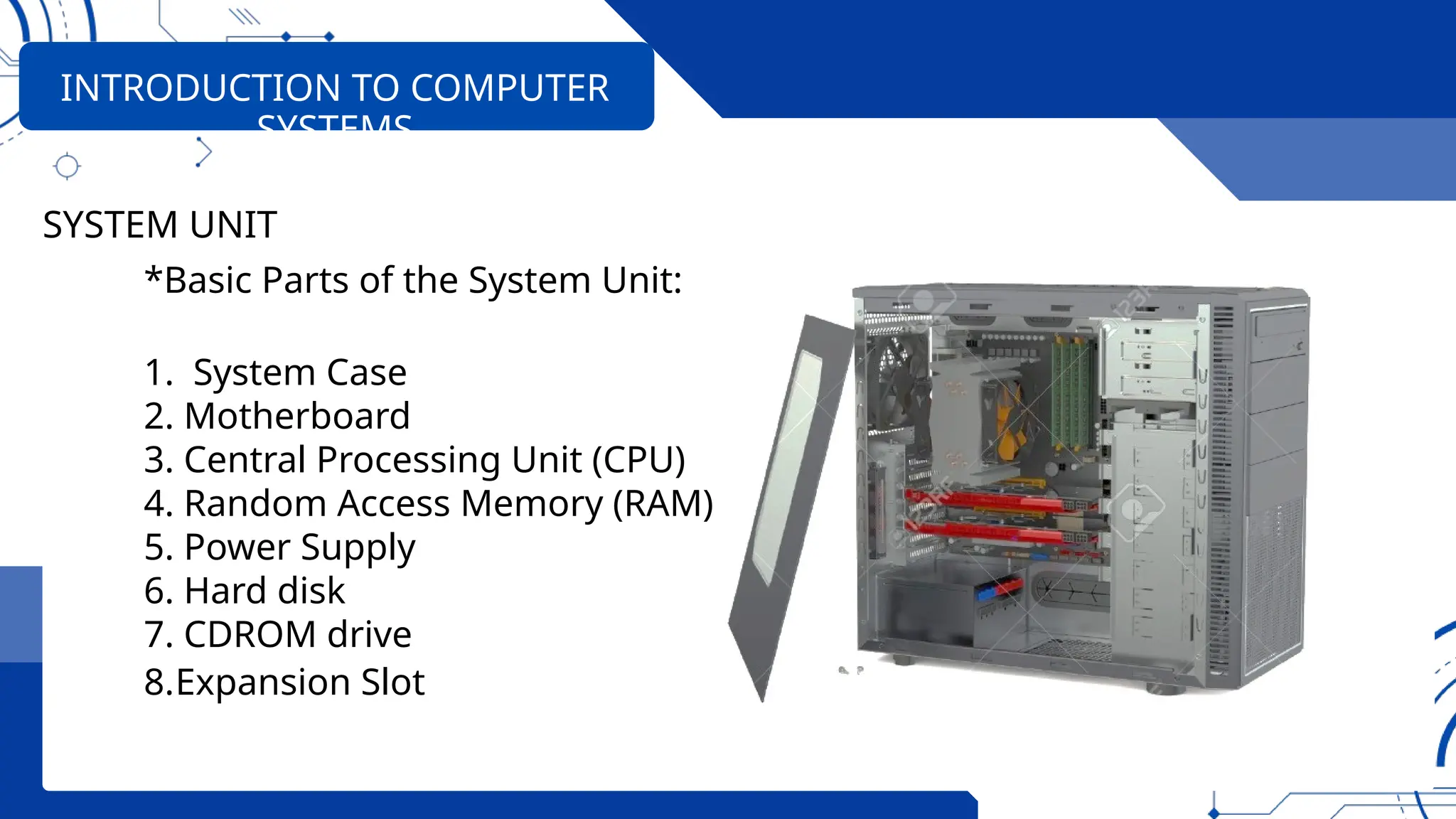
SYSTEM UNIT
*Basic Parts of the System Unit:
1. System Case
2. Motherboard
3. Central Processing Unit (CPU)
4. Random Access Memory (RAM)
5. Power Supply
6. Hard disk
7. CDROM drive
8.Expansion Slot
INTRODUCTION TO COMPUTER
SYSTEMS
System Case
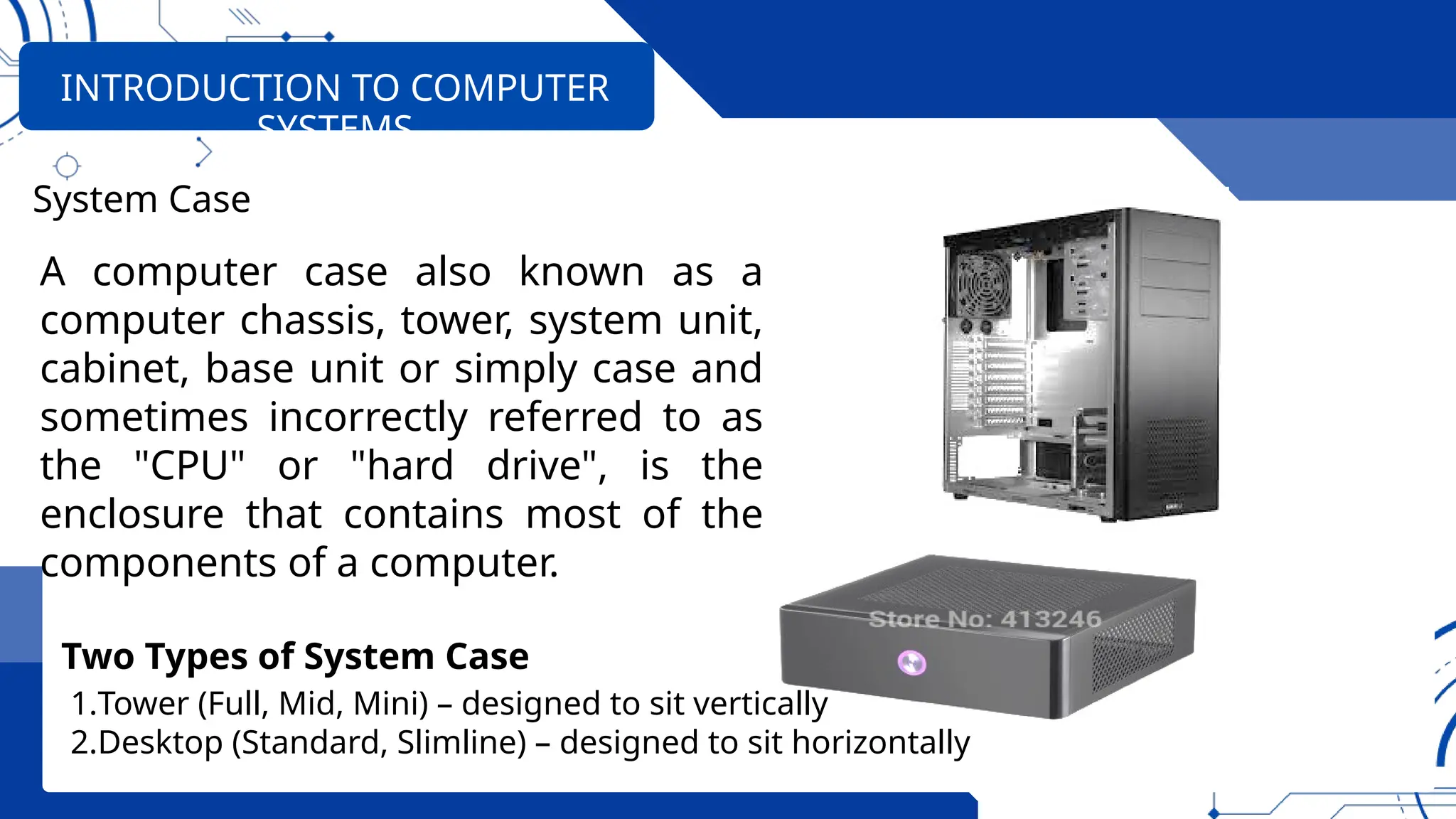
A computer case also known as a
computer chassis, tower, system unit,
cabinet, base unit or simply case and
sometimes incorrectly referred to as
the "CPU" or "hard drive", is the
enclosure that contains most of the
components of a computer.
Two Types of System Case
1.Tower (Full, Mid, Mini) – designed to sit vertically
2.Desktop (Standard, Slimline) – designed to sit horizontally
INTRODUCTION TO COMPUTER
SYSTEMS
Any Question?

COMPUTER SYSTEMS SERVICING NC II LO1 COC1 - 2024.pptx

  • 1.
    INSTALLING & CONFIGURING COMPUTER SYSTEMS CO R E C O M P E T E N C Y # 1 C O M P U T E R S Y S T E M S S E R V I C I N G N C I I
  • 2.
    NO. UNIT OFCOMPETENCY MODULE TITLE CODE 1. Install and configure computer systems Installing and configuring computer systems ELC724331 2. Set-up computer networks Setting-up computer networks ELC724332 3. Set-up Computer Servers Setting-up Computer Servers ELC724333 4. Maintain and repair computer systems and networks Maintaining and repairing computer systems and networks ELC724334 COMPUTER SYSTEM SERVICING NC II COMPETENCY-BASED LEARNING MATERIALS List of Competencies
  • 3.
    Upon completion ofthe module you should be able to: • LO1 Assemble computer hardware • LO2 Prepare installer • LO3 Install operating system and drivers for peripherals/ devices • LO4 Install application software • LO5 Conduct testing and documentation SUMMARY OF LEARNING OUTCOMES:
  • 4.
    • Anti-Static –A product that prevents the buildup of static electricity • BIOS – Basic Input/Output System, a chip that controls the most basic functions of the computer and performs a self- test every time you turn it on. • Graphic tablet – objects are drawn using a pen or a puck. The puck is technically a tablet cursor, not a mouse. • Hard-disk drive – a storage device that stores billions of characters of data on a non-removable disk. TECHNICAL TERMS
  • 5.
    • Hardware- refersto the tangible (things you can touch) components of a computer system. Hardware components are further divided into three groups namely • Joy Stick - a hand-held control stick that allows a player to control the movements of a cursor on a computer screen or a symbol in a video game. • LAN Card – Local area network interface card. • Multi-tester- is an instrument use to measure voltage, current and resistance. TECHNICAL TERMS
  • 6.
    • NIC –Network Interface Card–The PC expansion board that plug into a personal computer or server and works with the network operating system to control the flow of information over the network. • Network – is a communications system connecting two or more computers. • OHS – Occupational Health and Safety • Operating System (OS) - software that controls the allocation and use of programs and data that a computer uses. TECHNICAL TERMS
  • 7.
    • Peers- meanany computer sharing the same protocol layer with another computer. • Printer - It is a piece of hardware that produces a paper copy (also known as ‘hardcopy’) of the information generated by the computer. • RAM – Random Access Memory, is a primary memory. This memory is used inside the computer to hold programs and data while it is running. • RJ 45 – Registered Jack 45 is the connector plugged into the NIC ports on computers and often connecting the main networking hardware together. TECHNICAL TERMS
  • 8.
    • Router –a device that forwards data packets between Local or Wide Area Network groups. • Scanner- it is an input device that reads text or illustration printed on paper, and translates the information into a form that a computer can use. • Server – is a part of a network. It is a special computer that users on the network can assess to carry out a particular job. TECHNICAL TERMS
  • 9.
    • Software –programs and data that a computer uses. • Static – The discharge of electricity between two objects with different electrical potential • USB – Universal Serial Bus, a hardware interface for low- speed peripherals such as the keyboard, mouse, joystick, scanner, printer and telephony devices. TECHNICAL TERMS
  • 10.
    • Unit assemblyis planned and prepared to ensure OH&S policies and procedures are followed in accordance with systems requirements • Materials necessary to complete the work are identified and obtained in accordance with established procedures and checked against systems requirements. • Tools, equipment, and testing devices needed to carry out the installation work are obtained in accordance with established procedures and checked for correct operation LEARNING OUTCOME 01: ASSEMBLE COMPUTER HARDWARE
  • 11.
    • Computer hardwareis assembled in accordance with established procedures and systems requirements • Basic-input-output-system (BIOS) configuration is performed in accordance with hardware requirements. LEARNING OUTCOME 01: ASSEMBLE COMPUTER HARDWARE
  • 12.
  • 13.
    OHS POLICIES AND PROCEDURES PersonalSafety While Working Along With PC’s Computer equipment can be dangerous, and you or others can be injured or even killed if you don’t follow proper safety guidelines when working along PC’s.
  • 14.
    OHS POLICIES AND PROCEDURES OCCUPATIONALHEALTH & SAFETY (OHS) PROCEDURES (When assembling computer hardware) • Wear shoes with non-conductive rubber soles to help reduce the chance of being shocked. • Unplug all electronics/equipment from the power source? • Do not remove expansion cards or other components a computer when it is turned on. • Remove all jewelry when working inside any computer related equipment.
  • 15.
    OHS POLICIES AND PROCEDURES OCCUPATIONALHEALTH & SAFETY (OHS) PROCEDURES (When assembling computer hardware) • Be sure not to mix electronic components and water. • Do not over tighten the screws. • Always handle computer components by the edges. • Wear an anti-static device to prevent Electro Static Discharge.
  • 16.
  • 17.
  • 18.
    FOUR (4) TYPESOF COMPUTER: 1. Supercomputer • The most powerful computers in terms of performance and data processing are the supercomputers. INTRODUCTION TO COMPUTER SYSTEMS This Supercomputer Can Calculate in 1 Second What Would Take You 6 Billion Years. The supercomputer is an IBM AC922 system that's made up of 4,608 computer servers
  • 19.
    FOUR (4) TYPESOF COMPUTER: 2. Mainframe computer • Although Mainframes are not as powerful as supercomputers, they are certainly quite expensive nonetheless, and many large firms & government organizations use INTRODUCTION TO COMPUTER SYSTEMS IBM System Z9 MAINFRAME
  • 20.
    FOUR (4) TYPESOF COMPUTER: 3. Minicomputer • Minicomputers are used by small businesses & firms. Minicomputers are also called as “Midrange Computers”. INTRODUCTION TO COMPUTER SYSTEMS
  • 21.
    FOUR (4) TYPESOF COMPUTER: 4. Microcomputer • Desktop computers, laptops, personal digital assistants (PDA), tablets & smartphones are all types of microcomputers. INTRODUCTION TO COMPUTER SYSTEMS
  • 22.
    THE 3 FUNDAMENTALELEMENTS OF THE COMPUTER • System Unit-acts like the center or core, processing the data and information it receives from input devices. • Input Devices-An input device is any hardware device that sends data to a computer, allowing you to interact with and control the computer. • Output Devices-these are the devices like printers. It receives the system unit's processed information. INTRODUCTION TO COMPUTER SYSTEMS
  • 23.
    THE 3 FUNDAMENTALELEMENTS OF THE COMPUTER INTRODUCTION TO COMPUTER SYSTEMS
  • 24.
  • 25.
  • 26.
    INTRODUCTION TO COMPUTER SYSTEMS SYSTEMUNIT *Basic Parts of the System Unit: 1. System Case 2. Motherboard 3. Central Processing Unit (CPU) 4. Random Access Memory (RAM) 5. Power Supply 6. Hard disk 7. CDROM drive 8.Expansion Slot
  • 27.
    INTRODUCTION TO COMPUTER SYSTEMS SystemCase A computer case also known as a computer chassis, tower, system unit, cabinet, base unit or simply case and sometimes incorrectly referred to as the "CPU" or "hard drive", is the enclosure that contains most of the components of a computer. Two Types of System Case 1.Tower (Full, Mid, Mini) – designed to sit vertically 2.Desktop (Standard, Slimline) – designed to sit horizontally
  • 28.

Editor's Notes

  • #13 In the school as a computer teacher you must be aware of how your students behave when they are working in the computer laboratory, as well as implementing a safe way of accomplishing every task. Safety practices should be learned early and always adhered to when working with any electrical device, including personal computers and peripherals. This is for the protection of not only the people working with them, but also for the devices themselves. The basis for this process begins with your Occupational Health and Safety Policies.
  • #17 A computer is an electronic device that helps people perform different task. It accepts information (in the form of digitalized data) and manipulates it for some result based on a program or sequence of instructions on how the data is to be processed.
  • #19 Uses of Supercomputer: ● Space Exploration ● Earthquake studies ● Weather Forecasting ● Nuclear weapons testing
  • #20 Uses of Supercomputer: ● Space Exploration ● Earthquake studies ● Weather Forecasting ● Nuclear weapons testing
  • #21 Uses of Supercomputer: ● Space Exploration ● Earthquake studies ● Weather Forecasting ● Nuclear weapons testing
  • #28 A computer is an electronic device that helps people perform different task. It accepts information (in the form of digitalized data) and manipulates it for some result based on a program or sequence of instructions on how the data is to be processed.