PREPARING INSTALLER
C O R E C O M P E T E N C Y # 1
C O M P U T E R S Y S T E M S S E R V I C I N G
N C I I
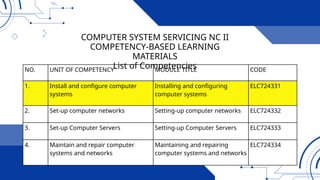
NO. UNIT OF COMPETENCY MODULE TITLE CODE
1. Install and configure computer
systems
Installing and configuring
computer systems
ELC724331
2. Set-up computer networks Setting-up computer networks ELC724332
3. Set-up Computer Servers Setting-up Computer Servers ELC724333
4. Maintain and repair computer
systems and networks
Maintaining and repairing
computer systems and networks
ELC724334
COMPUTER SYSTEM SERVICING NC II
COMPETENCY-BASED LEARNING
MATERIALS
List of Competencies
Upon completion of the module you should be able to:
• LO1 Assemble computer hardware
• LO2 Prepare installer
• LO3 Install operating system and drivers for
peripherals/ devices
• LO4 Install application software
• LO5 Conduct testing and documentation
SUMMARY OF LEARNING
OUTCOMES:
• An installation program
or installer is a computer
program that installs files,
such as applications,
drivers, or other software,
onto a computer.
SOFTWARE INSTALLATION
• Installation (or setup) of a computer program
(including device drivers and plugins), is the act
of making the program ready for execution.
Because the process varies for each program
and each computer, programs (including
operating systems) often come with an installer,
a specialized program responsible for doing
whatever is needed for their installation.
Installation may be part of a larger software
SOFTWARE INSTALLATION
• An installation program or installer is a
computer program that installs files, such as
applications, drivers, or other software, onto a
computer. Some installers are specifically made
to install the files they contain; other installers
are general-purpose and work by reading the
contents of the software package to be installed.
INSTALLER
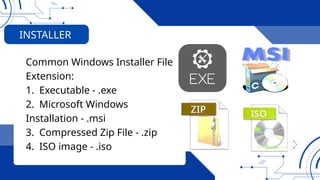
Common Windows Installer File
Extension:
1. Executable - .exe
2. Microsoft Windows
Installation - .msi
3. Compressed Zip File - .zip
4. ISO image - .iso
INSTALLER
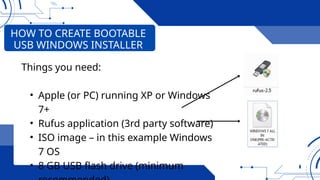
Things you need:
• Apple (or PC) running XP or Windows
7+
• Rufus application (3rd party software)
• ISO image – in this example Windows
7 OS
• 8 GB USB flash drive (minimum
HOW TO CREATE BOOTABLE
USB WINDOWS INSTALLER
HOW TO CREATE BOOTABLE
USB WINDOWS INSTALLER
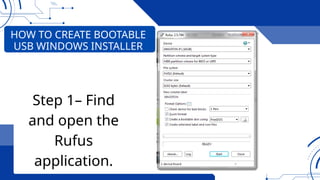
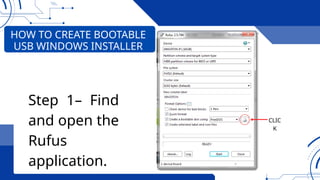
Step 1– Find
and open the
Rufus
application.
HOW TO CREATE BOOTABLE
USB WINDOWS INSTALLER
Step 1– Find
and open the
Rufus
application.
CLIC
K
HOW TO CREATE BOOTABLE
USB WINDOWS INSTALLER
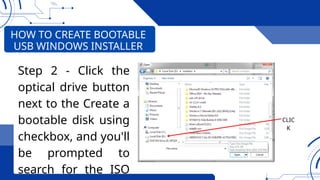
Step 2 - Click the
optical drive button
next to the Create a
bootable disk using
checkbox, and you'll
be prompted to
search for the ISO
CLIC
K
HOW TO CREATE BOOTABLE
USB WINDOWS INSTALLER
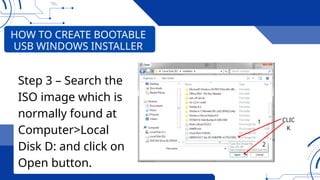
Step 3 – Search the
ISO image which is
normally found at
Computer>Local
Disk D: and click on
Open button.
CLIC
K
1
2
CLIC
K
HOW TO CREATE BOOTABLE
USB WINDOWS INSTALLER
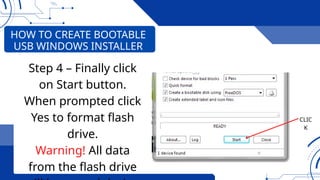
Step 4 – Finally click
on Start button.
When prompted click
Yes to format flash
drive.
Warning! All data
from the flash drive
• Software is the component
of a computer system that
refers to the set of
instructions written in a
code-that computers can
understand and execute.
Another name for this set of
instructions is program.
SOFTWARE
THREE (3) TYPES OF SOFTWARE:
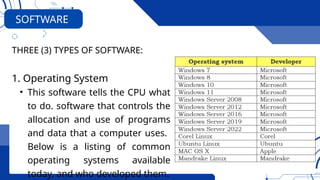
1. Operating System
• This software tells the CPU what
to do. software that controls the
allocation and use of programs
and data that a computer uses.
Below is a listing of common
operating systems available
today, and who developed them.
SOFTWARE
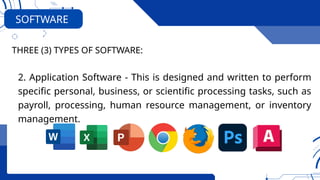
2. Application Software - This is designed and written to perform
specific personal, business, or scientific processing tasks, such as
payroll, processing, human resource management, or inventory
management.
THREE (3) TYPES OF SOFTWARE:
SOFTWARE
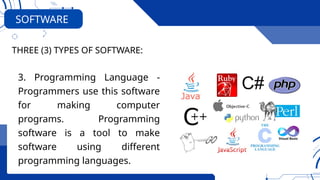
3. Programming Language -
Programmers use this software
for making computer
programs. Programming
software is a tool to make
software using different
programming languages.
THREE (3) TYPES OF SOFTWARE:
SOFTWARE
PREPARING INSTALLER
Any Question?

COC1 LO2 COMPUTER SYSTEMS SERVICING NC II - 2024.pptx

  • 1.
    PREPARING INSTALLER C OR E C O M P E T E N C Y # 1 C O M P U T E R S Y S T E M S S E R V I C I N G N C I I
  • 2.
    NO. UNIT OFCOMPETENCY MODULE TITLE CODE 1. Install and configure computer systems Installing and configuring computer systems ELC724331 2. Set-up computer networks Setting-up computer networks ELC724332 3. Set-up Computer Servers Setting-up Computer Servers ELC724333 4. Maintain and repair computer systems and networks Maintaining and repairing computer systems and networks ELC724334 COMPUTER SYSTEM SERVICING NC II COMPETENCY-BASED LEARNING MATERIALS List of Competencies
  • 3.
    Upon completion ofthe module you should be able to: • LO1 Assemble computer hardware • LO2 Prepare installer • LO3 Install operating system and drivers for peripherals/ devices • LO4 Install application software • LO5 Conduct testing and documentation SUMMARY OF LEARNING OUTCOMES:
  • 4.
    • An installationprogram or installer is a computer program that installs files, such as applications, drivers, or other software, onto a computer. SOFTWARE INSTALLATION
  • 5.
    • Installation (orsetup) of a computer program (including device drivers and plugins), is the act of making the program ready for execution. Because the process varies for each program and each computer, programs (including operating systems) often come with an installer, a specialized program responsible for doing whatever is needed for their installation. Installation may be part of a larger software SOFTWARE INSTALLATION
  • 6.
    • An installationprogram or installer is a computer program that installs files, such as applications, drivers, or other software, onto a computer. Some installers are specifically made to install the files they contain; other installers are general-purpose and work by reading the contents of the software package to be installed. INSTALLER
  • 7.
    Common Windows InstallerFile Extension: 1. Executable - .exe 2. Microsoft Windows Installation - .msi 3. Compressed Zip File - .zip 4. ISO image - .iso INSTALLER
  • 8.
    Things you need: •Apple (or PC) running XP or Windows 7+ • Rufus application (3rd party software) • ISO image – in this example Windows 7 OS • 8 GB USB flash drive (minimum HOW TO CREATE BOOTABLE USB WINDOWS INSTALLER
  • 9.
    HOW TO CREATEBOOTABLE USB WINDOWS INSTALLER Step 1– Find and open the Rufus application.
  • 10.
    HOW TO CREATEBOOTABLE USB WINDOWS INSTALLER Step 1– Find and open the Rufus application. CLIC K
  • 11.
    HOW TO CREATEBOOTABLE USB WINDOWS INSTALLER Step 2 - Click the optical drive button next to the Create a bootable disk using checkbox, and you'll be prompted to search for the ISO CLIC K
  • 12.
    HOW TO CREATEBOOTABLE USB WINDOWS INSTALLER Step 3 – Search the ISO image which is normally found at Computer>Local Disk D: and click on Open button. CLIC K 1 2
  • 13.
    CLIC K HOW TO CREATEBOOTABLE USB WINDOWS INSTALLER Step 4 – Finally click on Start button. When prompted click Yes to format flash drive. Warning! All data from the flash drive
  • 14.
    • Software isthe component of a computer system that refers to the set of instructions written in a code-that computers can understand and execute. Another name for this set of instructions is program. SOFTWARE
  • 15.
    THREE (3) TYPESOF SOFTWARE: 1. Operating System • This software tells the CPU what to do. software that controls the allocation and use of programs and data that a computer uses. Below is a listing of common operating systems available today, and who developed them. SOFTWARE
  • 16.
    2. Application Software- This is designed and written to perform specific personal, business, or scientific processing tasks, such as payroll, processing, human resource management, or inventory management. THREE (3) TYPES OF SOFTWARE: SOFTWARE
  • 17.
    3. Programming Language- Programmers use this software for making computer programs. Programming software is a tool to make software using different programming languages. THREE (3) TYPES OF SOFTWARE: SOFTWARE
  • 18.

Editor's Notes

  • #9 A computer is an electronic device that helps people perform different task. It accepts information (in the form of digitalized data) and manipulates it for some result based on a program or sequence of instructions on how the data is to be processed.
  • #10 A computer is an electronic device that helps people perform different task. It accepts information (in the form of digitalized data) and manipulates it for some result based on a program or sequence of instructions on how the data is to be processed.
  • #11 A computer is an electronic device that helps people perform different task. It accepts information (in the form of digitalized data) and manipulates it for some result based on a program or sequence of instructions on how the data is to be processed.
  • #12 A computer is an electronic device that helps people perform different task. It accepts information (in the form of digitalized data) and manipulates it for some result based on a program or sequence of instructions on how the data is to be processed.
  • #13 A computer is an electronic device that helps people perform different task. It accepts information (in the form of digitalized data) and manipulates it for some result based on a program or sequence of instructions on how the data is to be processed.
  • #15 Uses of Supercomputer: â—Ź Space Exploration â—Ź Earthquake studies â—Ź Weather Forecasting â—Ź Nuclear weapons testing
  • #16 Uses of Supercomputer: â—Ź Space Exploration â—Ź Earthquake studies â—Ź Weather Forecasting â—Ź Nuclear weapons testing
  • #17 Uses of Supercomputer: â—Ź Space Exploration â—Ź Earthquake studies â—Ź Weather Forecasting â—Ź Nuclear weapons testing
  • #18 A computer is an electronic device that helps people perform different task. It accepts information (in the form of digitalized data) and manipulates it for some result based on a program or sequence of instructions on how the data is to be processed.