COMPUTER SYSTEM SERVICING
(CSS)
Bootable Installer Preparation
PREPARE INSTALLER
Mrs. Jean B. Daraug
Carmen National High School-Day Class
Carmen, Cebu, Philippines
LEARNING COMPETENCIES
Learners will be able to…
•create portable bootable devices in accordance with
software manufacturer instruction;
•prepare customized installers in accordance with
software utilization guide and end user agreement;
and
•carry out installation of portable applications in
accordance with software user guide and software
license.
EXERCISE
What is the difference
between a hardware
and software?
ACTVITY 1: Word Search
Direction:
Locate the given words in the
grid, running in one of eight
possible directions horizontally,
vertically, or diagonally.
WHAT IS IT!
The software installer package of an
operating system from the market is
usually inside a CD or DVD. There are
times when we come across situations
where there is no CD or DVD drive in a
computer so there is no way we can use
that CD/DVD to install or re-install that
operating system.
WHAT IS IT!
Having a bootable version of Windows on a
DVD and USB drive can be very useful in
times when we need to install an operating
system. A DVD installer can be used
whenever the version of BIOS of the
computer doesn’t allow for USB installers. A
USB installer can also be used whenever
there is no available CD or DVD drive in a
computer.
ISO Image File
A file with an .iso file extension is a virtual
copy of a CD or DVD, with the same file
structure and the same data.ISO copies are
referred to as "images" of the original.
Therefore, the ISO is a perfect copy of what
would be on an original Windows CD or DVD.
Bootable Device
A bootable device is a kind of storage
hardware, such as a hard drive, USB flash
drive, CD, or DVD which contains necessary
boot files and drivers for loading the
operating system.
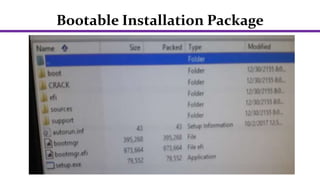
Bootable Installation Package
The bootable installation package contains a disk
image that is identical to the boxed product that
you would purchase at any software retailer. This
image may be burned directly to physical media
to produce a bootable installation DVD. Once
copied to physical media, this package may be
used to install an Operating System on any
compatible hardware, with or without an existing
Operating System installed.
Bootable Installation Package
Requirements In Making a Bootable
Device
To create a bootable USB flash drive, you’ll need
the following:
1. Access to Windows DiskPart or a third-party
equivalent (ex. Rufus, Windows USB/DVD Tool)
2. USB flash drive with at least 8GB of storage
3. An ISO file of the OS you want to install or use
to repair
ACTVITY 2
Direction: Choose the correct answer from the
box given below.
1. It is a kind of storage hardware, such as a hard
drive, USB flash drive, CD, or DVD which contains
necessary boot files and drivers for loading the
operating system.
ACTVITY 2
2. It is an example of a software utility that can
create a bootable CD or DVD.
3. It is the file extension of a disc image file.
4. It is a disk partition utility in Windows that can
be used to create a bootable USB.
5. It contains a disk image that is identical to the
boxed product that you would purchase at any
software retailer.

Bootable Installer Preparation .pptx

  • 1.
    COMPUTER SYSTEM SERVICING (CSS) BootableInstaller Preparation PREPARE INSTALLER Mrs. Jean B. Daraug Carmen National High School-Day Class Carmen, Cebu, Philippines
  • 2.
    LEARNING COMPETENCIES Learners willbe able to… •create portable bootable devices in accordance with software manufacturer instruction; •prepare customized installers in accordance with software utilization guide and end user agreement; and •carry out installation of portable applications in accordance with software user guide and software license.
  • 3.
    EXERCISE What is thedifference between a hardware and software?
  • 4.
    ACTVITY 1: WordSearch Direction: Locate the given words in the grid, running in one of eight possible directions horizontally, vertically, or diagonally.
  • 5.
    WHAT IS IT! Thesoftware installer package of an operating system from the market is usually inside a CD or DVD. There are times when we come across situations where there is no CD or DVD drive in a computer so there is no way we can use that CD/DVD to install or re-install that operating system.
  • 6.
    WHAT IS IT! Havinga bootable version of Windows on a DVD and USB drive can be very useful in times when we need to install an operating system. A DVD installer can be used whenever the version of BIOS of the computer doesn’t allow for USB installers. A USB installer can also be used whenever there is no available CD or DVD drive in a computer.
  • 7.
    ISO Image File Afile with an .iso file extension is a virtual copy of a CD or DVD, with the same file structure and the same data.ISO copies are referred to as "images" of the original. Therefore, the ISO is a perfect copy of what would be on an original Windows CD or DVD.
  • 8.
    Bootable Device A bootabledevice is a kind of storage hardware, such as a hard drive, USB flash drive, CD, or DVD which contains necessary boot files and drivers for loading the operating system.
  • 9.
    Bootable Installation Package Thebootable installation package contains a disk image that is identical to the boxed product that you would purchase at any software retailer. This image may be burned directly to physical media to produce a bootable installation DVD. Once copied to physical media, this package may be used to install an Operating System on any compatible hardware, with or without an existing Operating System installed.
  • 10.
  • 11.
    Requirements In Makinga Bootable Device To create a bootable USB flash drive, you’ll need the following: 1. Access to Windows DiskPart or a third-party equivalent (ex. Rufus, Windows USB/DVD Tool) 2. USB flash drive with at least 8GB of storage 3. An ISO file of the OS you want to install or use to repair
  • 12.
    ACTVITY 2 Direction: Choosethe correct answer from the box given below. 1. It is a kind of storage hardware, such as a hard drive, USB flash drive, CD, or DVD which contains necessary boot files and drivers for loading the operating system.
  • 13.
    ACTVITY 2 2. Itis an example of a software utility that can create a bootable CD or DVD. 3. It is the file extension of a disc image file. 4. It is a disk partition utility in Windows that can be used to create a bootable USB. 5. It contains a disk image that is identical to the boxed product that you would purchase at any software retailer.