
Maintain Computer Systems and
Network
Lovelito Mark B.Tan
At the end lesson, students must be able to
• determine the steps in maintaining computer system;
• perform the steps in maintaining computer system;
and
• recognize the importance of maintaining computer
system.
Motivation
• Divide yourselves into 2 groups. Share
the things you do in the morning before
going to school. One representative
from each group will present their ideas
in the class.
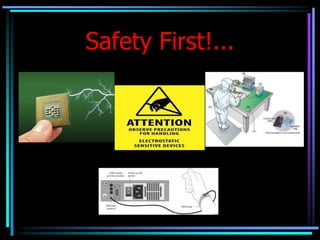
Safety First!...
Group Activity
• Perform a step by step procedure in
maintaining the computer system
• Hardware
• Software
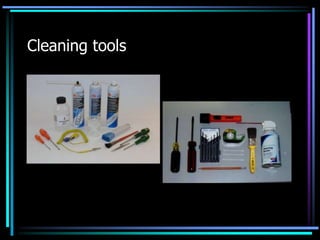
Cleaning tools
• Hardware
– Monitoring, evaluating and updating plan.
– Place your computer in a well ventilated area.
– Schedule use of computers for its longer life.
– Move computer parts and clean it when it is
turned off and unplugged.
– Treat your computer properly.
• Software
– Backup your files
– Install or secure passwords
– Delete temporary files
– Update antivirus and spy ware
Things to Ponder…
• How did you find the activity? What did you
observe?
• Why do we need to maintain the computer
system?
• Why do we need to follow the sequence in
maintaining computer system?
Arrange the following procedure in
maintaining computer system
• HARDWARE
– Place your computer in a well ventilated area.
– Treat your computer properly.
– Schedule use of computers for its longer life.
– Monitoring, evaluating and updating plan.
– Move computer parts and clean it when it is
turned off and unplugged.
• SOFTWARE
– Install or secure passwords
– Delete temporary files
– Update antivirus and spy ware
– Backup your files
EVALUATION
• Checklist
– Did the group follow the safety
precautions?
– Did the group used the cleaning tools
properly?
– Did the group perform the procedures in
maintaining computer system well?
ASSIGNMENT
• ½ Crosswise
• Enumerate and define the tools used in
computer networking.
THE END
:D :D :D

Maintain Computer Systems and Network.ppt

  • 1.
    Maintain Computer Systemsand Network Lovelito Mark B.Tan
  • 2.
    At the endlesson, students must be able to • determine the steps in maintaining computer system; • perform the steps in maintaining computer system; and • recognize the importance of maintaining computer system.
  • 3.
    Motivation • Divide yourselvesinto 2 groups. Share the things you do in the morning before going to school. One representative from each group will present their ideas in the class.
  • 4.
  • 5.
    Group Activity • Performa step by step procedure in maintaining the computer system • Hardware • Software
  • 6.
  • 7.
    • Hardware – Monitoring,evaluating and updating plan. – Place your computer in a well ventilated area. – Schedule use of computers for its longer life. – Move computer parts and clean it when it is turned off and unplugged. – Treat your computer properly.
  • 8.
    • Software – Backupyour files – Install or secure passwords – Delete temporary files – Update antivirus and spy ware
  • 9.
    Things to Ponder… •How did you find the activity? What did you observe? • Why do we need to maintain the computer system? • Why do we need to follow the sequence in maintaining computer system?
  • 10.
    Arrange the followingprocedure in maintaining computer system • HARDWARE – Place your computer in a well ventilated area. – Treat your computer properly. – Schedule use of computers for its longer life. – Monitoring, evaluating and updating plan. – Move computer parts and clean it when it is turned off and unplugged.
  • 11.
    • SOFTWARE – Installor secure passwords – Delete temporary files – Update antivirus and spy ware – Backup your files
  • 12.
    EVALUATION • Checklist – Didthe group follow the safety precautions? – Did the group used the cleaning tools properly? – Did the group perform the procedures in maintaining computer system well?
  • 13.
    ASSIGNMENT • ½ Crosswise •Enumerate and define the tools used in computer networking.
  • 14.