BASICS
OF THE COMPUTER SYSTEM
Presented By,
Ms.M.Jancypriya,
Asst. Prof., Dept. of CA,
Bon Secours College for Women,
Thanjavur.
Definition.
A computer is an electronic machine which helps in
solving problems quickly and easily. It solves problems according
to instructions given to it by the computer user called programs or
software. It is a digital machine(that uses binary digits) used in all
fields.
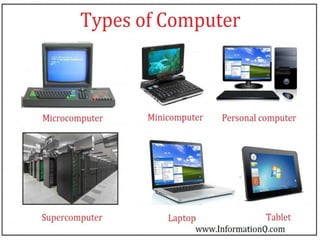
1. PERSONAL COMPUTER
2. MAINFRAME COMPUTER
3. MINICOMPUTER
4. SUPER COMPUTER
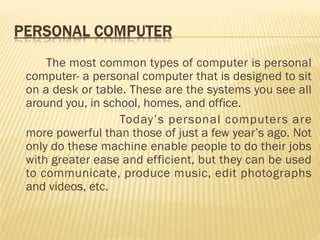
The most common types of computer is personal
computer- a personal computer that is designed to sit
on a desk or table. These are the systems you see all
around you, in school, homes, and office.
Today’s personal computers are
more powerful than those of just a few year’s ago. Not
only do these machine enable people to do their jobs
with greater ease and efficient, but they can be used
to communicate, produce music, edit photographs
and videos, etc.
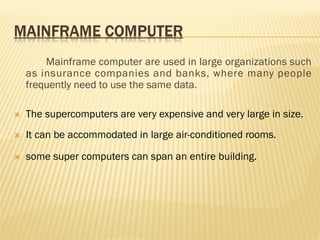
Mainframe computer are used in large organizations such
as insurance companies and banks, where many people
frequently need to use the same data.
 The supercomputers are very expensive and very large in size.
 It can be accommodated in large air-conditioned rooms.
 some super computers can span an entire building.
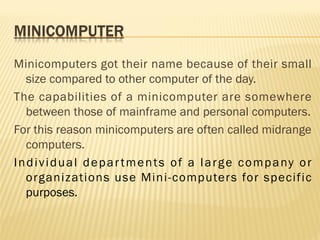
Minicomputers got their name because of their small
size compared to other computer of the day.
The capabilities of a minicomputer are somewhere
between those of mainframe and personal computers.
For this reason minicomputers are often called midrange
computers.
Individual departments of a large company or
organizations use Mini-computers for specific
purposes.
The most powerful computers in terms of
performance and data processing are the
Supercomputers. 
These systems can process huge amounts of
data, and the fastest supercomputers can
perform more than one trillion calculations per
second.
PARTS OF THE COMPUTER SYSTEM
A complete computer system consists of mainly four parts.
1. Hardware (The computer)
2. Software (Programs)
3. Data (Information)
4. User (People)
Hardware
The mechanical devices that make up the computer are called
Hardware. A computer’s hardware consists of interconnected
electronic devices that you can use to control the computer’s
operation, input, and output.
Software
Software is a set of instructions that makes the computer perform
tasks. In other words we can say that, software tells the
computer what to do. Here the program refers to any piece of
software
Data
Data consist of individual facts or pieces of information
that by themselves may not make much sense to a person. A
computer primary job is to process these tiny pieces of data
in various ways, converting them into useful information
Users
Peoples are the computer operators, also known as
users. One can argue that some computer systems are
complete without a person’s involvement; however no
computer is totally autonomous.
Even if a computer can do its job without a person
sitting in front of it, people still design, build, program, and
repair computer system
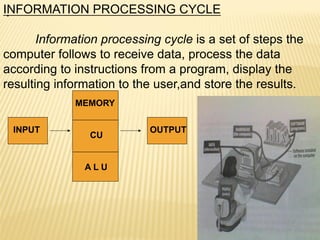
.INFORMATION PROCESSING CYCLE
Information processing cycle is a set of steps the
computer follows to receive data, process the data
according to instructions from a program, display the
resulting information to the user,and store the results.
INPUT
MEMORY
CU
A L U
OUTPUT
ESSENTIAL COMPUTER HARDWARE
A Computer’s hardware devices fall into one of four categories.
Processor: The procedure that transforms raw data into
useful information is called processing. The processor is like
the brain of computer system.
Memory devices:
Memory devices are of two types.
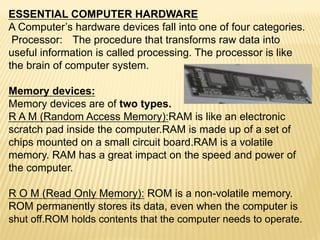
R A M (Random Access Memory):RAM is like an electronic
scratch pad inside the computer.RAM is made up of a set of
chips mounted on a small circuit board.RAM is a volatile
memory. RAM has a great impact on the speed and power of
the computer.
R O M (Read Only Memory): ROM is a non-volatile memory.
ROM permanently stores its data, even when the computer is
shut off.ROM holds contents that the computer needs to operate.
C U (control unit):
All the computer’s resources are managed from the control
unit. It act as a traffic signal directing the flow of data through the
CPU as well as to and from other devices. The CPU instructions
for carrying out commands are built into the control unit. The
control unit is the logical hub of the computer.
A L U (Arithmetic logic unit):
The work of the ALU is to perform arithmetic and logical
operations. Arithmetic operation include addition, subtraction,
multiplication ,and division. Logical operation include comparison,
such as determining whether one number is equal to, greater
than, or less than another
number.
 an input device is a peripheral (piece of computer
hardware equipment) used to provide data and
control signals to an information processing
system such as a computer or information
appliance.Examples of input devices include
keyboards, mouse, scanners, digital cameras and
joysticks.
 An output device is any piece of computer
hardware item used to communicate the results of
data processing carried out by an information
processing system 
INPUT AND OUTPUT DEVICES
Input devices:
The following are the types of input devices.
•KEYBOARD: The most common type of input device is keyboard
which accepts letters, numbers, and command from the users.
•MOUSE: This is another type of input device through which the
user give command to the computer.
•JOYSTICK: The joystick is a swiveling lever mounted on a stati-
onary base that is well suited for playing video games.
•SCANNER: A scanner ca copy a printed page of a text or graphic
into the computer’s memory, freeing you from creating the data
From scratch.
•DIGITAL CAMERA: A digital camera can record still iamges,
which you can view and edit on the computer.
• TOUCH SCREEN: Touch screen accept input by allowing the
user to place a fingertips directly on the computer screen.
Output devices:
The following are the type of output devices.
• MONITOR: The computer sends output to the monitor (the dis-
play screen) when the user needs only to see the output.
• SPEAKER: This is another type of output devices through
which we used to hear sound and music.
• PRINTER: Printer is most common output device in the
computer system.Through printer we used to print the inform-
ation on a piece of paper. The printer paper is also called hard
copy.
TYPES OF PRINTER:
Generally printers fall into two categories.
I. Impact printers:
An impact printer creates an image by using pins and hammers
to press an inked ribbon against the paper Ex:- typewriter.
II. Non-impact printer:
Non-impact printer use other means to create an image .Ex:Inkjet
Printer use tiny nozzles to spray to spray droplets of ink onto the
page.
•DOT MATRIX PRINTER:
These printer can produce sheet of plain text very quickly.These
printer are commonly used in workplace where physical impact
with the paper is important. The speed of dot matrix printer is
Measured in character per second (CPS).
Other types of impact printer is line printers, band printers.
•INK JET PRINTERS:
Ink jet printers create an image directly on the paper by spreading
Ink through tiny nozzles. These model typically attain print resol-
ution of at least 300 dots per inch and can print two to four page
Per minute. In this type of printer routine replacement of ink
cartridge is necessary.
•LASER PRINTERS:
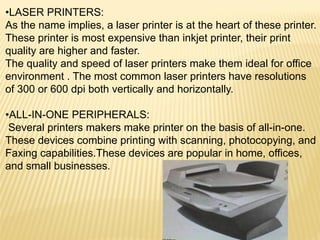
As the name implies, a laser printer is at the heart of these printer.
These printer is most expensive than inkjet printer, their print
quality are higher and faster.
The quality and speed of laser printers make them ideal for office
environment . The most common laser printers have resolutions
of 300 or 600 dpi both vertically and horizontally.
•ALL-IN-ONE PERIPHERALS:
Several printers makers make printer on the basis of all-in-one.
These devices combine printing with scanning, photocopying, and
Faxing capabilities.These devices are popular in home, offices,
and small businesses.
USING OPERATING SYSTEM:
The OS is an example of system software- software that controls
the system’s hardware and that interacts with the user and
application software. In short OS is the computer’s master control
program. The OS provides you with the tool that enables you to
Interact with the PC.
Types of operating system:
Operating system can be organized into four types.
1. Real-time operating system
2. Single-user/single-tasking operating system
3. Single-user/multitasking operating system
4. Multi-user/multitasking operating system
1. Real-time operating system
A real time operating system is a very fast, relatively small OS.
They are build into the circuitry of a device and are not loaded from
a disk drive. A real time OS is needed to run real time application
Real time application are needed to run medical diagnostics
equipment, life support system, machinery, scientific instruments,
and industrial systems.
2. Single-user/single-tasking operating system:
An operating system that allows a single user to perform just one
task at a time is a single-user/single-tasking operating system.OS
can only manage a single task at a time.
MS-DOS is one example of a single tasking OS.
3. Single-user/multitasking operating system:
A Single-user/multitasking operating system is one that allows a
Single user to perform two or more functions at once. The multi-
tasking features of these OSs have greatly increased the
productivity of people in the large variety of jobs because they
can accomplish in less time.
The disadvantages of Single-user/multitasking operating system is
the increased size, complexity to support multitasking.
4. Multi-user/multitasking operating system:
A Multi-user/multitasking operating system is an operating system
that allows multiple users to use programs that are simultaneously
running on a single network server. In a Multi-user/multitasking
operating system environment, all or most of the computing
occurs at the server. The advantage of these operating system is
that they can be managed by simply making changes to one
server rather than to many desktop computer.
A disadvantages is that if the network connection to the server is
Broken, the user can not do any work in the application of server.
Ex- UNIX, VMS, and mainframe operating system such as MVS.
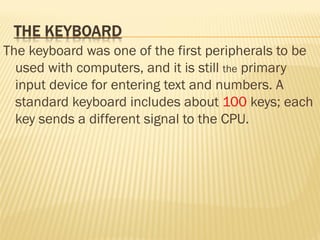
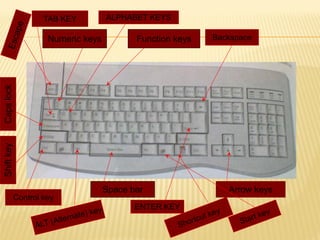
The keyboard was one of the first peripherals to be
used with computers, and it is still the primary
input device for entering text and numbers. A
standard keyboard includes about 100 keys; each
key sends a different signal to the CPU.
Numeric keys Function keys
Space bar Arrow keys
ShiftkeyCapslockEscape
Control key
ENTER KEY
TAB KEY
ALT (Alternate) key
Backspace
ALPHABET KEYS
Shortcut key
Start key
A personal computer that was purchased in the
early 1980s probably included a keyboard as
the only input device. It is a pointing device. A
mouse is an input device that you can move
around on a flat surface and control the pointer.
The pointer is an on-screen object, usually an
arrow, that is use to select text, access menus,
and interact with programs, files, or data that
appear on the screen.
CATEGORISED STORAGE DEVICES
The purpose of a storage device is hold data-even when
the computer is turned off-so the data can be used
whenever it is needed. Storage involves two processes:
>> writing, or recording, the data so it can be found later
for use.
>> Reading the stored data, then transferring it into the
computer’s memory.
The physical material on which data is
stored are called storage media.
The hardware components that write data to, and read
data from, storage media are called storage devices. For
example: a diskette.
MAGNETIC STORAGE DEVICE
Magnetic storage device are use the same medium
(the material on which the data is stored),
diskette derives, hard disk drives, high-capacity
floppy disk drives, and tape drives use similar
techniques for writing and reading data. The
surfaces of diskettes, hard disks, high- capacity
floppy disks, and magnetic tape are coated with
a magnetically sensitive material, such as iron
oxide, that reacts to a magnetic field.
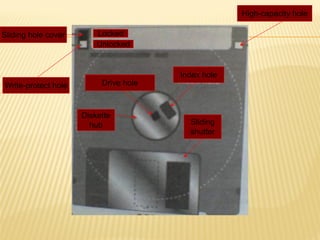
Drive hole
Index hole
Diskette
hub Sliding
shutter
Locked
Unlocked
Sliding hole cover
Write-protect hole
High-capacity hole
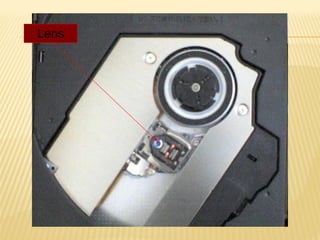
The most popular alternatives to magnetic
storage systems are optical systems are optical
systems, including CD-ROM, DVD-ROM, and
their variants. These devices fall into the
category of optical storage because they store
data on a reflective surface so it can be read by
a beam of laser light. A laser uses a
concentrated, narrow beam of light, focused
and directed with lenses, prisms, and mirrors.
Lens
The familiar audio compact disk is a popular medium
for storing music. In the computer world, however,
the medium is called COMPACT DISK-READ-ONLY
MEMORY (CD-ROM).CD-ROM uses the same
technology used to produce music CD. If your
computer has a CD-ROM drive, sound card, and
speakers, you can play audio cd’s on your PC.A CD-
ROM drive reads digital data (whether computer
data or audio) from a spinning disk by focusing a
laser on the disk’s surface. Data is storage in the
form of lands, which are flat areas on the metal
surface, and pits, which are depressions or hollows.
A standard compact disk can store 650 MB of data
or about 70 minutes of audio.
Many of today’s new PCs feature a built-in
DIGITAL VIDEO DISK-read-only memory (DVD-
ROM) drive rather than a standard CD-ROM
drive. DVD-ROM is a high- density medium
capable of storing a full-length movie on a
single disk the size of a CD.
The quality of the images that a monitor can
display is defined as much by the video card (also
called video controller) as by the monitor itself. The
video controller is an intermediary device between the
CPU and the monitor. It contains the video –dedicated
memory and other circuitry necessary to send
information to the monitor for display on the screen.
Microphones are now important input devices,
and speakers and their associated
technologies are key output system. Sounds
systems are especially useful to people who
use their computer to create or use multimedia
products, watch videos or listen to music, or
participate in online activities such as
videoconferences or distance learning.
The most complicated part of a computer’s sound
system is the sound card. A computer’s sound card is
a circuit board that converts sounds from analog to
digital form, and vice versa, for recording or playback.
A sounds card actually has both input and output
functions. If you want to use your computer’s
microphone to record your voice, for instance, you
connect the microphone to the sounds card’s input
jack.
THANK YOU...

Introduction to computer

  • 1.
    BASICS OF THE COMPUTERSYSTEM Presented By, Ms.M.Jancypriya, Asst. Prof., Dept. of CA, Bon Secours College for Women, Thanjavur.
  • 2.
    Definition. A computer is an electronicmachine which helps in solving problems quickly and easily. It solves problems according to instructions given to it by the computer user called programs or software. It is a digital machine(that uses binary digits) used in all fields.
  • 3.
    1. PERSONAL COMPUTER 2.MAINFRAME COMPUTER 3. MINICOMPUTER 4. SUPER COMPUTER
  • 5.
    The most commontypes of computer is personal computer- a personal computer that is designed to sit on a desk or table. These are the systems you see all around you, in school, homes, and office. Today’s personal computers are more powerful than those of just a few year’s ago. Not only do these machine enable people to do their jobs with greater ease and efficient, but they can be used to communicate, produce music, edit photographs and videos, etc.
  • 6.
    Mainframe computer areused in large organizations such as insurance companies and banks, where many people frequently need to use the same data.  The supercomputers are very expensive and very large in size.  It can be accommodated in large air-conditioned rooms.  some super computers can span an entire building.
  • 7.
    Minicomputers got theirname because of their small size compared to other computer of the day. The capabilities of a minicomputer are somewhere between those of mainframe and personal computers. For this reason minicomputers are often called midrange computers. Individual departments of a large company or organizations use Mini-computers for specific purposes.
  • 8.
    The most powerfulcomputers in terms of performance and data processing are the Supercomputers.  These systems can process huge amounts of data, and the fastest supercomputers can perform more than one trillion calculations per second.
  • 9.
    PARTS OF THECOMPUTER SYSTEM A complete computer system consists of mainly four parts. 1. Hardware (The computer) 2. Software (Programs) 3. Data (Information) 4. User (People) Hardware The mechanical devices that make up the computer are called Hardware. A computer’s hardware consists of interconnected electronic devices that you can use to control the computer’s operation, input, and output. Software Software is a set of instructions that makes the computer perform tasks. In other words we can say that, software tells the computer what to do. Here the program refers to any piece of software
  • 10.
    Data Data consist ofindividual facts or pieces of information that by themselves may not make much sense to a person. A computer primary job is to process these tiny pieces of data in various ways, converting them into useful information Users Peoples are the computer operators, also known as users. One can argue that some computer systems are complete without a person’s involvement; however no computer is totally autonomous. Even if a computer can do its job without a person sitting in front of it, people still design, build, program, and repair computer system
  • 11.
    .INFORMATION PROCESSING CYCLE Informationprocessing cycle is a set of steps the computer follows to receive data, process the data according to instructions from a program, display the resulting information to the user,and store the results. INPUT MEMORY CU A L U OUTPUT
  • 12.
    ESSENTIAL COMPUTER HARDWARE AComputer’s hardware devices fall into one of four categories. Processor: The procedure that transforms raw data into useful information is called processing. The processor is like the brain of computer system. Memory devices: Memory devices are of two types. R A M (Random Access Memory):RAM is like an electronic scratch pad inside the computer.RAM is made up of a set of chips mounted on a small circuit board.RAM is a volatile memory. RAM has a great impact on the speed and power of the computer. R O M (Read Only Memory): ROM is a non-volatile memory. ROM permanently stores its data, even when the computer is shut off.ROM holds contents that the computer needs to operate.
  • 13.
    C U (controlunit): All the computer’s resources are managed from the control unit. It act as a traffic signal directing the flow of data through the CPU as well as to and from other devices. The CPU instructions for carrying out commands are built into the control unit. The control unit is the logical hub of the computer. A L U (Arithmetic logic unit): The work of the ALU is to perform arithmetic and logical operations. Arithmetic operation include addition, subtraction, multiplication ,and division. Logical operation include comparison, such as determining whether one number is equal to, greater than, or less than another number.
  • 14.
     an input device isa peripheral (piece of computer hardware equipment) used to provide data and control signals to an information processing system such as a computer or information appliance.Examples of input devices include keyboards, mouse, scanners, digital cameras and joysticks.  An output device is any piece of computer hardware item used to communicate the results of data processing carried out by an information processing system 
  • 15.
    INPUT AND OUTPUTDEVICES Input devices: The following are the types of input devices. •KEYBOARD: The most common type of input device is keyboard which accepts letters, numbers, and command from the users. •MOUSE: This is another type of input device through which the user give command to the computer. •JOYSTICK: The joystick is a swiveling lever mounted on a stati- onary base that is well suited for playing video games. •SCANNER: A scanner ca copy a printed page of a text or graphic into the computer’s memory, freeing you from creating the data From scratch. •DIGITAL CAMERA: A digital camera can record still iamges, which you can view and edit on the computer. • TOUCH SCREEN: Touch screen accept input by allowing the user to place a fingertips directly on the computer screen.
  • 16.
    Output devices: The followingare the type of output devices. • MONITOR: The computer sends output to the monitor (the dis- play screen) when the user needs only to see the output. • SPEAKER: This is another type of output devices through which we used to hear sound and music. • PRINTER: Printer is most common output device in the computer system.Through printer we used to print the inform- ation on a piece of paper. The printer paper is also called hard copy. TYPES OF PRINTER: Generally printers fall into two categories. I. Impact printers: An impact printer creates an image by using pins and hammers to press an inked ribbon against the paper Ex:- typewriter.
  • 17.
    II. Non-impact printer: Non-impactprinter use other means to create an image .Ex:Inkjet Printer use tiny nozzles to spray to spray droplets of ink onto the page. •DOT MATRIX PRINTER: These printer can produce sheet of plain text very quickly.These printer are commonly used in workplace where physical impact with the paper is important. The speed of dot matrix printer is Measured in character per second (CPS). Other types of impact printer is line printers, band printers. •INK JET PRINTERS: Ink jet printers create an image directly on the paper by spreading Ink through tiny nozzles. These model typically attain print resol- ution of at least 300 dots per inch and can print two to four page Per minute. In this type of printer routine replacement of ink cartridge is necessary.
  • 18.
    •LASER PRINTERS: As thename implies, a laser printer is at the heart of these printer. These printer is most expensive than inkjet printer, their print quality are higher and faster. The quality and speed of laser printers make them ideal for office environment . The most common laser printers have resolutions of 300 or 600 dpi both vertically and horizontally. •ALL-IN-ONE PERIPHERALS: Several printers makers make printer on the basis of all-in-one. These devices combine printing with scanning, photocopying, and Faxing capabilities.These devices are popular in home, offices, and small businesses.
  • 19.
    USING OPERATING SYSTEM: TheOS is an example of system software- software that controls the system’s hardware and that interacts with the user and application software. In short OS is the computer’s master control program. The OS provides you with the tool that enables you to Interact with the PC. Types of operating system: Operating system can be organized into four types. 1. Real-time operating system 2. Single-user/single-tasking operating system 3. Single-user/multitasking operating system 4. Multi-user/multitasking operating system 1. Real-time operating system A real time operating system is a very fast, relatively small OS. They are build into the circuitry of a device and are not loaded from a disk drive. A real time OS is needed to run real time application
  • 20.
    Real time applicationare needed to run medical diagnostics equipment, life support system, machinery, scientific instruments, and industrial systems. 2. Single-user/single-tasking operating system: An operating system that allows a single user to perform just one task at a time is a single-user/single-tasking operating system.OS can only manage a single task at a time. MS-DOS is one example of a single tasking OS. 3. Single-user/multitasking operating system: A Single-user/multitasking operating system is one that allows a Single user to perform two or more functions at once. The multi- tasking features of these OSs have greatly increased the productivity of people in the large variety of jobs because they can accomplish in less time. The disadvantages of Single-user/multitasking operating system is the increased size, complexity to support multitasking.
  • 21.
    4. Multi-user/multitasking operatingsystem: A Multi-user/multitasking operating system is an operating system that allows multiple users to use programs that are simultaneously running on a single network server. In a Multi-user/multitasking operating system environment, all or most of the computing occurs at the server. The advantage of these operating system is that they can be managed by simply making changes to one server rather than to many desktop computer. A disadvantages is that if the network connection to the server is Broken, the user can not do any work in the application of server. Ex- UNIX, VMS, and mainframe operating system such as MVS.
  • 22.
    The keyboard wasone of the first peripherals to be used with computers, and it is still the primary input device for entering text and numbers. A standard keyboard includes about 100 keys; each key sends a different signal to the CPU.
  • 23.
    Numeric keys Functionkeys Space bar Arrow keys ShiftkeyCapslockEscape Control key ENTER KEY TAB KEY ALT (Alternate) key Backspace ALPHABET KEYS Shortcut key Start key
  • 24.
    A personal computerthat was purchased in the early 1980s probably included a keyboard as the only input device. It is a pointing device. A mouse is an input device that you can move around on a flat surface and control the pointer. The pointer is an on-screen object, usually an arrow, that is use to select text, access menus, and interact with programs, files, or data that appear on the screen.
  • 25.
    CATEGORISED STORAGE DEVICES Thepurpose of a storage device is hold data-even when the computer is turned off-so the data can be used whenever it is needed. Storage involves two processes: >> writing, or recording, the data so it can be found later for use. >> Reading the stored data, then transferring it into the computer’s memory. The physical material on which data is stored are called storage media. The hardware components that write data to, and read data from, storage media are called storage devices. For example: a diskette.
  • 26.
    MAGNETIC STORAGE DEVICE Magneticstorage device are use the same medium (the material on which the data is stored), diskette derives, hard disk drives, high-capacity floppy disk drives, and tape drives use similar techniques for writing and reading data. The surfaces of diskettes, hard disks, high- capacity floppy disks, and magnetic tape are coated with a magnetically sensitive material, such as iron oxide, that reacts to a magnetic field.
  • 27.
    Drive hole Index hole Diskette hubSliding shutter Locked Unlocked Sliding hole cover Write-protect hole High-capacity hole
  • 28.
    The most popularalternatives to magnetic storage systems are optical systems are optical systems, including CD-ROM, DVD-ROM, and their variants. These devices fall into the category of optical storage because they store data on a reflective surface so it can be read by a beam of laser light. A laser uses a concentrated, narrow beam of light, focused and directed with lenses, prisms, and mirrors.
  • 29.
  • 30.
    The familiar audiocompact disk is a popular medium for storing music. In the computer world, however, the medium is called COMPACT DISK-READ-ONLY MEMORY (CD-ROM).CD-ROM uses the same technology used to produce music CD. If your computer has a CD-ROM drive, sound card, and speakers, you can play audio cd’s on your PC.A CD- ROM drive reads digital data (whether computer data or audio) from a spinning disk by focusing a laser on the disk’s surface. Data is storage in the form of lands, which are flat areas on the metal surface, and pits, which are depressions or hollows. A standard compact disk can store 650 MB of data or about 70 minutes of audio.
  • 31.
    Many of today’snew PCs feature a built-in DIGITAL VIDEO DISK-read-only memory (DVD- ROM) drive rather than a standard CD-ROM drive. DVD-ROM is a high- density medium capable of storing a full-length movie on a single disk the size of a CD.
  • 32.
    The quality ofthe images that a monitor can display is defined as much by the video card (also called video controller) as by the monitor itself. The video controller is an intermediary device between the CPU and the monitor. It contains the video –dedicated memory and other circuitry necessary to send information to the monitor for display on the screen.
  • 33.
    Microphones are nowimportant input devices, and speakers and their associated technologies are key output system. Sounds systems are especially useful to people who use their computer to create or use multimedia products, watch videos or listen to music, or participate in online activities such as videoconferences or distance learning.
  • 34.
    The most complicatedpart of a computer’s sound system is the sound card. A computer’s sound card is a circuit board that converts sounds from analog to digital form, and vice versa, for recording or playback. A sounds card actually has both input and output functions. If you want to use your computer’s microphone to record your voice, for instance, you connect the microphone to the sounds card’s input jack.
  • 35.