
INTRODUCTION
to
Computer Software
and
Computer Network
By: Prof. Ganesh Ingle
Module 1 objective
Introduction
Computer Software
Types of Software
Software Development Steps
Internet Evolution
Basic Internet Terminology
Computer Network
A set of instructions or programs instructing a computer to do
specific tasks. Software is a generic term used to describe
computer programs.
Scripts, applications, programs and a set of instructions are all
terms often used to describe software.
1.1 Computer Software
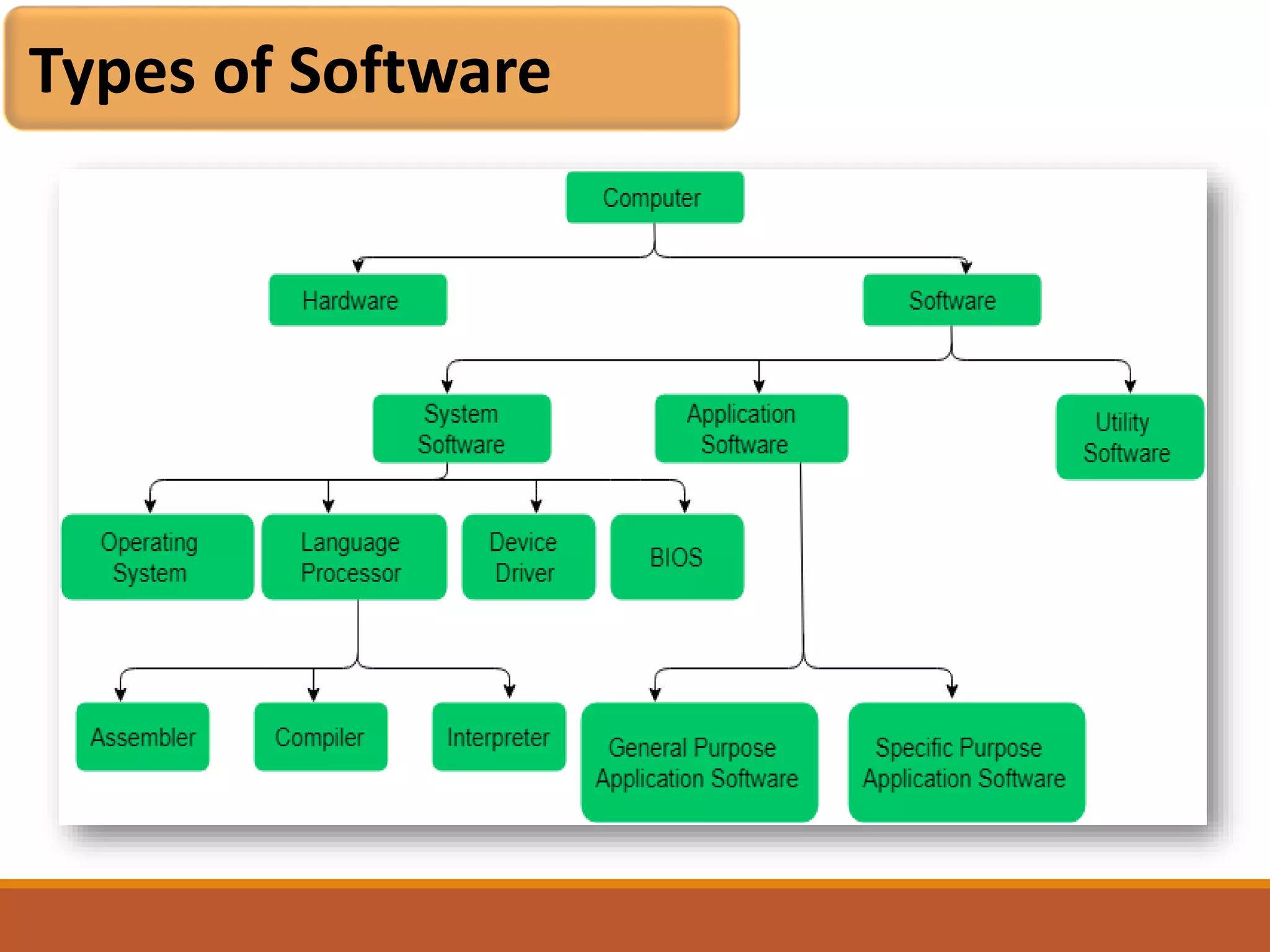
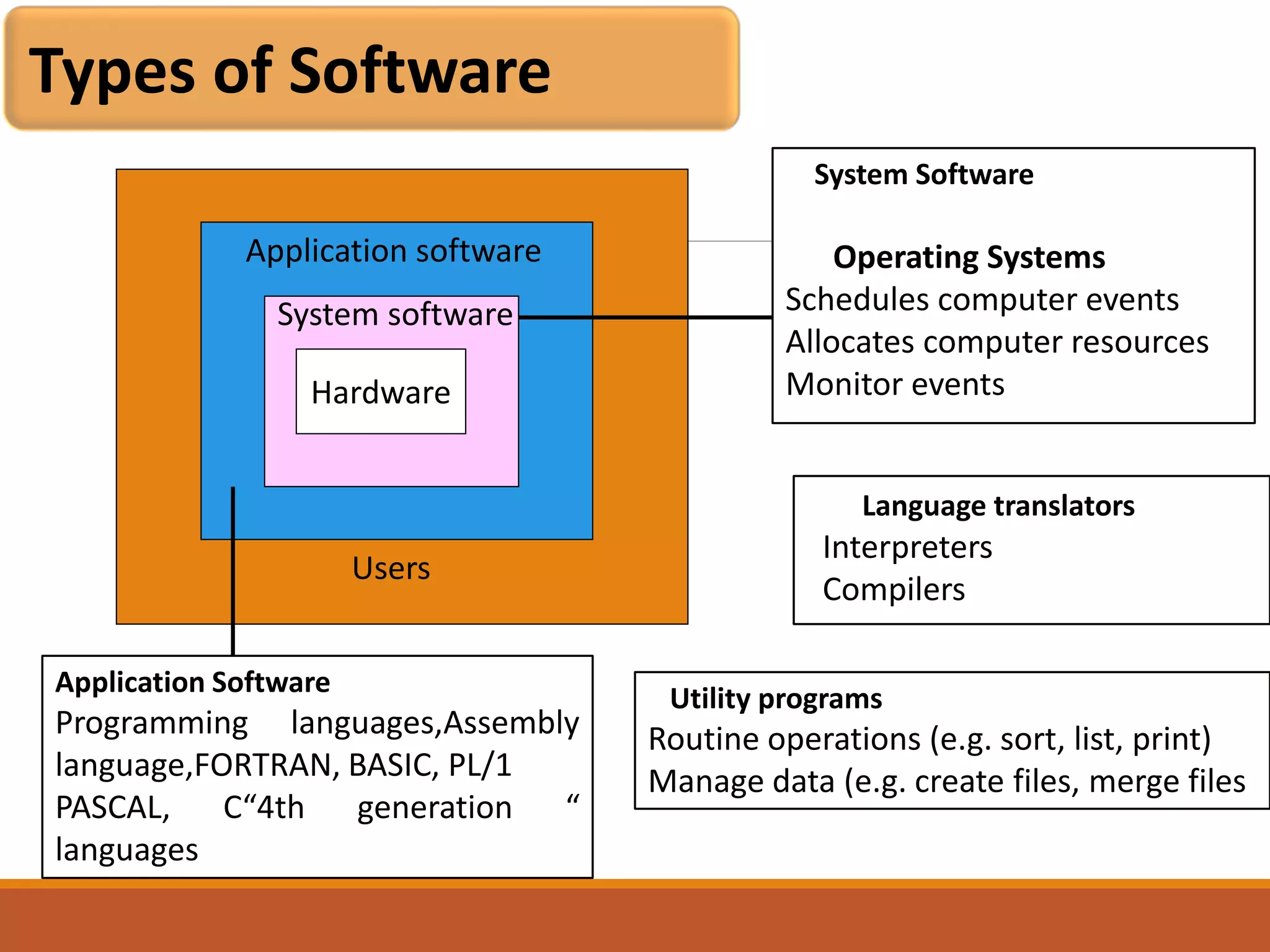
Types of Software
Application software
Hardware
System software
System Software
Operating Systems
Schedules computer events
Allocates computer resources
Monitor events
Application Software
Programming languages,Assembly
language,FORTRAN, BASIC, PL/1
PASCAL, C“4th generation “
languages
Users
Language translators
Interpreters
Compilers
Utility programs
Routine operations (e.g. sort, list, print)
Manage data (e.g. create files, merge files
Types of Software
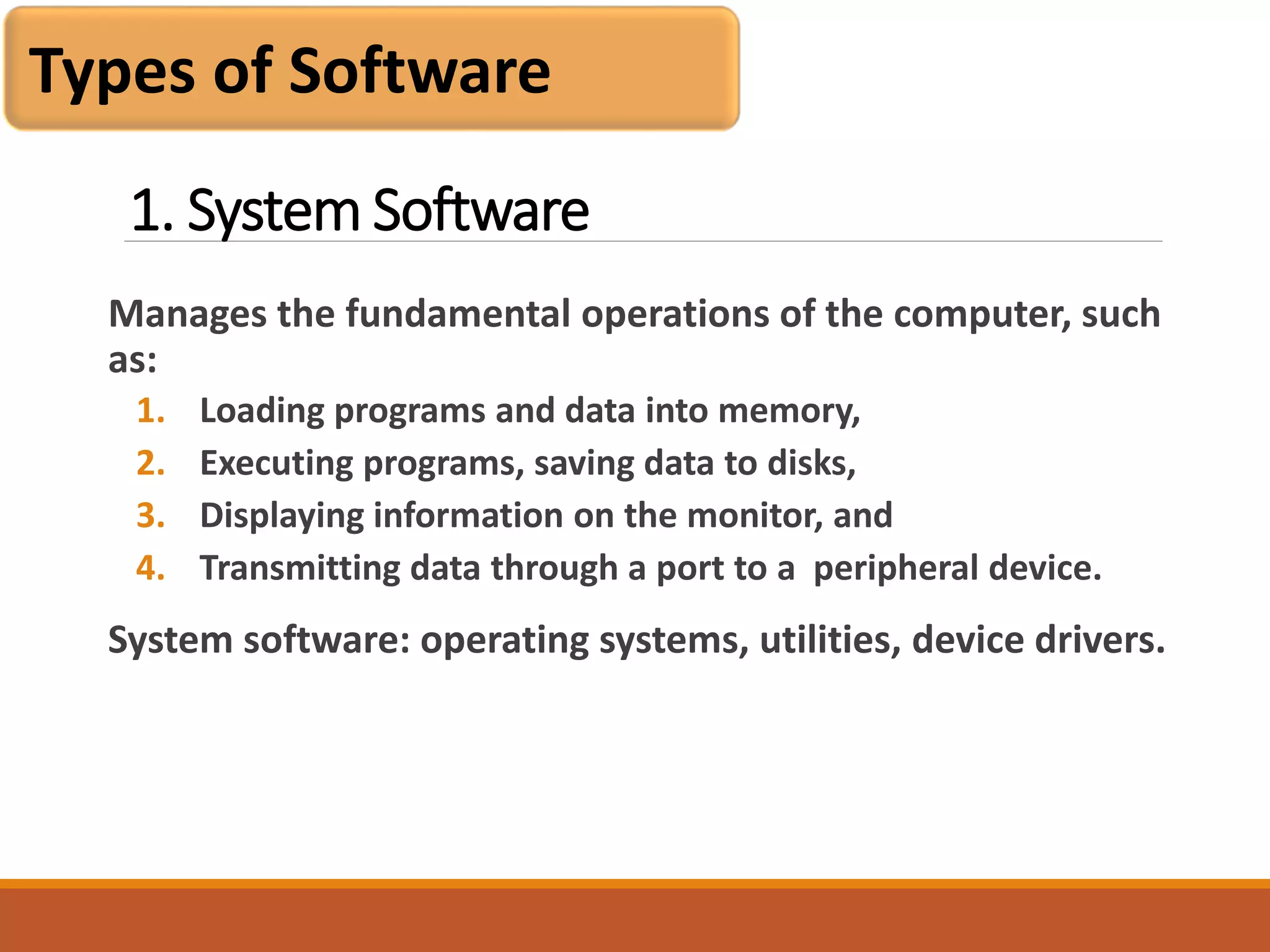
1. System Software
Manages the fundamental operations of the computer, such
as:
1. Loading programs and data into memory,
2. Executing programs, saving data to disks,
3. Displaying information on the monitor, and
4. Transmitting data through a port to a peripheral device.
System software: operating systems, utilities, device drivers.
Types of Software
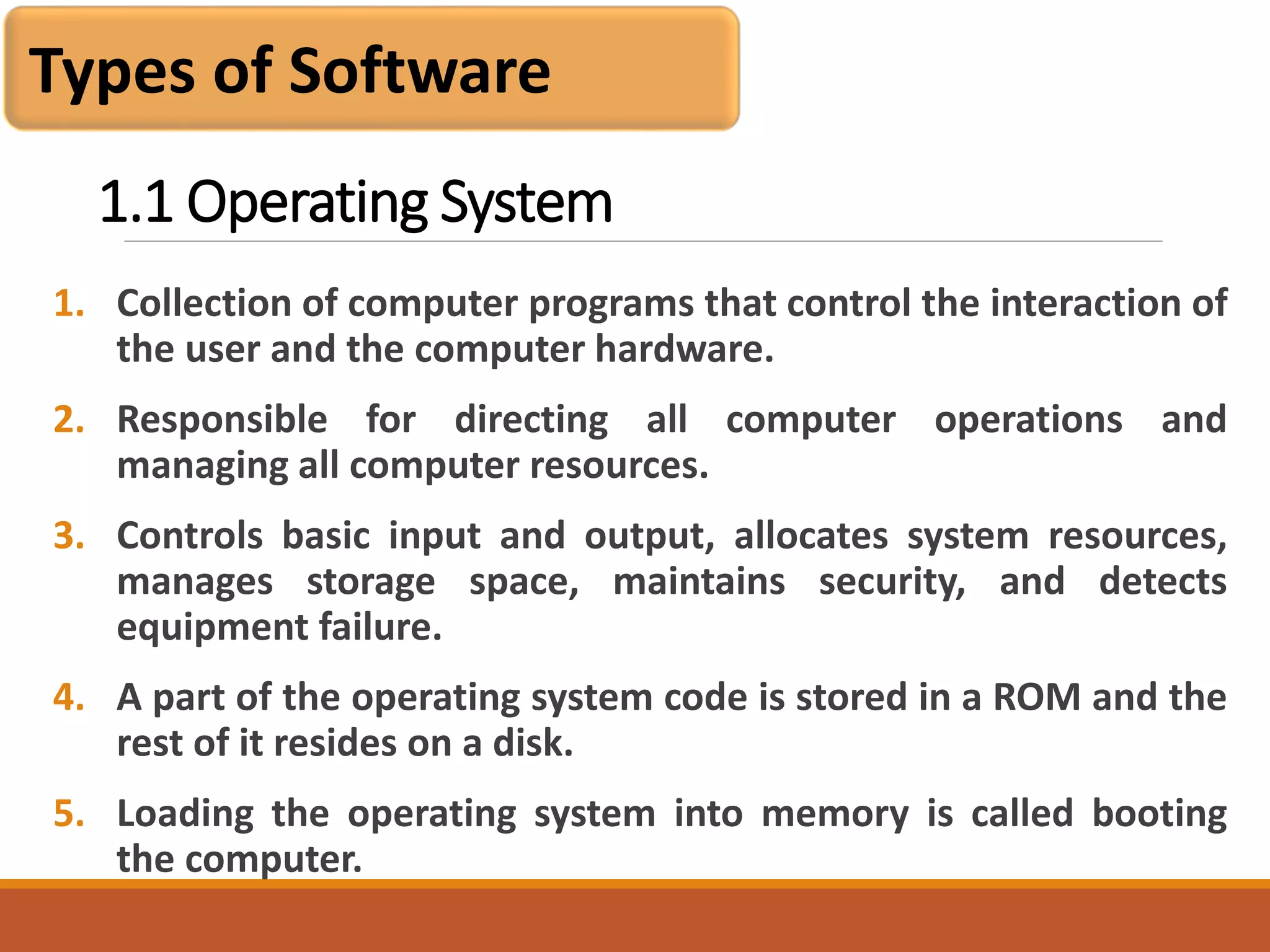
1.1 Operating System
1. Collection of computer programs that control the interaction of
the user and the computer hardware.
2. Responsible for directing all computer operations and
managing all computer resources.
3. Controls basic input and output, allocates system resources,
manages storage space, maintains security, and detects
equipment failure.
4. A part of the operating system code is stored in a ROM and the
rest of it resides on a disk.
5. Loading the operating system into memory is called booting
the computer.
Types of Software
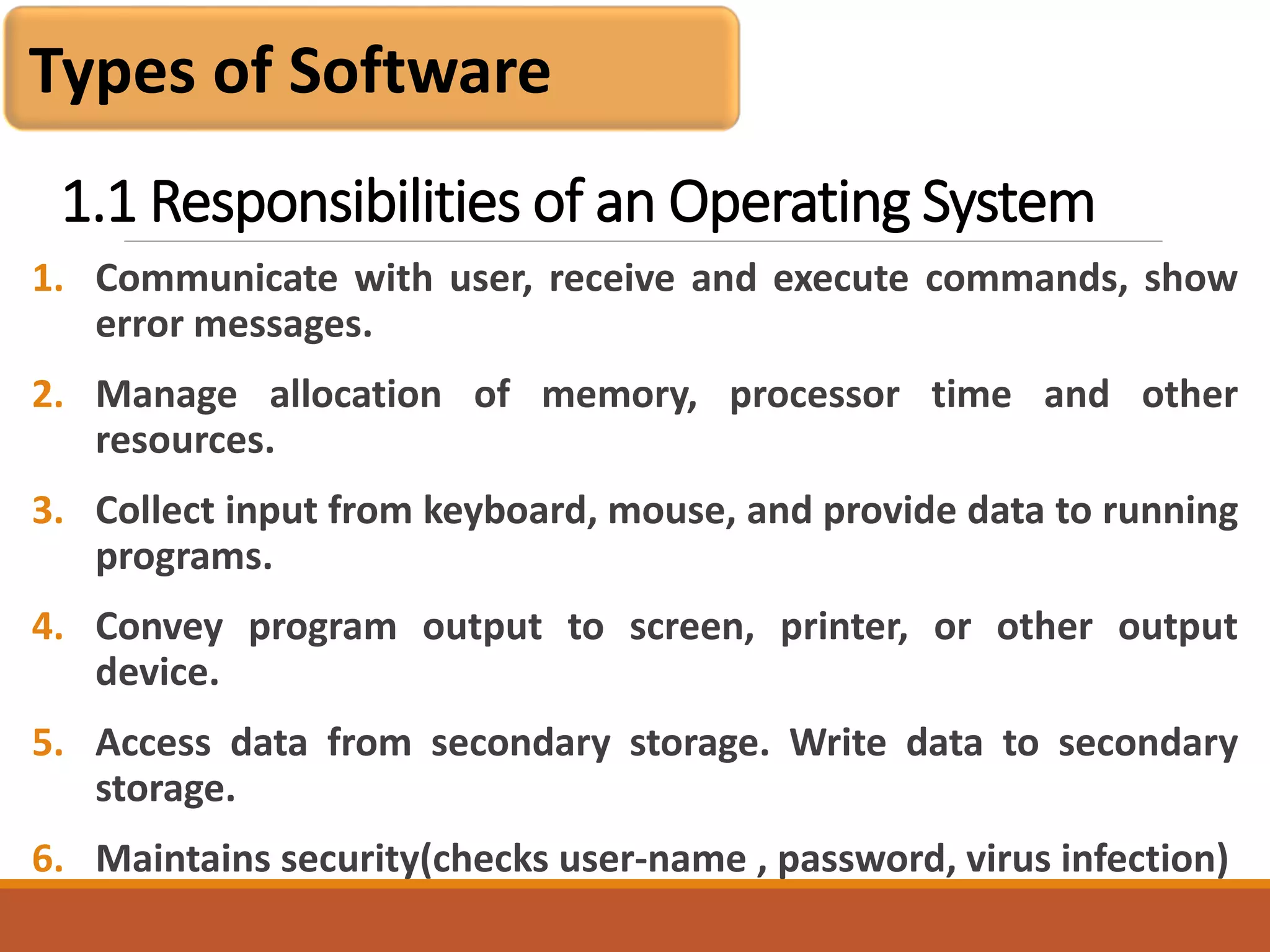
1.1 Responsibilities of an Operating System
1. Communicate with user, receive and execute commands, show
error messages.
2. Manage allocation of memory, processor time and other
resources.
3. Collect input from keyboard, mouse, and provide data to running
programs.
4. Convey program output to screen, printer, or other output
device.
5. Access data from secondary storage. Write data to secondary
storage.
6. Maintains security(checks user-name , password, virus infection)
Types of Software
1.2 Device driver
1. A computer program that can establish communication
because it contains information about the characteristics
of your computer and of the device.
2. Each peripheral device requires a device driver.
3. Helps the computer communicate with that particular
device.
4. When we add a device to an existing computer, part of its
installation includes adding its device driver to the
configuration.
Types of Software
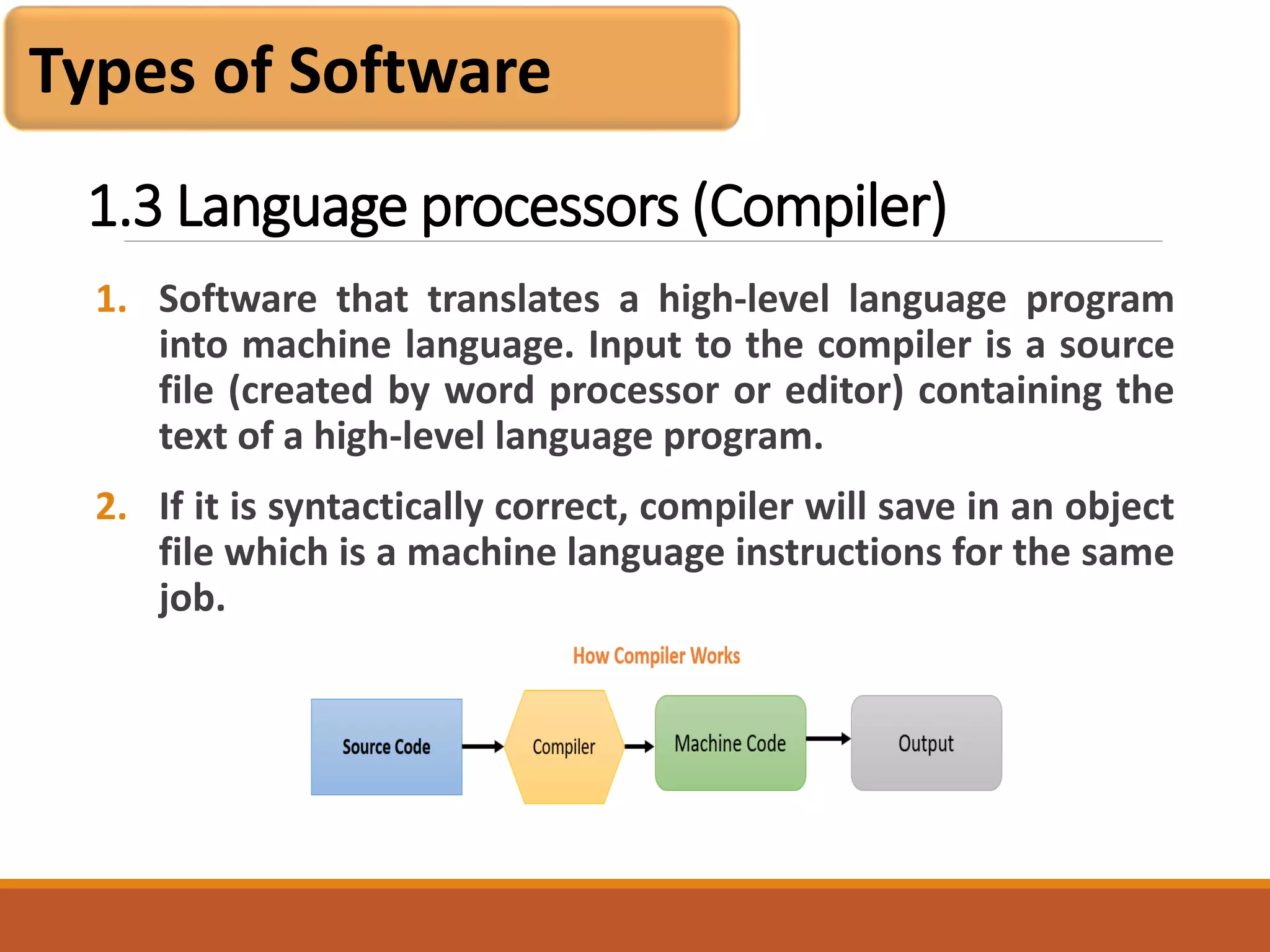
1.3 Language processors (Compiler)
1. Software that translates a high-level language program
into machine language. Input to the compiler is a source
file (created by word processor or editor) containing the
text of a high-level language program.
2. If it is syntactically correct, compiler will save in an object
file which is a machine language instructions for the same
job.
Types of Software
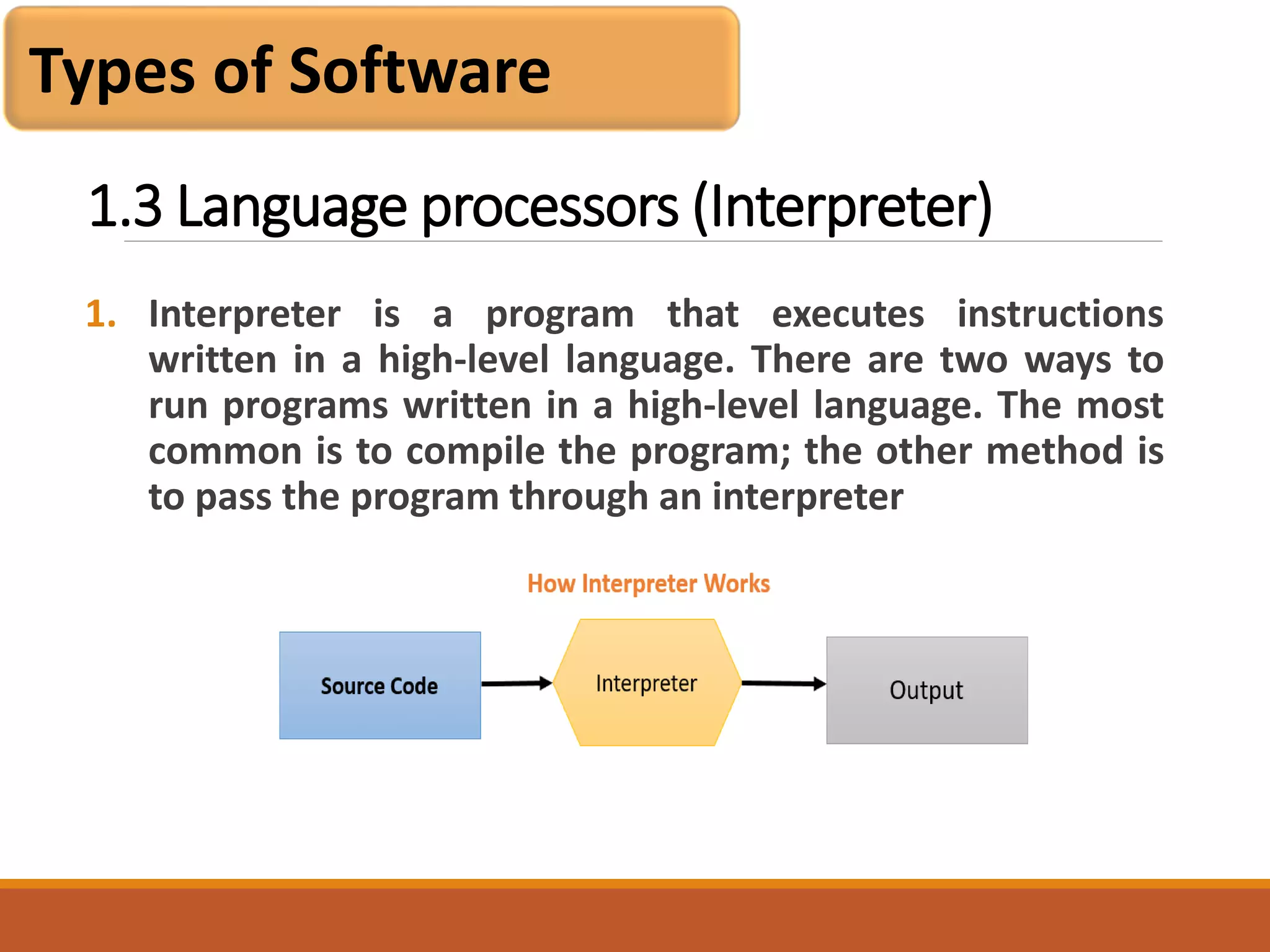
1.3 Language processors (Interpreter)
1. Interpreter is a program that executes instructions
written in a high-level language. There are two ways to
run programs written in a high-level language. The most
common is to compile the program; the other method is
to pass the program through an interpreter
Types of Software
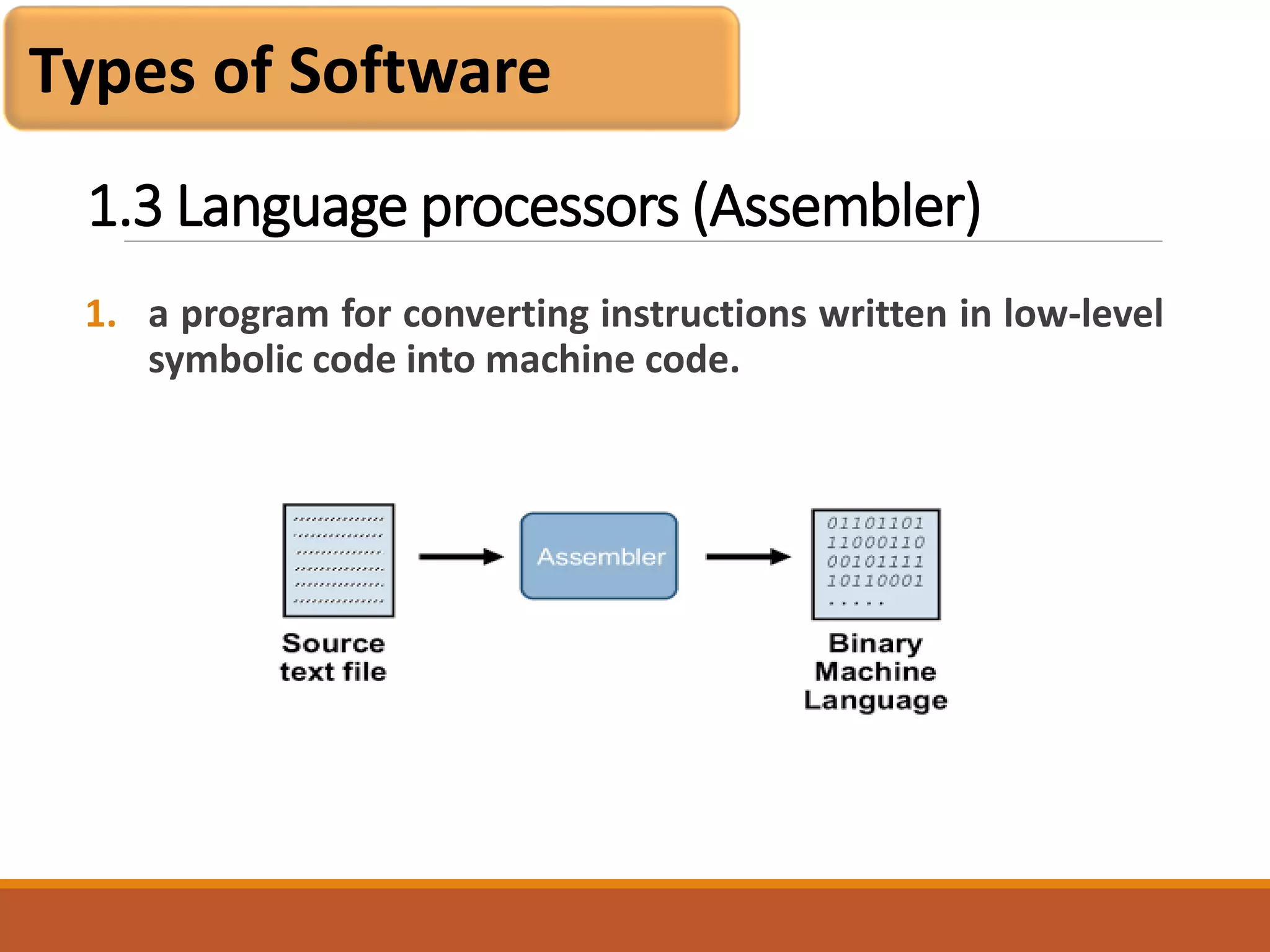
1.3 Language processors (Assembler)
1. a program for converting instructions written in low-level
symbolic code into machine code.
Types of Software
1.4 BIOS
The BIOS is a program pre-installed on Windows-based
computers (not on Macs) that the computer uses to start
up. The CPU accesses the BIOS even before the operating
system is loaded. The BIOS then checks all your hardware
connections and locates all your devices. If everything is
OK, the BIOS loads the operating system into the
computer's memory and finishes the boot-up process.
Types of Software
1.5 Application software
1. Developed for a specific task , such as word processing(
MS Word/ WordPerfect), accounting (Lotus 1-2-3/ Excel),
or database management (Access/ dBASE).
2. We also use graphics and presentation software.
3. Most applications are purchased on diskette or CD-ROM.
4. They are installed by copying the programs from the
diskettes/CD-ROM to the hard disk.
Types of Software
1.6 Utility Software
1. Utility software is software designed to help to analyze, configure,
optimize or maintain a computer. It is used to support the
computer infrastructure
2. System Utilities: Software applications like anti-virus, memory
testers, package managers, network utilities, and registry cleaners
are included in system utility software.
3. File management utilities: Archivers, backup software, data
compression utilities and file managers fall in the category of file
management utilities.
4. Storage device management utilities: All the disk related software
utilities fall into this type of utility. They can be disk checkers, disk
partition editors, disk formatters, disk space analyzers and so on.
Types of Software
Software Development Steps
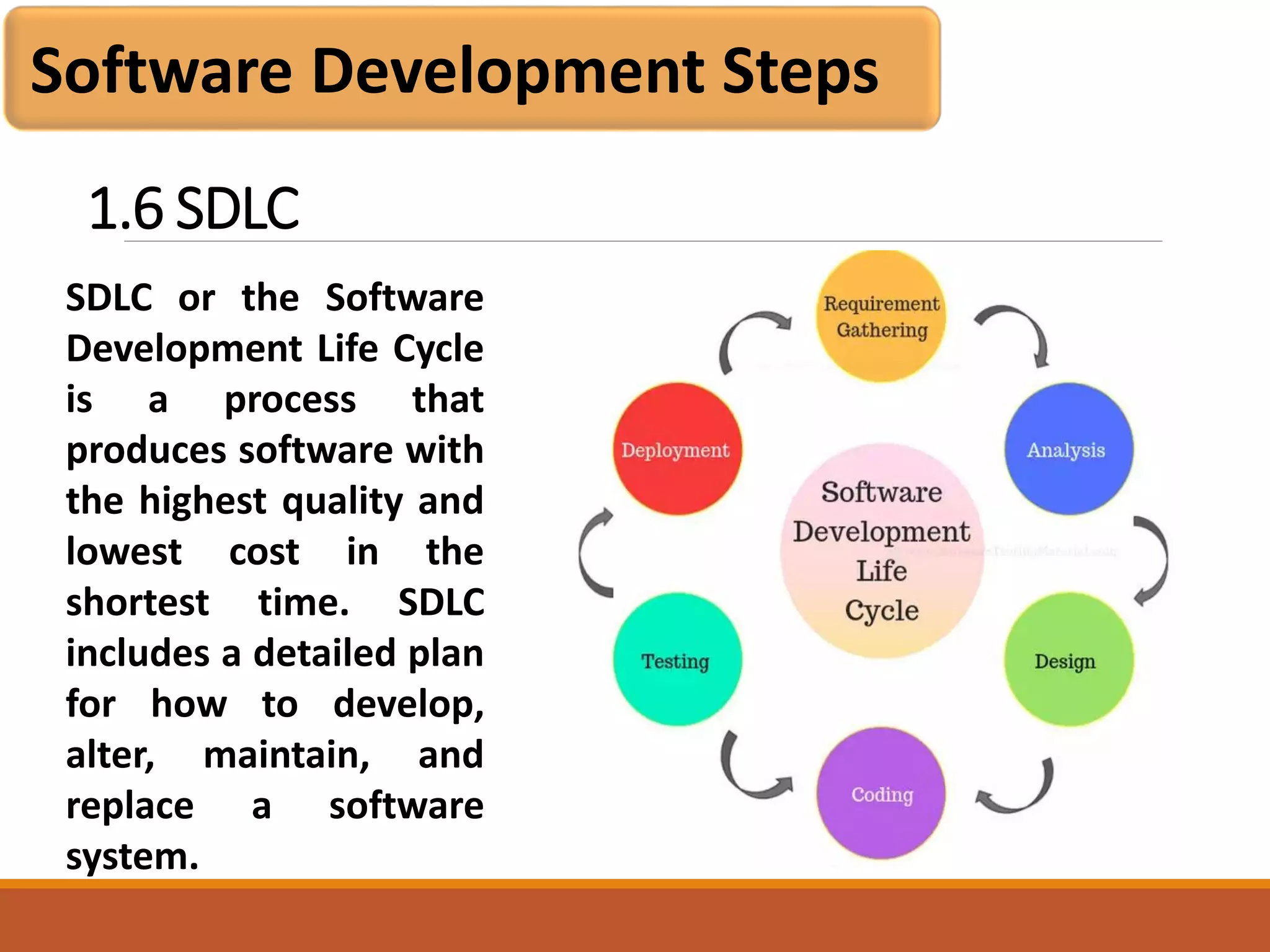
SDLC or the Software
Development Life Cycle
is a process that
produces software with
the highest quality and
lowest cost in the
shortest time. SDLC
includes a detailed plan
for how to develop,
alter, maintain, and
replace a software
system.
1.6 SDLC
Software Development Steps
Requirement Phase:
Business Analyst collects the requirement from the
Customer/Client as per the clients business needs and documents
the requirements in the Business Requirement Specification
(document name varies depends upon the Organization.
Analysis Phase:
This is done through the SRS (Software Requirement
Specification) document. SRS consists of all the product
requirements to be designed and developed during the project
life cycle. The outcome of this phase is the Software Requirement
Specification.
1.6 SDLC
Software Development Steps
Design Phase:
It has two steps:
HLD – High-Level Design – It gives the architecture of the software
product to be developed and is done by architects and senior
developers
LLD – Low-Level Design – It is done by senior developers. It
describes how each and every feature in the product should work
and how every component should work. Here, only the design
will be there and not the code
1.6 SDLC
Software Development Steps
Development Phase:
This is the phase where which start building the software and
start writing the code for the product. The outcome from this
phase is Source Code Document (SCD) and the developed
product.
Testing Phase:
Test team tests it thoroughly for different defects using manual
and automated testing with black box and white box approach.
They either test the software manually or using automated
testing tools depends on the process defined in STLC (Software
Testing Life Cycle) and ensure that each and every component of
the software works fine.
1.6 SDLC
Software Development Steps
Deployment & Maintenance Phase:
After successful testing, the product is delivered/deployed to the
customer for their use. Deployment is done by the
Deployment/Implementation engineers. Once when the
customers start using the developed system then the actual
problems will come up and needs to be solved from time to time.
Fixing the issues found by the customer comes in the
maintenance phase. 100% testing is not possible – because, the
way testers test the product is different from the way customers
use the product.
1.6 SDLC
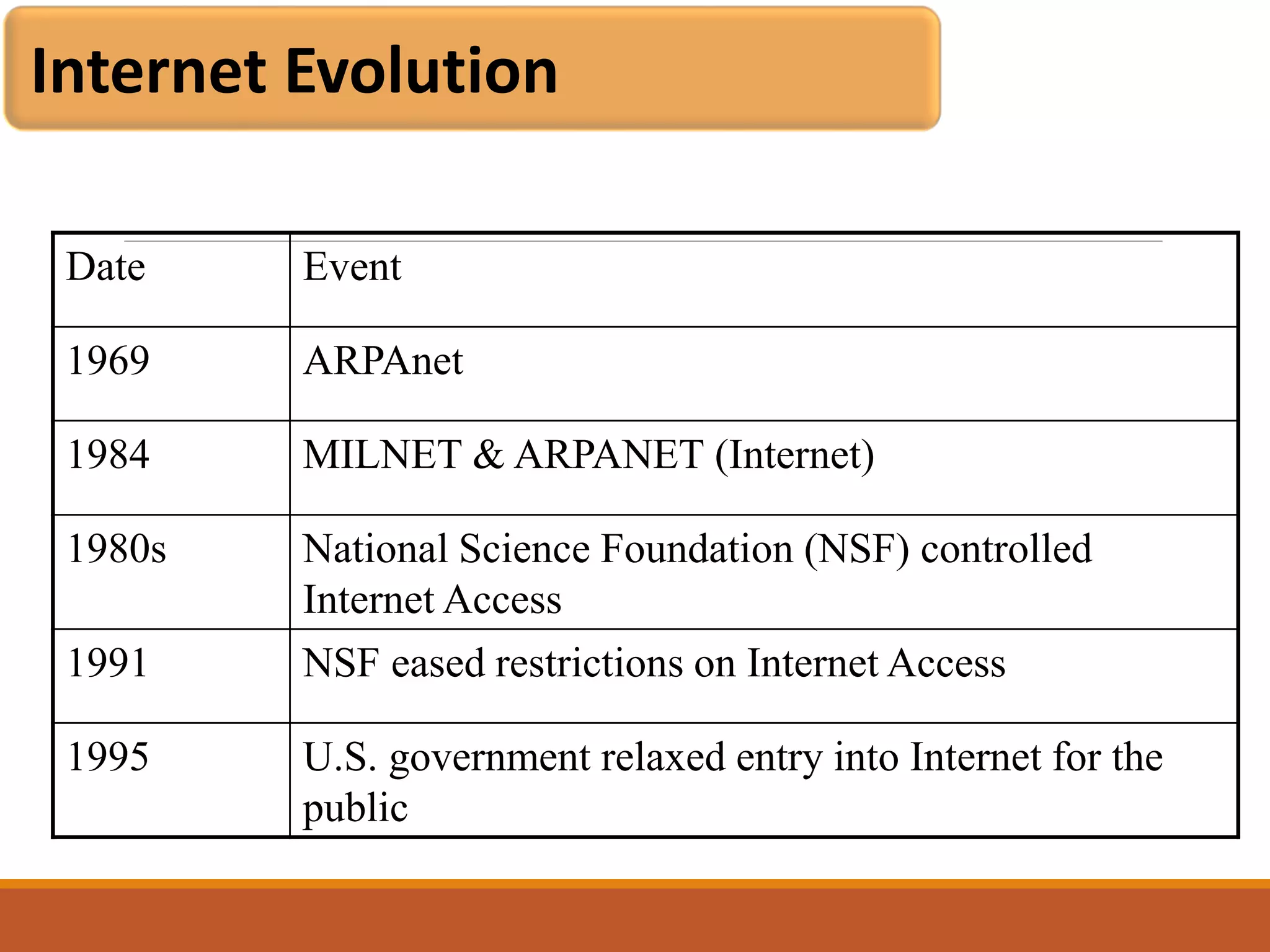
Internet Evolution
Date Event
1969 ARPAnet
1984 MILNET & ARPANET (Internet)
1980s National Science Foundation (NSF) controlled
Internet Access
1991 NSF eased restrictions on Internet Access
1995 U.S. government relaxed entry into Internet for the
public
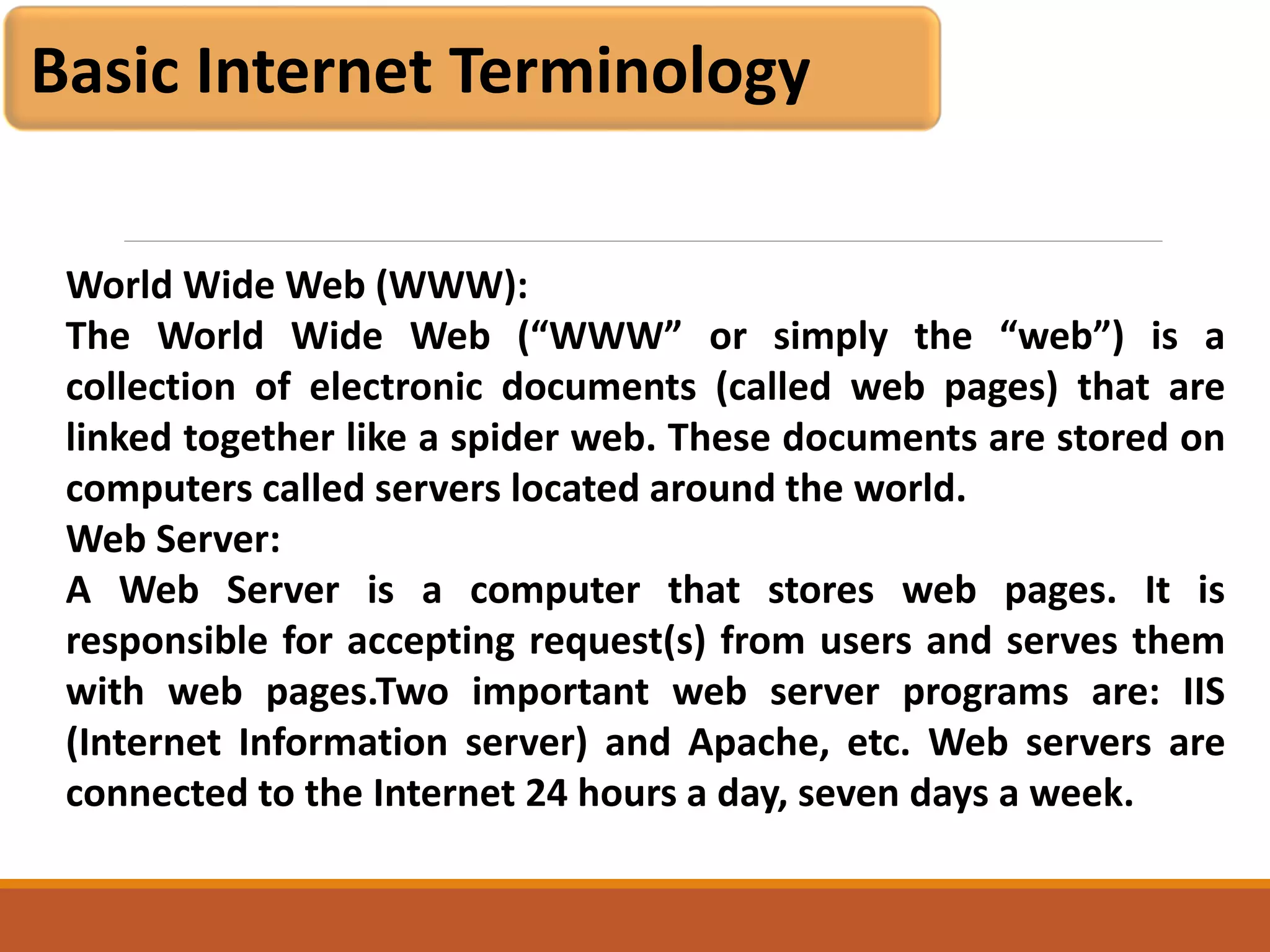
Basic Internet Terminology
World Wide Web (WWW):
The World Wide Web (“WWW” or simply the “web”) is a
collection of electronic documents (called web pages) that are
linked together like a spider web. These documents are stored on
computers called servers located around the world.
Web Server:
A Web Server is a computer that stores web pages. It is
responsible for accepting request(s) from users and serves them
with web pages.Two important web server programs are: IIS
(Internet Information server) and Apache, etc. Web servers are
connected to the Internet 24 hours a day, seven days a week.
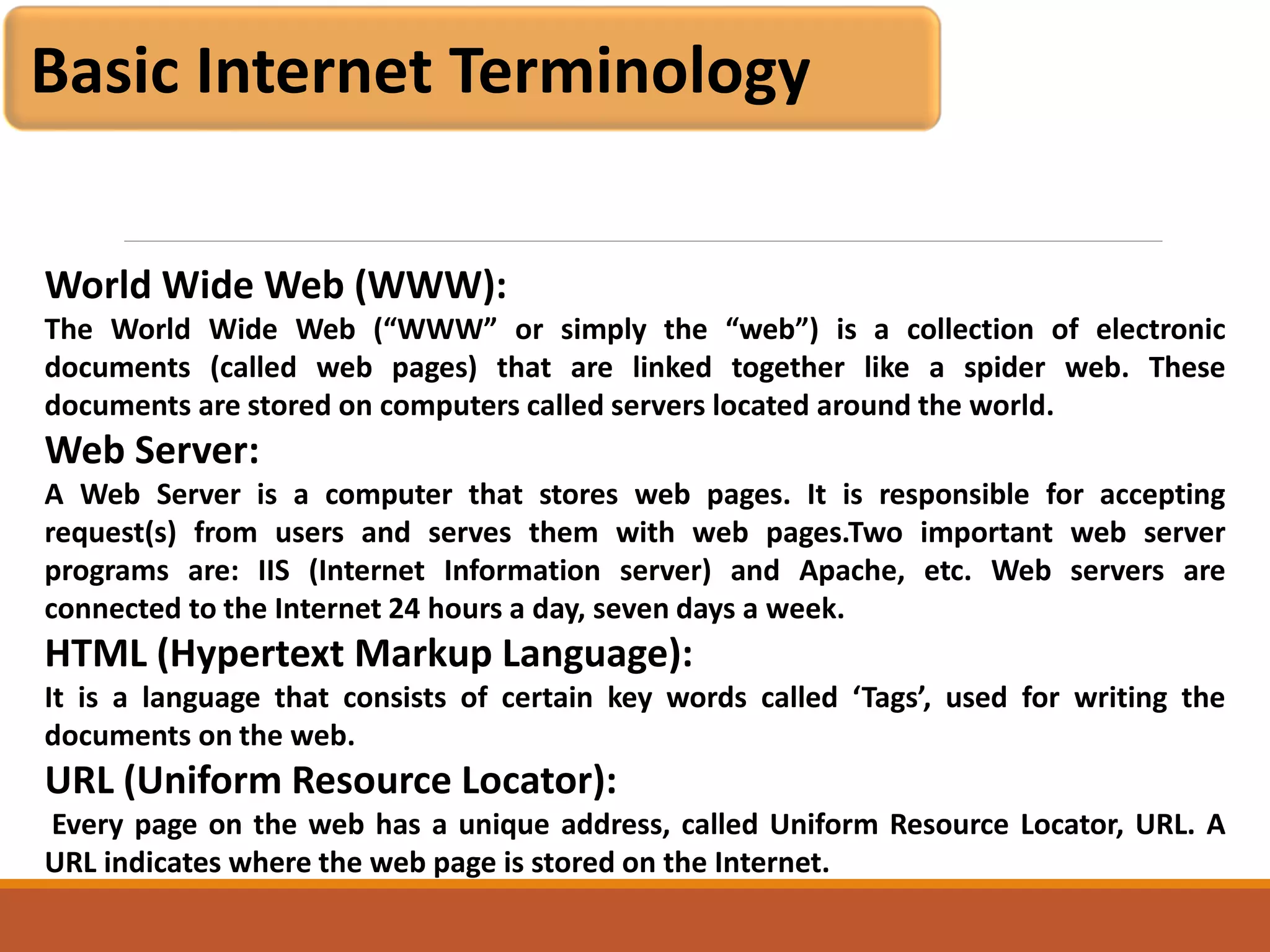
Basic Internet Terminology
World Wide Web (WWW):
The World Wide Web (“WWW” or simply the “web”) is a collection of electronic
documents (called web pages) that are linked together like a spider web. These
documents are stored on computers called servers located around the world.
Web Server:
A Web Server is a computer that stores web pages. It is responsible for accepting
request(s) from users and serves them with web pages.Two important web server
programs are: IIS (Internet Information server) and Apache, etc. Web servers are
connected to the Internet 24 hours a day, seven days a week.
HTML (Hypertext Markup Language):
It is a language that consists of certain key words called ‘Tags’, used for writing the
documents on the web.
URL (Uniform Resource Locator):
Every page on the web has a unique address, called Uniform Resource Locator, URL. A
URL indicates where the web page is stored on the Internet.
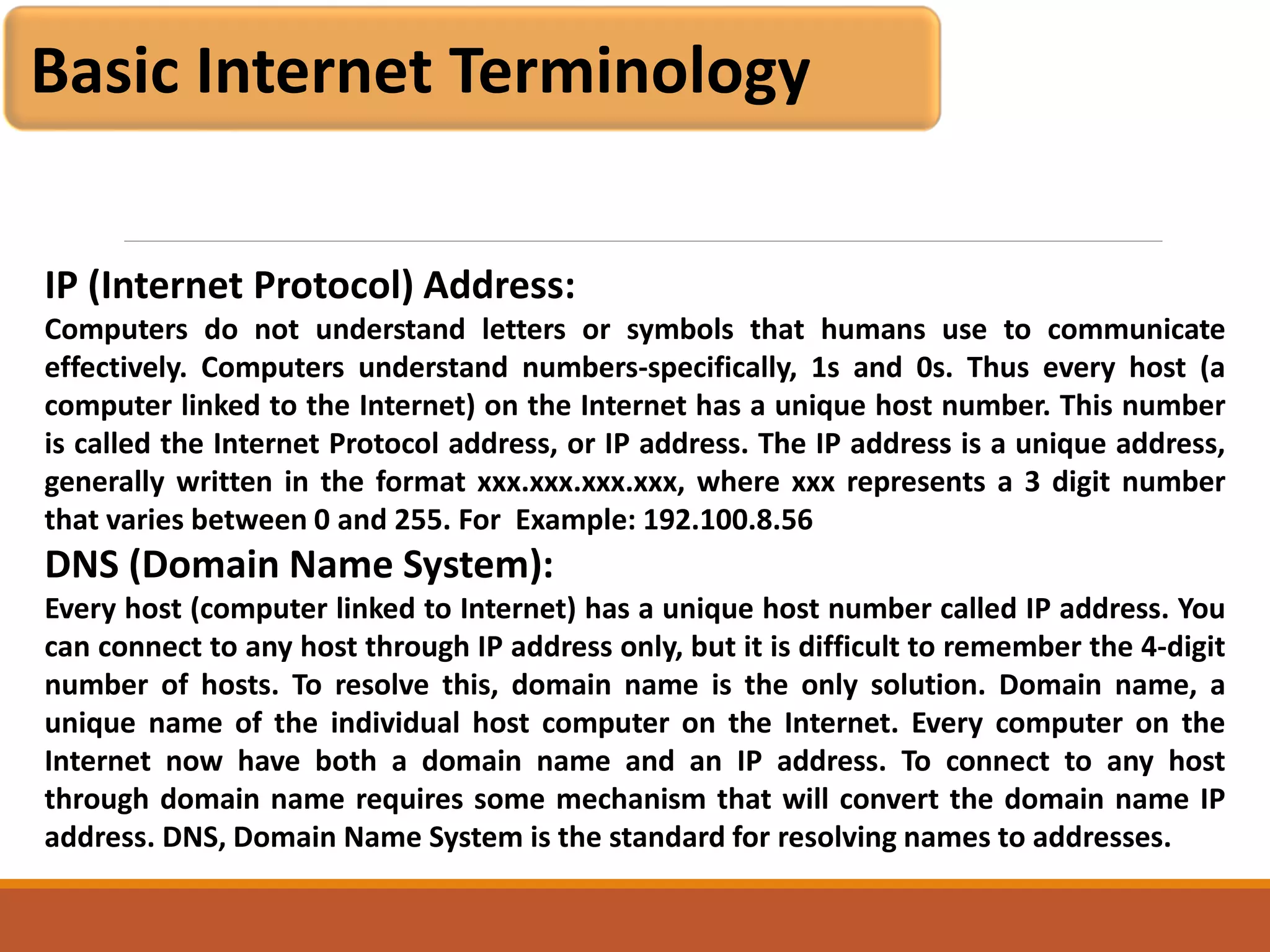
Basic Internet Terminology
IP (Internet Protocol) Address:
Computers do not understand letters or symbols that humans use to communicate
effectively. Computers understand numbers-specifically, 1s and 0s. Thus every host (a
computer linked to the Internet) on the Internet has a unique host number. This number
is called the Internet Protocol address, or IP address. The IP address is a unique address,
generally written in the format xxx.xxx.xxx.xxx, where xxx represents a 3 digit number
that varies between 0 and 255. For Example: 192.100.8.56
DNS (Domain Name System):
Every host (computer linked to Internet) has a unique host number called IP address. You
can connect to any host through IP address only, but it is difficult to remember the 4-digit
number of hosts. To resolve this, domain name is the only solution. Domain name, a
unique name of the individual host computer on the Internet. Every computer on the
Internet now have both a domain name and an IP address. To connect to any host
through domain name requires some mechanism that will convert the domain name IP
address. DNS, Domain Name System is the standard for resolving names to addresses.
Basic Internet Terminology
HTTP :
The hypertext transfer protocol (http) that enables html documents to be read on the
Internet. Hypertext - Text that is non-sequential, produced by writing in HTML (Hypertext
Markup Language) language. This HTML coding allows the information (text, graphics,
sound, video) to be accessed using HTTP (Hypertext Transfer Protocol).
Modem :
A device that connects your computer to the Internet, when you are not connected via a
LAN (local area network, such as at work or on a campus.) Most people connect to a
modem when using a home computer. The modem translates computer signals to analog
signals which are sent via phone lines.
Search Engine :
Specialized software, such as AltaVista and Yahoo, that lets WWW browser users search
for information on the Web by using keywords, phrases, and Boolean logic. Different
search engines have different ways of categorizing and indexing information.
Basic Internet Terminology
Virus:
A computer program usually hidden in an existing program. Once the existing program is
executed, the virus program is activated and can attach itself to other programs or files.
Viruses can range from benign activities such as attaching a harmless message to
performing malicious activities such as destroying all the data on a computer hard drive.
Viruses are commonly distributed as e-mail attachments which activate when the
attachment is opened. Virus protection software, updated regularly with the latest virus
definitions, can help protect computers from viruses.
Web Bot:
A term that applies to programs/applets (macros and intelligent agents) used on the
Internet. Such bots perform a repetitive function, such as posting messages to multiple
newsgroups or doing searches for information.
Basic Internet Terminology
Wide World Web (WWW):
A hypermedia information storage system which links computer-based resources around
the world. Computer programs called Browsers enable words or icons called hyperlinks to
display, text, video, graphics and sound on a computer screen. The source of the material
is at a different location - a different file in the same directory, a file in another computer,
which can be located anywhere in the world.
XML (Extensible Markup Language):
is a less robust variety of SGML, a system for organizing and tagging elements of a
document so that the document can be transmitted and interpreted between
applications and organizations. Human readable XML tags defines "what it is," and HTML
defines "how it looks." XML allows designers to create their own tags.
Basic Internet Terminology
PHP - (Hypertext Preprocessor):
Open source, server-side HTML scripting languaage used to create dynamic Web pages.
PHP is embedded within tags, so the author authorr can move between HTML and PHP
instead of using large amounts of code. Because PHP is executed on the server, the
viewer cannot see the code. PHP can perform the same tasks as a CGI program can do
and is compatible with many different kinds of databases.
Bandwidth:
The capacity of an electronic line, such as a communications network or computer
channel, to transmit bits per second (bps).
FTP :
Using file transfer protocol software to receive from upload) or send to (download) files
(text, pictures, spreadsheets, etc.) from one computer/server to another.
Basic Internet Terminology
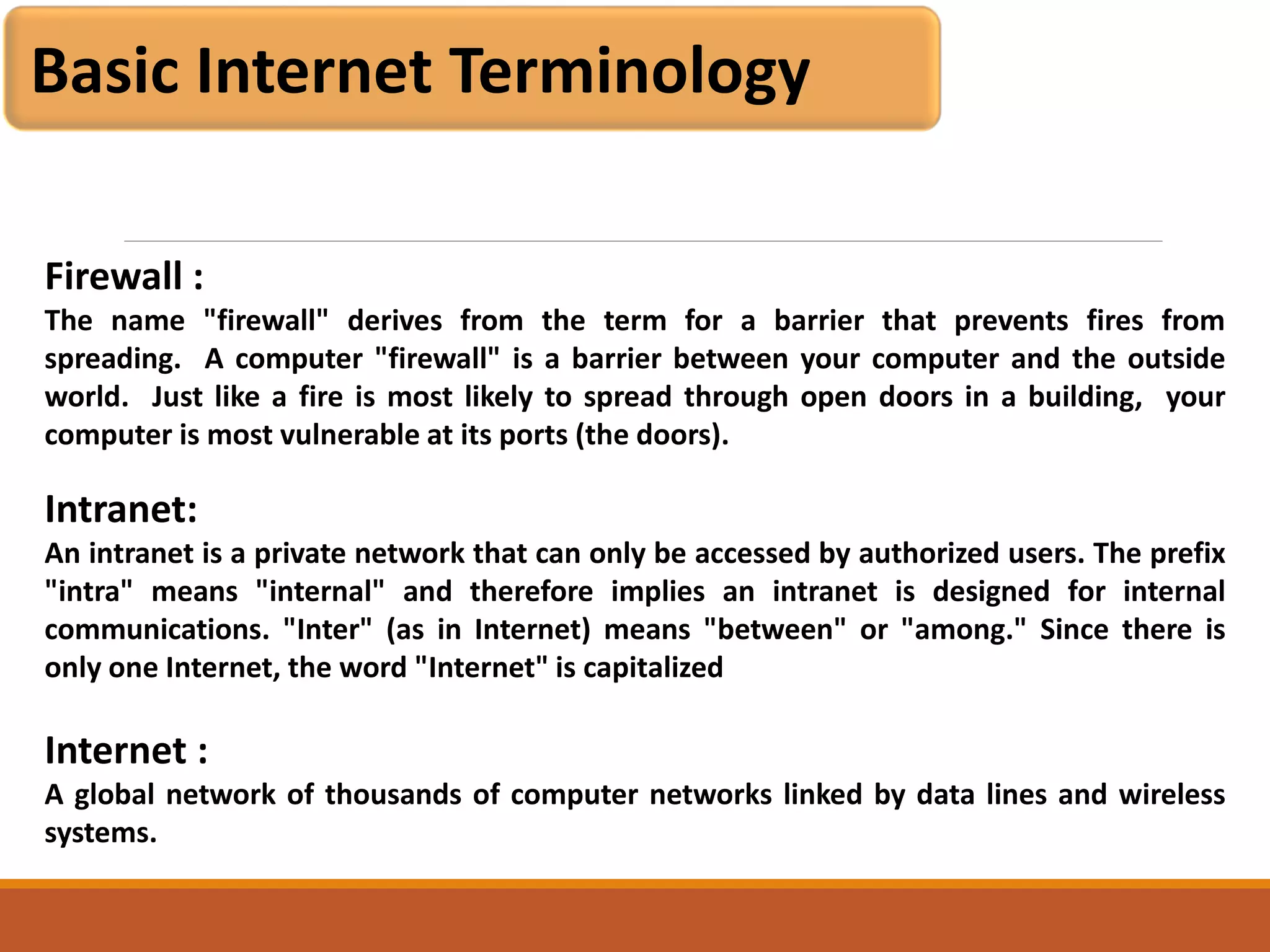
Firewall :
The name "firewall" derives from the term for a barrier that prevents fires from
spreading. A computer "firewall" is a barrier between your computer and the outside
world. Just like a fire is most likely to spread through open doors in a building, your
computer is most vulnerable at its ports (the doors).
Intranet:
An intranet is a private network that can only be accessed by authorized users. The prefix
"intra" means "internal" and therefore implies an intranet is designed for internal
communications. "Inter" (as in Internet) means "between" or "among." Since there is
only one Internet, the word "Internet" is capitalized
Internet :
A global network of thousands of computer networks linked by data lines and wireless
systems.
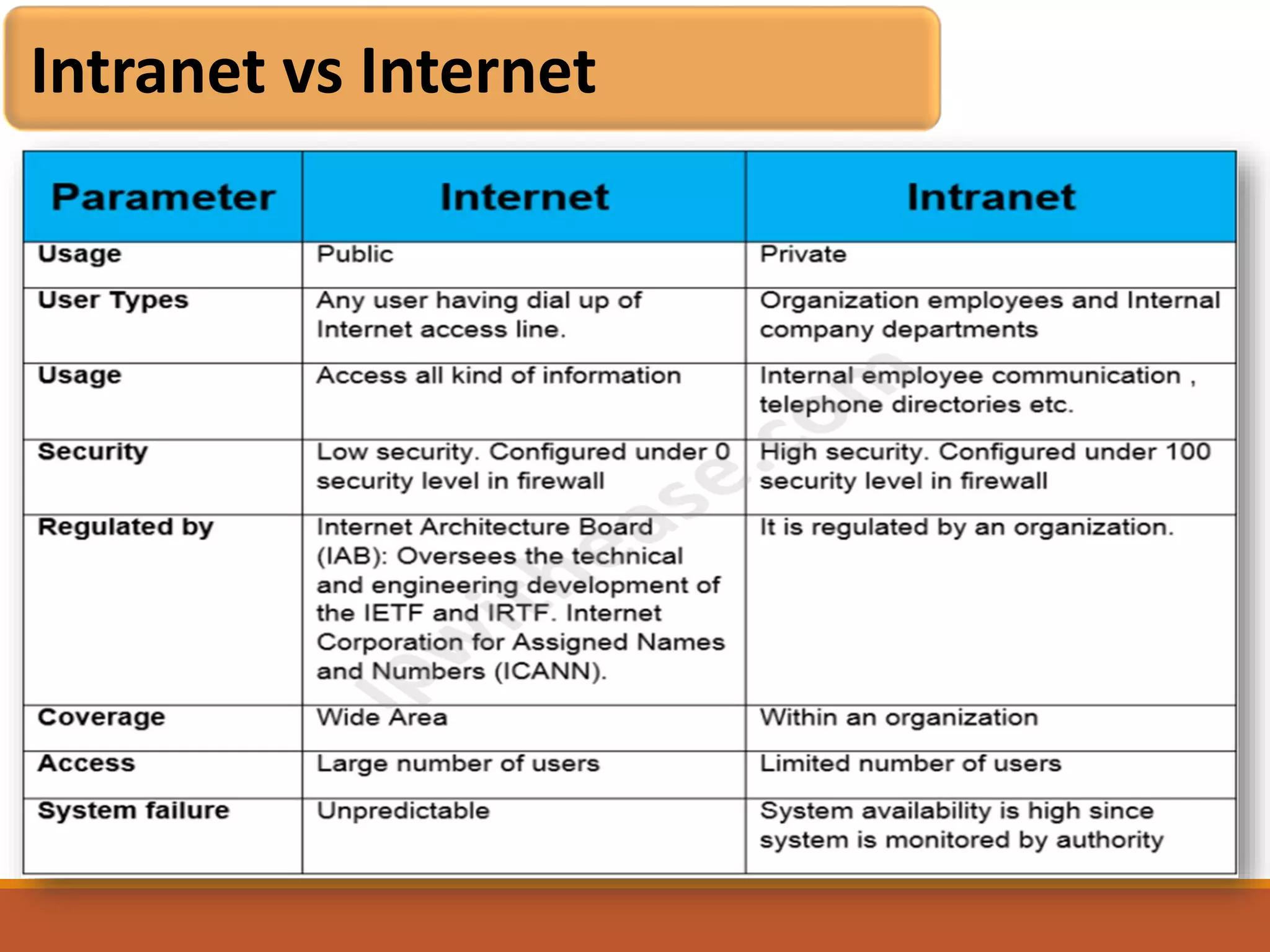
Intranet vs Internet
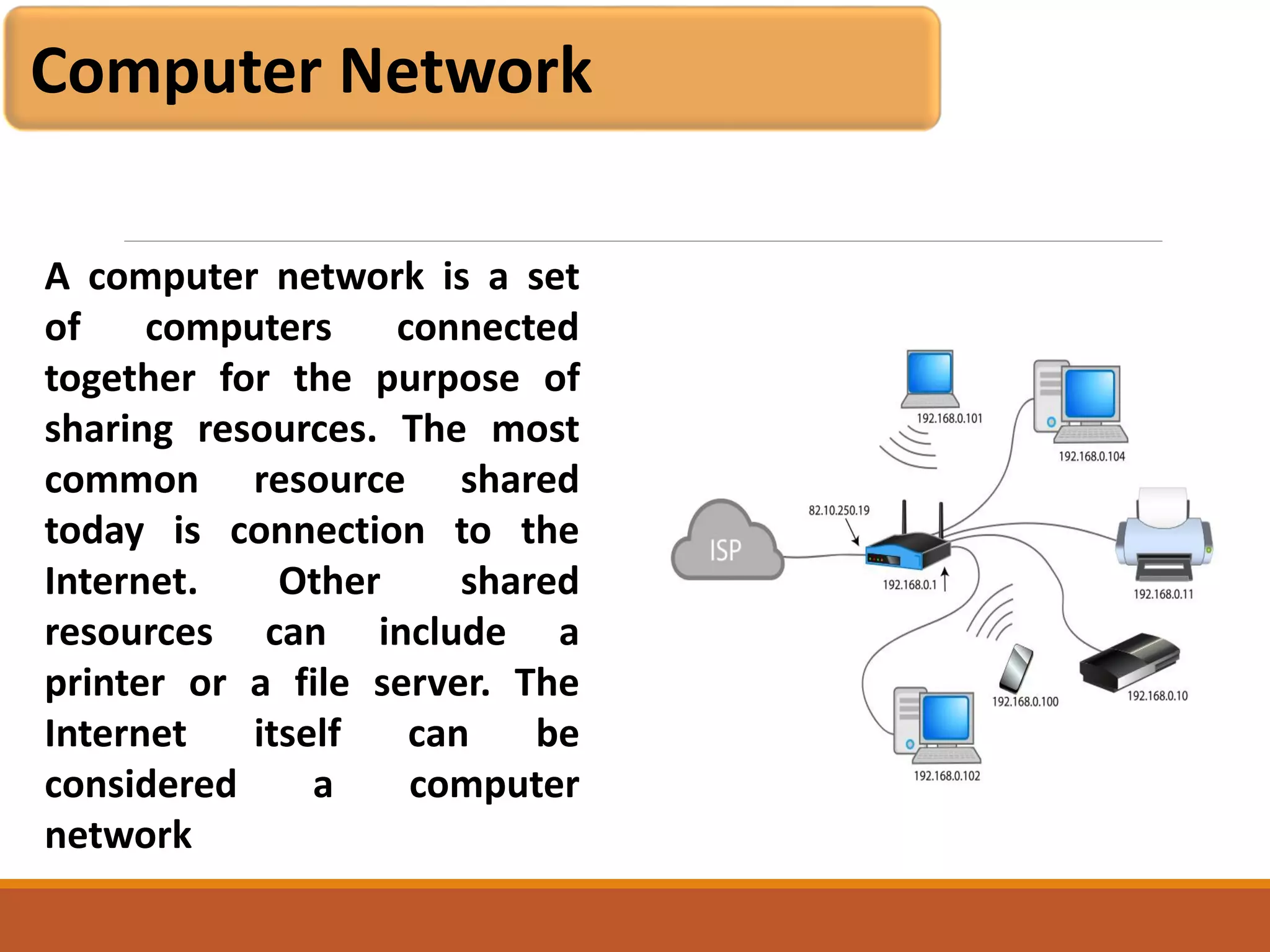
Computer Network
A computer network is a set
of computers connected
together for the purpose of
sharing resources. The most
common resource shared
today is connection to the
Internet. Other shared
resources can include a
printer or a file server. The
Internet itself can be
considered a computer
network
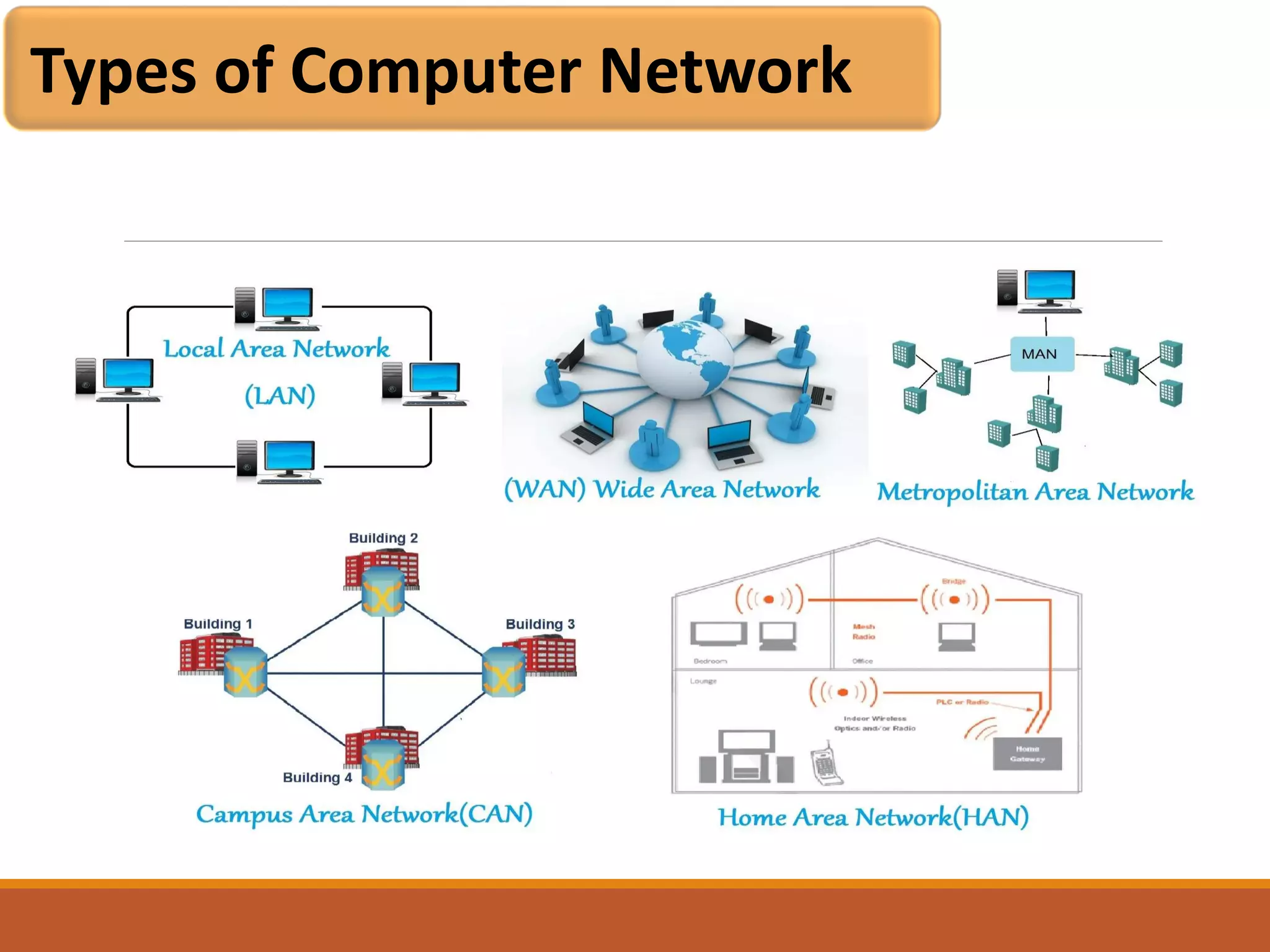
Types of Computer Network
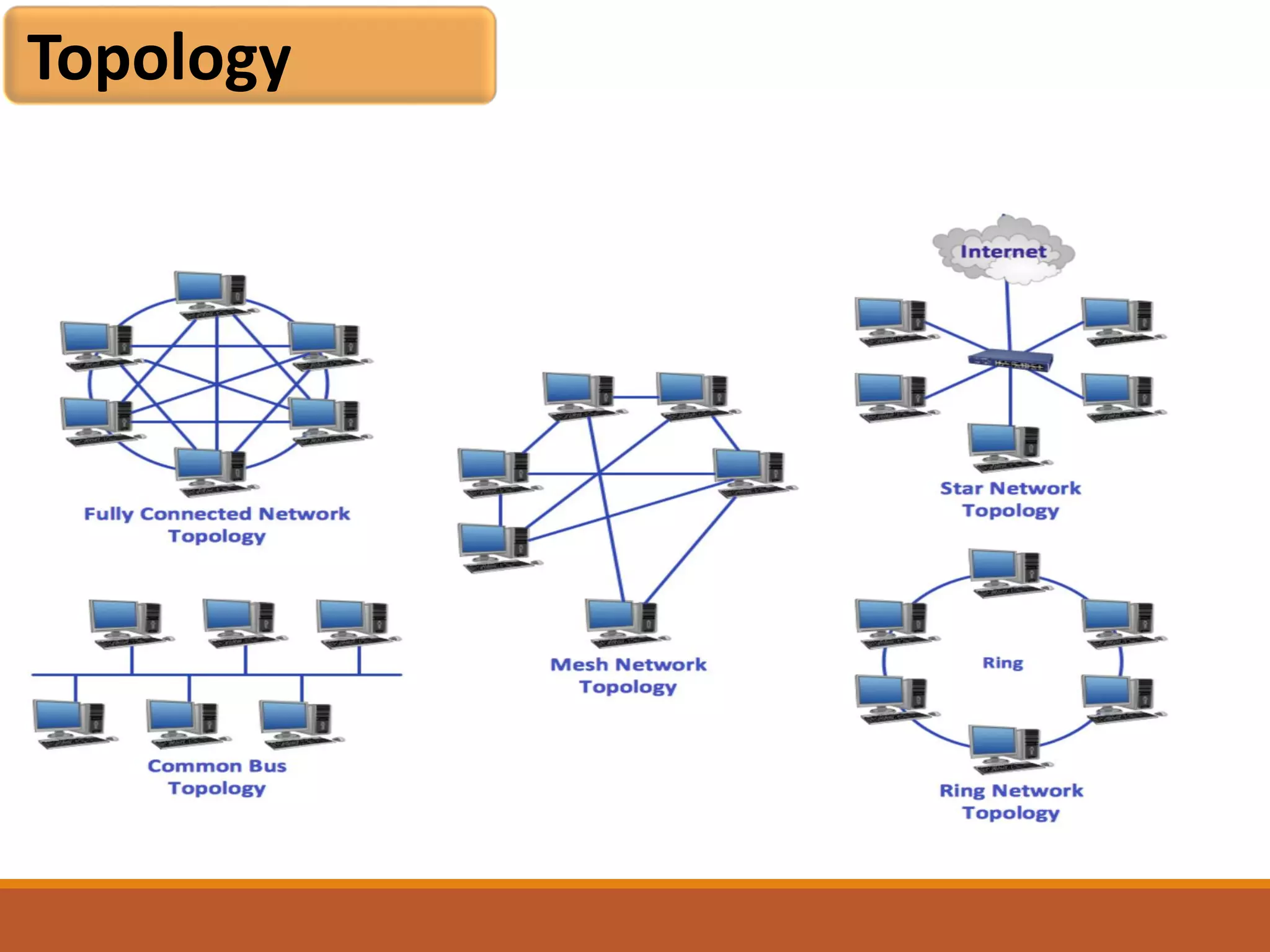
Topology
Topology
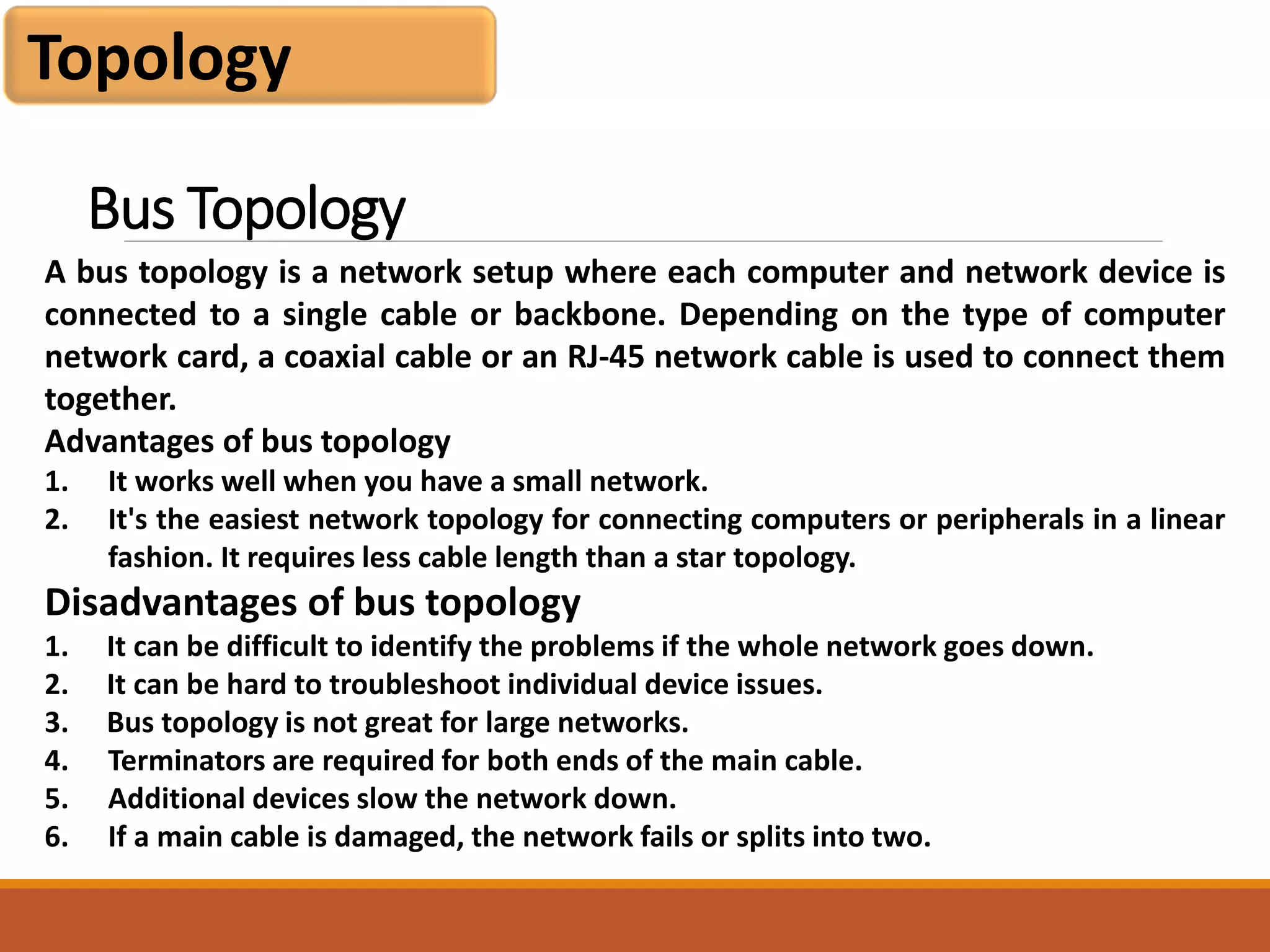
A bus topology is a network setup where each computer and network device is
connected to a single cable or backbone. Depending on the type of computer
network card, a coaxial cable or an RJ-45 network cable is used to connect them
together.
Advantages of bus topology
1. It works well when you have a small network.
2. It's the easiest network topology for connecting computers or peripherals in a linear
fashion. It requires less cable length than a star topology.
Disadvantages of bus topology
1. It can be difficult to identify the problems if the whole network goes down.
2. It can be hard to troubleshoot individual device issues.
3. Bus topology is not great for large networks.
4. Terminators are required for both ends of the main cable.
5. Additional devices slow the network down.
6. If a main cable is damaged, the network fails or splits into two.
Bus Topology
Topology
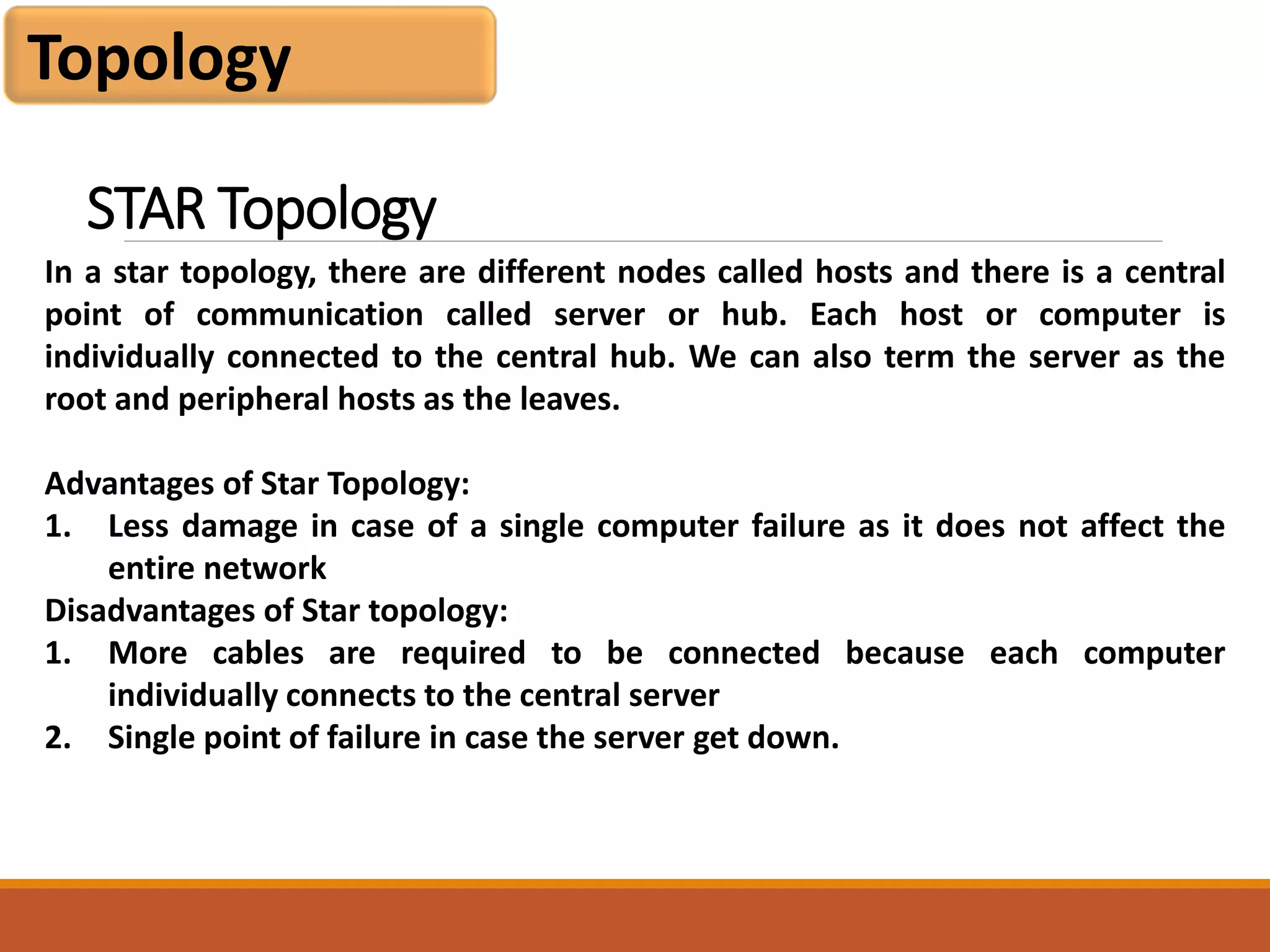
In a star topology, there are different nodes called hosts and there is a central
point of communication called server or hub. Each host or computer is
individually connected to the central hub. We can also term the server as the
root and peripheral hosts as the leaves.
Advantages of Star Topology:
1. Less damage in case of a single computer failure as it does not affect the
entire network
Disadvantages of Star topology:
1. More cables are required to be connected because each computer
individually connects to the central server
2. Single point of failure in case the server get down.
STAR Topology
Topology
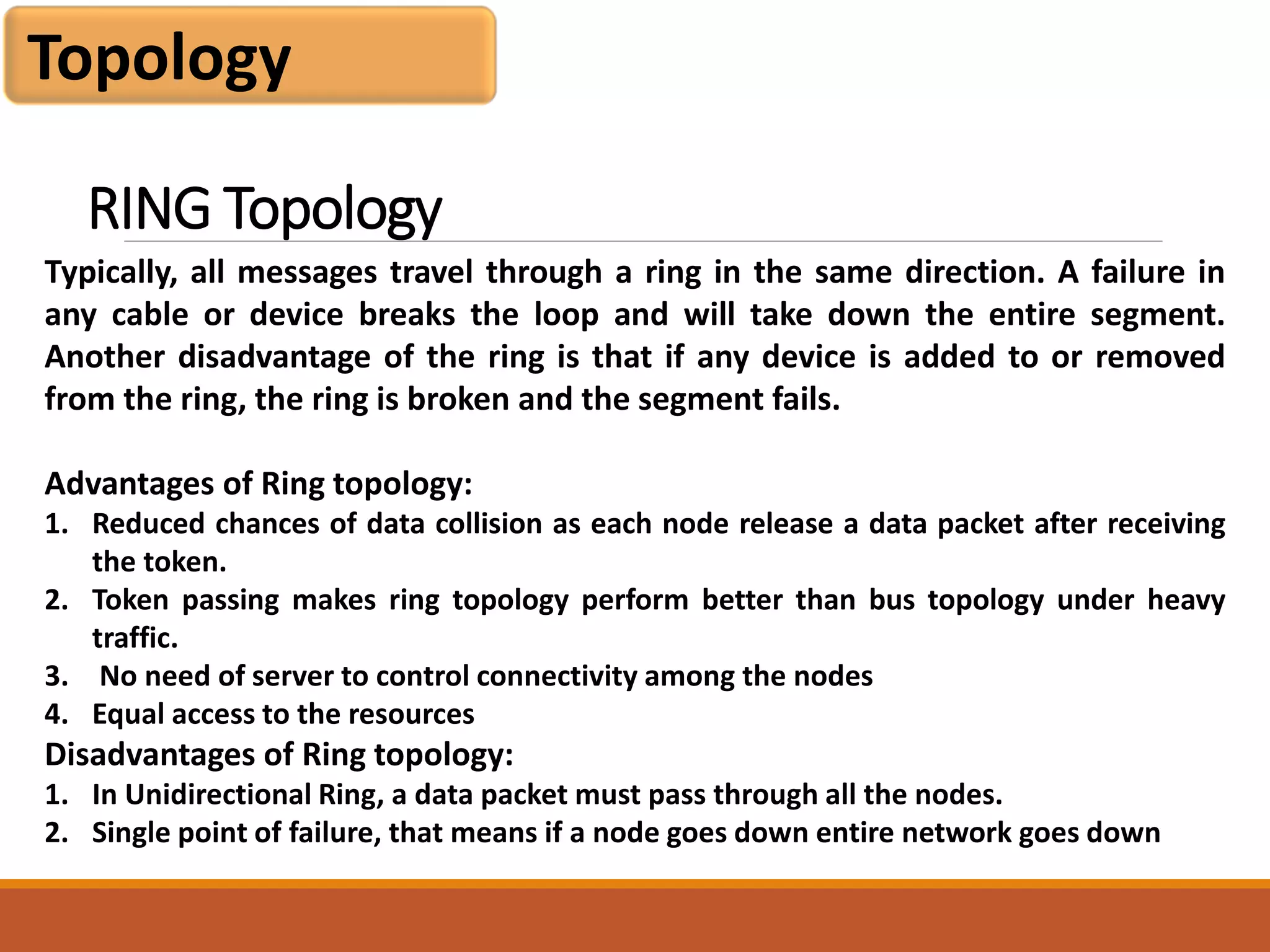
Typically, all messages travel through a ring in the same direction. A failure in
any cable or device breaks the loop and will take down the entire segment.
Another disadvantage of the ring is that if any device is added to or removed
from the ring, the ring is broken and the segment fails.
Advantages of Ring topology:
1. Reduced chances of data collision as each node release a data packet after receiving
the token.
2. Token passing makes ring topology perform better than bus topology under heavy
traffic.
3. No need of server to control connectivity among the nodes
4. Equal access to the resources
Disadvantages of Ring topology:
1. In Unidirectional Ring, a data packet must pass through all the nodes.
2. Single point of failure, that means if a node goes down entire network goes down
RING Topology
Topology
A mesh topology is a network topology in which all the network nodes are
individually connected to most of the other nodes. There is not a concept of a
central switch, hub or computer which acts as a central point of communication
to pass on the messages.
Advantages of mesh topology:
1. Each connection can carry its own data load
2. It is robust
3. A fault is diagnosed easily
4. Provides security and privacy
Disadvantages of mesh topology:
1. Installation and configuration are difficult if the connectivity gets more
2. Cabling cost is more and the most in case of a fully connected mesh topology
3. Bulk wiring is required
MESH Topology
THANK YOU
Image Source
searchenterpriseai.techtarget.com
wikipedia

Computer software and computer network

  • 1.
  • 2.
    Module 1 objective Introduction ComputerSoftware Types of Software Software Development Steps Internet Evolution Basic Internet Terminology Computer Network
  • 3.
    A set ofinstructions or programs instructing a computer to do specific tasks. Software is a generic term used to describe computer programs. Scripts, applications, programs and a set of instructions are all terms often used to describe software. 1.1 Computer Software
  • 4.
  • 5.
    Application software Hardware System software SystemSoftware Operating Systems Schedules computer events Allocates computer resources Monitor events Application Software Programming languages,Assembly language,FORTRAN, BASIC, PL/1 PASCAL, C“4th generation “ languages Users Language translators Interpreters Compilers Utility programs Routine operations (e.g. sort, list, print) Manage data (e.g. create files, merge files Types of Software
  • 6.
    1. System Software Managesthe fundamental operations of the computer, such as: 1. Loading programs and data into memory, 2. Executing programs, saving data to disks, 3. Displaying information on the monitor, and 4. Transmitting data through a port to a peripheral device. System software: operating systems, utilities, device drivers. Types of Software
  • 7.
    1.1 Operating System 1.Collection of computer programs that control the interaction of the user and the computer hardware. 2. Responsible for directing all computer operations and managing all computer resources. 3. Controls basic input and output, allocates system resources, manages storage space, maintains security, and detects equipment failure. 4. A part of the operating system code is stored in a ROM and the rest of it resides on a disk. 5. Loading the operating system into memory is called booting the computer. Types of Software
  • 8.
    1.1 Responsibilities ofan Operating System 1. Communicate with user, receive and execute commands, show error messages. 2. Manage allocation of memory, processor time and other resources. 3. Collect input from keyboard, mouse, and provide data to running programs. 4. Convey program output to screen, printer, or other output device. 5. Access data from secondary storage. Write data to secondary storage. 6. Maintains security(checks user-name , password, virus infection) Types of Software
  • 9.
    1.2 Device driver 1.A computer program that can establish communication because it contains information about the characteristics of your computer and of the device. 2. Each peripheral device requires a device driver. 3. Helps the computer communicate with that particular device. 4. When we add a device to an existing computer, part of its installation includes adding its device driver to the configuration. Types of Software
  • 10.
    1.3 Language processors(Compiler) 1. Software that translates a high-level language program into machine language. Input to the compiler is a source file (created by word processor or editor) containing the text of a high-level language program. 2. If it is syntactically correct, compiler will save in an object file which is a machine language instructions for the same job. Types of Software
  • 11.
    1.3 Language processors(Interpreter) 1. Interpreter is a program that executes instructions written in a high-level language. There are two ways to run programs written in a high-level language. The most common is to compile the program; the other method is to pass the program through an interpreter Types of Software
  • 12.
    1.3 Language processors(Assembler) 1. a program for converting instructions written in low-level symbolic code into machine code. Types of Software
  • 13.
    1.4 BIOS The BIOSis a program pre-installed on Windows-based computers (not on Macs) that the computer uses to start up. The CPU accesses the BIOS even before the operating system is loaded. The BIOS then checks all your hardware connections and locates all your devices. If everything is OK, the BIOS loads the operating system into the computer's memory and finishes the boot-up process. Types of Software
  • 14.
    1.5 Application software 1.Developed for a specific task , such as word processing( MS Word/ WordPerfect), accounting (Lotus 1-2-3/ Excel), or database management (Access/ dBASE). 2. We also use graphics and presentation software. 3. Most applications are purchased on diskette or CD-ROM. 4. They are installed by copying the programs from the diskettes/CD-ROM to the hard disk. Types of Software
  • 15.
    1.6 Utility Software 1.Utility software is software designed to help to analyze, configure, optimize or maintain a computer. It is used to support the computer infrastructure 2. System Utilities: Software applications like anti-virus, memory testers, package managers, network utilities, and registry cleaners are included in system utility software. 3. File management utilities: Archivers, backup software, data compression utilities and file managers fall in the category of file management utilities. 4. Storage device management utilities: All the disk related software utilities fall into this type of utility. They can be disk checkers, disk partition editors, disk formatters, disk space analyzers and so on. Types of Software
  • 16.
    Software Development Steps SDLCor the Software Development Life Cycle is a process that produces software with the highest quality and lowest cost in the shortest time. SDLC includes a detailed plan for how to develop, alter, maintain, and replace a software system. 1.6 SDLC
  • 17.
    Software Development Steps RequirementPhase: Business Analyst collects the requirement from the Customer/Client as per the clients business needs and documents the requirements in the Business Requirement Specification (document name varies depends upon the Organization. Analysis Phase: This is done through the SRS (Software Requirement Specification) document. SRS consists of all the product requirements to be designed and developed during the project life cycle. The outcome of this phase is the Software Requirement Specification. 1.6 SDLC
  • 18.
    Software Development Steps DesignPhase: It has two steps: HLD – High-Level Design – It gives the architecture of the software product to be developed and is done by architects and senior developers LLD – Low-Level Design – It is done by senior developers. It describes how each and every feature in the product should work and how every component should work. Here, only the design will be there and not the code 1.6 SDLC
  • 19.
    Software Development Steps DevelopmentPhase: This is the phase where which start building the software and start writing the code for the product. The outcome from this phase is Source Code Document (SCD) and the developed product. Testing Phase: Test team tests it thoroughly for different defects using manual and automated testing with black box and white box approach. They either test the software manually or using automated testing tools depends on the process defined in STLC (Software Testing Life Cycle) and ensure that each and every component of the software works fine. 1.6 SDLC
  • 20.
    Software Development Steps Deployment& Maintenance Phase: After successful testing, the product is delivered/deployed to the customer for their use. Deployment is done by the Deployment/Implementation engineers. Once when the customers start using the developed system then the actual problems will come up and needs to be solved from time to time. Fixing the issues found by the customer comes in the maintenance phase. 100% testing is not possible – because, the way testers test the product is different from the way customers use the product. 1.6 SDLC
  • 21.
    Internet Evolution Date Event 1969ARPAnet 1984 MILNET & ARPANET (Internet) 1980s National Science Foundation (NSF) controlled Internet Access 1991 NSF eased restrictions on Internet Access 1995 U.S. government relaxed entry into Internet for the public
  • 22.
    Basic Internet Terminology WorldWide Web (WWW): The World Wide Web (“WWW” or simply the “web”) is a collection of electronic documents (called web pages) that are linked together like a spider web. These documents are stored on computers called servers located around the world. Web Server: A Web Server is a computer that stores web pages. It is responsible for accepting request(s) from users and serves them with web pages.Two important web server programs are: IIS (Internet Information server) and Apache, etc. Web servers are connected to the Internet 24 hours a day, seven days a week.
  • 23.
    Basic Internet Terminology WorldWide Web (WWW): The World Wide Web (“WWW” or simply the “web”) is a collection of electronic documents (called web pages) that are linked together like a spider web. These documents are stored on computers called servers located around the world. Web Server: A Web Server is a computer that stores web pages. It is responsible for accepting request(s) from users and serves them with web pages.Two important web server programs are: IIS (Internet Information server) and Apache, etc. Web servers are connected to the Internet 24 hours a day, seven days a week. HTML (Hypertext Markup Language): It is a language that consists of certain key words called ‘Tags’, used for writing the documents on the web. URL (Uniform Resource Locator): Every page on the web has a unique address, called Uniform Resource Locator, URL. A URL indicates where the web page is stored on the Internet.
  • 24.
    Basic Internet Terminology IP(Internet Protocol) Address: Computers do not understand letters or symbols that humans use to communicate effectively. Computers understand numbers-specifically, 1s and 0s. Thus every host (a computer linked to the Internet) on the Internet has a unique host number. This number is called the Internet Protocol address, or IP address. The IP address is a unique address, generally written in the format xxx.xxx.xxx.xxx, where xxx represents a 3 digit number that varies between 0 and 255. For Example: 192.100.8.56 DNS (Domain Name System): Every host (computer linked to Internet) has a unique host number called IP address. You can connect to any host through IP address only, but it is difficult to remember the 4-digit number of hosts. To resolve this, domain name is the only solution. Domain name, a unique name of the individual host computer on the Internet. Every computer on the Internet now have both a domain name and an IP address. To connect to any host through domain name requires some mechanism that will convert the domain name IP address. DNS, Domain Name System is the standard for resolving names to addresses.
  • 25.
    Basic Internet Terminology HTTP: The hypertext transfer protocol (http) that enables html documents to be read on the Internet. Hypertext - Text that is non-sequential, produced by writing in HTML (Hypertext Markup Language) language. This HTML coding allows the information (text, graphics, sound, video) to be accessed using HTTP (Hypertext Transfer Protocol). Modem : A device that connects your computer to the Internet, when you are not connected via a LAN (local area network, such as at work or on a campus.) Most people connect to a modem when using a home computer. The modem translates computer signals to analog signals which are sent via phone lines. Search Engine : Specialized software, such as AltaVista and Yahoo, that lets WWW browser users search for information on the Web by using keywords, phrases, and Boolean logic. Different search engines have different ways of categorizing and indexing information.
  • 26.
    Basic Internet Terminology Virus: Acomputer program usually hidden in an existing program. Once the existing program is executed, the virus program is activated and can attach itself to other programs or files. Viruses can range from benign activities such as attaching a harmless message to performing malicious activities such as destroying all the data on a computer hard drive. Viruses are commonly distributed as e-mail attachments which activate when the attachment is opened. Virus protection software, updated regularly with the latest virus definitions, can help protect computers from viruses. Web Bot: A term that applies to programs/applets (macros and intelligent agents) used on the Internet. Such bots perform a repetitive function, such as posting messages to multiple newsgroups or doing searches for information.
  • 27.
    Basic Internet Terminology WideWorld Web (WWW): A hypermedia information storage system which links computer-based resources around the world. Computer programs called Browsers enable words or icons called hyperlinks to display, text, video, graphics and sound on a computer screen. The source of the material is at a different location - a different file in the same directory, a file in another computer, which can be located anywhere in the world. XML (Extensible Markup Language): is a less robust variety of SGML, a system for organizing and tagging elements of a document so that the document can be transmitted and interpreted between applications and organizations. Human readable XML tags defines "what it is," and HTML defines "how it looks." XML allows designers to create their own tags.
  • 28.
    Basic Internet Terminology PHP- (Hypertext Preprocessor): Open source, server-side HTML scripting languaage used to create dynamic Web pages. PHP is embedded within tags, so the author authorr can move between HTML and PHP instead of using large amounts of code. Because PHP is executed on the server, the viewer cannot see the code. PHP can perform the same tasks as a CGI program can do and is compatible with many different kinds of databases. Bandwidth: The capacity of an electronic line, such as a communications network or computer channel, to transmit bits per second (bps). FTP : Using file transfer protocol software to receive from upload) or send to (download) files (text, pictures, spreadsheets, etc.) from one computer/server to another.
  • 29.
    Basic Internet Terminology Firewall: The name "firewall" derives from the term for a barrier that prevents fires from spreading. A computer "firewall" is a barrier between your computer and the outside world. Just like a fire is most likely to spread through open doors in a building, your computer is most vulnerable at its ports (the doors). Intranet: An intranet is a private network that can only be accessed by authorized users. The prefix "intra" means "internal" and therefore implies an intranet is designed for internal communications. "Inter" (as in Internet) means "between" or "among." Since there is only one Internet, the word "Internet" is capitalized Internet : A global network of thousands of computer networks linked by data lines and wireless systems.
  • 30.
  • 31.
    Computer Network A computernetwork is a set of computers connected together for the purpose of sharing resources. The most common resource shared today is connection to the Internet. Other shared resources can include a printer or a file server. The Internet itself can be considered a computer network
  • 32.
  • 33.
  • 34.
    Topology A bus topologyis a network setup where each computer and network device is connected to a single cable or backbone. Depending on the type of computer network card, a coaxial cable or an RJ-45 network cable is used to connect them together. Advantages of bus topology 1. It works well when you have a small network. 2. It's the easiest network topology for connecting computers or peripherals in a linear fashion. It requires less cable length than a star topology. Disadvantages of bus topology 1. It can be difficult to identify the problems if the whole network goes down. 2. It can be hard to troubleshoot individual device issues. 3. Bus topology is not great for large networks. 4. Terminators are required for both ends of the main cable. 5. Additional devices slow the network down. 6. If a main cable is damaged, the network fails or splits into two. Bus Topology
  • 35.
    Topology In a startopology, there are different nodes called hosts and there is a central point of communication called server or hub. Each host or computer is individually connected to the central hub. We can also term the server as the root and peripheral hosts as the leaves. Advantages of Star Topology: 1. Less damage in case of a single computer failure as it does not affect the entire network Disadvantages of Star topology: 1. More cables are required to be connected because each computer individually connects to the central server 2. Single point of failure in case the server get down. STAR Topology
  • 36.
    Topology Typically, all messagestravel through a ring in the same direction. A failure in any cable or device breaks the loop and will take down the entire segment. Another disadvantage of the ring is that if any device is added to or removed from the ring, the ring is broken and the segment fails. Advantages of Ring topology: 1. Reduced chances of data collision as each node release a data packet after receiving the token. 2. Token passing makes ring topology perform better than bus topology under heavy traffic. 3. No need of server to control connectivity among the nodes 4. Equal access to the resources Disadvantages of Ring topology: 1. In Unidirectional Ring, a data packet must pass through all the nodes. 2. Single point of failure, that means if a node goes down entire network goes down RING Topology
  • 37.
    Topology A mesh topologyis a network topology in which all the network nodes are individually connected to most of the other nodes. There is not a concept of a central switch, hub or computer which acts as a central point of communication to pass on the messages. Advantages of mesh topology: 1. Each connection can carry its own data load 2. It is robust 3. A fault is diagnosed easily 4. Provides security and privacy Disadvantages of mesh topology: 1. Installation and configuration are difficult if the connectivity gets more 2. Cabling cost is more and the most in case of a fully connected mesh topology 3. Bulk wiring is required MESH Topology
  • 38.