Oracle Database Architecture
Database and Instance
• Database
– A database is a set of physical files,
– located on disk, that store data and
– are created by the CREATE DATABASE statement.
Database and Instance
• Database instance
– An instance is a set of memory structures that
manage database files.
– The instance serves the users of the database.
– Because an instance exists in memory and a
database exists on disk, an instance can exist
without a database and a database can exist
without an instance.
Database and Instance
• Database instance
– When an instance is started, Oracle Database
allocates a memory area called the system global area
(SGA) and starts one or more background processes.
– An instance begins when it is created with
the STARTUP command and ends when it is
terminated.
– An instance can associate itself with one and only
one database.
Oracle System Identifier (SID)
• The system identifier (SID) is a unique name
for an Oracle database instance on a specific
host.
• Oracle Database uses the SID to create a key
to shared memory.
DATABASE STORAGE STRUCTURE
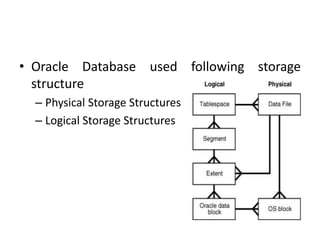
• Oracle Database used following storage
structure
– Physical Storage Structures
– Logical Storage Structures
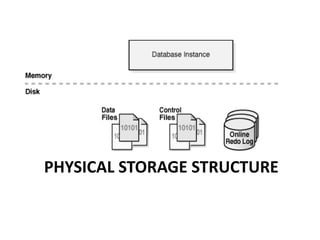
PHYSICAL STORAGE STRUCTURE
Physical Storage Structure
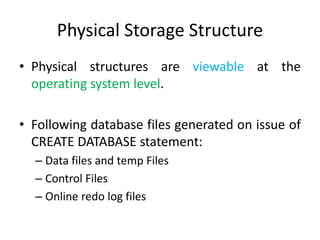
• Physical structures are viewable at the
operating system level.
• Following database files generated on issue of
CREATE DATABASE statement:
– Data files and temp Files
– Control Files
– Online redo log files
Physical Storage Structure
• Data files
– A data file contains data structures such as tables
and indexes.
– The maximum number of data files in a database
is limited (usually to 64 KB files),
Physical Storage Structure
• Temp files
– A temp file is a data file that belongs to a
temporary tablespace
– Cannot be read by other programs.
Physical Storage Structure
• Control Files
– A control file is a root file that tracks the physical
components of the database.
– Control File contain following information
• The database name and database unique identifier
(DBID)
• The time stamp of database creation
• Information about data files, online redo log files, and
archived redo log files
• Tablespace information
Physical Data Structure
• Control File
– Purpose
• The control file tracks structural changes to the
database.
• It contains metadata that must be accessible
when the database is not open.
Physical Storage Structure
• Online redo log files
– The online redo log is a set of files containing
records of changes made to data.
– The database maintains online redo log files to
protect against data loss.
• After an instance failure the online redo log files enable
Oracle Database to recover committed data not yet
written to the data files.
Archived Redo Log Files
• An archived redo log file is a copy of a an online redo
log group.
• This file is not considered part of the database, but is
an offline copy of an online redo log file created by the
database and written to a user-specified location.
• You can use archived redo log files to:
– Recover a database backup
– Update a standby database
– Obtain information about the history of a database
LOGICAL STORAGE SPACE
Logical Storage Space
• These structures are created and recognized by
Oracle Database and are not known to the
operating system.
• Oracle Database allocates logical space for all
data in the database.
• Logical storage structures enable Oracle Database
to have fine-grained control of disk space use.
Logical Storage Space
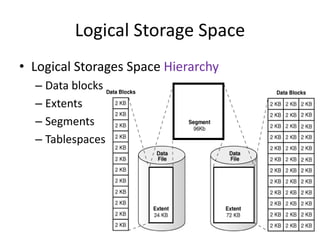
• Logical Storages Space Hierarchy
– Data blocks
– Extents
– Segments
– Tablespaces
Logical Storage Space
• Data blocks
– Oracle Database data is stored in data blocks.
– One data block corresponds to a specific number of
bytes on disk.
– Data blocks are the smallest units of storage that
Oracle Database can use or allocate.
– The standard data block size for a database is 4 KB or
8 KB.
– The DB_BLOCK_SIZE initialization parameter sets the
data block size for a database when it is created
Logical Storage Structure
• Extents
– An extent is a specific number of logically
contiguous data blocks, allocated for storing a
specific type of information
Logical Storage Structure
• Segments
– A segment is a set of extents allocated for a user
object (for example, a table or index).
– Every database object that consumes storage
consists of a single segment.
Logical Storage Structure
• Segments
– A single data segment in a database stores the
data for one user object.
– There are different types of segments.
• Table
• LOB
• Index
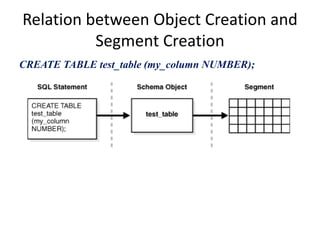
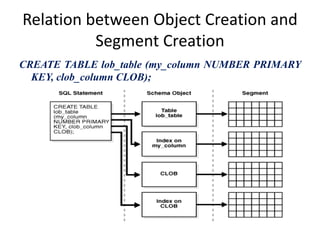
Relation between Object Creation and
Segment Creation
CREATE TABLE test_table (my_column NUMBER);
Relation between Object Creation and
Segment Creation
CREATE TABLE lob_table (my_column NUMBER PRIMARY
KEY, clob_column CLOB);
Logical Storage Structure
• Tablespaces
– Oracle Database physically stores tablespace data
in data files.
– A database is divided into logical storage units
called tablespaces.
– A tablespace is the logical container for a
segment.
– A database must have
the SYSTEM and SYSAUX tablespaces
Logical Storage Structure
• Tablespace
– Each tablespace consists of one or more data files.
• The data for a database is collectively stored in the data
files located in each tablespace of the database.
– A segment can span one or more data files, but it
cannot span multiple tablespaces.
Logical Storage Structue
• SYSTEM Tablespace
– The data dictionary
– Tables and views that contain administrative
information about the database
– Compiled stored objects such as triggers, procedures,
and packages
– All information is owned by the SYS user
Logical Storage Structure
• SYSAUX tablespace
– an auxiliary tablespace to the SYSTEM tablespace.
– provides a centralized location for database
metadata.
– created automatically during database creation or
upgrade.
Logical Storage Structure
• Undo Tablespaces
– reserved for system-managed undo data.
• Temporary Tablespaces
– contains transient data that persists only for the
duration of a session.
– No permanent schema objects can reside in a
temporary tablespace.
– The database stores temporary tablespace data in
temp files.
Logical Storage Structure
• Online and Offline Tablespace
– A tablespace is usually online so that its data is
available to users.
– The SYSTEM tablespace and temporary
tablespaces cannot be taken offline.

12. oracle database architecture

  • 1.
  • 2.
    Database and Instance •Database – A database is a set of physical files, – located on disk, that store data and – are created by the CREATE DATABASE statement.
  • 3.
    Database and Instance •Database instance – An instance is a set of memory structures that manage database files. – The instance serves the users of the database. – Because an instance exists in memory and a database exists on disk, an instance can exist without a database and a database can exist without an instance.
  • 4.
    Database and Instance •Database instance – When an instance is started, Oracle Database allocates a memory area called the system global area (SGA) and starts one or more background processes. – An instance begins when it is created with the STARTUP command and ends when it is terminated. – An instance can associate itself with one and only one database.
  • 5.
    Oracle System Identifier(SID) • The system identifier (SID) is a unique name for an Oracle database instance on a specific host. • Oracle Database uses the SID to create a key to shared memory.
  • 6.
  • 7.
    • Oracle Databaseused following storage structure – Physical Storage Structures – Logical Storage Structures
  • 8.
  • 9.
    Physical Storage Structure •Physical structures are viewable at the operating system level. • Following database files generated on issue of CREATE DATABASE statement: – Data files and temp Files – Control Files – Online redo log files
  • 10.
    Physical Storage Structure •Data files – A data file contains data structures such as tables and indexes. – The maximum number of data files in a database is limited (usually to 64 KB files),
  • 11.
    Physical Storage Structure •Temp files – A temp file is a data file that belongs to a temporary tablespace – Cannot be read by other programs.
  • 12.
    Physical Storage Structure •Control Files – A control file is a root file that tracks the physical components of the database. – Control File contain following information • The database name and database unique identifier (DBID) • The time stamp of database creation • Information about data files, online redo log files, and archived redo log files • Tablespace information
  • 13.
    Physical Data Structure •Control File – Purpose • The control file tracks structural changes to the database. • It contains metadata that must be accessible when the database is not open.
  • 14.
    Physical Storage Structure •Online redo log files – The online redo log is a set of files containing records of changes made to data. – The database maintains online redo log files to protect against data loss. • After an instance failure the online redo log files enable Oracle Database to recover committed data not yet written to the data files.
  • 15.
    Archived Redo LogFiles • An archived redo log file is a copy of a an online redo log group. • This file is not considered part of the database, but is an offline copy of an online redo log file created by the database and written to a user-specified location. • You can use archived redo log files to: – Recover a database backup – Update a standby database – Obtain information about the history of a database
  • 16.
  • 17.
    Logical Storage Space •These structures are created and recognized by Oracle Database and are not known to the operating system. • Oracle Database allocates logical space for all data in the database. • Logical storage structures enable Oracle Database to have fine-grained control of disk space use.
  • 18.
    Logical Storage Space •Logical Storages Space Hierarchy – Data blocks – Extents – Segments – Tablespaces
  • 19.
    Logical Storage Space •Data blocks – Oracle Database data is stored in data blocks. – One data block corresponds to a specific number of bytes on disk. – Data blocks are the smallest units of storage that Oracle Database can use or allocate. – The standard data block size for a database is 4 KB or 8 KB. – The DB_BLOCK_SIZE initialization parameter sets the data block size for a database when it is created
  • 20.
    Logical Storage Structure •Extents – An extent is a specific number of logically contiguous data blocks, allocated for storing a specific type of information
  • 21.
    Logical Storage Structure •Segments – A segment is a set of extents allocated for a user object (for example, a table or index). – Every database object that consumes storage consists of a single segment.
  • 22.
    Logical Storage Structure •Segments – A single data segment in a database stores the data for one user object. – There are different types of segments. • Table • LOB • Index
  • 23.
    Relation between ObjectCreation and Segment Creation CREATE TABLE test_table (my_column NUMBER);
  • 24.
    Relation between ObjectCreation and Segment Creation CREATE TABLE lob_table (my_column NUMBER PRIMARY KEY, clob_column CLOB);
  • 25.
    Logical Storage Structure •Tablespaces – Oracle Database physically stores tablespace data in data files. – A database is divided into logical storage units called tablespaces. – A tablespace is the logical container for a segment. – A database must have the SYSTEM and SYSAUX tablespaces
  • 26.
    Logical Storage Structure •Tablespace – Each tablespace consists of one or more data files. • The data for a database is collectively stored in the data files located in each tablespace of the database. – A segment can span one or more data files, but it cannot span multiple tablespaces.
  • 27.
    Logical Storage Structue •SYSTEM Tablespace – The data dictionary – Tables and views that contain administrative information about the database – Compiled stored objects such as triggers, procedures, and packages – All information is owned by the SYS user
  • 28.
    Logical Storage Structure •SYSAUX tablespace – an auxiliary tablespace to the SYSTEM tablespace. – provides a centralized location for database metadata. – created automatically during database creation or upgrade.
  • 29.
    Logical Storage Structure •Undo Tablespaces – reserved for system-managed undo data. • Temporary Tablespaces – contains transient data that persists only for the duration of a session. – No permanent schema objects can reside in a temporary tablespace. – The database stores temporary tablespace data in temp files.
  • 30.
    Logical Storage Structure •Online and Offline Tablespace – A tablespace is usually online so that its data is available to users. – The SYSTEM tablespace and temporary tablespaces cannot be taken offline.

Editor's Notes

  • #5 the instance can mount a database only once, close it only once, and open it only once. After a database has been closed or shut down, you must start a different instance to mount and open this database.
  • #14  1. For example, when an administrator adds, renames, or drops a data file or online redo log file, the database updates the control file to reflect this change. 2. For example, the control file contains information required to recover the database, including checkpoints. 
  • #30 Oracle Database maintains records of the actions of transactions, collectively known as undo data Oracle Database uses undo to do the following: Roll back an active transaction Recover a terminated transaction Provide read consistency. Perform some logical flashback operations