System Software
Learning Objectives
• Describe several important trends occurring in
  computer software
• Give examples of several major types of
  application and system software
• Explain the purpose of several popular
  software packages for end user productivity
  and collaborative computing
Learning Objectives
• Define and describe the functions of an
  operating system
• Describe the main uses of computer
  programming software, tools, and languages
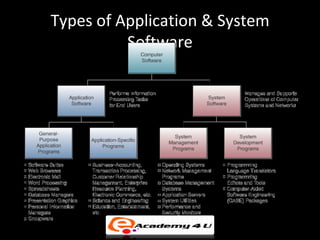
Types of Application & System
          Software
Application Software
• General Purpose
  – Programs that perform common information
    processing jobs for end users
  – E.g., word processing, spreadsheet
  – Also call productivity packages

• Custom Software
  – Software applications developed within an
    organization for use by that organization
Application Software
• Open-source Software
  – Developers collaborate on the development of an
    application using programming standards which
    allow anyone to contribute to the software
  – As each developer completes a project, the
    application code becomes available and free to
    anyone who wants it
Business Application Software
• Function-Specific Application Software
  – Thousands of these packages support specific
    applications of end users
  – Examples: customer relationship management,
    enterprise resource planning, supply chain
    management, Web-enabled electronic commerce
Software Suites, Integrated Packages
• Most widely used productivity packages are bundled
  together as software suites
• Advantages
   – Cost less than buying individual packages
   – All have similar GUI
   – Work well together
• Disadvantages
   – All features not used
   – Takes a lot of disk space (bloatware)
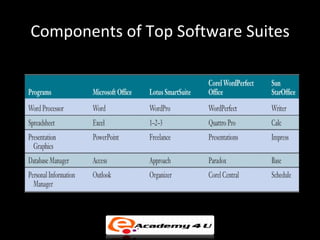
Components of Top Software Suites
Web Browsers
• Software applications that support navigation
  through the point-and-click hyper-linked resources of
  the Web
• Becoming the universal platform from which end
  users launch…
   –   Information searches
   –   E-mail
   –   Multimedia file transfer
   –   Discussion groups
   –   Other Internet-based applications
Search Engines
• Browsers are used to gain access to Internet
  search engines
  – Google, Ask Jeeves, Look Smart, Lycos, Overture,
    Yahoo!
• Using search engines to find information has
  become an indispensable part of Internet,
  intranet, and extranet applications
E-mail, Instant Messaging, and
                  Weblogs
• E-mail
   – Software to communicate by sending and receiving
     messages and attachments via the Internet, intranet, or
     extranet
• Instant messaging (IM)
   – Receive electronic messages instantly
• Weblog or blog
   – A personal website in dated log format
   – Updated with new information about a subject or range of
     subjects
Word Processing/Desktop Publishing

   • Word Processing
     – Create, edit, revise, and print documents
     – E.g., Microsoft Word, Lotus WordPro, Corel
       WordPerfect
   • Desktop Publishing
     – Produce printed materials that look
       professionally published
     – E.g., Adobe PageMaker, Microsoft Publisher,
       QuarkXPress
Electronic Spreadsheets
• Used by virtually every business for…
   – Analysis, planning, modeling
• Electronic Spreadsheet
   – Worksheet of rows and columns
   – Can be stored on local computer or on network
   – Requires designing format and developing the
     relationships (formulas)
   – Most help you develop charts and graphic displays
     of spreadsheet results
   – Supports what-if questions
Presentation Graphics
• Common presentation graphics packages…
  – Converts numeric data into graphics displays
  – Used to create multimedia presentations of graphics,
    photos, animation, and video clips
  – E.g., Microsoft PowerPoint, Lotus Freelance, Corel
    Presentations
  – Top packages can tailor files for transfer in HTML format to
    websites
Personal Information Managers
• Software for end user productivity and collaboration
   – Stores information about clients
   – Manages schedules, appointments, tasks
   – Most include ability to access the Web and provide e-mail
     capabilities
   – Some support team collaboration by sharing information
     with other PIM users
   – E.g., Lotus Organizer, Microsoft Outlook
Groupware
• Software that helps workgroups
  collaborate on group assignments
  – E-mail, discussion groups, databases, video
    conferencing
  – E.g., Lotus Notes, Novell GroupWise,
    Microsoft Exchange
  – Windows SharePoint Services and
    WebSphere both allow teams to create
    websites for information sharing and
    document collaboration
Interface Between End Users and Computer
System Management Software :
          Operating Systems
• Integrated system of programs that…
  – Manages the operations of the CPU
  – Controls the input/output, storage resources,
    and activities of the computer system
  – Provides support services as the computer executes
    application programs
• The operating system must be loaded and activated
  before other tasks can be accomplished
Operating System Basic Functions
User Interface
• The part of the operating system that allows
  you to communicate with it
• Three main types…
  – Command-driven
  – Menu-driven
  – Graphical user interfaces (GUI)
Resource Management
• Part of the operating system that manages the
  hardware and networking resources of a computer
  system
  – Includes CPU, memory, secondary storage devices,
    telecommunications, and input/output peripherals
• Common functions
  – Keeping track of where data and programs are stored
  – Subdividing memory; providing virtual memory capability
File Management
• Part of the operating system that controls the
  creation, deletion, and access of files and
  programs
  – Keeps track of physical location on storage devices
  – Maintains directories of information about the
    location and characteristics of stored files
Task Management
• Part of the operating system that manages the
  accomplishment of end user computing tasks
   – Controls which task gets access to the CPU,
     and for how long
   – Can interrupt the CPU at any time to substitute
     a higher priority task
   – Supports preemptive and cooperative multi-tasking and
     multi-processing
Popular Operating Systems
• Windows
  – GUI, multitasking, networking, multimedia
  – Microsoft’s operating system
  – NT, XP, 2003
  – Different versions manage servers
• Unix
  – Multitasking, multi-user, network-managing
  – Portable - can run on mainframes, midrange,
    and PCs
Popular Operating Systems
• Linux
  – Low-cost, powerful reliable Unix-like
    operating system
  – Open-source
• MAC OS X
  – Apple operating system for the iMac
  – GUI
  – Multitasking
  – Multimedia
Other System Management Programs
Other System Software
 Utilities
 ◦ Miscellaneous housekeeping functions
 ◦ Example: Norton utilities includes data backup,
   virus protection, data compression, etc.
 Performance Monitors
 ◦ Programs that monitor and adjust computer system
   to keep them running efficiently
 Security Monitors
 ◦ Monitor and control use of computer systems
   to prevent unauthorized use of resources
System Development Programme:
       Programming Languages
• Examples of programming in each language
Machine Languages
• First generation languages
   – The most basic of programming languages
   – Strings of binary codes unique to each computer
   – Requires specific knowledge of the internal
     operations of the CPU being used
   – Must specify the storage locations for every
     instruction and item of data used
   – Difficult to work with, and error prone
Assembler Languages
• Second generation languages
  – Developed to reduce difficulties in writing machine
    language programs
  – Uses assemblers to convert the programs into machine
    instructions
  – Symbols are used to represent operation codes and
    storage locations
  – Alphabetic abbreviations call mnemonics and other
    symbols represent operation codes, storage locations, and
    data elements
High-Level Languages
• Third generation languages
  – Uses brief statements or arithmetic expressions
  – Statements translated into machine language by compilers
    or interpreters
  – Less efficient than assembler languages and requires
    greater translation time
  – Machine independent
  – Examples: BASIC, COBOL, and FORTRAN
Fourth-Generation Languages
  Variety of programming languages that are
   nonprocedural and conversational
  ◦ Encourages programmers to specify the results
    wanted; the computer determines the sequence
    of instructions that accomplishes the results
  ◦ Simplified the programming process
  Natural languages
  ◦ Very close to English or other human language
  ◦ Sometimes called fifth-generation (5GLs)
  ◦ No longer a trade-off between ease of use and
    flexibility
Object-Oriented Languages
• Combines data elements
  and the procedures that
  will be performed upon
  them into objects
  – E.g., data about a bank
    account and the
    procedures performed
    on it, such as interest
    calculations
Object-Oriented Languages
• Most widely used software development
  languages
  – Easier to use and more efficient for graphics-
    oriented user interfaces
  – Reusable: can use an object from one
    application in another application
  – Examples: Visual Basic, C++, Java
  – Most object-oriented languages provide a
    GUI that supports visual programming
Web Languages
 HTML
 ◦ A page description language that creates hypertext
   documents for the Web
 XML
 ◦ Describes Web page content by applying identifying
   tags or contextual labels to the data
 Java
 ◦ Object-oriented programming language that is
   simple, secure, and platform independent
 ◦ Java applets can be executed on any computer

Management information system software

  • 1.
  • 2.
    Learning Objectives • Describeseveral important trends occurring in computer software • Give examples of several major types of application and system software • Explain the purpose of several popular software packages for end user productivity and collaborative computing
  • 3.
    Learning Objectives • Defineand describe the functions of an operating system • Describe the main uses of computer programming software, tools, and languages
  • 4.
    Types of Application& System Software
  • 5.
    Application Software • GeneralPurpose – Programs that perform common information processing jobs for end users – E.g., word processing, spreadsheet – Also call productivity packages • Custom Software – Software applications developed within an organization for use by that organization
  • 6.
    Application Software • Open-sourceSoftware – Developers collaborate on the development of an application using programming standards which allow anyone to contribute to the software – As each developer completes a project, the application code becomes available and free to anyone who wants it
  • 7.
    Business Application Software •Function-Specific Application Software – Thousands of these packages support specific applications of end users – Examples: customer relationship management, enterprise resource planning, supply chain management, Web-enabled electronic commerce
  • 8.
    Software Suites, IntegratedPackages • Most widely used productivity packages are bundled together as software suites • Advantages – Cost less than buying individual packages – All have similar GUI – Work well together • Disadvantages – All features not used – Takes a lot of disk space (bloatware)
  • 9.
    Components of TopSoftware Suites
  • 10.
    Web Browsers • Softwareapplications that support navigation through the point-and-click hyper-linked resources of the Web • Becoming the universal platform from which end users launch… – Information searches – E-mail – Multimedia file transfer – Discussion groups – Other Internet-based applications
  • 11.
    Search Engines • Browsersare used to gain access to Internet search engines – Google, Ask Jeeves, Look Smart, Lycos, Overture, Yahoo! • Using search engines to find information has become an indispensable part of Internet, intranet, and extranet applications
  • 12.
    E-mail, Instant Messaging,and Weblogs • E-mail – Software to communicate by sending and receiving messages and attachments via the Internet, intranet, or extranet • Instant messaging (IM) – Receive electronic messages instantly • Weblog or blog – A personal website in dated log format – Updated with new information about a subject or range of subjects
  • 13.
    Word Processing/Desktop Publishing • Word Processing – Create, edit, revise, and print documents – E.g., Microsoft Word, Lotus WordPro, Corel WordPerfect • Desktop Publishing – Produce printed materials that look professionally published – E.g., Adobe PageMaker, Microsoft Publisher, QuarkXPress
  • 14.
    Electronic Spreadsheets • Usedby virtually every business for… – Analysis, planning, modeling • Electronic Spreadsheet – Worksheet of rows and columns – Can be stored on local computer or on network – Requires designing format and developing the relationships (formulas) – Most help you develop charts and graphic displays of spreadsheet results – Supports what-if questions
  • 15.
    Presentation Graphics • Commonpresentation graphics packages… – Converts numeric data into graphics displays – Used to create multimedia presentations of graphics, photos, animation, and video clips – E.g., Microsoft PowerPoint, Lotus Freelance, Corel Presentations – Top packages can tailor files for transfer in HTML format to websites
  • 16.
    Personal Information Managers •Software for end user productivity and collaboration – Stores information about clients – Manages schedules, appointments, tasks – Most include ability to access the Web and provide e-mail capabilities – Some support team collaboration by sharing information with other PIM users – E.g., Lotus Organizer, Microsoft Outlook
  • 17.
    Groupware • Software thathelps workgroups collaborate on group assignments – E-mail, discussion groups, databases, video conferencing – E.g., Lotus Notes, Novell GroupWise, Microsoft Exchange – Windows SharePoint Services and WebSphere both allow teams to create websites for information sharing and document collaboration
  • 18.
    Interface Between EndUsers and Computer
  • 19.
    System Management Software: Operating Systems • Integrated system of programs that… – Manages the operations of the CPU – Controls the input/output, storage resources, and activities of the computer system – Provides support services as the computer executes application programs • The operating system must be loaded and activated before other tasks can be accomplished
  • 20.
  • 21.
    User Interface • Thepart of the operating system that allows you to communicate with it • Three main types… – Command-driven – Menu-driven – Graphical user interfaces (GUI)
  • 22.
    Resource Management • Partof the operating system that manages the hardware and networking resources of a computer system – Includes CPU, memory, secondary storage devices, telecommunications, and input/output peripherals • Common functions – Keeping track of where data and programs are stored – Subdividing memory; providing virtual memory capability
  • 23.
    File Management • Partof the operating system that controls the creation, deletion, and access of files and programs – Keeps track of physical location on storage devices – Maintains directories of information about the location and characteristics of stored files
  • 24.
    Task Management • Partof the operating system that manages the accomplishment of end user computing tasks – Controls which task gets access to the CPU, and for how long – Can interrupt the CPU at any time to substitute a higher priority task – Supports preemptive and cooperative multi-tasking and multi-processing
  • 25.
    Popular Operating Systems •Windows – GUI, multitasking, networking, multimedia – Microsoft’s operating system – NT, XP, 2003 – Different versions manage servers • Unix – Multitasking, multi-user, network-managing – Portable - can run on mainframes, midrange, and PCs
  • 26.
    Popular Operating Systems •Linux – Low-cost, powerful reliable Unix-like operating system – Open-source • MAC OS X – Apple operating system for the iMac – GUI – Multitasking – Multimedia
  • 27.
  • 28.
    Other System Software Utilities ◦ Miscellaneous housekeeping functions ◦ Example: Norton utilities includes data backup, virus protection, data compression, etc.  Performance Monitors ◦ Programs that monitor and adjust computer system to keep them running efficiently  Security Monitors ◦ Monitor and control use of computer systems to prevent unauthorized use of resources
  • 29.
    System Development Programme: Programming Languages • Examples of programming in each language
  • 30.
    Machine Languages • Firstgeneration languages – The most basic of programming languages – Strings of binary codes unique to each computer – Requires specific knowledge of the internal operations of the CPU being used – Must specify the storage locations for every instruction and item of data used – Difficult to work with, and error prone
  • 31.
    Assembler Languages • Secondgeneration languages – Developed to reduce difficulties in writing machine language programs – Uses assemblers to convert the programs into machine instructions – Symbols are used to represent operation codes and storage locations – Alphabetic abbreviations call mnemonics and other symbols represent operation codes, storage locations, and data elements
  • 32.
    High-Level Languages • Thirdgeneration languages – Uses brief statements or arithmetic expressions – Statements translated into machine language by compilers or interpreters – Less efficient than assembler languages and requires greater translation time – Machine independent – Examples: BASIC, COBOL, and FORTRAN
  • 33.
    Fourth-Generation Languages Variety of programming languages that are nonprocedural and conversational ◦ Encourages programmers to specify the results wanted; the computer determines the sequence of instructions that accomplishes the results ◦ Simplified the programming process  Natural languages ◦ Very close to English or other human language ◦ Sometimes called fifth-generation (5GLs) ◦ No longer a trade-off between ease of use and flexibility
  • 34.
    Object-Oriented Languages • Combinesdata elements and the procedures that will be performed upon them into objects – E.g., data about a bank account and the procedures performed on it, such as interest calculations
  • 35.
    Object-Oriented Languages • Mostwidely used software development languages – Easier to use and more efficient for graphics- oriented user interfaces – Reusable: can use an object from one application in another application – Examples: Visual Basic, C++, Java – Most object-oriented languages provide a GUI that supports visual programming
  • 36.
    Web Languages  HTML ◦ A page description language that creates hypertext documents for the Web  XML ◦ Describes Web page content by applying identifying tags or contextual labels to the data  Java ◦ Object-oriented programming language that is simple, secure, and platform independent ◦ Java applets can be executed on any computer

Editor's Notes

  • #2 Multimedia Lecture Support Package to Accompany Basic Marketing Lecture Script 6-