© GCSE Computing
Candidates should be able to:
 Explain
 the need for security measures in networks such as:
 user access levels
 suitable passwords
 encryption techniques
Slide 1
GCSE Computing - 1.6 Computer
communications and networking (4)
© GCSE Computing
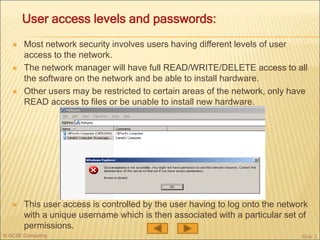
 Most network security involves users having different levels of user
access to the network.
 The network manager will have full READ/WRITE/DELETE access to all
the software on the network and be able to install hardware.
 Other users may be restricted to certain areas of the network, only have
READ access to files or be unable to install new hardware.
 This user access is controlled by the user having to log onto the network
with a unique username which is then associated with a particular set of
permissions.
Slide 2
User access levels and passwords:
© GCSE Computing
 A password is used in combination with the
username to prevent unauthorised access
to a network.
 A suitable (strong) password should not be
easy to guess.
 Ideally it should:
 be a reasonable length (8 or more
characters)
 not be a dictionary word
 include a random mixture of upper-case and
lower-case letters, numbers and even
symbols
Slide 3
What are suitable passwords?
 Many network authentication systems will require users to regularly
change their passwords and block the use of previous passwords.
 Stored passwords on the network should be encrypted.
© GCSE Computing
 Physical security: CCTV, locks and swipe-card systems etc. can be used
to physically restrict access to networked computers. USB ports and floppy
disk / optical media drives can be removed or disabled to stop file copying.
 Firewall: this can be a device or be software-based. Its purpose is to
control network transmissions between networks. It is commonly used to
block unauthorised access to a network from the Internet, while allowing
legitimate network traffic through.
 Antivirus software: Many viruses are designed to bypass security
systems and having up-to-date antivirus software installed will reduce this
risk.
 Proxy server: this can be a device or be software-based and uses a set of
rules to check that the file, connection or web page the user requests is
acceptable. It can filter network traffic by IP address or protocol. If the
request is valid then the proxy server then makes the connection on behalf
of the user.
Slide 4
Other methods of increasing network security
© GCSE Computing
 An encryption technique is the method used to encrypt and then decrypt
data.
 Most encryption relies on scrambling up data with some form of numerical
‘key’ such as a very large prime number.
 Without the key the data is meaningless if it is intercepted.
 The problem is that to communicate securely between computers, they
both need the key and the key would need to be unencrypted for the
receiving computer to be able to read it and then use it.
 The encryption technique used to get round this
problem is to use two keys, a public key to
encrypt the data and a private key to decrypt it.
Slide 5
What are encryption techniques?
© GCSE Computing
 When you access a secure web server two keys are used:
 A public key to encrypt the data
 A private key to decrypt it.
 How it works:
 Your browser makes an HTTPS request to the server for secure
communication.
 The server responds by sending out its public key. Only the server has the
private key that decrypts anything encrypted using this key.
 Your browser then uses the server public key to encrypt its own public key and
sends this to the server.
 The server uses its own private key to decrypt your browser’s public key.
 The server and browser can now communicate in both directions using each
others public keys to encrypt data and their own private keys to decrypt
data.
 Any data that is intercepted will be meaningless, even if both public keys were
known.
Slide 6
How the public/private key system works

Computer Networks 4

  • 1.
    © GCSE Computing Candidatesshould be able to:  Explain  the need for security measures in networks such as:  user access levels  suitable passwords  encryption techniques Slide 1 GCSE Computing - 1.6 Computer communications and networking (4)
  • 2.
    © GCSE Computing Most network security involves users having different levels of user access to the network.  The network manager will have full READ/WRITE/DELETE access to all the software on the network and be able to install hardware.  Other users may be restricted to certain areas of the network, only have READ access to files or be unable to install new hardware.  This user access is controlled by the user having to log onto the network with a unique username which is then associated with a particular set of permissions. Slide 2 User access levels and passwords:
  • 3.
    © GCSE Computing A password is used in combination with the username to prevent unauthorised access to a network.  A suitable (strong) password should not be easy to guess.  Ideally it should:  be a reasonable length (8 or more characters)  not be a dictionary word  include a random mixture of upper-case and lower-case letters, numbers and even symbols Slide 3 What are suitable passwords?  Many network authentication systems will require users to regularly change their passwords and block the use of previous passwords.  Stored passwords on the network should be encrypted.
  • 4.
    © GCSE Computing Physical security: CCTV, locks and swipe-card systems etc. can be used to physically restrict access to networked computers. USB ports and floppy disk / optical media drives can be removed or disabled to stop file copying.  Firewall: this can be a device or be software-based. Its purpose is to control network transmissions between networks. It is commonly used to block unauthorised access to a network from the Internet, while allowing legitimate network traffic through.  Antivirus software: Many viruses are designed to bypass security systems and having up-to-date antivirus software installed will reduce this risk.  Proxy server: this can be a device or be software-based and uses a set of rules to check that the file, connection or web page the user requests is acceptable. It can filter network traffic by IP address or protocol. If the request is valid then the proxy server then makes the connection on behalf of the user. Slide 4 Other methods of increasing network security
  • 5.
    © GCSE Computing An encryption technique is the method used to encrypt and then decrypt data.  Most encryption relies on scrambling up data with some form of numerical ‘key’ such as a very large prime number.  Without the key the data is meaningless if it is intercepted.  The problem is that to communicate securely between computers, they both need the key and the key would need to be unencrypted for the receiving computer to be able to read it and then use it.  The encryption technique used to get round this problem is to use two keys, a public key to encrypt the data and a private key to decrypt it. Slide 5 What are encryption techniques?
  • 6.
    © GCSE Computing When you access a secure web server two keys are used:  A public key to encrypt the data  A private key to decrypt it.  How it works:  Your browser makes an HTTPS request to the server for secure communication.  The server responds by sending out its public key. Only the server has the private key that decrypts anything encrypted using this key.  Your browser then uses the server public key to encrypt its own public key and sends this to the server.  The server uses its own private key to decrypt your browser’s public key.  The server and browser can now communicate in both directions using each others public keys to encrypt data and their own private keys to decrypt data.  Any data that is intercepted will be meaningless, even if both public keys were known. Slide 6 How the public/private key system works