NETWORK SECURITY
Sangar N.Qadir
Botnet factsBotnet facts
• Botnets are the primary infrastructure of criminal
activity on the Internet, used most heavily for
spamming, phishing, and creating more bots.
• Platforms
– Most bots are compromised Windows machines
– Most controllers are compromised Unix hosts.
– Networks of compromised end-user machines
spread SPAM, launch attacks, collect and share
stolen information
Network Security Issues - BotnetsNetwork Security Issues - Botnets
Platform for Botnet Attacks
􀂾 Spyware
􀂾 Adware
􀂾 Spamming
􀂾 Phishing
􀂾 Denial of Service (DoS) Attacks
Security issues - SpywareSecurity issues - Spyware
Spyware is a computer software that is installed on a
Pc without user awareness to intercept or take
partial control over the user interaction with the
computer.
Spyware program can collect various type of
Personal information such as:
• Internet surfing habits;
• Internet sites visited;
• Interfere with user control of the computer and
install additional software which may contain
Viruses.
Security issues - AdwareSecurity issues - Adware
 Download and display advertisements and forces an
infected system's browser to visit a specific
Web site.
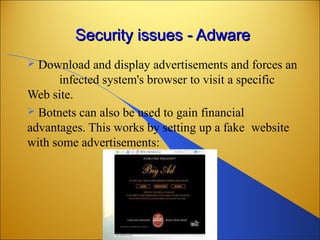
 Botnets can also be used to gain financial
advantages. This works by setting up a fake website
with some advertisements:
Security issues - SpammingSecurity issues - Spamming
Most junk email is sent by bots. Owners of
Infected computers are usually unaware that
their machines are being used to commit a
crime.
In addition, this can of course also be used to
send phishing-mails since phishing is a special
case of spam.
Spam BOTNETSSpam BOTNETS
Security issues with emailSecurity issues with email
 Viruses and Trojans still use spam-like social
engineering.
 Phishing emails for online banking information are
now common to fool the people
 Stock promotion scams – Impact on the Stock market
 "click here to unsubscribe" scams will indeed give you
more spam, viruses and phishing scams
 Spoofed From: addresses use legitimate domain names,
making filtering more difficult.
 Social engineering scams - promises of nude celebrity
pictures
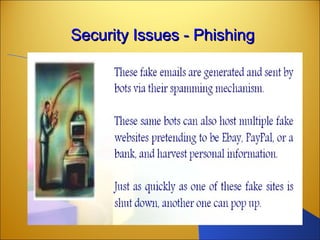
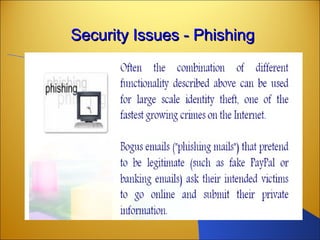
Security Issues - PhishingSecurity Issues - Phishing
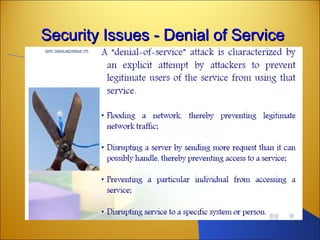
Security Issues - Denial of ServiceSecurity Issues - Denial of Service
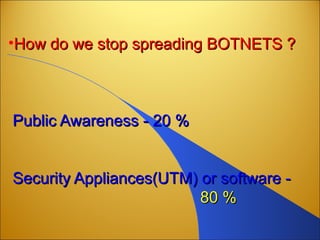
•How do we stop spreading BOTNETS ?How do we stop spreading BOTNETS ?
Public Awareness - 20 %Public Awareness - 20 %
Security Appliances(UTM) or software -Security Appliances(UTM) or software -
80 %80 %
User EducationUser Education
•A Botnet is a blended threat, which need to be
tackled at multiple levels through web content
filtering and gateway anti-virus checks and
scanning of web mail traffic.
•Similarly, its gateway anti-spyware scans web
and mail traffic while gateway anti-spam scans
mail traffic for spam and malware laced mails.
USER AUTHONTICATIONUSER AUTHONTICATION
RADIUS
TOKEN SECURITY
BIOMETRICS
RADIUSRADIUS
RADIUS
SECURE TOKEN
BIOMETRICS
RADIUSRADIUS
 Remote Authentication Dial In User Service (RADIUS) is
a networking protocol that provides centralized access,
authorization and accounting management for people or
computers to connect and use a network service. When a
person or device connects to a network often "Authentication
" is required. Networks or services not requiring authentication
are said to be anonymous or open.
 Once authenticated, RADIUS also determines what rights or
privileges the person or computer is "Authorized" to perform
and makes a record of this access in the "Accounting" feature
of the server. The support of Authentication, Authorization and
Accounting is referred to as the AAA (said triple A) process.
SECURE TOKENSECURE TOKEN
•A security token (or sometimes a hardware token, hard token,
authentication token, USB token, cryptographic token[1]
, or
key fob) may be a physical device that an authorized user of
computer services is given to ease authentication. The term
may also refer to software tokens.
• Security tokens are used to prove one's identity electronically
(as in the case of a customer trying to access their bank
account). The token is used in addition to or in place of a
password to prove that the customer is who they claim to be.
The token acts like an electronic key to access something.
RADIUSRADIUS
 Remote Authentication Dial In User Service (RADIUS) is
a networking protocol that provides centralized access,
authorization and accounting management for people or
computers to connect and use a network service. When a
person or device connects to a network often "Authentication
" is required. Networks or services not requiring authentication
are said to be anonymous or open.
 Once authenticated, RADIUS also determines what rights or
privileges the person or computer is "Authorized" to perform
and makes a record of this access in the "Accounting" feature
of the server. The support of Authentication, Authorization and
Accounting is referred to as the AAA (said triple A) process.
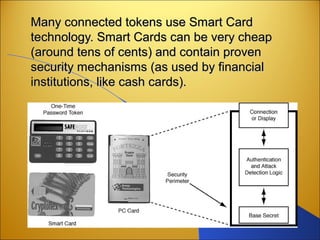
Many connected tokens use Smart CardMany connected tokens use Smart Card
technology. Smart Cards can be very cheaptechnology. Smart Cards can be very cheap
(around tens of cents) and contain proven(around tens of cents) and contain proven
security mechanisms (as used by financialsecurity mechanisms (as used by financial
institutions, like cash cards).institutions, like cash cards).
BOIMETRICBOIMETRIC
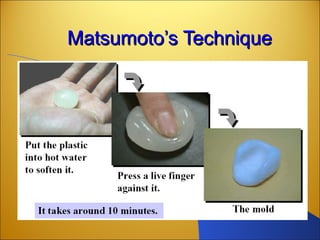
 Biometrics refers to methods for uniquely recognizing humans
based upon one or more intrinsic physical or behavioural traits. In
information technology, in particular, biometrics is used as a form
of identity access management and access control.
 Biometric characteristics can be divided in two main classes:
 Physiological are related to the shape of the body. Examples
include, but are not limited to fingerprint, face
recognition, DNA, hand and palm geometry, iris
recognition, which has largely replaced retina, and odor/scent.
 Behavioural are related to the behavior of a person. Examples
include, but are not limited to typing rhythm, gait, and
voice.
Biometrics: Why?Biometrics: Why?
Eliminate memorization –
 Users don’t have to memorize features of their
voice, face, eyes, or fingerprints
Eliminate misplaced tokens –
 Users won’t forget to bring fingerprints to work
Can’t be delegated –
 Users can’t lend fingers or faces to someone else
Often unique –
 Save money and maintain database integrity by
eliminating duplicate enrollments
Biometrics: How?Biometrics: How?
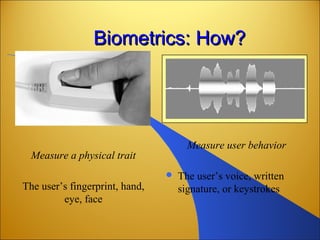
Measure a physical trait
The user’s fingerprint, hand,
eye, face
Measure user behavior
 The user’s voice, written
signature, or keystrokes
Biometrics: How Strong?Biometrics: How Strong?
Three types of attacks
• Trial-and-error attack
– Classic way of measuring biometric strength
• Digital spoofing
– Transmit a digital pattern that mimics that of a legitimate
user’s biometric signature
– Similar to password sniffing and replay
– Biometrics can’t prevent such attacks by themselves
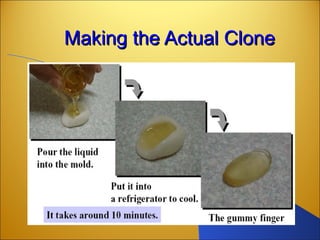
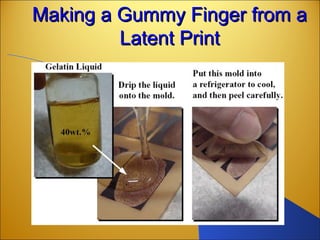
• Physical spoofing
– Present a biometric sensor with an image that mimics the
appearance of a legitimate user
Biometric AuthenticationBiometric Authentication
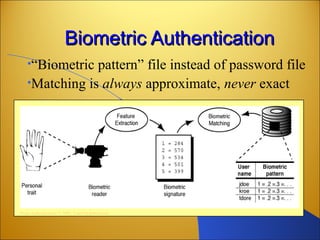
•“Biometric pattern” file instead of password file
•Matching is always approximate, never exact
From Authentication © 2002. Used by permission
Pattern MatchingPattern Matching
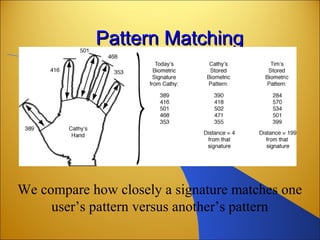
We compare how closely a signature matches one
user’s pattern versus another’s pattern
Matsumoto’s TechniqueMatsumoto’s Technique
Making the Actual CloneMaking the Actual Clone
Making a Gummy Finger from aMaking a Gummy Finger from a
Latent PrintLatent Print
SECURITY IN THE INTERNETSECURITY IN THE INTERNET
 IP Sec
SSL/TLS
FIREWALL
IP SecIP Sec
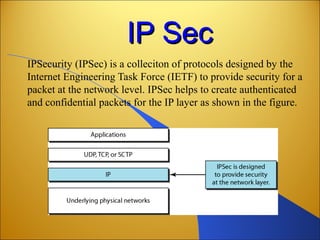
IPSecurity (IPSec) is a colleciton of protocols designed by the
Internet Engineering Task Force (IETF) to provide security for a
packet at the network level. IPSec helps to create authenticated
and confidential packets for the IP layer as shown in the figure.
TWO MODESTWO MODES
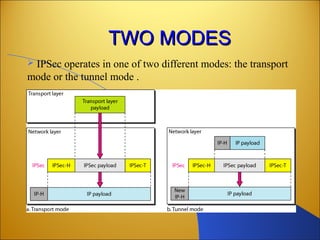
 IPSec operates in one of two different modes: the transport
mode or the tunnel mode .
 Transport Mode
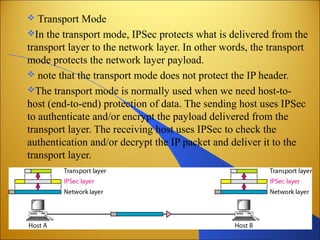
In the transport mode, IPSec protects what is delivered from the
transport layer to the network layer. In other words, the transport
mode protects the network layer payload.
 note that the transport mode does not protect the IP header.
The transport mode is normally used when we need host-to-
host (end-to-end) protection of data. The sending host uses IPSec
to authenticate and/or encrypt the payload delivered from the
transport layer. The receiving host uses IPSec to check the
authentication and/or decrypt the IP packet and deliver it to the
transport layer.
TUNNEL MODETUNNEL MODE
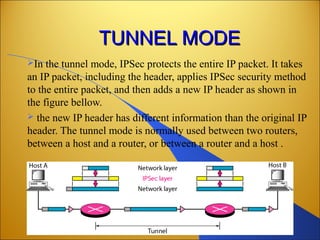
In the tunnel mode, IPSec protects the entire IP packet. It takes
an IP packet, including the header, applies IPSec security method
to the entire packet, and then adds a new IP header as shown in
the figure bellow.
 the new IP header has different information than the original IP
header. The tunnel mode is normally used between two routers,
between a host and a router, or between a router and a host .
TWO DIFFERENTTWO DIFFERENT
PROTOCOLSPROTOCOLS
IPSec defines two protocols:
1.the Authentication Header (AH) protocol
2. the Encapsulating Security Payload (ESP) Protocol
to provide authentication and/or encryption for packets at the
IP level.
SSL/TLSSSL/TLS
 a transport layer security provides end-to-end security services
for applications that use a reliable transport layer protocol such as
TCP. The idea is to provide security services for transactions on
the internet.
 two protocols are dominant today for providing security at the
transport layer:
1.The Secure sockets Layer (SSL) Protocol
2.The Transport Layer Security (TSL) Protocol.
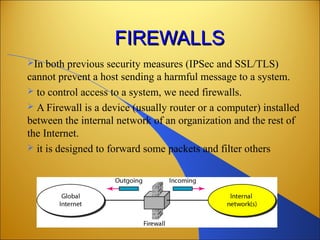
FIREWALLSFIREWALLS
In both previous security measures (IPSec and SSL/TLS)
cannot prevent a host sending a harmful message to a system.
 to control access to a system, we need firewalls.
 A Firewall is a device (usually router or a computer) installed
between the internal network of an organization and the rest of
the Internet.
 it is designed to forward some packets and filter others
A firewall is usually classified as a packet-filter or proxy-based
firewalls.
PACKET-FILTER FIREWALL
A firewall can be used as a packet filter. It can forward or block
packets based on the information in the network layer and
transport layer headers: source and destination IP addresses,
source and destination port addresses, and type of protocol (TCP
or UDP).
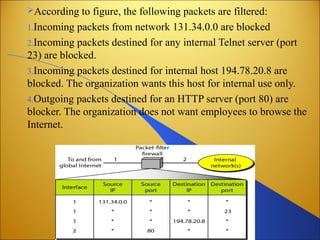
A packet-filter firewall is a router that uses a filtering table to
decide which packets must be discarded, as shown in the figure in
the next slide.
According to figure, the following packets are filtered:
1.Incoming packets from network 131.34.0.0 are blocked
2.Incoming packets destined for any internal Telnet server (port
23) are blocked.
3.Incoming packets destined for internal host 194.78.20.8 are
blocked. The organization wants this host for internal use only.
4.Outgoing packets destined for an HTTP server (port 80) are
blocker. The organization does not want employees to browse the
Internet.
PROXY FIREWALL
The packet-filter firewall is based on the information available
in the network layer and transport layer headers. However,
sometimes we need to filter a message based on the information
available in the message itself.
As an example, assume that an organization wants to implement
the following policies regarding its Web pages: Only those
Internet users who have previously established business relations
with the company can have access; access to other users must be
blocked. In this case, a packet-filter firewall is not feasible
because it cannot distinguish between different packets arriving
at TCP port . Testing must be done at the application layer.
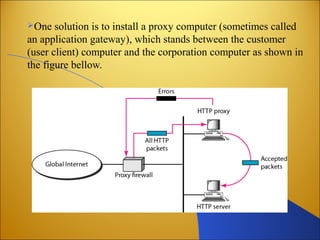
One solution is to install a proxy computer (sometimes called
an application gateway), which stands between the customer
(user client) computer and the corporation computer as shown in
the figure bellow.
When the user client process sends a message,
the proxy firewall runs a server process to
receive the request. The sever opens the packer
at the application level and finds out if the
request is legitimate. If it is, the sever acts as a
client process and sends the message to the real
sever in the corporation.. If it is not, the message
is dropped and an error message is sent to the
external user. In this way, the requests of the
external users are filtered based on the contents
at the application layer.
Network security

Network security

  • 1.
  • 2.
    Botnet factsBotnet facts •Botnets are the primary infrastructure of criminal activity on the Internet, used most heavily for spamming, phishing, and creating more bots. • Platforms – Most bots are compromised Windows machines – Most controllers are compromised Unix hosts. – Networks of compromised end-user machines spread SPAM, launch attacks, collect and share stolen information
  • 3.
    Network Security Issues- BotnetsNetwork Security Issues - Botnets Platform for Botnet Attacks 􀂾 Spyware 􀂾 Adware 􀂾 Spamming 􀂾 Phishing 􀂾 Denial of Service (DoS) Attacks
  • 4.
    Security issues -SpywareSecurity issues - Spyware Spyware is a computer software that is installed on a Pc without user awareness to intercept or take partial control over the user interaction with the computer. Spyware program can collect various type of Personal information such as: • Internet surfing habits; • Internet sites visited; • Interfere with user control of the computer and install additional software which may contain Viruses.
  • 5.
    Security issues -AdwareSecurity issues - Adware  Download and display advertisements and forces an infected system's browser to visit a specific Web site.  Botnets can also be used to gain financial advantages. This works by setting up a fake website with some advertisements:
  • 6.
    Security issues -SpammingSecurity issues - Spamming Most junk email is sent by bots. Owners of Infected computers are usually unaware that their machines are being used to commit a crime. In addition, this can of course also be used to send phishing-mails since phishing is a special case of spam.
  • 7.
    Spam BOTNETSSpam BOTNETS Securityissues with emailSecurity issues with email  Viruses and Trojans still use spam-like social engineering.  Phishing emails for online banking information are now common to fool the people  Stock promotion scams – Impact on the Stock market  "click here to unsubscribe" scams will indeed give you more spam, viruses and phishing scams  Spoofed From: addresses use legitimate domain names, making filtering more difficult.  Social engineering scams - promises of nude celebrity pictures
  • 8.
    Security Issues -PhishingSecurity Issues - Phishing
  • 9.
    Security Issues -PhishingSecurity Issues - Phishing
  • 10.
    Security Issues -Denial of ServiceSecurity Issues - Denial of Service
  • 11.
    •How do westop spreading BOTNETS ?How do we stop spreading BOTNETS ? Public Awareness - 20 %Public Awareness - 20 % Security Appliances(UTM) or software -Security Appliances(UTM) or software - 80 %80 %
  • 12.
    User EducationUser Education •ABotnet is a blended threat, which need to be tackled at multiple levels through web content filtering and gateway anti-virus checks and scanning of web mail traffic. •Similarly, its gateway anti-spyware scans web and mail traffic while gateway anti-spam scans mail traffic for spam and malware laced mails.
  • 13.
  • 14.
  • 15.
    RADIUSRADIUS  Remote AuthenticationDial In User Service (RADIUS) is a networking protocol that provides centralized access, authorization and accounting management for people or computers to connect and use a network service. When a person or device connects to a network often "Authentication " is required. Networks or services not requiring authentication are said to be anonymous or open.  Once authenticated, RADIUS also determines what rights or privileges the person or computer is "Authorized" to perform and makes a record of this access in the "Accounting" feature of the server. The support of Authentication, Authorization and Accounting is referred to as the AAA (said triple A) process.
  • 16.
    SECURE TOKENSECURE TOKEN •Asecurity token (or sometimes a hardware token, hard token, authentication token, USB token, cryptographic token[1] , or key fob) may be a physical device that an authorized user of computer services is given to ease authentication. The term may also refer to software tokens. • Security tokens are used to prove one's identity electronically (as in the case of a customer trying to access their bank account). The token is used in addition to or in place of a password to prove that the customer is who they claim to be. The token acts like an electronic key to access something.
  • 17.
    RADIUSRADIUS  Remote AuthenticationDial In User Service (RADIUS) is a networking protocol that provides centralized access, authorization and accounting management for people or computers to connect and use a network service. When a person or device connects to a network often "Authentication " is required. Networks or services not requiring authentication are said to be anonymous or open.  Once authenticated, RADIUS also determines what rights or privileges the person or computer is "Authorized" to perform and makes a record of this access in the "Accounting" feature of the server. The support of Authentication, Authorization and Accounting is referred to as the AAA (said triple A) process.
  • 18.
    Many connected tokensuse Smart CardMany connected tokens use Smart Card technology. Smart Cards can be very cheaptechnology. Smart Cards can be very cheap (around tens of cents) and contain proven(around tens of cents) and contain proven security mechanisms (as used by financialsecurity mechanisms (as used by financial institutions, like cash cards).institutions, like cash cards).
  • 19.
    BOIMETRICBOIMETRIC  Biometrics refersto methods for uniquely recognizing humans based upon one or more intrinsic physical or behavioural traits. In information technology, in particular, biometrics is used as a form of identity access management and access control.  Biometric characteristics can be divided in two main classes:  Physiological are related to the shape of the body. Examples include, but are not limited to fingerprint, face recognition, DNA, hand and palm geometry, iris recognition, which has largely replaced retina, and odor/scent.  Behavioural are related to the behavior of a person. Examples include, but are not limited to typing rhythm, gait, and voice.
  • 21.
    Biometrics: Why?Biometrics: Why? Eliminatememorization –  Users don’t have to memorize features of their voice, face, eyes, or fingerprints Eliminate misplaced tokens –  Users won’t forget to bring fingerprints to work Can’t be delegated –  Users can’t lend fingers or faces to someone else Often unique –  Save money and maintain database integrity by eliminating duplicate enrollments
  • 22.
    Biometrics: How?Biometrics: How? Measurea physical trait The user’s fingerprint, hand, eye, face Measure user behavior  The user’s voice, written signature, or keystrokes
  • 23.
    Biometrics: How Strong?Biometrics:How Strong? Three types of attacks • Trial-and-error attack – Classic way of measuring biometric strength • Digital spoofing – Transmit a digital pattern that mimics that of a legitimate user’s biometric signature – Similar to password sniffing and replay – Biometrics can’t prevent such attacks by themselves • Physical spoofing – Present a biometric sensor with an image that mimics the appearance of a legitimate user
  • 24.
    Biometric AuthenticationBiometric Authentication •“Biometricpattern” file instead of password file •Matching is always approximate, never exact From Authentication © 2002. Used by permission
  • 25.
    Pattern MatchingPattern Matching Wecompare how closely a signature matches one user’s pattern versus another’s pattern
  • 26.
  • 27.
    Making the ActualCloneMaking the Actual Clone
  • 28.
    Making a GummyFinger from aMaking a Gummy Finger from a Latent PrintLatent Print
  • 29.
    SECURITY IN THEINTERNETSECURITY IN THE INTERNET  IP Sec SSL/TLS FIREWALL
  • 30.
    IP SecIP Sec IPSecurity(IPSec) is a colleciton of protocols designed by the Internet Engineering Task Force (IETF) to provide security for a packet at the network level. IPSec helps to create authenticated and confidential packets for the IP layer as shown in the figure.
  • 31.
    TWO MODESTWO MODES IPSec operates in one of two different modes: the transport mode or the tunnel mode .
  • 32.
     Transport Mode Inthe transport mode, IPSec protects what is delivered from the transport layer to the network layer. In other words, the transport mode protects the network layer payload.  note that the transport mode does not protect the IP header. The transport mode is normally used when we need host-to- host (end-to-end) protection of data. The sending host uses IPSec to authenticate and/or encrypt the payload delivered from the transport layer. The receiving host uses IPSec to check the authentication and/or decrypt the IP packet and deliver it to the transport layer.
  • 33.
    TUNNEL MODETUNNEL MODE Inthe tunnel mode, IPSec protects the entire IP packet. It takes an IP packet, including the header, applies IPSec security method to the entire packet, and then adds a new IP header as shown in the figure bellow.  the new IP header has different information than the original IP header. The tunnel mode is normally used between two routers, between a host and a router, or between a router and a host .
  • 34.
    TWO DIFFERENTTWO DIFFERENT PROTOCOLSPROTOCOLS IPSecdefines two protocols: 1.the Authentication Header (AH) protocol 2. the Encapsulating Security Payload (ESP) Protocol to provide authentication and/or encryption for packets at the IP level.
  • 35.
    SSL/TLSSSL/TLS  a transportlayer security provides end-to-end security services for applications that use a reliable transport layer protocol such as TCP. The idea is to provide security services for transactions on the internet.  two protocols are dominant today for providing security at the transport layer: 1.The Secure sockets Layer (SSL) Protocol 2.The Transport Layer Security (TSL) Protocol.
  • 36.
    FIREWALLSFIREWALLS In both previoussecurity measures (IPSec and SSL/TLS) cannot prevent a host sending a harmful message to a system.  to control access to a system, we need firewalls.  A Firewall is a device (usually router or a computer) installed between the internal network of an organization and the rest of the Internet.  it is designed to forward some packets and filter others
  • 37.
    A firewall isusually classified as a packet-filter or proxy-based firewalls. PACKET-FILTER FIREWALL A firewall can be used as a packet filter. It can forward or block packets based on the information in the network layer and transport layer headers: source and destination IP addresses, source and destination port addresses, and type of protocol (TCP or UDP). A packet-filter firewall is a router that uses a filtering table to decide which packets must be discarded, as shown in the figure in the next slide.
  • 38.
    According to figure,the following packets are filtered: 1.Incoming packets from network 131.34.0.0 are blocked 2.Incoming packets destined for any internal Telnet server (port 23) are blocked. 3.Incoming packets destined for internal host 194.78.20.8 are blocked. The organization wants this host for internal use only. 4.Outgoing packets destined for an HTTP server (port 80) are blocker. The organization does not want employees to browse the Internet.
  • 39.
    PROXY FIREWALL The packet-filterfirewall is based on the information available in the network layer and transport layer headers. However, sometimes we need to filter a message based on the information available in the message itself. As an example, assume that an organization wants to implement the following policies regarding its Web pages: Only those Internet users who have previously established business relations with the company can have access; access to other users must be blocked. In this case, a packet-filter firewall is not feasible because it cannot distinguish between different packets arriving at TCP port . Testing must be done at the application layer.
  • 40.
    One solution isto install a proxy computer (sometimes called an application gateway), which stands between the customer (user client) computer and the corporation computer as shown in the figure bellow.
  • 41.
    When the userclient process sends a message, the proxy firewall runs a server process to receive the request. The sever opens the packer at the application level and finds out if the request is legitimate. If it is, the sever acts as a client process and sends the message to the real sever in the corporation.. If it is not, the message is dropped and an error message is sent to the external user. In this way, the requests of the external users are filtered based on the contents at the application layer.