HTML – Tables
By
Dr. I. Uma Maheswari
iuma_maheswari@yahoo.co.in
Tables
• Tables are information represented in rows
and columns.
• Information are understandable in the form
of tables rather than continuous text.
• It also gives professional look to the
document and increase easy readability of
the information.
Elements of a html table
• Caption – indicates what the table is
dealing with and they are optional
• Table heading – they give a title for each
row or column
• Table data – this denotes the values inside
the table
• Table cells – they are individual squares in
a table. A cell can contain either table data
or table heading.
Table tag
• <table> and </table> is the tag used for creating
a table in html document.
Attributes of table tag
• Width – specifies the width of a table
• Cellspacing – specifies the space between cells.
• Cellpadding – specifies the space between border
of the cell and its contents.
• Border – specifies thickness of the border around
the table. If border = “0” no border will be
displayed.
• Bgcolor – background colour of a table or table
cell.
More tags on table
• Row tag - <tr> …..</tr> within this tag,
table heading and table data are specified.
• Heading tag - <th> …. </th> specifies row
headings or column headings.
• Data tag - <td> ….. </td> specifies data
Attributes of <td> tag
• Align – used to align the content of a cell.
Eg., <TD align = “center”> English </TD>
• Bgcolor – change the colour of the table.
(Table cell or entire table colour can be
changed)
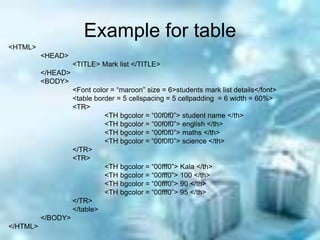
Example for table
<HTML>
<HEAD>
<TITLE> Mark list </TITLE>
</HEAD>
<BODY>
<Font color = “maroon” size = 6>students mark list details</font>
<table border = 5 cellspacing = 5 cellpadding = 6 width = 60%>
<TR>
<TH bgcolor = “00f0f0”> student name </th>
<TH bgcolor = “00f0f0”> english </th>
<TH bgcolor = “00f0f0”> maths </th>
<TH bgcolor = “00f0f0”> science </th>
</TR>
<TR>
<TH bgcolor = “00fff0”> Kala </th>
<TH bgcolor = “00fff0”> 100 </th>
<TH bgcolor = “00fff0”> 90 </th>
<TH bgcolor = “00fff0”> 95 </th>
</TR>
</table>
</BODY>
</HTML>
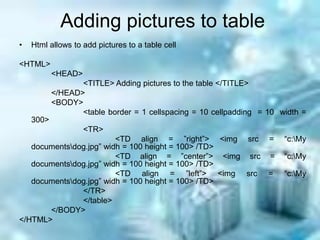
Adding pictures to table
• Html allows to add pictures to a table cell
<HTML>
<HEAD>
<TITLE> Adding pictures to the table </TITLE>
</HEAD>
<BODY>
<table border = 1 cellspacing = 10 cellpadding = 10 width =
300>
<TR>
<TD align = ”right”> <img src = “c:My
documentsdog.jpg” widh = 100 height = 100> /TD>
<TD align = ”center”> <img src = “c:My
documentsdog.jpg” widh = 100 height = 100> /TD>
<TD align = ”left”> <img src = “c:My
documentsdog.jpg” widh = 100 height = 100> /TD>
</TR>
</table>
</BODY>
</HTML>

Computer language - Html tables

  • 1.
    HTML – Tables By Dr.I. Uma Maheswari iuma_maheswari@yahoo.co.in
  • 2.
    Tables • Tables areinformation represented in rows and columns. • Information are understandable in the form of tables rather than continuous text. • It also gives professional look to the document and increase easy readability of the information.
  • 3.
    Elements of ahtml table • Caption – indicates what the table is dealing with and they are optional • Table heading – they give a title for each row or column • Table data – this denotes the values inside the table • Table cells – they are individual squares in a table. A cell can contain either table data or table heading.
  • 4.
    Table tag • <table>and </table> is the tag used for creating a table in html document. Attributes of table tag • Width – specifies the width of a table • Cellspacing – specifies the space between cells. • Cellpadding – specifies the space between border of the cell and its contents. • Border – specifies thickness of the border around the table. If border = “0” no border will be displayed. • Bgcolor – background colour of a table or table cell.
  • 5.
    More tags ontable • Row tag - <tr> …..</tr> within this tag, table heading and table data are specified. • Heading tag - <th> …. </th> specifies row headings or column headings. • Data tag - <td> ….. </td> specifies data
  • 6.
    Attributes of <td>tag • Align – used to align the content of a cell. Eg., <TD align = “center”> English </TD> • Bgcolor – change the colour of the table. (Table cell or entire table colour can be changed)
  • 7.
    Example for table <HTML> <HEAD> <TITLE>Mark list </TITLE> </HEAD> <BODY> <Font color = “maroon” size = 6>students mark list details</font> <table border = 5 cellspacing = 5 cellpadding = 6 width = 60%> <TR> <TH bgcolor = “00f0f0”> student name </th> <TH bgcolor = “00f0f0”> english </th> <TH bgcolor = “00f0f0”> maths </th> <TH bgcolor = “00f0f0”> science </th> </TR> <TR> <TH bgcolor = “00fff0”> Kala </th> <TH bgcolor = “00fff0”> 100 </th> <TH bgcolor = “00fff0”> 90 </th> <TH bgcolor = “00fff0”> 95 </th> </TR> </table> </BODY> </HTML>
  • 8.
    Adding pictures totable • Html allows to add pictures to a table cell <HTML> <HEAD> <TITLE> Adding pictures to the table </TITLE> </HEAD> <BODY> <table border = 1 cellspacing = 10 cellpadding = 10 width = 300> <TR> <TD align = ”right”> <img src = “c:My documentsdog.jpg” widh = 100 height = 100> /TD> <TD align = ”center”> <img src = “c:My documentsdog.jpg” widh = 100 height = 100> /TD> <TD align = ”left”> <img src = “c:My documentsdog.jpg” widh = 100 height = 100> /TD> </TR> </table> </BODY> </HTML>