H T M L
T AB L E S
E X P L A I NE D
Author: M.Muzaffar Hameed
What is a TABLE?
• The HTML table allows web designers to
arrange & organize data -- text, images,
hyperlinks, forms, form fields, other tables, etc.
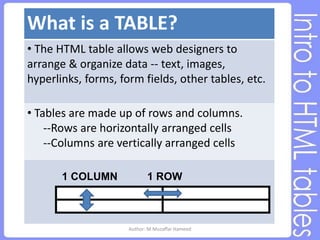
• Tables are made up of rows and columns.
--Rows are horizontally arranged cells
--Columns are vertically arranged cells
1 ROW
1 COLUMN
Author: M.Muzaffar Hameed
TABLE: Components
• Basic HTML table tags:
o <table></table> required
oDefines the beginning and end of the table
o <tr></tr> required
oTable Row - Defines the beginning and end of a
horizontal row.
o <td></td> required
oTable Cell - Defines an individual cell. Cells are always
placed inside a row. “td” stands for table data.
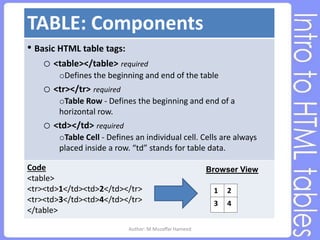
Code
<table>
<tr><td>1</td><td>2</td></tr>
<tr><td>3</td><td>4</td></tr>
</table>
1 2
3 4
Browser View
Author: M.Muzaffar Hameed
TABLE: Components Cont.
• Additional HTML table tags:
o <th></th> optional
o Defines a table header row. Used instead of “td.”
o Text is bold & centered within the cell
o <caption></caption> optional
o Sets a caption for the table. Goes after the table tag but
not inside “tr” or “td.” There should be only one caption
per table. Appears centered above the table.
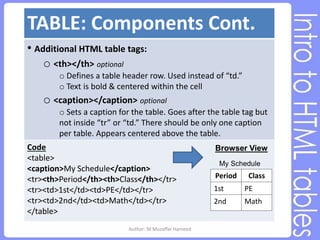
Code
<table>
<caption>My Schedule</caption>
<tr><th>Period</th><th>Class</th></tr>
<tr><td>1st</td><td>PE</td></tr>
<tr><td>2nd</td><td>Math</td></tr>
</table>
Period Class
1st PE
2nd Math
Browser View
My Schedule
Author: M.Muzaffar Hameed
TABLE: Tag attributes
• Attributes that can be added to table tags:
o Table Border optional
o Table border attribute dictates border thickness
o Example: <table border=“1”>
o 0 = no border & larger numbers = thicker borders
o No border defined = no border viewable
o bordercolor can be added to change the color of the
table border. Border must be >0 to see the color
o Example: <table border=“1” bordercolor=“red”>
o Table Width & Height optional
o Width & Height can be defined in the open table tag
o Example: <table width=“100” height=“100”>
o The height attribute is widely supported, but isn't actually
part of the official HTML standard. It may not always work
as you expect.
o If no size values are specified, the browser will decide on
an appropriate size. Results will vary between browsers.
Author: M.Muzaffar Hameed
TABLE: Tag attributes cont.
• Additional attributes that can be added to table tags:
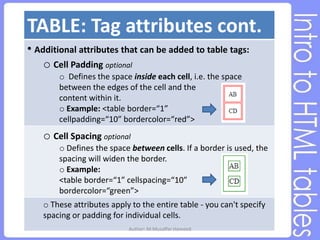
o Cell Padding optional
o Defines the space inside each cell, i.e. the space
between the edges of the cell and the
content within it.
o Example: <table border=“1”
cellpadding=“10” bordercolor=“red”>
o Cell Spacing optional
o Defines the space between cells. If a border is used, the
spacing will widen the border.
o Example:
<table border=“1” cellspacing=“10”
bordercolor=“green”>
o These attributes apply to the entire table - you can't specify
spacing or padding for individual cells.
Author: M.Muzaffar Hameed
TABLE: Tag attributes cont.
• Attributes that can be added to th, tr, & td tags:
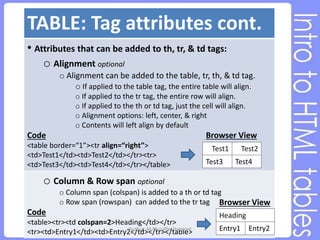
o Alignment optional
o Alignment can be added to the table, tr, th, & td tag.
o If applied to the table tag, the entire table will align.
o If applied to the tr tag, the entire row will align.
o If applied to the th or td tag, just the cell will align.
o Alignment options: left, center, & right
o Contents will left align by default
Code
<table border=“1”><tr align=“right”>
<td>Test1</td><td>Test2</td></tr><tr>
<td>Test3</td><td>Test4</td></tr></table>
o Column & Row span optional
o Column span (colspan) is added to a th or td tag
o Row span (rowspan) can added to the tr tag
Code
<table><tr><td colspan=2>Heading</td></tr>
<tr><td>Entry1</td><td>Entry2</td></tr></table>
Browser View
Test1 Test2
Test3 Test4
Browser View
Heading
Entry1 Entry2
Author: M.Muzaffar Hameed
REVIEW: HTML tables
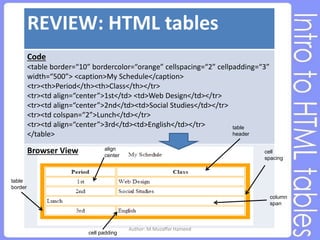
Code
<table border=“10” bordercolor=“orange” cellspacing=“2” cellpadding=“3”
width=“500”> <caption>My Schedule</caption>
<tr><th>Period</th><th>Class</th></tr>
<tr><td align=“center”>1st</td> <td>Web Design</td></tr>
<tr><td align=“center”>2nd</td><td>Social Studies</td></tr>
<tr><td colspan=“2”>Lunch</td></tr>
<tr><td align=“center”>3rd</td><td>English</td></tr>
</table>
table
border
align
center
cell padding
cell
spacing
table
header
column
span
Browser View
Author: M.Muzaffar Hameed

2. HTML Tables.ppt

  • 1.
    H T ML T AB L E S E X P L A I NE D Author: M.Muzaffar Hameed
  • 2.
    What is aTABLE? • The HTML table allows web designers to arrange & organize data -- text, images, hyperlinks, forms, form fields, other tables, etc. • Tables are made up of rows and columns. --Rows are horizontally arranged cells --Columns are vertically arranged cells 1 ROW 1 COLUMN Author: M.Muzaffar Hameed
  • 3.
    TABLE: Components • BasicHTML table tags: o <table></table> required oDefines the beginning and end of the table o <tr></tr> required oTable Row - Defines the beginning and end of a horizontal row. o <td></td> required oTable Cell - Defines an individual cell. Cells are always placed inside a row. “td” stands for table data. Code <table> <tr><td>1</td><td>2</td></tr> <tr><td>3</td><td>4</td></tr> </table> 1 2 3 4 Browser View Author: M.Muzaffar Hameed
  • 4.
    TABLE: Components Cont. •Additional HTML table tags: o <th></th> optional o Defines a table header row. Used instead of “td.” o Text is bold & centered within the cell o <caption></caption> optional o Sets a caption for the table. Goes after the table tag but not inside “tr” or “td.” There should be only one caption per table. Appears centered above the table. Code <table> <caption>My Schedule</caption> <tr><th>Period</th><th>Class</th></tr> <tr><td>1st</td><td>PE</td></tr> <tr><td>2nd</td><td>Math</td></tr> </table> Period Class 1st PE 2nd Math Browser View My Schedule Author: M.Muzaffar Hameed
  • 5.
    TABLE: Tag attributes •Attributes that can be added to table tags: o Table Border optional o Table border attribute dictates border thickness o Example: <table border=“1”> o 0 = no border & larger numbers = thicker borders o No border defined = no border viewable o bordercolor can be added to change the color of the table border. Border must be >0 to see the color o Example: <table border=“1” bordercolor=“red”> o Table Width & Height optional o Width & Height can be defined in the open table tag o Example: <table width=“100” height=“100”> o The height attribute is widely supported, but isn't actually part of the official HTML standard. It may not always work as you expect. o If no size values are specified, the browser will decide on an appropriate size. Results will vary between browsers. Author: M.Muzaffar Hameed
  • 6.
    TABLE: Tag attributescont. • Additional attributes that can be added to table tags: o Cell Padding optional o Defines the space inside each cell, i.e. the space between the edges of the cell and the content within it. o Example: <table border=“1” cellpadding=“10” bordercolor=“red”> o Cell Spacing optional o Defines the space between cells. If a border is used, the spacing will widen the border. o Example: <table border=“1” cellspacing=“10” bordercolor=“green”> o These attributes apply to the entire table - you can't specify spacing or padding for individual cells. Author: M.Muzaffar Hameed
  • 7.
    TABLE: Tag attributescont. • Attributes that can be added to th, tr, & td tags: o Alignment optional o Alignment can be added to the table, tr, th, & td tag. o If applied to the table tag, the entire table will align. o If applied to the tr tag, the entire row will align. o If applied to the th or td tag, just the cell will align. o Alignment options: left, center, & right o Contents will left align by default Code <table border=“1”><tr align=“right”> <td>Test1</td><td>Test2</td></tr><tr> <td>Test3</td><td>Test4</td></tr></table> o Column & Row span optional o Column span (colspan) is added to a th or td tag o Row span (rowspan) can added to the tr tag Code <table><tr><td colspan=2>Heading</td></tr> <tr><td>Entry1</td><td>Entry2</td></tr></table> Browser View Test1 Test2 Test3 Test4 Browser View Heading Entry1 Entry2 Author: M.Muzaffar Hameed
  • 8.
    REVIEW: HTML tables Code <tableborder=“10” bordercolor=“orange” cellspacing=“2” cellpadding=“3” width=“500”> <caption>My Schedule</caption> <tr><th>Period</th><th>Class</th></tr> <tr><td align=“center”>1st</td> <td>Web Design</td></tr> <tr><td align=“center”>2nd</td><td>Social Studies</td></tr> <tr><td colspan=“2”>Lunch</td></tr> <tr><td align=“center”>3rd</td><td>English</td></tr> </table> table border align center cell padding cell spacing table header column span Browser View Author: M.Muzaffar Hameed