HTMLTABLE
COURSE INSTRUCTOR: Mrs. Raya Idrissa
Email: r.idrisa@gmail.com
TheStateUniversityOfZanzibar
1
INF 003: Website Design and Development
Simple HTMLTables
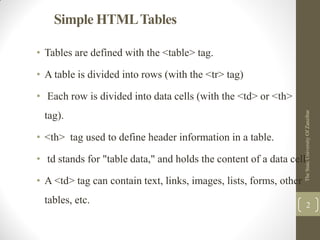
• Tables are defined with the <table> tag.
• A table is divided into rows (with the <tr> tag)
• Each row is divided into data cells (with the <td> or <th>
tag).
• <th> tag used to define header information in a table.
• td stands for "table data," and holds the content of a data cell.
• A <td> tag can contain text, links, images, lists, forms, other
tables, etc.
TheStateUniversityOfZanzibar
2
Simple HTMLTables
TheStateUniversityOfZanzibar
3
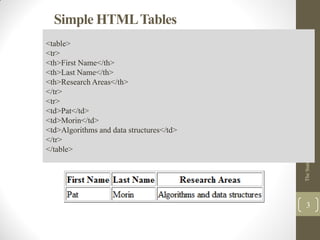
<table>
<tr>
<th>First Name</th>
<th>Last Name</th>
<th>Research Areas</th>
</tr>
<tr>
<td>Pat</td>
<td>Morin</td>
<td>Algorithms and data structures</td>
</tr>
</table>
HTMLTable Tags
TheStateUniversityOfZanzibar
4
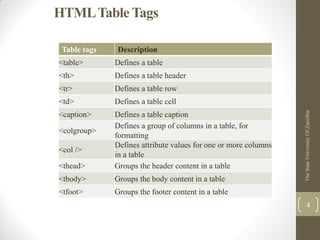
Table tags Description
<table> Defines a table
<th> Defines a table header
<tr> Defines a table row
<td> Defines a table cell
<caption> Defines a table caption
<colgroup>
Defines a group of columns in a table, for
formatting
<col />
Defines attribute values for one or more columns
in a table
<thead> Groups the header content in a table
<tbody> Groups the body content in a table
<tfoot> Groups the footer content in a table
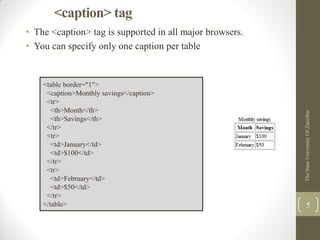
<caption> tag
• The <caption> tag is supported in all major browsers.
• You can specify only one caption per table
TheStateUniversityOfZanzibar
5
<table border="1">
<caption>Monthly savings</caption>
<tr>
<th>Month</th>
<th>Savings</th>
</tr>
<tr>
<td>January</td>
<td>$100</td>
</tr>
<tr>
<td>February</td>
<td>$50</td>
</tr>
</table>
<colgroup> tag
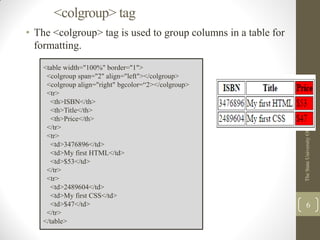
• The <colgroup> tag is used to group columns in a table for
formatting.
TheStateUniversityOfZanzibar
6
<table width="100%" border="1">
<colgroup span="2" align="left"></colgroup>
<colgroup align="right" bgcolor=“2></colgroup>
<tr>
<th>ISBN</th>
<th>Title</th>
<th>Price</th>
</tr>
<tr>
<td>3476896</td>
<td>My first HTML</td>
<td>$53</td>
</tr>
<tr>
<td>2489604</td>
<td>My first CSS</td>
<td>$47</td>
</tr>
</table>
<thead>, <tbody> and <tfoot> tag
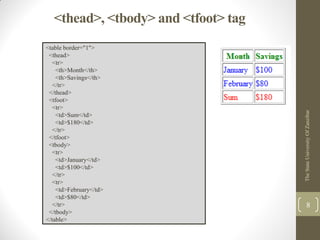
• The <thead> groups the header content in an HTML table.
• Thw <tfoot> groups the footer content in an HTML table.
• The <tbody> groups the body content in an HTML table.
• <thead>, <tbody> and <tfoot> are partially supported in all
major browser
TheStateUniversityOfZanzibar
7
<thead>, <tbody> and <tfoot> tag
TheStateUniversityOfZanzibar
8
<table border="1">
<thead>
<tr>
<th>Month</th>
<th>Savings</th>
</tr>
</thead>
<tfoot>
<tr>
<td>Sum</td>
<td>$180</td>
</tr>
</tfoot>
<tbody>
<tr>
<td>January</td>
<td>$100</td>
</tr>
<tr>
<td>February</td>
<td>$80</td>
</tr>
</tbody>
</table>
HTML<col> Tag
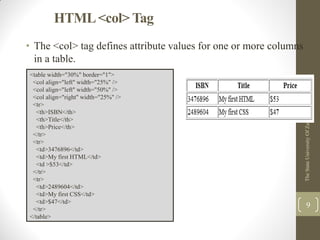
• The <col> tag defines attribute values for one or more columns
in a table.
TheStateUniversityOfZanzibar
9
<table width="30%" border="1">
<col align="left" width="25%" />
<col align="left" width="50%" />
<col align="right" width="25%" />
<tr>
<th>ISBN</th>
<th>Title</th>
<th>Price</th>
</tr>
<tr>
<td>3476896</td>
<td>My first HTML</td>
<td >$53</td>
</tr>
<tr>
<td>2489604</td>
<td>My first CSS</td>
<td>$47</td>
</tr>
</table>
Attributes of HTMLTable Tags
TheStateUniversityOfZanzibar
10
Table tags
attributees
Description
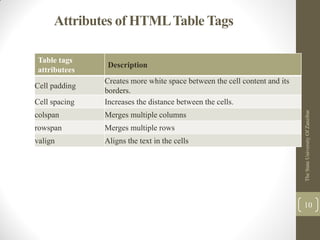
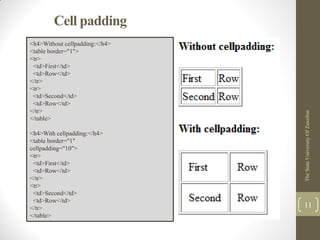
Cell padding
Creates more white space between the cell content and its
borders.
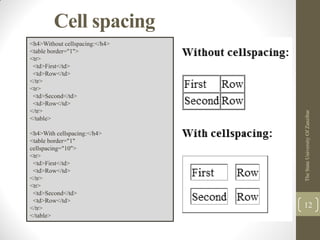
Cell spacing Increases the distance between the cells.
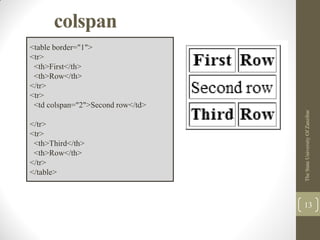
colspan Merges multiple columns
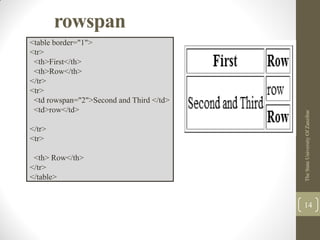
rowspan Merges multiple rows
valign Aligns the text in the cells
Cell padding
TheStateUniversityOfZanzibar
11
<h4>Without cellpadding:</h4>
<table border="1">
<tr>
<td>First</td>
<td>Row</td>
</tr>
<tr>
<td>Second</td>
<td>Row</td>
</tr>
</table>
<h4>With cellpadding:</h4>
<table border="1"
cellpadding="10">
<tr>
<td>First</td>
<td>Row</td>
</tr>
<tr>
<td>Second</td>
<td>Row</td>
</tr>
</table>
Cell spacing
TheStateUniversityOfZanzibar
12
<h4>Without cellspacing:</h4>
<table border="1">
<tr>
<td>First</td>
<td>Row</td>
</tr>
<tr>
<td>Second</td>
<td>Row</td>
</tr>
</table>
<h4>With cellspacing:</h4>
<table border="1"
cellspacing="10">
<tr>
<td>First</td>
<td>Row</td>
</tr>
<tr>
<td>Second</td>
<td>Row</td>
</tr>
</table>
colspan
TheStateUniversityOfZanzibar
13
<table border="1">
<tr>
<th>First</th>
<th>Row</th>
</tr>
<tr>
<td colspan="2">Second row</td>
</tr>
<tr>
<th>Third</th>
<th>Row</th>
</tr>
</table>
rowspan
TheStateUniversityOfZanzibar
14
<table border="1">
<tr>
<th>First</th>
<th>Row</th>
</tr>
<tr>
<td rowspan="2">Second and Third </td>
<td>row</td>
</tr>
<tr>
<th> Row</th>
</tr>
</table>
TheStateUniversityOfZanzibar
15
TheStateUniversityOfZanzibar
16

Lecture 5 html table

  • 1.
    HTMLTABLE COURSE INSTRUCTOR: Mrs.Raya Idrissa Email: r.idrisa@gmail.com TheStateUniversityOfZanzibar 1 INF 003: Website Design and Development
  • 2.
    Simple HTMLTables • Tablesare defined with the <table> tag. • A table is divided into rows (with the <tr> tag) • Each row is divided into data cells (with the <td> or <th> tag). • <th> tag used to define header information in a table. • td stands for "table data," and holds the content of a data cell. • A <td> tag can contain text, links, images, lists, forms, other tables, etc. TheStateUniversityOfZanzibar 2
  • 3.
    Simple HTMLTables TheStateUniversityOfZanzibar 3 <table> <tr> <th>First Name</th> <th>LastName</th> <th>Research Areas</th> </tr> <tr> <td>Pat</td> <td>Morin</td> <td>Algorithms and data structures</td> </tr> </table>
  • 4.
    HTMLTable Tags TheStateUniversityOfZanzibar 4 Table tagsDescription <table> Defines a table <th> Defines a table header <tr> Defines a table row <td> Defines a table cell <caption> Defines a table caption <colgroup> Defines a group of columns in a table, for formatting <col /> Defines attribute values for one or more columns in a table <thead> Groups the header content in a table <tbody> Groups the body content in a table <tfoot> Groups the footer content in a table
  • 5.
    <caption> tag • The<caption> tag is supported in all major browsers. • You can specify only one caption per table TheStateUniversityOfZanzibar 5 <table border="1"> <caption>Monthly savings</caption> <tr> <th>Month</th> <th>Savings</th> </tr> <tr> <td>January</td> <td>$100</td> </tr> <tr> <td>February</td> <td>$50</td> </tr> </table>
  • 6.
    <colgroup> tag • The<colgroup> tag is used to group columns in a table for formatting. TheStateUniversityOfZanzibar 6 <table width="100%" border="1"> <colgroup span="2" align="left"></colgroup> <colgroup align="right" bgcolor=“2></colgroup> <tr> <th>ISBN</th> <th>Title</th> <th>Price</th> </tr> <tr> <td>3476896</td> <td>My first HTML</td> <td>$53</td> </tr> <tr> <td>2489604</td> <td>My first CSS</td> <td>$47</td> </tr> </table>
  • 7.
    <thead>, <tbody> and<tfoot> tag • The <thead> groups the header content in an HTML table. • Thw <tfoot> groups the footer content in an HTML table. • The <tbody> groups the body content in an HTML table. • <thead>, <tbody> and <tfoot> are partially supported in all major browser TheStateUniversityOfZanzibar 7
  • 8.
    <thead>, <tbody> and<tfoot> tag TheStateUniversityOfZanzibar 8 <table border="1"> <thead> <tr> <th>Month</th> <th>Savings</th> </tr> </thead> <tfoot> <tr> <td>Sum</td> <td>$180</td> </tr> </tfoot> <tbody> <tr> <td>January</td> <td>$100</td> </tr> <tr> <td>February</td> <td>$80</td> </tr> </tbody> </table>
  • 9.
    HTML<col> Tag • The<col> tag defines attribute values for one or more columns in a table. TheStateUniversityOfZanzibar 9 <table width="30%" border="1"> <col align="left" width="25%" /> <col align="left" width="50%" /> <col align="right" width="25%" /> <tr> <th>ISBN</th> <th>Title</th> <th>Price</th> </tr> <tr> <td>3476896</td> <td>My first HTML</td> <td >$53</td> </tr> <tr> <td>2489604</td> <td>My first CSS</td> <td>$47</td> </tr> </table>
  • 10.
    Attributes of HTMLTableTags TheStateUniversityOfZanzibar 10 Table tags attributees Description Cell padding Creates more white space between the cell content and its borders. Cell spacing Increases the distance between the cells. colspan Merges multiple columns rowspan Merges multiple rows valign Aligns the text in the cells
  • 11.
    Cell padding TheStateUniversityOfZanzibar 11 <h4>Without cellpadding:</h4> <tableborder="1"> <tr> <td>First</td> <td>Row</td> </tr> <tr> <td>Second</td> <td>Row</td> </tr> </table> <h4>With cellpadding:</h4> <table border="1" cellpadding="10"> <tr> <td>First</td> <td>Row</td> </tr> <tr> <td>Second</td> <td>Row</td> </tr> </table>
  • 12.
    Cell spacing TheStateUniversityOfZanzibar 12 <h4>Without cellspacing:</h4> <tableborder="1"> <tr> <td>First</td> <td>Row</td> </tr> <tr> <td>Second</td> <td>Row</td> </tr> </table> <h4>With cellspacing:</h4> <table border="1" cellspacing="10"> <tr> <td>First</td> <td>Row</td> </tr> <tr> <td>Second</td> <td>Row</td> </tr> </table>
  • 13.
  • 14.
  • 15.
  • 16.