IPE-409 CAD/CAM
Dr. Nafis Ahmad
Professor
Department of IPE, BUET
Email:nafis@ipe.buet.ac.bd
Ch#4.
Elements of Interactive Computer
Graphics
2
Topics
▷ Introduction
▷ Computer Graphics types, technology etc.
▷ Drawing 2D object on a VDU
▷ Drawing 3D object on a VDU
▷ Visual realism
▷ Conclusion
3
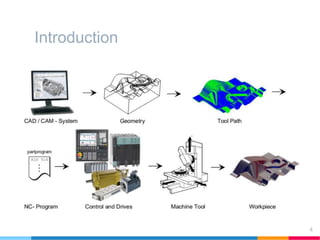
Introduction
4
5
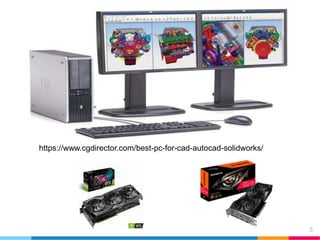
https://www.cgdirector.com/best-pc-for-cad-autocad-solidworks/
Introduction
• The designers or others who uses the models need facilities
to display them as they are being develop, and to interact with
the models with the CAD system.
• Design models are primarily geometric or graphical in nature
• Computer graphics through system’s user interface help the
designer
• Computer graphics are:
• Passive or active (based on user control)
• Vector graphics or raster graphics (based on image generation)
• Image space graphics (ms paint) or object space graphics (flight
simulator)
6
Introduction to Computer Graphics
• Computer graphics is an extremely effective medium for
communication between people and computer.
• Display devices-Raster scan, other raster type display and
hardcopy devices
• Vector displays drew picture by constructing series of lines or
vectors on screen and were popular until 1980s.
• Raster type displays are the most popular now. CRT, LCD,
TFT are some raster type display.
• Raster type display uses succession of equidistant linear
arrays of pixels. VGA,HD, 2K, 4K….(HD-1920X1080, 4K-
3840x2160)
7
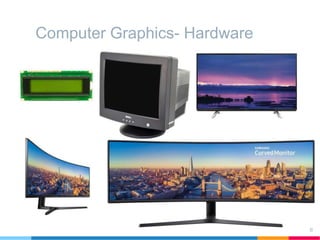
Computer Graphics- Hardware
8
Introduction to Computer Graphics
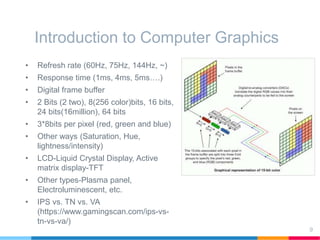
• Refresh rate (60Hz, 75Hz, 144Hz, ~)
• Response time (1ms, 4ms, 5ms….)
• Digital frame buffer
• 2 Bits (2 two), 8(256 color)bits, 16 bits,
24 bits(16million), 64 bits
• 3*8bits per pixel (red, green and blue)
• Other ways (Saturation, Hue,
lightness/intensity)
• LCD-Liquid Crystal Display, Active
matrix display-TFT
• Other types-Plasma panel,
Electroluminescent, etc.
• IPS vs. TN vs. VA
(https://www.gamingscan.com/ips-vs-
tn-vs-va/)
9
Introduction to Computer Graphics
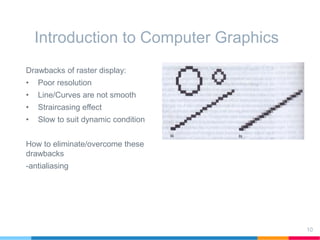
Drawbacks of raster display:
• Poor resolution
• Line/Curves are not smooth
• Straircasing effect
• Slow to suit dynamic condition
How to eliminate/overcome these
drawbacks
-antialiasing
10
2D Computer Graphics
• Model is 2D or 3D, but VDU is 2D with display being defined by
integer numerical coordinates.
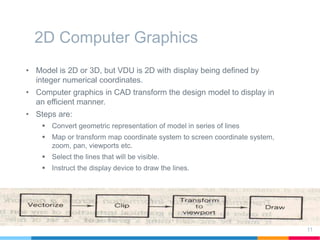
• Computer graphics in CAD transform the design model to display in
an efficient manner.
• Steps are:
 Convert geometric representation of model in series of lines
 Map or transform map coordinate system to screen coordinate system,
zoom, pan, viewports etc.
 Select the lines that will be visible.
 Instruct the display device to draw the lines.
11
2D Computer Graphics
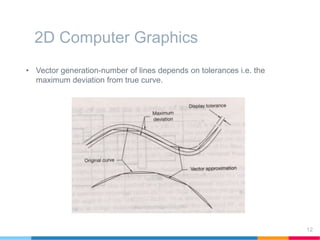
• Vector generation-number of lines depends on tolerances i.e. the
maximum deviation from true curve.
12
2D Computer Graphics
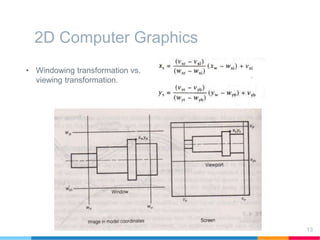
• Windowing transformation vs.
viewing transformation.
13
2D Computer Graphics
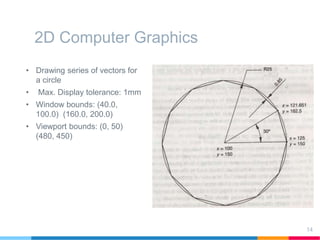
• Drawing series of vectors for
a circle
• Max. Display tolerance: 1mm
• Window bounds: (40.0,
100.0) (160.0, 200.0)
• Viewport bounds: (0, 50)
(480, 450)
14
3D Computer Graphics
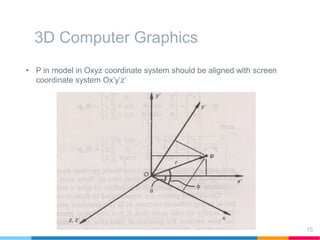
• P in model in Oxyz coordinate system should be aligned with screen
coordinate system Ox’y’z’
15
3D Computer Graphics
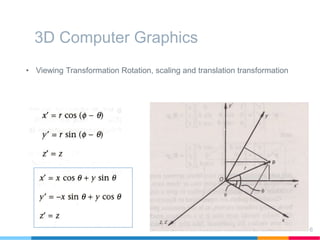
• Viewing Transformation Rotation, scaling and translation transformation
16
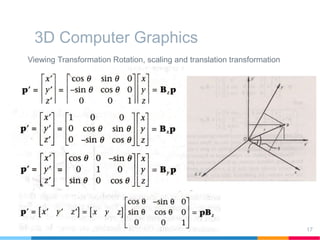
3D Computer Graphics
Viewing Transformation Rotation, scaling and translation transformation
17
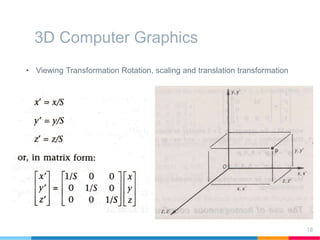
3D Computer Graphics
• Viewing Transformation Rotation, scaling and translation transformation
18
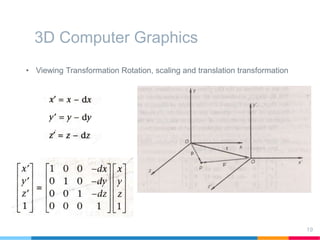
3D Computer Graphics
• Viewing Transformation Rotation, scaling and translation transformation
19
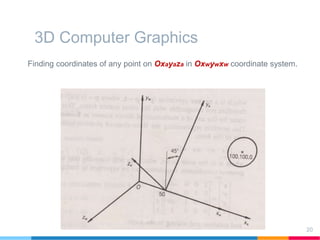
3D Computer Graphics
Finding coordinates of any point on Oxayaza in Oxwywxw coordinate system.
20
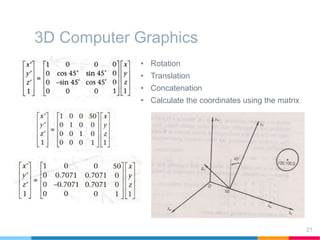
3D Computer Graphics
• Rotation
• Translation
• Concatenation
• Calculate the coordinates using the matrix
21
Conclusions
▷ Image generation on display, the technology used are
discussed.
▷ Steps for displaying 2D and 3D models are: vectorize, clip,
transform and draw.
▷ Windowing and viewing transformation.
▷ Now low cost hardware for display of graphics images are
available.
▷ Possible high degree of visual realism in the display of
engineering model and dynamic manipulation of shaded
images of engineering parts.
22
Thanks!
Any questions?
You can find me at:
@ahmadn
nafis@ipe.buet.ac.bd
23

Computer graphics

  • 1.
    IPE-409 CAD/CAM Dr. NafisAhmad Professor Department of IPE, BUET Email:nafis@ipe.buet.ac.bd
  • 2.
    Ch#4. Elements of InteractiveComputer Graphics 2
  • 3.
    Topics ▷ Introduction ▷ ComputerGraphics types, technology etc. ▷ Drawing 2D object on a VDU ▷ Drawing 3D object on a VDU ▷ Visual realism ▷ Conclusion 3
  • 4.
  • 5.
  • 6.
    Introduction • The designersor others who uses the models need facilities to display them as they are being develop, and to interact with the models with the CAD system. • Design models are primarily geometric or graphical in nature • Computer graphics through system’s user interface help the designer • Computer graphics are: • Passive or active (based on user control) • Vector graphics or raster graphics (based on image generation) • Image space graphics (ms paint) or object space graphics (flight simulator) 6
  • 7.
    Introduction to ComputerGraphics • Computer graphics is an extremely effective medium for communication between people and computer. • Display devices-Raster scan, other raster type display and hardcopy devices • Vector displays drew picture by constructing series of lines or vectors on screen and were popular until 1980s. • Raster type displays are the most popular now. CRT, LCD, TFT are some raster type display. • Raster type display uses succession of equidistant linear arrays of pixels. VGA,HD, 2K, 4K….(HD-1920X1080, 4K- 3840x2160) 7
  • 8.
  • 9.
    Introduction to ComputerGraphics • Refresh rate (60Hz, 75Hz, 144Hz, ~) • Response time (1ms, 4ms, 5ms….) • Digital frame buffer • 2 Bits (2 two), 8(256 color)bits, 16 bits, 24 bits(16million), 64 bits • 3*8bits per pixel (red, green and blue) • Other ways (Saturation, Hue, lightness/intensity) • LCD-Liquid Crystal Display, Active matrix display-TFT • Other types-Plasma panel, Electroluminescent, etc. • IPS vs. TN vs. VA (https://www.gamingscan.com/ips-vs- tn-vs-va/) 9
  • 10.
    Introduction to ComputerGraphics Drawbacks of raster display: • Poor resolution • Line/Curves are not smooth • Straircasing effect • Slow to suit dynamic condition How to eliminate/overcome these drawbacks -antialiasing 10
  • 11.
    2D Computer Graphics •Model is 2D or 3D, but VDU is 2D with display being defined by integer numerical coordinates. • Computer graphics in CAD transform the design model to display in an efficient manner. • Steps are:  Convert geometric representation of model in series of lines  Map or transform map coordinate system to screen coordinate system, zoom, pan, viewports etc.  Select the lines that will be visible.  Instruct the display device to draw the lines. 11
  • 12.
    2D Computer Graphics •Vector generation-number of lines depends on tolerances i.e. the maximum deviation from true curve. 12
  • 13.
    2D Computer Graphics •Windowing transformation vs. viewing transformation. 13
  • 14.
    2D Computer Graphics •Drawing series of vectors for a circle • Max. Display tolerance: 1mm • Window bounds: (40.0, 100.0) (160.0, 200.0) • Viewport bounds: (0, 50) (480, 450) 14
  • 15.
    3D Computer Graphics •P in model in Oxyz coordinate system should be aligned with screen coordinate system Ox’y’z’ 15
  • 16.
    3D Computer Graphics •Viewing Transformation Rotation, scaling and translation transformation 16
  • 17.
    3D Computer Graphics ViewingTransformation Rotation, scaling and translation transformation 17
  • 18.
    3D Computer Graphics •Viewing Transformation Rotation, scaling and translation transformation 18
  • 19.
    3D Computer Graphics •Viewing Transformation Rotation, scaling and translation transformation 19
  • 20.
    3D Computer Graphics Findingcoordinates of any point on Oxayaza in Oxwywxw coordinate system. 20
  • 21.
    3D Computer Graphics •Rotation • Translation • Concatenation • Calculate the coordinates using the matrix 21
  • 22.
    Conclusions ▷ Image generationon display, the technology used are discussed. ▷ Steps for displaying 2D and 3D models are: vectorize, clip, transform and draw. ▷ Windowing and viewing transformation. ▷ Now low cost hardware for display of graphics images are available. ▷ Possible high degree of visual realism in the display of engineering model and dynamic manipulation of shaded images of engineering parts. 22
  • 23.
    Thanks! Any questions? You canfind me at: @ahmadn nafis@ipe.buet.ac.bd 23