Introduction
Areas to be covered:
1. What is Computer Aided Design?
2. Origins of CAD
3. Uses of CAD
4. CAD Design
5. CAD in mechanical field
6. CAD & Databases
7. Conclusion
●
CAD also known as Computer Aided Drafting.
●
There are 3 different types of CAD (2D, 2.5D and
3D).
●
The software is used to create and design models
of these types and test them.
●
The first source of CAD resulted from attempts to
automate the drafting process.
●
These developments were pioneered by the General
Motors Research Laboratories in the early 1960s.
●
CAD became more widely used after 1970 because of
technological advancements.
●
CAD allowed users to design products much quicker
without the production of an actual product.
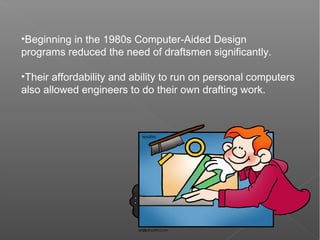
•Beginning in the 1980s Computer-Aided Design
programs reduced the need of draftsmen significantly.
•Their affordability and ability to run on personal computers
also allowed engineers to do their own drafting work.
CAD is used to design a variety of different
products for a variety of fields such as
●
Architecture
●
Electronics
●
Automotive engineering
●
Industrial Design
●
Machinery
●
Visual Art
●
Medical Design
●
The limitations of CAD is that it doesn't incorporate
real life concepts, such as gravity or friction.
●
By Using a expert system it can carry out
calculations such as stress of a building or the drag
of a vehicle.
●
The use of a expert system with CAD can be used
with a variety of products such as:
1. Building materials for buildings/constructions
2. The Design of vehicles.
3. Design of individual parts.
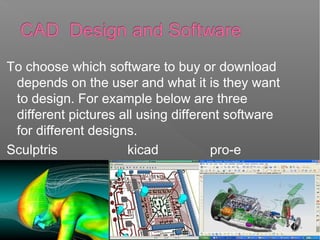
To choose which software to buy or download
depends on the user and what it is they want
to design. For example below are three
different pictures all using different software
for different designs.
Sculptris kicad pro-e
Many parts like nuts, bolts are designed
and it further assembled by there
positions, this parts all mixed and
becomes a part
for example: screw jack, stuffing box
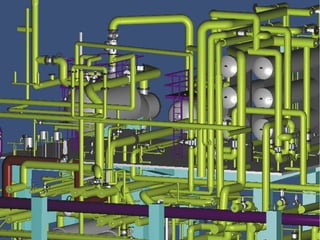
Not only parts a whole body can be
designed in this particular software it
may be a drilling machine or it may be a
vehicle
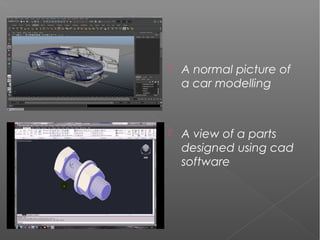
 A normal picture of
a car modelling
 A view of a parts
designed using cad
software
Some CAD programs which you can buy are:
– AutoCAD
– TurboCAD
– ProgeCAD
But there are a lot open source programs such
as:
– Archimedes
– FreeCAD
– BRL-CAD
CAD & Databases
•Typically CAD software is built upon some database
stored in hard disk
•From user point of view it looks like a file
•However CAD objects such as line or circle are stored
as structured records and CAD engine has
implemented methods for fast data retrieval and storage
Conclusion
 CAD is important in the design and safety of
constructions
 There are many different types of CAD software to
choose from to meet specific needs
 CAD extraction data is input into a database which
appears in the form of a file
It has spread into many other fields of jobs more recently
such as medicine and electronics
 CAD is overall a cheaper tool than taking on a larger
workforce to complete drawing tasks
K Naveen Teja
Mechanical
VR Siddhartha
Engineering college

computer aided design

  • 2.
    Introduction Areas to becovered: 1. What is Computer Aided Design? 2. Origins of CAD 3. Uses of CAD 4. CAD Design 5. CAD in mechanical field 6. CAD & Databases 7. Conclusion
  • 3.
    ● CAD also knownas Computer Aided Drafting. ● There are 3 different types of CAD (2D, 2.5D and 3D). ● The software is used to create and design models of these types and test them.
  • 4.
    ● The first sourceof CAD resulted from attempts to automate the drafting process. ● These developments were pioneered by the General Motors Research Laboratories in the early 1960s. ● CAD became more widely used after 1970 because of technological advancements. ● CAD allowed users to design products much quicker without the production of an actual product.
  • 5.
    •Beginning in the1980s Computer-Aided Design programs reduced the need of draftsmen significantly. •Their affordability and ability to run on personal computers also allowed engineers to do their own drafting work.
  • 6.
    CAD is usedto design a variety of different products for a variety of fields such as ● Architecture ● Electronics ● Automotive engineering ● Industrial Design ● Machinery ● Visual Art ● Medical Design
  • 7.
    ● The limitations ofCAD is that it doesn't incorporate real life concepts, such as gravity or friction. ● By Using a expert system it can carry out calculations such as stress of a building or the drag of a vehicle. ● The use of a expert system with CAD can be used with a variety of products such as: 1. Building materials for buildings/constructions 2. The Design of vehicles. 3. Design of individual parts.
  • 9.
    To choose whichsoftware to buy or download depends on the user and what it is they want to design. For example below are three different pictures all using different software for different designs. Sculptris kicad pro-e
  • 10.
    Many parts likenuts, bolts are designed and it further assembled by there positions, this parts all mixed and becomes a part for example: screw jack, stuffing box Not only parts a whole body can be designed in this particular software it may be a drilling machine or it may be a vehicle
  • 11.
     A normalpicture of a car modelling  A view of a parts designed using cad software
  • 12.
    Some CAD programswhich you can buy are: – AutoCAD – TurboCAD – ProgeCAD But there are a lot open source programs such as: – Archimedes – FreeCAD – BRL-CAD
  • 13.
    CAD & Databases •TypicallyCAD software is built upon some database stored in hard disk •From user point of view it looks like a file •However CAD objects such as line or circle are stored as structured records and CAD engine has implemented methods for fast data retrieval and storage
  • 14.
    Conclusion  CAD isimportant in the design and safety of constructions  There are many different types of CAD software to choose from to meet specific needs  CAD extraction data is input into a database which appears in the form of a file It has spread into many other fields of jobs more recently such as medicine and electronics  CAD is overall a cheaper tool than taking on a larger workforce to complete drawing tasks
  • 15.
    K Naveen Teja Mechanical VRSiddhartha Engineering college

Editor's Notes

  • #6 This would eliminate the need for entire departments
  • #7 Architecture – Such as house planning on a small scale all the way to sky scrapers, any kind of building in general. Machinery – Creating accurate drawings of machinery parts to check they are fit for purpose size and function-wise Medical Design – constructing body surfaces in 3D or 2D, eg – using 2D brain scans and manipulating into a 3 dimensional shape for a different view
  • #10 can range from as cheap as 50 pounds to 2000 or more All specific to their needs so, more specialised will obviously cost more because of a greater spectrum of tools