COMPUTER AIDED DESIGN
Unit – I
Fundamentals of Computer Graphics
www.mechbix.com
Fundamentals of Computer Graphics
• Product cycle
• Design process
• Sequential and concurrent engineering
• Computer aided design
• CAD system architecture
• Computer graphics
• Co-ordinate systems
• 2D and 3D transformations
• Homogeneous coordinates
• Line drawing
• Clipping
• Viewing transformation
www.mechbix.com
• CAD/CAM has been utilized in engineering
practice in many ways including drafting, design,
simulation, analysis and manufacturing.
• Computer Aided Design uses computer systems to
design products and create the drawings needed
for the products to be manufactured.
www.mechbix.com
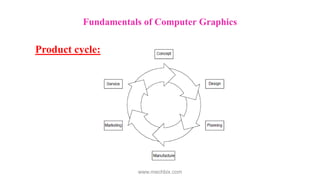
Product cycle:
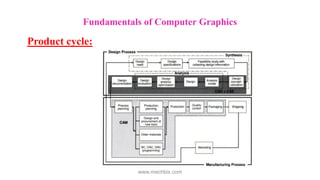
The product begins with the need which is identified
based on customers and markets demands.
The product goes through two main processes from
inception to a finished product:
The design process and the manufacturing process.
Fundamentals of Computer Graphics
www.mechbix.com
Fundamentals of Computer Graphics
Product cycle:
www.mechbix.com
Fundamentals of Computer Graphics
Product cycle:
www.mechbix.com
Design process
Synthesis and analysis are the two main sub processes of
the design process.
Synthesis
• Philosophy, functionality and uniqueness of the product
are determined during synthesis.
• A design takes the form of sketches and layout
drawings.
Fundamentals of Computer Graphics
Product cycle:
www.mechbix.com
Design process
Analysis
• Begins with analysis and optimization of the
design.
• The outcome of the analysis process is the design
documentation in the form of engineering
drawings(blueprints).
Fundamentals of Computer Graphics
Product cycle:
www.mechbix.com
Manufacturing process
Manufacturing process begins with the process planning
and ends with the actual product.
Process planning
• Process planning is a function that establishes which
processes and the proper parameters for the processes
are to be used.
• It also selects the machines that will perform the
processes.
Fundamentals of Computer Graphics
Product cycle:
www.mechbix.com
Process planning
• The outcome of the process planning is a
production plan, tools procurement, material
order and the machine programming.
• Once this phase is complete the actual production
of the product begins.
Product cycle:
Fundamentals of Computer Graphics
www.mechbix.com
• The manufactured parts are inspected and usually
must pass certain standard quality control
requirements.
• Assembly, packaging, labeling and shipping to the
customers.
• Market feedback – a closed loop product cycle.
Product cycle:
Fundamentals of Computer Graphics
www.mechbix.com
Fundamentals of Computer Graphics
Design Process:
www.mechbix.com
Fundamentals of Computer Graphics
Design Process:
www.mechbix.com
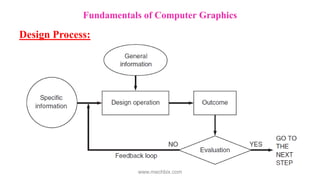
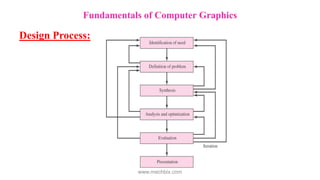
• Generally, companies need to respond quickly
to market needs.
• cost effective, reduce lead-times to market
and deliver superior quality products.
• Those goals are achieved through above
mentioned product development process.
Fundamentals of Computer Graphics
Sequential and Concurrent Engineering
www.mechbix.com
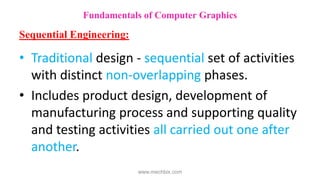
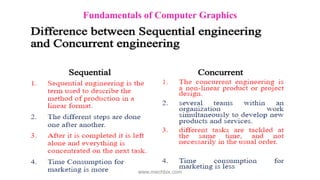
• Traditional design - sequential set of activities
with distinct non-overlapping phases.
• Includes product design, development of
manufacturing process and supporting quality
and testing activities all carried out one after
another.
Fundamentals of Computer Graphics
Sequential Engineering:
www.mechbix.com
Fundamentals of Computer Graphics
Sequential Engineering:
www.mechbix.com
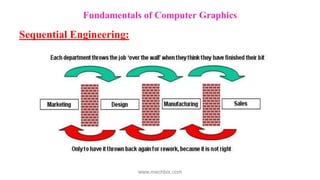
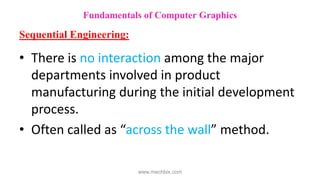
• There is no interaction among the major
departments involved in product
manufacturing during the initial development
process.
• Often called as “across the wall” method.
Fundamentals of Computer Graphics
Sequential Engineering:
www.mechbix.com
Fundamentals of Computer Graphics
Sequential Engineering:
www.mechbix.com
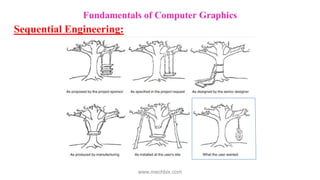
• Each department team completes the task in
isolation and passes over the document to the
next segment.
• If a serious mistake in the product is detected
during testing the revision process has to start
from design.
Fundamentals of Computer Graphics
Sequential Engineering:
www.mechbix.com
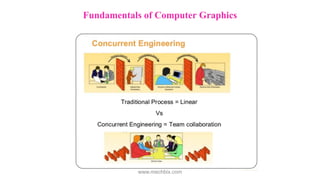
• Simultaneous engineering
• A method of designing and developing
products, in which the different stages run
simultaneously, rather than consecutively.
Fundamentals of Computer Graphics
Concurrent Engineering:
www.mechbix.com
Fundamentals of Computer Graphics
Concurrent Engineering:
www.mechbix.com
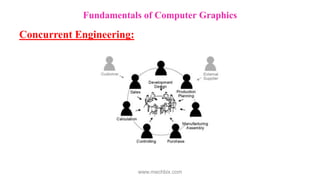
• Brings together a wide spectrum of people
from several functional areas in design and
manufacture of a product.
• Concurrent engineering is greatly facilitated by
the use of computer-aided engineering.
Fundamentals of Computer Graphics
Concurrent Engineering:
www.mechbix.com
• A team-based approach in which all aspects of
the product development process are
represented on a closely communicating
team.
• Team members perform their jobs in an
overlapping and concurrent manner so as to
minimize the time for product development
Fundamentals of Computer Graphics
Concurrent Engineering:
www.mechbix.com
• Reduction in the number of design changes
• Cost of changes in design is reduced
• Holistic approach to product development
• Robust products
• Reduction in the lead time for product
development
Benefits of Concurrent Engg. over Sequential Engg.:
Fundamentals of Computer Graphics
www.mechbix.com
Fundamentals of Computer Graphics
www.mechbix.com
Fundamentals of Computer Graphics
www.mechbix.com
• CAD is the process of designing and drafting
on a computer.
• CAD is quicker and more accurate. It has
largely replaced hand drafting.
Fundamentals of Computer Graphics
Computer Aided Design:
www.mechbix.com
Fundamentals of Computer Graphics
CAD System Architecture:
www.mechbix.com
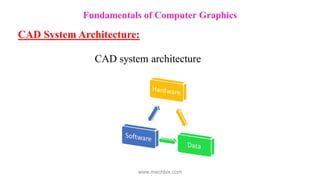
Computer is the main component. It has these
subsystems:
• Hardware: Computer and components
 Input devices such as keyboard and mouse
 Output devices such as monitor, printer and plotter
• Software
 Programs running on hardware (CAD, ProE,ANSYS, SOLID WORKS, CATIA…)
• Data
 Data structure created and manipulated by the software
Fundamentals of Computer Graphics
CAD System Architecture:
www.mechbix.com
• Creation, Manipulation, and Storage of
geometric objects (modelling) and their
images (rendering)
• Display those images on screens or hardcopy
devices
• Image processing
Fundamentals of Computer Graphics
Computer Graphics:
www.mechbix.com
• Traditionally drawings are prepared on plane
drawing sheets.
• This has several limitations.
• The sketches have to be made only in two
dimensions.
• Though the depth can be represented by
pictorial projections like isometric and
perspective projections, the projections have to
be necessarily reduced to two dimensions.
Fundamentals of Computer Graphics
Computer Graphics:
www.mechbix.com
• Use of computer graphics has opened up
tremendous possibilities for the designer.
• The object is represented by its geometric model
in three dimensions (X, Y and Z).
• The mathematical representation reduces
creation of views like orthographic, isometric,
perspective projections into simple viewing
transformations.
Fundamentals of Computer Graphics
Computer Graphics:
www.mechbix.com
• Though the size of the screen is limited, there
is no need to scale the drawings.
• Drawings can be made very accurate.
• The geometric models can be represented in
color and can be viewed from any angle.
• Sections can be automatically created.
Fundamentals of Computer Graphics
Computer Graphics:
www.mechbix.com
• Drawings (geometric models) can be modified
easily.
• More important than all, drawings can be
reused conveniently.
• Storage and retrieval of drawings are easy.
Fundamentals of Computer Graphics
Computer Graphics:
www.mechbix.com
• Modern computer graphics displays are simple
in construction.
• They consist of basically three components.
i. Monitor
ii. Digital Memory or Frame Buffer
iii. Display Controller
Fundamentals of Computer Graphics
Computer Graphics:
www.mechbix.com
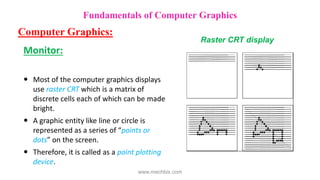
Monitor:
 Most of the computer graphics displays
use raster CRT which is a matrix of
discrete cells each of which can be made
bright.
 A graphic entity like line or circle is
represented as a series of “points or
dots” on the screen.
 Therefore, it is called as a point plotting
device.
Fundamentals of Computer Graphics
Computer Graphics:
Raster CRT display
www.mechbix.com
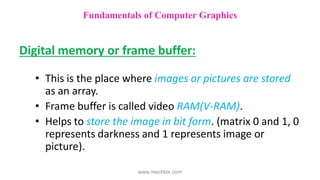
Digital memory or frame buffer:
• This is the place where images or pictures are stored
as an array.
• Frame buffer is called video RAM(V-RAM).
• Helps to store the image in bit form. (matrix 0 and 1, 0
represents darkness and 1 represents image or
picture).
Fundamentals of Computer Graphics
www.mechbix.com
 Display Controller
Interface between memory buffer and monitor.
Its job is to pass the contents of FB to monitor.
The DC reads successive byte of data from FB and
converts 0’s and 1’s into corresponding video signal.
The signal is then fed to the monitor to produce a
black and white picture on the screen.
DC is recognised as display card.(VGA card with a
resolution of 640x480)
Fundamentals of Computer Graphics
www.mechbix.com
The video display screen is divided into very small
rectangular elements called a picture element or
pixel.
This happens to be the smallest addressable screen
element.
Graphic images are formed by setting suitable
intensity and color to the pixels which compose the
image.
Depending upon the resolution screens may have
varying number of pixels.
Fundamentals of Computer Graphics
www.mechbix.com
For example, an SVGA monitor with a resolution
of 1024 x 768 will have 1024 pixels in every row (X
- direction) and 768 pixels in every column (Y-
direction).
Monitors of larger size will have resolution of 1024
x 1024 or more. A raster scan system displays the
image on a CRT in a certain fixed sequence.
Fundamentals of Computer Graphics
www.mechbix.com
• Co-ordinate system
In a 2-D coordinate system the X axis generally
points from left to right, and the Y axis generally
points from bottom to top. (Although some
windowing systems will have their Y coordinates
going from top to bottom).
When we add the third coordinate, Z, we have a
choice as to whether the Z-axis points into the
screen or out of the screen:
Fundamentals of Computer Graphics
www.mechbix.com
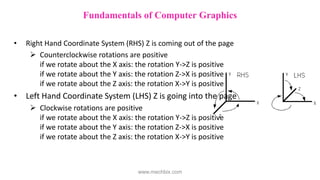
• Right Hand Coordinate System (RHS) Z is coming out of the page
 Counterclockwise rotations are positive
if we rotate about the X axis: the rotation Y->Z is positive
if we rotate about the Y axis: the rotation Z->X is positive
if we rotate about the Z axis: the rotation X->Y is positive
• Left Hand Coordinate System (LHS) Z is going into the page
 Clockwise rotations are positive
if we rotate about the X axis: the rotation Y->Z is positive
if we rotate about the Y axis: the rotation Z->X is positive
if we rotate about the Z axis: the rotation X->Y is positive
Fundamentals of Computer Graphics
www.mechbix.com
• Three types of coordinate systems are needed
in order to input, store and display model
geometry and graphics.
Model coordinate system(MCS), (database, master
or world coordinate system)
Working coordinate system(WCS)
Screen coordinate system(SCS), (device coordinate
system)
Fundamentals of Computer Graphics
www.mechbix.com
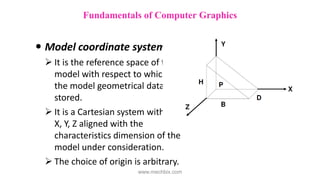
 Model coordinate system
 It is the reference space of the
model with respect to which all
the model geometrical data is
stored.
 It is a Cartesian system with its
X, Y, Z aligned with the
characteristics dimension of the
model under consideration.
 The choice of origin is arbitrary.
Fundamentals of Computer Graphics
www.mechbix.com
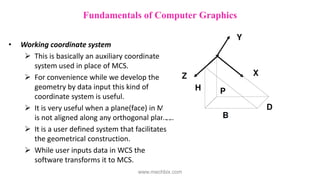
• Working coordinate system
 This is basically an auxiliary coordinate
system used in place of MCS.
 For convenience while we develop the
geometry by data input this kind of
coordinate system is useful.
 It is very useful when a plane(face) in MCS
is not aligned along any orthogonal planes.
 It is a user defined system that facilitates
the geometrical construction.
 While user inputs data in WCS the
software transforms it to MCS.
Fundamentals of Computer Graphics
www.mechbix.com
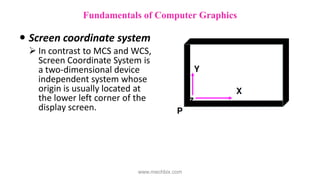
 Screen coordinate system
 In contrast to MCS and WCS,
Screen Coordinate System is
a two-dimensional device
independent system whose
origin is usually located at
the lower left corner of the
display screen.
Fundamentals of Computer Graphics
www.mechbix.com
– The SCS is important for display, screen input and
digitizing tasks.
– For Raster Graphics, the pixel grid serves as the
range of SCS.
– For a 1024x1280, the range is (0,0) to
(1024,1280).
Fundamentals of Computer Graphics
www.mechbix.com
• 2 – D transformations
• Drawings are created by a series of primitives
which are represented by the coordinates of the
end points.
• Changes in the drawings can be made by
performing some mathematical operations on
these coordinates.
Fundamentals of Computer Graphics
www.mechbix.com
• 2 – D transformations
• The basic transformations are
scaling,
translation and
rotation.
Fundamentals of Computer Graphics
www.mechbix.com
• 2 – D transformations
• Scaling
A drawing can be made bigger by increasing the
distance between the points of the drawing.
Multiplying the coordinates of the drawing by an
enlargement or reduction factor called scaling
factor.
Fundamentals of Computer Graphics
www.mechbix.com
Example: fig 1 represents a point in the XY
plane, P1(30,20). In the matrix form it is
represented as, P1 = [30 20].
Fundamentals of Computer Graphics
www.mechbix.com
2 D Transformations
– If we multiply this by a matrix
– We get a new point P2[60
60].
– The matrix is called scaling
matrix.
Figure 1
Fundamentals of Computer Graphics
www.mechbix.com
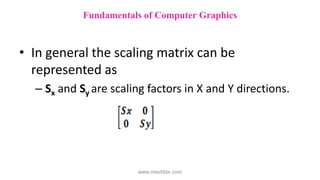
• In general the scaling matrix can be
represented as
– Sx and Sy are scaling factors in X and Y directions.
Fundamentals of Computer Graphics
www.mechbix.com
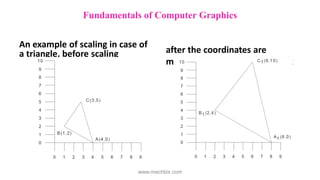
An example of scaling in case of
a triangle, before scaling after the coordinates are
multiplied by the scaling matrix
Fundamentals of Computer Graphics
www.mechbix.com
• 2 – D transformations
• Translation
– Moving drawing or model across the screen is
called translation.
– This is accomplished by adding to the coordinates
of each corner point the distance through which
the drawing is to be moved.
Fundamentals of Computer Graphics
www.mechbix.com
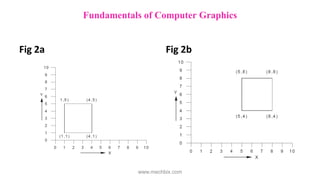
Fig 2a Fig 2b
Fundamentals of Computer Graphics
www.mechbix.com
• 2 – D transformations
• Translation
– Figure shows a rectangle. Fig 2a being moved to a
new position Fig 2b by adding 40 units to X co-
ordinate values and 30 units to Y coordinate
values.
Fundamentals of Computer Graphics
www.mechbix.com
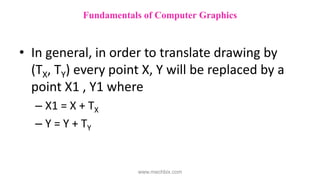
• In general, in order to translate drawing by
(TX, TY) every point X, Y will be replaced by a
point X1 , Y1 where
– X1 = X + TX
– Y = Y + TY
Fundamentals of Computer Graphics
www.mechbix.com
• 2 – D transformations
• Rotation
– Another useful transformation is the rotation of a
drawing about a pivot point.
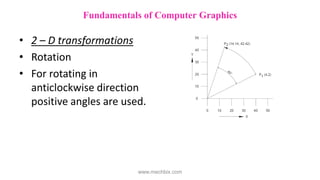
– Consider Fig 3 point P1 (40, 20) can be seen being
rotated about the origin through an angle, θ = 45°,
in the anti-clockwise direction to position P2.
Fundamentals of Computer Graphics
www.mechbix.com
• 2 – D transformations
• Rotation
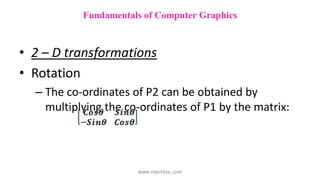
– The co-ordinates of P2 can be obtained by
multiplying the co-ordinates of P1 by the matrix:
Fundamentals of Computer Graphics
www.mechbix.com
• The new coordinates are
=
= [14.14 42.42]
Fundamentals of Computer Graphics
www.mechbix.com
• 2 – D transformations
• Rotation
• For rotating in
anticlockwise direction
positive angles are used.
Fundamentals of Computer Graphics
www.mechbix.com
• 2 – D transformations
• Shearing
• A shearing transformation produces distortion
of an object or an entire image.
• There are two types of shears: X-shear and Y-
shear.
Fundamentals of Computer Graphics
www.mechbix.com
• 2 – D transformations
• Shearing
• A Y-shear transforms the point (X, Y) to the
point (X1, Y1) by a factor Sh1, where X1 = X
Y1 = Sh1.
X+Y
Fundamentals of Computer Graphics
www.mechbix.com
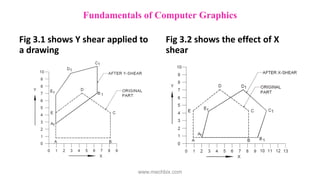
Fig 3.1 shows Y shear applied to
a drawing
Fig 3.2 shows the effect of X
shear
Fundamentals of Computer Graphics
www.mechbix.com
• An X-shear transforms the point (X, Y) to (X1,
Y1) where
– X1 = X + Sh2 .Y
– Y1 = Y
– Sh2 is the shear factor.
Fundamentals of Computer Graphics
www.mechbix.com
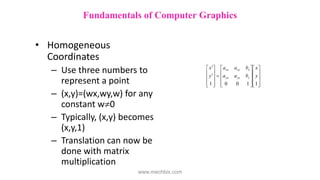
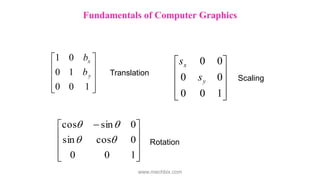
• Homogeneous
Coordinates
– Use three numbers to
represent a point
– (x,y)=(wx,wy,w) for any
constant w0
– Typically, (x,y) becomes
(x,y,1)
– Translation can now be
done with matrix
multiplication

































1
1
0
0
1
y
x
b
a
a
b
a
a
y
x
y
yy
yx
x
xy
xx
Fundamentals of Computer Graphics
www.mechbix.com










1
0
0
1
0
0
1
y
x
b
b
Translation










1
0
0
0
0
0
0
y
x
s
s
Scaling









 
1
0
0
0
cos
sin
0
sin
cos




Rotation
Fundamentals of Computer Graphics
www.mechbix.com
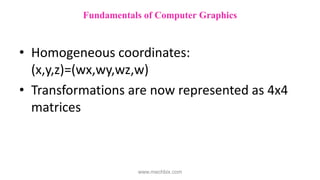
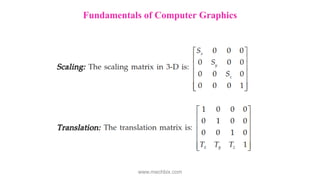
• Homogeneous coordinates:
(x,y,z)=(wx,wy,wz,w)
• Transformations are now represented as 4x4
matrices
Fundamentals of Computer Graphics
www.mechbix.com
Fundamentals of Computer Graphics
www.mechbix.com
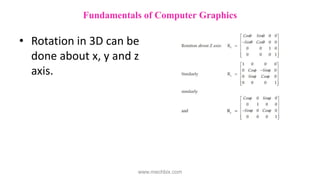
• Rotation in 3D can be
done about x, y and z
axis.
Fundamentals of Computer Graphics
www.mechbix.com
 Straight line segments are used a great deal in
computer generated pictures.
 The following criteria have been stipulated for line drawing
displays :
i. Lines should appear straight
ii. Lines should terminate accurately
iii. Lines should have constant density
iv. Line density should be independent of length and angle
v. Line should be drawn rapidly
Fundamentals of Computer Graphics
www.mechbix.com
– The process of turning on the pixels for a line
segment is called vector generation.
– If the end points of the line segment are known,
there are several schemes for selecting the pixels
between the end pixels.
– One method of generating a line segment is a
symmetrical digital differential analyzer (DDA).
Fundamentals of Computer Graphics
www.mechbix.com
• Clipping
– The process of determining the visible portions of
a drawing lying within a window.
– Each graphic element of the display is examined to
determine whether or not it is completely inside
the window, completely outside the window or
crosses a window boundary.
Fundamentals of Computer Graphics
www.mechbix.com
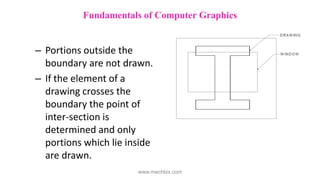
– Portions outside the
boundary are not drawn.
– If the element of a
drawing crosses the
boundary the point of
inter-section is
determined and only
portions which lie inside
are drawn.
Fundamentals of Computer Graphics
www.mechbix.com

CAD Unit-1.pdf

  • 1.
    COMPUTER AIDED DESIGN Unit– I Fundamentals of Computer Graphics www.mechbix.com
  • 2.
    Fundamentals of ComputerGraphics • Product cycle • Design process • Sequential and concurrent engineering • Computer aided design • CAD system architecture • Computer graphics • Co-ordinate systems • 2D and 3D transformations • Homogeneous coordinates • Line drawing • Clipping • Viewing transformation www.mechbix.com
  • 3.
    • CAD/CAM hasbeen utilized in engineering practice in many ways including drafting, design, simulation, analysis and manufacturing. • Computer Aided Design uses computer systems to design products and create the drawings needed for the products to be manufactured. www.mechbix.com
  • 4.
    Product cycle: The productbegins with the need which is identified based on customers and markets demands. The product goes through two main processes from inception to a finished product: The design process and the manufacturing process. Fundamentals of Computer Graphics www.mechbix.com
  • 5.
    Fundamentals of ComputerGraphics Product cycle: www.mechbix.com
  • 6.
    Fundamentals of ComputerGraphics Product cycle: www.mechbix.com
  • 7.
    Design process Synthesis andanalysis are the two main sub processes of the design process. Synthesis • Philosophy, functionality and uniqueness of the product are determined during synthesis. • A design takes the form of sketches and layout drawings. Fundamentals of Computer Graphics Product cycle: www.mechbix.com
  • 8.
    Design process Analysis • Beginswith analysis and optimization of the design. • The outcome of the analysis process is the design documentation in the form of engineering drawings(blueprints). Fundamentals of Computer Graphics Product cycle: www.mechbix.com
  • 9.
    Manufacturing process Manufacturing processbegins with the process planning and ends with the actual product. Process planning • Process planning is a function that establishes which processes and the proper parameters for the processes are to be used. • It also selects the machines that will perform the processes. Fundamentals of Computer Graphics Product cycle: www.mechbix.com
  • 10.
    Process planning • Theoutcome of the process planning is a production plan, tools procurement, material order and the machine programming. • Once this phase is complete the actual production of the product begins. Product cycle: Fundamentals of Computer Graphics www.mechbix.com
  • 11.
    • The manufacturedparts are inspected and usually must pass certain standard quality control requirements. • Assembly, packaging, labeling and shipping to the customers. • Market feedback – a closed loop product cycle. Product cycle: Fundamentals of Computer Graphics www.mechbix.com
  • 12.
    Fundamentals of ComputerGraphics Design Process: www.mechbix.com
  • 13.
    Fundamentals of ComputerGraphics Design Process: www.mechbix.com
  • 14.
    • Generally, companiesneed to respond quickly to market needs. • cost effective, reduce lead-times to market and deliver superior quality products. • Those goals are achieved through above mentioned product development process. Fundamentals of Computer Graphics Sequential and Concurrent Engineering www.mechbix.com
  • 15.
    • Traditional design- sequential set of activities with distinct non-overlapping phases. • Includes product design, development of manufacturing process and supporting quality and testing activities all carried out one after another. Fundamentals of Computer Graphics Sequential Engineering: www.mechbix.com
  • 16.
    Fundamentals of ComputerGraphics Sequential Engineering: www.mechbix.com
  • 17.
    • There isno interaction among the major departments involved in product manufacturing during the initial development process. • Often called as “across the wall” method. Fundamentals of Computer Graphics Sequential Engineering: www.mechbix.com
  • 18.
    Fundamentals of ComputerGraphics Sequential Engineering: www.mechbix.com
  • 19.
    • Each departmentteam completes the task in isolation and passes over the document to the next segment. • If a serious mistake in the product is detected during testing the revision process has to start from design. Fundamentals of Computer Graphics Sequential Engineering: www.mechbix.com
  • 20.
    • Simultaneous engineering •A method of designing and developing products, in which the different stages run simultaneously, rather than consecutively. Fundamentals of Computer Graphics Concurrent Engineering: www.mechbix.com
  • 21.
    Fundamentals of ComputerGraphics Concurrent Engineering: www.mechbix.com
  • 22.
    • Brings togethera wide spectrum of people from several functional areas in design and manufacture of a product. • Concurrent engineering is greatly facilitated by the use of computer-aided engineering. Fundamentals of Computer Graphics Concurrent Engineering: www.mechbix.com
  • 23.
    • A team-basedapproach in which all aspects of the product development process are represented on a closely communicating team. • Team members perform their jobs in an overlapping and concurrent manner so as to minimize the time for product development Fundamentals of Computer Graphics Concurrent Engineering: www.mechbix.com
  • 24.
    • Reduction inthe number of design changes • Cost of changes in design is reduced • Holistic approach to product development • Robust products • Reduction in the lead time for product development Benefits of Concurrent Engg. over Sequential Engg.: Fundamentals of Computer Graphics www.mechbix.com
  • 25.
    Fundamentals of ComputerGraphics www.mechbix.com
  • 26.
    Fundamentals of ComputerGraphics www.mechbix.com
  • 27.
    • CAD isthe process of designing and drafting on a computer. • CAD is quicker and more accurate. It has largely replaced hand drafting. Fundamentals of Computer Graphics Computer Aided Design: www.mechbix.com
  • 28.
    Fundamentals of ComputerGraphics CAD System Architecture: www.mechbix.com
  • 29.
    Computer is themain component. It has these subsystems: • Hardware: Computer and components  Input devices such as keyboard and mouse  Output devices such as monitor, printer and plotter • Software  Programs running on hardware (CAD, ProE,ANSYS, SOLID WORKS, CATIA…) • Data  Data structure created and manipulated by the software Fundamentals of Computer Graphics CAD System Architecture: www.mechbix.com
  • 30.
    • Creation, Manipulation,and Storage of geometric objects (modelling) and their images (rendering) • Display those images on screens or hardcopy devices • Image processing Fundamentals of Computer Graphics Computer Graphics: www.mechbix.com
  • 31.
    • Traditionally drawingsare prepared on plane drawing sheets. • This has several limitations. • The sketches have to be made only in two dimensions. • Though the depth can be represented by pictorial projections like isometric and perspective projections, the projections have to be necessarily reduced to two dimensions. Fundamentals of Computer Graphics Computer Graphics: www.mechbix.com
  • 32.
    • Use ofcomputer graphics has opened up tremendous possibilities for the designer. • The object is represented by its geometric model in three dimensions (X, Y and Z). • The mathematical representation reduces creation of views like orthographic, isometric, perspective projections into simple viewing transformations. Fundamentals of Computer Graphics Computer Graphics: www.mechbix.com
  • 33.
    • Though thesize of the screen is limited, there is no need to scale the drawings. • Drawings can be made very accurate. • The geometric models can be represented in color and can be viewed from any angle. • Sections can be automatically created. Fundamentals of Computer Graphics Computer Graphics: www.mechbix.com
  • 34.
    • Drawings (geometricmodels) can be modified easily. • More important than all, drawings can be reused conveniently. • Storage and retrieval of drawings are easy. Fundamentals of Computer Graphics Computer Graphics: www.mechbix.com
  • 35.
    • Modern computergraphics displays are simple in construction. • They consist of basically three components. i. Monitor ii. Digital Memory or Frame Buffer iii. Display Controller Fundamentals of Computer Graphics Computer Graphics: www.mechbix.com
  • 36.
    Monitor:  Most ofthe computer graphics displays use raster CRT which is a matrix of discrete cells each of which can be made bright.  A graphic entity like line or circle is represented as a series of “points or dots” on the screen.  Therefore, it is called as a point plotting device. Fundamentals of Computer Graphics Computer Graphics: Raster CRT display www.mechbix.com
  • 37.
    Digital memory orframe buffer: • This is the place where images or pictures are stored as an array. • Frame buffer is called video RAM(V-RAM). • Helps to store the image in bit form. (matrix 0 and 1, 0 represents darkness and 1 represents image or picture). Fundamentals of Computer Graphics www.mechbix.com
  • 38.
     Display Controller Interfacebetween memory buffer and monitor. Its job is to pass the contents of FB to monitor. The DC reads successive byte of data from FB and converts 0’s and 1’s into corresponding video signal. The signal is then fed to the monitor to produce a black and white picture on the screen. DC is recognised as display card.(VGA card with a resolution of 640x480) Fundamentals of Computer Graphics www.mechbix.com
  • 39.
    The video displayscreen is divided into very small rectangular elements called a picture element or pixel. This happens to be the smallest addressable screen element. Graphic images are formed by setting suitable intensity and color to the pixels which compose the image. Depending upon the resolution screens may have varying number of pixels. Fundamentals of Computer Graphics www.mechbix.com
  • 40.
    For example, anSVGA monitor with a resolution of 1024 x 768 will have 1024 pixels in every row (X - direction) and 768 pixels in every column (Y- direction). Monitors of larger size will have resolution of 1024 x 1024 or more. A raster scan system displays the image on a CRT in a certain fixed sequence. Fundamentals of Computer Graphics www.mechbix.com
  • 41.
    • Co-ordinate system Ina 2-D coordinate system the X axis generally points from left to right, and the Y axis generally points from bottom to top. (Although some windowing systems will have their Y coordinates going from top to bottom). When we add the third coordinate, Z, we have a choice as to whether the Z-axis points into the screen or out of the screen: Fundamentals of Computer Graphics www.mechbix.com
  • 42.
    • Right HandCoordinate System (RHS) Z is coming out of the page  Counterclockwise rotations are positive if we rotate about the X axis: the rotation Y->Z is positive if we rotate about the Y axis: the rotation Z->X is positive if we rotate about the Z axis: the rotation X->Y is positive • Left Hand Coordinate System (LHS) Z is going into the page  Clockwise rotations are positive if we rotate about the X axis: the rotation Y->Z is positive if we rotate about the Y axis: the rotation Z->X is positive if we rotate about the Z axis: the rotation X->Y is positive Fundamentals of Computer Graphics www.mechbix.com
  • 43.
    • Three typesof coordinate systems are needed in order to input, store and display model geometry and graphics. Model coordinate system(MCS), (database, master or world coordinate system) Working coordinate system(WCS) Screen coordinate system(SCS), (device coordinate system) Fundamentals of Computer Graphics www.mechbix.com
  • 44.
     Model coordinatesystem  It is the reference space of the model with respect to which all the model geometrical data is stored.  It is a Cartesian system with its X, Y, Z aligned with the characteristics dimension of the model under consideration.  The choice of origin is arbitrary. Fundamentals of Computer Graphics www.mechbix.com
  • 45.
    • Working coordinatesystem  This is basically an auxiliary coordinate system used in place of MCS.  For convenience while we develop the geometry by data input this kind of coordinate system is useful.  It is very useful when a plane(face) in MCS is not aligned along any orthogonal planes.  It is a user defined system that facilitates the geometrical construction.  While user inputs data in WCS the software transforms it to MCS. Fundamentals of Computer Graphics www.mechbix.com
  • 46.
     Screen coordinatesystem  In contrast to MCS and WCS, Screen Coordinate System is a two-dimensional device independent system whose origin is usually located at the lower left corner of the display screen. Fundamentals of Computer Graphics www.mechbix.com
  • 47.
    – The SCSis important for display, screen input and digitizing tasks. – For Raster Graphics, the pixel grid serves as the range of SCS. – For a 1024x1280, the range is (0,0) to (1024,1280). Fundamentals of Computer Graphics www.mechbix.com
  • 48.
    • 2 –D transformations • Drawings are created by a series of primitives which are represented by the coordinates of the end points. • Changes in the drawings can be made by performing some mathematical operations on these coordinates. Fundamentals of Computer Graphics www.mechbix.com
  • 49.
    • 2 –D transformations • The basic transformations are scaling, translation and rotation. Fundamentals of Computer Graphics www.mechbix.com
  • 50.
    • 2 –D transformations • Scaling A drawing can be made bigger by increasing the distance between the points of the drawing. Multiplying the coordinates of the drawing by an enlargement or reduction factor called scaling factor. Fundamentals of Computer Graphics www.mechbix.com
  • 51.
    Example: fig 1represents a point in the XY plane, P1(30,20). In the matrix form it is represented as, P1 = [30 20]. Fundamentals of Computer Graphics www.mechbix.com
  • 52.
    2 D Transformations –If we multiply this by a matrix – We get a new point P2[60 60]. – The matrix is called scaling matrix. Figure 1 Fundamentals of Computer Graphics www.mechbix.com
  • 53.
    • In generalthe scaling matrix can be represented as – Sx and Sy are scaling factors in X and Y directions. Fundamentals of Computer Graphics www.mechbix.com
  • 54.
    An example ofscaling in case of a triangle, before scaling after the coordinates are multiplied by the scaling matrix Fundamentals of Computer Graphics www.mechbix.com
  • 55.
    • 2 –D transformations • Translation – Moving drawing or model across the screen is called translation. – This is accomplished by adding to the coordinates of each corner point the distance through which the drawing is to be moved. Fundamentals of Computer Graphics www.mechbix.com
  • 56.
    Fig 2a Fig2b Fundamentals of Computer Graphics www.mechbix.com
  • 57.
    • 2 –D transformations • Translation – Figure shows a rectangle. Fig 2a being moved to a new position Fig 2b by adding 40 units to X co- ordinate values and 30 units to Y coordinate values. Fundamentals of Computer Graphics www.mechbix.com
  • 58.
    • In general,in order to translate drawing by (TX, TY) every point X, Y will be replaced by a point X1 , Y1 where – X1 = X + TX – Y = Y + TY Fundamentals of Computer Graphics www.mechbix.com
  • 59.
    • 2 –D transformations • Rotation – Another useful transformation is the rotation of a drawing about a pivot point. – Consider Fig 3 point P1 (40, 20) can be seen being rotated about the origin through an angle, θ = 45°, in the anti-clockwise direction to position P2. Fundamentals of Computer Graphics www.mechbix.com
  • 60.
    • 2 –D transformations • Rotation – The co-ordinates of P2 can be obtained by multiplying the co-ordinates of P1 by the matrix: Fundamentals of Computer Graphics www.mechbix.com
  • 61.
    • The newcoordinates are = = [14.14 42.42] Fundamentals of Computer Graphics www.mechbix.com
  • 62.
    • 2 –D transformations • Rotation • For rotating in anticlockwise direction positive angles are used. Fundamentals of Computer Graphics www.mechbix.com
  • 63.
    • 2 –D transformations • Shearing • A shearing transformation produces distortion of an object or an entire image. • There are two types of shears: X-shear and Y- shear. Fundamentals of Computer Graphics www.mechbix.com
  • 64.
    • 2 –D transformations • Shearing • A Y-shear transforms the point (X, Y) to the point (X1, Y1) by a factor Sh1, where X1 = X Y1 = Sh1. X+Y Fundamentals of Computer Graphics www.mechbix.com
  • 65.
    Fig 3.1 showsY shear applied to a drawing Fig 3.2 shows the effect of X shear Fundamentals of Computer Graphics www.mechbix.com
  • 66.
    • An X-sheartransforms the point (X, Y) to (X1, Y1) where – X1 = X + Sh2 .Y – Y1 = Y – Sh2 is the shear factor. Fundamentals of Computer Graphics www.mechbix.com
  • 67.
    • Homogeneous Coordinates – Usethree numbers to represent a point – (x,y)=(wx,wy,w) for any constant w0 – Typically, (x,y) becomes (x,y,1) – Translation can now be done with matrix multiplication                                  1 1 0 0 1 y x b a a b a a y x y yy yx x xy xx Fundamentals of Computer Graphics www.mechbix.com
  • 68.
  • 69.
    • Homogeneous coordinates: (x,y,z)=(wx,wy,wz,w) •Transformations are now represented as 4x4 matrices Fundamentals of Computer Graphics www.mechbix.com
  • 70.
    Fundamentals of ComputerGraphics www.mechbix.com
  • 71.
    • Rotation in3D can be done about x, y and z axis. Fundamentals of Computer Graphics www.mechbix.com
  • 72.
     Straight linesegments are used a great deal in computer generated pictures.  The following criteria have been stipulated for line drawing displays : i. Lines should appear straight ii. Lines should terminate accurately iii. Lines should have constant density iv. Line density should be independent of length and angle v. Line should be drawn rapidly Fundamentals of Computer Graphics www.mechbix.com
  • 73.
    – The processof turning on the pixels for a line segment is called vector generation. – If the end points of the line segment are known, there are several schemes for selecting the pixels between the end pixels. – One method of generating a line segment is a symmetrical digital differential analyzer (DDA). Fundamentals of Computer Graphics www.mechbix.com
  • 74.
    • Clipping – Theprocess of determining the visible portions of a drawing lying within a window. – Each graphic element of the display is examined to determine whether or not it is completely inside the window, completely outside the window or crosses a window boundary. Fundamentals of Computer Graphics www.mechbix.com
  • 75.
    – Portions outsidethe boundary are not drawn. – If the element of a drawing crosses the boundary the point of inter-section is determined and only portions which lie inside are drawn. Fundamentals of Computer Graphics www.mechbix.com