NAME : MOHSIN ALI
CLASS : B.ED. (2.5) MORNING
ROLL NO : 66
TOPIC : COMPUTER ASSISTED DATA ANALYSIS
ASSIGNED BY : DR. AMJAD ALI ARAIN
FACULTY OF EDUCATION
ELSA KAZI CAMPUS
Computer Assisted Data Analysis
 Advances in technology have provided new approaches for
data collection methods and analysis for researchers.
 Data collection is no longer limited to paper-and-pencil
format, and numerous methods are now available through
Internet and electronic resources.
 With these techniques, researchers are not burdened with
entering data manually and data analysis is facilitated by
software programs.
Data Analysis Software
 Data analysis Software tool that has the statistical and analytical
capability of inspecting, cleaning, transforming and modeling data with
an aim of driving important information for decision making purposes.
 Data analysis can be classified as Descriptive statistics, exploratory data
analysis (EDA) and confirmatory data analysis (CDA).
 We can Analyze our data by different softwares, Such as:
1. SPSS
2. MS-Excel
3. Statistics Calculators (on Smart phones)
Example:
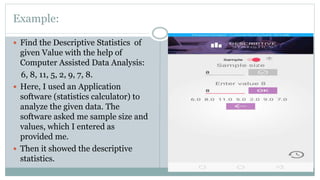
 Find the Descriptive Statistics of
given Value with the help of
Computer Assisted Data Analysis:
6, 8, 11, 5, 2, 9, 7, 8.
 Here, I used an Application
software (statistics calculator) to
analyze the given data. The
software asked me sample size and
values, which I entered as
provided me.
 Then it showed the descriptive
statistics.
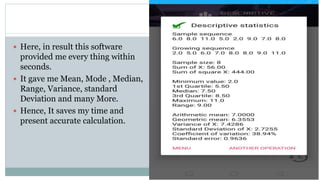
 Here, in result this software
provided me every thing within
seconds.
 It gave me Mean, Mode , Median,
Range, Variance, standard
Deviation and many More.
 Hence, It saves my time and
present accurate calculation.
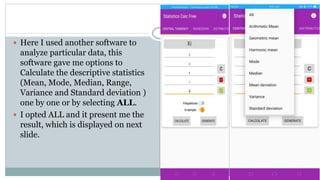
 Here I used another software to
analyze particular data, this
software gave me options to
Calculate the descriptive statistics
(Mean, Mode, Median, Range,
Variance and Standard deviation )
one by one or by selecting ALL.
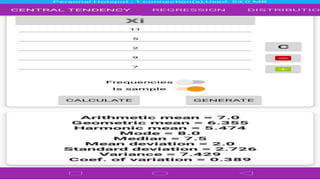
 I opted ALL and it present me the
result, which is displayed on next
slide.
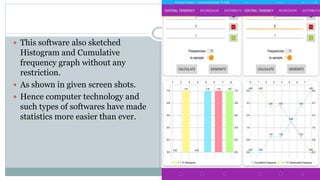
 This software also sketched
Histogram and Cumulative
frequency graph without any
restriction.
 As shown in given screen shots.
 Hence computer technology and
such types of softwares have made
statistics more easier than ever.
Computer Assisted Data Analysis (Hands-on Practice)

Computer Assisted Data Analysis (Hands-on Practice)

  • 1.
    NAME : MOHSINALI CLASS : B.ED. (2.5) MORNING ROLL NO : 66 TOPIC : COMPUTER ASSISTED DATA ANALYSIS ASSIGNED BY : DR. AMJAD ALI ARAIN FACULTY OF EDUCATION ELSA KAZI CAMPUS
  • 2.
    Computer Assisted DataAnalysis  Advances in technology have provided new approaches for data collection methods and analysis for researchers.  Data collection is no longer limited to paper-and-pencil format, and numerous methods are now available through Internet and electronic resources.  With these techniques, researchers are not burdened with entering data manually and data analysis is facilitated by software programs.
  • 3.
    Data Analysis Software Data analysis Software tool that has the statistical and analytical capability of inspecting, cleaning, transforming and modeling data with an aim of driving important information for decision making purposes.  Data analysis can be classified as Descriptive statistics, exploratory data analysis (EDA) and confirmatory data analysis (CDA).  We can Analyze our data by different softwares, Such as: 1. SPSS 2. MS-Excel 3. Statistics Calculators (on Smart phones)
  • 4.
    Example:  Find theDescriptive Statistics of given Value with the help of Computer Assisted Data Analysis: 6, 8, 11, 5, 2, 9, 7, 8.  Here, I used an Application software (statistics calculator) to analyze the given data. The software asked me sample size and values, which I entered as provided me.  Then it showed the descriptive statistics.
  • 5.
     Here, inresult this software provided me every thing within seconds.  It gave me Mean, Mode , Median, Range, Variance, standard Deviation and many More.  Hence, It saves my time and present accurate calculation.
  • 6.
     Here Iused another software to analyze particular data, this software gave me options to Calculate the descriptive statistics (Mean, Mode, Median, Range, Variance and Standard deviation ) one by one or by selecting ALL.  I opted ALL and it present me the result, which is displayed on next slide.
  • 8.
     This softwarealso sketched Histogram and Cumulative frequency graph without any restriction.  As shown in given screen shots.  Hence computer technology and such types of softwares have made statistics more easier than ever.