Outline
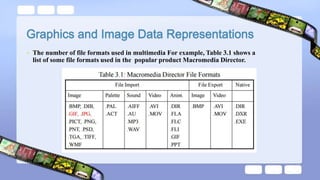
• The number of file formats used in multimedia For example, Table 3.1 shows a
list of some file formats used in the popular product Macromedia Director.
• digital image is represented by a matrix of numeric values each
representing a quantized intensity value.
• Intensity value can be represented by
o 1-bit: black & white images
o 8-bits: grayscale images
o 24-bits: color images (RGB)
• Images consist of pixels (picture elements in digital images).
• A 1-bit image (also called binary image) consists of on and off bits only and
thus is the simplest type of image.
 Each pixel is stored as a single bit (0 or 1), so also referred to as binary image.
 Such an image is also called a 1-bit monochrome image since it contains no
color.
 1-bit images can be satisfactory for pictures containing only simple graphics
and text.
 A 640 x 480 monochrome image requires 38.4 kilobytes of
 storage(640×480)., see Figure (3.1).
 Each pixel has a gray-value between 0 and 255.
 Each pixel is represented by a single byte; e.g., a dark pixel might have a value of 10,
and a bright one might be 230
 The entire image can be thought of as a two-dimensional array of pixel values. We
refer to such an array as a bitmap, - a representation of the graphics/image.
 Image resolution refers to the number of pixels in a digital image (higher resolution
always yields better quality but increases size).
 Question: each pixel is usually stored as a byte (a value between 0 and 255), so a
640×480 gray scale image requires (307,200) kilo bytes of storage.
• Such an array must be stored in hardware; we call this hardware a frame buffer.
Video card (actually a graphics card) is used for this purpose.
• The resolution of the video card does not have to match the desired resolution of the
image, but if not enough video card memory is available then the data has to be
shifted around in RAM for display.
• 8-bit image can be thought of as a set of 1-bit bit-planes, where each plane consists
of a 1-bit representation of the image at higher and higher levels.
• A bit is turned on if the image pixel has a nonzero value at that bit level.
• Figure (3.2) displays the concept of bit-planes graphically. Each bit-plane can have
a value of 0 or 1 at each pixel but together all the bit-planes make up a single byte
that stores values between 0 and 255 (in this 8-bit situation).
displays the concept of bit-planes graphically
Figure (3.2) Bit-planes for 8-bit gray scale
image
refers to the number of pixels in a digital image
(higher resolution always yields better quality).
• If we wish to print such an image, things become more complex.
Suppose we have available a 600 dot-per-inch (dpi) laser printer. Such
a device can usually only print a dot or not print it. However, a 600 ×
600 image will be printed in a 1-inch space and will thus not be very
pleasing. Instead, dithering is used.
When an image is printed, the basic strategy of dithering is used, which
trades intensity resolution for spatial resolution to provide ability to
print multi-level images on 2-level (1-bit) printers.
 For printing on a 1-bit printer, dithering is used to calculate larger patterns
of dots, such that values from 0 to 255 correspond to pleasing patterns
that correctly represent darker and brighter pixel values.
 Dithering is often used when converting grey scale images to
monochrome.
 The basic idea of Dithering is to use a larger pattern to approximate the
(greyscale) levels of the input image .
 The main strategy is to replace a pixel value by a larger pattern, say 2 x 2
or 4 x 4
• instead we use an n x n matrix of on-off 1-bit dots , we can represent
levels of intensity resolution. for example, three dots filled in any way counts
as one intensity level.
• example, if we use a 2 x 2 ''dither matrix":
 we can first remap image values in 0 .. 255 into the new range
0 .. 4 by (integer) dividing by 256/5. Then, for example, if the
pixel value is 0, we print nothing in a 2 x 2 area of printer
output. But if the pixel value is 4, we print all four dots.
 So the rule is
 If the intensity is > the dither matrix entry then print an on
dot at that entry location.
 Replace each pixel by an n × n matrix of such on or off
dots.
• Disadvantage:
• However, we notice that the number of levels, so far, is small for this type of printing. If we increase
the number of effective intensity levels by increasing the dither matrix size, we also increase the size
of the output image. This reduces the amount of detail in any small part of the image, effectively
reducing the spatial resolution.
• Question: if we use a larger dithering matrix size of 4×4 , what is the solution?
 The most common data types for graphics and image file formats — 24-bit color and
8-bit color
 In a color 24-bit image, each pixel is represented by three bytes, usually representing
RGB
 This format supports 256 × 256 × 256 possible combined colors
 a 640 × 480 24-bit color image would require (921.6) kelo byte of storage .
 An important point to note is that many 24-bit color images are actually stored
as 32-bit images, with the extra byte of data for each pixel storing an α (alpha)
value representing special-effect information. (See [2] for an introduction to
use of the α-channel for compositing several overlapping objects in a graphics
image. The simplest use is as a transparency flag).
 reasonably accurate color images can be obtained by quantizing the color information to collapse it.
 Color quantizing example: reducing the number of colors required to represent a digital image makes
it possible to reduce its file size.
 Many systems can make use of 8 bits of color information (the so-called “256 colors”) in producing a
screen image
 8-bit color image files use the concept of a lookup table to store color information. 8-bit color image
(so-called 256 colors. Why?) files use the concept of a lookup table (LUT) to store color
information. For example,:
 if exactly 23 pixels have RGB values (45, 200, 91)
 then store the value 23 in a three-dimensional array, at the element indexed by the index values [45,
200, 91].
 This data structure is called a color histogram. color histogram: is a very useful tool for image
transformation and manipulation in Image Processing.
• Note: the great savings in space for 8-bit images, over 24-bit ones: a 640
× 480 8-bit color image only requires 300 kB of storage, compared to
921.6 kB for a color image (again, without any compression applied
Forest fire.jpg
Notice that the difference between Fig. 3.5a, the 24-bit image, and Fig. 3.7, the 8-bit image, is
reasonably small.
24
Fig. 3.5a, the 24-bit image
Fig. 3.7, the 8-bit image
•One byte for each pixel
•Supports 256 out of the millions s possible, acceptable
color quality
•Requires Color Look-Up Tables (LUTs)
•A 640 x 480 8-bit color image requires 307.2 KB of
storage (the same as 8-bit grayscale)
•Each pixel is represented by three bytes (e.g., RGB)
•Supports 256 x 256 x 256 possible combined colors
(16,777,216)
•A 640 x 480 24-bit color image would require 921.6
KB of storage
• The idea used in 8-bit color images is to store only the index,
or code value, for each pixel. Then, e.g., if a pixel stores the
value 25, the meaning is to go to row 25 in a color look-up
table (LUT).
‫ؤ‬
Color piker: consist of any array of fairly large blocks of color (or asemi
continuous range of colors) such that amouse-click will select color
indicated.
Inreality acolor- picker displays the palette colors associated with index
value from (0 to 255 ) .
If the user selects the color block with index value (2) , then the color
meant is (cyan) with R, G , B values ( 0 , 255 , 255 ) .
How to devise a color look-up table
The most straightforward way to make 8-bit look-up color
out of 24-bit color would be to divide the RGB cube into
equal slices in each dimension.
(a) The centers of each of the resulting cubes would serve as the entries
in the color LUT, while simply scaling the RGB ranges 0..255 into
the appropriate ranges would generate the 8-bit codes.
(b) Since humans are more sensitive to R and G than to B, we could
shrink the R range and G range 0..255 into the 3-bit range 0..7 and
shrink the B range down to the 2-bit range 0..3, thus making up a
total of 8 bits.
(c) To shrink R and G, we could simply divide the R or G byte value
by (256/8)=32 and then truncate. Then each pixel in the image
gets replaced by its 8-bit index and the color LUT serves to generate
24-bit color.
Median-cut algorithm: A simple alternate solution that
does a better job for this color reduction problem.
(a) The idea is to sort the R byte values and find their median;
then values smaller than the median are labelled with a
0" bit and values larger than the median are labelled with
a 1" bit.
(b) This type of scheme will indeed concentrate bits where
they most need to dierentiate between high populations
of close colors.
(c) One can most easily visualize finding the median by using
a histogram showing counts at position 0..255.
(d) Fig. 3.11 shows a histogram of the R byte values for the
forestfire.bmp image along with the median of these val-
ues, shown as a vertical line.
Histogram of R bytes for the 24-bit color image forestre.bmp"
results in a 0" bit or 1" bit label for every pixel. For the second bit
of the color table index being built, we take R values less than the R
median and label just those pixels as 0" or 1" according as their G
value is less than or greater than the median of the G value, just for the
0" Red bit pixels. Continuing over R, G, B for 8 bits gives a color LUT
8-bit index.
• 8-bit GIF : one of the most important format because of its
historical connection to the WWW and HTML markup
language as the first image type recognized by net browsers
 Limited to 8-bit (256) color images only, which, while
producing acceptable color images
 comes in two flavors:
1. GIF87a: The original specification.
2. GIF89a: The later version. Supports simple animation
via a Graphics Control Extension block in the data, provides
simple control over delay time
GIF file format.
(continues for remaining colors)
GIF color map.
• Screen Descriptor comprises a set of attributes that belong
to every image in the file. According to the GIF87 standard,
it is defined as in Fig. 3.13.
 JPEG: The most important current standard for image
compression.
 The human vision system has some specific
limitations and JPEG takes advantage of these to
achieve high rates of compression.
 JPEG allows the user to set a desired level of quality,
or compression ratio .
• example image, with a quality factor Q=10%
 PNG format: standing for Portable Network Graphics meant
to supersede the GIF standard,
 Special features of PNG files include:
1. Support for up to 48 bits of color information a large
increase.
2. Files may contain gamma-correction information for
correct display of color images, as well as alpha-channel
information for such uses as control of transparency.
 The support for attachment of additional information
(referred to as “tags”) provides a great deal of flexibility.
 TIFF can store many different types of image:1-bit,
grayscale, 8-bit color, 24-bit RGB, etc
 The TIFF format was developed by the Aldus Corporation in
the 1980's and was later supported by Microsoft.
 is an image format for digital cameras
 A variety of tags (many more than in TIFF) are available to
facilitate higher quality printing, since information about the
camera and picture taking conditions (flash, exposure, light
source, white balance, type of scene, etc.) can be stored and
used by printers for possible color correction algorithms. The
EXIF standard also includes specification of file format for
audio that accompanies digital images.
 A few dominant formats aimed at storing graphics animations (i.e.,
series of drawings or graphic illustrations) as opposed to video (i.e.,
series of images)
 Difference: animations are considerably less demanding of resources
than video files.
 FLC is an animation or moving picture file format; it was originally
created by Animation Pro. Another format, FLI, is similar to FLC.
 GL produces somewhat better quality moving pictures. GL animations
can also usually handle larger file sizes
Postscript is a vector-based picture language, rather than
pixel based: page element definitions are essentially in terms
of vectors
1. Postscript includes text as well as vector/structured
graphics.
2. Postscript page description language itself does not provide
compression; in fact, Postscript files are just stored as ASCII
PDF files that do not include images have about the same compression ratio,
2:1 or 3:1, as do files compressed with other LZW-based compression tools.
the native vector file format for the Microsoft Windows operating environment
 Consist of a collection of GDI (Graphics Device Interface)
function calls, also native to the Window environment.
 WMF files are unlimited in size
• the major system standard graphics file format for Microsoft Windows, used in
Microsoft Paint and other programs.
• 1. PAINT was originally used in the MacPaint program, initially only for 1-bit
monochrome images.
• 2. PICT format is used in MacDraw (a vector-based drawing program) for storing
structured graphics.
the graphics format for the X Window system. PPM supports 24-bit color bitmaps,
Multimedia graphics and image data representation

Multimedia graphics and image data representation

  • 2.
  • 3.
    • The numberof file formats used in multimedia For example, Table 3.1 shows a list of some file formats used in the popular product Macromedia Director.
  • 5.
    • digital imageis represented by a matrix of numeric values each representing a quantized intensity value. • Intensity value can be represented by o 1-bit: black & white images o 8-bits: grayscale images o 24-bits: color images (RGB)
  • 6.
    • Images consistof pixels (picture elements in digital images). • A 1-bit image (also called binary image) consists of on and off bits only and thus is the simplest type of image.  Each pixel is stored as a single bit (0 or 1), so also referred to as binary image.  Such an image is also called a 1-bit monochrome image since it contains no color.  1-bit images can be satisfactory for pictures containing only simple graphics and text.  A 640 x 480 monochrome image requires 38.4 kilobytes of  storage(640×480)., see Figure (3.1).
  • 8.
     Each pixelhas a gray-value between 0 and 255.  Each pixel is represented by a single byte; e.g., a dark pixel might have a value of 10, and a bright one might be 230  The entire image can be thought of as a two-dimensional array of pixel values. We refer to such an array as a bitmap, - a representation of the graphics/image.  Image resolution refers to the number of pixels in a digital image (higher resolution always yields better quality but increases size).  Question: each pixel is usually stored as a byte (a value between 0 and 255), so a 640×480 gray scale image requires (307,200) kilo bytes of storage.
  • 10.
    • Such anarray must be stored in hardware; we call this hardware a frame buffer. Video card (actually a graphics card) is used for this purpose. • The resolution of the video card does not have to match the desired resolution of the image, but if not enough video card memory is available then the data has to be shifted around in RAM for display. • 8-bit image can be thought of as a set of 1-bit bit-planes, where each plane consists of a 1-bit representation of the image at higher and higher levels. • A bit is turned on if the image pixel has a nonzero value at that bit level. • Figure (3.2) displays the concept of bit-planes graphically. Each bit-plane can have a value of 0 or 1 at each pixel but together all the bit-planes make up a single byte that stores values between 0 and 255 (in this 8-bit situation).
  • 11.
    displays the conceptof bit-planes graphically Figure (3.2) Bit-planes for 8-bit gray scale image
  • 12.
    refers to thenumber of pixels in a digital image (higher resolution always yields better quality). • If we wish to print such an image, things become more complex. Suppose we have available a 600 dot-per-inch (dpi) laser printer. Such a device can usually only print a dot or not print it. However, a 600 × 600 image will be printed in a 1-inch space and will thus not be very pleasing. Instead, dithering is used. When an image is printed, the basic strategy of dithering is used, which trades intensity resolution for spatial resolution to provide ability to print multi-level images on 2-level (1-bit) printers.
  • 13.
     For printingon a 1-bit printer, dithering is used to calculate larger patterns of dots, such that values from 0 to 255 correspond to pleasing patterns that correctly represent darker and brighter pixel values.  Dithering is often used when converting grey scale images to monochrome.  The basic idea of Dithering is to use a larger pattern to approximate the (greyscale) levels of the input image .  The main strategy is to replace a pixel value by a larger pattern, say 2 x 2 or 4 x 4
  • 14.
    • instead weuse an n x n matrix of on-off 1-bit dots , we can represent levels of intensity resolution. for example, three dots filled in any way counts as one intensity level. • example, if we use a 2 x 2 ''dither matrix":
  • 15.
     we canfirst remap image values in 0 .. 255 into the new range 0 .. 4 by (integer) dividing by 256/5. Then, for example, if the pixel value is 0, we print nothing in a 2 x 2 area of printer output. But if the pixel value is 4, we print all four dots.  So the rule is  If the intensity is > the dither matrix entry then print an on dot at that entry location.  Replace each pixel by an n × n matrix of such on or off dots.
  • 18.
    • Disadvantage: • However,we notice that the number of levels, so far, is small for this type of printing. If we increase the number of effective intensity levels by increasing the dither matrix size, we also increase the size of the output image. This reduces the amount of detail in any small part of the image, effectively reducing the spatial resolution. • Question: if we use a larger dithering matrix size of 4×4 , what is the solution?
  • 20.
     The mostcommon data types for graphics and image file formats — 24-bit color and 8-bit color  In a color 24-bit image, each pixel is represented by three bytes, usually representing RGB  This format supports 256 × 256 × 256 possible combined colors  a 640 × 480 24-bit color image would require (921.6) kelo byte of storage .  An important point to note is that many 24-bit color images are actually stored as 32-bit images, with the extra byte of data for each pixel storing an α (alpha) value representing special-effect information. (See [2] for an introduction to use of the α-channel for compositing several overlapping objects in a graphics image. The simplest use is as a transparency flag).
  • 22.
     reasonably accuratecolor images can be obtained by quantizing the color information to collapse it.  Color quantizing example: reducing the number of colors required to represent a digital image makes it possible to reduce its file size.  Many systems can make use of 8 bits of color information (the so-called “256 colors”) in producing a screen image  8-bit color image files use the concept of a lookup table to store color information. 8-bit color image (so-called 256 colors. Why?) files use the concept of a lookup table (LUT) to store color information. For example,:  if exactly 23 pixels have RGB values (45, 200, 91)  then store the value 23 in a three-dimensional array, at the element indexed by the index values [45, 200, 91].  This data structure is called a color histogram. color histogram: is a very useful tool for image transformation and manipulation in Image Processing.
  • 23.
    • Note: thegreat savings in space for 8-bit images, over 24-bit ones: a 640 × 480 8-bit color image only requires 300 kB of storage, compared to 921.6 kB for a color image (again, without any compression applied Forest fire.jpg
  • 24.
    Notice that thedifference between Fig. 3.5a, the 24-bit image, and Fig. 3.7, the 8-bit image, is reasonably small. 24 Fig. 3.5a, the 24-bit image Fig. 3.7, the 8-bit image •One byte for each pixel •Supports 256 out of the millions s possible, acceptable color quality •Requires Color Look-Up Tables (LUTs) •A 640 x 480 8-bit color image requires 307.2 KB of storage (the same as 8-bit grayscale) •Each pixel is represented by three bytes (e.g., RGB) •Supports 256 x 256 x 256 possible combined colors (16,777,216) •A 640 x 480 24-bit color image would require 921.6 KB of storage
  • 25.
    • The ideaused in 8-bit color images is to store only the index, or code value, for each pixel. Then, e.g., if a pixel stores the value 25, the meaning is to go to row 25 in a color look-up table (LUT).
  • 26.
    ‫ؤ‬ Color piker: consistof any array of fairly large blocks of color (or asemi continuous range of colors) such that amouse-click will select color indicated. Inreality acolor- picker displays the palette colors associated with index value from (0 to 255 ) . If the user selects the color block with index value (2) , then the color meant is (cyan) with R, G , B values ( 0 , 255 , 255 ) .
  • 28.
    How to devisea color look-up table The most straightforward way to make 8-bit look-up color out of 24-bit color would be to divide the RGB cube into equal slices in each dimension. (a) The centers of each of the resulting cubes would serve as the entries in the color LUT, while simply scaling the RGB ranges 0..255 into the appropriate ranges would generate the 8-bit codes.
  • 29.
    (b) Since humansare more sensitive to R and G than to B, we could shrink the R range and G range 0..255 into the 3-bit range 0..7 and shrink the B range down to the 2-bit range 0..3, thus making up a total of 8 bits. (c) To shrink R and G, we could simply divide the R or G byte value by (256/8)=32 and then truncate. Then each pixel in the image gets replaced by its 8-bit index and the color LUT serves to generate 24-bit color.
  • 30.
    Median-cut algorithm: Asimple alternate solution that does a better job for this color reduction problem. (a) The idea is to sort the R byte values and find their median; then values smaller than the median are labelled with a 0" bit and values larger than the median are labelled with a 1" bit.
  • 31.
    (b) This typeof scheme will indeed concentrate bits where they most need to dierentiate between high populations of close colors. (c) One can most easily visualize finding the median by using a histogram showing counts at position 0..255. (d) Fig. 3.11 shows a histogram of the R byte values for the forestfire.bmp image along with the median of these val- ues, shown as a vertical line.
  • 33.
    Histogram of Rbytes for the 24-bit color image forestre.bmp" results in a 0" bit or 1" bit label for every pixel. For the second bit of the color table index being built, we take R values less than the R median and label just those pixels as 0" or 1" according as their G value is less than or greater than the median of the G value, just for the 0" Red bit pixels. Continuing over R, G, B for 8 bits gives a color LUT 8-bit index.
  • 34.
    • 8-bit GIF: one of the most important format because of its historical connection to the WWW and HTML markup language as the first image type recognized by net browsers
  • 35.
     Limited to8-bit (256) color images only, which, while producing acceptable color images  comes in two flavors: 1. GIF87a: The original specification. 2. GIF89a: The later version. Supports simple animation via a Graphics Control Extension block in the data, provides simple control over delay time
  • 36.
  • 37.
    (continues for remainingcolors) GIF color map.
  • 38.
    • Screen Descriptorcomprises a set of attributes that belong to every image in the file. According to the GIF87 standard, it is defined as in Fig. 3.13.
  • 39.
     JPEG: Themost important current standard for image compression.  The human vision system has some specific limitations and JPEG takes advantage of these to achieve high rates of compression.  JPEG allows the user to set a desired level of quality, or compression ratio .
  • 40.
    • example image,with a quality factor Q=10%
  • 41.
     PNG format:standing for Portable Network Graphics meant to supersede the GIF standard,  Special features of PNG files include: 1. Support for up to 48 bits of color information a large increase. 2. Files may contain gamma-correction information for correct display of color images, as well as alpha-channel information for such uses as control of transparency.
  • 42.
     The supportfor attachment of additional information (referred to as “tags”) provides a great deal of flexibility.  TIFF can store many different types of image:1-bit, grayscale, 8-bit color, 24-bit RGB, etc  The TIFF format was developed by the Aldus Corporation in the 1980's and was later supported by Microsoft.
  • 43.
     is animage format for digital cameras  A variety of tags (many more than in TIFF) are available to facilitate higher quality printing, since information about the camera and picture taking conditions (flash, exposure, light source, white balance, type of scene, etc.) can be stored and used by printers for possible color correction algorithms. The EXIF standard also includes specification of file format for audio that accompanies digital images.
  • 44.
     A fewdominant formats aimed at storing graphics animations (i.e., series of drawings or graphic illustrations) as opposed to video (i.e., series of images)  Difference: animations are considerably less demanding of resources than video files.  FLC is an animation or moving picture file format; it was originally created by Animation Pro. Another format, FLI, is similar to FLC.  GL produces somewhat better quality moving pictures. GL animations can also usually handle larger file sizes
  • 46.
    Postscript is avector-based picture language, rather than pixel based: page element definitions are essentially in terms of vectors 1. Postscript includes text as well as vector/structured graphics. 2. Postscript page description language itself does not provide compression; in fact, Postscript files are just stored as ASCII
  • 47.
    PDF files thatdo not include images have about the same compression ratio, 2:1 or 3:1, as do files compressed with other LZW-based compression tools. the native vector file format for the Microsoft Windows operating environment  Consist of a collection of GDI (Graphics Device Interface) function calls, also native to the Window environment.  WMF files are unlimited in size
  • 48.
    • the majorsystem standard graphics file format for Microsoft Windows, used in Microsoft Paint and other programs. • 1. PAINT was originally used in the MacPaint program, initially only for 1-bit monochrome images. • 2. PICT format is used in MacDraw (a vector-based drawing program) for storing structured graphics. the graphics format for the X Window system. PPM supports 24-bit color bitmaps,