A     presentationIMAGE   COMPRESSIONGuided by:  Prof.  N. A. NEMADEby:         Manish  kumarAbhishekranjanPrashantwagh
Why image compression?The image compression are required for providing    the proper image Format for different devices or     application which can be distinguished On the     basis of their platform and rendering type.For Web  based applications
Provides Different image formats
Provides basics for video compressionIMAGE COMPRESSIONGIF (GRAPHICS INTERCHANGE FORMAT)
 PNG (PORTABLE NETWORK GRAPHICS
 MNG (MULTIPLE-IMAGE NETWORK GRAPHICS)
 JPEG (JOIN PICTURE EXPERT GROUPGIF (GRAPHICS INTERCHANGE FORMAT)Introduced by CompuServe in 1987 (GIF87a)
 Support for multiple images in one file and metadata adding in 1989 (GIF89a)
 Indexed image format: up to 256 colours per image, chosen from a variable palette.
One colour index can indicate transparency.
Uses lossless LZW compression of data bytes.
Optional interlacing capabilityGIF UsesGIF became very popular in the early days of the Web.
  Supported by NCSA Mosaic.
Pretty good compression.
Most displays then were indexed rather than truecolor.
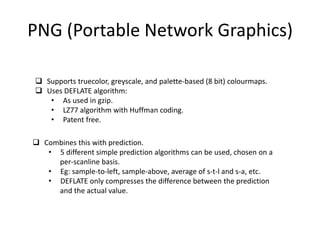
Today it’s still good for diagrams, cartoons, and other nonphotographic      images.Lossless encoding good for sharp edges (doesn’t blur).PNG (Portable Network Graphics)Supports truecolor, greyscale, and palette-based (8 bit) colourmaps.

Project presentation image compression by manish myst, ssgbcoet

  • 1.
    A presentationIMAGE COMPRESSIONGuided by: Prof. N. A. NEMADEby: Manish kumarAbhishekranjanPrashantwagh
  • 2.
    Why image compression?Theimage compression are required for providing the proper image Format for different devices or application which can be distinguished On the basis of their platform and rendering type.For Web based applications
  • 3.
  • 4.
    Provides basics forvideo compressionIMAGE COMPRESSIONGIF (GRAPHICS INTERCHANGE FORMAT)
  • 5.
    PNG (PORTABLENETWORK GRAPHICS
  • 6.
    MNG (MULTIPLE-IMAGENETWORK GRAPHICS)
  • 7.
    JPEG (JOINPICTURE EXPERT GROUPGIF (GRAPHICS INTERCHANGE FORMAT)Introduced by CompuServe in 1987 (GIF87a)
  • 8.
    Support formultiple images in one file and metadata adding in 1989 (GIF89a)
  • 9.
    Indexed imageformat: up to 256 colours per image, chosen from a variable palette.
  • 10.
    One colour indexcan indicate transparency.
  • 11.
    Uses lossless LZWcompression of data bytes.
  • 12.
    Optional interlacing capabilityGIFUsesGIF became very popular in the early days of the Web.
  • 13.
    Supportedby NCSA Mosaic.
  • 14.
  • 15.
    Most displays thenwere indexed rather than truecolor.
  • 16.
    Today it’s stillgood for diagrams, cartoons, and other nonphotographic images.Lossless encoding good for sharp edges (doesn’t blur).PNG (Portable Network Graphics)Supports truecolor, greyscale, and palette-based (8 bit) colourmaps.
  • 17.
  • 18.
    As usedin gzip.
  • 19.
    LZ77 algorithm withHuffman coding.
  • 20.
  • 21.
  • 22.
    5 different simpleprediction algorithms can be used, chosen on a per-scanlinebasis.Eg: sample-to-left, sample-above, average of s-t-l and s-a, etc.
  • 23.
    DEFLATE only compressesthe difference between the prediction and the actual value.
  • 24.
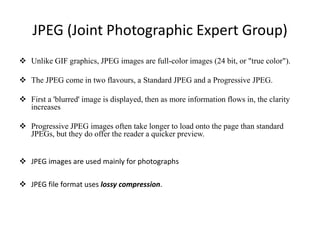
    JPEG (Joint PhotographicExpert Group)Unlike GIF graphics, JPEG images are full-color images (24 bit, or "true color").
  • 25.
    The JPEG comein two flavours, a Standard JPEG and a ProgressiveJPEG.
  • 26.
    First a 'blurred'image is displayed, then as more information flows in, the clarity increases.
  • 27.
    Progressive JPEG imagesoften take longer to load onto the page than standard JPEGs, but they do offer the reader a quicker preview.
  • 28.
    JPEG images areused mainly for photographs.
  • 29.
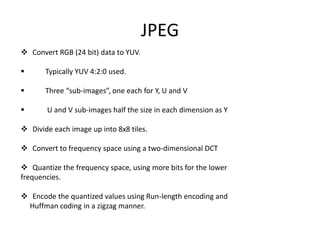
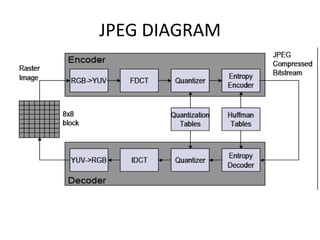
    JPEG file formatuses lossy compression.JPEG Convert RGB (24 bit) data to YUV.
  • 30.
    Typically YUV 4:2:0 used.
  • 31.
    Three “sub-images”, one each for Y, U and V
  • 32.
    U and V sub-images half the size in each dimension as Y
  • 33.
    Divide eachimage up into 8x8 tiles.
  • 34.
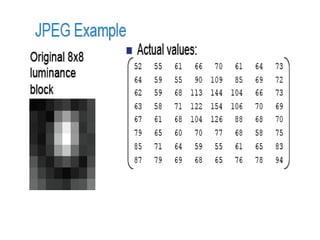
    Convert tofrequency space using a two-dimensional DCT
  • 35.
    Quantize thefrequency space, using more bits for the lowerfrequencies. Encode the quantized values using Run-length encoding and Huffman coding in a zigzag manner.
  • 36.
  • 38.
    File Compression2 Typesof File Compression: Lossy CompressionLossless CompressionThe objective is to reduce redundancy of the image data in order to be able to store data in an efficient form.  reducing the file size
  • 39.
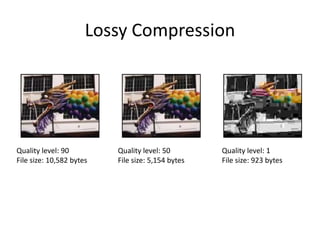
    Lossy CompressionA compressionscheme in which certain amounts of data are sacrifices to attain smaller file sizes. It is used when the files do not required extra data. User can choose a loss rate or ratio.JPEG uses lossy compression.
  • 40.
    Lossy CompressionQuality level:90 File size: 10,582 bytes Quality level: 50 File size: 5,154 bytes Quality level: 1 File size: 923 bytes
  • 41.
    Lossless CompressionLossless compressionmeans that even though the file is compressed (enjoys a smaller file size than an uncompressed image), it will not lose any quality.A lossless image will contain identical data regardless of whether it is compressed pr uncompressedExample of lossless compression included LZW (Lempel-Ziv-Welch) and RLE (Run Length Encoding)
  • 42.
    AdvantagesIt is fastto compute compared to many other suitable image transformations, It usually tends to result in low values for the weights of some of its basis images. The image that results from deleting low weight components is generally pleasing to the eye.
  • 43.
    conclusionWhile the goalwas reached in this particular case, this was not the same for all images tested. Using Neural networks it can be used to represent portions of the DWT coefficients and save some space. Neural networks generally work better on smaller datasets, (with two neurons in the input layer).

Editor's Notes

  • #2 Manish.ssgb.bridge@gmail.comShrisantgadgebaba college of engg. & tech, bhusawalElectronics & comm2011 batch