IMAGE FILE FORMAT
File Formats
1) BMP (Bitmap)
2) JPEG (Joint Photographers Expert Group)
3) GIF (Graphics Interchange Format)
4) TIFF (Tagged Image File Format)
5) PNG (Portable Network Graphics)
6) PICT (Picture)
7) TGA (Targa)
8) PSD (Photoshop Document)
Terminology
• Color depth- this defines the number of bits required to
store the information of each pixels of image in turns
determines the number of possible colors that can be
displayed in an image.
• Indexed color- this term refers to the image types usually
with the limited number of color values eg.256.
• Alpha channel- it specifies how the pixels color should
me merged with the another pixel when the two are
overlaid one on top of another.
Types of image files
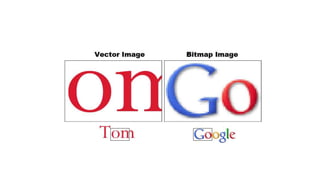
• Vector
– Images created from geometrical primitives such as
points, lines, curves and other mathematical defined
shapes.
• Bitmap
– Images recorded as an array of pixels-typically used for
the representation of photographic images.
Vector Images
• A vector image store internally as a mathematical
entities, rather than a collection of color dots.
BMP(BITMAP)
• BMP is a standard windows image format on DOS and
Windows-compatible computers.
• BMP supports RGB, Indexed color, Greyscale and Bitmap color
modes and doesn’t support alpha channels.
• Images are stored as a rectangular matrix of pixels.
• Pixels=picture element=a colored dot
• Can capture more subtlety than vector images.
• The color of every separate pixels is stored, so typical file sizes
much larger.
• Pixels dimensions are fixed- cannot easily be enlarged without
loss of quality.
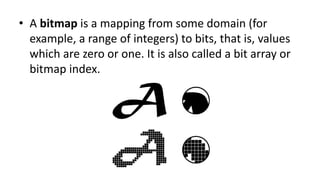
• A bitmap is a mapping from some domain (for
example, a range of integers) to bits, that is, values
which are zero or one. It is also called a bit array or
bitmap index.
• Images are stored as a rectangular matrix of pixels.
• Pixels=picture element=a colored dot
• Can capture more subtlety than vector images.
• The color of every separate pixels is stored, so
typical file sizes much larger.
• Pixels dimensions are fixed- cannot easily be
enlarged without loss of quality.
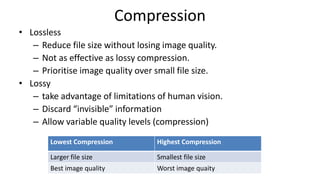
Compression
• Lossless
– Reduce file size without losing image quality.
– Not as effective as lossy compression.
– Prioritise image quality over small file size.
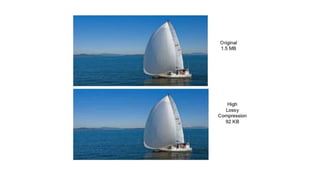
• Lossy
– take advantage of limitations of human vision.
– Discard “invisible” information
– Allow variable quality levels (compression)
Lowest Compression Highest Compression
Larger file size Smallest file size
Best image quality Worst image quaity
Compression
• Lossless
– RLE(Run Length Encoding)- Windows bitmap files(bmp,ico)
– LZW(lempel-Ziv-Welch)-GIF and TIFF files
– ZIP-TIFF FILES
• Lossy
– JPEG (Joint Photography Experts group )
– Best suited to photos and paintings of realistic scenes with
smooth variations of tone and color.
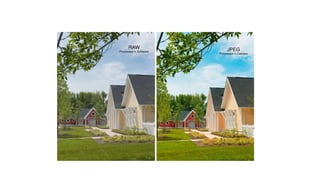
JPEG (Joint Photographers Expert Group)
JPEG format is commonly used to display
photographs and other continuous-tone images in
hypertext markup language(HTML) documents over
the World Wide Web and other online services.
 JPEG format supports CMYK, RGB, & Greyscale color
modes, & does not support alpha channels.
 It uses a 24-bit format-16 million colors.
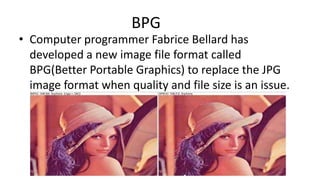
BPG
• Computer programmer Fabrice Bellard has
developed a new image file format called
BPG(Better Portable Graphics) to replace the JPG
image format when quality and file size is an issue.
• According to Bellard the main advantages of new BPG
image format are:
– High compression ratio.Files are much smaller than JPG for
similar quality.
– Supported by most web browsers with a small javascript
decoder
– Native support of 8 to 14 bits per channel for a higher
dynamic range.
– Loseless compression is supported.
GIF (Graphics Interchange Format)
 GIF format preserves transparency in indexed-color images.
 GIF format is use to create animated images.
 The images saved in this format lose a lot of color information
by being reduced to 256 colors (8 bits per pixel).
 That makes it not such a good format for photographs and
large images but ideal for storing graphics with a limited
number of colors such as clip art, simple drawings, logos, text,
diagrams, icons, small images or pictures.
GIF (Graphics Interchange Format)
• Pictures can contain at most 256 different colors
• Files format defines a “palette” of 24-bit colors
• Each pixels stored as an 8-bit index into this palette
• Use 8-bits(1 byte) per pixel
• LZW Compression-lossless
• Good for images with limited set of colors such as logos, web buttons
etc.
• Also support animation.
• Supported by all web browsers.
• Possible copyright problems.
TIFF(Tagged Image File Format)
TIFF was designed by Aldus Corporation & Microsoft in
1987, Widely used cross platform file format.
 It is not widely supported by web browsers, it remains
the standard format for printing, scanned documents
and Optical Character Recognition, since it doesn't have
any of the JPG artifacts.
 It uses lossless compression method hence it is
appropriate for printing purpose.
PNG (Portable Network Graphics)
• Portable Network Graphics.
• Designed to replace GIF files as there was a patent
issue with LZW compression.
• Also eliminates the restriction of number of color
• Does not support animation
• Lossless compression (DEFLATE related to ZIP)
• Supported by most modern web browsers.
PICT (Picture)
• PICT format is widely used among Mac OS graphics
and page-layout applications as an intermediary file
format for transferring images between applications.
• PICT supports RGB, Indexed color, Greyscale and
Bitmap color modes and bitmap-mode images
without alpha channels.
TGA (Targa)
• TGA format is designed for systems using the
Truevision video board and is commonly supported
by MS-DOS color applications.
• It supports 24-bit and 32 bit RGB images, indexed
color and greyscale images with alpha channel.
PSD (Photoshop Document)
• Photoshop format is the default file format used in
the Adobe Photoshop package and the only format
supporting all available image mode.
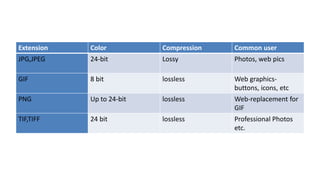
Extension Color Compression Common user
JPG,JPEG 24-bit Lossy Photos, web pics
GIF 8 bit lossless Web graphics-
buttons, icons, etc
PNG Up to 24-bit lossless Web-replacement for
GIF
TIF,TIFF 24 bit lossless Professional Photos
etc.
MM1
MM1

MM1

  • 1.
  • 2.
    File Formats 1) BMP(Bitmap) 2) JPEG (Joint Photographers Expert Group) 3) GIF (Graphics Interchange Format) 4) TIFF (Tagged Image File Format) 5) PNG (Portable Network Graphics) 6) PICT (Picture) 7) TGA (Targa) 8) PSD (Photoshop Document)
  • 3.
    Terminology • Color depth-this defines the number of bits required to store the information of each pixels of image in turns determines the number of possible colors that can be displayed in an image. • Indexed color- this term refers to the image types usually with the limited number of color values eg.256. • Alpha channel- it specifies how the pixels color should me merged with the another pixel when the two are overlaid one on top of another.
  • 4.
    Types of imagefiles • Vector – Images created from geometrical primitives such as points, lines, curves and other mathematical defined shapes. • Bitmap – Images recorded as an array of pixels-typically used for the representation of photographic images.
  • 5.
    Vector Images • Avector image store internally as a mathematical entities, rather than a collection of color dots.
  • 6.
    BMP(BITMAP) • BMP isa standard windows image format on DOS and Windows-compatible computers. • BMP supports RGB, Indexed color, Greyscale and Bitmap color modes and doesn’t support alpha channels. • Images are stored as a rectangular matrix of pixels. • Pixels=picture element=a colored dot • Can capture more subtlety than vector images. • The color of every separate pixels is stored, so typical file sizes much larger. • Pixels dimensions are fixed- cannot easily be enlarged without loss of quality.
  • 7.
    • A bitmapis a mapping from some domain (for example, a range of integers) to bits, that is, values which are zero or one. It is also called a bit array or bitmap index.
  • 8.
    • Images arestored as a rectangular matrix of pixels. • Pixels=picture element=a colored dot • Can capture more subtlety than vector images. • The color of every separate pixels is stored, so typical file sizes much larger. • Pixels dimensions are fixed- cannot easily be enlarged without loss of quality.
  • 10.
    Compression • Lossless – Reducefile size without losing image quality. – Not as effective as lossy compression. – Prioritise image quality over small file size. • Lossy – take advantage of limitations of human vision. – Discard “invisible” information – Allow variable quality levels (compression) Lowest Compression Highest Compression Larger file size Smallest file size Best image quality Worst image quaity
  • 12.
    Compression • Lossless – RLE(RunLength Encoding)- Windows bitmap files(bmp,ico) – LZW(lempel-Ziv-Welch)-GIF and TIFF files – ZIP-TIFF FILES • Lossy – JPEG (Joint Photography Experts group ) – Best suited to photos and paintings of realistic scenes with smooth variations of tone and color.
  • 13.
    JPEG (Joint PhotographersExpert Group) JPEG format is commonly used to display photographs and other continuous-tone images in hypertext markup language(HTML) documents over the World Wide Web and other online services.  JPEG format supports CMYK, RGB, & Greyscale color modes, & does not support alpha channels.  It uses a 24-bit format-16 million colors.
  • 15.
    BPG • Computer programmerFabrice Bellard has developed a new image file format called BPG(Better Portable Graphics) to replace the JPG image format when quality and file size is an issue.
  • 16.
    • According toBellard the main advantages of new BPG image format are: – High compression ratio.Files are much smaller than JPG for similar quality. – Supported by most web browsers with a small javascript decoder – Native support of 8 to 14 bits per channel for a higher dynamic range. – Loseless compression is supported.
  • 17.
    GIF (Graphics InterchangeFormat)  GIF format preserves transparency in indexed-color images.  GIF format is use to create animated images.  The images saved in this format lose a lot of color information by being reduced to 256 colors (8 bits per pixel).  That makes it not such a good format for photographs and large images but ideal for storing graphics with a limited number of colors such as clip art, simple drawings, logos, text, diagrams, icons, small images or pictures.
  • 18.
    GIF (Graphics InterchangeFormat) • Pictures can contain at most 256 different colors • Files format defines a “palette” of 24-bit colors • Each pixels stored as an 8-bit index into this palette • Use 8-bits(1 byte) per pixel • LZW Compression-lossless • Good for images with limited set of colors such as logos, web buttons etc. • Also support animation. • Supported by all web browsers. • Possible copyright problems.
  • 21.
    TIFF(Tagged Image FileFormat) TIFF was designed by Aldus Corporation & Microsoft in 1987, Widely used cross platform file format.  It is not widely supported by web browsers, it remains the standard format for printing, scanned documents and Optical Character Recognition, since it doesn't have any of the JPG artifacts.  It uses lossless compression method hence it is appropriate for printing purpose.
  • 22.
    PNG (Portable NetworkGraphics) • Portable Network Graphics. • Designed to replace GIF files as there was a patent issue with LZW compression. • Also eliminates the restriction of number of color • Does not support animation • Lossless compression (DEFLATE related to ZIP) • Supported by most modern web browsers.
  • 23.
    PICT (Picture) • PICTformat is widely used among Mac OS graphics and page-layout applications as an intermediary file format for transferring images between applications. • PICT supports RGB, Indexed color, Greyscale and Bitmap color modes and bitmap-mode images without alpha channels.
  • 24.
    TGA (Targa) • TGAformat is designed for systems using the Truevision video board and is commonly supported by MS-DOS color applications. • It supports 24-bit and 32 bit RGB images, indexed color and greyscale images with alpha channel.
  • 25.
    PSD (Photoshop Document) •Photoshop format is the default file format used in the Adobe Photoshop package and the only format supporting all available image mode.
  • 26.
    Extension Color CompressionCommon user JPG,JPEG 24-bit Lossy Photos, web pics GIF 8 bit lossless Web graphics- buttons, icons, etc PNG Up to 24-bit lossless Web-replacement for GIF TIF,TIFF 24 bit lossless Professional Photos etc.