Software
IGCSE CS
Competition
Come up with as many software as
possible in 3 minutes
Definition of a Software
A set of instructions written in a programming
language that performs one or more tasks to tell
the computer what to do.
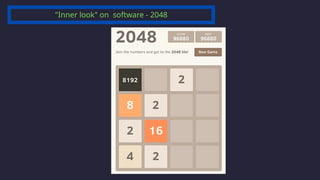
"Inner look" on software - 2048
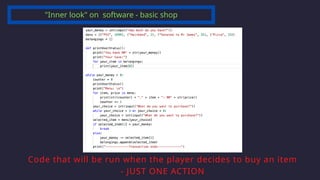
"Inner look" on software - basic shop
Code that will be run when the player decides to buy an item
- JUST ONE ACTION
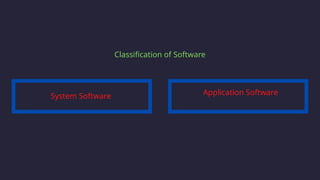
Classification of Software
System Software Application Software
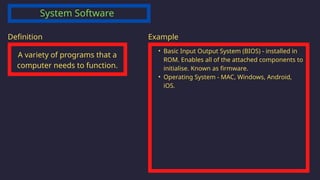
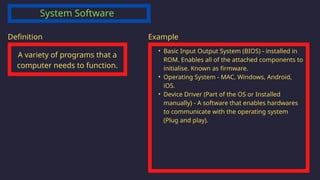
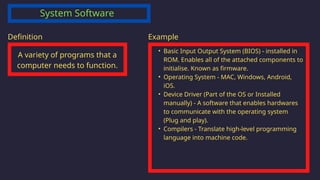
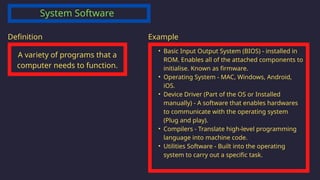
System Software
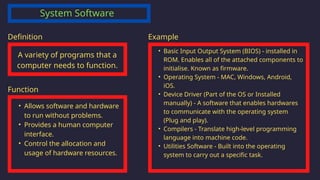
A variety of programs that a
computer needs to function.
Definition
System Software
A variety of programs that a
computer needs to function.
Definition
‱ Basic Input Output System (BIOS) - installed in
ROM. Enables all of the attached components to
initialise. Known as firmware.
Example
System Software
A variety of programs that a
computer needs to function.
Definition
‱ Basic Input Output System (BIOS) - installed in
ROM. Enables all of the attached components to
initialise. Known as firmware.
‱ Operating System - MAC, Windows, Android,
iOS.
Example
System Software
A variety of programs that a
computer needs to function.
Definition
‱ Basic Input Output System (BIOS) - installed in
ROM. Enables all of the attached components to
initialise. Known as firmware.
‱ Operating System - MAC, Windows, Android,
iOS.
‱ Device Driver (Part of the OS or Installed
manually) - A software that enables hardwares
to communicate with the operating system
(Plug and play).
Example
System Software
A variety of programs that a
computer needs to function.
Definition
‱ Basic Input Output System (BIOS) - installed in
ROM. Enables all of the attached components to
initialise. Known as firmware.
‱ Operating System - MAC, Windows, Android,
iOS.
‱ Device Driver (Part of the OS or Installed
manually) - A software that enables hardwares
to communicate with the operating system
(Plug and play).
‱ Compilers - Translate high-level programming
language into machine code.
Example
System Software
A variety of programs that a
computer needs to function.
Definition
‱ Basic Input Output System (BIOS) - installed in
ROM. Enables all of the attached components to
initialise. Known as firmware.
‱ Operating System - MAC, Windows, Android,
iOS.
‱ Device Driver (Part of the OS or Installed
manually) - A software that enables hardwares
to communicate with the operating system
(Plug and play).
‱ Compilers - Translate high-level programming
language into machine code.
‱ Utilities Software - Built into the operating
system to carry out a specific task.
Example
System Software
A variety of programs that a
computer needs to function.
Definition
‱ Basic Input Output System (BIOS) - installed in
ROM. Enables all of the attached components to
initialise. Known as firmware.
‱ Operating System - MAC, Windows, Android,
iOS.
‱ Device Driver (Part of the OS or Installed
manually) - A software that enables hardwares
to communicate with the operating system
(Plug and play).
‱ Compilers - Translate high-level programming
language into machine code.
‱ Utilities Software - Built into the operating
system to carry out a specific task.
Example
‱ Allows software and hardware
to run without problems.
‱ Provides a human computer
interface.
‱ Control the allocation and
usage of hardware resources.
Function
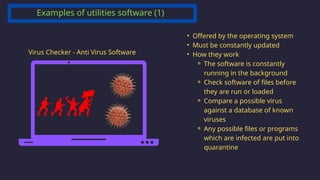
Examples of utilities software (1)
Virus Checker - Anti Virus Software
‱ Offered by the operating system
‱ Must be constantly updated
‱ How they work
⚬ The software is constantly
running in the background
⚬ Check software of files before
they are run or loaded
⚬ Compare a possible virus
against a database of known
viruses
⚬ Any possible files or programs
which are infected are put into
quarantine
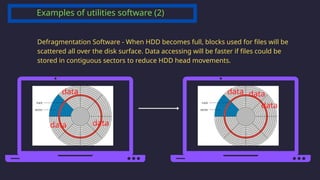
Defragmentation Software - When HDD becomes full, blocks used for files will be
scattered all over the disk surface. Data accessing will be faster if files could be
stored in contiguous sectors to reduce HDD head movements.
data
data data
data data
data
Examples of utilities software (2)
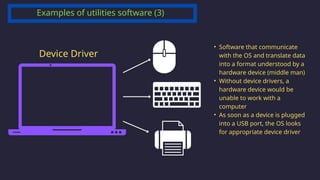
Device Driver
‱ Software that communicate
with the OS and translate data
into a format understood by a
hardware device (middle man)
‱ Without device drivers, a
hardware device would be
unable to work with a
computer
‱ As soon as a device is plugged
into a USB port, the OS looks
for appropriate device driver
Examples of utilities software (3)
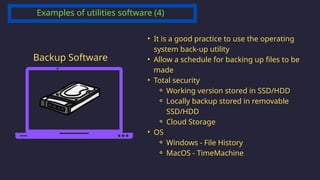
Backup Software
‱ It is a good practice to use the operating
system back-up utility
‱ Allow a schedule for backing up files to be
made
‱ Total security
⚬ Working version stored in SSD/HDD
⚬ Locally backup stored in removable
SSD/HDD
⚬ Cloud Storage
‱ OS
⚬ Windows - File History
⚬ MacOS - TimeMachine
Examples of utilities software (4)
Application Software
Software that a user needs to
make use of the computer
system
Definition
Application Software
Software that a user needs to
make use of the computer
system
Definition Examples
‱ Word Processor
‱ Spreadsheet
‱ Database
‱ Video Editing Software
‱ Apps
‱ Music and video streaming
‱ GPS
‱ Camera facility
Application Software
Software that a user needs to
make use of the computer
system
Definition Examples
‱ Word Processor
‱ Spreadsheet
‱ Database
‱ Video Editing Software
‱ Apps
‱ Music and video streaming
‱ GPS
‱ Camera facility
Features
‱ Used to perform various
applications (apps) on a computer
‱ Allows a user to perform specific
tasks using the computer’s
resources
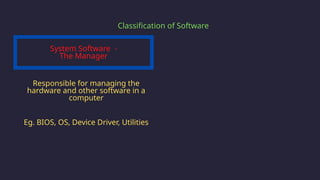
Eg. BIOS, OS, Device Driver, Utilities
System Software -
The Manager
Classification of Software
Responsible for managing the
hardware and other software in a
computer
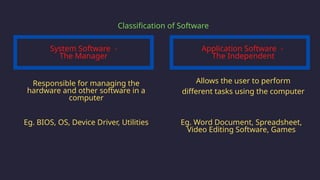
Eg. BIOS, OS, Device Driver, Utilities
Application Software -
The Independent
Classification of Software
Allows the user to perform
different tasks using the computer
Responsible for managing the
hardware and other software in a
computer
Eg. Word Document, Spreadsheet,
Video Editing Software, Games
System Software -
The Manager
Operating
System
IGCSE Computer Science
Chapter 4.2
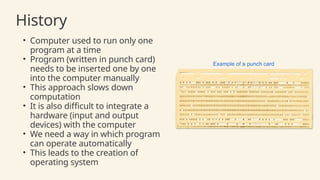
History
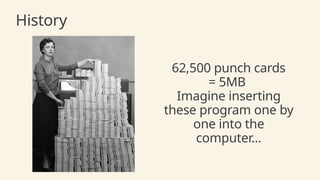
‱ Computer used to run only one
program at a time
‱ Program (written in punch card)
needs to be inserted one by one
into the computer manually
‱ This approach slows down
computation
‱ It is also difficult to integrate a
hardware (input and output
devices) with the computer
‱ We need a way in which program
can operate automatically
‱ This leads to the creation of
operating system
History
62,500 punch cards
= 5MB
Imagine inserting
these program one by
one into the
computer...
‱ It is a system software
‱ OS has the privilege of managing other
programs
‱ It is the first program to be launched (by
the BIOS) when a computer is turned on
‱ OS is an intermediaries between software
programs and hardware peripherals
(Driver)
‱ Stored within the SSD/HDD, loaded into
RAM when a particular action needs to be
carried out
About the Operating System
Main function of the operating system
Enable computer system to function correctly
Allow users to communicate with computer systems
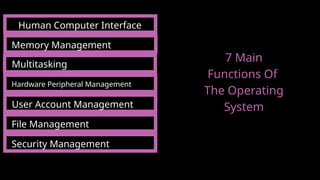
7 Main Functions Of
The Operating System
HCI
Human computer interface
The OS provides an interface which allow the user to communicate with the
computer.
HCI
Human computer interface
The OS provides an interface which allow the user to communicate with the
computer.
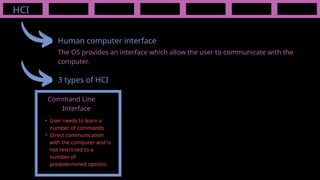
3 types of HCI
Command Line
Interface
‱ User needs to learn a
number of commands
‱ Direct communication
with the computer and is
not restricted to a
number of
predetermined options
HCI
Human computer interface
The OS provides an interface which allow the user to communicate with the
computer.
3 types of HCI
Command Line
Interface
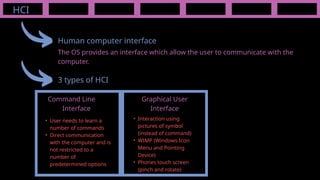
Graphical User
Interface
‱ User needs to learn a
number of commands
‱ Direct communication
with the computer and is
not restricted to a
number of
predetermined options
‱ Interaction using
pictures of symbol
(instead of command)
‱ WIMP (Windows Icon
Menu and Pointing
Device)
‱ Phones touch screen
(pinch and rotate)
HCI
Human computer interface
The OS provides an interface which allow the user to communicate with the
computer.
3 types of HCI
Command Line
Interface
Graphical User
Interface
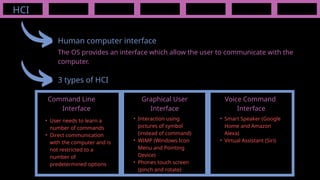
Voice Command
Interface
‱ User needs to learn a
number of commands
‱ Direct communication
with the computer and is
not restricted to a
number of
predetermined options
‱ Interaction using
pictures of symbol
(instead of command)
‱ WIMP (Windows Icon
Menu and Pointing
Device)
‱ Phones touch screen
(pinch and rotate)
‱ Smart Speaker (Google
Home and Amazon
Alexa)
‱ Virtual Assistant (Siri)
HCI
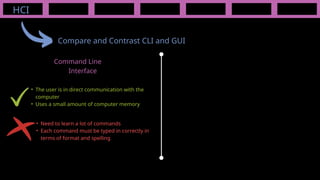
Compare and Contrast CLI and GUI
Command Line
Interface
‱ Need to learn a lot of commands
‱ Each command must be typed in correctly in
terms of format and spelling
‱ The user is in direct communication with the
computer
‱ Uses a small amount of computer memory
‱ It is more user-friendly; icons are used to
represent applications
‱ The user doesn’t need to learn any commands
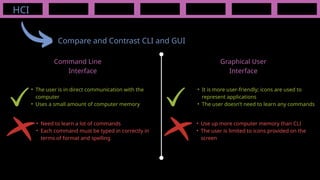
HCI
Compare and Contrast CLI and GUI
Command Line
Interface
Graphical User
Interface
‱ Need to learn a lot of commands
‱ Each command must be typed in correctly in
terms of format and spelling
‱ Use up more computer memory than CLI
‱ The user is limited to icons provided on the
screen
‱ The user is in direct communication with the
computer
‱ Uses a small amount of computer memory
HCI
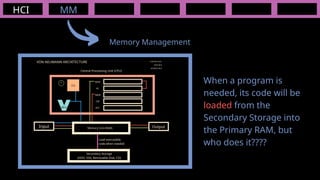
When a program is
needed, its code will be
loaded from the
Secondary Storage into
the Primary RAM, but
who does it????
MM
VON NEUMANN ARCHITECTURE
Input Output
Central Processing Unit (CPU)
Memory Unit (RAM)
ALU
CU
MAR
PC
MDR
CIR
ACC
CONTROL BUS
DATA BUS
ADDRESS BUS
Secondary Storage
(HDD, SSD, Removable Disk, CD)
Load executable
code when needed
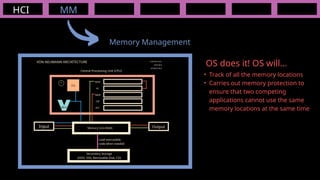
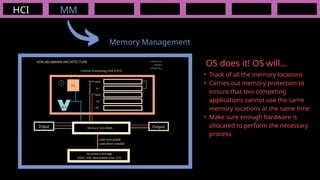
Memory Management
HCI
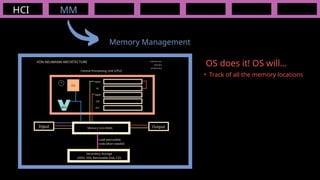
‱ Track of all the memory locations
MM
VON NEUMANN ARCHITECTURE
Input Output
Central Processing Unit (CPU)
Memory Unit (RAM)
ALU
CU
MAR
PC
MDR
CIR
ACC
CONTROL BUS
DATA BUS
ADDRESS BUS
Secondary Storage
(HDD, SSD, Removable Disk, CD)
Load executable
code when needed
Memory Management
OS does it! OS will...
HCI
‱ Track of all the memory locations
‱ Carries out memory protection to
ensure that two competing
applications cannot use the same
memory locations at the same time
MM
VON NEUMANN ARCHITECTURE
Input Output
Central Processing Unit (CPU)
Memory Unit (RAM)
ALU
CU
MAR
PC
MDR
CIR
ACC
CONTROL BUS
DATA BUS
ADDRESS BUS
Secondary Storage
(HDD, SSD, Removable Disk, CD)
Load executable
code when needed
Memory Management
OS does it! OS will...
HCI
‱ Track of all the memory locations
‱ Carries out memory protection to
ensure that two competing
applications cannot use the same
memory locations at the same time
‱ Make sure enough hardware is
allocated to perform the necessary
process
MM
VON NEUMANN ARCHITECTURE
Input Output
Central Processing Unit (CPU)
Memory Unit (RAM)
ALU
CU
MAR
PC
MDR
CIR
ACC
CONTROL BUS
DATA BUS
ADDRESS BUS
Secondary Storage
(HDD, SSD, Removable Disk, CD)
Load executable
code when needed
Memory Management
OS does it! OS will...
HCI MM
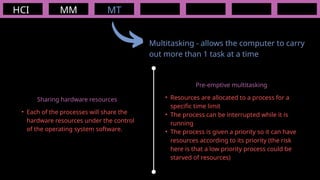
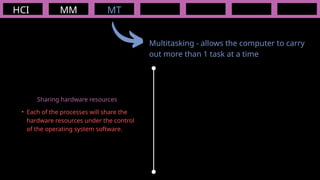
Multitasking - allows the computer to carry
out more than 1 task at a time
MT
‱ Each of the processes will share the
hardware resources under the control
of the operating system software.
Sharing hardware resources
HCI MM
Multitasking - allows the computer to carry
out more than 1 task at a time
MT
‱ Each of the processes will share the
hardware resources under the control
of the operating system software.
‱ Resources are allocated to a process for a
specific time limit
‱ The process can be interrupted while it is
running
‱ The process is given a priority so it can have
resources according to its priority (the risk
here is that a low priority process could be
starved of resources)
Sharing hardware resources
Pre-emptive multitasking
HCI MM
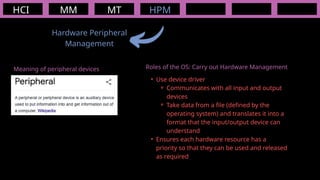
Hardware Peripheral
Management
MT HPM
Meaning of peripheral devices Roles of the OS: Carry out Hardware Management
‱ Use device driver
⚬ Communicates with all input and output
devices
⚬ Take data from a file (defined by the
operating system) and translates it into a
format that the input/output device can
understand
‱ Ensures each hardware resource has a
priority so that they can be used and released
as required
HCI MM
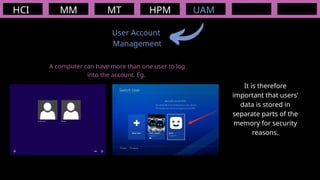
User Account
Management
MT HPM UAM
A computer can have more than one user to log
into the account. Eg.
It is therefore
important that users’
data is stored in
separate parts of the
memory for security
reasons.
HCI MM
User Account
Management
MT HPM UAM
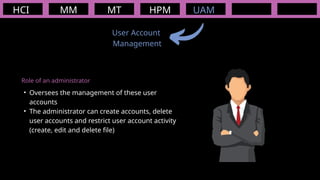
Role of an administrator
‱ Oversees the management of these user
accounts
‱ The administrator can create accounts, delete
user accounts and restrict user account activity
(create, edit and delete file)
HCI MM
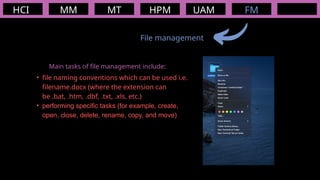
File management
MT HPM UAM FM
Main tasks of file management include:
‱ file naming conventions which can be used i.e.
filename.docx (where the extension can
be .bat, .htm, .dbf, .txt, .xls, etc.)
‱ performing specific tasks (for example, create,
open, close, delete, rename, copy, and move)
HCI MM
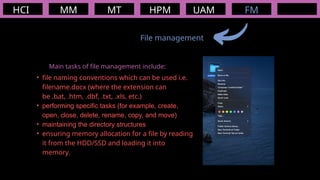
File management
MT HPM UAM FM
Main tasks of file management include:
‱ file naming conventions which can be used i.e.
filename.docx (where the extension can
be .bat, .htm, .dbf, .txt, .xls, etc.)
‱ performing specific tasks (for example, create,
open, close, delete, rename, copy, and move)
‱ maintaining the directory structures
‱ ensuring memory allocation for a file by reading
it from the HDD/SSD and loading it into
memory.
HCI MM
Security Management
- covered more in depth in chapter 5
MT HPM UAM FM
Main tasks of security management include:
‱ Ensures that anti virus software (and other security software) is always up to
date, preserving the integrity, security and privacy of data
‱ Maintains access rights for all users
‱ Communicates with a firewall to check all traffic to and from the computer
‱ By offering the ability for the recovery of data when it has been lost or corrupted
(eg. Apple Time Machine)
SEC
Human Computer Interface
7 Main
Functions Of
The Operating
System
Memory Management
Multitasking
Hardware Peripheral Management
User Account Management
File Management
Security Management
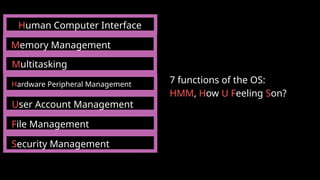
Human Computer Interface
Memory Management
Multitasking
Hardware Peripheral Management
User Account Management
File Management
Security Management
7 functions of the OS:
HMM, How U Feeling Son?
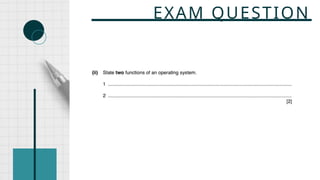
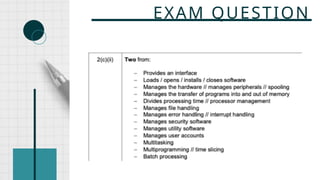
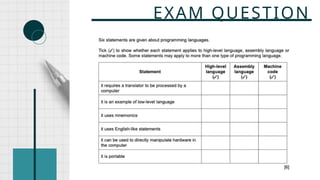
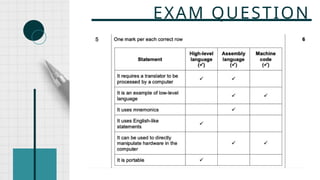
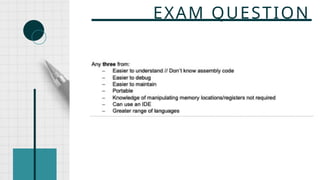
EXAM QUESTION
EXAM QUESTION
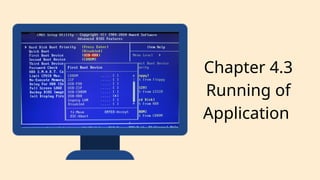
Chapter 4.3
Running of
Application
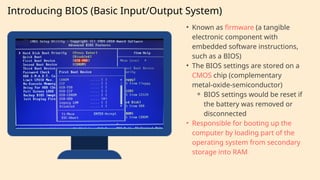
Introducing BIOS (Basic Input/Output System)
‱ Known as firmware (a tangible
electronic component with
embedded software instructions,
such as a BIOS)
‱ The BIOS settings are stored on a
CMOS chip (complementary
metal-oxide-semiconductor)
⚬ BIOS settings would be reset if
the battery was removed or
disconnected
‱ Responsible for booting up the
computer by loading part of the
operating system from secondary
storage into RAM
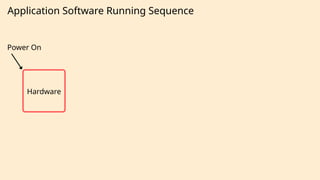
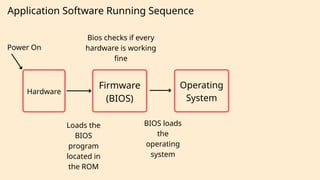
Application Software Running Sequence
Power On
Hardware
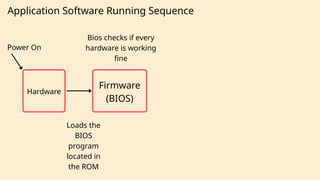
Application Software Running Sequence
Power On
Firmware
(BIOS)
Hardware
Bios checks if every
hardware is working
fine
Loads the
BIOS
program
located in
the ROM
Application Software Running Sequence
Power On
Firmware
(BIOS)
Operating
System
Hardware
Bios checks if every
hardware is working
fine
BIOS loads
the
operating
system
Loads the
BIOS
program
located in
the ROM
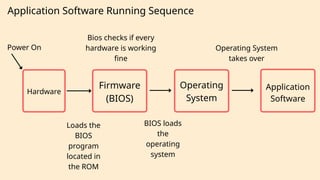
Application Software Running Sequence
Power On
Firmware
(BIOS)
Operating
System
Application
Software
Hardware
Bios checks if every
hardware is working
fine
BIOS loads
the
operating
system
Loads the
BIOS
program
located in
the ROM
Operating System
takes over
INTERRUPT
IGCSE CS
Chapter 4.4: Software
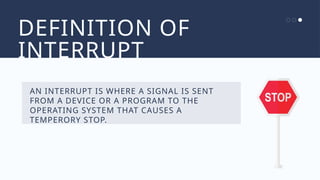
DEFINITION OF
INTERRUPT
AN INTERRUPT IS WHERE A SIGNAL IS SENT
FROM A DEVICE OR A PROGRAM TO THE
OPERATING SYSTEM THAT CAUSES A
TEMPERORY STOP.
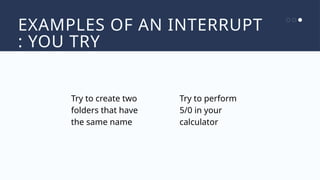
EXAMPLES OF AN INTERRUPT
: YOU TRY
Try to create two
folders that have
the same name
Try to perform
5/0 in your
calculator
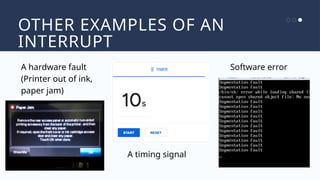
OTHER EXAMPLES OF AN
INTERRUPT
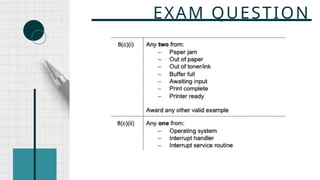
A hardware fault
(Printer out of ink,
paper jam)
A timing signal
Software error
FUNCTION OF AN INTERRUPT
CAUSE THE CURRENT PROGRAM TO
TEMPERORILY STOP WHAT IT IS DOING SO
THAT THE OS CAN SERVICE THE INTERRUPT
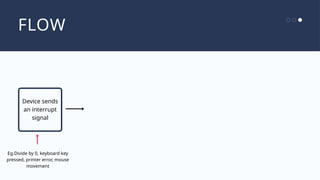
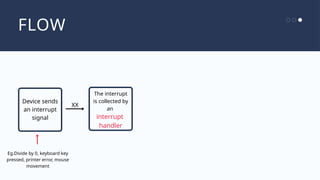
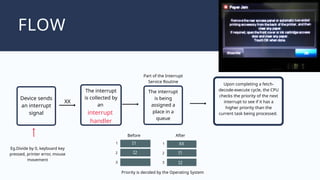
FLOW
Device sends
an interrupt
signal
Eg.Divide by 0, keyboard key
pressed, printer error, mouse
movement
FLOW
Device sends
an interrupt
signal
Eg.Divide by 0, keyboard key
pressed, printer error, mouse
movement
The interrupt
is collected by
an
XX
interrupt
handler
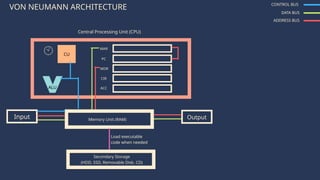
VON NEUMANN ARCHITECTURE
Input Output
Central Processing Unit (CPU)
Memory Unit (RAM)
ALU
CU
MAR
PC
MDR
CIR
ACC
Secondary Storage
(HDD, SSD, Removable Disk, CD)
Load executable
code when needed
CONTROL BUS
DATA BUS
ADDRESS BUS
VON NEUMANN ARCHITECTURE CONTROL BUS
DATA BUS
ADDRESS BUS
IF THERE ARE SO MANY INSTRUCTIONS NEED
TO BE EXECUTED IN A SECOND, HOW DOES THE
COMPUTER DECIDE WHICH INSTRUCTION TO
EXECUTE FIRST?
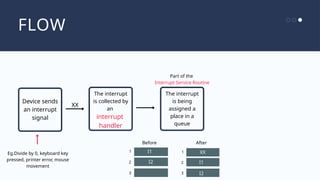
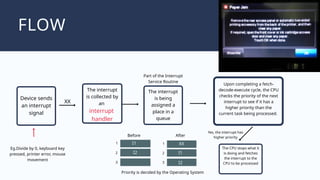
FLOW
Device sends
an interrupt
signal
Eg.Divide by 0, keyboard key
pressed, printer error, mouse
movement
The interrupt
is being
assigned a
place in a
queue
1
2
3
I1
I2
XX
Before
1
2
3
I1
I2
XX
Part of the
Interrupt Service Routine
After
The interrupt
is collected by
an
interrupt
handler
FLOW
Device sends
an interrupt
signal
Priority is decided by the Operating System
The interrupt
is being
assigned a
place in a
queue
1
2
3
I1
I2
XX
Before
1
2
3
I1
I2
XX
Part of the Interrupt
Service Routine
After
Eg.Divide by 0, keyboard key
pressed, printer error, mouse
movement
Upon completing a fetch-
decode-execute cycle, the CPU
checks the priority of the next
interrupt to see if it has a
higher priority than the
current task being processed.
The interrupt
is collected by
an
interrupt
handler
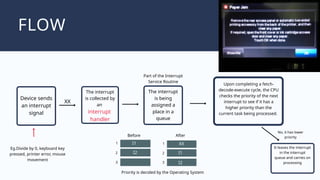
FLOW
Device sends
an interrupt
signal
Priority is decided by the Operating System
The interrupt
is being
assigned a
place in a
queue
1
2
3
I1
I2
XX
Before
1
2
3
I1
I2
XX
Part of the Interrupt
Service Routine
After
Eg.Divide by 0, keyboard key
pressed, printer error, mouse
movement
Upon completing a fetch-
decode-execute cycle, the CPU
checks the priority of the next
interrupt to see if it has a
higher priority than the
current task being processed.
The CPU stops what it
is doing and fetches
the interrupt to the
CPU to be processed
Yes, the interrupt has
higher priority
The interrupt
is collected by
an
interrupt
handler
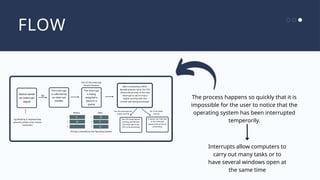
FLOW
Device sends
an interrupt
signal
Priority is decided by the Operating System
The interrupt
is being
assigned a
place in a
queue
1
2
3
I1
I2
XX
Before
1
2
3
I1
I2
XX
Part of the Interrupt
Service Routine
After
Eg.Divide by 0, keyboard key
pressed, printer error, mouse
movement
Upon completing a fetch-
decode-execute cycle, the CPU
checks the priority of the next
interrupt to see if it has a
higher priority than the
current task being processed.
No, it has lower
priority
It leaves the interrupt
in the interrupt
queue and carries on
processing
The interrupt
is collected by
an
interrupt
handler
FLOW
The process happens so quickly that it is
impossible for the user to notice that the
operating system has been interrupted
temperorily.
Interrupts allow computers to
carry out many tasks or to
have several windows open at
the same time
Device sends
an interrupt
signal
Priority is decided by the Operating System
The interrupt
is collected by
an interrupt
handler
The interrupt
is being
assigned a
place in a
queue
1
2
3
I1
I2
XX
Before
1
2
3
I1
I2
XX
Part of the Interrupt
Service Routine
After
Eg.Divide by 0, keyboard key
pressed, printer error, mouse
movement
Upon completing a fetch-
decode-execute cycle, the CPU
checks the priority of the next
interrupt to see if it has a
higher priority than the
current task being processed.
No, it has lower
priority
The CPU stops what it
is doing and fetches
the interrupt to the
CPU to be processed
Yes, the interrupt has
higher priority
It leaves the interrupt
in the interrupt
queue and carries on
processing
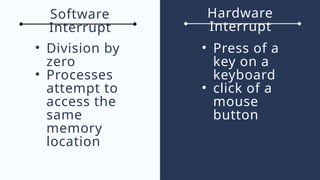
Hardware
Interrupt
Software
Interrupt
‱ Division by
zero
‱ Processes
attempt to
access the
same
memory
location
‱ Press of a
key on a
keyboard
‱ click of a
mouse
button
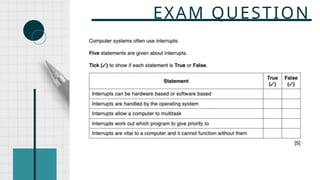
EXAM QUESTION
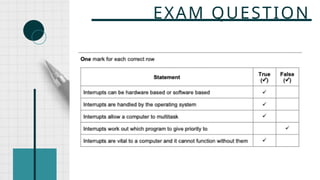
EXAM QUESTION
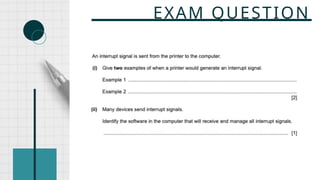
EXAM QUESTION
EXAM QUESTION
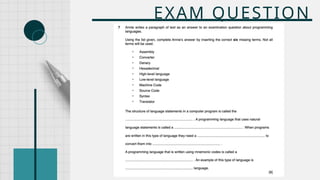
TYPES OF PROGRAMMING
LANGUAGES
IGCSE Computer Science
Chapter 4.4
assembly
language
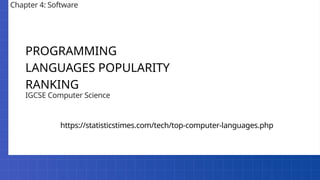
PROGRAMMING
LANGUAGES POPULARITY
RANKING
IGCSE Computer Science
Chapter 4: Software
https://statisticstimes.com/tech/top-computer-languages.php
Definition of a Software
A set of instructions written in a programming
language that performs one or more tasks to tell
the computer what to do.
RECAP
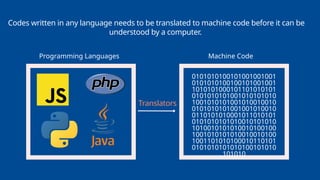
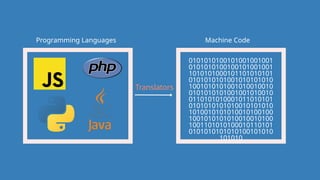
Programming Languages Machine Code
0101010100101001001001
0101010100100101001001
1010101000101101010101
0101010101001010101010
1001010101001010010010
0101010101001001010010
0110101010001011010101
0101010101010010101010
1010010101010010100100
1001010101010010010100
1001101010100010110101
0101010101010100101010
101010
Codes written in any language needs to be translated to machine code before it can be
understood by a computer.
Translators
Programming Languages Machine Code
0101010100101001001001
0101010100100101001001
1010101000101101010101
0101010101001010101010
1001010101001010010010
0101010101001001010010
0110101010001011010101
0101010101010010101010
1010010101010010100100
1001010101010010010100
1001101010100010110101
0101010101010100101010
101010
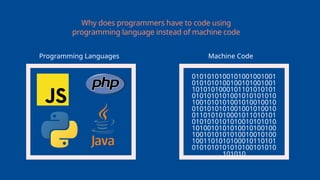
Why does programmers have to code using
programming language instead of machine code
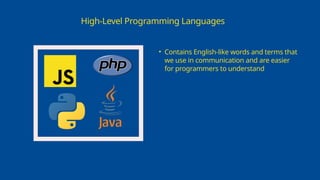
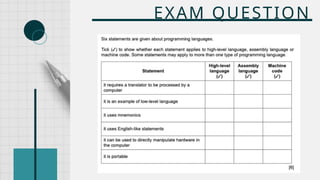
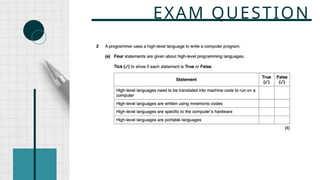
High-Level Programming Languages
‱ Contains English-like words and terms that
we use in communication and are easier
for programmers to understand
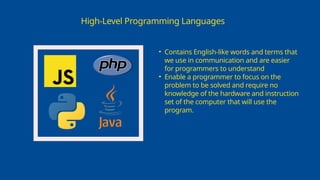
High-Level Programming Languages
‱ Contains English-like words and terms that
we use in communication and are easier
for programmers to understand
‱ Enable a programmer to focus on the
problem to be solved and require no
knowledge of the hardware and instruction
set of the computer that will use the
program.
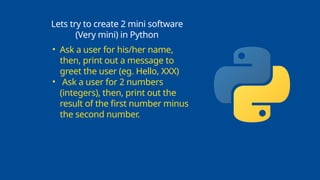
Lets try to create 2 mini software
(Very mini) in Python
‱ Ask a user for his/her name,
then, print out a message to
greet the user (eg. Hello, XXX)
‱ Ask a user for 2 numbers
(integers), then, print out the
result of the first number minus
the second number.
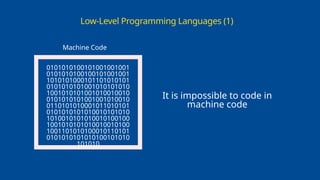
Low-Level Programming Languages (1)
Machine Code
0101010100101001001001
0101010100100101001001
1010101000101101010101
0101010101001010101010
1001010101001010010010
0101010101001001010010
0110101010001011010101
0101010101010010101010
1010010101010010100100
1001010101010010010100
1001101010100010110101
0101010101010100101010
101010
It is impossible to code in
machine code
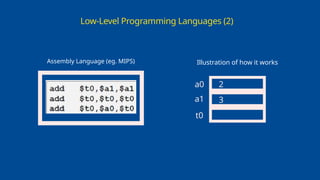
Low-Level Programming Languages (2)
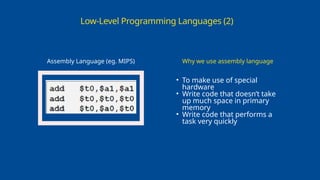
Assembly Language (eg. MIPS) Illustration of how it works
a0
a1
t0
2
3
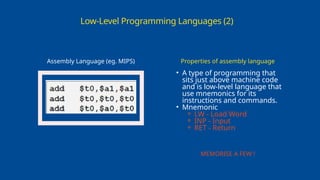
Low-Level Programming Languages (2)
Assembly Language (eg. MIPS)
‱ A type of programming that
sits just above machine code
and is low-level language that
use mnemonics for its
instructions and commands.
‱ Mnemonic
⚬ LW - Load Word
⚬ INP - Input
⚬ RET - Return
Properties of assembly language
MEMORISE A FEW !
Low-Level Programming Languages (2)
Assembly Language (eg. MIPS)
‱ To make use of special
hardware
‱ Write code that doesn’t take
up much space in primary
memory
‱ Write code that performs a
task very quickly
Why we use assembly language
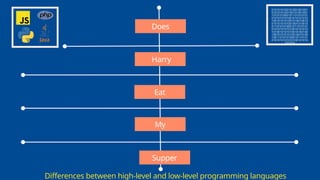
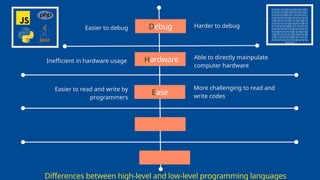
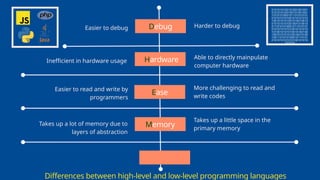
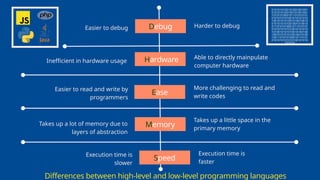
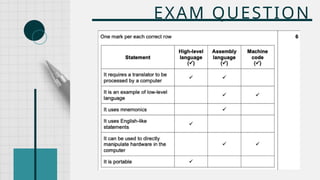
Differences between high-level and low-level programming languages
0101010100101001001001
0101010100100101001001
1010101000101101010101
0101010101001010101010
1001010101001010010010
0101010101001001010010
0110101010001011010101
0101010101010010101010
1010010101010010100100
1001010101010010010100
1001101010100010110101
0101010101010100101010
101010
Does
Harry
Eat
My
Supper
Differences between high-level and low-level programming languages
0101010100101001001001
0101010100100101001001
1010101000101101010101
0101010101001010101010
1001010101001010010010
0101010101001001010010
0110101010001011010101
0101010101010010101010
1010010101010010100100
1001010101010010010100
1001101010100010110101
0101010101010100101010
101010
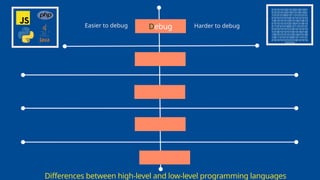
Debug
Easier to debug Harder to debug
Differences between high-level and low-level programming languages
0101010100101001001001
0101010100100101001001
1010101000101101010101
0101010101001010101010
1001010101001010010010
0101010101001001010010
0110101010001011010101
0101010101010010101010
1010010101010010100100
1001010101010010010100
1001101010100010110101
0101010101010100101010
101010
Debug
Easier to debug Harder to debug
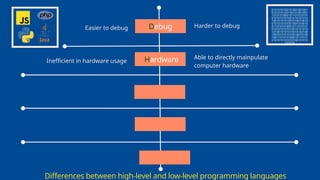
Hardware
Inefficient in hardware usage
Able to directly mainpulate
computer hardware
Differences between high-level and low-level programming languages
0101010100101001001001
0101010100100101001001
1010101000101101010101
0101010101001010101010
1001010101001010010010
0101010101001001010010
0110101010001011010101
0101010101010010101010
1010010101010010100100
1001010101010010010100
1001101010100010110101
0101010101010100101010
101010
Debug
Easier to debug Harder to debug
Hardware
Inefficient in hardware usage
Able to directly mainpulate
computer hardware
Ease
Easier to read and write by
programmers
More challenging to read and
write codes
Differences between high-level and low-level programming languages
0101010100101001001001
0101010100100101001001
1010101000101101010101
0101010101001010101010
1001010101001010010010
0101010101001001010010
0110101010001011010101
0101010101010010101010
1010010101010010100100
1001010101010010010100
1001101010100010110101
0101010101010100101010
101010
Debug
Easier to debug Harder to debug
Hardware
Inefficient in hardware usage
Able to directly mainpulate
computer hardware
Ease
Easier to read and write by
programmers
More challenging to read and
write codes
Memory
Takes up a little space in the
primary memory
Takes up a lot of memory due to
layers of abstraction
Differences between high-level and low-level programming languages
0101010100101001001001
0101010100100101001001
1010101000101101010101
0101010101001010101010
1001010101001010010010
0101010101001001010010
0110101010001011010101
0101010101010010101010
1010010101010010100100
1001010101010010010100
1001101010100010110101
0101010101010100101010
101010
Debug
Easier to debug Harder to debug
Hardware
Inefficient in hardware usage
Able to directly mainpulate
computer hardware
Ease
Easier to read and write by
programmers
More challenging to read and
write codes
Memory
Takes up a little space in the
primary memory
Takes up a lot of memory due to
layers of abstraction
Speed
Execution time is
slower
Execution time is
faster
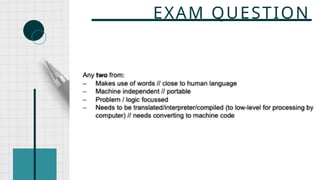
EXAM QUESTION
EXAM QUESTION
EXAM QUESTION
EXAM QUESTION
EXAM QUESTION
EXAM QUESTION
EXAM QUESTION
EXAM QUESTION
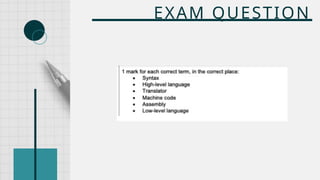
TRANSLATOR
IGCSE CS
Chapter 4.5
Programming Languages Machine Code
0101010100101001001001
0101010100100101001001
1010101000101101010101
0101010101001010101010
1001010101001010010010
0101010101001001010010
0110101010001011010101
0101010101010010101010
1010010101010010100100
1001010101010010010100
1001101010100010110101
0101010101010100101010
101010
Translators
Translators
Machine Code
0101010100101001001001
0101010100100101001001
1010101000101101010101
0101010101001010101010
1001010101001010010010
0101010101001001010010
0110101010001011010101
0101010101010010101010
1010010101010010100100
1001010101010010010100
1001101010100010110101
0101010101010100101010
101010
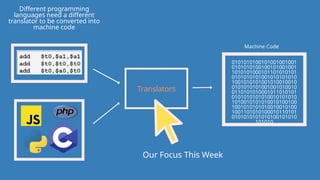
Different programming
languages need a different
translator to be converted into
machine code
Our Focus This Week
Translators
Machine Code
0101010100101001001001
0101010100100101001001
1010101000101101010101
0101010101001010101010
1001010101001010010010
0101010101001001010010
0110101010001011010101
0101010101010010101010
1010010101010010100100
1001010101010010010100
1001101010100010110101
0101010101010100101010
101010
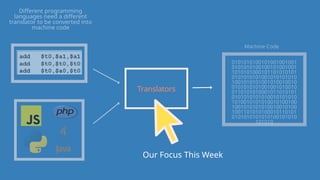
Different programming
languages need a different
translator to be converted into
machine code
Our Focus This Week
Translators
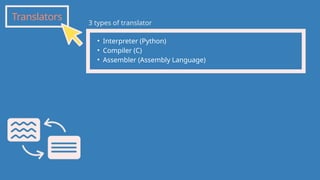
‱ Interpreter (Python)
‱ Compiler (C)
‱ Assembler (Assembly Language)
3 types of translator
Translators
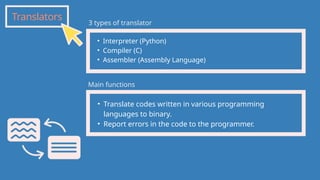
‱ Interpreter (Python)
‱ Compiler (C)
‱ Assembler (Assembly Language)
‱ Translate codes written in various programming
languages to binary.
‱ Report errors in the code to the programmer.
3 types of translator
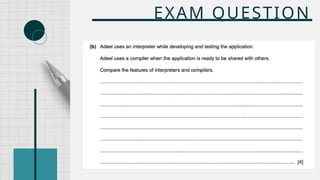
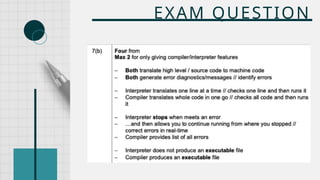
Main functions
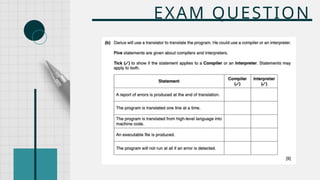
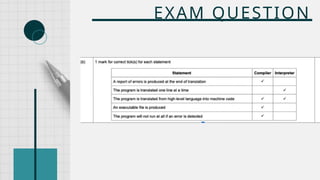
Interpreter
‱ Interpret the code line by line in a program
‱ Interpreter stop the execution of the code when it detects an
error (Compiler waits until the end of the execution process
before reporting errors)
‱ Will not produce an executable file at the end of the process
Python Javascript
Interpreter
Python
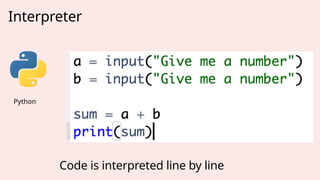
Code is interpreted line by line
Compiler
C Programming Language
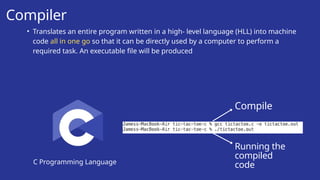
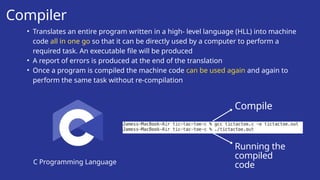
‱ Translates an entire program written in a high- level language (HLL) into machine
code all in one go so that it can be directly used by a computer to perform a
required task. An executable file will be produced
Compile
Running the
compiled
code
Compiler
C Programming Language
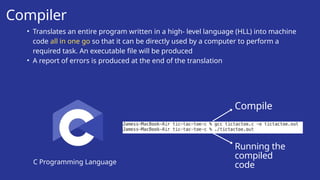
‱ Translates an entire program written in a high- level language (HLL) into machine
code all in one go so that it can be directly used by a computer to perform a
required task. An executable file will be produced
‱ A report of errors is produced at the end of the translation
Compile
Running the
compiled
code
Compiler
C Programming Language
‱ Translates an entire program written in a high- level language (HLL) into machine
code all in one go so that it can be directly used by a computer to perform a
required task. An executable file will be produced
‱ A report of errors is produced at the end of the translation
‱ Once a program is compiled the machine code can be used again and again to
perform the same task without re-compilation
Compile
Running the
compiled
code
Assembler
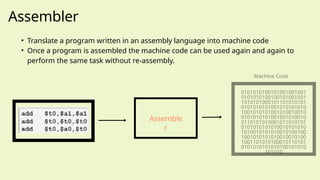
‱ Translate a program written in an assembly language into machine code
‱ Once a program is assembled the machine code can be used again and again to
perform the same task without re-assembly.
Assemble
r
Machine Code
0101010100101001001001
0101010100100101001001
1010101000101101010101
0101010101001010101010
1001010101001010010010
0101010101001001010010
0110101010001011010101
0101010101010010101010
1010010101010010100100
1001010101010010010100
1001101010100010110101
0101010101010100101010
101010
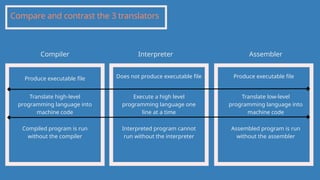
Compare and contrast the 3 translators
Compiler Interpreter Assembler
Produce executable file Produce executable file
Does not produce executable file
Compiled program is run
without the compiler
Execute a high level
programming language one
line at a time
Translate low-level
programming language into
machine code
Translate high-level
programming language into
machine code
Interpreted program cannot
run without the interpreter
Assembled program is run
without the assembler
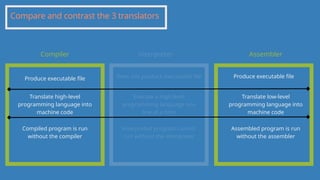
Compare and contrast the 3 translators
Compiler Interpreter Assembler
Produce executable file Produce executable file
Does not produce executable file
Compiled program is run
without the compiler
Execute a high level
programming language one
line at a time
Translate low-level
programming language into
machine code
Translate high-level
programming language into
machine code
Interpreted program cannot
run without the interpreter
Assembled program is run
without the assembler
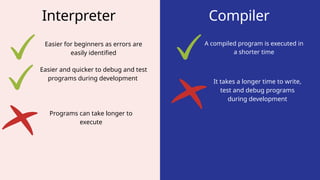
Interpreter Compiler
Easier for beginners as errors are
easily identified
Easier and quicker to debug and test
programs during development
A compiled program is executed in
a shorter time
Programs can take longer to
execute
It takes a longer time to write,
test and debug programs
during development
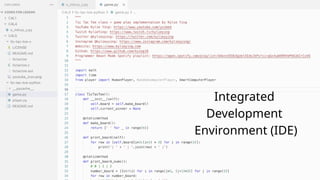
Integrated
Development
Environment (IDE)
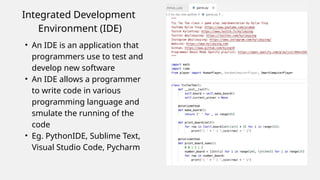
Integrated Development
Environment (IDE)
‱ An IDE is an application that
programmers use to test and
develop new software
‱ An IDE allows a programmer
to write code in various
programming language and
smulate the running of the
code
‱ Eg. PythonIDE, Sublime Text,
Visual Studio Code, Pycharm
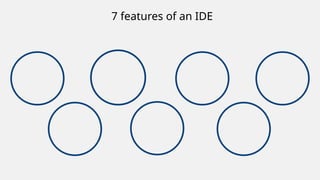
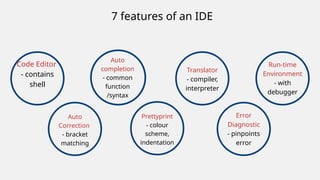
7 features of an IDE
Code Editor
- contains
shell
7 features of an IDE
Auto
completion
- common
function
/syntax
Auto
Correction
- bracket
matching
Prettyprint
- colour
scheme,
indentation
Translator
- compiler,
interpreter
Error
Diagnostic
- pinpoints
error
Run-time
Environment
- with
debugger
EXAM QUESTION
EXAM QUESTION
EXAM QUESTION
EXAM QUESTION
EXAM QUESTION
EXAM QUESTION
EXAM QUESTION
EXAM QUESTION

system software and application software.pptx

  • 1.
  • 2.
    Competition Come up withas many software as possible in 3 minutes
  • 3.
    Definition of aSoftware A set of instructions written in a programming language that performs one or more tasks to tell the computer what to do.
  • 4.
    "Inner look" onsoftware - 2048
  • 5.
    "Inner look" onsoftware - basic shop Code that will be run when the player decides to buy an item - JUST ONE ACTION
  • 6.
    Classification of Software SystemSoftware Application Software
  • 7.
    System Software A varietyof programs that a computer needs to function. Definition
  • 8.
    System Software A varietyof programs that a computer needs to function. Definition ‱ Basic Input Output System (BIOS) - installed in ROM. Enables all of the attached components to initialise. Known as firmware. Example
  • 9.
    System Software A varietyof programs that a computer needs to function. Definition ‱ Basic Input Output System (BIOS) - installed in ROM. Enables all of the attached components to initialise. Known as firmware. ‱ Operating System - MAC, Windows, Android, iOS. Example
  • 10.
    System Software A varietyof programs that a computer needs to function. Definition ‱ Basic Input Output System (BIOS) - installed in ROM. Enables all of the attached components to initialise. Known as firmware. ‱ Operating System - MAC, Windows, Android, iOS. ‱ Device Driver (Part of the OS or Installed manually) - A software that enables hardwares to communicate with the operating system (Plug and play). Example
  • 11.
    System Software A varietyof programs that a computer needs to function. Definition ‱ Basic Input Output System (BIOS) - installed in ROM. Enables all of the attached components to initialise. Known as firmware. ‱ Operating System - MAC, Windows, Android, iOS. ‱ Device Driver (Part of the OS or Installed manually) - A software that enables hardwares to communicate with the operating system (Plug and play). ‱ Compilers - Translate high-level programming language into machine code. Example
  • 12.
    System Software A varietyof programs that a computer needs to function. Definition ‱ Basic Input Output System (BIOS) - installed in ROM. Enables all of the attached components to initialise. Known as firmware. ‱ Operating System - MAC, Windows, Android, iOS. ‱ Device Driver (Part of the OS or Installed manually) - A software that enables hardwares to communicate with the operating system (Plug and play). ‱ Compilers - Translate high-level programming language into machine code. ‱ Utilities Software - Built into the operating system to carry out a specific task. Example
  • 13.
    System Software A varietyof programs that a computer needs to function. Definition ‱ Basic Input Output System (BIOS) - installed in ROM. Enables all of the attached components to initialise. Known as firmware. ‱ Operating System - MAC, Windows, Android, iOS. ‱ Device Driver (Part of the OS or Installed manually) - A software that enables hardwares to communicate with the operating system (Plug and play). ‱ Compilers - Translate high-level programming language into machine code. ‱ Utilities Software - Built into the operating system to carry out a specific task. Example ‱ Allows software and hardware to run without problems. ‱ Provides a human computer interface. ‱ Control the allocation and usage of hardware resources. Function
  • 14.
    Examples of utilitiessoftware (1) Virus Checker - Anti Virus Software ‱ Offered by the operating system ‱ Must be constantly updated ‱ How they work ⚬ The software is constantly running in the background ⚬ Check software of files before they are run or loaded ⚬ Compare a possible virus against a database of known viruses ⚬ Any possible files or programs which are infected are put into quarantine
  • 15.
    Defragmentation Software -When HDD becomes full, blocks used for files will be scattered all over the disk surface. Data accessing will be faster if files could be stored in contiguous sectors to reduce HDD head movements. data data data data data data Examples of utilities software (2)
  • 16.
    Device Driver ‱ Softwarethat communicate with the OS and translate data into a format understood by a hardware device (middle man) ‱ Without device drivers, a hardware device would be unable to work with a computer ‱ As soon as a device is plugged into a USB port, the OS looks for appropriate device driver Examples of utilities software (3)
  • 17.
    Backup Software ‱ Itis a good practice to use the operating system back-up utility ‱ Allow a schedule for backing up files to be made ‱ Total security ⚬ Working version stored in SSD/HDD ⚬ Locally backup stored in removable SSD/HDD ⚬ Cloud Storage ‱ OS ⚬ Windows - File History ⚬ MacOS - TimeMachine Examples of utilities software (4)
  • 18.
    Application Software Software thata user needs to make use of the computer system Definition
  • 19.
    Application Software Software thata user needs to make use of the computer system Definition Examples ‱ Word Processor ‱ Spreadsheet ‱ Database ‱ Video Editing Software ‱ Apps ‱ Music and video streaming ‱ GPS ‱ Camera facility
  • 20.
    Application Software Software thata user needs to make use of the computer system Definition Examples ‱ Word Processor ‱ Spreadsheet ‱ Database ‱ Video Editing Software ‱ Apps ‱ Music and video streaming ‱ GPS ‱ Camera facility Features ‱ Used to perform various applications (apps) on a computer ‱ Allows a user to perform specific tasks using the computer’s resources
  • 21.
    Eg. BIOS, OS,Device Driver, Utilities System Software - The Manager Classification of Software Responsible for managing the hardware and other software in a computer
  • 22.
    Eg. BIOS, OS,Device Driver, Utilities Application Software - The Independent Classification of Software Allows the user to perform different tasks using the computer Responsible for managing the hardware and other software in a computer Eg. Word Document, Spreadsheet, Video Editing Software, Games System Software - The Manager
  • 23.
  • 24.
    History ‱ Computer usedto run only one program at a time ‱ Program (written in punch card) needs to be inserted one by one into the computer manually ‱ This approach slows down computation ‱ It is also difficult to integrate a hardware (input and output devices) with the computer ‱ We need a way in which program can operate automatically ‱ This leads to the creation of operating system
  • 25.
    History 62,500 punch cards =5MB Imagine inserting these program one by one into the computer...
  • 26.
    ‱ It isa system software ‱ OS has the privilege of managing other programs ‱ It is the first program to be launched (by the BIOS) when a computer is turned on ‱ OS is an intermediaries between software programs and hardware peripherals (Driver) ‱ Stored within the SSD/HDD, loaded into RAM when a particular action needs to be carried out About the Operating System
  • 27.
    Main function ofthe operating system Enable computer system to function correctly Allow users to communicate with computer systems
  • 28.
    7 Main FunctionsOf The Operating System
  • 29.
    HCI Human computer interface TheOS provides an interface which allow the user to communicate with the computer.
  • 30.
    HCI Human computer interface TheOS provides an interface which allow the user to communicate with the computer. 3 types of HCI Command Line Interface ‱ User needs to learn a number of commands ‱ Direct communication with the computer and is not restricted to a number of predetermined options
  • 31.
    HCI Human computer interface TheOS provides an interface which allow the user to communicate with the computer. 3 types of HCI Command Line Interface Graphical User Interface ‱ User needs to learn a number of commands ‱ Direct communication with the computer and is not restricted to a number of predetermined options ‱ Interaction using pictures of symbol (instead of command) ‱ WIMP (Windows Icon Menu and Pointing Device) ‱ Phones touch screen (pinch and rotate)
  • 32.
    HCI Human computer interface TheOS provides an interface which allow the user to communicate with the computer. 3 types of HCI Command Line Interface Graphical User Interface Voice Command Interface ‱ User needs to learn a number of commands ‱ Direct communication with the computer and is not restricted to a number of predetermined options ‱ Interaction using pictures of symbol (instead of command) ‱ WIMP (Windows Icon Menu and Pointing Device) ‱ Phones touch screen (pinch and rotate) ‱ Smart Speaker (Google Home and Amazon Alexa) ‱ Virtual Assistant (Siri)
  • 33.
    HCI Compare and ContrastCLI and GUI Command Line Interface ‱ Need to learn a lot of commands ‱ Each command must be typed in correctly in terms of format and spelling ‱ The user is in direct communication with the computer ‱ Uses a small amount of computer memory
  • 34.
    ‱ It ismore user-friendly; icons are used to represent applications ‱ The user doesn’t need to learn any commands HCI Compare and Contrast CLI and GUI Command Line Interface Graphical User Interface ‱ Need to learn a lot of commands ‱ Each command must be typed in correctly in terms of format and spelling ‱ Use up more computer memory than CLI ‱ The user is limited to icons provided on the screen ‱ The user is in direct communication with the computer ‱ Uses a small amount of computer memory
  • 35.
    HCI When a programis needed, its code will be loaded from the Secondary Storage into the Primary RAM, but who does it???? MM VON NEUMANN ARCHITECTURE Input Output Central Processing Unit (CPU) Memory Unit (RAM) ALU CU MAR PC MDR CIR ACC CONTROL BUS DATA BUS ADDRESS BUS Secondary Storage (HDD, SSD, Removable Disk, CD) Load executable code when needed Memory Management
  • 36.
    HCI ‱ Track ofall the memory locations MM VON NEUMANN ARCHITECTURE Input Output Central Processing Unit (CPU) Memory Unit (RAM) ALU CU MAR PC MDR CIR ACC CONTROL BUS DATA BUS ADDRESS BUS Secondary Storage (HDD, SSD, Removable Disk, CD) Load executable code when needed Memory Management OS does it! OS will...
  • 37.
    HCI ‱ Track ofall the memory locations ‱ Carries out memory protection to ensure that two competing applications cannot use the same memory locations at the same time MM VON NEUMANN ARCHITECTURE Input Output Central Processing Unit (CPU) Memory Unit (RAM) ALU CU MAR PC MDR CIR ACC CONTROL BUS DATA BUS ADDRESS BUS Secondary Storage (HDD, SSD, Removable Disk, CD) Load executable code when needed Memory Management OS does it! OS will...
  • 38.
    HCI ‱ Track ofall the memory locations ‱ Carries out memory protection to ensure that two competing applications cannot use the same memory locations at the same time ‱ Make sure enough hardware is allocated to perform the necessary process MM VON NEUMANN ARCHITECTURE Input Output Central Processing Unit (CPU) Memory Unit (RAM) ALU CU MAR PC MDR CIR ACC CONTROL BUS DATA BUS ADDRESS BUS Secondary Storage (HDD, SSD, Removable Disk, CD) Load executable code when needed Memory Management OS does it! OS will...
  • 39.
    HCI MM Multitasking -allows the computer to carry out more than 1 task at a time MT ‱ Each of the processes will share the hardware resources under the control of the operating system software. Sharing hardware resources
  • 40.
    HCI MM Multitasking -allows the computer to carry out more than 1 task at a time MT ‱ Each of the processes will share the hardware resources under the control of the operating system software. ‱ Resources are allocated to a process for a specific time limit ‱ The process can be interrupted while it is running ‱ The process is given a priority so it can have resources according to its priority (the risk here is that a low priority process could be starved of resources) Sharing hardware resources Pre-emptive multitasking
  • 41.
    HCI MM Hardware Peripheral Management MTHPM Meaning of peripheral devices Roles of the OS: Carry out Hardware Management ‱ Use device driver ⚬ Communicates with all input and output devices ⚬ Take data from a file (defined by the operating system) and translates it into a format that the input/output device can understand ‱ Ensures each hardware resource has a priority so that they can be used and released as required
  • 42.
    HCI MM User Account Management MTHPM UAM A computer can have more than one user to log into the account. Eg. It is therefore important that users’ data is stored in separate parts of the memory for security reasons.
  • 43.
    HCI MM User Account Management MTHPM UAM Role of an administrator ‱ Oversees the management of these user accounts ‱ The administrator can create accounts, delete user accounts and restrict user account activity (create, edit and delete file)
  • 44.
    HCI MM File management MTHPM UAM FM Main tasks of file management include: ‱ file naming conventions which can be used i.e. filename.docx (where the extension can be .bat, .htm, .dbf, .txt, .xls, etc.) ‱ performing specific tasks (for example, create, open, close, delete, rename, copy, and move)
  • 45.
    HCI MM File management MTHPM UAM FM Main tasks of file management include: ‱ file naming conventions which can be used i.e. filename.docx (where the extension can be .bat, .htm, .dbf, .txt, .xls, etc.) ‱ performing specific tasks (for example, create, open, close, delete, rename, copy, and move) ‱ maintaining the directory structures ‱ ensuring memory allocation for a file by reading it from the HDD/SSD and loading it into memory.
  • 46.
    HCI MM Security Management -covered more in depth in chapter 5 MT HPM UAM FM Main tasks of security management include: ‱ Ensures that anti virus software (and other security software) is always up to date, preserving the integrity, security and privacy of data ‱ Maintains access rights for all users ‱ Communicates with a firewall to check all traffic to and from the computer ‱ By offering the ability for the recovery of data when it has been lost or corrupted (eg. Apple Time Machine) SEC
  • 47.
    Human Computer Interface 7Main Functions Of The Operating System Memory Management Multitasking Hardware Peripheral Management User Account Management File Management Security Management
  • 48.
    Human Computer Interface MemoryManagement Multitasking Hardware Peripheral Management User Account Management File Management Security Management 7 functions of the OS: HMM, How U Feeling Son?
  • 49.
  • 50.
  • 51.
  • 52.
    Introducing BIOS (BasicInput/Output System) ‱ Known as firmware (a tangible electronic component with embedded software instructions, such as a BIOS) ‱ The BIOS settings are stored on a CMOS chip (complementary metal-oxide-semiconductor) ⚬ BIOS settings would be reset if the battery was removed or disconnected ‱ Responsible for booting up the computer by loading part of the operating system from secondary storage into RAM
  • 53.
    Application Software RunningSequence Power On Hardware
  • 54.
    Application Software RunningSequence Power On Firmware (BIOS) Hardware Bios checks if every hardware is working fine Loads the BIOS program located in the ROM
  • 55.
    Application Software RunningSequence Power On Firmware (BIOS) Operating System Hardware Bios checks if every hardware is working fine BIOS loads the operating system Loads the BIOS program located in the ROM
  • 56.
    Application Software RunningSequence Power On Firmware (BIOS) Operating System Application Software Hardware Bios checks if every hardware is working fine BIOS loads the operating system Loads the BIOS program located in the ROM Operating System takes over
  • 57.
  • 58.
    DEFINITION OF INTERRUPT AN INTERRUPTIS WHERE A SIGNAL IS SENT FROM A DEVICE OR A PROGRAM TO THE OPERATING SYSTEM THAT CAUSES A TEMPERORY STOP.
  • 59.
    EXAMPLES OF ANINTERRUPT : YOU TRY Try to create two folders that have the same name Try to perform 5/0 in your calculator
  • 60.
    OTHER EXAMPLES OFAN INTERRUPT A hardware fault (Printer out of ink, paper jam) A timing signal Software error
  • 61.
    FUNCTION OF ANINTERRUPT CAUSE THE CURRENT PROGRAM TO TEMPERORILY STOP WHAT IT IS DOING SO THAT THE OS CAN SERVICE THE INTERRUPT
  • 62.
    FLOW Device sends an interrupt signal Eg.Divideby 0, keyboard key pressed, printer error, mouse movement
  • 63.
    FLOW Device sends an interrupt signal Eg.Divideby 0, keyboard key pressed, printer error, mouse movement The interrupt is collected by an XX interrupt handler
  • 64.
    VON NEUMANN ARCHITECTURE InputOutput Central Processing Unit (CPU) Memory Unit (RAM) ALU CU MAR PC MDR CIR ACC Secondary Storage (HDD, SSD, Removable Disk, CD) Load executable code when needed CONTROL BUS DATA BUS ADDRESS BUS
  • 65.
    VON NEUMANN ARCHITECTURECONTROL BUS DATA BUS ADDRESS BUS IF THERE ARE SO MANY INSTRUCTIONS NEED TO BE EXECUTED IN A SECOND, HOW DOES THE COMPUTER DECIDE WHICH INSTRUCTION TO EXECUTE FIRST?
  • 66.
    FLOW Device sends an interrupt signal Eg.Divideby 0, keyboard key pressed, printer error, mouse movement The interrupt is being assigned a place in a queue 1 2 3 I1 I2 XX Before 1 2 3 I1 I2 XX Part of the Interrupt Service Routine After The interrupt is collected by an interrupt handler
  • 67.
    FLOW Device sends an interrupt signal Priorityis decided by the Operating System The interrupt is being assigned a place in a queue 1 2 3 I1 I2 XX Before 1 2 3 I1 I2 XX Part of the Interrupt Service Routine After Eg.Divide by 0, keyboard key pressed, printer error, mouse movement Upon completing a fetch- decode-execute cycle, the CPU checks the priority of the next interrupt to see if it has a higher priority than the current task being processed. The interrupt is collected by an interrupt handler
  • 68.
    FLOW Device sends an interrupt signal Priorityis decided by the Operating System The interrupt is being assigned a place in a queue 1 2 3 I1 I2 XX Before 1 2 3 I1 I2 XX Part of the Interrupt Service Routine After Eg.Divide by 0, keyboard key pressed, printer error, mouse movement Upon completing a fetch- decode-execute cycle, the CPU checks the priority of the next interrupt to see if it has a higher priority than the current task being processed. The CPU stops what it is doing and fetches the interrupt to the CPU to be processed Yes, the interrupt has higher priority The interrupt is collected by an interrupt handler
  • 69.
    FLOW Device sends an interrupt signal Priorityis decided by the Operating System The interrupt is being assigned a place in a queue 1 2 3 I1 I2 XX Before 1 2 3 I1 I2 XX Part of the Interrupt Service Routine After Eg.Divide by 0, keyboard key pressed, printer error, mouse movement Upon completing a fetch- decode-execute cycle, the CPU checks the priority of the next interrupt to see if it has a higher priority than the current task being processed. No, it has lower priority It leaves the interrupt in the interrupt queue and carries on processing The interrupt is collected by an interrupt handler
  • 70.
    FLOW The process happensso quickly that it is impossible for the user to notice that the operating system has been interrupted temperorily. Interrupts allow computers to carry out many tasks or to have several windows open at the same time Device sends an interrupt signal Priority is decided by the Operating System The interrupt is collected by an interrupt handler The interrupt is being assigned a place in a queue 1 2 3 I1 I2 XX Before 1 2 3 I1 I2 XX Part of the Interrupt Service Routine After Eg.Divide by 0, keyboard key pressed, printer error, mouse movement Upon completing a fetch- decode-execute cycle, the CPU checks the priority of the next interrupt to see if it has a higher priority than the current task being processed. No, it has lower priority The CPU stops what it is doing and fetches the interrupt to the CPU to be processed Yes, the interrupt has higher priority It leaves the interrupt in the interrupt queue and carries on processing
  • 71.
    Hardware Interrupt Software Interrupt ‱ Division by zero ‱Processes attempt to access the same memory location ‱ Press of a key on a keyboard ‱ click of a mouse button
  • 72.
  • 73.
  • 74.
  • 75.
  • 76.
    TYPES OF PROGRAMMING LANGUAGES IGCSEComputer Science Chapter 4.4 assembly language
  • 77.
    PROGRAMMING LANGUAGES POPULARITY RANKING IGCSE ComputerScience Chapter 4: Software https://statisticstimes.com/tech/top-computer-languages.php
  • 78.
    Definition of aSoftware A set of instructions written in a programming language that performs one or more tasks to tell the computer what to do. RECAP
  • 79.
    Programming Languages MachineCode 0101010100101001001001 0101010100100101001001 1010101000101101010101 0101010101001010101010 1001010101001010010010 0101010101001001010010 0110101010001011010101 0101010101010010101010 1010010101010010100100 1001010101010010010100 1001101010100010110101 0101010101010100101010 101010 Codes written in any language needs to be translated to machine code before it can be understood by a computer. Translators
  • 80.
    Programming Languages MachineCode 0101010100101001001001 0101010100100101001001 1010101000101101010101 0101010101001010101010 1001010101001010010010 0101010101001001010010 0110101010001011010101 0101010101010010101010 1010010101010010100100 1001010101010010010100 1001101010100010110101 0101010101010100101010 101010 Why does programmers have to code using programming language instead of machine code
  • 81.
    High-Level Programming Languages ‱Contains English-like words and terms that we use in communication and are easier for programmers to understand
  • 82.
    High-Level Programming Languages ‱Contains English-like words and terms that we use in communication and are easier for programmers to understand ‱ Enable a programmer to focus on the problem to be solved and require no knowledge of the hardware and instruction set of the computer that will use the program.
  • 83.
    Lets try tocreate 2 mini software (Very mini) in Python ‱ Ask a user for his/her name, then, print out a message to greet the user (eg. Hello, XXX) ‱ Ask a user for 2 numbers (integers), then, print out the result of the first number minus the second number.
  • 84.
    Low-Level Programming Languages(1) Machine Code 0101010100101001001001 0101010100100101001001 1010101000101101010101 0101010101001010101010 1001010101001010010010 0101010101001001010010 0110101010001011010101 0101010101010010101010 1010010101010010100100 1001010101010010010100 1001101010100010110101 0101010101010100101010 101010 It is impossible to code in machine code
  • 85.
    Low-Level Programming Languages(2) Assembly Language (eg. MIPS) Illustration of how it works a0 a1 t0 2 3
  • 86.
    Low-Level Programming Languages(2) Assembly Language (eg. MIPS) ‱ A type of programming that sits just above machine code and is low-level language that use mnemonics for its instructions and commands. ‱ Mnemonic ⚬ LW - Load Word ⚬ INP - Input ⚬ RET - Return Properties of assembly language MEMORISE A FEW !
  • 87.
    Low-Level Programming Languages(2) Assembly Language (eg. MIPS) ‱ To make use of special hardware ‱ Write code that doesn’t take up much space in primary memory ‱ Write code that performs a task very quickly Why we use assembly language
  • 88.
    Differences between high-leveland low-level programming languages 0101010100101001001001 0101010100100101001001 1010101000101101010101 0101010101001010101010 1001010101001010010010 0101010101001001010010 0110101010001011010101 0101010101010010101010 1010010101010010100100 1001010101010010010100 1001101010100010110101 0101010101010100101010 101010 Does Harry Eat My Supper
  • 89.
    Differences between high-leveland low-level programming languages 0101010100101001001001 0101010100100101001001 1010101000101101010101 0101010101001010101010 1001010101001010010010 0101010101001001010010 0110101010001011010101 0101010101010010101010 1010010101010010100100 1001010101010010010100 1001101010100010110101 0101010101010100101010 101010 Debug Easier to debug Harder to debug
  • 90.
    Differences between high-leveland low-level programming languages 0101010100101001001001 0101010100100101001001 1010101000101101010101 0101010101001010101010 1001010101001010010010 0101010101001001010010 0110101010001011010101 0101010101010010101010 1010010101010010100100 1001010101010010010100 1001101010100010110101 0101010101010100101010 101010 Debug Easier to debug Harder to debug Hardware Inefficient in hardware usage Able to directly mainpulate computer hardware
  • 91.
    Differences between high-leveland low-level programming languages 0101010100101001001001 0101010100100101001001 1010101000101101010101 0101010101001010101010 1001010101001010010010 0101010101001001010010 0110101010001011010101 0101010101010010101010 1010010101010010100100 1001010101010010010100 1001101010100010110101 0101010101010100101010 101010 Debug Easier to debug Harder to debug Hardware Inefficient in hardware usage Able to directly mainpulate computer hardware Ease Easier to read and write by programmers More challenging to read and write codes
  • 92.
    Differences between high-leveland low-level programming languages 0101010100101001001001 0101010100100101001001 1010101000101101010101 0101010101001010101010 1001010101001010010010 0101010101001001010010 0110101010001011010101 0101010101010010101010 1010010101010010100100 1001010101010010010100 1001101010100010110101 0101010101010100101010 101010 Debug Easier to debug Harder to debug Hardware Inefficient in hardware usage Able to directly mainpulate computer hardware Ease Easier to read and write by programmers More challenging to read and write codes Memory Takes up a little space in the primary memory Takes up a lot of memory due to layers of abstraction
  • 93.
    Differences between high-leveland low-level programming languages 0101010100101001001001 0101010100100101001001 1010101000101101010101 0101010101001010101010 1001010101001010010010 0101010101001001010010 0110101010001011010101 0101010101010010101010 1010010101010010100100 1001010101010010010100 1001101010100010110101 0101010101010100101010 101010 Debug Easier to debug Harder to debug Hardware Inefficient in hardware usage Able to directly mainpulate computer hardware Ease Easier to read and write by programmers More challenging to read and write codes Memory Takes up a little space in the primary memory Takes up a lot of memory due to layers of abstraction Speed Execution time is slower Execution time is faster
  • 94.
  • 95.
  • 96.
  • 97.
  • 98.
  • 99.
  • 100.
  • 101.
  • 102.
  • 103.
    Programming Languages MachineCode 0101010100101001001001 0101010100100101001001 1010101000101101010101 0101010101001010101010 1001010101001010010010 0101010101001001010010 0110101010001011010101 0101010101010010101010 1010010101010010100100 1001010101010010010100 1001101010100010110101 0101010101010100101010 101010 Translators
  • 104.
  • 105.
  • 106.
    Translators ‱ Interpreter (Python) ‱Compiler (C) ‱ Assembler (Assembly Language) 3 types of translator
  • 107.
    Translators ‱ Interpreter (Python) ‱Compiler (C) ‱ Assembler (Assembly Language) ‱ Translate codes written in various programming languages to binary. ‱ Report errors in the code to the programmer. 3 types of translator Main functions
  • 108.
    Interpreter ‱ Interpret thecode line by line in a program ‱ Interpreter stop the execution of the code when it detects an error (Compiler waits until the end of the execution process before reporting errors) ‱ Will not produce an executable file at the end of the process Python Javascript
  • 109.
  • 110.
    Compiler C Programming Language ‱Translates an entire program written in a high- level language (HLL) into machine code all in one go so that it can be directly used by a computer to perform a required task. An executable file will be produced Compile Running the compiled code
  • 111.
    Compiler C Programming Language ‱Translates an entire program written in a high- level language (HLL) into machine code all in one go so that it can be directly used by a computer to perform a required task. An executable file will be produced ‱ A report of errors is produced at the end of the translation Compile Running the compiled code
  • 112.
    Compiler C Programming Language ‱Translates an entire program written in a high- level language (HLL) into machine code all in one go so that it can be directly used by a computer to perform a required task. An executable file will be produced ‱ A report of errors is produced at the end of the translation ‱ Once a program is compiled the machine code can be used again and again to perform the same task without re-compilation Compile Running the compiled code
  • 113.
    Assembler ‱ Translate aprogram written in an assembly language into machine code ‱ Once a program is assembled the machine code can be used again and again to perform the same task without re-assembly. Assemble r Machine Code 0101010100101001001001 0101010100100101001001 1010101000101101010101 0101010101001010101010 1001010101001010010010 0101010101001001010010 0110101010001011010101 0101010101010010101010 1010010101010010100100 1001010101010010010100 1001101010100010110101 0101010101010100101010 101010
  • 114.
    Compare and contrastthe 3 translators Compiler Interpreter Assembler Produce executable file Produce executable file Does not produce executable file Compiled program is run without the compiler Execute a high level programming language one line at a time Translate low-level programming language into machine code Translate high-level programming language into machine code Interpreted program cannot run without the interpreter Assembled program is run without the assembler
  • 115.
    Compare and contrastthe 3 translators Compiler Interpreter Assembler Produce executable file Produce executable file Does not produce executable file Compiled program is run without the compiler Execute a high level programming language one line at a time Translate low-level programming language into machine code Translate high-level programming language into machine code Interpreted program cannot run without the interpreter Assembled program is run without the assembler
  • 116.
    Interpreter Compiler Easier forbeginners as errors are easily identified Easier and quicker to debug and test programs during development A compiled program is executed in a shorter time Programs can take longer to execute It takes a longer time to write, test and debug programs during development
  • 117.
  • 118.
    Integrated Development Environment (IDE) ‱An IDE is an application that programmers use to test and develop new software ‱ An IDE allows a programmer to write code in various programming language and smulate the running of the code ‱ Eg. PythonIDE, Sublime Text, Visual Studio Code, Pycharm
  • 119.
  • 120.
    Code Editor - contains shell 7features of an IDE Auto completion - common function /syntax Auto Correction - bracket matching Prettyprint - colour scheme, indentation Translator - compiler, interpreter Error Diagnostic - pinpoints error Run-time Environment - with debugger
  • 121.
  • 122.
  • 123.
  • 124.
  • 125.
  • 126.
  • 127.
  • 128.