CLUSTER COMPUTING
Presented by:
Harsha vardhan
Sharath
CONTENTS
• Introducing Clusters
• About Cluster Computing
• Why Clusters?
• History
• Architecture
• Categories
• Issues
INTRODUCTION
 A computer cluster is a group of tightly coupled
computers that work together closely so that it
can be viewed as a single computer.
 Clusters are commonly connected through fast
local area networks.
 Clusters have evolved to support applications
ranging from e-commerce, to high performance
database applications.
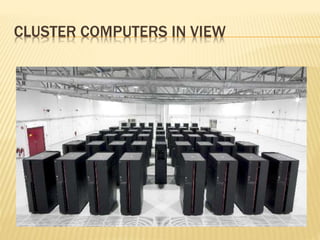
CLUSTER COMPUTERS IN VIEW
CLUSTER COMPUTERS
 A group of interconnected WHOLE
COMPUTERS works together as a unified
computing resource that can create the
illusion of being one machine having parallel
processing.
 The components of a cluster are commonly,
but not always, connected to each other
through fast local area networks.
WHY TO USE CLUSTERS
 Price/Performance
The reason for the growth in use of clusters is that they
have significantly reduced the cost of processing power.
 Availability
Single points of failure can be eliminated, if any one
system component goes down, the system as a whole stay
highly available.
 Scalability
HPC clusters can grow in overall capacity because
processors and nodes can be added as demand
increases.
HISTORY
 The first commodity clustering product was ARCsystem,
developed by Datapoint in 1977.
 The next product was VAXcluster, released by DEC in
1980’s.
 Microsoft, Sun Microsystems, and other leading hardware
and software companies offer clustering packages.
 But Linux is the most widely used operating systems ever
since for cluster computers around the world.
ARCHITECTURE
 A cluster is a type of parallel /distributed processing
system,which consists of a collection of interconnected
stand-alone computers cooperatively working together a
single, integrated computing resource.
 A node:
 a single or multiprocessor system with memory, I/O
facilities, &OS
 generally 2 or more computers (nodes) connected
together
 in a single cabinet, or physically separated & connected
via a LAN
 appear as a single system to users and applications
 provide a cost-effective way to gain features and benefits
CLUSTERS ARCHITECTURE
CLUSTER CATEGORISATION
 High-availability (HA)
 Load-balancing
 High- Performance(HP)
HIGH AVAILABILITY CLUSTERS
 Avoid single point of failure
 This requires atleast two nodes - a primary a
nd a backup.
 Always with redundancy
 Almost all load balancing cluster are with HA
capability.
LOAD BALANCING CLUSTERS
 PC cluster deliver load balancing performanc
e
 Commonly used with busy ftp and web serve
rs with large client base
 Large number of nodes to share load
HIGH-PERFORMANCE
 Start from 1994
 Donald Becker of NASA assembled this clust
er.
 Also called Beowulf cluster
 Applications like data mining, simulations, pa
rallel
 processing, weather modeling, etc.
ISSUES
 Cluster Networking
 Cluster Software
 Programming
 Timing
 Network Selection
 Speed Selection
CLUSTER NETWORKING
 Huge difference in the speed of data
accessibility and transferability and how the
nodes communicate.
 Just got to make sure that if it’s in your
budget then the clusters have the similar
networking capabilities and if possible, then
buy the network adapters from the same
manufacturer.
CLUSTER SOFTWARE
 You will have to build versions of clustering
software for each kind of system you include
in your cluster.
PROGRAMMING
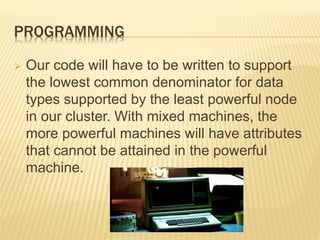
 Our code will have to be written to support
the lowest common denominator for data
types supported by the least powerful node
in our cluster. With mixed machines, the
more powerful machines will have attributes
that cannot be attained in the powerful
machine.
TIMING
 This is the most problematic aspect of
cluster. Since these machines have different
performance profile our code will execute at
different rates on the different kinds of nodes.
This can cause serious bottlenecks if a
process on one node is waiting for results of
a calculation on a slower node..
NETWORK SELECTION
 There are a number of different kinds of
network topologies, including buses, cubes
of various degrees, and grids/meshes. These
network topologies will be implemented by
use of one or more network interface cards,
or NICs, installed into the head-node and
compute nodes of our cluster.
SPEED SELECTION
 No matter what topology you choose for
your cluster, you will want to get fastest
network that your budget allows. Fortunately,
the availability of high speed computers has
also forced the development of high speed
networking systems.
Examples are :
10Mbit Ethernet, 100Mbit Ethernet, gigabit
networking, channel bonding etc.
THANK YOU!!!

Cluster computing

  • 1.
  • 2.
    CONTENTS • Introducing Clusters •About Cluster Computing • Why Clusters? • History • Architecture • Categories • Issues
  • 3.
    INTRODUCTION  A computercluster is a group of tightly coupled computers that work together closely so that it can be viewed as a single computer.  Clusters are commonly connected through fast local area networks.  Clusters have evolved to support applications ranging from e-commerce, to high performance database applications.
  • 4.
  • 5.
    CLUSTER COMPUTERS  Agroup of interconnected WHOLE COMPUTERS works together as a unified computing resource that can create the illusion of being one machine having parallel processing.  The components of a cluster are commonly, but not always, connected to each other through fast local area networks.
  • 6.
    WHY TO USECLUSTERS  Price/Performance The reason for the growth in use of clusters is that they have significantly reduced the cost of processing power.  Availability Single points of failure can be eliminated, if any one system component goes down, the system as a whole stay highly available.  Scalability HPC clusters can grow in overall capacity because processors and nodes can be added as demand increases.
  • 7.
    HISTORY  The firstcommodity clustering product was ARCsystem, developed by Datapoint in 1977.  The next product was VAXcluster, released by DEC in 1980’s.  Microsoft, Sun Microsystems, and other leading hardware and software companies offer clustering packages.  But Linux is the most widely used operating systems ever since for cluster computers around the world.
  • 8.
    ARCHITECTURE  A clusteris a type of parallel /distributed processing system,which consists of a collection of interconnected stand-alone computers cooperatively working together a single, integrated computing resource.  A node:  a single or multiprocessor system with memory, I/O facilities, &OS  generally 2 or more computers (nodes) connected together  in a single cabinet, or physically separated & connected via a LAN  appear as a single system to users and applications  provide a cost-effective way to gain features and benefits
  • 9.
  • 10.
    CLUSTER CATEGORISATION  High-availability(HA)  Load-balancing  High- Performance(HP)
  • 11.
    HIGH AVAILABILITY CLUSTERS Avoid single point of failure  This requires atleast two nodes - a primary a nd a backup.  Always with redundancy  Almost all load balancing cluster are with HA capability.
  • 12.
    LOAD BALANCING CLUSTERS PC cluster deliver load balancing performanc e  Commonly used with busy ftp and web serve rs with large client base  Large number of nodes to share load
  • 13.
    HIGH-PERFORMANCE  Start from1994  Donald Becker of NASA assembled this clust er.  Also called Beowulf cluster  Applications like data mining, simulations, pa rallel  processing, weather modeling, etc.
  • 14.
    ISSUES  Cluster Networking Cluster Software  Programming  Timing  Network Selection  Speed Selection
  • 15.
    CLUSTER NETWORKING  Hugedifference in the speed of data accessibility and transferability and how the nodes communicate.  Just got to make sure that if it’s in your budget then the clusters have the similar networking capabilities and if possible, then buy the network adapters from the same manufacturer.
  • 16.
    CLUSTER SOFTWARE  Youwill have to build versions of clustering software for each kind of system you include in your cluster.
  • 17.
    PROGRAMMING  Our codewill have to be written to support the lowest common denominator for data types supported by the least powerful node in our cluster. With mixed machines, the more powerful machines will have attributes that cannot be attained in the powerful machine.
  • 18.
    TIMING  This isthe most problematic aspect of cluster. Since these machines have different performance profile our code will execute at different rates on the different kinds of nodes. This can cause serious bottlenecks if a process on one node is waiting for results of a calculation on a slower node..
  • 19.
    NETWORK SELECTION  Thereare a number of different kinds of network topologies, including buses, cubes of various degrees, and grids/meshes. These network topologies will be implemented by use of one or more network interface cards, or NICs, installed into the head-node and compute nodes of our cluster.
  • 20.
    SPEED SELECTION  Nomatter what topology you choose for your cluster, you will want to get fastest network that your budget allows. Fortunately, the availability of high speed computers has also forced the development of high speed networking systems. Examples are : 10Mbit Ethernet, 100Mbit Ethernet, gigabit networking, channel bonding etc.
  • 21.