General Purpose Computation on
Graphics Processors (GPGPU)
Mike Houston, Stanford University
2Mike Houston - Stanford University Graphics Lab
A little about me
http://graphics.stanford.edu/~mhouston
Education:
– UC San Diego, Computer Science BS
– Stanford University, Computer Science MS
– Currently a PhD candidate at Stanford University
Research
– Parallel Rendering
– High performance computing
– Computation on graphics processors (GPGPU)
3Mike Houston - Stanford University Graphics Lab
What can you do on GPUs other than graphics?
Large matrix/vector operations (BLAS)
Protein Folding (Molecular Dynamics)
FFT (SETI, signal processing)
Ray Tracing
Physics Simulation [cloth, fluid, collision]
Sequence Matching (Hidden Markov Models)
Speech Recognition (Hidden Markov Models, Neural nets)
Databases
Sort/Search
Medical Imaging (image segmentation, processing)
And many, many more…
http://www.gpgpu.org
4Mike Houston - Stanford University Graphics Lab
Why use GPUs?
COTS
– In every machine
Performance
– Intel 3.0 GHz Pentium 4
• 12 GFLOPs peak (MAD)
• 5.96 GB/s to main memory
– ATI Radeon X1800XT
• 120 GFLOPs peak (fragment engine)
• 42 GB/s to video memory
5Mike Houston - Stanford University Graphics Lab
Task vs. Data parallelism
Task parallel
– Independent processes with little communication
– Easy to use
• “Free” on modern operating systems with SMP
Data parallel
– Lots of data on which the same computation is being executed
– No dependencies between data elements in each step in the
computation
– Can saturate many ALUs
– But often requires redesign of traditional algorithms
6Mike Houston - Stanford University Graphics Lab
CPU vs. GPU
CPU
– Really fast caches (great for data reuse)
– Fine branching granularity
– Lots of different processes/threads
– High performance on a single thread of execution
GPU
– Lots of math units
– Fast access to onboard memory
– Run a program on each fragment/vertex
– High throughput on parallel tasks
CPUs are great for task parallelism
GPUs are great for data parallelism
7Mike Houston - Stanford University Graphics Lab
The Importance of Data Parallelism for GPUs
GPUs are designed for highly parallel tasks like rendering
GPUs process independent vertices and fragments
– Temporary registers are zeroed
– No shared or static data
– No read-modify-write buffers
– In short, no communication between vertices or fragments
Data-parallel processing
– GPU architectures are ALU-heavy
• Multiple vertex & pixel pipelines
• Lots of compute power
– GPU memory systems are designed to stream data
• Linear access patterns can be prefetched
• Hide memory latency
Courtesy GPGPU.org
8Mike Houston - Stanford University Graphics Lab
GPGPU Terminology
9Mike Houston - Stanford University Graphics Lab
Arithmetic Intensity
Arithmetic intensity
– Math operations per word transferred
– Computation / bandwidth
Ideal apps to target GPGPU have:
– Large data sets
– High parallelism
– Minimal dependencies between data elements
– High arithmetic intensity
– Lots of work to do without CPU intervention
Courtesy GPGPU.org
10Mike Houston - Stanford University Graphics Lab
Data Streams & Kernels
Streams
– Collection of records requiring similar computation
• Vertex positions, Voxels, FEM cells, etc.
– Provide data parallelism
Kernels
– Functions applied to each element in stream
• transforms, PDE, …
– No dependencies between stream elements
• Encourage high Arithmetic Intensity
Courtesy GPGPU.org
11Mike Houston - Stanford University Graphics Lab
Scatter vs. Gather
Gather
– Indirect read from memory ( x = a[i] )
– Naturally maps to a texture fetch
– Used to access data structures and data streams
Scatter
– Indirect write to memory ( a[i] = x )
– Difficult to emulate:
• Render to vertex array
• Sorting buffer
– Needed for building many data structures
– Usually done on the CPU
12Mike Houston - Stanford University Graphics Lab
Mapping algorithms to the GPU
13Mike Houston - Stanford University Graphics Lab
Mapping CPU algorithms to the GPU
Basics
– Stream/Arrays -> Textures
– Parallel loops -> Quads
– Loop body -> vertex + fragment program
– Output arrays -> render targets
– Memory read -> texture fetch
– Memory write -> framebuffer write
Controlling the parallel loop
– Rasterization = Kernel Invocation
– Texture Coordinates = Computational Domain
– Vertex Coordinates = Computational Range
Courtesy GPGPU.org
14Mike Houston - Stanford University Graphics Lab
Computational Resources
Programmable parallel processors
– Vertex & Fragment pipelines
Rasterizer
– Mostly useful for interpolating values (texture coordinates) and
per-vertex constants
Texture unit
– Read-only memory interface
Render to texture
– Write-only memory interface
Courtesy GPGPU.org
15Mike Houston - Stanford University Graphics Lab
Vertex Processors
Fully programmable (SIMD / MIMD)
Processes 4-vectors (RGBA / XYZW)
Capable of scatter but not gather
– Can change the location of current vertex
– Cannot read info from other vertices
– Can only read a small constant memory
Vertex Texture Fetch
– Random access memory for vertices
– Limited gather capabilities
• Can fetch from texture
• Cannot fetch from current vertex stream
Courtesy GPGPU.org
16Mike Houston - Stanford University Graphics Lab
Fragment Processors
Fully programmable (SIMD)
Processes 4-component vectors (RGBA / XYZW)
Random access memory read (textures)
Generally capable of gather but not scatter
– Indirect memory read (texture fetch), but no indirect memory write
– Output address fixed to a specific pixel
Typically more useful than vertex processor
– More fragment pipelines than vertex pipelines
– Direct output (fragment processor is at end of pipeline)
– Better memory read performance
For GPGPU, we mainly concentrate on using the fragment
processors
– Most of the flops
– Highest memory bandwidth
Courtesy GPGPU.org
17Mike Houston - Stanford University Graphics Lab
GPGPU example – Adding Vectors
float a[5*5];
float b[5*5];
float c[5*5];
//initialize vector a
//initialize vector b
for(int i=0; i<5*5; i++)
{
c[i] = a[i] + b[i];
}
0 1 2 3 4
5 6 7 8 9
10 11 12 13 14
15 16 17 18 19
20 21 22 23 24
Place arrays into 2D textures
Convert loop body into a shader
Loop body = Render a quad
– Needs to cover all the pixels in the
output
– 1:1 mapping between pixels and texels
Readback framebuffer into result array
!!ARBfp1.0
TEMP R0;
TEMP R1;
TEX R0, fragment.position, texture[0], 2D;
TEX R1, fragment.position, texture[1], 2D;
ADD R0, R0, R1;
MOV fragment.color, R0;
18Mike Houston - Stanford University Graphics Lab
How this basically works – Adding vectors
Bind Input Textures
Bind Render Targets
Load Shader
Render Quad
Readback Buffer
Set Shader Params
!!ARBfp1.0
TEMP R0;
TEMP R1;
TEX R0, fragment.position, texture[0], 2D;
TEX R1, fragment.position, texture[1], 2D;
ADD R0, R0, R1;
MOV fragment.color, R0;
Vector A Vector B
Vector C
C = A+B
,
19Mike Houston - Stanford University Graphics Lab
Rolling your own GPGPU apps
Lots of information on GPGPU.org
For those with a strong graphics background:
– Do all the graphics setup yourself
– Write your kernels:
• Use high level languages
– Cg, HLSL, ASHLI
• Or, direct assembly
– ARB_fragment_program, ps20, ps2a, ps2b, ps30
High level languages and systems to make GPGPU
easier
– Brook (http://graphics.stanford.edu/projects/brookgpu/)
– Sh (http://libsh.org)
20Mike Houston - Stanford University Graphics Lab
BrookGPU
History
– Developed at Stanford University
– Goal: allow non-graphics users to use GPUs for computation
– Lots of GPGPU apps written in Brook
Design
– C based language with streaming extensions
– Compiles kernels to DX9 and OpenGL shading models
– Runtimes (DX9/OpenGL) handle all graphics commands
Performance
– 80-90% of hand tuned GPU application in many cases
21Mike Houston - Stanford University Graphics Lab
GPGPU and the ATI X1800
22Mike Houston - Stanford University Graphics Lab
GPGPU on the ATI X1800
IEEE 32-bit floating point
– Simplifies precision issues in applications
Long programs
– We can now handle larger applications
– 512 static instructions
– Effectively unlimited dynamic instructions
Branching and Looping
– No performance cliffs for dynamic branching and looping
– Fine branch granularity: ~16 fragments
Faster upload/download
– 50-100% increase in PCIe bandwidth over last generation
23Mike Houston - Stanford University Graphics Lab
GPGPU on the ATI X1800, cont.
Advanced memory controller
– Latency hiding for streaming reads and writes to memory
• With enough math ops you can hide all memory access!
– Large bandwidth improvement over previous generation
Scatter support (a[i] = x)
– Arbitrary number of float outputs from fragment processors
– Uncached reads and writes for register spilling
F-Buffer
– Support for linearizing datasets
– Store temporaries “in flight”
24Mike Houston - Stanford University Graphics Lab
GPGPU on the ATI X1800, cont.
Flexibility
– Unlimited texture reads
– Unlimited dependent texture reads
– 32 hardware registers per fragment
512MB memory support
– Larger datasets without going to system memory
25Mike Houston - Stanford University Graphics Lab
Performance basics for GPGPU – X1800XT
(from GPUBench)
Compute
– 83 GFLOPs (MAD)
Memory
– 42 GB/s cache bandwidth
– 21 GB/s streaming bandwidth
– 4 cycle latency for a float4 fetch (cache hit)
– 8 cycle latency for a float4 fetch (streaming)
Branch granularity – 16 fragments
Offload to GPU
– Download (GPU -> CPU): 900 MB/s
– Upload (CPU -> GPU): 1.4 GB/s
http://graphics.stanford.edu/projects/gpubench
26Mike Houston - Stanford University Graphics Lab
A few examples on the
ATI X1800XT
27Mike Houston - Stanford University Graphics Lab
BLAS
Basic Linear Algebra Subprograms
– High performance computing
• The basis for LINPACK benchmarks
• Heavily used in simulation
– Ubiquitous in many math packages
• MatLab™
• LAPACK
BLAS 1: scalar, vector, vector/vector operations
BLAS 2: matrix-vector operations
BLAS 3: matrix-matrix operations
28Mike Houston - Stanford University Graphics Lab
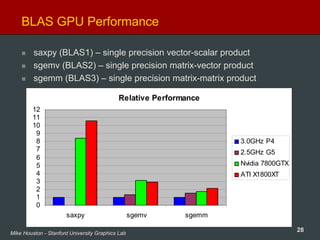
BLAS GPU Performance
saxpy (BLAS1) – single precision vector-scalar product
sgemv (BLAS2) – single precision matrix-vector product
sgemm (BLAS3) – single precision matrix-matrix product
Relative Performance
0
1
2
3
4
5
6
7
8
9
10
11
12
saxpy sgemv sgemm
3.0GHz P4
2.5GHz G5
Nvidia 7800GTX
ATI X1800XT
29Mike Houston - Stanford University Graphics Lab
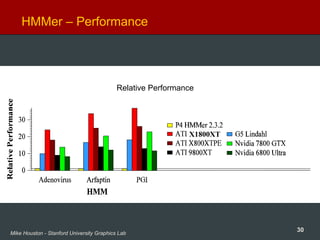
HMMer – Protein sequence matching
Goal
– Find matching patterns between protein sequences
– Relationship between diseases and genetics
– Genetic relationships between species
Problem
– HUGE databases to search against
– Queries take lots of time to process
• Researches start searches and go home for the night
Core Algorithm (hmmsearch)
– Viterbi algorithm
– Compare a Hidden Markov Model against a large database of
protein sequences
Paper at IEEE Supercomputing 2005
– http://graphics.stanford.edu/papers/clawhmmer/
30Mike Houston - Stanford University Graphics Lab
HMMer – Performance
X1800XT
Relative Performance
31Mike Houston - Stanford University Graphics Lab
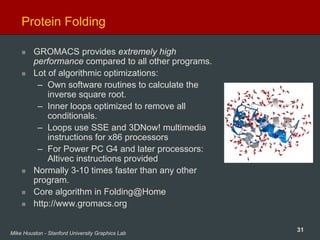
Protein Folding
GROMACS provides extremely high
performance compared to all other programs.
Lot of algorithmic optimizations:
– Own software routines to calculate the
inverse square root.
– Inner loops optimized to remove all
conditionals.
– Loops use SSE and 3DNow! multimedia
instructions for x86 processors
– For Power PC G4 and later processors:
Altivec instructions provided
Normally 3-10 times faster than any other
program.
Core algorithm in Folding@Home
http://www.gromacs.org
32Mike Houston - Stanford University Graphics Lab
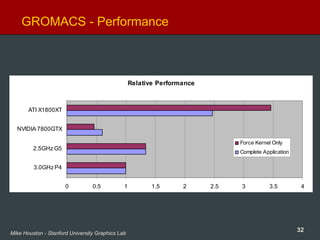
GROMACS - Performance
Relative Performance
0 0.5 1 1.5 2 2.5 3 3.5 4
3.0GHz P4
2.5GHz G5
NVIDIA 7800GTX
ATI X1800XT
Force Kernel Only
Complete Application
33Mike Houston - Stanford University Graphics Lab
GROMACS – GPU Implementation
Written using Brook by non-graphics programmers
– Offloads force calculation to GPU (~80% of CPU time)
– Force calculation on X1800XT is ~3.5X a 3.0GHz P4
– Overall speed up on X1800XT is ~2.5X a 3.0GHz P4
Not yet optimized for X1800XT
– Using ps2b kernels, i.e. no looping
– Not making use of new scatter functionality
The revenge of Ahmdal’s law
– Force calculation no longer bottleneck (38% of runtime)
– Need to also accelerate data structure building (neighbor lists)
• MUCH easier with scatter support
This looks like a very promising application for GPUs
– Combine CPU and GPU processing for a folding monster!
34Mike Houston - Stanford University Graphics Lab
Making GPGPU easier
35Mike Houston - Stanford University Graphics Lab
What GPGPU needs from vendors
More information
– Shader ISA
– Latency information
– GPGPU Programming guide (floating point)
• How to order code for ALU efficiency
• The “real” cost of all instructions
• Expected latencies of different types of memory fetches
Direct access to the hardware
– GL/DX is not what we want to be using
• We don’t need state tracking
• Using graphics commands is odd for doing computation
• The graphics abstractions aren’t useful for us
– Better memory management
Fast transfer to and from GPU
– Non-blocking
Consistent graphics drivers
– Some optimizations for games hurt GPGPU performance
36Mike Houston - Stanford University Graphics Lab
What GPGPU needs from the community
Data Parallel programming languages
– Lots of academic research
“GCC” for GPUs
Parallel data structures
More applications
– What will make the average user care about GPGPU?
– What can we make data parallel and run fast?
37Mike Houston - Stanford University Graphics Lab
Thanks
The BrookGPU team – Ian Buck, Tim Foley, Jeremy
Sugerman, Daniel Horn, Kayvon Fatahalian
GROMACS – Vishal Vaidyanathan, Erich Elsen, Vijay
Pande, Eric Darve
HMMer – Daniel Horn, Eric Lindahl
Pat Hanrahan
Everyone at ATI Technologies
38Mike Houston - Stanford University Graphics Lab
Questions?
I’ll also be around after the talk
Email: mhouston@stanford.edu
Web: http://graphics.stanford.edu/~mhouston
For lots of great GPGPU information:
– GPGPU.org (http://www.gpgpu.org)

Cliff sugerman

  • 1.
    General Purpose Computationon Graphics Processors (GPGPU) Mike Houston, Stanford University
  • 2.
    2Mike Houston -Stanford University Graphics Lab A little about me http://graphics.stanford.edu/~mhouston Education: – UC San Diego, Computer Science BS – Stanford University, Computer Science MS – Currently a PhD candidate at Stanford University Research – Parallel Rendering – High performance computing – Computation on graphics processors (GPGPU)
  • 3.
    3Mike Houston -Stanford University Graphics Lab What can you do on GPUs other than graphics? Large matrix/vector operations (BLAS) Protein Folding (Molecular Dynamics) FFT (SETI, signal processing) Ray Tracing Physics Simulation [cloth, fluid, collision] Sequence Matching (Hidden Markov Models) Speech Recognition (Hidden Markov Models, Neural nets) Databases Sort/Search Medical Imaging (image segmentation, processing) And many, many more… http://www.gpgpu.org
  • 4.
    4Mike Houston -Stanford University Graphics Lab Why use GPUs? COTS – In every machine Performance – Intel 3.0 GHz Pentium 4 • 12 GFLOPs peak (MAD) • 5.96 GB/s to main memory – ATI Radeon X1800XT • 120 GFLOPs peak (fragment engine) • 42 GB/s to video memory
  • 5.
    5Mike Houston -Stanford University Graphics Lab Task vs. Data parallelism Task parallel – Independent processes with little communication – Easy to use • “Free” on modern operating systems with SMP Data parallel – Lots of data on which the same computation is being executed – No dependencies between data elements in each step in the computation – Can saturate many ALUs – But often requires redesign of traditional algorithms
  • 6.
    6Mike Houston -Stanford University Graphics Lab CPU vs. GPU CPU – Really fast caches (great for data reuse) – Fine branching granularity – Lots of different processes/threads – High performance on a single thread of execution GPU – Lots of math units – Fast access to onboard memory – Run a program on each fragment/vertex – High throughput on parallel tasks CPUs are great for task parallelism GPUs are great for data parallelism
  • 7.
    7Mike Houston -Stanford University Graphics Lab The Importance of Data Parallelism for GPUs GPUs are designed for highly parallel tasks like rendering GPUs process independent vertices and fragments – Temporary registers are zeroed – No shared or static data – No read-modify-write buffers – In short, no communication between vertices or fragments Data-parallel processing – GPU architectures are ALU-heavy • Multiple vertex & pixel pipelines • Lots of compute power – GPU memory systems are designed to stream data • Linear access patterns can be prefetched • Hide memory latency Courtesy GPGPU.org
  • 8.
    8Mike Houston -Stanford University Graphics Lab GPGPU Terminology
  • 9.
    9Mike Houston -Stanford University Graphics Lab Arithmetic Intensity Arithmetic intensity – Math operations per word transferred – Computation / bandwidth Ideal apps to target GPGPU have: – Large data sets – High parallelism – Minimal dependencies between data elements – High arithmetic intensity – Lots of work to do without CPU intervention Courtesy GPGPU.org
  • 10.
    10Mike Houston -Stanford University Graphics Lab Data Streams & Kernels Streams – Collection of records requiring similar computation • Vertex positions, Voxels, FEM cells, etc. – Provide data parallelism Kernels – Functions applied to each element in stream • transforms, PDE, … – No dependencies between stream elements • Encourage high Arithmetic Intensity Courtesy GPGPU.org
  • 11.
    11Mike Houston -Stanford University Graphics Lab Scatter vs. Gather Gather – Indirect read from memory ( x = a[i] ) – Naturally maps to a texture fetch – Used to access data structures and data streams Scatter – Indirect write to memory ( a[i] = x ) – Difficult to emulate: • Render to vertex array • Sorting buffer – Needed for building many data structures – Usually done on the CPU
  • 12.
    12Mike Houston -Stanford University Graphics Lab Mapping algorithms to the GPU
  • 13.
    13Mike Houston -Stanford University Graphics Lab Mapping CPU algorithms to the GPU Basics – Stream/Arrays -> Textures – Parallel loops -> Quads – Loop body -> vertex + fragment program – Output arrays -> render targets – Memory read -> texture fetch – Memory write -> framebuffer write Controlling the parallel loop – Rasterization = Kernel Invocation – Texture Coordinates = Computational Domain – Vertex Coordinates = Computational Range Courtesy GPGPU.org
  • 14.
    14Mike Houston -Stanford University Graphics Lab Computational Resources Programmable parallel processors – Vertex & Fragment pipelines Rasterizer – Mostly useful for interpolating values (texture coordinates) and per-vertex constants Texture unit – Read-only memory interface Render to texture – Write-only memory interface Courtesy GPGPU.org
  • 15.
    15Mike Houston -Stanford University Graphics Lab Vertex Processors Fully programmable (SIMD / MIMD) Processes 4-vectors (RGBA / XYZW) Capable of scatter but not gather – Can change the location of current vertex – Cannot read info from other vertices – Can only read a small constant memory Vertex Texture Fetch – Random access memory for vertices – Limited gather capabilities • Can fetch from texture • Cannot fetch from current vertex stream Courtesy GPGPU.org
  • 16.
    16Mike Houston -Stanford University Graphics Lab Fragment Processors Fully programmable (SIMD) Processes 4-component vectors (RGBA / XYZW) Random access memory read (textures) Generally capable of gather but not scatter – Indirect memory read (texture fetch), but no indirect memory write – Output address fixed to a specific pixel Typically more useful than vertex processor – More fragment pipelines than vertex pipelines – Direct output (fragment processor is at end of pipeline) – Better memory read performance For GPGPU, we mainly concentrate on using the fragment processors – Most of the flops – Highest memory bandwidth Courtesy GPGPU.org
  • 17.
    17Mike Houston -Stanford University Graphics Lab GPGPU example – Adding Vectors float a[5*5]; float b[5*5]; float c[5*5]; //initialize vector a //initialize vector b for(int i=0; i<5*5; i++) { c[i] = a[i] + b[i]; } 0 1 2 3 4 5 6 7 8 9 10 11 12 13 14 15 16 17 18 19 20 21 22 23 24 Place arrays into 2D textures Convert loop body into a shader Loop body = Render a quad – Needs to cover all the pixels in the output – 1:1 mapping between pixels and texels Readback framebuffer into result array !!ARBfp1.0 TEMP R0; TEMP R1; TEX R0, fragment.position, texture[0], 2D; TEX R1, fragment.position, texture[1], 2D; ADD R0, R0, R1; MOV fragment.color, R0;
  • 18.
    18Mike Houston -Stanford University Graphics Lab How this basically works – Adding vectors Bind Input Textures Bind Render Targets Load Shader Render Quad Readback Buffer Set Shader Params !!ARBfp1.0 TEMP R0; TEMP R1; TEX R0, fragment.position, texture[0], 2D; TEX R1, fragment.position, texture[1], 2D; ADD R0, R0, R1; MOV fragment.color, R0; Vector A Vector B Vector C C = A+B ,
  • 19.
    19Mike Houston -Stanford University Graphics Lab Rolling your own GPGPU apps Lots of information on GPGPU.org For those with a strong graphics background: – Do all the graphics setup yourself – Write your kernels: • Use high level languages – Cg, HLSL, ASHLI • Or, direct assembly – ARB_fragment_program, ps20, ps2a, ps2b, ps30 High level languages and systems to make GPGPU easier – Brook (http://graphics.stanford.edu/projects/brookgpu/) – Sh (http://libsh.org)
  • 20.
    20Mike Houston -Stanford University Graphics Lab BrookGPU History – Developed at Stanford University – Goal: allow non-graphics users to use GPUs for computation – Lots of GPGPU apps written in Brook Design – C based language with streaming extensions – Compiles kernels to DX9 and OpenGL shading models – Runtimes (DX9/OpenGL) handle all graphics commands Performance – 80-90% of hand tuned GPU application in many cases
  • 21.
    21Mike Houston -Stanford University Graphics Lab GPGPU and the ATI X1800
  • 22.
    22Mike Houston -Stanford University Graphics Lab GPGPU on the ATI X1800 IEEE 32-bit floating point – Simplifies precision issues in applications Long programs – We can now handle larger applications – 512 static instructions – Effectively unlimited dynamic instructions Branching and Looping – No performance cliffs for dynamic branching and looping – Fine branch granularity: ~16 fragments Faster upload/download – 50-100% increase in PCIe bandwidth over last generation
  • 23.
    23Mike Houston -Stanford University Graphics Lab GPGPU on the ATI X1800, cont. Advanced memory controller – Latency hiding for streaming reads and writes to memory • With enough math ops you can hide all memory access! – Large bandwidth improvement over previous generation Scatter support (a[i] = x) – Arbitrary number of float outputs from fragment processors – Uncached reads and writes for register spilling F-Buffer – Support for linearizing datasets – Store temporaries “in flight”
  • 24.
    24Mike Houston -Stanford University Graphics Lab GPGPU on the ATI X1800, cont. Flexibility – Unlimited texture reads – Unlimited dependent texture reads – 32 hardware registers per fragment 512MB memory support – Larger datasets without going to system memory
  • 25.
    25Mike Houston -Stanford University Graphics Lab Performance basics for GPGPU – X1800XT (from GPUBench) Compute – 83 GFLOPs (MAD) Memory – 42 GB/s cache bandwidth – 21 GB/s streaming bandwidth – 4 cycle latency for a float4 fetch (cache hit) – 8 cycle latency for a float4 fetch (streaming) Branch granularity – 16 fragments Offload to GPU – Download (GPU -> CPU): 900 MB/s – Upload (CPU -> GPU): 1.4 GB/s http://graphics.stanford.edu/projects/gpubench
  • 26.
    26Mike Houston -Stanford University Graphics Lab A few examples on the ATI X1800XT
  • 27.
    27Mike Houston -Stanford University Graphics Lab BLAS Basic Linear Algebra Subprograms – High performance computing • The basis for LINPACK benchmarks • Heavily used in simulation – Ubiquitous in many math packages • MatLab™ • LAPACK BLAS 1: scalar, vector, vector/vector operations BLAS 2: matrix-vector operations BLAS 3: matrix-matrix operations
  • 28.
    28Mike Houston -Stanford University Graphics Lab BLAS GPU Performance saxpy (BLAS1) – single precision vector-scalar product sgemv (BLAS2) – single precision matrix-vector product sgemm (BLAS3) – single precision matrix-matrix product Relative Performance 0 1 2 3 4 5 6 7 8 9 10 11 12 saxpy sgemv sgemm 3.0GHz P4 2.5GHz G5 Nvidia 7800GTX ATI X1800XT
  • 29.
    29Mike Houston -Stanford University Graphics Lab HMMer – Protein sequence matching Goal – Find matching patterns between protein sequences – Relationship between diseases and genetics – Genetic relationships between species Problem – HUGE databases to search against – Queries take lots of time to process • Researches start searches and go home for the night Core Algorithm (hmmsearch) – Viterbi algorithm – Compare a Hidden Markov Model against a large database of protein sequences Paper at IEEE Supercomputing 2005 – http://graphics.stanford.edu/papers/clawhmmer/
  • 30.
    30Mike Houston -Stanford University Graphics Lab HMMer – Performance X1800XT Relative Performance
  • 31.
    31Mike Houston -Stanford University Graphics Lab Protein Folding GROMACS provides extremely high performance compared to all other programs. Lot of algorithmic optimizations: – Own software routines to calculate the inverse square root. – Inner loops optimized to remove all conditionals. – Loops use SSE and 3DNow! multimedia instructions for x86 processors – For Power PC G4 and later processors: Altivec instructions provided Normally 3-10 times faster than any other program. Core algorithm in Folding@Home http://www.gromacs.org
  • 32.
    32Mike Houston -Stanford University Graphics Lab GROMACS - Performance Relative Performance 0 0.5 1 1.5 2 2.5 3 3.5 4 3.0GHz P4 2.5GHz G5 NVIDIA 7800GTX ATI X1800XT Force Kernel Only Complete Application
  • 33.
    33Mike Houston -Stanford University Graphics Lab GROMACS – GPU Implementation Written using Brook by non-graphics programmers – Offloads force calculation to GPU (~80% of CPU time) – Force calculation on X1800XT is ~3.5X a 3.0GHz P4 – Overall speed up on X1800XT is ~2.5X a 3.0GHz P4 Not yet optimized for X1800XT – Using ps2b kernels, i.e. no looping – Not making use of new scatter functionality The revenge of Ahmdal’s law – Force calculation no longer bottleneck (38% of runtime) – Need to also accelerate data structure building (neighbor lists) • MUCH easier with scatter support This looks like a very promising application for GPUs – Combine CPU and GPU processing for a folding monster!
  • 34.
    34Mike Houston -Stanford University Graphics Lab Making GPGPU easier
  • 35.
    35Mike Houston -Stanford University Graphics Lab What GPGPU needs from vendors More information – Shader ISA – Latency information – GPGPU Programming guide (floating point) • How to order code for ALU efficiency • The “real” cost of all instructions • Expected latencies of different types of memory fetches Direct access to the hardware – GL/DX is not what we want to be using • We don’t need state tracking • Using graphics commands is odd for doing computation • The graphics abstractions aren’t useful for us – Better memory management Fast transfer to and from GPU – Non-blocking Consistent graphics drivers – Some optimizations for games hurt GPGPU performance
  • 36.
    36Mike Houston -Stanford University Graphics Lab What GPGPU needs from the community Data Parallel programming languages – Lots of academic research “GCC” for GPUs Parallel data structures More applications – What will make the average user care about GPGPU? – What can we make data parallel and run fast?
  • 37.
    37Mike Houston -Stanford University Graphics Lab Thanks The BrookGPU team – Ian Buck, Tim Foley, Jeremy Sugerman, Daniel Horn, Kayvon Fatahalian GROMACS – Vishal Vaidyanathan, Erich Elsen, Vijay Pande, Eric Darve HMMer – Daniel Horn, Eric Lindahl Pat Hanrahan Everyone at ATI Technologies
  • 38.
    38Mike Houston -Stanford University Graphics Lab Questions? I’ll also be around after the talk Email: mhouston@stanford.edu Web: http://graphics.stanford.edu/~mhouston For lots of great GPGPU information: – GPGPU.org (http://www.gpgpu.org)