




GPGPU
Performance & Tools I
Outline
1.   Introduction

2.   Threads

3.   Physical Memory
                                 NOTE:
4.   Logical Memory              A lot of this serves as a recap of
                                 what was covered so far.
5.   Efficient GPU Programming
                                 REMEMBER:
6.   Some Examples               Repetition is the key to remembering things.

7.   CUDA Programming

8.   CUDA Tools Introduction

9.   CUDA Debugger

10. CUDA Visual Profiler
But first…
• Do you believe that there can be a school without exams?

• Do you believe that a 9 year old kid in a South Indian village can
  understand how DNA works?

• Do you believe that schools and universities
  should be changed entirely?


• http://www.ted.com/talks/sugata_mitra_build_a_school_in_the_
  cloud.html
  • Fixing education is a task that requires everyone’s attention…
Most importantly…
• Do you believe that we can learn, driven entirely by
  motivation?
  • If your answer is “NO”, then try to…

  • … Get a new perspective on life…
           …leave your comfort zone!
                             突破自己!
Introduction
Why are we here?
    CPU vs. GPU
•
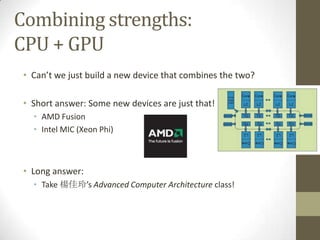
Combining strengths:
CPU + GPU
 • Can’t we just build a new device that combines the two?

 • Short answer: Some new devices are just that!
   • AMD Fusion
   • Intel MIC (Xeon Phi)


 • Long answer:
   • Take 楊佳玲’s Advanced Computer Architecture class!
Writing Code
Performance vs. Design
• Programmers have two contradictory goals:
  1.     Good Performance (FAST!)
  2.     Good Design (bug-resilient, extensible, easy to use etc…)


• Rule of thumb: Fast code is not pretty

• Example:
  •    Mathematical description –   1 line
  •    Algorithm Pseudocode –       10 lines
  •    Algorithm Code –             20 lines
  •    Optimized Algorithm Code –   50 lines
Writing Code
Common Fallacies
1.    “GPU Programs are always faster than their CPU counterpart”
     • Only if: 1. The problem allows it and 2. you invest a lot of time

2.    “I don’t need a profiler”
     • A profiler helps you analyze performance and find bottlenecks.
     • If you don’t care for performance, do NOT use the GPU.

3.    “I don’t need a debugger”
     • Yes you do.
     • Adding tons of printf’s makes things a lot more difficult (and longer)
     • (Plus, people are lazy)

4.    “I can write bug-free code”
     • No, you can’t – No one can.
Writing Code
A Tale of Two Address Spaces…
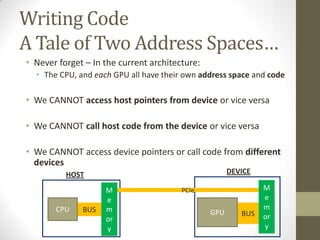
• Never forget – In the current architecture:
  • The CPU, and each GPU all have their own address space and code

• We CANNOT access host pointers from device or vice versa

• We CANNOT call host code from the device or vice versa

• We CANNOT access device pointers or call code from different
  devices
          HOST                                        DEVICE

                    M                   PCIe                   M
                    e                                          e
       CPU    BUS   m                                          m
                                                GPU      BUS
                    or                                         or
                    y                                          y
Threads &
Parallel Programming
Why do we need multithreading?
• Most and foremost: Speed!
  • There are some other reasons, but not today…

• Real-life example:
  • Ship 10k containers from 台北 to 香港
  • Question: Do you use 1 very fast ship, or 4 slow ships?

• Program example:
  • Add a scalar to 10k numbers
  • Question: Do you use 1 very fast processor, or 4 slow processors?


• The real issue: Single-unit speed never scales!
    There is no very fast ship or very fast processor
Why do we hate multithreading?
 • Multithreading adds whole new dimensions of complications
   to programming
   • … Communication
   • … Synchronization
   • (… Dead-locks – But generally not on the GPU)


 • Plus, debugging is a lot more complicated
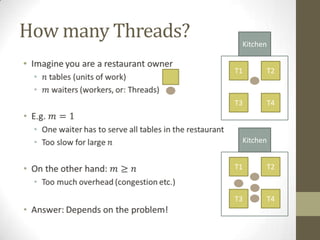
How many Threads?    Kitchen

•
                    T1     T2


                    T3     T4


                     Kitchen


                    T1     T2


                    T3     T4
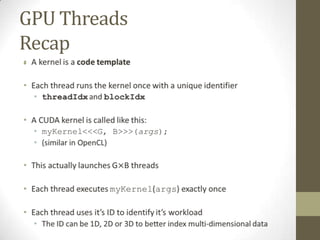
GPU Threads
Recap
•
Physical Memory
How our computer works
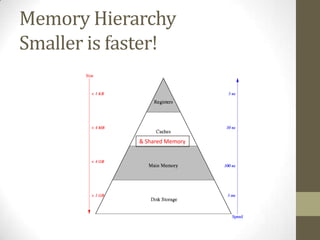
Memory Hierarchy
Smaller is faster!


             & Shared Memory
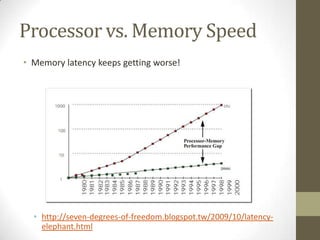
Processor vs. Memory Speed
• Memory latency keeps getting worse!


  • http://seven-degrees-of-freedom.blogspot.tw/2009/10/latency-
    elephant.html
Logical Memory
How we see memory in our programs
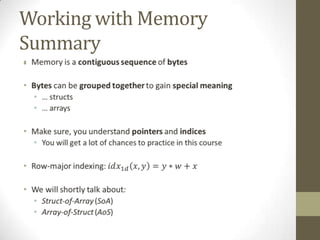
Working with Memory
What is Memory logically?
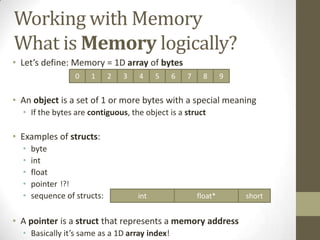
• Let’s define: Memory = 1D array of bytes
                  0   1      2   3   4     5   6   7     8      9


• An object is a set of 1 or more bytes with a special meaning
  • If the bytes are contiguous, the object is a struct

• Examples of structs:
  •   byte
  •   int
  •   float
  •   pointer !?!
  •   sequence of structs:           int               float*       short


• A pointer is a struct that represents a memory address
  • Basically it’s same as a 1D array index!
Working with Memory
Structs vs. Arrays
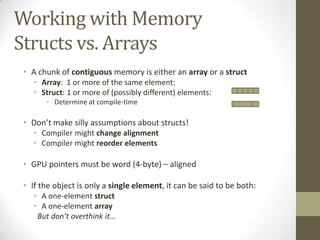
• A chunk of contiguous memory is either an array or a struct
   • Array: 1 or more of the same element:
   • Struct: 1 or more of (possibly different) elements:
      • Determine at compile-time

• Don’t make silly assumptions about structs!
   • Compiler might change alignment
   • Compiler might reorder elements

• GPU pointers must be word (4-byte) – aligned

• If the object is only a single element, it can be said to be both:
   • A one-element struct
   • A one-element array
    But don’t overthink it…
Working with Memory
Multi-dimensional Arrays
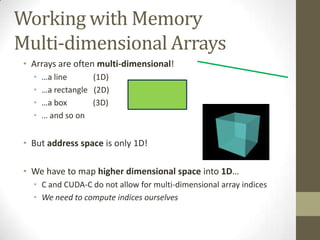
 • Arrays are often multi-dimensional!
   •   …a line      (1D)
   •   …a rectangle (2D)
   •   …a box       (3D)
   •   … and so on


 • But address space is only 1D!

 • We have to map higher dimensional space into 1D…
   • C and CUDA-C do not allow for multi-dimensional array indices
   • We need to compute indices ourselves
Working with Memory
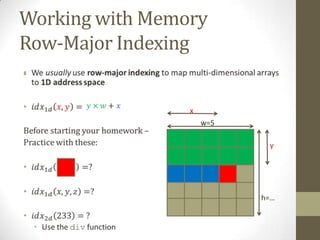
Row-Major Indexing
•


                 x
                     w=5

                            y


                           h=…
Working with Memory
Summary
•
Efficient GPU
Programming
Must Read!
• If you want to understand the GPU and write fast programs, read these:


  • CUDA C Programming Guide

  • CUDA Best Practices Guide


• All important CUDA documentation is right here:
  • http://docs.nvidia.com/cuda/index.html

• OpenCL documentation:
  • http://developer.amd.com/resources/heterogeneous-computing/opencl-
    zone/
  • http://www.nvidia.com/content/cudazone/download/OpenCL/NVIDIA_Open
    CL_ProgrammingGuide.pdf
Can Read!
Some More Optimization Slides
• The power of ILP:
  • http://www.cs.berkeley.edu/~volkov/volkov10-GTC.pdf


• Some tips and tricks:
  • http://www.nvidia.com/content/cudazone/download/Advanced_
    CUDA_Training_NVISION08.pdf
ILP Magic
• The GPU facilitates both TLP and ILP
  • Thread-level parallelism
  • Instruction-level parallelism

• ILP means: We can execute multiple instructions at the same time

• Thread does not stall on memory access
  • It only stalls on RAW (Read-After-Write) dependencies:
  a = A[i];                // no stall
  b = B[i];                // no stall
  // …
  c = a * b;               // stall

• Threads can execute multiple arithmetic instructions in parallel
  a = k1 + c * d; // no stall
  b = k2 + f * g; // no stall
Warps occupying a SM
(SM=Streaming Multiprocessor)
• Using the previous example:                           SM Scheduler
                                                  …
  a = A[i];              // no stall            warp6
                                                warp4
  b = B[i];              // no stall
  // …                                                     warp5 warp8

  c = a * b;             // stall


• What happens on a stall?
  • The current warp is placed in the I/O queue and another can run on
    the SM
  • That is why we want as many threads (warps) per SM as possible
  • Also need multiple blocks
     • E.g. Geforce 660 can have 2048 threads/SM but only 1024 threads/block
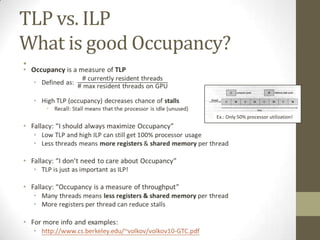
TLP vs. ILP
What is good Occupancy?
•


                     Ex.: Only 50% processor utilization!
Registers + Shared Memory vs.
Working Set Size
• Shared Memory + Registers must hold current working set of
  all active warps on a SM
  • In other words: Shared Memory + Registers must hold all (or most
    of the) data that all of the threads currently and most often need

• More threads = better TLP = less actual stalls

• More threads = less space for working set
  • Less registers/thread & shared memory/thread

• If Shm + Registers too small for working set, must use out-of-
  core method
  • For example: External merge sort
  • http://en.wikipedia.org/wiki/External_sorting
Memory Coalescing and
Bank Conflicts
• VERY big bottleneck!


• See the professor’s slides


• Also, see the   Must Read! section
OOP vs. DOP
• Array-of-Struct vs. Struct-of-Array (AoS vs. SoA)

• You probably all have heard of Object-Oriented Programming
  • Idealistic OOP is slow
  • OOP groups data (and code) into logical chunks (structs)
  • OOP generally ignores temporal locality of data

• Good performance requires: Data-Oriented Programming
  • http://research.scee.net/files/presentations/gcapaustralia09/Pitf
    alls_of_Object_Oriented_Programming_GCAP_09.pdf

• Bundle data together that is accessed at about the same time!
  • I.e. group data in a way that maximizes temporal locality
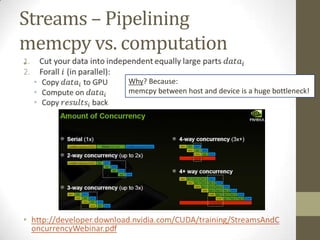
Streams – Pipelining
memcpy vs. computation
•
           Why? Because:
           memcpy between host and device is a huge bottleneck!
Look beyond the code
E.g.
        int a = …, wA = …;
        int tx = threadIdx.x, ty = threadIdx.y;
        __shared__ int A[128];
        As[ty][tx] = A[a + wA * ty + tx];


• Which resources does the line of code use?
  • Several registers and constant cache
       • Variables and constants
       • Intermediate results


  • Memory (shared or global)
       • Reads from    A     (shared)
       • Writes to     As    (maybe global)
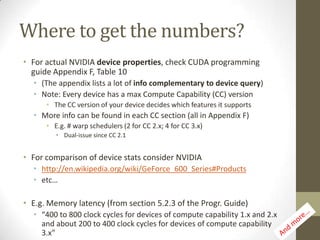
Where to get the numbers?
• For actual NVIDIA device properties, check CUDA programming
  guide Appendix F, Table 10
  • (The appendix lists a lot of info complementary to device query)
  • Note: Every device has a max Compute Capability (CC) version
      • The CC version of your device decides which features it supports
  • More info can be found in each CC section (all in Appendix F)
      • E.g. # warp schedulers (2 for CC 2.x; 4 for CC 3.x)
         • Dual-issue since CC 2.1


• For comparison of device stats consider NVIDIA
  • http://en.wikipedia.org/wiki/GeForce_600_Series#Products
  • etc…

• E.g. Memory latency (from section 5.2.3 of the Progr. Guide)
  • “400 to 800 clock cycles for devices of compute capability 1.x and 2.x
    and about 200 to 400 clock cycles for devices of compute capability
    3.x”
Other Tuning Tips
• The most important contributor to performance is the algorithm!

• Block size always a multiple of Warp size (32 on NVIDIA, 64 on AMD)!

• There is a lot more…
  • Page-lock Host Memory
  • Etc…

• Read all the references mentioned in this talk and you’ll get it.
Writing the Code…
• Do not ask the TA via email to help you with the code!

• Use the forum instead
  • Other people probably have similar questions!


• The TA (this guy) will answer all forum posts to his best judgment

• Other students can also help!

• Just one rule: Do not share your actual code!
Some Examples
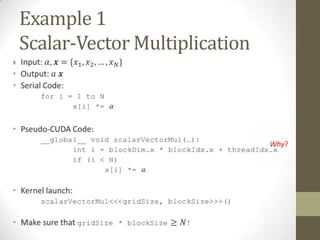
Example 1
    Scalar-Vector Multiplication
•


                                   Why?
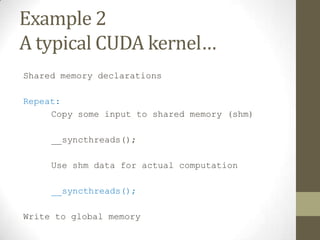
Example 2
A typical CUDA kernel…
Shared memory declarations

Repeat:
     Copy some input to shared memory (shm)

     __syncthreads();

     Use shm data for actual computation

     __syncthreads();

Write to global memory
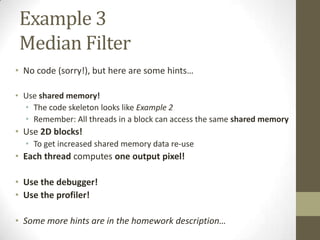
Example 3
 Median Filter
• No code (sorry!), but here are some hints…

• Use shared memory!
  • The code skeleton looks like Example 2
  • Remember: All threads in a block can access the same shared memory
• Use 2D blocks!
  • To get increased shared memory data re-use
• Each thread computes one output pixel!

• Use the debugger!
• Use the profiler!

• Some more hints are in the homework description…
Many More Examples…
• Check out the NVIDIA CUDA and AMD APP SDK samples

• Some of them come with documents, explaining:
  • The parallel algorithm (and how it was developed)
  • Exactly how much speed up was gained from each optimization step

• CUDA 5 samples with docs:
  •   simpleMultiCopy
  •   Mandelbrot
  •   Eigenvalue
  •   recursiveGaussian
  •   sobelFilter
  •   smokeParticles
  •   BlackScholes
  •   …and many more…
CUDA Tools
Documentation

• Online Documentation for NSIGHT 3
  • http://http.developer.nvidia.com/NsightVisualStudio/3.0/Documentatio
    n/UserGuide/HTML/Nsight_Visual_Studio_Edition_User_Guide.htm


• Again: Read the documents from the    Must read! section
CUDA Debugger
VS 2010 & NSIGHT
Works with Eclipse and VS 2010
(no VS 2012 support yet)
NSIGHT 3 and 2.2
  Setup
• Get NSIGHT 3.0:
  • Go to: https://developer.nvidia.com/nvidia-nsight-visual-studio-edition
  • Register (Create an account)
  • Login
     • https://developer.nvidia.com/rdp/nsight-visual-studio-edition-early-access
  • Download NSIGHT 3
     • Works for CUDA 5
     • Also has an OpenGL debugger and more


• Alternative: Get NSIGHT 2.2
  • No login required
  • Only works for CUDA 4
CUDA Debugger
Some References
• http://http.developer.nvidia.com/NsightVisualStudio/3.0/Doc
  umentation/UserGuide/HTML/Content/Debugging_CUDA_Ap
  plication.htm

• https://www.youtube.com/watch?v=FLQuqXhlx40
  • A bit outdated, but still very useful


• etc…
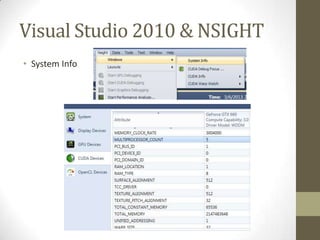
Visual Studio 2010 & NSIGHT
• System Info
Visual Studio 2010 & NSIGHT
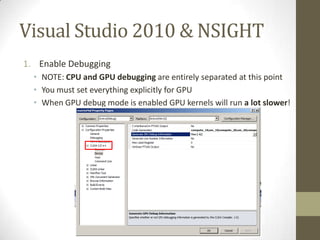
1. Enable Debugging
  • NOTE: CPU and GPU debugging are entirely separated at this point
  • You must set everything explicitly for GPU
  • When GPU debug mode is enabled GPU kernels will run a lot slower!
Visual Studio 2010 & NSIGHT
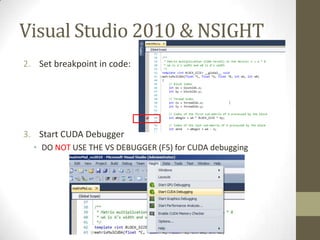
2. Set breakpoint in code:


3. Start CUDA Debugger
  • DO NOT USE THE VS DEBUGGER (F5) for CUDA debugging
Visual Studio 2010 & NSIGHT
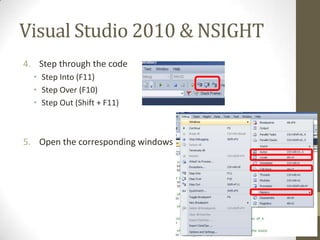
4. Step through the code
  • Step Into (F11)
  • Step Over (F10)
  • Step Out (Shift + F11)


5. Open the corresponding windows
Visual Studio 2010 & NSIGHT
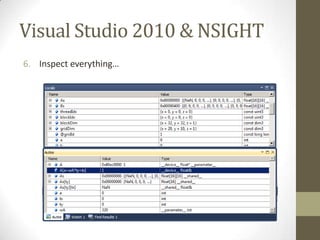
6. Inspect everything…
Visual Studio 2010 & NSIGHT
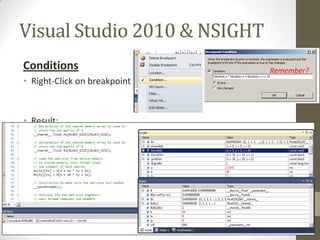
Conditions                    Remember?
• Right-Click on breakpoint


• Result:
Visual Studio 2010 & NSIGHT
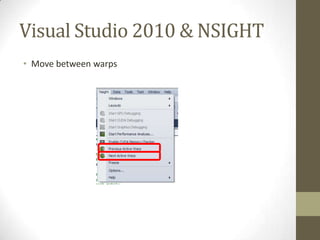
• Move between warps
Visual Studio 2010 & NSIGHT
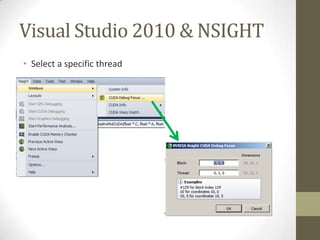
• Select a specific thread
Visual Studio 2010 & NSIGHT
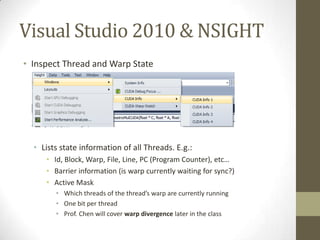
• Inspect Thread and Warp State


  • Lists state information of all Threads. E.g.:
     • Id, Block, Warp, File, Line, PC (Program Counter), etc…
     • Barrier information (is warp currently waiting for sync?)
     • Active Mask
        • Which threads of the thread’s warp are currently running
        • One bit per thread
        • Prof. Chen will cover warp divergence later in the class
Visual Studio 2010 & NSIGHT
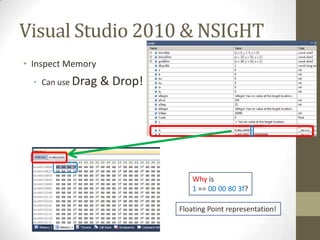
• Inspect Memory
  • Can use Drag   & Drop!


                                 Why is
                                 1 == 00 00 80 3f?

                             Floating Point representation!
CUDA Profilers
Understand your program’s performance profiles!
Comprehensive References
• Great Overview:
  • http://people.maths.ox.ac.uk/gilesm/cuda/lecs/NV_Profiling_low
    res.pdf


• http://developer.download.nvidia.com/GTC/PDF/GTC2012/Pr
  esentationPDF/S0419B-GTC2012-Profiling-Profiling-Tools.pdf
NVIDIA Visual Profiler
TODO…
• Great Tool!


• Chance for bonus points:
• Put together a comprehensive and easily understandable
  tutorial!

• We will cast a vote!
• The best tutorial gets bonus points!
nvprof
TODO
• Text-based profiler
  • For everyone without a GUI

• Maybe also bonus points?

• We will post more details on the forum…
GTC – More about the GPU
• NVIDIA’s annual GPU Technology Conference hosts many talks
  available online

• This year’s GTC is in progress RIGHT NOW!
  • http://www.gputechconf.com/page/sessions.html


• Of course it’s a big advertisement campaign for NVIDIA
  • But it also has a lot of interesting stuff!
The End
Any Questions?
Update (1)
1. Compiler Options
nvcc (NVIDIA Cuda Compiler)有很多option可以玩玩看。
建議各位把nvcc的help印到一個檔案然後每次開始寫code之前多多參考:
nvcc --help > nvcchelp.txt

2. Compute Capability 1.3
測試系統很老所以他跑的CUDA版本跟大部分的人家裡的CUDA版本應該不一樣。
你們如果家裡可以pass但是批改娘雖然不讓你們pass的話,這裡就有一個很好
的解決方法:用"-arch=sm_13"萊compile跟測試系統會跑一樣的machine code:
nvcc -arch=sm_13

3. Register Pressure & Register Usage
這個stackoverflow的文章就是談nvcc跟register usage的一些事情:
[url]http://stackoverflow.com/questions/9723431/tracking-down-cuda-kernel-
register-usage[/url]
如果跟nvcc講-Xptxas="-v"的話,他就會跟你講每一個thread到底在用幾個
register。

我的中文好差。請各位多多指教。
Update (2)
• Occupancy Calculator!
  • http://developer.download.nvidia.com/compute/cuda/CUDA_Oc
    cupancy_calculator.xls

Gpgpu intro

  • 1.
  • 2.
    Outline 1. Introduction 2. Threads 3. Physical Memory NOTE: 4. Logical Memory A lot of this serves as a recap of what was covered so far. 5. Efficient GPU Programming REMEMBER: 6. Some Examples Repetition is the key to remembering things. 7. CUDA Programming 8. CUDA Tools Introduction 9. CUDA Debugger 10. CUDA Visual Profiler
  • 3.
    But first… • Doyou believe that there can be a school without exams? • Do you believe that a 9 year old kid in a South Indian village can understand how DNA works? • Do you believe that schools and universities should be changed entirely? • http://www.ted.com/talks/sugata_mitra_build_a_school_in_the_ cloud.html • Fixing education is a task that requires everyone’s attention…
  • 4.
    Most importantly… • Doyou believe that we can learn, driven entirely by motivation? • If your answer is “NO”, then try to… • … Get a new perspective on life… …leave your comfort zone! 突破自己!
  • 5.
  • 6.
    Why are wehere? CPU vs. GPU •
  • 7.
    Combining strengths: CPU +GPU • Can’t we just build a new device that combines the two? • Short answer: Some new devices are just that! • AMD Fusion • Intel MIC (Xeon Phi) • Long answer: • Take 楊佳玲’s Advanced Computer Architecture class!
  • 8.
    Writing Code Performance vs.Design • Programmers have two contradictory goals: 1. Good Performance (FAST!) 2. Good Design (bug-resilient, extensible, easy to use etc…) • Rule of thumb: Fast code is not pretty • Example: • Mathematical description – 1 line • Algorithm Pseudocode – 10 lines • Algorithm Code – 20 lines • Optimized Algorithm Code – 50 lines
  • 9.
    Writing Code Common Fallacies 1. “GPU Programs are always faster than their CPU counterpart” • Only if: 1. The problem allows it and 2. you invest a lot of time 2. “I don’t need a profiler” • A profiler helps you analyze performance and find bottlenecks. • If you don’t care for performance, do NOT use the GPU. 3. “I don’t need a debugger” • Yes you do. • Adding tons of printf’s makes things a lot more difficult (and longer) • (Plus, people are lazy) 4. “I can write bug-free code” • No, you can’t – No one can.
  • 10.
    Writing Code A Taleof Two Address Spaces… • Never forget – In the current architecture: • The CPU, and each GPU all have their own address space and code • We CANNOT access host pointers from device or vice versa • We CANNOT call host code from the device or vice versa • We CANNOT access device pointers or call code from different devices HOST DEVICE M PCIe M e e CPU BUS m m GPU BUS or or y y
  • 11.
  • 12.
    Why do weneed multithreading? • Most and foremost: Speed! • There are some other reasons, but not today… • Real-life example: • Ship 10k containers from 台北 to 香港 • Question: Do you use 1 very fast ship, or 4 slow ships? • Program example: • Add a scalar to 10k numbers • Question: Do you use 1 very fast processor, or 4 slow processors? • The real issue: Single-unit speed never scales! There is no very fast ship or very fast processor
  • 13.
    Why do wehate multithreading? • Multithreading adds whole new dimensions of complications to programming • … Communication • … Synchronization • (… Dead-locks – But generally not on the GPU) • Plus, debugging is a lot more complicated
  • 14.
    How many Threads? Kitchen • T1 T2 T3 T4 Kitchen T1 T2 T3 T4
  • 15.
  • 16.
  • 17.
    Memory Hierarchy Smaller isfaster! & Shared Memory
  • 18.
    Processor vs. MemorySpeed • Memory latency keeps getting worse! • http://seven-degrees-of-freedom.blogspot.tw/2009/10/latency- elephant.html
  • 19.
    Logical Memory How wesee memory in our programs
  • 20.
    Working with Memory Whatis Memory logically? • Let’s define: Memory = 1D array of bytes 0 1 2 3 4 5 6 7 8 9 • An object is a set of 1 or more bytes with a special meaning • If the bytes are contiguous, the object is a struct • Examples of structs: • byte • int • float • pointer !?! • sequence of structs: int float* short • A pointer is a struct that represents a memory address • Basically it’s same as a 1D array index!
  • 21.
    Working with Memory Structsvs. Arrays • A chunk of contiguous memory is either an array or a struct • Array: 1 or more of the same element: • Struct: 1 or more of (possibly different) elements: • Determine at compile-time • Don’t make silly assumptions about structs! • Compiler might change alignment • Compiler might reorder elements • GPU pointers must be word (4-byte) – aligned • If the object is only a single element, it can be said to be both: • A one-element struct • A one-element array But don’t overthink it…
  • 22.
    Working with Memory Multi-dimensionalArrays • Arrays are often multi-dimensional! • …a line (1D) • …a rectangle (2D) • …a box (3D) • … and so on • But address space is only 1D! • We have to map higher dimensional space into 1D… • C and CUDA-C do not allow for multi-dimensional array indices • We need to compute indices ourselves
  • 23.
    Working with Memory Row-MajorIndexing • x w=5 y h=…
  • 24.
  • 25.
  • 26.
    Must Read! • Ifyou want to understand the GPU and write fast programs, read these: • CUDA C Programming Guide • CUDA Best Practices Guide • All important CUDA documentation is right here: • http://docs.nvidia.com/cuda/index.html • OpenCL documentation: • http://developer.amd.com/resources/heterogeneous-computing/opencl- zone/ • http://www.nvidia.com/content/cudazone/download/OpenCL/NVIDIA_Open CL_ProgrammingGuide.pdf
  • 27.
    Can Read! Some MoreOptimization Slides • The power of ILP: • http://www.cs.berkeley.edu/~volkov/volkov10-GTC.pdf • Some tips and tricks: • http://www.nvidia.com/content/cudazone/download/Advanced_ CUDA_Training_NVISION08.pdf
  • 28.
    ILP Magic • TheGPU facilitates both TLP and ILP • Thread-level parallelism • Instruction-level parallelism • ILP means: We can execute multiple instructions at the same time • Thread does not stall on memory access • It only stalls on RAW (Read-After-Write) dependencies: a = A[i]; // no stall b = B[i]; // no stall // … c = a * b; // stall • Threads can execute multiple arithmetic instructions in parallel a = k1 + c * d; // no stall b = k2 + f * g; // no stall
  • 29.
    Warps occupying aSM (SM=Streaming Multiprocessor) • Using the previous example: SM Scheduler … a = A[i]; // no stall warp6 warp4 b = B[i]; // no stall // … warp5 warp8 c = a * b; // stall • What happens on a stall? • The current warp is placed in the I/O queue and another can run on the SM • That is why we want as many threads (warps) per SM as possible • Also need multiple blocks • E.g. Geforce 660 can have 2048 threads/SM but only 1024 threads/block
  • 30.
    TLP vs. ILP Whatis good Occupancy? • Ex.: Only 50% processor utilization!
  • 31.
    Registers + SharedMemory vs. Working Set Size • Shared Memory + Registers must hold current working set of all active warps on a SM • In other words: Shared Memory + Registers must hold all (or most of the) data that all of the threads currently and most often need • More threads = better TLP = less actual stalls • More threads = less space for working set • Less registers/thread & shared memory/thread • If Shm + Registers too small for working set, must use out-of- core method • For example: External merge sort • http://en.wikipedia.org/wiki/External_sorting
  • 32.
    Memory Coalescing and BankConflicts • VERY big bottleneck! • See the professor’s slides • Also, see the Must Read! section
  • 33.
    OOP vs. DOP •Array-of-Struct vs. Struct-of-Array (AoS vs. SoA) • You probably all have heard of Object-Oriented Programming • Idealistic OOP is slow • OOP groups data (and code) into logical chunks (structs) • OOP generally ignores temporal locality of data • Good performance requires: Data-Oriented Programming • http://research.scee.net/files/presentations/gcapaustralia09/Pitf alls_of_Object_Oriented_Programming_GCAP_09.pdf • Bundle data together that is accessed at about the same time! • I.e. group data in a way that maximizes temporal locality
  • 34.
    Streams – Pipelining memcpyvs. computation • Why? Because: memcpy between host and device is a huge bottleneck!
  • 35.
    Look beyond thecode E.g. int a = …, wA = …; int tx = threadIdx.x, ty = threadIdx.y; __shared__ int A[128]; As[ty][tx] = A[a + wA * ty + tx]; • Which resources does the line of code use? • Several registers and constant cache • Variables and constants • Intermediate results • Memory (shared or global) • Reads from A (shared) • Writes to As (maybe global)
  • 36.
    Where to getthe numbers? • For actual NVIDIA device properties, check CUDA programming guide Appendix F, Table 10 • (The appendix lists a lot of info complementary to device query) • Note: Every device has a max Compute Capability (CC) version • The CC version of your device decides which features it supports • More info can be found in each CC section (all in Appendix F) • E.g. # warp schedulers (2 for CC 2.x; 4 for CC 3.x) • Dual-issue since CC 2.1 • For comparison of device stats consider NVIDIA • http://en.wikipedia.org/wiki/GeForce_600_Series#Products • etc… • E.g. Memory latency (from section 5.2.3 of the Progr. Guide) • “400 to 800 clock cycles for devices of compute capability 1.x and 2.x and about 200 to 400 clock cycles for devices of compute capability 3.x”
  • 37.
    Other Tuning Tips •The most important contributor to performance is the algorithm! • Block size always a multiple of Warp size (32 on NVIDIA, 64 on AMD)! • There is a lot more… • Page-lock Host Memory • Etc… • Read all the references mentioned in this talk and you’ll get it.
  • 38.
    Writing the Code… •Do not ask the TA via email to help you with the code! • Use the forum instead • Other people probably have similar questions! • The TA (this guy) will answer all forum posts to his best judgment • Other students can also help! • Just one rule: Do not share your actual code!
  • 39.
  • 40.
    Example 1 Scalar-Vector Multiplication • Why?
  • 41.
    Example 2 A typicalCUDA kernel… Shared memory declarations Repeat: Copy some input to shared memory (shm) __syncthreads(); Use shm data for actual computation __syncthreads(); Write to global memory
  • 42.
    Example 3 MedianFilter • No code (sorry!), but here are some hints… • Use shared memory! • The code skeleton looks like Example 2 • Remember: All threads in a block can access the same shared memory • Use 2D blocks! • To get increased shared memory data re-use • Each thread computes one output pixel! • Use the debugger! • Use the profiler! • Some more hints are in the homework description…
  • 43.
    Many More Examples… •Check out the NVIDIA CUDA and AMD APP SDK samples • Some of them come with documents, explaining: • The parallel algorithm (and how it was developed) • Exactly how much speed up was gained from each optimization step • CUDA 5 samples with docs: • simpleMultiCopy • Mandelbrot • Eigenvalue • recursiveGaussian • sobelFilter • smokeParticles • BlackScholes • …and many more…
  • 44.
  • 45.
    Documentation • Online Documentationfor NSIGHT 3 • http://http.developer.nvidia.com/NsightVisualStudio/3.0/Documentatio n/UserGuide/HTML/Nsight_Visual_Studio_Edition_User_Guide.htm • Again: Read the documents from the Must read! section
  • 46.
    CUDA Debugger VS 2010& NSIGHT Works with Eclipse and VS 2010 (no VS 2012 support yet)
  • 47.
    NSIGHT 3 and2.2 Setup • Get NSIGHT 3.0: • Go to: https://developer.nvidia.com/nvidia-nsight-visual-studio-edition • Register (Create an account) • Login • https://developer.nvidia.com/rdp/nsight-visual-studio-edition-early-access • Download NSIGHT 3 • Works for CUDA 5 • Also has an OpenGL debugger and more • Alternative: Get NSIGHT 2.2 • No login required • Only works for CUDA 4
  • 48.
    CUDA Debugger Some References •http://http.developer.nvidia.com/NsightVisualStudio/3.0/Doc umentation/UserGuide/HTML/Content/Debugging_CUDA_Ap plication.htm • https://www.youtube.com/watch?v=FLQuqXhlx40 • A bit outdated, but still very useful • etc…
  • 49.
    Visual Studio 2010& NSIGHT • System Info
  • 50.
    Visual Studio 2010& NSIGHT 1. Enable Debugging • NOTE: CPU and GPU debugging are entirely separated at this point • You must set everything explicitly for GPU • When GPU debug mode is enabled GPU kernels will run a lot slower!
  • 51.
    Visual Studio 2010& NSIGHT 2. Set breakpoint in code: 3. Start CUDA Debugger • DO NOT USE THE VS DEBUGGER (F5) for CUDA debugging
  • 52.
    Visual Studio 2010& NSIGHT 4. Step through the code • Step Into (F11) • Step Over (F10) • Step Out (Shift + F11) 5. Open the corresponding windows
  • 53.
    Visual Studio 2010& NSIGHT 6. Inspect everything…
  • 54.
    Visual Studio 2010& NSIGHT Conditions Remember? • Right-Click on breakpoint • Result:
  • 55.
    Visual Studio 2010& NSIGHT • Move between warps
  • 56.
    Visual Studio 2010& NSIGHT • Select a specific thread
  • 57.
    Visual Studio 2010& NSIGHT • Inspect Thread and Warp State • Lists state information of all Threads. E.g.: • Id, Block, Warp, File, Line, PC (Program Counter), etc… • Barrier information (is warp currently waiting for sync?) • Active Mask • Which threads of the thread’s warp are currently running • One bit per thread • Prof. Chen will cover warp divergence later in the class
  • 58.
    Visual Studio 2010& NSIGHT • Inspect Memory • Can use Drag & Drop! Why is 1 == 00 00 80 3f? Floating Point representation!
  • 59.
    CUDA Profilers Understand yourprogram’s performance profiles!
  • 60.
    Comprehensive References • GreatOverview: • http://people.maths.ox.ac.uk/gilesm/cuda/lecs/NV_Profiling_low res.pdf • http://developer.download.nvidia.com/GTC/PDF/GTC2012/Pr esentationPDF/S0419B-GTC2012-Profiling-Profiling-Tools.pdf
  • 61.
    NVIDIA Visual Profiler TODO… •Great Tool! • Chance for bonus points: • Put together a comprehensive and easily understandable tutorial! • We will cast a vote! • The best tutorial gets bonus points!
  • 62.
    nvprof TODO • Text-based profiler • For everyone without a GUI • Maybe also bonus points? • We will post more details on the forum…
  • 63.
    GTC – Moreabout the GPU • NVIDIA’s annual GPU Technology Conference hosts many talks available online • This year’s GTC is in progress RIGHT NOW! • http://www.gputechconf.com/page/sessions.html • Of course it’s a big advertisement campaign for NVIDIA • But it also has a lot of interesting stuff!
  • 64.
  • 65.
    Update (1) 1. CompilerOptions nvcc (NVIDIA Cuda Compiler)有很多option可以玩玩看。 建議各位把nvcc的help印到一個檔案然後每次開始寫code之前多多參考: nvcc --help > nvcchelp.txt 2. Compute Capability 1.3 測試系統很老所以他跑的CUDA版本跟大部分的人家裡的CUDA版本應該不一樣。 你們如果家裡可以pass但是批改娘雖然不讓你們pass的話,這裡就有一個很好 的解決方法:用"-arch=sm_13"萊compile跟測試系統會跑一樣的machine code: nvcc -arch=sm_13 3. Register Pressure & Register Usage 這個stackoverflow的文章就是談nvcc跟register usage的一些事情: [url]http://stackoverflow.com/questions/9723431/tracking-down-cuda-kernel- register-usage[/url] 如果跟nvcc講-Xptxas="-v"的話,他就會跟你講每一個thread到底在用幾個 register。 我的中文好差。請各位多多指教。
  • 66.
    Update (2) • OccupancyCalculator! • http://developer.download.nvidia.com/compute/cuda/CUDA_Oc cupancy_calculator.xls